Category Archives: How to Fix

CheXNet-master: CUDA out of memery [How to Solve]

add with torch.no_grad() before for i, (inp, target) in enumerate(test_loader): no error will be reported

with torch.no_grad():
    for i, (inp, target) in enumerate(test_loader):
        target = target.cuda()
        gt = torch.cat((gt, target), 0)
        bs, n_crops, c, h, w = inp.size()
        input_var = torch.autograd.Variable(inp.view(-1, c, h, w).cuda())
        output = model(input_var)
        output_mean = output.view(bs, n_crops, -1).mean(1)
        pred = torch.cat((pred, output_mean.data), 0)

But the effect is not good

The average AUROC is 0.531
The AUROC of Atelectasis is 0.552835646499197
The AUROC of Cardiomegaly is 0.4891981635698571
The AUROC of Effusion is 0.5078801344734772
The AUROC of Infiltration is 0.5471494224277326
The AUROC of Mass is 0.5019205110036506
The AUROC of Nodule is 0.48564796421763534
The AUROC of Pneumonia is 0.49787587924670523
The AUROC of Pneumothorax is 0.46888930706822896
The AUROC of Consolidation is 0.45797680791836254
The AUROC of Edema is 0.5500617972215441
The AUROC of Emphysema is 0.7189693346796524
The AUROC of Fibrosis is 0.548014619318718
The AUROC of Pleural_Thickening is 0.47339353023337755
The AUROC of Hernia is 0.638215609588036
[Solved] Timeout failure when upgrading horizon DAAS from 9.0.1/20.2.0 to 9.1.0/21.1.0

Problem Description
When we upgrade from VMware Horizon DaaS 9.0.1/20.2.0 to Horizon Daas 9.1.0/21.1.0, an error is reported on the HAL side and the upgrade fails with an error similar to the following in the HAL’s /var/log/horizon-air-link.log log.
2021-01-15T06:29:39,987 INFO [jersey-server-managed-async-executor-15] ApplianceNetworkAdapterAction – Updating network for appliance example.local, adapter: NetworkAdapterSpec{deviceIndex=1, connected=true, connectedOnStartup=true, network=‘null’}
2021-01-15T06:29:41,102 INFO [jersey-server-managed-async-executor-15] SpHalApiKeySyncAction – [10.11.3.224/example.local] running Synckey on the appliance.
2021-01-15T06:29:41,453 INFO [jersey-server-managed-async-executor-15] SpHalApiKeySyncAction – [10.11.3.224/example.local] Running script ‘sync-api-key’
2021-01-15T06:32:50,995 ERROR [jersey-server-managed-async-executor-15] AbstractAction – Error in abstract Action
com.vmware.vim25.InvalidState: null
at jdk.internal.reflect.NativeConstructorAccessorImpl.newInstance0(Native Method) ~[?:?]
at jdk.internal.reflect.NativeConstructorAccessorImpl.newInstance(Unknown Source) ~[?:?]
at jdk.internal.reflect.DelegatingConstructorAccessorImpl.newInstance(Unknown Source) ~[?:?]
at java.lang.reflect.Constructor.newInstance(Unknown Source) ~[?:?]
at java.lang.Class.newInstance(Unknown Source) ~[?:?]
at com.vmware.vim25.ws.XmlGen.fromXml(XmlGen.java:205) ~[smartnode-bootstrap-21.1.0-all.jar:21.1.0-17336825]
at com.vmware.vim25.ws.XmlGen.parseSoapFault(XmlGen.java:82) ~[smartnode-bootstrap-21.1.0-all.jar:21.1.0-17336825]
at com.vmware.vim25.ws.WSClient.invoke(WSClient.java:134) ~[smartnode-bootstrap-21.1.0-all.jar:21.1.0-17336825]
at com.vmware.vim25.ws.VimStub.listProcessesInGuest(VimStub.java:3820) ~[smartnode-bootstrap-21.1.0-all.jar:21.1.0-17336825]
at com.vmware.vim25.mo.GuestProcessManager.listProcessesInGuest(GuestProcessManager.java:68) ~[smartnode-bootstrap-21.1.0-all.jar:21.1.0-17336825]
at com.vmware.smartnode.bootstrap.vim.VijavaGuestClient.executeInGuest(VijavaGuestClient.java:118) ~[smartnode-bootstrap-21.1.0-all.jar:21.1.0-17336825]
at com.vmware.hdaas.flow.SpHalApiKeySyncAction.doAction(SpHalApiKeySyncAction.java:138) ~[smartnode-bootstrap-21.1.0-all.jar:21.1.0-17336825]
at com.vmware.smartnode.flow.AbstractAction.run(AbstractAction.java:94) [smartnode-bootstrap-21.1.0-all.jar:21.1.0-17336825]
at com.vmware.smartnode.flow.CompositeAction.doAction(CompositeAction.java:53) [smartnode-bootstrap-21.1.0-all.jar:21.1.0-17336825]
at com.vmware.smartnode.flow.AbstractAction.run(AbstractAction.java:94) [smartnode-bootstrap-21.1.0-all.jar:21.1.0-17336825]
at com.vmware.smartnode.flow.FallbackAction.doAction(FallbackAction.java:25) [smartnode-bootstrap-21.1.0-all.jar:21.1.0-17336825]
at com.vmware.smartnode.flow.AbstractAction.run(AbstractAction.java:94) [smartnode-bootstrap-21.1.0-all.jar:21.1.0-17336825]
at com.vmware.smartnode.flow.CompositeAction.doAction(CompositeAction.java:53) [smartnode-bootstrap-21.1.0-all.jar:21.1.0-17336825]
at com.vmware.smartnode.flow.AbstractAction.run(AbstractAction.java:94) [smartnode-bootstrap-21.1.0-all.jar:21.1.0-17336825]
at java.util.concurrent.ThreadPoolExecutor.runWorker(Unknown Source) [?:?]
at java.util.concurrent.ThreadPoolExecutor$Worker.run(Unknown Source) [?:?]
at java.lang.Thread.run(Unknown Source) [?:?]
2021-01-15T06:32:50,999 ERROR [jersey-server-managed-async-executor-15] AbstractAction – Error in abstract Action
com.vmware.vim25.InvalidState: null
at jdk.internal.reflect.NativeConstructorAccessorImpl.newInstance0(Native Method) ~[?:?]
In addition, you will see a similar message in the setup log of the SP1 device that has been created.
2021-01-15,06:29:43 [HAL restore – DB changes]: ******* Sync API key *******
2021-01-15,06:29:43 [HAL restore – DB changes]: Update API key into cloud_config
UPDATE 1
2021-01-15,06:29:43 [HAL restore – DB changes]: Update HAL ip address
INSERT 0 0
2021-01-15,06:29:43 [restart dtService]: Restarting dtService…
[sudo] password for desktone: 2021-01-15,06:32:53 [Appliance Services]: ******* Started handling appliance services for ‘stop’ action *******
2021-01-15,06:32:53 [Appliance Services]: Proceeding with ‘stop’ for services ‘dtService memcached dbmonitor slons’ on SP appliance
2021-01-15,06:32:53 [Appliance Services]: Service Name:dtService, Action:stop
Job for dtService.service canceled.
2021-01-15,06:32:53 [Appliance Services]: Service Name:memcached, Action:stop
Cause.
The issue is caused by a timeout due to a high load on vCenter Server during deployment causing the SP1 appliance to take longer to reboot. This is a known issue with 9.0.1/20.2.0 upgrades to 9.1.0/21.1.0 for which there is no official VMware solution.
Temporary treatment.
Please check to make sure that the vCenter instance and vCenter cluster cluster load at the location where the SP is part of is not under tension before trying to schedule the deployment task again.

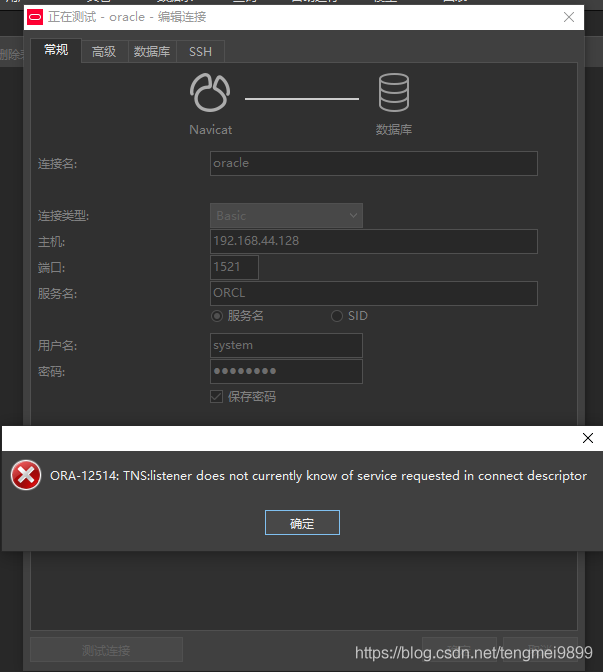
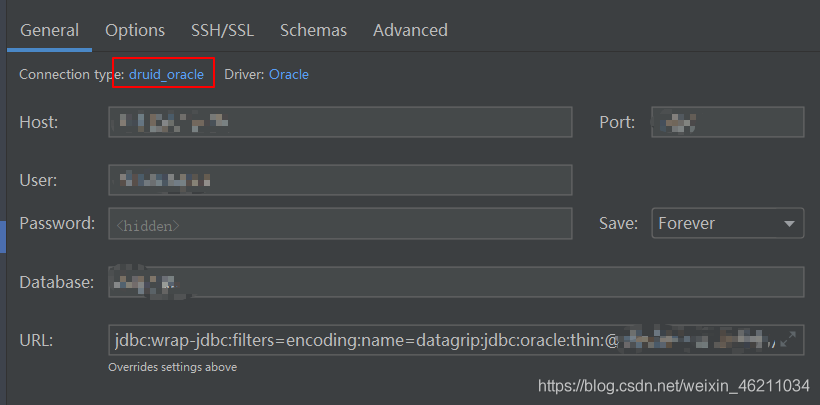
Navicate premium Connecting to a remote Oracle,ORA-12514: TNS:listener does not currently know of service requested in c

Navicate premium, ora-12514: TNS: listener does not currently know of service requested in connect descriptor

Ora-12514: TNS: listener does not currently know of service requested in connect descriptor

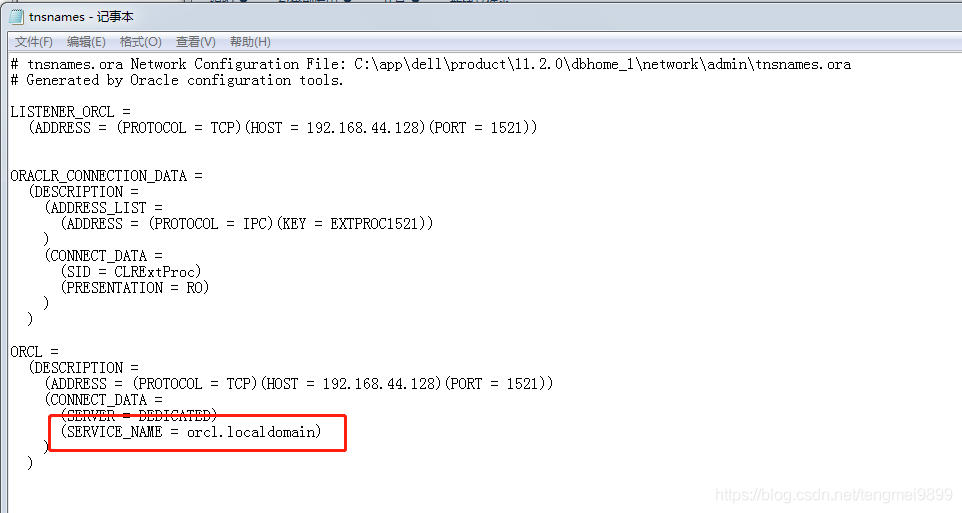
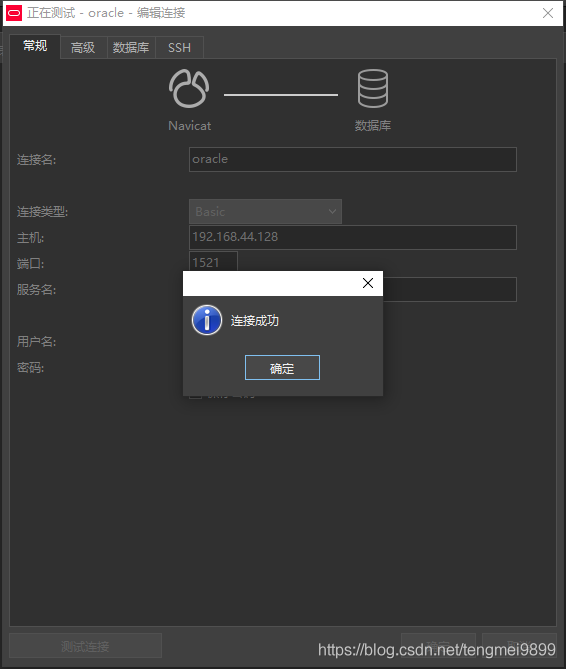
many methods on the Internet are to modify tnsnames.ora and listener.ora files, but the results are useless check the tnsnames.ora file and find that the service name is orcl.localdomain instead of orcl by default. Login successfully after modification

20851;2011;Error: identifier 822’HAL’s StatusTypeDef 8225; is undefined.

This bug appears when editing code with Hal Library of STM32. Right click to locate the relevant header file, but the system still reports an error. In fact, the main problem is the header file.

1. It is necessary to check whether the part used by the main program in the header file has been enabled, especially “stm32f1xx”_ hal_ “Con. H” and “stm32f1xx”_ hal.h”。

2. The compiler error is not accurate, such as the header file stm32f1xx_ Hal in RCC. H_ Statustypedef is not defined. You need to check carefully. The error is reported when compiling the. C file. Basically, they are all written by themselves. This kind of error will be reported only when there is an error in the compilation of the. C file. We need to pay attention to the unified include  “ stm32f7xx_ hal.h>”,    Instead of a separate include “stm32f7xx”_ hal_ gpio.h>” stm32f1xx_ hal_ (such as XXX. H header file)

urllib3 (1.26.4) or chardet (4.0.0) doesn‘t match a supported version!

Python script execution requests dependent package warning:

C:\Python36\lib\site-packages\requests\__ init__. py:80: RequestsDependencyWarning: urllib3 (1.26.4) or chardet (4.0.0) doesn’t match a supported version! RequestsDependencyWarning)

Reason: the version of urllib3 (1.26.4) or chardet (4.0.0) in Python library is not compatible
– – – –
let’s talk about the solution first: this prompt means that the current version of urllib3 is 1.26.4 and chardet is 4.0.0__ init__ The version required in the file does not match. Follow the prompts to open the__ init__ File, line 80, you can see that there are detailed regulations for the versions of these two files, which are between the two version numbers. Here, my urllib3 or chardet is higher than the version number specified in the file, so I need to update the requests version to a higher version. Update command to   pip install upgrade requests.

Let’s talk about the background of writing this article: last week, I debugged the interface and called the requests method very smoothly. Today, when I suddenly executed this interface again, I reported the initial error. At the beginning, I didn’t know what it meant, so I went to the Internet to search, and then I started to try. For example, someone suggested using the uninstall method to unload urllib and chardet. So I just brain, regardless of all, first to unload the urllib. It’s OK to uninstall it. When I install it again, I can’t understand the error reported. Maybe the requests library can’t run normally. Well, use PIP install third party library name again     To install, who knows that my computer has turned on the agent by default when I don’t pay attention to it, so all kinds of errors that failed to install PIP pop up. There is no screenshot. The main idea is that the server host is inconsistent with the proxy host. Because of this mistake, it is another online search solution. Finally, it is found. The answer is concise and accurate. It is precisely located at the problem: the computer agent has been opened. Hurry to shut down the agent So: PIP install urllib3 is successful, PIP install upgrade requests is successful.

Time: it took me about one day to solve this problem, and finally let me solve it. It can also be regarded as a bit of harvest on the way of learning interface automation. I know how to solve this problem in the future.

Perfect, sprinkle flowers

Sys.webforms.pagerequestmanagerparsererrorexception: unable to parse message received from server

chinese:

Sys.WebForms.PageRequestManagerParserErrorException:

The message received from the server cannot be parsed. The common reason for this error is that response filters, httpmodules, or server tracing will be enabled when the corresponding message is modified by calling response. Write().

Details: error parsing nearby output.

The solution is as follows:

1. If the server control calling the response. Write() method is on the page using the UpdatePanel, you only need to add a node under the UpdatePanel and register the control with postbacktrigger. The code is as follows:

    < asp:ScriptManager ID= “ScriptManager1” runat=“server”>& lt;/ asp:ScriptManager>& lt; asp:UpdatePanel ID= “UpdatePanel1” runat=“server”> & lt; asp:PostBackTrigger ControlID= “Button2” />

    < asp:Button ID= “Button2” runat=“server” OnClick=“Button2_ Click” Text=“Button” />& lt; asp:UpdateProgress ID= “UpdateProgress1” runat=“server”>& lt;/ asp:UpdateProgress> & lt;/ asp:UpdatePanel>

    2. However, if the UpdatePanel is used in the master page, the above methods cannot be used to solve the problem. Otherwise, the following error may appear:

    A control with ID ‘btnExport’ could not be found for the trigger in UpdatePanel ‘UpdatePanel1’.

    This is mainly because updatepanel1 cannot be found & lt; asp:PostBackTrigger ControlID= “btnExport” /> Because we generally do not add this control (btnexport) to the master page( Of course, if a control with ID btnexport is added under the node of the UpdatePanel, there will be no error.)

    If there is such an error, what should I do?My solution is to use the page of the control page where the response. Write() method is needed_ Add the following code to the load event:
    ((ScriptManager) master. Findcontrol (“scriptmanager1”)). Registerpostbackcontrol (btnexport)
    // scriptmanager1 is & lt; asp:ScriptManager ID= “ScriptManager1” runat=“server”> & lt;/ asp:ScriptManager> ID of

    Reprint address: http://www.cnblogs.com/shenyixin/archive/2012/03/08/2385376.html

Ima tag error HTML, microsoft.mshtml.dll add reference and type selection error solution

In earlier articles, we mentioned the use of   Microsoft.mshtml.dll to simulate the example of browser click.

1. The problem of adding references

In general, microsoft.mshtml.dll will be stored in three places in the development environment. So when you add a reference, three seemingly identical items appear. For developers, any one of them will not affect the normal development. But the problem will be after the software release! When running on the client’s machine, it usually prompts that the signature of the file is incorrect and cannot be loaded.

The solution is to delete the current reference to mshtml. Reselect the correct reference. It’s the bottom one. The path is: X: program files, microsoft.net, primary interop assemblies, microsoft.mshtml.dll. Expand the reference dialog box to see the path of the file.

2. Wrong type selection

If the problem is solved, or you choose right from the beginning. Maybe the client is running and reporting system_ Comobject cannot be cast to htmlwindow2class, htmldocumentclass, or other similar errors. It runs on the developer’s machine, but it’s completely normal. At this time, usually we will grab, completely do not know why! In the development environment, using obj. Tostring() to show that htmlxxxxclass gets the result of system_ ComObject.

The solution is very simple. Replace htmlxxxxclass with htmlxxxxx. You can find and replace all the classes following htmlwindow2class, htmldocumentclass, etc. But don’t make your public class XXX public XXX

The above methods are summarized from the actual project development of Visual Studio 2008/2010.

Original text: https://www.cnblogs.com/soundcode/p/9770410.html

The solution to the problem that the method of interacting with database in the servlet class is invalid after the servlet submits 404, 500 refresh and becomes 404, and after connecting to the data pool

About 404

When checking the path and web inf carefully, take a look at the default path of Tomcat and change it to

About 505 in refresh to 404

There may be a problem with the jar package. It is recommended to check it carefully and try importing it again

Method failure
was found         The connection pool needs to use streams to accept configuration files. I wrote classloder.getsystemclassloder, which is wrong. It should be written as jdbcutils. Class. Getclassloder
instead           Classloader.getsystemclassloader is a system class loader (or application class loader), but in Tomcat’s class loader architecture, or ordinary web projects (JavaEE projects, not ordinary Java projects), we write our own business program code and resource files (configuration files are also counted, the code is the code in the SRC directory), When you deploy to the server, you will go to/WEB-INF/classes and/web-infb (you can go and have a look). The contents in these two directories are not loaded by the system class loader, but a webappclassloader (which can be printed)   System.out.println(JdbcUtils.class.getClassLoader());), So you can’t

use that