Category Archives: How to Fix

Zookeeper start error [How to Solve]

Zookeeper start error

When you start zookeeper, JPS finds that there is no quorum peermain

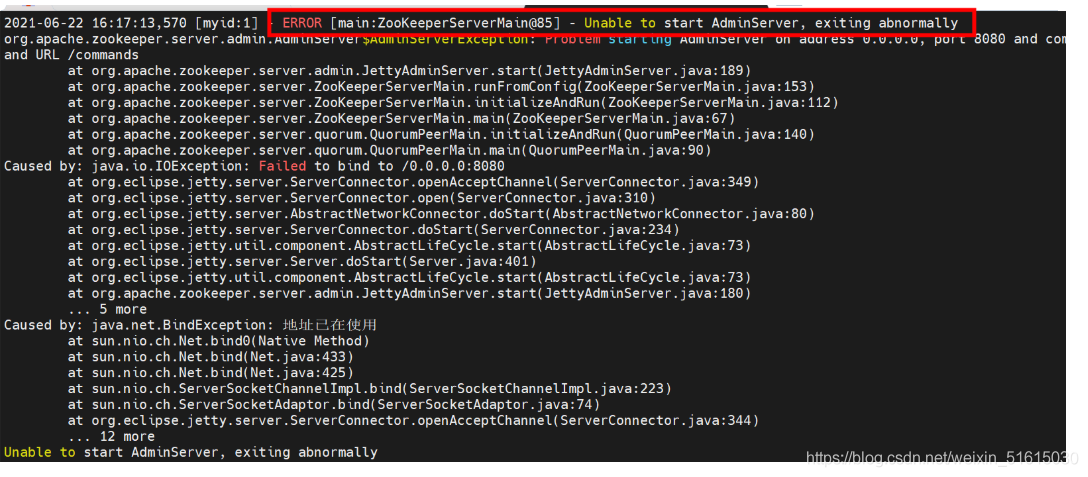
Then go to zookeeper to check the log, and find the startup error

It indicates that port 8080 is not generated when starting

#Check if the port is occupied

netstat -natp | grep 8080

#Kill him when he finds out he’s occupied

kill -9 4944

Then restart zookeeper

bin/zkServer.sh start

jps

hypercan Have unordered match in sub-expressions.

Question:

Hyperscan 5.4.0 compiles the following rule: have unordered match in sub expressions

0  :/ com$/Q
1:/http./Q
2:/  ( ! ( 0)&( 1))/C

reason:

Because the two subexpressions 0 and 1 in the logical combination of rule 2 contain rules leading to disorder, which are not supported in hypersan. Rules similar to rule 0 can be used alone, but they are not allowed in combination logic https://github.com/intel/hyperscan/issues/234

Revision:

Remove the rule of 0 in combinatorial logic,

reference resources:

https://github.com/intel/hyperscan/issues/234

https://gitmemory.com/issue/intel/hyperscan/234/626130718

https://bestofcpp.com/repo/intel-hyperscan-cpp-regular-expression

http://intel.github.io/hyperscan/dev-reference/compilation.html#logical -combinations

https://github.com/intel/hyperscan/releases

Spring boot integrates Mongo to solve some common connection and permission problems. Docker compose installs Mongo

Spring boot integrates Mongo to solve some common connection and permission problems. Docker compose installs Mongo

1、 Docker compose to install Mongo

version: '3.1'

services:

  mongo:
    image: mongo
    container_name: mongo
    restart: always
    ports:
      - 27017:27017
    environment:
      MONGO_INITDB_ROOT_USERNAME: root
      MONGO_INITDB_ROOT_PASSWORD: 123456

  mongo-express:
    image: mongo-express
    container_name: mongo-express
    restart: always
    ports:
      - 8081:8081
    environment:
      ME_CONFIG_MONGODB_SERVER: mongo
      ME_CONFIG_MONGODB_ADMINUSERNAME: root
      ME_CONFIG_MONGODB_ADMINPASSWORD: 123456

2、 Spring boot integrates Mongo

Maven dependency

<dependency>
    <groupId>org.springframework.boot</groupId>
    <artifactId>spring-boot-starter-data-mongodb</artifactId>
</dependency>

There are some points to pay attention to in the yaml configuration of springboot

1、 How to configure URI

1. Using the URI configuration method to configure password, user name, etc. will not take effect

2. If you encounter permission problems, check whether the user name and password match first. If you encounter

Command failed with error 17 (ProtocolError): ‘Attempt to switch database target during SASL authentication.

This kind of error report usually ends?Authsource = admin without

spring:
  data:
    mongodb:
      uri: mongodb://root:[email protected]:27017/demo?authSource=admin

2、 Configuration of traditional SQL

1. If you are a pure digital password, for example, the author’s password is 123456, use single or double quotation marks when configuring, otherwise you will be identified incorrectly, because the receiving password uses char array, and 123456 will obviously overflow

spring:
  data:
    mongodb:
      username: root
      password: '123456'
      host: 192.168.50.150
      port: 27017
      database: demo
      authentication-database: admin

MySQL: if the remote connection using navicatip fails, prompt “is not allowed to connect to this MySQL server”

Problem:
when using Navicat premium to remotely connect to MySQL via IP, it fails, indicating “is not allowed to connect to this MySQL server”, but it is normal to use localhost instead of IP locally.

*Operate on the server side

Solution:
modify the user table in the MySQL library, change the host value corresponding to the user root from localhost to%, and restart the MySQL service to take effect.

Method 1 (simplest): use Navicat premium local login to modify.

You can log in successfully with localhost locally. Open the user table in the MySQL library, change the host of the corresponding root user to%, submit and restart the MySQL service.

Method 2: login and modify with MySQL command line.

1. Connect to server: MySQL – U root – P

2. View all current databases: show databases( Note the comma at the end)

3. Enter MySQL database: use MySQL;

4. View all the tables in MySQL database: show tables;

5. View the data in the user table:

select Host, User,Password from user;

6. Modify the host in the user table.

update user set Host=’%’ where User=‘root’;

7. Refresh: flush privileges;

8. The test connection is successful

Link to the original text: https://blog.csdn.net/quan278905570/article/details/106327719
Node Sass version 6.0.1 is incompatible with ^4.0.0.

Node sass version 6.0.0 is not compatible with ^ 4.0.0
1. Uninstall the previous version of node sass
NPM install node sass
2. Install version 4.0.0 after uninstall
NPM install [email protected]
Here may fail, because you install the Taobao image problem.

If it fails, reload the Taobao image
NPM install – G cnpm — registry= https://registry.npm.taobao.org
After reassembling, perform the second step again

npm install [email protected]

Restart the project NPM run dev

The binary version of its metadata is 1.5.1, expected version is 1.1.16

The binary version of its metadata is 1.5.1, expected version is 1.1.16

In the development process of using flutter, we encountered the version conflict of kotlin. We searched many methods on the Internet and found that they could not be solved.

Finally, we found that we need to upgrade the kotlin version, and then upgrade the gradle version.

I’d like to upgrade here to:

The kotlin version changes to:

ext.kotlin_version = '1.5.0'

Gradle version changed to:

distributionUrl=https\://services.gradle.org/distributions/gradle-6.9-all.zip

If you encounter kotlin, you can try to upgrade the version. Note that kotlin corresponds to gradle.

WARNING:tensorflow:`add_update` `inputs` kwarg has been deprecated.

    Use the layer defined by tensorflow 1x in TF2 warning:

WARNING:tensorflow:`add_ update` `inputs` kwarg has been deprecated.

    Check is to use self. Add in the custom BN layer_ Update ([…], inputs), while using autograph in the tf2x version, the inputs parameter has been eliminated. Of course, if it is written, it will be compatible, but it will be warned. Modify to: self.add_ Update ([…]) can avoid the harassment of warning.

https://github.com/tensorflow/tensorflow/blob/r2.1/tensorflow/python/keras/engine/base_ layer.py

  @deprecation.deprecated_args(None, '`inputs` is now automatically inferred',
                               'inputs')
  @doc_controls.for_subclass_implementers
  def add_update(self, updates, inputs=None):
    """Add update op(s), potentially dependent on layer inputs.
    Weight updates (for instance, the updates of the moving mean and variance
    in a BatchNormalization layer) may be dependent on the inputs passed
    when calling a layer. Hence, when reusing the same layer on
    different inputs `a` and `b`, some entries in `layer.updates` may be
    dependent on `a` and some on `b`. This method automatically keeps track
    of dependencies.
    The `get_updates_for` method allows to retrieve the updates relevant to a
    specific set of inputs.
    This call is ignored when eager execution is enabled (in that case, variable
    updates are run on the fly and thus do not need to be tracked for later
    execution).
    Arguments:
      updates: Update op, or list/tuple of update ops, or zero-arg callable
        that returns an update op. A zero-arg callable should be passed in
        order to disable running the updates by setting `trainable=False`
        on this Layer, when executing in Eager mode.
      inputs: Deprecated, will be automatically inferred.
    """


com.fasterxml.jackson.databind.exc.InvalidDefinitionException: No serializer found for class

com.fasterxml.jackson.databind.exc.InvalidDefinitionException: No serializer found for class (through reference chain: com.jd.lean.mjp.dal.entity.Province_$$_ jvste70_ 0[“handler”])

1. Background

When using mybatis one to many collection query, an error is reported

2. Solution

One to many, entity class, with annotation
@ jsonignoreproperties (value = {“handler”})

3. Reasons

JSON serialization does not ignore some properties in the bean that do not need to be converted, such as handler

Java 11.0.11 SQL Server connection error

After upgrading to Zulu JDK 11.0.11, connect to SQL server and prompt the server selected protocol version tls10 is not accepted by client preferences [tls13, tls12]
this is because Java gave up supporting tls1.0, 1.1 and other versions of the algorithm, while the SQL server server was not upgraded to tls1.2
in the downloaded JDK,… Zulu11.43.55-ca-jdk11.0.9.1-win_ Open Java. Security and search JDK. TLS. Disabledalgorithms . This is an unsupported algorithm. Delete tls1.0 to support it

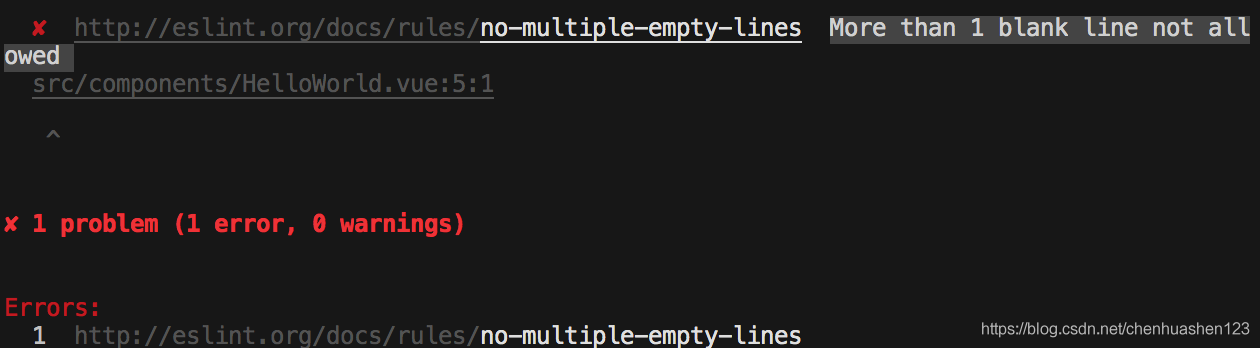
Vue More than 1 blank line not allowed

When you create a Vue project, you may encounter this prompt, which literally means that the code is not allowed to have more than one blank line. However, when you write a lot of code and ask for the running result, it is impossible to remove the blank line all the time. The reason is that

There are two solutions to the problem caused by eslint check syntax.
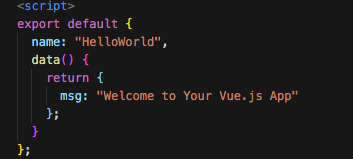
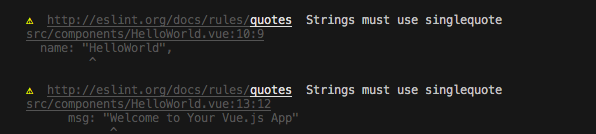
1. Format code: Shift + Alt + F, which can remove redundant blank lines. However, other problems will arise. You will find that after formatting, your string ‘hello word’ will change from single quotation marks to double quotation marks, and you will be warned
2  


Warning means that the string must use single quotation marks
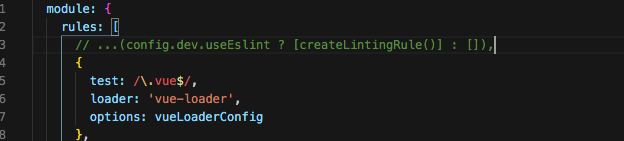
we can set it like this and find webpack.base.conf.js in build

Then comment out this line of code, and do not use the eslint verification rule
instead  

2. If you don’t format the code, you can use the second way

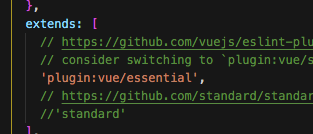
Find the file. Eslintrc. JS

Comment out standard and run it again

android Caused by: java.util.ConcurrentModificationException

First look at the logcat log:

2021-06-25 10:47:47.262 29869-29869/com.***.*** E/AndroidRuntime: FATAL EXCEPTION: main
    Process: com.***.***, PID: 29869
    java.lang.RuntimeException: Error receiving broadcast Intent { act=com.***.servicecallback.content flg=0x10 (has extras) } in com.***.***.MainActivity$SocketMessageReceiver@b855039
        at android.app.LoadedApk$ReceiverDispatcher$Args.lambda$-android_app_LoadedApk$ReceiverDispatcher$Args_52497(LoadedApk.java:1323)
        at android.app.-$Lambda$aS31cHIhRx41653CMnd4gZqshIQ.$m$7(Unknown Source:4)
        at android.app.-$Lambda$aS31cHIhRx41653CMnd4gZqshIQ.run(Unknown Source:39)
        at android.os.Handler.handleCallback(Handler.java:790)
        at android.os.Handler.dispatchMessage(Handler.java:99)
        at android.os.Looper.loop(Looper.java:164)
        at android.app.ActivityThread.main(ActivityThread.java:6494)
        at java.lang.reflect.Method.invoke(Native Method)
        at com.android.internal.os.RuntimeInit$MethodAndArgsCaller.run(RuntimeInit.java:438)
        at com.android.internal.os.ZygoteInit.main(ZygoteInit.java:807)
     Caused by: java.util.ConcurrentModificationException
        at java.util.ArrayList$Itr.next(ArrayList.java:860)
        at com.***.***.MainActivity$SocketMessageReceiver.onReceive(MainActivity.java:733)
        at android.app.LoadedApk$ReceiverDispatcher$Args.lambda$-android_app_LoadedApk$ReceiverDispatcher$Args_52497(LoadedApk.java:1313)
        at android.app.-$Lambda$aS31cHIhRx41653CMnd4gZqshIQ.$m$7(Unknown Source:4) 
        at android.app.-$Lambda$aS31cHIhRx41653CMnd4gZqshIQ.run(Unknown Source:39) 
        at android.os.Handler.handleCallback(Handler.java:790) 
        at android.os.Handler.dispatchMessage(Handler.java:99) 
        at android.os.Looper.loop(Looper.java:164) 
        at android.app.ActivityThread.main(ActivityThread.java:6494) 
        at java.lang.reflect.Method.invoke(Native Method) 
        at com.android.internal.os.RuntimeInit$MethodAndArgsCaller.run(RuntimeInit.java:438) 
        at com.android.internal.os.ZygoteInit.main(ZygoteInit.java:807) 

At first, I thought it was the problem of broadcast onreceiver

java.lang.RuntimeException: Error receiving broadcast Intent { act=com.***.servicecallback.content flg=0x10 (has extras) } in com.***.***.MainActivity$SocketMessageReceiver@b855039

Later, I found out that it was caused by the following sentence:

 Caused by: java.util.ConcurrentModificationException

Look at the reason again: if you modify vector and ArrayList at the same time during iteration, you will throw a Java. Util. Concurrent modificationexception.

The reason is that I use the list when I process data in onreceiver. When I traverse and iterate the query, I insert the data, which leads to the collapse of the list.