Category Archives: How to Fix

Solve the problem that the version of less is too high

Implementation  npm install --save less less-loader

After installing less, error will be reported when using less in style

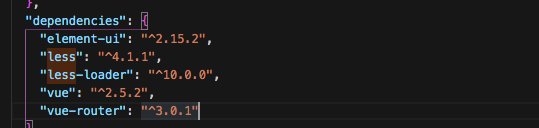
This situation is caused by the over high version of less loader. You can check the current version of less in package.json
to find out  

Therefore, in view of this situation, we can first uninstall the existing less loader, and then install the lower version of less loader
NPM install
NPM install [email protected] –save
 
Run it again

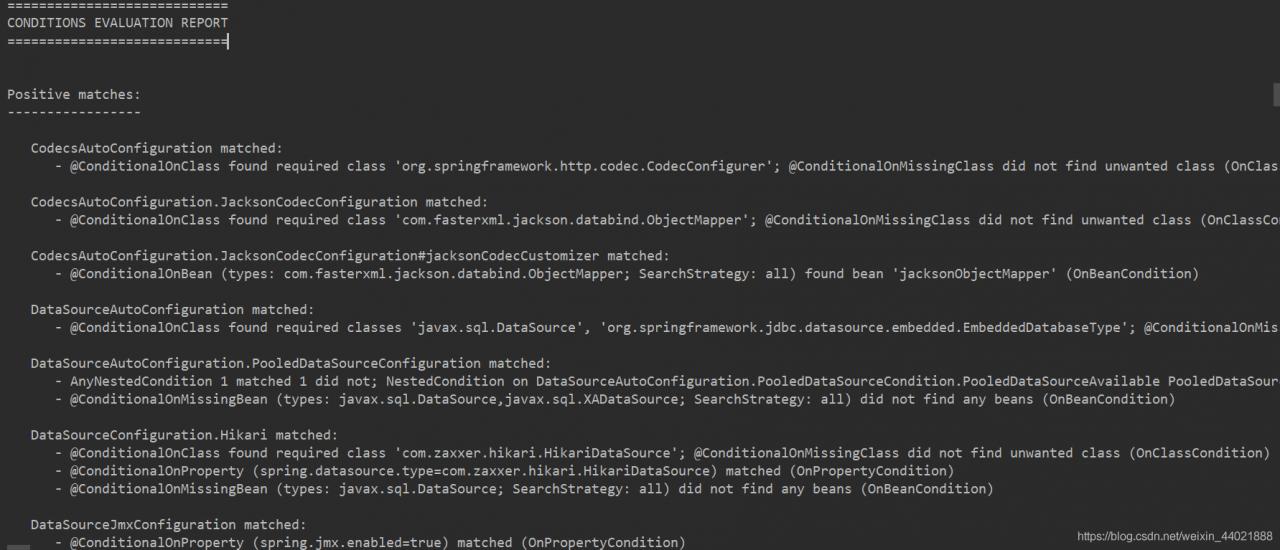
CONDITIONS EVALUATION REPORT

CONDITIONS EVALUATION REPORT

Spring boot project display: conditions evaluation report

Reason: the log is configured with the level property

terms of settlement:

In the configuration file application.yml or application.properties, add:

logging.level.org.springframework.boot.autoconfigure: error

Using pop-up window and I18N, error in render: “typeerror: cannot read property” appears_ T ‘of undefined’ solution

First, make sure to hang Vue under window.vm in main.js (the name of VM can be customized)

window.vm = new Vue({
  el: '#app',
  i18n,
  router,
  store,
  render: h => h(App)
})

Secondly, when writing multi language in the pop-up box, you need to add VM.
for example, when writing multi language, you need to write {$t ('xxxxx ')} or this. $t ('xxx')
then you need to write {VM. $t ('xxxxx ')} or this. VM. $t ('xxxxx') or this

Project read error when downloading Maven project

The reason is not very clear, but the online search method can solve the error;

Operation steps:
1, open the computer’s CMD operation interface, and find the folder to open the wrong project in the CMD interface, for example, my project folder is in F/user/workspace/cxfserver
Enter CD: F/user/workspace/cxfserver in the CMD interface     You can go to the folder where the project is located
2. Enter the MVN – x clean install command and click enter. After that, the interface will refresh continuously. Finally, build success will appear to indicate that the operation is completed
3, then right-click the target project Maven – & gt; Updata project, check your project for confirmation, then update the project and solve the project read error

Syntax Error: SassError: Invalid CSS after “…-height: #{math“: expected expression (e.g. 1px, bold

Syntax Error: SassError: Invalid CSS after "...-height: #{math": expected expression (e.g. 1px, bold), was ".div($--input-heigh"
        on line 142 of node_modules/element-plus/packages/theme-chalk/src/input-number.scss
        from line 13 of node_modules/element-plus/packages/theme-chalk/src/index.scss
        from line 10 of src/assets/css/element-variables.scss
        from line 1 of src/assets/css/global.scss
>>       line-height: #{math.div($--input-height - 2, 2)};

   -------------------------^

terms of settlement

npm i sass-loader node-sass --save-dev

The installation of docker desktop failed. After successful installation, the docker can not be started

First of all, I installed it successfully, but I couldn’t start it. The error is as follows

docker An error occurred  
First, see if virtualization is turned on
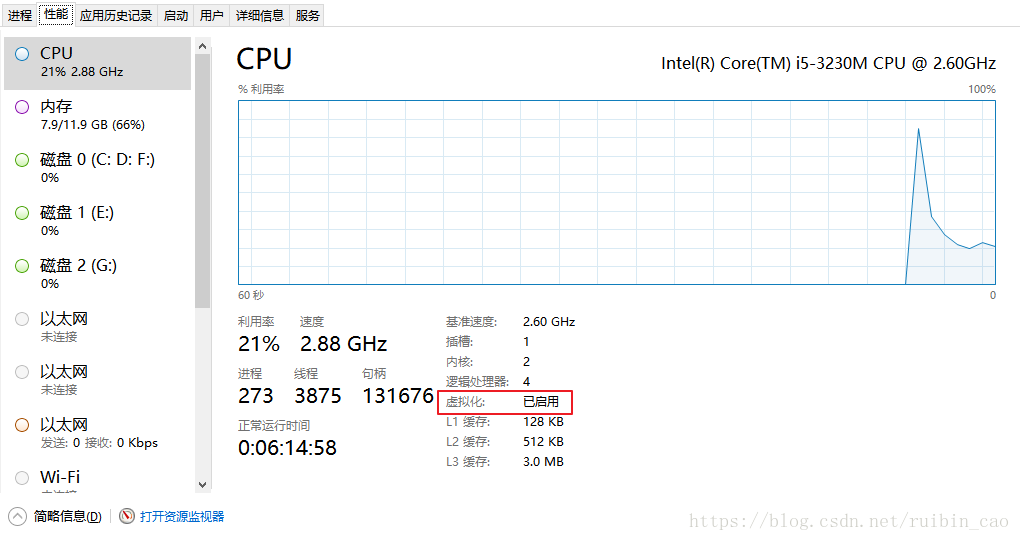
If not, open Baidu by itself. Tip: can I open the meeting here   CPU model, motherboard model, windows system version, some versions just can’t be turned on. Then if the version is OK   All the settings in BIOS and windows system must be turned on at the same time.

Can’t you open it?

Try the link below

https://blog.csdn.net/ruibin_ cao/article/details/80959954

After I went through the above steps, I still reported an error, but I had no choice but to reload docker.

And this time, I can’t even fit it

Failed with the following error:
component communityinstaller.serviceaction failed: failed to start service:  
The service did not respond to the start or control request in a timely fashion at CommunityInstaller.Service.Service.< StartAsync> d__ 29.MoveNext() — End of stack trace from previous location where exception was thrown —  
at System.Runtime.ExceptionServices.ExceptionDispatchInfo.Throw() at System.Runtime.CompilerServices.TaskAwaiter.HandleNonSuccessAndDebuggerNotification(Task task)  
at CommunityInstaller.Service.Manager.< AddServiceAsync> d__ 23.
the following methods have been tried

https://blog.csdn.net/fenger_ c/article/details/114800687

https://blog.csdn.net/weixin_ 42787754/article/details/104209345

https://www.cnblogs.com/zhiqsyr/p/12364124.html

Useless, but so far, the status is: computer virtualization has been turned on, docker related files have been deleted.

Every time I install, I check the option of opening virtualization in docker at the beginning. I think it is already opened, so I don’t check it here, so I check this option, and then install OK, open OK and run OK..

(-2:Unspecified error) could not find a writer for the specified extension in function‘cv::imwrite_

The following error occurred while running the imwrite function

error: (-2:Unspecified error) could not find a writer for the specified extension in function 'cv::imwrite_'

What’s the reason for this

cv.imwrite(**'skeleton',**skeleton)

No suffixes, JPG, PNG, etc… Change it to the following

cv.imwrite('skeleton.jpg',skeleton)