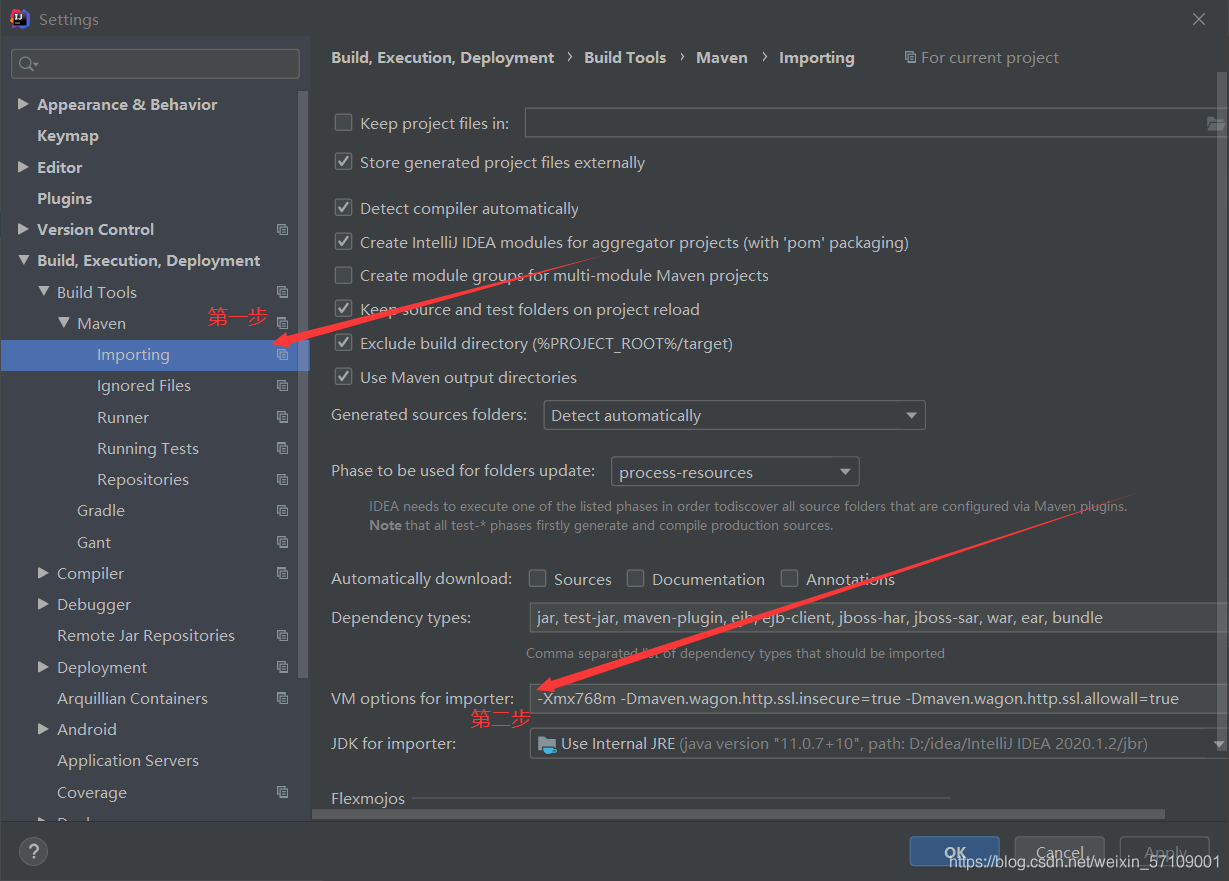
1. Under file, click settings
2. Find importing under Maven
3. Add in the second step – Dmaven.wagon.http.ssl.insecure=true -Dmaven.wagon.http.ssl.allowall=true
You can complete
java.lang.IllegalArgumentException: Index for header ‘XXX‘ is 1 but CSVRecord only has 1 value
Java, error in importing CSV file.
Error locating to the following code
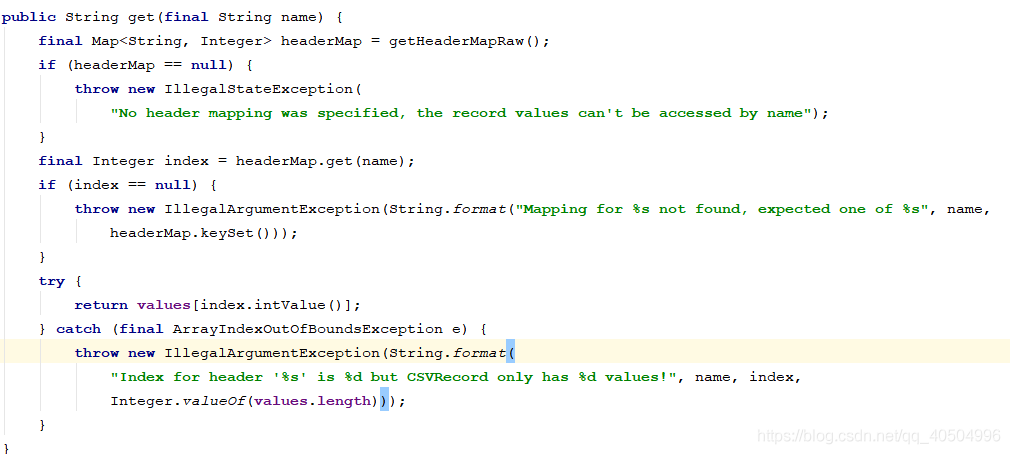
This is a simple string array, value. Consider the reason for the error.
The data of CSV is as follows:
Xiao Ming, 1,2,3
Xiao Li, 3,4,5
If the separator of your CSV file is different from the one set by your program, this error is likely to occur.
solve:

Error: the main class usertest could not be found or loaded
This class has a specified package
An error occurred when running java test from the command line: the main class usertest could not be found or loaded

- first of all, the user test needs to compile
the command, such as the folder where the user test.java is located, executes javac user test.java to compile. After compiling, the user test.class file appears in the directory where the user test.java is located, and then it can be run on the command line<

 runs the usertest.class file through the Java command
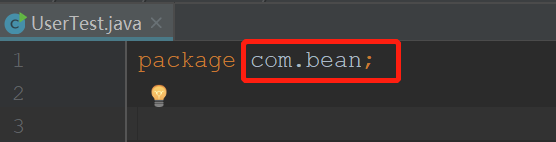
 first, let’s see what the package name written after the package of the class usertest.java is. My name is com.bean
when I run Java usertest in the bean directory, I report an error:
can't find or load the main class usertest 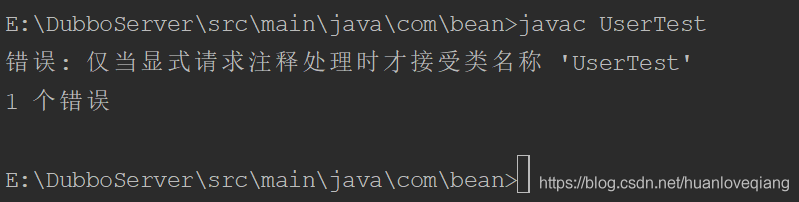
later, I see that someone says Java com.bean.usertest can run, and it really can run after a try. But Java usertest can’t run. Later, it is found that this class has a specified package

This class does not specify a package
1. Use javac usertest. Java to compile our. Java file
2. If the java file does not specify a package, just use the Java command to run our class file (Java usertest)
PaddlePaddle:Process finished with exit code -1073741819 (0xC0000005)
Paddleocr training ICDAR training set, can only run one epoch, no obvious error, no memory abnormal situation. Occasionally see – 1073741819.
The solution is to reduce the version of SciPy to 1.3.1, or 1.4.
Reference (2 messages) paddlepaddle: process finished with exit code – 1073741819 (0xc0000005)_ Big big__ CSDN blog
Mybatis passes in multiple parameters to mapper. And uses @param details to report an error
“nested exception is org.apache.ibatis.binding.BindingException: Parameter ‘ orgName’ not found. Available parameters are [ wxOrganizationAccount, page, param1, param2]”,
This bug was fixed for a long time and finally found.
At the beginning, I thought that the @ param annotation was not written when multiple parameters were passed in, but I found that it was not right after writing,
“nested exception is org.apache.ibatis.binding.BindingException: Parameter ‘ orgName’ not found. Available parameters are [ wxOrganizationAccount, page, param1, param2]”,
I want to add another parameter’s type field to an entity class, then save the parameter into the entity class, and then pass only one object in the process of passing the parameter. Of course, these are just my personal ideas. In the end, of course, they failed.
“nested exception is org.apache.ibatis.binding.BindingException: Parameter ‘ orgName’ not found. Available parameters are [ wxOrganizationAccount, page, param1]”,
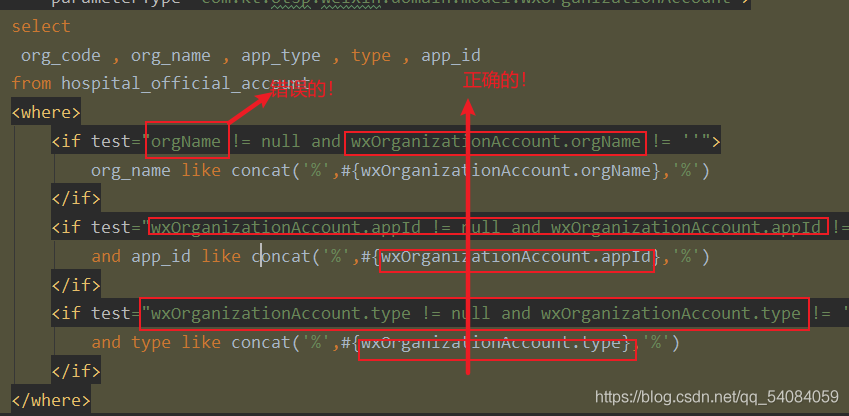
It’s just missing a parameter, or it’s wrong. At this time, I was thinking that since it’s not the problem passed in, it might be the problem of value taking. Finally, I found that the value can’t be taken because it’s not accurate enough to get the value from the object!
How to solve the problem of “please enter a commit message to explain why this merge is necessary” when git merges branches?
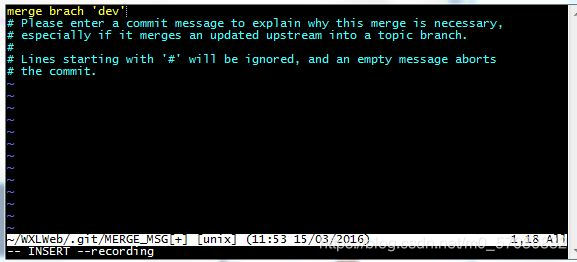
resolvent:
1. In case of the above situation, press the “ese” exit key in the upper left corner of the keyboard
2. Enter “: WQ”, pay attention to the colon in English input status, and then press “enter”( I think this method is good. What does “WQ” mean???Learn Linux operating system command: mandatory write file and exit.)
Record pyinnstaller package file execution error modulenotfoundererror: no module named ‘cmath’ solution
Problem description
After packaging Python scripts with pyinnstaller, the executable file reported an error modulenotfoundererror: no module named ‘cmath’. However, I did not use cmath. After checking, I found that cmath was implicitly imported by default after panda version 1.2 (there is a description link here), but pyinnstaller did not check that cmath needs to be executed in the scripts, So it’s not packaged into an executable.
Solution
- similar to the errors caused by the inclusion of pandas or other libraries mentioned above, you can try to change the version of the corresponding library and modify the packaged. Spec configuration file (such as modification method). If not many dependencies are missing, this simple method is recommended to display the package with import error prompt in your own script
Threejs is used in Vue to introduce error reporting problem of orbitcontrols
I checked many methods on the Internet, and all of them introduced the orbitcontrols in the example. However, these methods I use now report errors. The specific problem may be that the versions are different, and I don’t particularly study them in depth. At this moment, the method I use is to introduce three orbitcontrols, which can be tested by myself
import * as THREE from "three";
import { OrbitControls } from 'three-orbitcontrols-ts';


const controls = new OrbitControls(camera, renderer.domElement);
Note: many methods are temporarily feasible, more often need to verify!
Use xx [‘xx ‘] = XX to set field value or does not support field: XXX
Demand:
After the tiem object is created, modify the written table of the original item_ Name value
My item:
class People(scrapy.Item):
    table_name = 'people'
    id = scrapy.Field()
    url_token = scrapy.Field()
    name = scrapy.Field()
Solution:
people = People()
people.__class__.table_name='people_20216'
Source code analysis:
If this is what the item says
table_name= scrapy.Field()
After creation, you can directly assign values in this way, which is normal operation
people = People()

people['table_name'] = 'people_20216'
Situation 1:
But if you write like me:
class People(scrapy.Item):
    table_name = 'people'
In addition, it can be modified as follows:
people[‘table_ name’] = ‘people_ 20216’
You will report an error:
Traceback (most recent call last):
  File "C:\Program Files\Python39\lib\site-packages\twisted\internet\defer.py", line 662, in _runCallbacks
    current.result = callback(current.result, *args, **kw)
  File "C:\Program Files\Python39\lib\site-packages\scrapy\utils\defer.py", line 150, in f
    return deferred_from_coro(coro_f(*coro_args, **coro_kwargs))
  File "E:\codedata\gitee\pySpace\study\npoms\npoms\pipelines.py", line 62, in process_item
    item['table_name'] = item.table_name + "_" + mysql_split_util.current_year_month
  File "C:\Program Files\Python39\lib\site-packages\scrapy\item.py", line 100, in __setitem__
    raise KeyError(f"{self.__class__.__name__} does not support field: {key}")
Corresponding to this section of the original code, the source code covers this:

Case 2:
If you write like this
people.table_ name’= ‘people_ 20216’
You will report an error:
Traceback (most recent call last):
  File "C:\Program Files\Python39\lib\site-packages\twisted\internet\defer.py", line 662, in _runCallbacks
    current.result = callback(current.result, *args, **kw)
  File "C:\Program Files\Python39\lib\site-packages\scrapy\utils\defer.py", line 150, in f
    return deferred_from_coro(coro_f(*coro_args, **coro_kwargs))
  File "E:\codedata\gitee\pySpace\study\npoms\npoms\pipelines.py", line 63, in process_item
    item.set_table_name(table_name)
  File "E:\codedata\gitee\pySpace\study\npoms\npoms\items.py", line 66, in set_table_name
    self.table_name = table_name
  File "C:\Program Files\Python39\lib\site-packages\scrapy\item.py", line 112, in __setattr__
    raise AttributeError(f"Use item[{name!r}] = {value!r} to set field value")
AttributeError: Use item['table_name'] = 'people_202106' to set field value
Corresponding to this section of the original code, the source code also has corresponding interception:

At this time, we need to look at the creation phase of the source code object
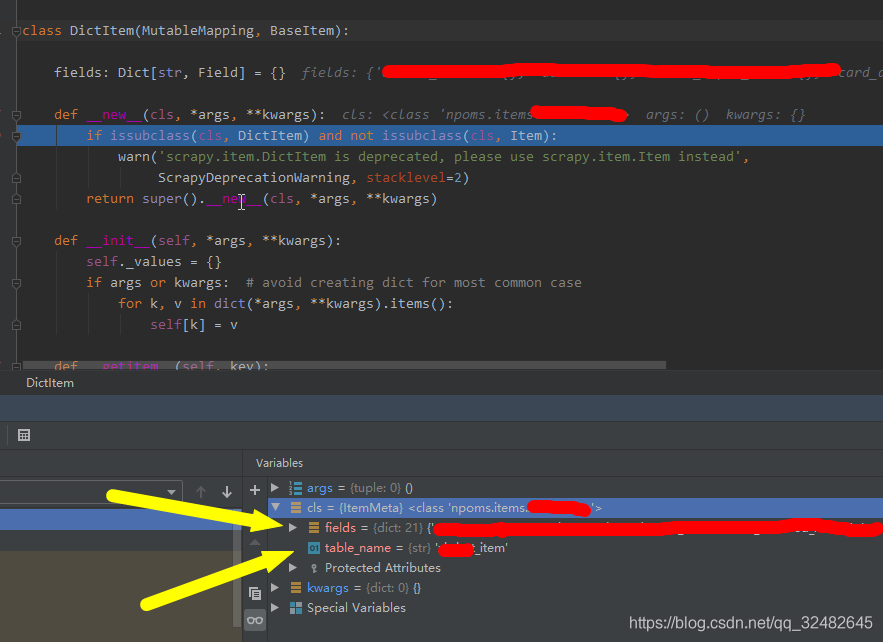
The object creation phase is divided into fields and classes, which we can use above__ setitem__ Method to modify the object in fields. So we need to get the class object and modify the values of the properties in the class.
Solution to redis error in CentOS of idea connected virtual machine
1. In CentOS, ifconfig determines redis.host
2. In CentOS, change the path to the installation directory of redis, and change the content of redis.conf file
Modify bind
change bind 127.0.0.1 to – & gt; Change bind 0.0.0.0 protected mode yes to — & gt; Protected mode no close firewall
systemctl stop firewalld.service # stop firewall
systemctl disable firewalld.service # disable firewall startup
firewall CMD — state # view default firewall status, firewall status display not running
3. Restart CentOS
4. Enable redis to start as specified configuration file
Switch to the SRC directory under the redis directory./redis server…/redis.conf to start redis
5. Test the connection between idea and redis

Error in installing Google Chrome in Ubuntu
Problem description
Prepare to install Google browser in Ubuntu, open the installation after downloading and find that it cannot be installed normally, and prompt “this software is from a third party and may contain non free components”, as follows:

Solution
Install third party software solutions:
- gdebi installation
sudo apt install gdebi-core
- if it can’t be installed, try to change the source and execute first
sudo apt-get update
- find the location of the downloaded Google browser installation package, and then execute:
sudo gdebi xxx.deb
Xxx.deb is the package name
Navicat for MySQL error 1251 failed to connect to MySQL
It’s very useful to have a try, so make a record of it https://blog.csdn.net/wshxhghsjjsn/article/details/80459542
As like as two peas, I wrote the previous revision, but my MySQL version was 8. The current version is 5.7. So the screenshots are weird, but the steps are the same. I have tried all the 2 versions.
Step one: open as like as two peas, Command Line Client, see CMD, mysql, and you will find 2 identical ones.
Step 2: enter the password of MySQL. Enter is the password set when installing mysql. Only enter the password without semicolon
Step 3: enter alter user ‘root’ @’localhost ‘identified with MySQL_ native_ Password by ‘MySQL password’; Don’t miss the carriage return. There is a semicolon at the back. The password of MySQL is set when installing mysql
Step 4: input flush priorities; Don’t miss the semicolon at the back of the carriage return
Let me demonstrate: my MySQL password is 111111
The word “OK” won’t make a mistake
You can also modify the MySQL password through this method. For example, my MySQL password is 111111, I want to change it to 123456
That is to change the password of Mysql to 123456