Category Archives: How to Fix

DB: the solution of table already exist when migrating

        When running rake DB: migrate, you sometimes find an error in rake abort. Rake says that a table already exists, so it can’t do the work of this migrate. This table does exist, so how can rake skip this table or force it to be overridden?There is one area that needs to be modified:

Original migrate file:

Ruby code


    class   CreateProducts  & lt;   ActiveRecord::Migration      def   self.up        create_ table  : products   do  | t|          t.column  : title,  : string          t.column  : description,  : text          t.column  : image_ url,  : string        end      end        def   self.down        drop_ table  : products      end    end   

    Modified migrate file:

    Ruby code


      class   CreateProducts  & lt;   ActiveRecord::Migration      def   self.up        create_ table  : products,  : force  =& gt;   true   do  | t|          t.column  : title,  : string          t.column  : description,  : text          t.column  : image_ url,  : string        end      end        def   self.down        drop_ table  : products      end    end   

      Do you see that in create_ In the parameter of table, add: force = & gt; True.

(transfer) using Wireshark package capture software to prompt the NPF driver isn’t running solution

Wireshark is a powerful packet capture analysis tool. When it is first used on win7/10 64 bit system, unexpected situations may occur. The NPF driver isn’t running. This may be because WinPcap driver is not installed or WinPcap option is not selected when WinPcap is installed.

resolvent:

    WinPcap is not installed. Generally, there is an installation package with WinPcap in the installation directory of Wireshark. The installation package of the green version of Wireshark is usually in the following location: wiresharkportable/APP/Wireshark/WinPcap_ x_ x_ x.exe。 Run the installation once, and then restart the system. Note that there is an auto start option to be selected during the installation process. Otherwise, you may need to manually start the NPF driver every time you use Wireshark. If the installation of WinPcap is wrong, please try to uninstall WinPcap first, and restart the system after the uninstall is completed. If there is a file locking error during the uninstall process, you do not need to pay attention to it. When you restart the computer and re install WinPcap, you may be prompted that WinPcap has been installed in your system. You don’t need to worry about it. Just continue to install it. After the installation, restart the system so that Wireshark can be used normally

    3. None of the above two situations can be solved. First, you need to confirm whether the NPF service has been installed in the system correctly. First, you need to confirm whether the npf.sys file exists in the folder C: windows?System32?Drivers. If the file does not exist, please re install WinPcap. If the file exists, then run CMD (win7/Vista user needs to press start, input CMD search, right-click the icon of cmd.exe in the search program results, and select run as administrator.

    3.1 enter the command to query whether the NPF service is installed

    C:\Windows\system32> sc qc npf
    [SC] QueryServiceConfig SUCCESS

    SERVICE_ NAME: npf
    TYPE : 1 KERNEL_ DRIVER
    START_ TYPE : 2 AUTO_ START
    ERROR_ CONTROL : 1 NORMAL
    BINARY_ PATH_ NAME : system32\drivers\npf.sys
    LOAD_ ORDER_ GROUP :
    TAG : 0
    DISPLAY_ NAME : NetGroup Packet Filter Driver
    DEPENDENCIES :
    SERVICE_ START_ Name:
    with the above results, the output is normal. If not, re install WinPcap and try again.

    3.2 start NPF service manually:

    C:\Windows\system32> SC start NPF
    if there is no error prompt, Wireshark can be used normally.

    3.3 if start in the query result of NPF service_ The value of type is not auto_ If you want to start, you don’t want to run the NPF driver manually every time. You can use the following command to change the NPF service to start automatically.

    C:\Windows\system32> sc config npf start= auto

    The source text of the post is from the website
    and http://blog.sina.com.cn/s/blog_ 718ccdb90102uzqr.html

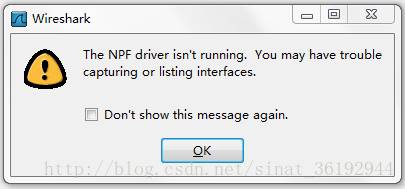
The NPF driver isn’t running. You may have trouble capturing or listing interfaces

The processing method of “the NPF driver isn’t running. You may have trouble capturing or listing interfaces (as shown)” appears in Wireshark packet capturing tool


First of all, you have to make sure that you have installed WinPcap (it’s better to download the latest version: official download, which seems to be unable to be opened by the official, and it can also be downloaded by the Chinese Army)

a. If you are using Linux or Ubuntu, please use & gt$ The Su administrator command switches to the account with the highest authority, and then enters the command: “net start NPF” (if not, find a similar command yourself). b. If you are using Windows XP/me, please use the administrator account to log in, open CMD, and enter the command: “net start NPF”. You will be prompted to open the driver service successfully. c. If you are using Windows Vista or windows 7 that I tried out, please find the file cmd.exe under “C::?Windows?System32”, right-click and select “run as administrator”, and then enter the command “net start NPF” in the command line mode to successfully open the NPF driver. It should be that the npf.sys file I found earlier has been opened.


Finally, turn on Wireshark again, and “bingo” will work normally.

See

Ora-02292: integrity constraint (XX) violated – child record found foreign key Association, record cannot be deleted

When we delete data with foreign keys, Oracle will prompt: ora-02292: integrity constraint (XX) violated – child record found  

Step 1: invalidate the primary key: alter table_ name disable primary key cascade;

Step 2: delete from   table_ name   where id = ‘xx’;

Step 3: make the primary key effective: alter table_ name enable primary key;

Unable to boot : please use a kernel appropriate for your cpu

Suppose you get this message in the VirtualBox:

                  Unable to boot – please use a kernel appropriate for your CPU

The following solutions can help you:

1. Restart your computer and enter the BIOS. There are options such as virtualization technology. Let it choose enable

Assuming this doesn’t solve your problem, try another way.

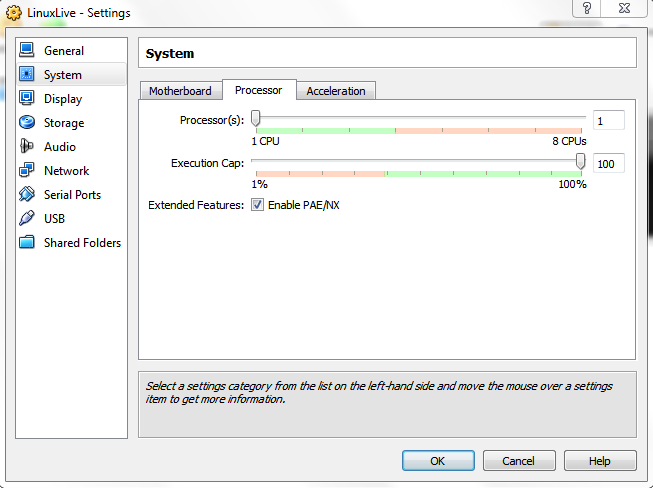
2. Enter the settings of VirtualBox, click system, and select enable PAE/NX, as shown in the figure:

3. This prompt may also be that you are running a 64 bit operating system and the processor is not compatible. Just download 32-bit instead of 64 bit.

Reproduced in: https://www.cnblogs.com/mengfanrong/p/5217029.html

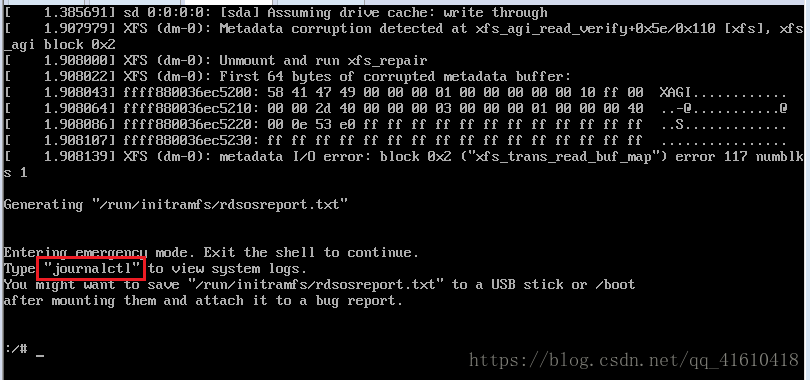
Entering emergency mode. Exit the shell to continue.

When the CentOS virtual machine is powered off or forced to shut down, there is a problem when it is rebooted:

Find out where the problem is:
here, journalctl is to view the log information of the system; Enter this command to view the log directly. There may be a lot of log content. Quickly turn the page or directly locate the latest log information. If you find something marked in red, it means that there is an error here
error reason:
failed to mount/sysRoot.
dependency failed for initrd root file system.
dependency failed for reload configuration from the real root.
problem solving:
input command: XFS_ The repair – V – L/dev/dm-0
– L option specifies to force log zeroing and XFS_ Repair zeros the log even if it contains dirty data (metadata changes).

java.lang.IllegalStateException: Cannot call sendRedirect() after the response has been committed

Error message: java.lang.illegalstateexception: cannot call sendredirect() after the response has been committed java.lang.illegalstateexception


Error message parsing: redirection cannot be called after response

Basic overview of Servlet

    determine whether it is necessary to use redirection. If necessary, use redirection. Otherwise, continue the work of servlet

    Cause of error:

      when using retargeting, our page has jumped, and the retargeted code will not be able to perform work. In order to make the jump page unaffected, we add a return after retargeting (most likely) the doget() and dopost() methods in servlet are incomplete. For example, write a doget() method less and delete the super. Doget() and super. Dopost() in the doget() and dopost() methods after rewriting; Here, we can use a request method to receive parameters. For example, the client uses the post or get request to send parameters, and we receive and respond consistently using the get method. At this time, we can add the code dopost (request, response) in the dopost () method check whether the program logic causes multiple jumps

      Note: when we write the redirection path. Redirection supports both the project resources and the resources in the server to use redirection, so the general redirection path is /project resource name/page or servlet to be redirected to or write the relative path directly

How to Solve FreeMarker template error

In the process of using freemarker, the following errors are often seen:

11 Dec 2015 15:53:09,674 ERROR freemarker.runtime:98 - Error executing FreeMarker template  
FreeMarker template error:  
The following has evaluated to null or missing:  
==> sex  [in template "freemarker3.html" at line 10, column 3]  
  
Tip: If the failing expression is known to be legally null/missing, either specify a default value with myOptionalVar!myDefault, or use <#if myOptionalVar??>when-present<#else>when-missing</#if>. (These only cover the last step of the expression; to cover the whole expression, use parenthessis: (myOptionVar.foo)!myDefault, (myOptionVar.foo)??


The template code is as follows:

<!DOCTYPE html>  
<html>  
<head>  
<meta charset="UTF-8">  
<title>freemarker demo</title>  
</head>  
<body>  
${username} <br />  
${age}<br />  
${sex}  
</body>  
</html>

 Root cause: sex is not set, so an error is reported

Solution:

Add an exclamation mark after undeclared variables

${sex!}


 You can also set the default value, add the default value after the exclamation mark

${sex!'abc'}

How to Add custom middleware for GRPC server

1. Objective:

a. To customize a middleware to capture global code 500 error (panic error) in grpc server.

b. Grpc middleware is different from HTTP gin middleware. Gin can use use use or handlerfunc to enable middleware, but grpc can’t. Here we use the go grpc middleware plug-in to demonstrate.

c. Grpc client is only an active calling interface, so it is unnecessary to be a middleware.

2. Writing middleware

Install plug-in dependencies:

go get github.com/grpc-ecosystem/go-grpc-middleware

All the codes of middleware, in which the return value type is fixed (the return value form of go grpc middleware plug-in is the maximum value form)

package middlewares

import (
	"context"
	"fmt"

	"google.golang.org/grpc"
)


// StreamGSError500 Catching Fatal Errors in Streaming Code
func StreamGSError500(address string) grpc.StreamServerInterceptor {
	return func(srv interface{}, stream grpc.ServerStream, info *grpc.StreamServerInfo, handler grpc.StreamHandler) (err error) {
		
		fmt.Println("StreamGSError500 The service has been added to the listener===")
		defer func() {
			if err := recover(); err != nil {
				//Print error stack information
				fmt.Println(err)
				
			}
		}()

		err = handler(srv, stream)
		return err
	}
}

// UnaryGSError500 Catching fatal errors in simple code
func UnaryGSError500(address string) grpc.UnaryServerInterceptor {
	return func(ctx context.Context, req interface{}, info *grpc.UnaryServerInfo, handler grpc.UnaryHandler) (_ interface{}, err error) {

		fmt.Println("UnaryGSError500 The service has been added to the listener===")
		defer func() {
			if err := recover(); err != nil {
				//Print error stack information
				fmt.Println(err)
				
			}
		}()

		resp, err := handler(ctx, req)
		return resp, err
	}
}

3. Add middleware when starting grpc server

introduce:

import (
    "github.com/grpc-ecosystem/go-grpc-middleware"
	grpcRecovery "github.com/grpc-ecosystem/go-grpc-middleware/recovery"
	"google.golang.org/grpc"

)

Startup:

    var address string = "127.0.0.1:9600"


	// Instantiate the grpc server and insert the median price
	grpcServer := grpc.NewServer(
		grpc.StreamInterceptor(grpc_middleware.ChainStreamServer( // Stream Interceptor
			middlewares.StreamGSError500(address),
            grpcRecovery.StreamServerInterceptor(),
		)),
		grpc.UnaryInterceptor(grpc_middleware.ChainUnaryServer( // Simple Interceptor
			middlewares.UnaryGSError500(address),
            grpcRecovery.StreamServerInterceptor(),
		)),
	)
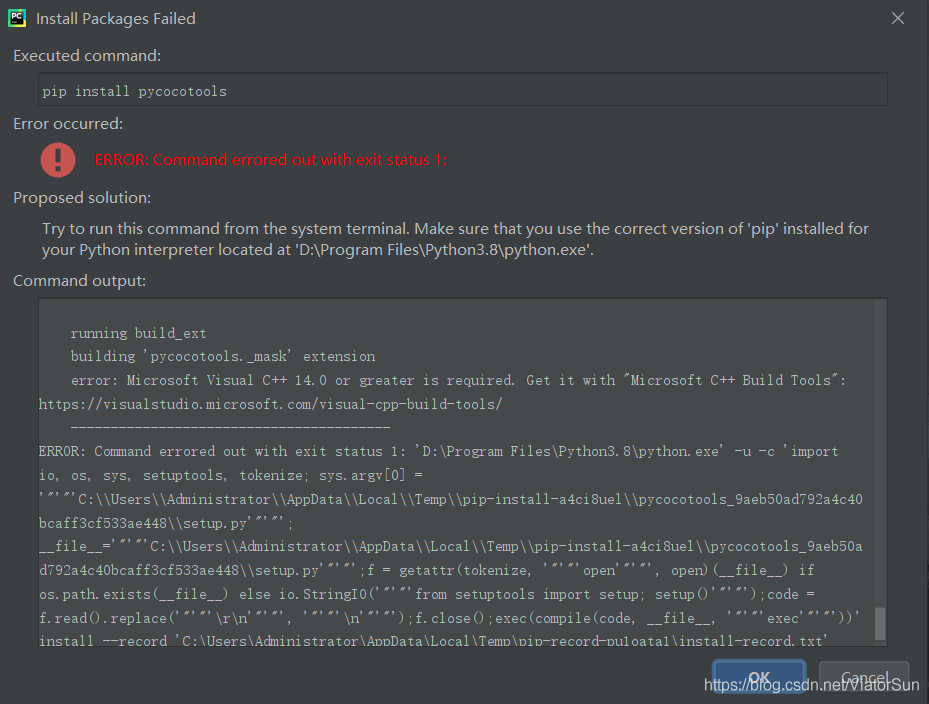
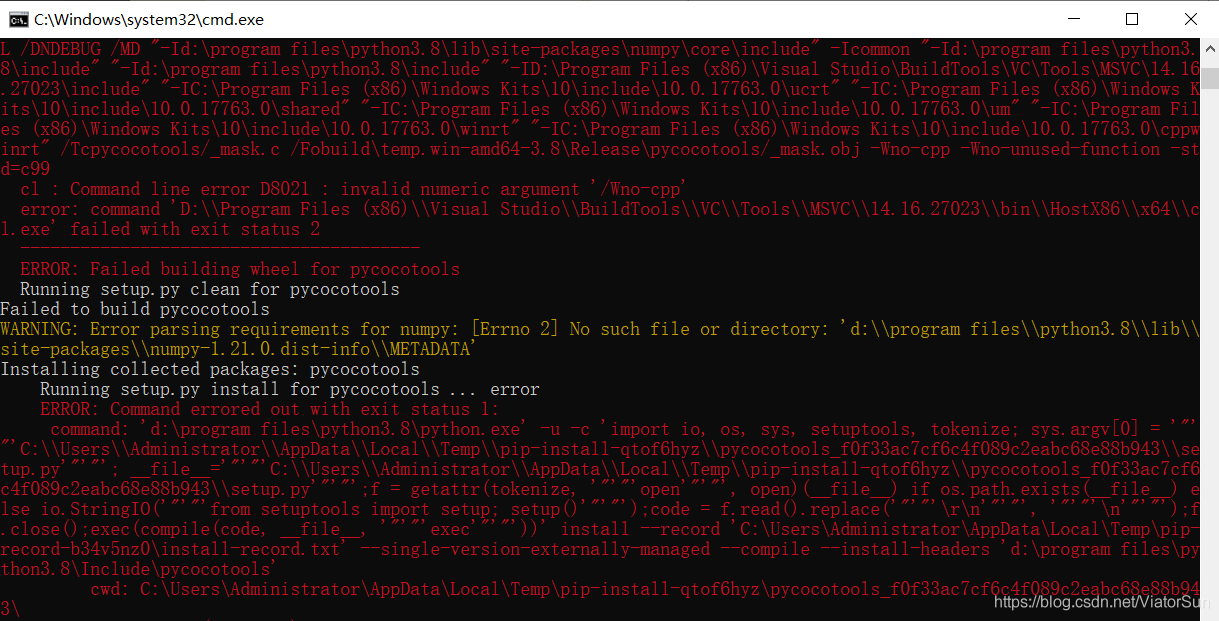
[Solved] error: Microsoft Visual C++ 14.0 or greater is required

error: Microsoft Visual C++ 14.0 or greater is required. Get it with “Microsoft C++ Build Tools”: https://visualstudio.microsoft.com/visual-cpp-build-tools/

For the problem of error: Microsoft C + + build tools  error, most of the partners have tried to install Microsoft C + + build tools 3.13mb, but it seems that they can’t continue to use it at present. Here, the author provides a new version of Microsoft C + + build tools 2017/2019. This version of Microsoft C + + build tools is downward compatible with Microsoft C + + build tools. If you need, you can try it

First download: Microsoft Visual C + + build tools. If the link fails, you can go to to download from this link

Here, we only need to select visual c + + generation tool, and the installation location can be modified by ourselves

You can see that the installation size is about 4GB

The following errors may occur during the installation. This is only because there is no corresponding file. It is because of the library version problem. You can view it in the corresponding location or change the version to solve it (not a problem)

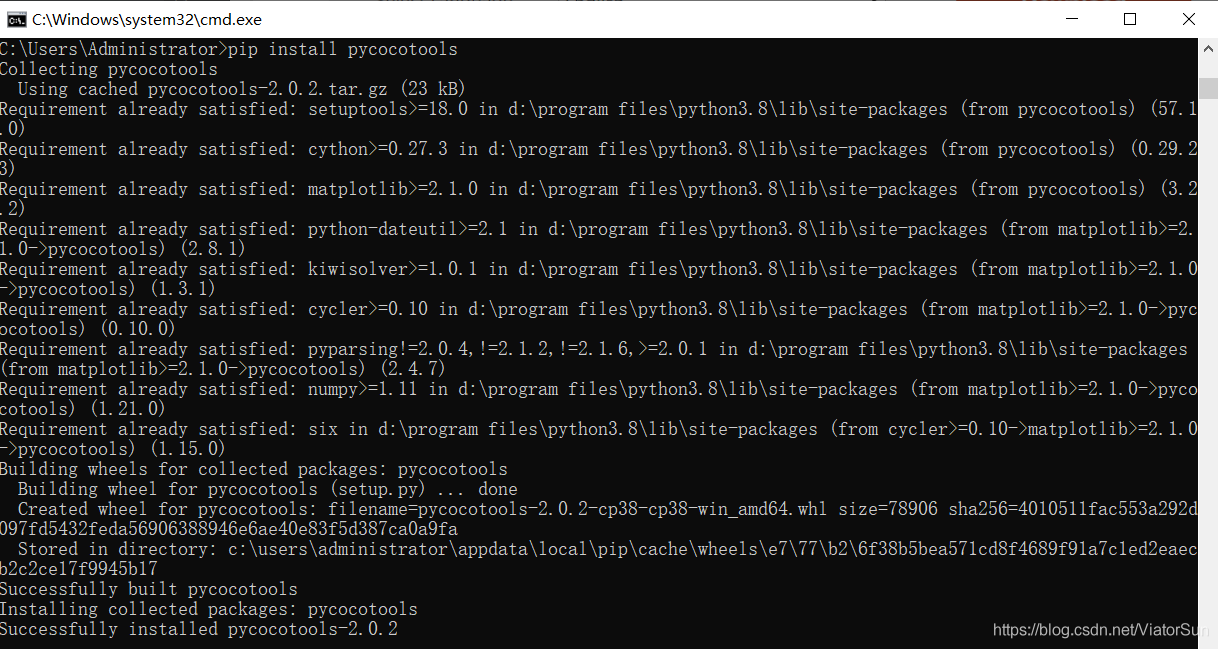
If there is no such problem, you can easily solve it by installing the python library again

Good luck!


Solution to the problem that the toolbar menu button cannot be clicked

Today, I encountered a bug. I added a menu to the toolbar, but there is no response when I click it. In other words, this button cannot be clicked.

Menu file menu_ toolbar_ announcement_ comment:

<?xml version="1.0" encoding="utf-8"?>
<menu xmlns:android="http://schemas.android.com/apk/res/android"
    xmlns:app="http://schemas.android.com/apk/res-auto">

    <item
        android:id="@+id/menu_comment"
        android:title="@string/comment"
        android:visible="true"
        app:actionLayout="@layout/menu_provider_number_subscript"
        app:showAsAction="always" />

</menu>

code:

mToolbar.setOnMenuItemClickListener(new Toolbar.OnMenuItemClickListener() {
            @Override
            public boolean onMenuItemClick(MenuItem item) {
                switch (item.getItemId()) {
                    case R.id.menu_comment:
                        //enable comment
                        showComment();
                        break;
                }
                return true;
            }
        });

 @Override
    public boolean onCreateOptionsMenu(Menu menu) {
        getMenuInflater().inflate(R.menu.menu_toolbar_announcement_comment, menu);
        return true;
    }

The setonmenuitemclicklistener method in the code doesn’t work.

I think the reason may be that I use custom layout in menu
app: actionlayout = @ layout/menu_ provider_ number_ subscript"

At this time, you need to write the click event of the menu in oncreateoptionsmenu

The details are as follows:

@Override
    public boolean onCreateOptionsMenu(Menu menu) {
        getMenuInflater().inflate(R.menu.menu_toolbar_announcement_comment, menu);
        MenuItem item = menu.findItem(R.id.menu_comment);
        item.getActionView().setOnClickListener(new View.OnClickListener() {
            @Override
            public void onClick(View v) {
                //enable comment
                showComment();
            }
        });
        return true;
    }