The following error occurs when STM32 downloads the program:


Solution:
1. Click on the magic wand
2. Select debug
3. Click “Settings”
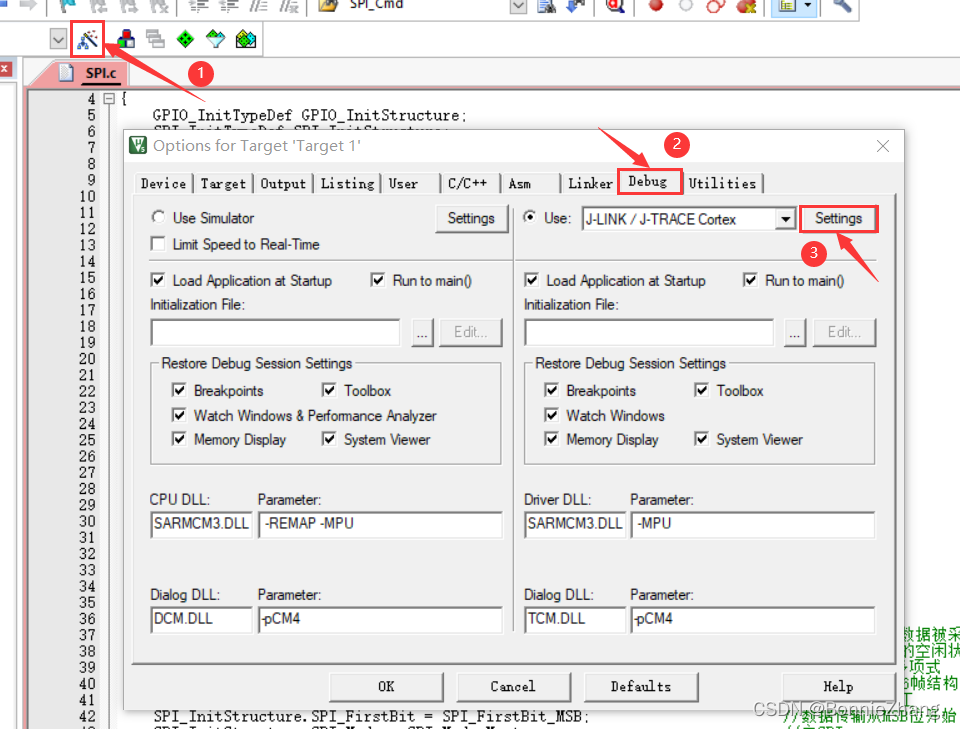
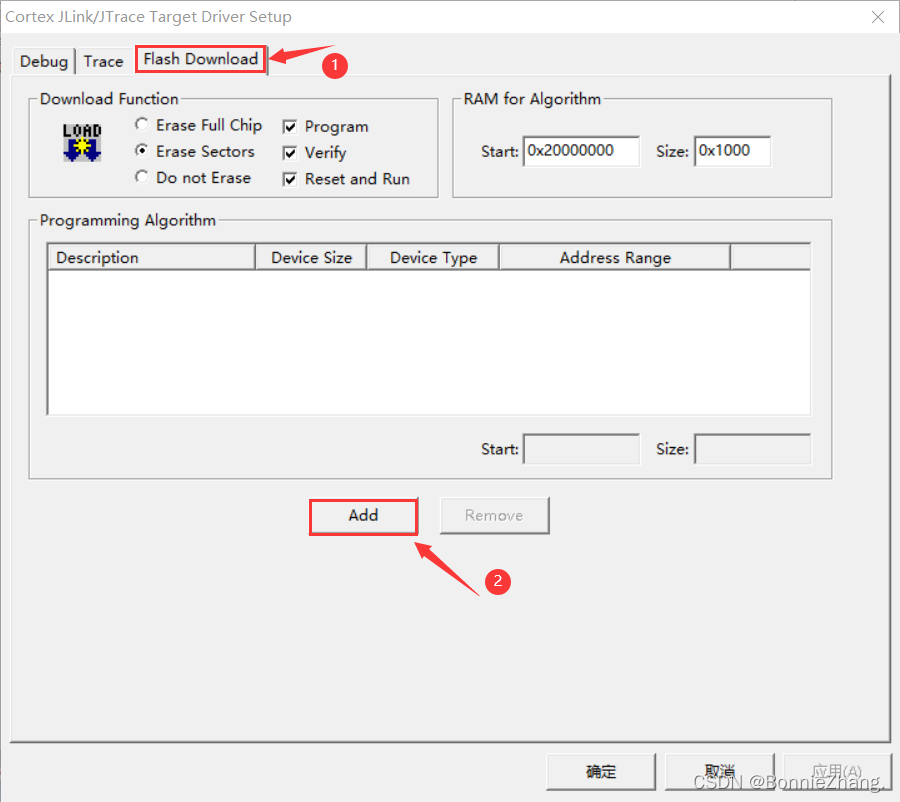
4. Click “flash download”
5. Click “add”
6. Add the model corresponding to the chip flash
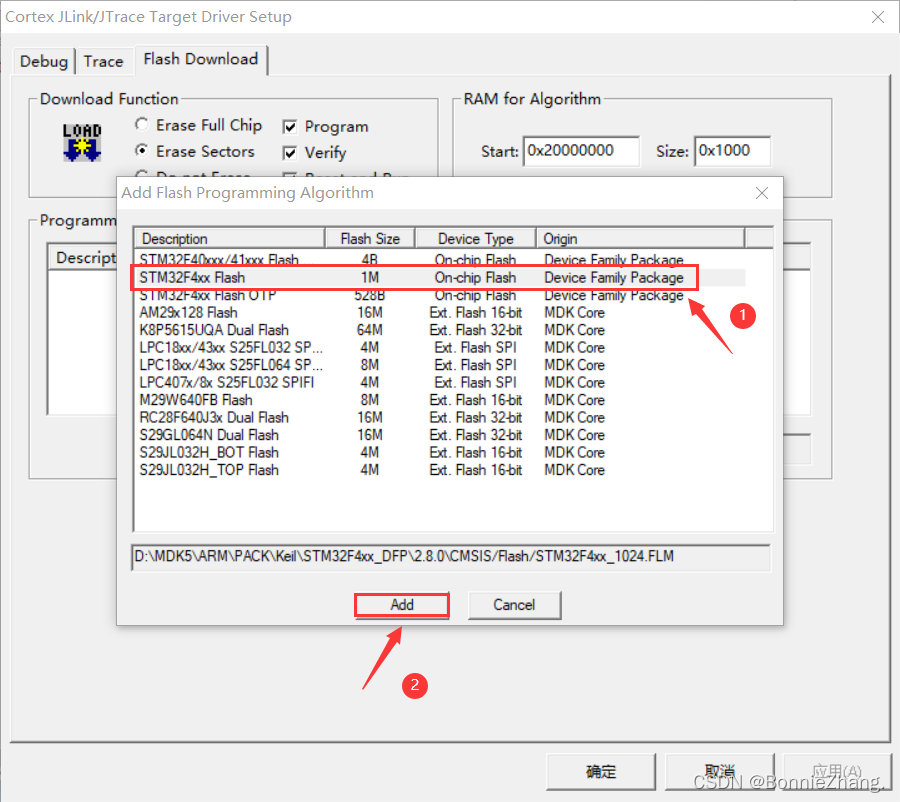
7. Click “OK” and “OK”
The following error occurs when STM32 downloads the program:
Solution:
1. Click on the magic wand
2. Select debug
3. Click “Settings”
4. Click “flash download”
5. Click “add”
6. Add the model corresponding to the chip flash
7. Click “OK” and “OK”
PM> dotnet ef migrations add InitialIdentityServerPersistedGrantDbMigration -c PersistedGrantDbContext -o Data/Migrations/IdentityServer/PersistedGrantDb –project MicroService.IdentityServer
Build started…
Build succeeded.
An error occurred while accessing the Microsoft.Extensions.Hosting services. Continuing without the application service provider. Error: Unable to build IHost
No DbContext named ‘PersistedGrantDbContext’ was found.
PM> dotnet ef migrations add InitialIdentityServerPersistedGrantDbMigration -c PersistedGrantDbContext -o Data/Migrations/IdentityServer/PersistedGrantDb –project MicroService.IdentityServer

int  delete(nodelink head,char k){
	nodelink p,q;
	q=head;
	p=head->link;
	while(((p->a)!=k)&&p){
		q=q->link;
		p=p->link;
	  }
	if(p){
		q->link=p->link;
		return 1;
		}
	else{
		printf("There is no %c\n",k);
		return 0;
	  }
}
The reason for this error is that delete is an operator in C + +, and the defined delete function conflicts with it.
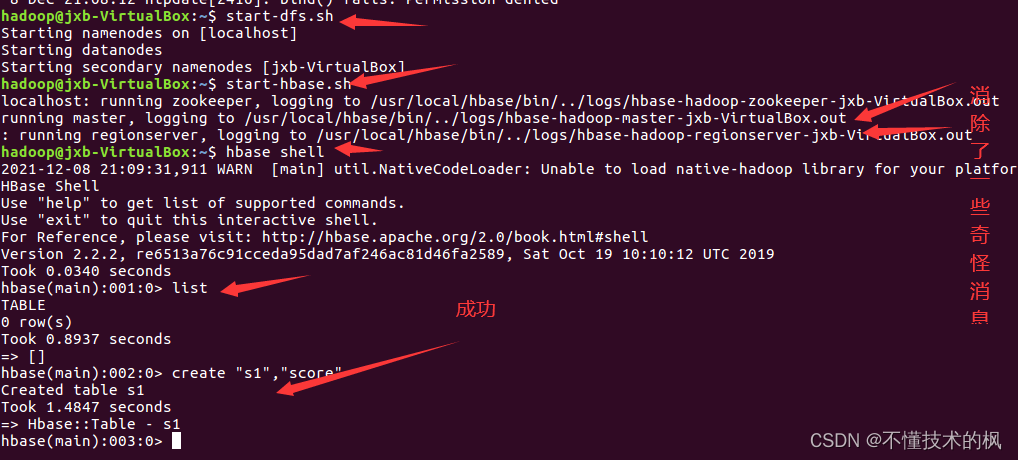
To create a table in the HBase shell:
A few days ago, it was OK. Today, I want to review it. Suddenly, it doesn’t work.
I checked a lot and said that list can’t create tables. When I encountered a problem, list can’t create tables.
after reading a lot, I found that many of them are about the problem of zookeeper. Clearing HBase cache, I cried because I didn’t install zookeeper client, let alone clearing it.
the next step is to change the configuration, Synchronize the time cycle and eliminate strange error reports
Problem Description:
There is no problem using list in HBase shell
there is a problem when creating a table: error: org apache. hadoop. hbase. PleaseHoldException: Master is initializing
Cause analysis:
1. hbase file configuration
2. The clock does not correspond to
3. Some strange errors are reported when hbase runs (although it can run normally before, there are hidden dangers)
4. hbase is sick (artificial mental retardation)
Solution:
Modify HBase configuration file
By modifying the hbase configuration file hbase-site.xml, hbase.rootdir is changed to hbase.root.dir. The following configuration file
<configuration>
        <property>
                <name>hbase.root.dir</name>
                <value>hdfs://localhost:9000/hbase</value>
        </property>
        <property>
                <name>hbase.cluster.distributed</name>
                <value>true</value>
        </property>
        <property>
                <name>hbase.unsafe.stream.capability.enforce</name>
                <value>false</value>
        </property>
</configuration>
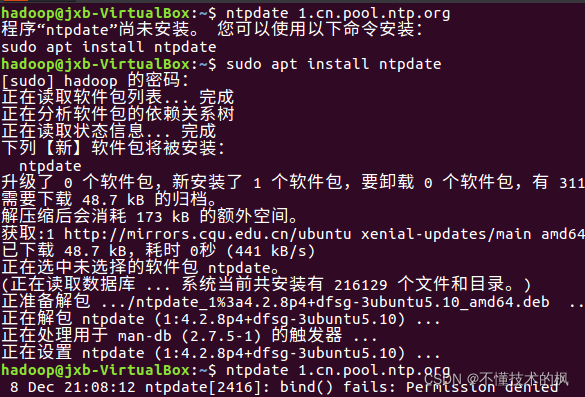
synchronization time
directly enter the following command in the shell
ntpdate 1.cn.pool.ntp.org
 3. Eliminate strange messages from HBase
Directly in HBase env Add the following command to the SH file
export HBASE_DISABLE_HADOOP_CLASSPATH_LOOKUP=true
Reboot
**Cmake error: the source… Does not match the used to generate cache Re-run cmake…
Solution:
Delete the CMakeLists.txt.user file in the project.
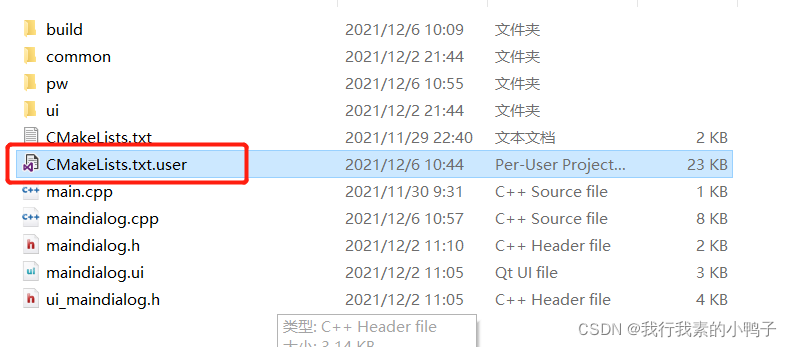
problem is solved. Later, it is found that the file is also a cache file, which contains the compilation status information of the project before, such as the debug directory. In cmake, if there is this file, the compiler will use the relevant cache information in this file, so various errors will occur:
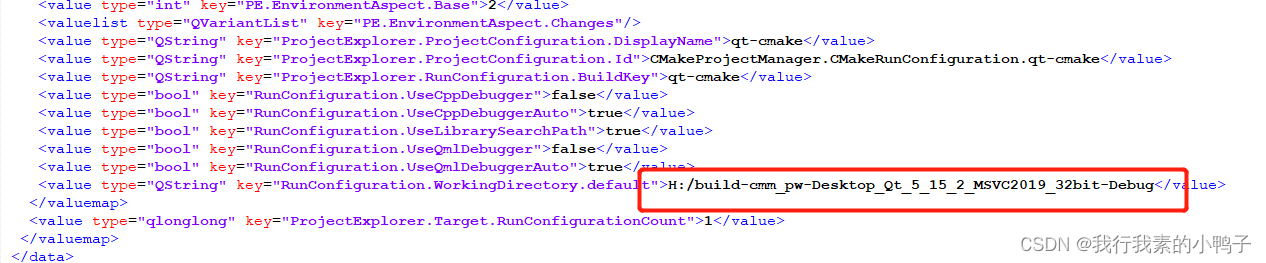
delete the file and restart cmake, A new file is regenerated.
sass-loader!
Failed to compile.

./src/main.js
Module not found: Error: Can't resolve 'sass-loader' in 'E:\study_software\JetBrains\WebStorm2021\WebstormProjects\vue-element-admin-master'
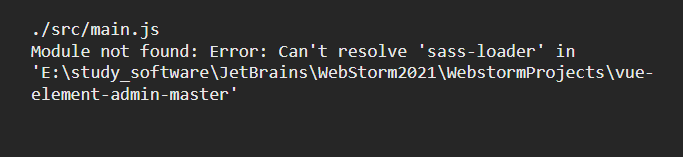
npm install sass-loader sass webpack --save-dev
npm install --save-dev node-sass
or
cnpm install node-sass --save
sass-loader: https://www.npmjs.com/package/sass-loader
Problem Description:
When testing yarn , starting the wordcount test case fails, and the following prompt appears
Error: Could not find or load main class org.apache.hadoop.mapreduce.v2.app.MRAppMaster

Please check whether your etc/hadoop/mapred-site.xml contains the below configuration:
<property>
  <name>yarn.app.mapreduce.am.env</name>
  <value>HADOOP_MAPRED_HOME=${full path of your hadoop distribution directory}<alue>
</property>
<property>
  <name>mapreduce.map.env</name>
  <value>HADOOP_MAPRED_HOME=${full path of your hadoop distribution directory}<alue>
</property>
<property>
  <name>mapreduce.reduce.env</name>
  <value>HADOOP_MAPRED_HOME=${full path of your hadoop distribution directory}<alue>
</property>

For more detailed output, check the application tracking page: http://hadoop103:8088/cluster/app/application_1638539388325_0001 Then click on links to logs of each attempt.
. Failing the application.
Cause analysis
Cannot find the main classpath
Solution:
Follow the prompts to add a classpath
At yen site XML and mapred site XML, add the following
<property>
	<name>yarn.application.classpath</name>
	<value>
		${HADOOP_HOME}/etc/*,
		${HADOOP_HOME}/etc/hadoop/*,
		${HADOOP_HOME}/lib/*,
		${HADOOP_HOME}/share/hadoop/common/*,
		${HADOOP_HOME}/share/hadoop/common/lib/*,
		${HADOOP_HOME}/share/hadoop/mapreduce/*,
		${HADOOP_HOME}/share/hadoop/mapreduce/lib-examples/*,
		${HADOOP_HOME}/share/hadoop/hdfs/*,
		${HADOOP_HOME}/share/hadoop/hdfs/lib/*,
		${HADOOP_HOME}/share/hadoop/yarn/*,
		${HADOOP_HOME}/share/hadoop/yarn/lib/*,
	</value>
</property>
Because ${hadoop_home} is used, you need to inherit environment variables in Yard site XML is added as follows, where Hadoop_Home is what we need. Just put the rest as needed. I put some commonly used ones here
<!--Inheritance of environment variables-->
<property>
  <name>yarn.nodemanager.env-whitelist</name>,
  <value>JAVA_HOME,HADOOP_HOME,HADOOP_COMMON_HOME, HADOOP_ HDFS_HOME, HADOOP_ CONF_DIR, CLASSPATH_PREPEND_DISTCACHE, HADOOP_YARN_HOME, HADOOP_MAPRED_HOME
  </value>
</property>
If the
yarnservice related to multiple servers is enabled, remember to configure each server
Configure custom login page
http.formLogin().loginPage("login.html")  //Custom login page The error is caused by this, the page needs to be preceded by a slash
                .loginProcessingUrl("/login") // the address of the action in the login form, which is the path of the authentication request
                .usernameParameter("username")
                .passwordParameter("password")
                .defaultSuccessUrl("/home"); //Default jump path after successful login
Change to
http.formLogin().loginPage("/login.html")
                .loginProcessingUrl("/login")
                .usernameParameter("username")
                .passwordParameter("password")
                .defaultSuccessUrl("/home");
  <!-- Database connection pooling-->
        <dependency>
            <groupId>com.alibaba</groupId>
            <artifactId>druid</artifactId>
            <version>1.1.22</version>
        </dependency>
Version issue updated to 1.1 22
When redis executes redis cli shutdown, it reports error err errors trying to shutdown Check logs.
1. Start the pseudo cluster after installing reids (the configuration file is in/data/server/redis/etc/redis.CONF)
redis-server /data/server/redis/etc/redis.conf
redis-server /data/server/redis/etc/redis.conf --port 6380
redis-server /data/server/redis/etc/redis.conf --port 6381
redis-server /data/server/redis/etc/redis.conf --port 6382
Generate multiple redis nodes
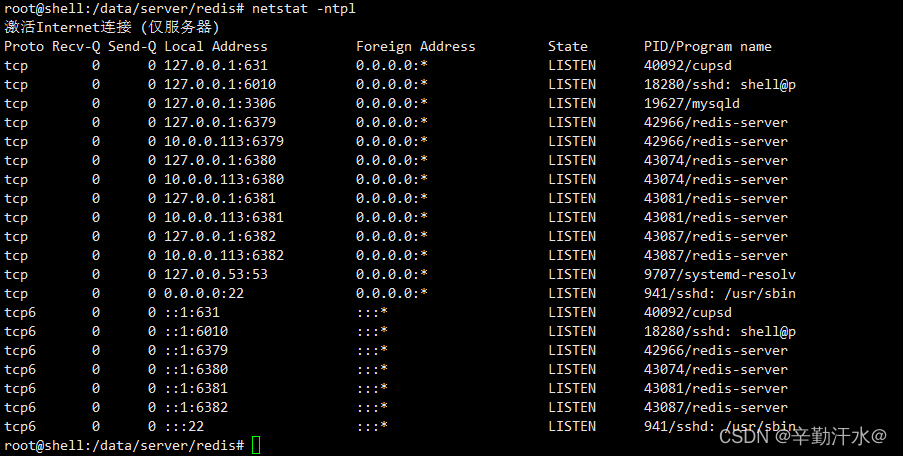
2 Suddenly want to delete the redundant nodes
redis-cli -p 6380 shutdown
Error reporting:

3 Solve the problem of
modifying the redis configuration file
vim /data/server/redis/etc/redis.conf
# Modify
logfile "/data/server/redis/log/redis.log"
Kill the redis process and restart it.
Redis cli shutdown can be used
Habse startup error
Habse startup error error: could not find or load main class org apache.hadoop.hbase.util.GetJavaProperty.
after referring to many articles on the Internet, it’s useless to modify classpath if the version doesn’t match.
Later, I saw an issue mentioned on Apache JIRA. Check his comments and see the following sentence:
Happens because I added hadoop to my PATH so then I go the HADOOP_IN_path in bin/hbase.
Thinking that Hadoop has been pre installed on the machine, it may be caused by this. Find hadpop in the the following variables are found: bin/HBase file_IN_Path
#If avail, add Hadoop to the CLASSPATH and to the JAVA_LIBRARY_PATH
# Allow this functionality to be disabled
if [ "$HBASE_DISABLE_HADOOP_CLASSPATH_LOOKUP" != "true" ] ; then
  HADOOP_IN_PATH=$(PATH="${HADOOP_HOME:-${HADOOP_PREFIX}}/bin:$PATH" which hadoop 2>/dev/null)
fi
In line 223 (hbase-3.0.0-alpha-1).
then add a line above this:
export HBASE_DISABLE_HADOOP_CLASSPATH_LOOKUP="true"
Disable lookup of haddop classpath.
Print the classpath with bin/HBase classpath , and it is found that there is no Hadoop path. There is no error message in bin/HBase version , and there will be no error when running the List command in bin/HBase shell. So the problem is solved.
However, why does the Hadoop path cause this problem? I didn’t take a closer look. There may be an explanation in the issue mentioned above. If you are interested, you can study it. I have to say that useful information on the Internet is too difficult to find. Make a record here. I hope this solution can help some people.
My backend Shijian type is string, the SQL server time type is datetime,
the time format to be returned is “2021-12-09 12:20:45”
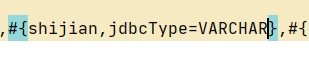
#{} just add a JDBC type = varchar