Category Archives: Error

Template Render Error Solution (Hexo blog theme, GIT upload)

Error information

INFO  Start processing
FATAL Something's wrong. Maybe you can find the solution here: http://hexo.io/do                                                                                                                                                                                               cs/troubleshooting.html
Template render error: (unknown path) [Line 310, Column 115]
  expected variable end

According to the prompt, you can enter the reference website

http://hexo.io/docs/troubleshooting.html

The source of the questions provided in the website is
1. The topic configuration file 2 config.yml There is a problem in ;, most likely because the configuration file is not separated by spaces.
First, go to the topic directory and open config.yml files…. My topic is yilia

..\themes\yilia\config.yml

Then, is there any of the following

Error.
  Home:/
  All articles:/archives
Correct.
  Home: /
  All articles: /archives

Correct format: The configuration item is followed by the parameter with a space

2. My problem is in the second item, that is, there are some characters that can’t be used in the articles I wrote, which leads to errors in the conversion of. MD format articles

..\source\_posts articles in the folds

Solution: carefully check .. \ source\_ Are there "{}" and other symbols in the posts directory, or are the codes not put into the code box

.The md file format is markdown, and you can use three stops to indicate the code box
```Write the code in the middle``

The convenient way is that the full text is annotated with pause sign, so there is no need to check

Error configuring application listener of class jdbc.ContextListener [One of the solutions]

Error configuring application listener of class jdbc.ContextListener One of the solutions

In the process of developing with MyEclipse + Tomcat 5.5 these two days, this error message suddenly appeared when starting the project. The previous two days have been good. How can this problem suddenly appear?I still doubt whether the computer is poisoned.

The error message is as follows


2011-4-26 14:39:52 org.apache.catalina.loader.WebappClassLoader validateJarFile
Message: validateJarFile(E:\java\Tomcat5\webapps\pmis-center\WEB-INF\lib\servlet-api.jar) - jar not loaded. See Servlet Spec 2.3, section 9.7.2. Offending class: javax/servlet/Servlet.class
2011-04-26 14:39:53,843 ERROR [org.apache.catalina.core.ContainerBase.[Catalina].[localhost].[/center]] - <Error configuring application listener of class jdbc.ContextListener>
java.lang.Error: Unresolved compilation problems: 
	The hierarchy of the type ContextListener is inconsistent
	Implicit super constructor Object() is undefined for default constructor. Must define an explicit constructor
	The type java.util.EventListener cannot be resolved. It is indirectly referenced from required .class files

	at jdbc.ContextListener.<init>(ContextListener.java:4)
	at sun.reflect.NativeConstructorAccessorImpl.newInstance0(Native Method)
	at sun.reflect.NativeConstructorAccessorImpl.newInstance(NativeConstructorAccessorImpl.java:39)
	at sun.reflect.DelegatingConstructorAccessorImpl.newInstance(DelegatingConstructorAccessorImpl.java:27)
	at java.lang.reflect.Constructor.newInstance(Constructor.java:513)
	at java.lang.Class.newInstance0(Class.java:355)
	at java.lang.Class.newInstance(Class.java:308)


Before that, we also reported WEB-INF/lib/servlet- api.jar Error in not loaded. See servlet spec 2.3, section 9.7.2

Before looking for a long time on the Internet, there is a problem servlet- api.jar Later, all the methods were tried, even the system was reinstalled, but it didn’t work. Finally, I calm down and take a look at the JRE package content in the running environment of MyEclipse. I found that all the jar packages are JDK jars. Change the jar package and recompile it. The result is good.

Remind yourself of this problem. The problem is often in the most trivial place. If you find the problem, you will get something if you think about what changes you have made before.


MAC: Brew upgrade Error [How to Fix]

rm -rf /usr/local/etc/bash_completion.d/brew
rm -rf /usr/local/share/zsh/site-functions/_brew
rm -rf /usr/local/share/man/man1/brew.1
rm -rf /usr/local/share/doc/homebrew
brew update


ymdeMacBook-Pro:~ ym$ brew updateAlready up-to-date. 
brew update          # Update Homebrew's information
brew outdated # See which software can be upgraded
brew upgrade <xxx> # If you don't want to upgrade all of them, then upgrade the specified ones like this

brew upgrade; brew cleanup # If you want to upgrade them all, just upgrade them and clean them up


Error Report of Yarn Create UMI

There is a project that needs to use UMI, so it is decided to use the scaffolding method of UMI to create the project, which can save a lot of things, although it should not be advocated. But there is the problem of line and surface

PS F:\data-train> yarn create umi
yarn create v1.21.1
[1/4] Resolving packages...
[2/4] Fetching packages...
error An unexpected error occurred: "C:\\Users\\num\\AppData\\Local\\Yarn\\Cache\\v6\\npm-doctrine-2.1.0-5cd01fc101621b42c4cd7f5d1a66243716d3f39d-integrity\\node_modules\\doctrine\\.yarn-metadata.json: Unexpected end of JSON input".
info If you think this is a bug, please open a bug report with the information provided in "C:\\Users\\num\\AppData\\Local\\Yarn\\Data\\global\\yarn-error.log".
info Visit https://yarnpkg.com/en/docs/cli/create for documentation about this command.
PS F:\data-train> npm create umi
npm ERR! code ENOLOCAL
npm ERR! Could not install from "Data\npm-cache\_npx\13476" as it does not contain a package.json file.

npm ERR! A complete log of this run can be found in:
npm ERR!     d:\user\工号\Application Data\npm-cache\_logs\2019-12-21T09_22_57_009Z-debug.log
install create-umi@latest error, error code:1

The error an unexpected error occurred: "C:\\users\\job number\\appdata\\local\\yarn\\cache\\ V6\\npm-document-2.1.0-5cd01fc101621b42c4cd7f5d1a66243716d3f39d integrity\\node_ modules\\doctrine\\.yarn- metadata.json : unexpected end of JSON input "." yarn "is found after changing the\\in to \- metadata.json Delete this file and re execute yarn create UMI to install it

Git xcrun: error: invalid active developer path (/Library/Developer/CommandLineTools), missing xcru

Question one

After upgrading the latest MacOS system, GIT, which had no problem, reported the following error:

Сannot Run Git
xcrun: error: invalid active developer path (/Library/Developer/CommandLineTools), missing xcrun at: /Library/Developer/CommandLineTools/usr/bin/xcrun

At this time, thanks to Baidu, I found a solution

resolvent

The solution to the above problem is to execute the command on the terminal

xcode-select --install

After the installation is successful, we can execute git command on the terminal. The magic thing happened. Git command can run normally

Question 2

Next, let’s talk about another magical problem. If you are using the idea editor, when you open the idea, you may find that the idea will always prompt the following error message:

Cannot Run Git
xcrun:error:invalid active developer path...

The screenshot is as follows:

at a loss, we found a solution again

Solution

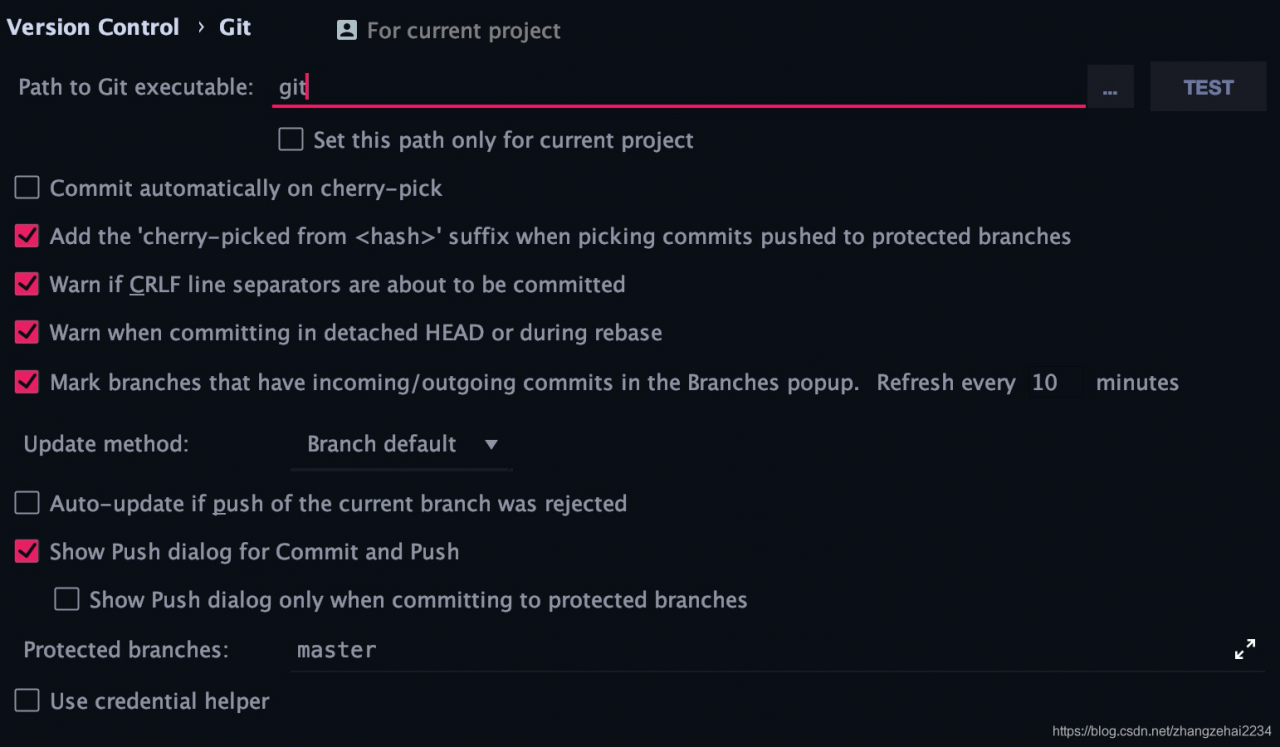
Click the preferences option in the system to enter the system configuration page, search git in the search box of the system configuration page, and configure the path to git executable option in the GIT configuration page as git, as shown in the following figure:
, and then click apply Submit the configuration information just now. Next, close the configuration page. It’s time to witness the miracle. The error message disappears. In this way, the configuration of GIT error message in the whole system is completed

Anaconda start error resolution navigator start error

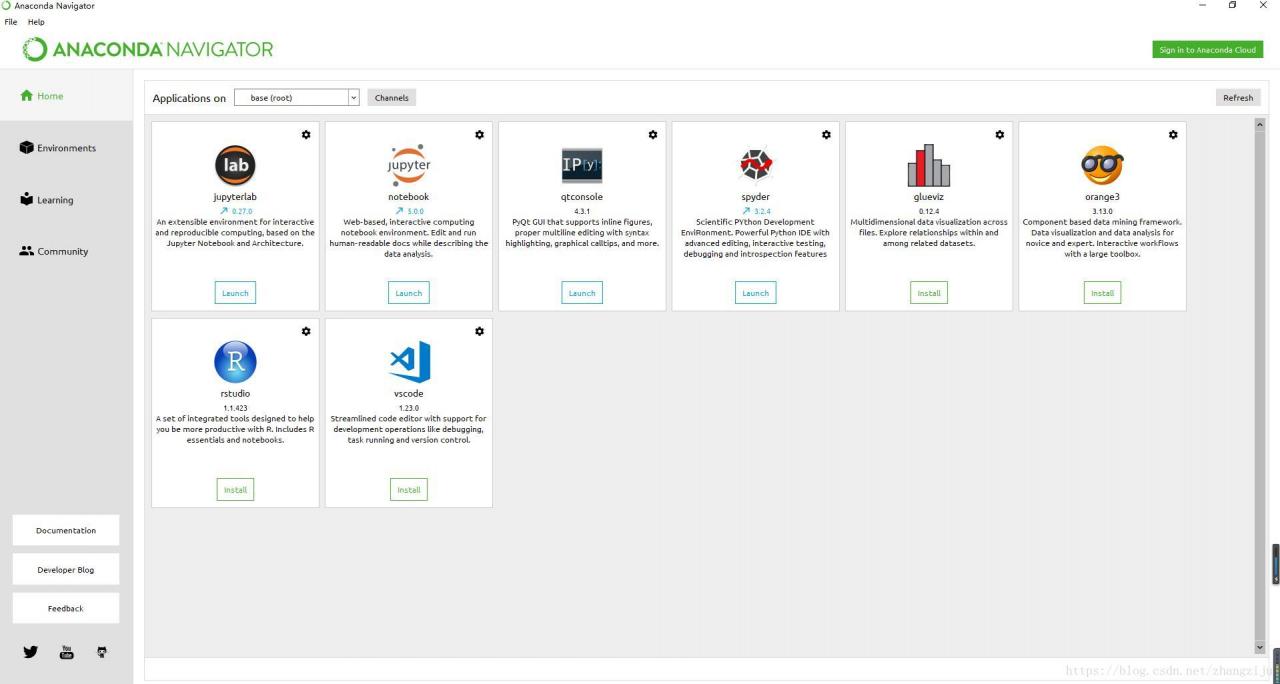
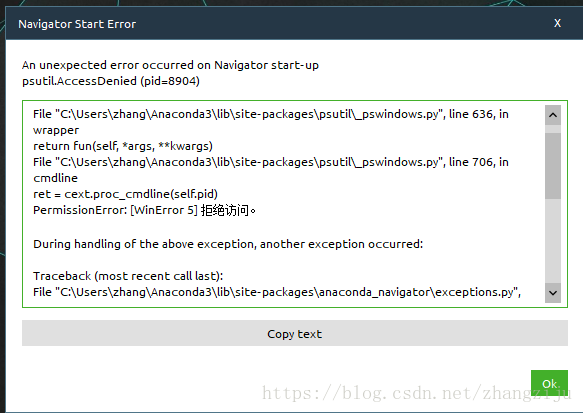
navigator start error generally, anaconda is not updated or has not been opened for a long time, and the error is as follows:
in this case, anaconda is not updated


resolvent:

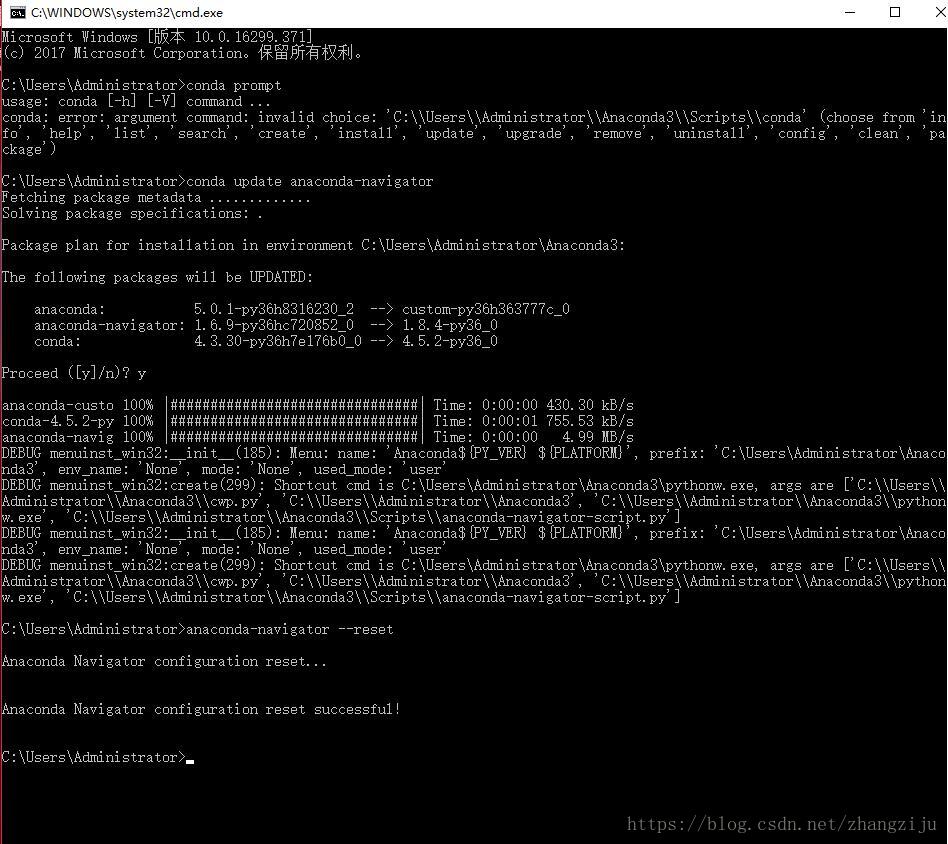
1)Run with administrator: conda prompt
2) Execute the command conda update anaconda-navigator
3) If that doesn't work, try the commandanaconda-navigator --reset


Start navigator again:
ignore Big Joe…


How to Solve Azkaban Error Chung during uploading files to DB

Error:
Error Chunking during uploading files to db…
azkaban-web-server error:
azkaban.project.ProjectManagerException: Error Chunking during uploading files to db…
at azkaban.project.JdbcProjectLoader.uploadFileInChunks(JdbcProjectLoader.java:503)
at azkaban.project.JdbcProjectLoader.uploadProjectFile(JdbcProjectLoader.java:382)
at azkaban.project.JdbcProjectLoader.uploadProjectFile(JdbcProjectLoader.java:365)
at azkaban.storage.DatabaseStorage.put(DatabaseStorage.java:55)
at azkaban.storage.StorageManager.uploadProject(StorageManager.java:95)
at azkaban.project.ProjectManager.uploadProject(ProjectManager.java:503)
at azkaban.webapp.servlet.ProjectManagerServlet.ajaxHandleUpload(ProjectManagerServlet.java:1713)
at azkaban.webapp.servlet.ProjectManagerServlet.handleUpload(ProjectManagerServlet.java:1789)
at azkaban.webapp.servlet.ProjectManagerServlet.handleMultiformPost(ProjectManagerServlet.java:197)
at azkaban.webapp.servlet.LoginAbstractAzkabanServlet.doPost(LoginAbstractAzkabanServlet.java:319)
at javax.servlet.http.HttpServlet.service(HttpServlet.java:688)
at javax.servlet.http.HttpServlet.service(HttpServlet.java:770)
at org.mortbay.jetty.servlet.ServletHolder.handle(ServletHolder.java:511)
at org.mortbay.jetty.servlet.ServletHandler.handle(ServletHandler.java:401)
at org.mortbay.jetty.servlet.SessionHandler.handle(SessionHandler.java:182)
at org.mortbay.jetty.handler.ContextHandler.handle(ContextHandler.java:766)
at org.mortbay.jetty.handler.HandlerWrapper.handle(HandlerWrapper.java:152)
at org.mortbay.jetty.Server.handle(Server.java:326)
at org.mortbay.jetty.HttpConnection.handleRequest(HttpConnection.java:542)
at org.mortbay.jetty.HttpConnection$RequestHandler.content(HttpConnection.java:945)
at org.mortbay.jetty.HttpParser.parseNext(HttpParser.java:756)
at org.mortbay.jetty.HttpParser.parseAvailable(HttpParser.java:212)
at org.mortbay.jetty.HttpConnection.handle(HttpConnection.java:404)
at org.mortbay.jetty.bio.SocketConnector$Connection.run(SocketConnector.java:228)
at org.mortbay.jetty.security.SslSocketConnector$SslConnection.run(SslSocketConnector.java:713)
at org.mortbay.thread.QueuedThreadPool$PoolThread.run(QueuedThreadPool.java:582)

Problem Cause.
azkaban is unable to update the database.
Solution, restart the database.


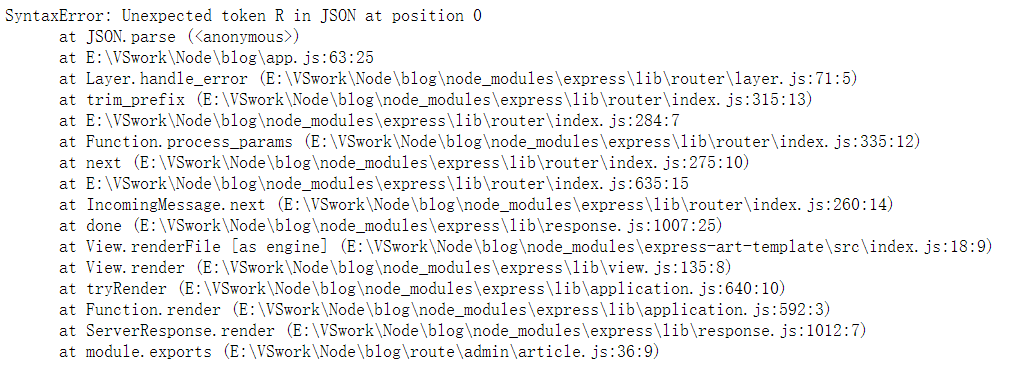
Template cannot be rendered due to the joint query of populate in mongoose: syntax error: unexpected token r in JSON at position 0

Error information

Error code

    let articles = await Article.find().populate('author');
    res.render('admin/article', { articles });

Error reason

When the populate </ code> method is used in mongoose to realize the set association, the template engine cannot render. This is because when the set joint query and rendering page template are carried out at the same time, the two conflicts will result in the failure of rendering the page. For example, we change the above code to the following:

    let articles = await Article.find().populate('author');
    res.send('ok');    // The server side can respond to the client ok so there is a real conflict between template rendering and federated queries

resolvent

Using the lean () method

    let articles = await Article.find().populate('author').lean();
    res.render('admin/article', { articles });

Lean() method: it tells mongoose to return a normal object instead of a mongoose document object, which is used internally first JSON.stringify () this method converts the document object to a string, removes all other attribute formats, and then leaves only the required data string~

Using stringfy() and parse() methods

And the above method is essentially the same

    let articles = await Article.find().populate('author');
    let str = JSON.stringify(result);
    let json = JSON.parse(str);
    res.render('admin/article', { json });

When we continue the paging function, we use the JSON method

To achieve paging function, we use the mongoose sex page </ code> third-party module for paging, and then we change the code to:

let temp = await pagination(Article).find({})
    .page(page)
    .size(2)
    .display(2).populate('author')
    .exec();
let str = JSON.stringify(temp);
let articles = JSON.parse(str);
res.render('admin/article', { articles });

The problem will be solved 😀

Angular6 rxjs start error in node_modules/rxjs/internal/types.d.ts(81,44): error TS1005: ‘;’ expected.

After introducing the rxjs module, the project starts with an error
ERROR in node_modules/rxjs/internal/types.d.ts(81,44): error TS1005: ‘;’ expected.
node_modules/rxjs/internal/types.d.ts(81,74): error TS1005: ‘;’ expected.
node_modules/rxjs/internal/types.d.ts(81,77): error TS1109: Expression expected.

How to solve this error?
You could update your project to TS 2.8You can pin your project to [email protected]
issue:
https://github.com/ReactiveX/rxjs/issues/4540
https://github.com/ReactiveX/rxjs/issues/4512

Android studio version 3.0 import version 2.2.2 error Error:This Gradle plugin requires Studio 3.0 minimum

Foreword: the company uses version 3.0, and its computer is installed with version 2.2.2. The imported project gradle has reported an error, which has been encountered before. The reason for time has forgotten how to solve it, so Google has solved it, and hereby records it in a blog


Error:This Gradle Plugin requires studio 3.0 minimum
error: gradle plug-in requires 3.0 minimum

add this code android.injected.build.model.only.versioned=3

According to the above steps, the problem of gradle plug-in is solved, and an error is reported at runtime

Installation failed with message INSTALL_ FAILED_ TEST_ ONLY.
It is possible that this issue is resolved by uninstalling an existing version of the apk if it is present, and then re-installing.

WARNING: Uninstalling will remove the application data!

Do you want to uninstall the existing application?

No matter you click cancel or OK, the installation is not successful, as shown in the following figure


The solution: still in gradle.properties File addition android.injected.testOnly=false

add android.injected.testOnly=false

Then the problem is solved, the project can run normally on the mobile phone, and can play happily

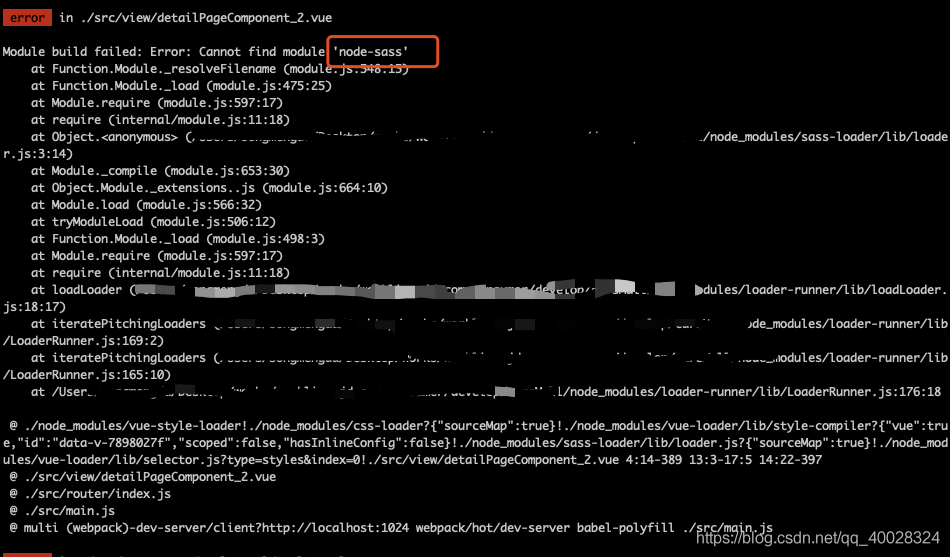
NPM run dev Error Module build failed: Error: Cannot find module ‘node-sass’

For a project, you may pull it from another library, change a computer, or for other reasons, you need to re install the dependency environment,

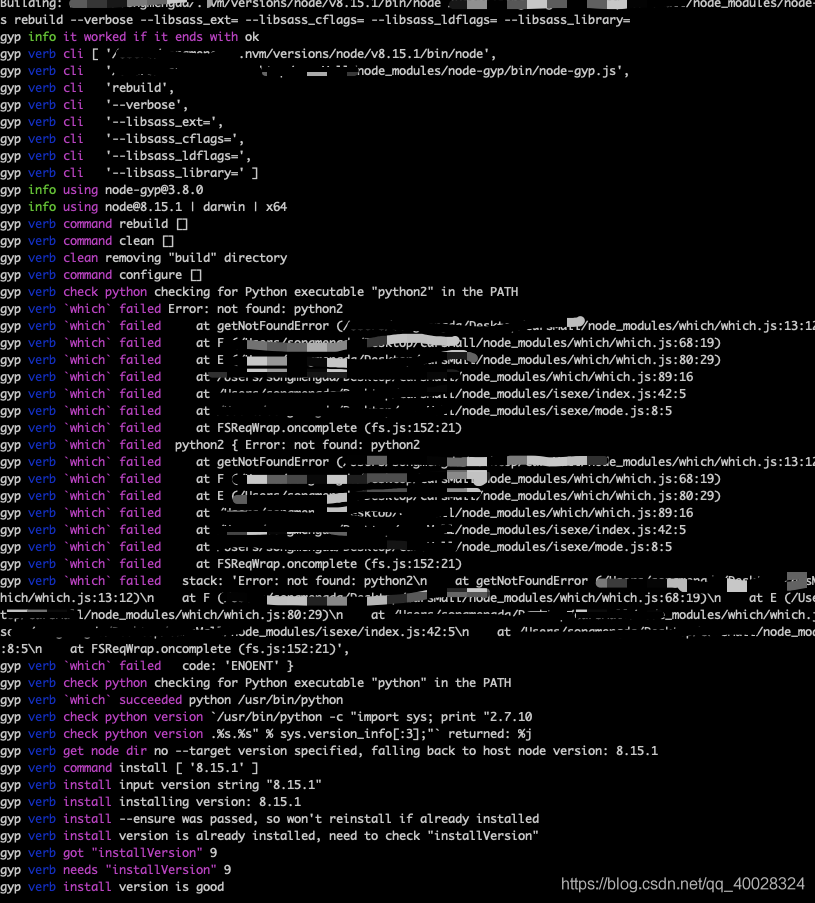
Sometimes the node sass installation fails. This phenomenon is too normal, for example:

Don’t panic when you report an error. You can usually find the answer by reading the beginning of the error report. He said that he didn’t find the module node sass

In this case, you can go to the project dependency node_ Look inside the module and find that there is no such bag. Please reload it

npm install node-sass –save

This kind of error report is coming. This node sass package should be on a foreign site. It is very easy to fail in the process of pulling. If it is broken in the middle, it will be over. So the Taobao team made an image of NPM, called cnpm. They will mirror the packages on NPM to their own site. It is relatively smooth for the domestic ones to pull the domestic ones, so you need to have the function of cnpm first, and then use cnpm to install

1.npm install -g cnpm –registry= https://registry.npm.taobao.org

2.cnpm install node-sass –save

Check the node after loading_ Modules found that the installation was successful

Run NPM run dev

docker load Error processing tar file(exit status 1): archive/tar: invalid tar header

in use

$ docker load [image].tar

When the command uploads the docker image, an error is reported:

Load an image from a tar archive or STDIN

Add parameter – I

$ docker load -i [image].tar

Still report error:

Error processing tar file(exit status 1): archive/tar: invalid tar header

Solution reference: https://stackoverflow.com/questions/40622162/docker-load-and-save-archive-tar-invalid-tar-header

reason:

Running docker save and docker load in different operating systems will cause this problem. Even on different physical machines, the same operating system may also appear.

Solution:

add the parameter – O when the docker is saved. Refer to the official website https://docs.docker.com/engine/reference/commandline/save/

Run on the machine where you want to save the. Tar image:

docker save -o [image].tar

Run on the machine that needs to be uploaded:

docker load -i [image].tar