Category Archives: Error

Git: “error: RPC failed; curl 18 transfer closed with outstanding read data remaining”

Error: RPC failed; curl 18 transfer closed with standing read data remaining
fatal: the remote end hung up unexpectedly
fatal: early EOF
fatal: index pack failed

If git item is too large, this error may occur when pulling code.

Error cause analysis
git has two ways to pull code, one is HTTP, the other is SSH. The HTTP bottom layer of Git is through curl. The bottom layer of HTTP is based on TCP, and the implementation of TCP protocol has buffer.
so this error basically means that the connection has been closed, but there is unfinished data at this time.

Solution
increase the buffer size.
after cutting to git project directory, execute the following command,

//The unit of 524288000 represents B, and 524288000b is 500MB.
//the size of this value can be set by yourself.
git config –-global http.postBuffer 524288000

and then check whether the setting is successful,

git config –list | grep postbuffer
If none of the above works, use below:

The configuration is as follows:

$ git  config –global http.postBuffer twenty-four million two hundred and eighty-eight thousand

$ git config –list
NVM ERROR open \settings.txt: The system cannot find the file specified

    1. when installing other software, the environment variable of NVM was accidentally deleted. After restoring the installation path of NVM in the system path, an error was reported using NVM
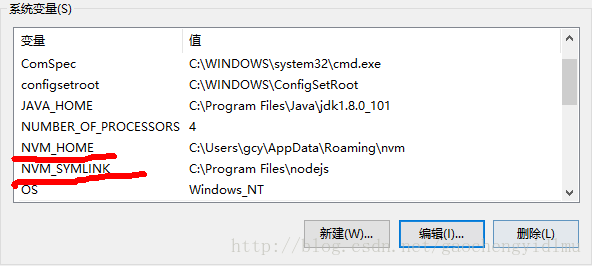
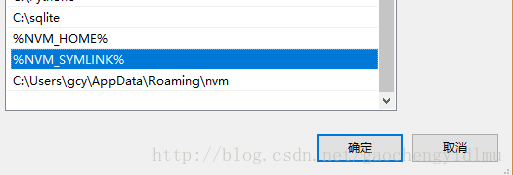
    1. error open\ settings.txt : the system cannot find the file specified after comparing my environment variables with those of other people, I find that I am missing% NVM_ HOME%,%NVM_ Symlink% two variables add two paths to the path

    1. add two variables to the system variables, and the variable values can be found in the NVM installation file settings.txt
    1. root: NVM_ home
    1. path: nvm_ Symlink

    restart the computer, open CMD in administrator mode, type NVM, OK reference link: https://github.com/coreybutler/nvm-windows/issues/39

Error starting ApplicationContext. To display the auto-configuration report re-run your application

Error starting ApplicationContext. To display the auto-configuration report re-run your application with ‘debug’ enabled

Error starting ApplicationContext. To display the auto-configuration report re-run your application with 'debug' enabled.
2019-09-08 02:07:28.798 ERROR 10540 --- [           main] o.s.b.d.LoggingFailureAnalysisReporter   : 

***************************
APPLICATION FAILED TO START
***************************

Description:

Cannot determine embedded database driver class for database type NONE

Action:

If you want an embedded database please put a supported one on the classpath. If you have database settings to be loaded from a particular profile you may need to active it (no profiles are currently active).


Process finished with exit code 1

When the springboot project is started, no error is reported, but it will be terminated automatically later. View POM file

       <!-- spring boot Integration mybatis -->
        <dependency>
            <groupId>org.mybatis.spring.boot</groupId>
            <artifactId>mybatis-spring-boot-starter</artifactId>
            <version>1.3.0</version>
        </dependency>

        <!-- MySQL -->
        <dependency>
            <groupId>mysql</groupId>
            <artifactId>mysql-connector-java</artifactId>
        </dependency>

The solution: in the pom.xml Remove database related dependencies (MySQL connection)- java.jar,  mybatis.xxx.jar, PageHelper, database connection pool, etc.)

There must be a default configuration file, if any. Such as database connection configuration.

Tomcat Error parsing HTTP request header Note: further occurrences of HTTP header parsing errors

Tomcat reported an error when parsing HTTP request and returned the error to the client. The specific error is as follows:

 org.apache.coyote.http11.AbstractHttp11Processor.process Error parsing HTTP request header
 Note: further occurrences of HTTP header parsing errors will be logged at DEBUG level.

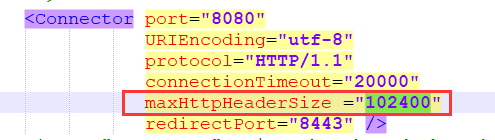
The reason for the error is that the amount of data carried by the URL link header file is too large. You only need to modify the server.xml Change maxhttpheadersize to a larger value. It is shown as follows:

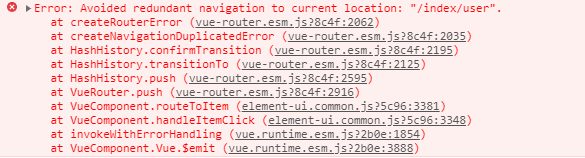
How to Solve Error: avoided redundant navigation to current location: “index/user”

Error: avoided redundant navigation to current location: “index/user” solution

Problem description solution

Problem description

Using the navigation menu made by element UI, when clicking the same navigation continuously, an error will be reported
the error will not affect the function ( Affect obsessive-compulsive disorder )

As shown in the figure

current address http://localhost : 8080/#/index/user
continuous click – user list
jump to the same address http://localhost : 8080/#/index/user

error report

Solutions

import Vue from 'vue'
import VueRouter from 'vue-router'
Vue.use(VueRouter)
// router folder - >index.js file
//cv the following code to solve the error reporting problem of duplicate routing addresses (once and for all)
const originalPush = VueRouter.prototype.push
   VueRouter.prototype.push = function push(location) {
   return originalPush.call(this, location).catch(err => err)
}

kubernetes Error from server (AlreadyExists): error when creating “kubernetes-dashboard.yaml”: serv

In implementation:

kubectl apply -f kubernetes-dashboard.yaml

report errors

Error from server (AlreadyExists): error when creating “kubernetes- dashboard.yaml “: services “kubernetes-dashboard” already exist

The preliminary judgment is that there is, and the dashboard already exists

use:

kubectl get pod --all-namespaces 

It is found that there is an abnormal imagepullbackoff

Then use

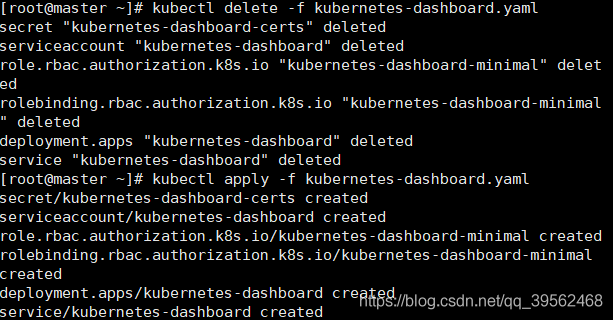
kubectl delete -f kubernetes-dashboard.yaml 

Delete

OK, finish

SpringBoot Error running ‘Application’: Command line is too long.Shorten command line for

1.Error information

Error running 'Application':
Command line is too long.Shorten command line for Application or also for Spring Boot default configuration.

2.Cause of error

Springboot project startup command too long

3. Solutions

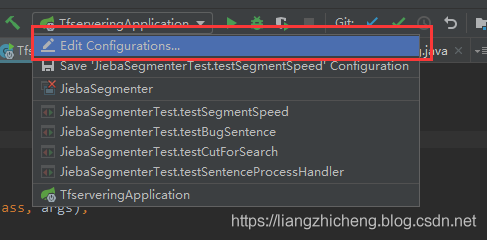
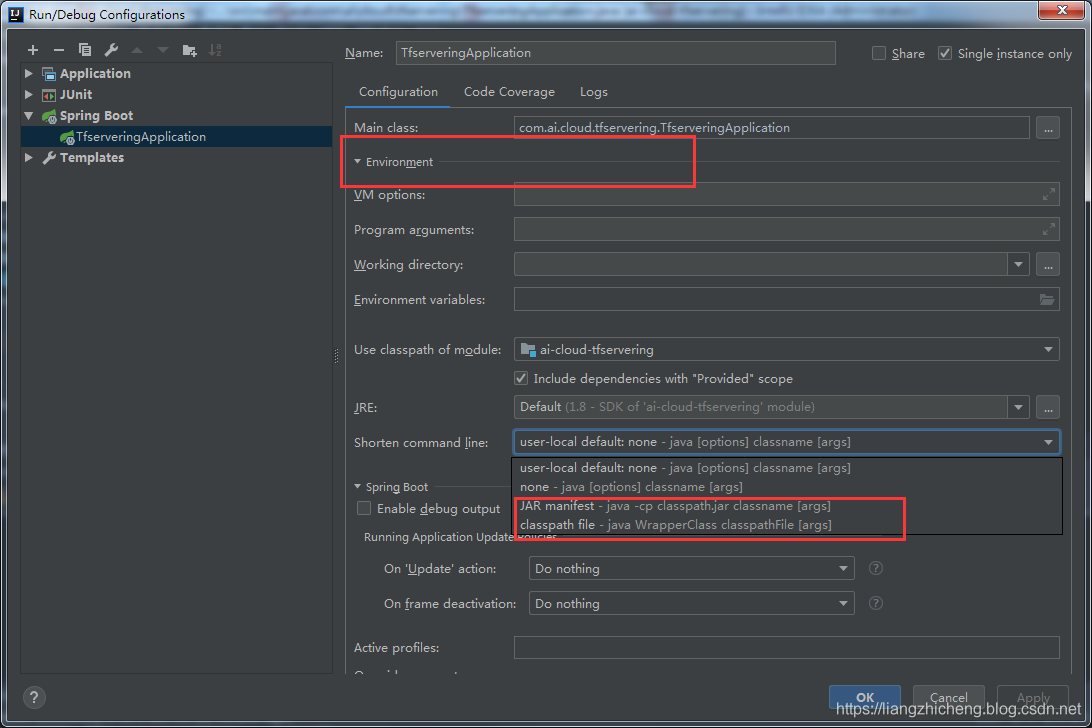
Click the project startup configuration item -> short command line option, select the classpath file or Java manifest option -> restart the project

HEXO D Command ERROR Deployer not found: git

Problem description

I have written in the site configuration file:

deploy:
  type: git
  repo: [email protected]:lanlan2017/lanlan2017.github.io.git  # Github pages地址
  branch: master

However, hexo d error:

ERROR Deployer not found: git

Solution

This is because the hexo deployer git </ code> plug-in is not installed. Just enter the following plug-in under the site directory to install it:

npm install hexo-deployer-git --save

Then you can use the hexo - d command to push.

How to Solve Error: cannot open .Git/fetch_HEAD: Permission denied

When using gitoite to manage git library, an error is reported when using the administrator account to perform git pull operation on gitolite admin warehouse

[drpeng@srvser gitolite-admin]$ git pull
error: cannot open .git/FETCH_HEAD: Permission denied

It literally means . Git/fetch_Head this file does not have permission. The permission to enter the. Git folder and view this file is really wrong. That’s a good solution

[drpeng@srvser gitolite-admin]$ cd .git
[drpeng@srvser .git]$ ll -h FETCH_HEAD
Totally 48K
**-rw-r--r--   1 root   root      0 Sep   7 2016 FETCH_HEAD**
[drpeng@srvser .git]$ exit
logout
[root@srvser git]# cd /home/drpeng/git-13/gitolite-admin/.git
[root@srvser .git]# chown -R drpeng.drpeng FETCH_HEAD
[root@srvser .git]# su - drpeng
[root@srvser git]# cd /home/drpeng/git-13/gitolite-admin/
[drpeng@srvser git-13]$ cd gitolite-admin/
[drpeng@srvser gitolite-admin]$ git pull
remote: Counting objects: 509, done.
remote: Compressing objects: 100% (404/404), done.
remote: Total 499 (delta 125), reused 0 (delta 0)
Receiving objects: 100% (499/499), 53.32 KiB, done.
Resolving deltas: 100% (125/125), done.

Above, the problem is solved~

Error: # error PCL requires C++ 14 or above

I’m compiling NDT_ When using the OMP function package, an error was reported: error PCL requires C + + 14 or above, and a bunch of errors were reported later. At first, I thought it was a problem with the PCL version. Later, I turned to other bloggers’ blogs and found that CMakeLists.txt Add the following code to compile

    ADD_COMPILE_OPTIONS(-std=c++11 )
    ADD_COMPILE_OPTIONS(-std=c++14 )
    set( CMAKE_CXX_FLAGS "-std=c++11 -O3" )
    or do not specify that cmkae compile with c++11 features, etc. can be compiled successfully.

How to Solve Redis Cluster Error: (Error) Moved

The solution of data operation error moved with redis cli

Examples of error reporting:

(base) wdh@wdh:~$ redis-cli -h 172.17.0.1 -p 6391
172.17.0.1:6391> get name
(error) MOVED 5798 172.100.0.1:6392
172.17.0.1:6391> 

Cause of error:

No cluster mode connection (connection node command does not add – C parameter)

terms of settlement:

Connect redis cluster nodes with – C parameter: redis cli – C – H 172.17.0.1 – P 6391

(base) wdh@wdh:~$ redis-cli -c -h 172.17.0.1 -p 6391
172.17.0.1:6391> get name
-> Redirected to slot [5798] located at 172.100.0.1:6392
(nil)
172.100.0.1:6392> set name 1
OK
172.100.0.1:6392> get name
"1"
172.100.0.1:6392>