Category Archives: Error

[Solved] Error creating bean with name rController‘: Unsatisfied dependency expressed through field

Problem Description:

@Override
Error creating bean with name 'ucenterMemberController': Unsatisfied dependency expressed through field 'ucenterMemberService'; nested exception is org.springframework.beans.factory.UnsatisfiedDependencyException: Error creating bean with name 'ucenterMemberServiceImpl': Unsatisfied dependency expressed through field 'baseMapper'; nested exception is org.springframework.beans.factory.NoSuchBeanDefinitionException: No qualifying bean of type 'com.atguigu.educenter.mapper.UcenterMemberMapper' available: expected at least 1 bean which qualifies as autowire candidate. Dependency annotations: {@org.springframework.beans.factory.annotation.Autowired(required=true)}

Cause Analysis:
Noted one sentence of the error: No qualifying bean of type’com.atguigu.educenter.mapper.UcenterMemberMapper’ available: expected at least 1 bean which qualifies as autowire candidate. It means that the mapper is not scanned, and it needs to be added to the startup class. Scan the mapper’s comments

solution:

There was a mistake here, so the mapper was not scanned, so an error was reported.

The browser is compatible with IE11 “ReferenceError: ‘Promise’ is not defined” “ReferenceError: ‘Promise’ is not defined”

ReferenceError: “Promise” is not defined””

IE does not support promise solutions

//import
<script src = "https://cdn.polyfill.io/v2/polyfill.min.js"> </script> 
//or 
<script type="text/javascript" src ="https://cdn.polyfill.io/v2/polyfill.min.js?features=es6"></script>

Promise does not support iE

VUE project

(1) cnpm install –save babel-polyfill

(2) Add code require(“babel-polyfill”) in webpack.base.conf.js

(3) Add the code import “babel-polyfill” in main.js;

React project

(1) cnpm install –save babel-polyfill

(2) Add the code import “babel-polyfill” in the entry file (app.js/router.js);

Solve the VUE startup problem (You may use special comments to disable some warnings)

Run: “npm run dev” reports an
error: As shown in the figure below, “”You may use special comments to disable some warnings.”
Reason: Eslint’s detection mechanism.


There are two solutions
Method 1:
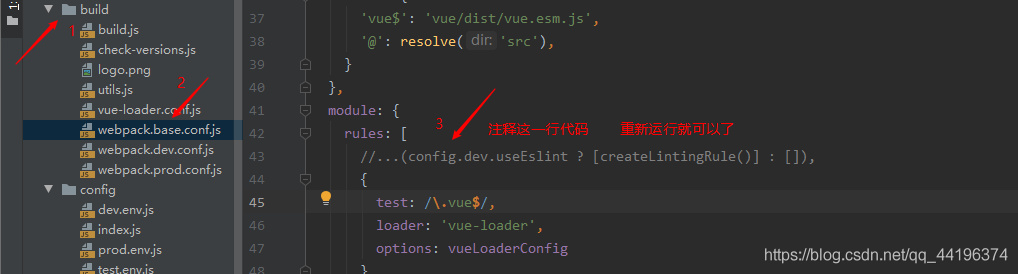
is to comment out the 43rd line of code in the build/webpack.base.conf.js file, as shown in the figure below, and then restart npm run dev


Method 2:
Change the value true of useEslint in line 26 of the config/index.js file to false, as shown in the figure below, and then restart npm run dev

Adjusted frame length exceeds 4096: 5637-discarded server solution

Solve the server-side Adjusted frame length exceeds 4096: 5637-discarded problem
1. Specific error
2. Error reason
2.1 Length format problem
2.2 Length size problem
3. Solution
1. Specific error
The following shows some error details.

io.netty.handler.codec.TooLongFrameException: Adjusted frame length exceeds 4096: 18247-discarded
at io.netty.handler.codec.LengthFieldBasedFrameDecoder.fail(LengthFieldBasedFrameDecoder.java:503)
at io.netty.handler.codec.LengthFieldIfNecessary (LengthFieldBasedFrameDecoder.java:489)
AT io.netty.handler.codec.LengthFieldBasedFrameDecoder.exceededFrameLength (LengthFieldBasedFrameDecoder.java:376)
AT io.netty.handler.codec.LengthFieldBasedFrameDecoder.decode (LengthFieldBasedFrameDecoder.java:419)
AT io.netty. handler.codec.LengthFieldBasedFrameDecoder.decode(LengthFieldBasedFrameDecoder.java:332)
at io.netty.handler.codec.ByteToMessageDecoder.decodeRemovalReentryProtection(ByteToMessageDecoder.java:498)
at io.netty.handler.codec.ByteToMessageDecoder.callDecode(ByteToMessageDecoder.java:437)
at io.netty.handler.codec.ByteToMessageDecoder.channelRead(ByteToMessageDecoder.java:276)
at io.netty.channel.AbstractChannelHandlerContext.invokeChannelRead(AbstractChannelHandlerContext .java:379)
at io.netty.channel.AbstractChannelHandlerContext.invokeChannelRead(AbstractChannelHandlerContext.java:365)
at io.netty.channel.AbstractChannelHandlerContext.fireChannelRead(AbstractChannelHandlerContext.java:357)
at io.netty.channel.DefaultChannelPipeline$HeadContext. channelRead(DefaultChannelPipeline.java:1410)
at io.netty.channel.AbstractChannelHandlerContext.invokeChannelRead(AbstractChannelHandlerContext.java:379)
at io.netty.channel.AbstractChannelHandlerContext.invokeChannelRead(AbstractChannelHandlerContext.java:365)
at io.netty.channel.DefaultChannelPipeline.fireChannelRead(DefaultChannelPipeline.java:919)
at io.netty.channel.nio.AbstractNioByteChannel$NioByteUnsafe.read(AbstractNioByteChannel .java:163)
at io.netty.channel.nio.NioEventLoop.processSelectedKey(NioEventLoop.java:714)
at io.netty.channel.nio.NioEventLoop.processSelectedKeysOptimized(NioEventLoop.java:650)
at io.netty.channel. nio.NioEventLoop.processSelectedKeys(NioEventLoop.java:576)
at io.netty.channel.nio.NioEventLoop.run(NioEventLoop.java:493)
at io.netty.util.concurrent.SingleThreadEventExecutor$4.run(SingleThreadEventExecutor.java:989 )
at io.netty.util.internal.ThreadExecutorMap$2.run(ThreadExecutorMap.java:74)
at io.netty.util.concurrent.FastThreadLocalRunnable.run(FastThreadLocalRunnable.java:30)
at java.lang.Thread.run(Thread. java:748)

2. Error reason
2.1 Length format problem
Netty’s own LengthFieldBasedFrameDecodr length coding protocol, the length offset value must be expressed in hexadecimal.

new LengthFieldBasedFrameDecoder(4*1024,0,2);
// Length bit: 000C means 12 length
// eg: 000C321453215435413415206753 (byte[] to hexadecimal representation)

2.2 Length size problem The
adjusted frame length exceeds 4096:18247- Has been discarded. I used the LengthFieldBasedFrameDecodr length protocol decoder when processing data packets on the netty server. Part of the code is as follows:

@Override
public void initChannel(SocketChannel ch) {
//Decoder of length protocol
ch.pipeline().addLast(new LengthFieldBasedFrameDecoder(4*1024,0,2));
ch.pipeline().addLast(new SocketServerHandler() );//Control category
}

And the length agreement sets a maximum acceptable length of 4*1024 = 4096. Therefore, after the server receives more than 4096 bytes, the server discards it as a junk packet.

3. Solution
Change the maximum acceptable length of the decoder of the length protocol of the netty server to be long enough according to the needs.

new LengthFieldBasedFrameDecoder(20*1024,0,2);

[Solved] Springboot Error creating bean with name ‘dataSource’ defined in class path resource

The error message is as follows:

2020-04-02 15:25:15.549 WARN 4360 — [ main] ConfigServletWebServerApplicationContext : Exception encountered during context initialization – cancelling refresh attempt: org.springframework.beans.factory.BeanCreationException: Error creating bean with name ‘dataSource’ defined in class path resource [org/springframework/boot/autoconfigure/jdbc/DataSourceConfiguration$Hikari.class]: Bean instantiation via factory method failed; nested exception is org.springframework.beans.BeanInstantiationException: Failed to instantiate [com.zaxxer.hikari.HikariDataSource]: Factory method ‘dataSource’ threw exception; nested exception is org.springframework.boot.autoconfigure.jdbc.DataSourceProperties$DataSourceBeanCreationException: Failed to determine a suitable driver class
2020-04-02 15:25:15.549 INFO 4360 — [ main] o.s.j.e.a.AnnotationMBeanExporter : Unregistering JMX-exposed beans on shutdown
2020-04-02 15:25:15.554 INFO 4360 — [ main] o.apache.catalina.core.StandardService : Stopping service [Tomcat]

Solution:

Method 1:

Add @EnableAutoConfiguration(exclude={DataSourceAutoConfiguration.class}) to the startup class

package com.example.securitycore;

import org.springframework.boot.SpringApplication;
import org.springframework.boot.autoconfigure.EnableAutoConfiguration;
import org.springframework.boot.autoconfigure.SpringBootApplication;
import org.springframework.boot.autoconfigure.jdbc.DataSourceAutoConfiguration;

@EnableAutoConfiguration(exclude={DataSourceAutoConfiguration.class})
@SpringBootApplication
public class SecurityCoreApplication {

public static void main(String[] args) {
SpringApplication.run(SecurityCoreApplication.class, args);
}

}

Method 2:

Add configuration in application.properties

spring.datasource.driver-class-name=com.mysql.jdbc.Driver
spring.datasource.url=jdbc:mysql://localhost:3306/security_demo?characterEncoding=utf-8
spring.datasource.data-username=root
spring .datasource.data-password=root

SpringBoot startup error Failed to determine a suitable driver class

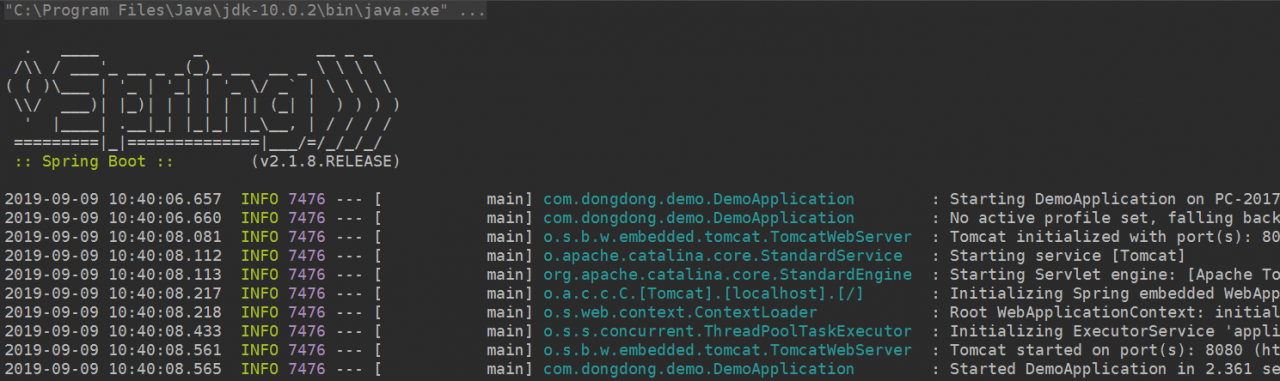
Add a simple controller to a new SpringBoot project from SpringBoot Initializer , and the startup error is as follows:

  . ____ _ __ _ _
 /\\ / ___'_ __ _ _(_)_ __ __ _ \ \ \ \
(()\___ |'_ |'_| |'_ \/ _` | \ \ \ \
 \\/ ___)| |_)| | | | | || (_| |))))
  '|____| .__|_| |_|_| |_\__, | / / / /
 ==========|_|==============|___/=/_/_/_/
 :: Spring Boot ::        (v2.1.8.RELEASE)

2019-09-09 10:37:16.750  INFO 11232 --- [           main] com.dongdong.demo.DemoApplication        : Starting DemoApplication on PC-20170304VFOZ with PID 11232 (E:\Spring\Projects\demo\target\classes started by Administrator in E:\Spring\Projects\demo)
2019-09-09 10:37:16.752  INFO 11232 --- [           main] com.dongdong.demo.DemoApplication        : No active profile set, falling back to default profiles: default
2019-09-09 10:37:17.711  INFO 11232 --- [           main] .s.d.r.c.RepositoryConfigurationDelegate : Bootstrapping Spring Data repositories in DEFAULT mode.
2019-09-09 10:37:17.730  INFO 11232 --- [           main] .s.d.r.c.RepositoryConfigurationDelegate : Finished Spring Data repository scanning in 16ms. Found 0 repository interfaces.
2019-09-09 10:37:18.023  INFO 11232 --- [           main] trationDelegate$BeanPostProcessorChecker : Bean 'org.springframework.transaction.annotation.ProxyTransactionManagementConfiguration' of type [org.springframework.transaction.annotation.ProxyTransactionManagementConfiguration$$EnhancerBySpringCGLIB$$3d0e1f1a] is not eligible for getting processed by all BeanPostProcessors (for example: not eligible for auto-proxying)
2019-09-09 10:37:18.327  INFO 11232 --- [           main] o.s.b.w.embedded.tomcat.TomcatWebServer  : Tomcat initialized with port(s): 8080 (http)
2019-09-09 10:37:18.359  INFO 11232 --- [           main] o.apache.catalina.core.StandardService   : Starting service [Tomcat]
2019-09-09 10:37:18.360  INFO 11232 --- [           main] org.apache.catalina.core.StandardEngine  : Starting Servlet engine: [Apache Tomcat/9.0.24]
2019-09-09 10:37:18.476  INFO 11232 --- [           main] o.a.c.c.C.[Tomcat].[localhost].[/]       : Initializing Spring embedded WebApplicationContext
2019-09-09 10:37:18.476  INFO 11232 --- [           main] o.s.web.context.ContextLoader            : Root WebApplicationContext: initialization completed in 1645 ms
2019-09-09 10:37:18.732  INFO 11232 --- [           main] o.s.s.concurrent.ThreadPoolTaskExecutor  : Initializing ExecutorService 'applicationTaskExecutor'
2019-09-09 10:37:18.842  WARN 11232 --- [           main] ConfigServletWebServerApplicationContext : Exception encountered during context initialization - cancelling refresh attempt: org.springframework.beans.factory.BeanCreationException: Error creating bean with name 'dataSource' defined in class path resource [org/springframework/boot/autoconfigure/jdbc/DataSourceConfiguration$Hikari.class]: Bean instantiation via factory method failed; nested exception is org.springframework.beans.BeanInstantiationException: Failed to instantiate [com.zaxxer.hikari.HikariDataSource]: Factory method 'dataSource' threw exception; nested exception is org.springframework.boot.autoconfigure.jdbc.DataSourceProperties$DataSourceBeanCreationException: Failed to determine a suitable driver class
2019-09-09 10:37:18.843  INFO 11232 --- [           main] o.s.s.concurrent.ThreadPoolTaskExecutor  : Shutting down ExecutorService 'applicationTaskExecutor'
2019-09-09 10:37:18.846  INFO 11232 --- [           main] o.apache.catalina.core.StandardService   : Stopping service [Tomcat]
2019-09-09 10:37:18.860  INFO 11232 --- [           main] ConditionEvaluationReportLoggingListener : 

Error starting ApplicationContext. To display the conditions report re-run your application with 'debug' enabled.
2019-09-09 10:37:18.864 ERROR 11232 --- [           main] o.s.b.d.LoggingFailureAnalysisReporter   : 

***************************
APPLICATION FAILED TO START
***************************

Description:

Failed to configure a DataSource: 'url' attribute is not specified and no embedded datasource could be configured.

Reason: Failed to determine a suitable driver class


Action:

Consider the following:
    If you want an embedded database (H2, HSQL or Derby), please put it on the classpath.
    If you have database settings to be loaded from a particular profile you may need to activate it (no profiles are currently active).


Process finished with exit code 1


the reason

The application does not use DataSource, but introduces mybatis-spring-boot-starter in pom.xml


Problem solution

There are two types:
remove the dependency of mybatis-spring-boot-starter, so that it will not trigger the spring boot related
code    disable the spring boot automatically initialize the DataSource related code

There are two ways to prohibit:

In the @SpringBootApplication of the startup class, add

@SpringBootApplication(exclude = { DataSourceAutoConfiguration.class,DataSourceTransactionManagerAutoConfiguration.class })


Configure in application.properties:

spring.autoconfigure.exclude=org.springframework.boot.autoconfigure.jdbc.DataSourceAutoConfiguration,org.springframework.boot.autoconfigure.jdbc.DataSourceTransactionManagerAutoConfiguration


Get it done!

Solve Maven project running error Failed to clean project: Failed to delete

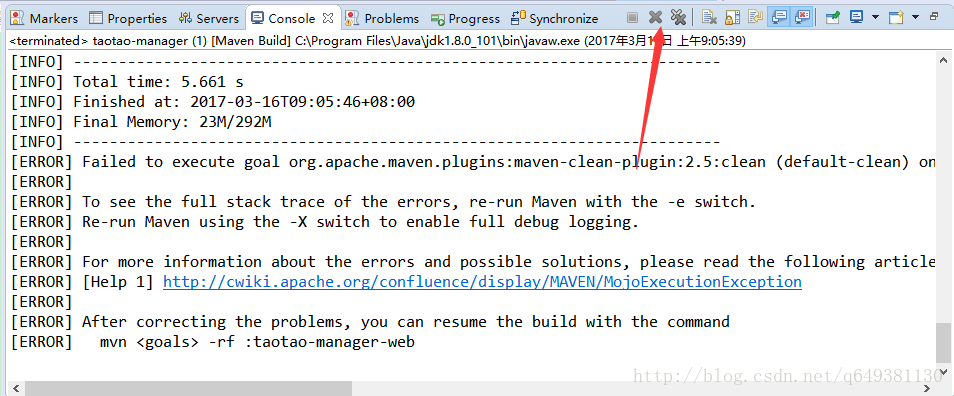
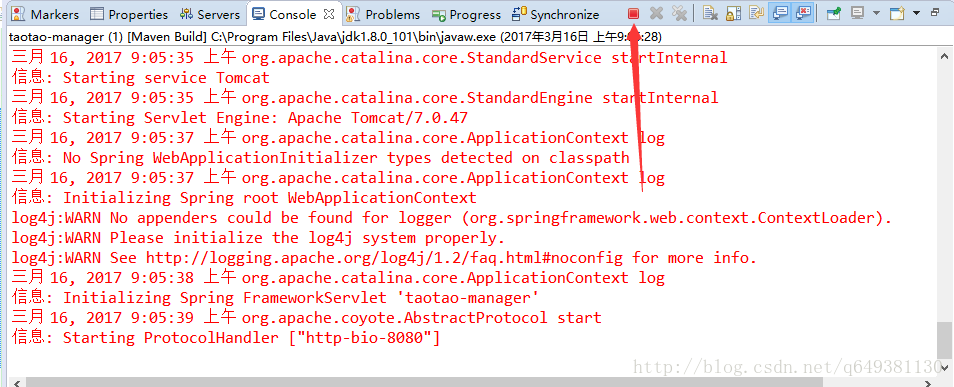
As in the question, the error “Failed to clean project: Failed to delete” is reported when running the maven project. The reason is that the previously compiled project is still running and cannot be cleaned, which makes the maven life cycle unable to continue.

The solution is as follows:

Close the current eclipse console, as shown below:


After closing the console, the last running console will appear, just stop running:


Re-run the maven project and the problem is solved.

How to Solve Docker Error: elasticsearch exception: type=cluster_block_exception, reason=blocked by: [FORBIDDEN/12/index read-only / allow delete (api)];

The error may be caused by an es error, which can be determined by viewing the system log: elasticsearch exception: type=cluster_block_exception, reason=blocked by: [FORBIDDEN/12/index read-only / allow delete (api)];

The reason for this error is that when the disk space is less than 85%, the default value is 85%, which means that Elasticsearch will not allocate fragments to nodes that use more than 85% of the disk. All the above errors will be reported.


The solution to this error:

Since the es container has already been mapped, there is no need to enter the container and execute the reset all index instructions outside.


curl -XPUT -H “Content-Type: application/json”  http://127.0.0.1:9200/_all/_settings  -d'{“index.blocks.read_only_allow_delete”: null}’

[Solved] This usually happens because your environment has changed since running `npm install`

The root of the problem: This is usually because the environment has changed after running the NPM installation.
Run “NPM Rebuild Node SASS-Mandatory” to build bindings for the current environment.

How to solve: Run at this time and follow the prompts to execute the npm rebuild node-sass command

(If it doesn’t work, run the npm install node-sass command first)

Then run the node command to start the service