Category Archives: Error

Spring deployment error: Could not open ServletContext resource [/db.properties]

In the process of using Spring MVC, the deployment project reports an error, and the error message is as follows:

Agu 15, 2016 5:02:04 PM org.apache.catalina.core.StandardContext listenerStart
warning: Exception sending context initialized event to listener instance of class org.springframework.web.context.ContextLoaderListener
org.springframework.beans.factory.BeanInitializationException: Could not load properties; nested exception is java.io.FileNotFoundException: Could not open ServletContext resource [/db.properties]
at org.springframework.context.support.PropertySourcesPlaceholderConfigurer.postProcessBeanFactory(PropertySourcesPlaceholderConfigurer.java:151)
…….
at org.apache.tomcat.util.threads.TaskThread$WrappingRunnable.run(TaskThread.java:61)
at java.lang.Thread.run(Unknown Source)
Caused by: java.io.FileNotFoundException: Could not open ServletContext resource [/db.properties]
at org.springframework.web.context.support.ServletContextResource.getInputStream(ServletContextResource.java:141)
at org.springframework.core.io.support.EncodedResource.getInputStream(EncodedResource.java:153)
… 51 more

………………………………………….. ………………………………………….. ………………………………………….. …………………….

For the Maven project, the application-context.xml and db.properties files are all placed in the src/main/resources directory. For the Tomcat deployment project, the default location of the configuration file in the src/main/resources directory is: {project name}/WEB-INF /classes, but Spring looks for it in the root directory of the project, and it is definitely not found. Therefore, you can find it in the classpath directory when configuring it.

The solution is as follows:

<context:property-placeholder location=”classpath:db.properties” />
Tomcat startup error: Failed to start component [StandardServer[8005]] solution

SEVERE: The required Server component failed to start so Tomcat is unable to start. org.apache.catalina.LifecycleException: Failed to start component [StandardServer[8005]]

The Tomcat server was deployed on Eclipse before, and it was deployed on MyEclipse today. As a result, Tomcat failed to start and an error was reported. After searching the Internet for a long time, some said it was because the port was occupied, and some said it was because of the wrong version of Tomcat’s JDK. Actually neither. The reason is that the last few extra lines in Tomcat’s server.xml configuration file are probably automatically generated by projects that were previously run on Eclipse. After deleting them, Tomcat will run normally.


 <Host appBase=”webapps” autoDeploy=”true” name=”localhost” unpackWARs=”true”>

<Valve className=”org.apache.catalina.authenticator.SingleSignOn” />

<Valve className=”org.apache.catalina.valves.AccessLogValve” directory=”logs” pattern=”%h %l %u %t “%r” %s %b” prefix=”localhost_access_log.” suffix=” .txt”/> 

<Context docBase=”MyProject” path=”/MyProject” reloadable=”true” source=”org.eclipse.jst.jee.server:MyProject”/></Host>

Java.lang.AbstractMethodError: org.mybatis.spring.transaction.SpringManagedTransaction.getTimeout()Ljava/lang/Integer; error resolution

In mybatis+spring integration, an error will be reported due to version issues:

java.lang.AbstractMethodError: org.mybatis.spring.transaction.SpringManagedTransaction.getTimeout()Ljava/lang/Integer;
at org.apache.ibatis.executor.SimpleExecutor.prepareStatement(SimpleExecutor.java:85)
at org.apache.ibatis .executor.SimpleExecutor.doQuery(SimpleExecutor.java:62)
at org.apache.ibatis.executor.BaseExecutor.queryFromDatabase(BaseExecutor.java:325)
at org.apache.ibatis.executor.BaseExecutor.query(BaseExecutor.java:156 )
at org.apache.ibatis.executor.CachingExecutor.query(CachingExecutor.java:109)
at org.apache.ibatis.executor.CachingExecutor.query(CachingExecutor.java:83)
at org.apache.ibatis.session.defaults. DefaultSqlSession.selectList(DefaultSqlSession.java:148)
at org.apache.ibatis.session.defaults.DefaultSqlSession.selectList(DefaultSqlSession.java:141)
at sun.reflect.NativeMethodAccessorImpl.invoke0(Native Method)
at sun.reflect.NativeMethodAccessorImpl.invoke(Unknown Source)
at sun.reflect. DelegatingMethodAccessorImpl.invoke(Unknown Source)
at java.lang.reflect.Method.invoke(Unknown Source)
at org.mybatis.spring.SqlSessionTemplate$SqlSessionInterceptor.invoke(SqlSessionTemplate.java:408)
at com.sun.proxy.$Proxy12. selectList(Unknown Source)
at org.mybatis.spring.SqlSessionTemplate.selectList(SqlSessionTemplate.java:206)
at org.apache.ibatis.binding.MapperMethod.executeForMany(MapperMethod.java:128)
at org.apache.ibatis.binding. MapperMethod.execute(MapperMethod.java:68)
at org.apache.ibatis.binding.MapperProxy.invoke(MapperProxy.java:53)
at com.sun.proxy.$Proxy13.selectByExample(Unknown Source)
at bz.beppe.daoTest.SeckillMapperTest.selectByExample(SeckillMapperTest.java:26 )
at sun.reflect.NativeMethodAccessorImpl.invoke0(Native Method)
at sun.reflect.NativeMethodAccessorImpl.invoke(Unknown Source)
at sun.reflect.DelegatingMethodAccessorImpl.invoke(Unknown Source)
at java.lang.reflect.Method.invoke(Unknown Source )
at org.junit.runners.model.FrameworkMethod$1.runReflectiveCall(FrameworkMethod.java:47)
at org.junit.internal.runners.model.ReflectiveCallable.run(ReflectiveCallable.java:12)
at org.junit.runners.model .FrameworkMethod.invokeExplosively(FrameworkMethod.java:44)
at org.junit.internal.runners.statements.InvokeMethod.evaluate(InvokeMethod.java:17)
at org.springframework.test.context.junit4.statements.RunBeforeTestMethodCallbacks.evaluate(RunBeforeTestMethodCallbacks.java:73)
at org.springframework.test .context.junit4.statements.RunAfterTestMethodCallbacks.evaluate(RunAfterTestMethodCallbacks.java:82)
at org.springframework.test.context.junit4.statements.SpringRepeat.evaluate(SpringRepeat.java:73)
at org.junit.runners.ParentRunner.runLeaf (ParentRunner.java:271)
at org.springframework.test.context.junit4.SpringJUnit4ClassRunner.runChild(SpringJUnit4ClassRunner.java:224)
at org.springframework.test.context.junit4.SpringJUnit4ClassRunner.runChild(SpringJUnit4ClassRunner.java:83)
at org.junit.runners.ParentRunner$3.run(ParentRunner.java:238)
at org.junit.runners.ParentRunner$1.schedule(ParentRunner.java:63)
at org.junit.runners.ParentRunner.runChildren(ParentRunner.java :236)
at org.junit.runners.ParentRunner.access$000(ParentRunner.java:53)
at org.junit.runners.ParentRunner$2.evaluate(ParentRunner.java:229)
at org.springframework.test.context.junit4. statements.RunBeforeTestClassCallbacks.evaluate(RunBeforeTestClassCallbacks.java:61)
at org.springframework.test.context.junit4.statements.RunAfterTestClassCallbacks.evaluate(RunAfterTestClassCallbacks.java:68)
at org.junit.runners.ParentRunner.run(ParentRunner.java: 309)
at org.springframework.test.context.junit4.SpringJUnit4ClassRunner.run(SpringJUnit4ClassRunner.java:163)
at org.eclipse.jdt.internal.junit4.runner.JUnit4TestReference.run(JUnit4TestReference.java:50)
at org.eclipse.jdt .internal.junit.runner.TestExecution.run(TestExecution.java:38)
at org.eclipse.jdt.internal.junit.runner.RemoteTestRunner.runTests(RemoteTestRunner.java:459)
at org.eclipse.jdt.internal.junit .runner.RemoteTestRunner.runTests(RemoteTestRunner.java:675)
at org.eclipse.jdt.internal.junit.runner.RemoteTestRunner.run(RemoteTestRunner.java:382)
at org.eclipse.jdt.internal.junit.runner.RemoteTestRunner .main(RemoteTestRunner.java:192)

 For the root cause of this problem, you can check the official website of mybatis for the application of mybatis-spring jar package version

MyBatis-Spring MyBatis Spring
1.0.0 and 1.0.1 3.0.1 to 3.0.5 3.0.0 or higher
1.0.2 3.0.6 3.0.0 or higher
1.1.0 or higher 3.1.0 or higher 3.0.0 or higher
1.3.0 or higher 3.4.0 or higher 3.0.0 or higher

Use this correspondence to select the version of the mybatis-spring jar package you need

I used spring 4.1+mybatis 3.4 and mybatis-spring used version 1.2, which caused the project to report an error. After I changed it to version 1.3.0, everything was normal! !

Solve the data transfer between vue irrelevant components error: this.$store.commit is not a function

In a Vue project, if the project is simple, the data transfer between parent and child components can be passed using props or $emit etc.

But if it is a large and medium-sized project, it is often necessary to transfer data between unrelated parallel components, and many data require multiple components to be recycled. At this time, using the above method will make the project code verbose, and is not conducive to the reuse of components, which improves the degree of coupling.

Vue’s state management tool Vuex perfectly solves this problem.

I looked at the official website of vuex, and I don’t think it is very easy to understand. Sometimes we just need to dynamically get data from a component (the official website is called “component level”: it is an independent control, and the scope of action is only within the component) and then I want to put it in a place called “application level” by the official website (it can be accessed and dynamically modified anywhere in the project. After the modification, vue will update your entire project). This is the reason why I first came to learn vue. I didn’t want to make a front-end data structure library. . .

Let’s take a look at my small example step by step

First install vuex. The company project has been migrated from vue1.0 to vue2.0 by me, download and install vue  

npm install vuex –save

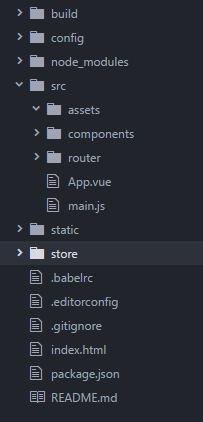
Then create a new folder store at the same level as index.html, and create a new index.js file in the folder. This file is used to assemble the module and export the store file


[1. Get the data in the store]

import Vue from  ' vue ' 
import Vuex from  ' vuex '

// Tell vue to "use" vuex 
Vue.use(Vuex)

// Create an object to save the initial state when the application starts
 // The state that needs to be maintained 
const store = new Vuex.Store({
  state: {
    // Place the initial global initial value when the app is started 
    bankInf: { " name " : " I am the first data of vuex " , " id " : 100 , " bankName " : " Bank of China " }
  }
})
// Integrate the initial state and change function, we get the store we need
 //So far, this store can be connected to our application 
export default store

Register the store in the vue root file so that all components can use the data in the store

My project file structure:


Register store in the main.js file

import Vue from  ' vue ' 
import App from  ' ./App ' 
import router from  ' ./router ' 
import store from  ' ./../store/index '

/* eslint-disable no-new */ 
new Vue({
  el: ' #app ' ,
  router,
  store,
  template: ' <App/> ' ,
  components: {App}
})

This simple first step is complete. You can use the data in the store in any component. The method of use is also very simple, that is, use the calculated attribute to return the data in the store to a new attribute, and then you can use it in your template. Use this attribute value:

In any component:

export default {
  ...
  computed: {
    bankName() {
      return  this .$store.state.bankInf.bankName;
    }
  },
  ...
}

The bankName attribute can be used directly in the template, which is the Bank of China in the store


[Two, modify the state in the store in the component]

Add html template to any component

<div class = " bank " >
    <list-header :headerData= " bankName " ></list-header>
    04Bank Details Page
    <input name= "" v-model= " textValue " >
    <button type= " button " name= " Get data " @click= " newBankName " ></button>
</div>

Then submit the mutation in the component

export default {
  ...
  computed: {
    bankName() {
      return  this .$store.state.bankInf.bankName;
    }
  },
  methods: {
    newBankName: function() {
      this .$store.commit( ' newBankName ' , this .textValue)
    }
  }
 ...   
}

Add mutations to index.js in the store:

const store = new Vuex.Store({
  state: {
    // Place the initial global initial value when the app is started 
    bankInf: { " name " : " I am the first data of vuex " , " id " : 100 , " bankName " : " Bank of China " },
    count: 0
  },
  mutations: {
    newBankName(state,msg) {
      state.bankInf.bankName = msg;
    }
  }
})

In this way, you find that when you click the submit button, the page has displayed the data you modified, and all the data in the place where this component is reused has been updated by Vue;


If you find an error this.$store.commit is not a function during use, please open the configuration file package.json of your project and check the version of vuex you are using. I am using vuex2.0,

If you want to delete the old version of vuex and install the new version of vuex, please use

npm rm vuex –save

Then install the latest vuex

npm install vuex –save

You can solve this error, or check the vuex official website api to modify the statement submitted to the mutation

How to Solve Error: You need to use a Theme.AppCompat theme (or descendant) with this activity.

When learning the activity life cycle, I hope to test the difference between onPause() and onStop() through the Dialog theme. When clicking the button to jump to the Activity, an error is reported:

E/AndroidRuntime: FATAL EXCEPTION: main
                  Process: com.example.activitylifecycletest, PID: 2920
                  java.lang.RuntimeException: Unable to start activity ComponentInfo{com.example.activitylifecycletest/com.example.activitylifecycletest.DialogActivity}: java.lang.IllegalStateException: You need to use a Theme.AppCompat theme (or descendant) with this activity.
                      at android.app.ActivityThread.performLaunchActivity(ActivityThread.java:2646)
                      at android.app.ActivityThread.handleLaunchActivity(ActivityThread.java:2707)
                      at android.app.ActivityThread.-wrap12(ActivityThread.java)
                      at android.app.ActivityThread$H.handleMessage(ActivityThread.java:1460)
                      at android.os.Handler.dispatchMessage (Handler.java:102)
                      at android.os.Looper.loop(Looper.java:154)
                      at android.app.ActivityThread.main(ActivityThread.java:6077)
                      at java.lang.reflect.Method.invoke(Native Method)
                      at com.android.internal.os.ZygoteInit$MethodAndArgsCaller.run(ZygoteInit.java:865)
                      at com.android.internal.os.ZygoteInit.main(ZygoteInit.java:755)
                   Caused by: java.lang.IllegalStateException: You need to use a Theme.AppCompat theme (or descendant) with this activity.
                      at android.support.v7.app.AppCompatDelegateImplV9.createSubDecor(AppCompatDelegateImplV9.java:347)
                      at android.support.v7.app.AppCompatDelegateImplV9.ensureSubDecor(AppCompatDelegateImplV9.java:316)
                      at android.support.v7.app.AppCompatDelegateImplV9.setContentView(AppCompatDelegateImplV9.java:281)
                      at android.support.v7.app.AppCompatActivity.setContentView(AppCompatActivity.java:140)
                      at com.example.activitylifecycletest.DialogActivity.onCreate(DialogActivity.java:11)
                      at android.app.Activity.performCreate(Activity.java:6664)
                      at android.app.Instrumentation.callActivityOnCreate(Instrumentation.java:1118)
                      at android.app.ActivityThread.performLaunchActivity(ActivityThread.java:2599)
                      at android.app.ActivityThread.handleLaunchActivity(ActivityThread.java:2707) 
                      at android.app.ActivityThread.-wrap12(ActivityThread.java) 
                      at android.app.ActivityThread$H.handleMessage(ActivityThread.java:1460) 
                      at android.os.Handler.dispatchMessage (Handler.java:102) 
                      at android.os.Looper.loop(Looper.java:154) 
                      at android.app.ActivityThread.main(ActivityThread.java:6077) 
                      at java.lang.reflect.Method.invoke(Native Method) 
                      at com.android.internal.os.ZygoteInit$MethodAndArgsCaller.run(ZygoteInit.java:865) 
                      at com.android.internal.os.ZygoteInit.main(ZygoteInit.java:755)

Find the most useful sentence, indicating that the theme used does not match the current Activity:

You need to use a Theme.AppCompat theme (or descendant) with this activity.

The activity configuration in AndroidManifest.xml is as follows:

1 <activity
2     android:name=".DialogActivity"
3     android:theme="@android:style/Theme.Dialog">
4 </activity>

Change the theme to AppCompat according to the error message:

1 <activity
2     android:name=".DialogActivity"
3     android:theme="@style/Theme.AppCompat.Dialog">
4 </activity>

After checking the java code, I found that my Activity inherits the AppCompatActivity class. When creating an Activity in Android Studio, if you check the Backwards Compatibility (AppCompat) option, the created Activity will inherit AppCompatActivity instead of Activity, and you need to use the corresponding AppCompat theme.

java code:

 1 import android.support.v7.app.AppCompatActivity;
 2 import android.os.Bundle;
 3 
 4 public class DialogActivity extends AppCompatActivity {
 5 
 6     @Override
 7     protected void onCreate(Bundle savedInstanceState) {
 8         super.onCreate(savedInstanceState);
 9         setContentView(R.layout.activity_dialog);
10     }
11 
12 }

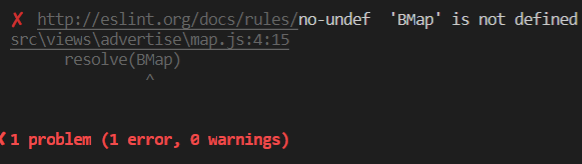
Vue Import Baidu map error: BMap is not defined, eslint BMap reports an error

When the mounted map is initialized, BMap is not defined due to asynchronous issues, that is, the map has been initialized before Baidu’s api is fully introduced or loaded.

Solution:

1. Create a map.js

export function MP(ak) {
   return  new Promise( function (resolve, reject) {
    window.init = function () {
      resolve(BMap)
    }
    var script = document.createElement('script' )
    script.type ='text/javascript' 
    script.src = `http: // api.map.baidu.com/api?v=2.0&ak=${ak}&callback=init` 
    script.onerror = reject
    document.head.appendChild(script)
  })
}

2. Reference in the .vue file 

import {MP} from'../map.js'

3. Initialize in the mounted function

   this .$nextTick(() => {
      const _this = this 
      MP(_this.ak).then(BMap => {
        _this.initMap()
      })
    })

Undefined BMap in map.js will report an error


 Solution:

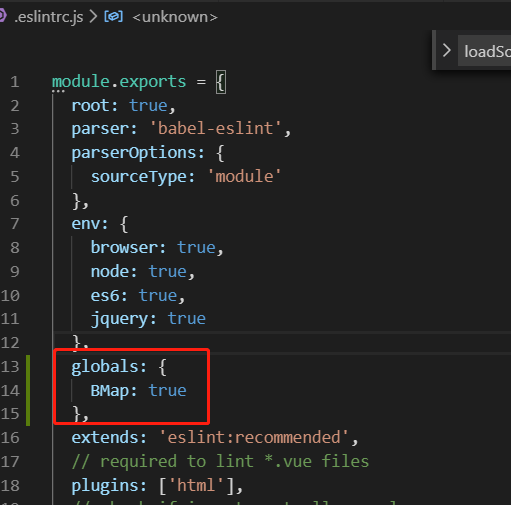
Make a global declaration in eslintrc.js

  globals: {
    BMap: true 
  }


 That’s it~~

How to Solve Error: Missing type map configuration or unsupported mapping

Error: Missing type map configuration or unsupported mapping

□ Background

When saving the View Model into Domain Model, an error occurred in AutoMapper.


□ Analysis

1. A mapping has been established in the Profile class derived from AutoMapper:
Mapper.CreateMap<SomeDomainModel, SomeViewModel>();


2. The classes derived from Profile have also been initialized:

    public  static  class AutoMapperConfiguration
    {
        public  static  void Configure()
        {
            Mapper.Initialize(x => x.AddProfile<SomeProfile>());
 
        }
    }

3. Also registered in the global:

        protected  void Application_Start()
        {
            //Configuration mapping
            AutoMapperConfiguration.Configure();
        }

4. The unit test also passed:

    [TestClass]
    public  class AutoMapperConfigurationTester
    {
        [TestMethod]
        public  void TestMethod1()
        {
            AutoMapperConfiguration.Configure();
            Mapper.AssertConfigurationIsValid();
        }
    }

□ Solution

When actually mapping, replace AutoMapper.Mapper.Map<Source, Destination> with AutoMapper.Mapper.DynamicMap<Source, Destination>

DomainModel someDomainModel = AutoMapper.Mapper.Map<ViewModel, DomainModel>(someViewModel);

Change to:

DomainModel someDomainModel = AutoMapper.Mapper.DynamicMap<ViewModel, DomainModel>(someViewModel);    

The problem of using GB2312 encoding in .NET Core to report errors

wrong description

surroundings

  • dotnet 2.1.4

phenomenon

When used in code

System.Text.Encoding.GetEncoding("GB2312")
//or
System.Text.Encoding.GetEncoding("GBK")

Will throw an exception:

Unhandled Exception: System.ArgumentException:’GB2312′ is not a supported encoding name. For information on defining a custom encoding, see the documentation for the Encoding.RegisterProvider method.

or

Unhandled Exception: System.ArgumentException:’GBK’ is not a supported encoding name. For information on defining a custom encoding, see the documentation for the Encoding.RegisterProvider method.

solve

the reason

Use the following code to check the supported encoding:

System.Text.Encoding.GetEncodings();

It is found that there is no GB2312 or GBK in the obtained code.

Solution

first step

Add the following packages to the project:

System.Text.Encoding.CodePages

According to the description of System.Text.Encoding.CodePages nuget homepage , this package can provide programs with Windows-1252, Shift-JIS, and GB2312 encodings.

Provides support for code-page based encodings, including Windows-1252, Shift-JIS, and GB2312.

So after importing this package, we will be able to use GB2312 encoding.

In the .csprojdocument should add the following code:

  <ItemGroup>
    <PackageReference Include="System.Text.Encoding.CodePages" Version="4.4.0" />
  </ItemGroup>

Or execute the following command in the project directory:

dotnet add package System.Text.Encoding.CodePages --version 4.4.0

Of course, the version number needs to be modified to the latest. At this time (2018.02.22) the latest version is 4.4.0.

Don’t forget to execute dotnet restore.

Second step

According to error, we need to use coded references Encoding.RegisterProviderto register functions.

In use System.Text.Encoding.GetEncoding ("GB2312")prior to execution in the code:

System.Text.Encoding.RegisterProvider (System.Text.CodePagesEncodingProvider.Instance);

After registering, you won’t get an error when you get the GB2312 code object, and you can use the functions normally.

How to Solve Error: Unsupported field: HourOfDay

Error: Unsupported field: HourOfDay

code show as below

LocalDate now = LocalDate.now();
String year = now.format(DateTimeFormatter.ofPattern("yyyy"));
String hour = now.format(DateTimeFormatter.ofPattern("MM-dd-HH"));

The error is as follows

Exception in thread "main" java.time.temporal.UnsupportedTemporalTypeException: Unsupported field: HourOfDay
	at java.time.LocalDate.get0(LocalDate.java:680)
	at java.time.LocalDate.getLong(LocalDate.java:659)
	at java.time.format.DateTimePrintContext.getValue(DateTimePrintContext.java:298)
	at java.time.format.DateTimeFormatterBuilder$NumberPrinterParser.format(DateTimeFormatterBuilder.java:2540)
	at java.time.format.DateTimeFormatterBuilder$CompositePrinterParser.format(DateTimeFormatterBuilder.java:2179)
	at java.time.format.DateTimeFormatter.formatTo(DateTimeFormatter.java:1746)
	at java.time.format.DateTimeFormatter.format(DateTimeFormatter.java:1720)
	at java.time.LocalDate.format(LocalDate.java:1691)
	at com.feiyangshop.recommendation.HdfsHandler.main(HdfsHandler.java:21)

I also traced it to the jdk source code to view it.

private int get0(TemporalField field) {
        switch ((ChronoField) field) {
            case DAY_OF_WEEK: return getDayOfWeek().getValue();
            case ALIGNED_DAY_OF_WEEK_IN_MONTH: return ((day - 1) % 7) + 1;
            case ALIGNED_DAY_OF_WEEK_IN_YEAR: return ((getDayOfYear() - 1) % 7) + 1;
            case DAY_OF_MONTH: return day;
            case DAY_OF_YEAR: return getDayOfYear();
            case EPOCH_DAY: throw new UnsupportedTemporalTypeException("Invalid field 'EpochDay' for get() method, use getLong() instead");
            case ALIGNED_WEEK_OF_MONTH: return ((day - 1) / 7) + 1;
            case ALIGNED_WEEK_OF_YEAR: return ((getDayOfYear() - 1) / 7) + 1;
            case MONTH_OF_YEAR: return month;
            case PROLEPTIC_MONTH: throw new UnsupportedTemporalTypeException("Invalid field 'ProlepticMonth' for get() method, use getLong() instead");
            case YEAR_OF_ERA: return (year >= 1 ? year : 1 - year);
            case YEAR: return year;
            case ERA: return (year >= 1 ? 1 : 0);
        }
        throw new UnsupportedTemporalTypeException("Unsupported field: " + field);
    }

Finally, the code that throws the exception is here.

I explained in now.format(DateTimeFormatter.ofPattern("MM-dd-HH"));the HHis not caseamong.

Why caseis there only year, month and day, and no hour, minute and second?

emmmmm.

The answer is: I used the wrong class

LocalDateTimeThis class should be used . This class contains hours, minutes and seconds.

LocalDateTime now = LocalDateTime.now();
String year = now.format(DateTimeFormatter.ofPattern("yyyy"));
String hour = now.format(DateTimeFormatter.ofPattern("MM-dd-HH"));

How to Solve jQuery error: Uncaught ReferenceError: $ is not defined

When using jQuery, I found the following error:

Uncaught ReferenceError: $ is not defined (anonymous function)

The reason for this error:

1. The path of the jQuery library file is wrong. Checking whether the file path is correct can usually solve the error.

2. If the path of the library file is correct, the order of loading the jQuery library file in the html may be wrong. If the jQuery library file is loaded at the very beginning, the error can be solved.

Mybatis error under Springboot project: Invalid bound statement (not found)

Mybatis reports an error: Invalid bound statement (not found). There are many reasons, but just like the error message, the SQL statement in the xml cannot be found. There are three situations in which the error is reported:

The first type: grammatical error

Java DAO layer interface

public  void delete(@Param("id")String id);

Mapper.xml file corresponding to Java

<? xml version="1.0" encoding="UTF-8" ?> 
<! DOCTYPE mapper PUBLIC "-//mybatis.org//DTD Mapper 3.0//EN" "http://mybatis.org/dtd/mybatis -3-mapper.dtd" > 
< mapper namespace ="xxx.xxx.xxx.Mapper" > 
    <!-- Delete data --> 
    < delete id ="delete" parameterType ="java.lang.String" >
        DELETE FROM xxx WHERE id=#{id}
    </ delete > 
</ mapper >

Check: 1. Whether the method name (delete) in the interface is consistent with id=”delete” in the xml file

2. Whether the path in namespace=”xxx.xxx.xxx.Mapper” in the xml file is consistent with the interface file path

3. Whether parameterType and resultType are accurate; resultMap and resultType are different.

The second: compilation error

Locate the project path: under the error path in target\classes\, and look for the corresponding xml file.

(1) If there is no corresponding xml file, you need to add the following code in pom.xml:

< build > 
    < resources > 
         < resource > 
             < directory > src/main/java </ directory > 
             < excludes > 
                 < exclude > **/*.java </ exclude > 
             </ excludes > 
         </ resource > 
         < resource > 
             < directory > src/main/resources </ directory > 
             < includes > 
                 < include >**/*.* </include > 
             </ includes > 
        </ resource > 
    </ resources > 
</ build >

Delete the files in the classes folder, recompile, and the corresponding xml file will appear.

(2) If there is an xml file, open the xml file and check whether the error part is consistent with the source file.

First clear the files in the classes folder, execute the command: mvn clean to clean up the content, and then recompile.

The third type: configuration error

  When specifying the scan package in the configuration file, there is a problem with the configuration path. For example: the “basePackage” attribute package name specified in the spring configuration file must be specific to the package where the interface is located, instead of writing the parent or higher level package, otherwise problems may occur; cn.dao and cn.* may also cause errors ; When the annotation is scanned, the package may not be scanned.

[Solved] ora 01033 linux,ORA-01033: ORACLE initialization or shutdown in progres

ORA-01033: ORACLE initialization or shutdown in progres

2009-01-20 15:22

If it is because of careless manual deletion, oracle data files (such as table space) and this error generated. Then there is help.

Methods as below:

First find the BIN under oracle_home, for example (oracle\product\10.2.0\db_2\bin), find sqlplus.exe in this directory and run it. then

SQL>connect sys/user password as sysdba

SQL>shutdown normal

SQL>startup mount

SQL>alter database open;

alter database open

*

There is an error on line 1:

ORA-01157: unable to identify/lock data file 5-see DBWR trace file

ORA-01110: data file 5:’F:/ORACLE/TEST01.DBF’

It can be concluded that it is caused by the data file deletion operation. Next:

SQL> alter database create datafile 5;

The database has been changed.

SQL> alter database datafile 5 offline drop;

The database has been changed.

Then test it

SQL> conn scott/tiger

ERROR:

ORA-01033: ORACLE initialization or shutdown in progres

Warning: You are no longer connected to ORACLE.

Failed, log in again.

SQL> conn system/oracle as sysdba;

Retest

SQL> conn scott/tiger

ORA-01157: unable to identify/lock data file 6-see DBWR trace file

ORA-01110: data file 6:’F:/ORACLE/TEST01.DBF’

This means that you have deleted more than one file.

Repeating the above operation is nothing more than changing datafile 5 to datafile 6. Until SQL> conn scott/tiger can connect normally.

Note: The above SQL> conn scott/tiger test premise is that the scott user has been unlocked. You can also change to another user name (or you can define it yourself) to test.

————————————————– ——————–

When the client Oracle server enters PL/SQL Developer, it reports ora-01033: oracle initializationg or shutdown in progress, indicating that the application system cannot connect to the Oracle service. Solve the problem through remote guidance. The process is as follows:

1. Enter CMD and execute set ORACLE_SID=fbms to ensure that it is connected to the correct SID;

2. Run sqlplus “/as sysdba”

SQL>shutdown immediate stop service

SQL>startup Start the service, observe whether there is an error when the data file is loaded at startup, and remember the label of the error data file

SQL>shutdown immediate stop the service again

SQL>startup mount

SQL> recover datafile 2 Recover error data file

SQL>shutdown immediate stop the service again

SQL>startup starts the service, this time it is normal.

3. Enter PL/SQL Developer to check, and no more errors are prompted.

————————————————– —————

Solution to oracle error ora-01658 2008-07-23 11:04 This error is reported that the size of the oracle table space is insufficient. First check all tables

Room size:

SELECT T.TABLESPACE_NAME, ROUND(SUM(BYTES/(1024 * 1024)), 0) TS_SIZE

FROM DBA_TABLESPACES T, DBA_DATA_FILES D

WHERE T.TABLESPACE_NAME = D.TABLESPACE_NAME

GROUP BY T.TABLESPACE_NAME;

Then query the data file name of the table space to be modified:

select file_name,blocks,tablespace_name

from dba_data_files

Write down the path of the dpf file corresponding to the table space. For example,’/opt/oracle/oradata/TEST/test.dbf’

Finally modify the table space data file:

ALTER DATABASE DATAFILE’/opt/oracle/oradata/TEST/test.dbf’ RESIZE 2000M;