Android packaging error
AAPT: error: Idat: incorrect data check.
AAPT: error: file failed to compile. Solution:
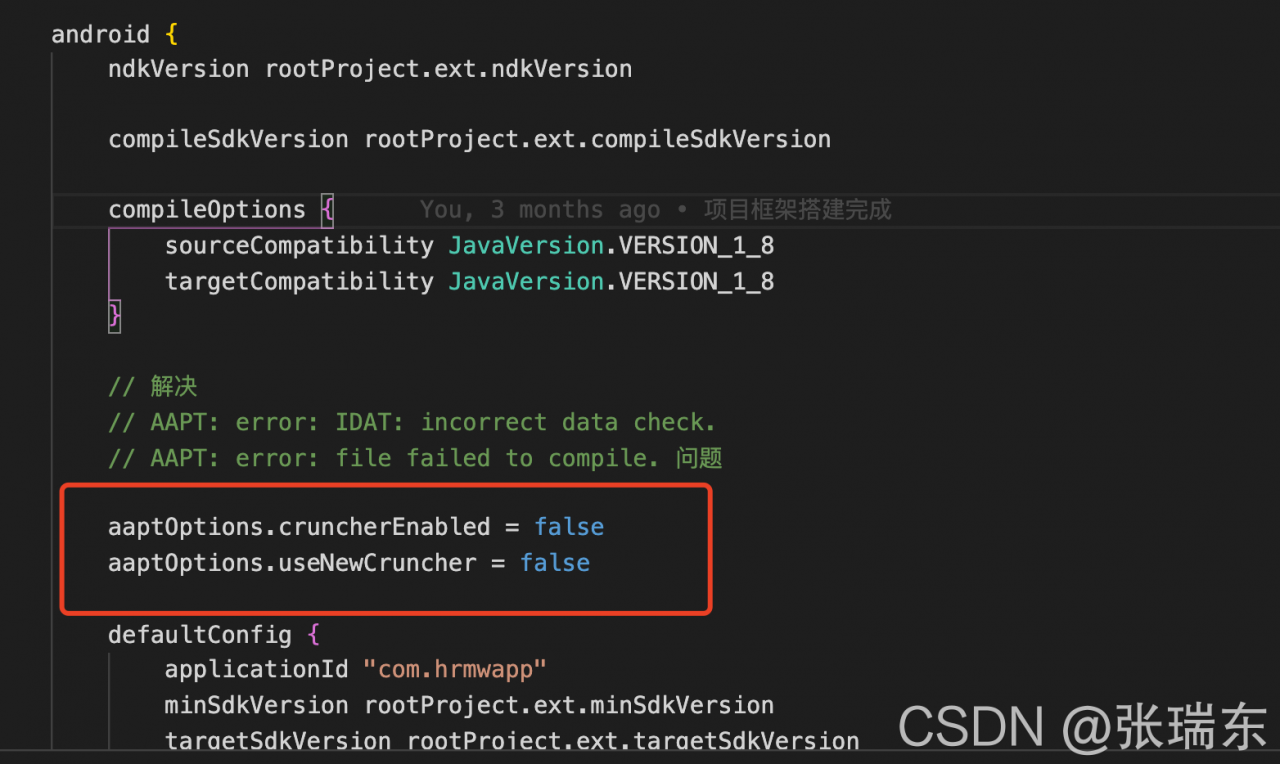
add the following code to the app/build.gradle file
aaptOptions.cruncherEnabled = false
aaptOptions.useNewCruncher = false
Android packaging error
AAPT: error: Idat: incorrect data check.
AAPT: error: file failed to compile. Solution:
add the following code to the app/build.gradle file
aaptOptions.cruncherEnabled = false
aaptOptions.useNewCruncher = false
Problem background
An error occurs when gitlab modifies the root password:
`handle_ argument_ error’: ERROR: “rails console” was called with arguments [“production”] (Thor::InvocationError)
As shown in the figure:
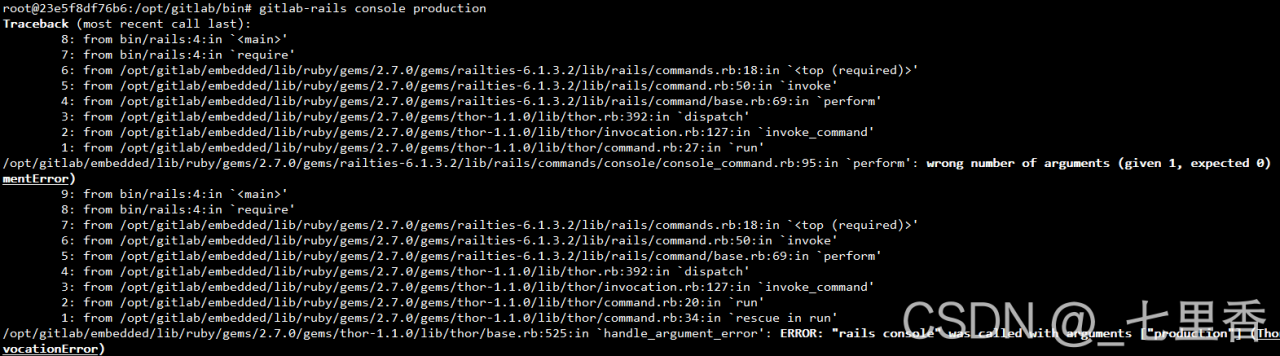
Note that the following prompt: Usage: “rails console [options]” is incorrect

Change password normally
There are only two parameters in total. After trying, the correct instruction is as follows:
gitlab-rails console -e production
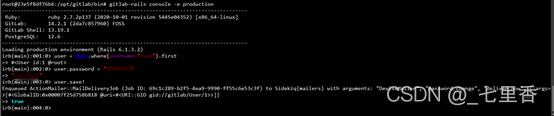
be accomplished!
When installing docker, an error message appears (on alicloud server):
Error: Failed to download metadata for repo ‘docker-ce-stable’: Cannot
download repomd.xml: Cannot download repodata/repomd.xml: All mirrors
were triedError: Failed to download metadata for repo
‘docker-ce-stable’: Cannot download repomd.xml: Cannot download
repodata/repomd.xml: All mirrors were tried
Solution:
Here, my work is done on the alicloud server. There are some small problems. According to the alicloud official website, you need to make some minor modifications to your docker-ce.repo
Change the $releasever variable to 7

yolox_s.pth to tensorRT Error
python tools/trt.py -n yolox-s -c preModels/yolox_s.ptherror:
2021-08-26 06:47:14.864 | INFO     | __main__:main:52 - loaded checkpoint done.
[TensorRT] INFO: [MemUsageChange] Init CUDA: CPU +300, GPU +0, now: CPU 1889, GPU 970 (MiB)
[TensorRT] WARNING: Tensor DataType is determined at build time for tensors not marked as input or output.
2021-08-26 06:47:21.311 | ERROR    | __main__:<module>:77 - An error has been caught in function '<module>', process 'MainProcess' (12166), thread 'MainThread' (140257983133504):
Traceback (most recent call last):

> File "tools/trt.py", line 77, in <module>
    main()
    └ <function main at 0x7f8f9f310950>

  File "tools/trt.py", line 62, in main
    max_workspace_size=(1 << 32),

  File "/home/moli/anaconda3/envs/tf25/lib/python3.7/site-packages/torch2trt-0.3.0-py3.7.egg/torch2trt/torch2trt.py", line 558, in torch2trt
    builder.max_workspace_size = max_workspace_size
    │                            └ 4294967296
    └ <tensorrt.tensorrt.Builder object at 0x7f8f94a50970>

AttributeError: 'tensorrt.tensorrt.Builder' object has no attribute 'max_workspace_size'
The solution to this problem is to reduce the version of NVIDIA tensorrt [2021-8-27]
reference link: https://github.com/NVIDIA-AI-IOT/torch2trt/issues/557
pip install nvidia-tensorrt==7.2.* --index-url https://pypi.ngc.nvidia.com
Finally, with the following command, the model conversion was successful. It took 10 minutes, which was outrageous
python tools/trt.py -n yolox-s -c preModels/yolox_s.pth


`0   N/A  N/A      7491      C   python                           6491MiB `

## output:

cuda :  True
2021-08-27 04:09:41.895 | INFO     | __main__:main:57 - loaded checkpoint done.
[TensorRT] WARNING: Tensor DataType is determined at build time for tensors not marked as input or output.
[TensorRT] INFO: Some tactics do not have sufficient workspace memory to run. Increasing workspace size may increase performance, please check verbose output.
[TensorRT] INFO: Detected 1 inputs and 1 output network tensors.
2021-08-27 04:17:33.106 | INFO     | __main__:main:70 - Converted TensorRT model done.
2021-08-27 04:17:33.286 | INFO     | __main__:main:78 - Converted TensorRT model engine file is saved for C++ inference.
Conversion model default path: yolox_ outputs/yolox_ s/
 ll YOLOX_outputs/yolox_s/

total 52348

22065949 Aug 27 04:17 model_trt.engine
31524975 Aug 27 04:17 model_trt.pth
I. AAPT: error: unescaped apostrophe in string </ font>
Cause analysis of error reporting
When doing the internationalization multilingual function, I defined some strings in the arrays.xml file as follows
<item>My name's Lisa</item>
The error report is translated as the apostrophe
that is not replaced by the string. Therefore, I thought that the error report may be caused by ', so I replaced the above code with the following code to solve the error report.
<item>My name"s Lisa</item>
Error reporting solution
apostrophe ' available & amp; quot; replacement, such as: <item> My name& quot; s Lisa you can use double quotation marks to enclose string resources, such as: <item>" My name's Lisa" escape characters can be used before apostrophe ', such as: <item> My name\'s Lisa
II. Multiple substitutions specified in non positive format
Cause analysis of error reporting
First, I defined some strings in the string. XML file
<string name = "upgrade_time"> Driver board: %s\t\t signal version.%s</string>
Error reporting translates to multiple substitutions specified in a non location format. The error reporting prompt mentions setting formatted = "false" , so I change the above code to the following one, so I won’t run error reporting.
<string name = "upgrade_time" formatted="false"> Driver board: %s\t\t signal version.%s</string>
Error resolution
After reviewing some blog posts and trying it out myself, there are these ways to fix the above error.
Add formatted="false" attribute in the string with %% to indicate a %
Third, some common HTML special character encoding
In the Android xml file, involving some special characters may be reported in the display of the error, you need to use HTML special characters to convert.
| Special symbols | HTML encoding |
|---|---|
| & | & |
| > | > |
| < | < |
| > | > |
| ’ | " |
| > | > |
| Half a blank space | ensp; |
| A blank space |   |
| > | > |
~/Library/Group Containers/UBF8T346G9.Office/User Content.localized/Startup.localized/Word
Just delete the file below this one. You can refer to the following solution.
I had the same problem, and found that it was due to incompatible Adobe Add-in “linkCreation.dotm”.
It is located at:
~/Library/Group Containers/UBF8T346G9.Office/User Content.localized/Startup.localized/Word
Once you remove the file and re-start Word, no more errors.
Sqoop:Error during export:Export job failed !
sqoop export data to mysql exception, usually are very normal today can not, there is nothing to report error information, is not very depressed.
21/08/25 15:03:05 ERROR tool.ExportTool: Error during export:
Export job failed!
at org.apache.sqoop.mapreduce.ExportJobBase.runExport(ExportJobBase.java:439)
at org.apache.sqoop.manager.SqlManager.exportTable(SqlManager.java:931)
at org.apache.sqoop.tool.ExportTool.exportTable(ExportTool.java:80)
at org.apache.sqoop.tool.ExportTool.run(ExportTool.java:99)
at org.apache.sqoop.Sqoop.run(Sqoop.java:147)
at org.apache.hadoop.util.ToolRunner.run(ToolRunner.java:70)
at org.apache.sqoop.Sqoop.runSqoop(Sqoop.java:183)
at org.apache.sqoop.Sqoop.runTool(Sqoop.java:234)
at org.apache.sqoop.Sqoop.runTool(Sqoop.java:243)
at org.apache.sqoop.Sqoop.main(Sqoop.java:252)
Several possibilities
1, conversion: the null problem requires conversion
–input-fields-terminated-by ‘\001’
–input-null-string ‘\N’
–input-null-non-string ‘\N’
2, table structure inconsistencies, hive table fields mysql table must have, mysql fields can be more not less
3, mysql table field length to less, change the structure on the good
Link error: linker tools error LNK2019
The error prompt error LNK2019: unresolved external "XX" often appears during the compilation of C + + projects. The main reason is that the definition of the corresponding reference variable or function cannot be found in the currently referenced library during the linking process. At this time, you need to add the library that defines the reference variable to the corresponding project.
There are two main ways to solve this problem:
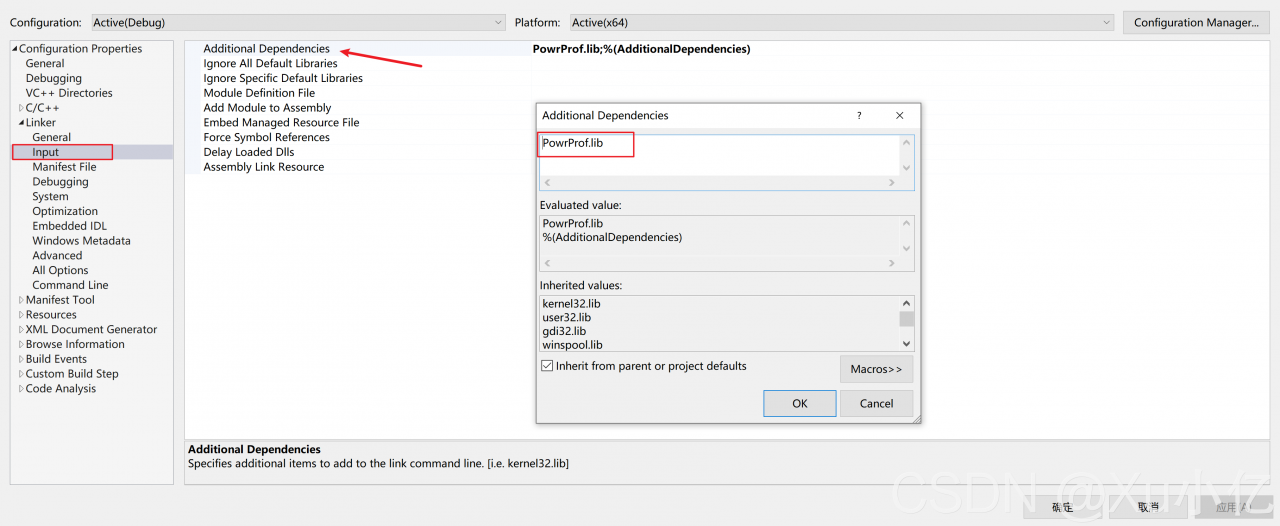
To manually add the powrprof.lib </KBD> library, do the following:
Method 1: use #pragma comment , such as
#pragma comment (LIB, "powrprof. Lib") method 2: properties under the corresponding item in vs: enter the corresponding position
Properties > Configuration Properties > Linker > Input > Additional dependencies add the powrprof.lib library, as shown in the following figure:
1. Problem
ERROR ITMS-90022: “Missing required icon file. The bundle does not contain an app icon for iPhone/iPod Touch of exactly ‘120×120’ pixels, in .png format for iOS versions >= 10.0. To support older versions of iOS, the icon may be required in the bundle outside of an asset catalog. Make sure the Info.plist file includes appropriate entries referencing the file. See https://developer.apple.com/documentation/bundleresources/information_property_list/user_interface”
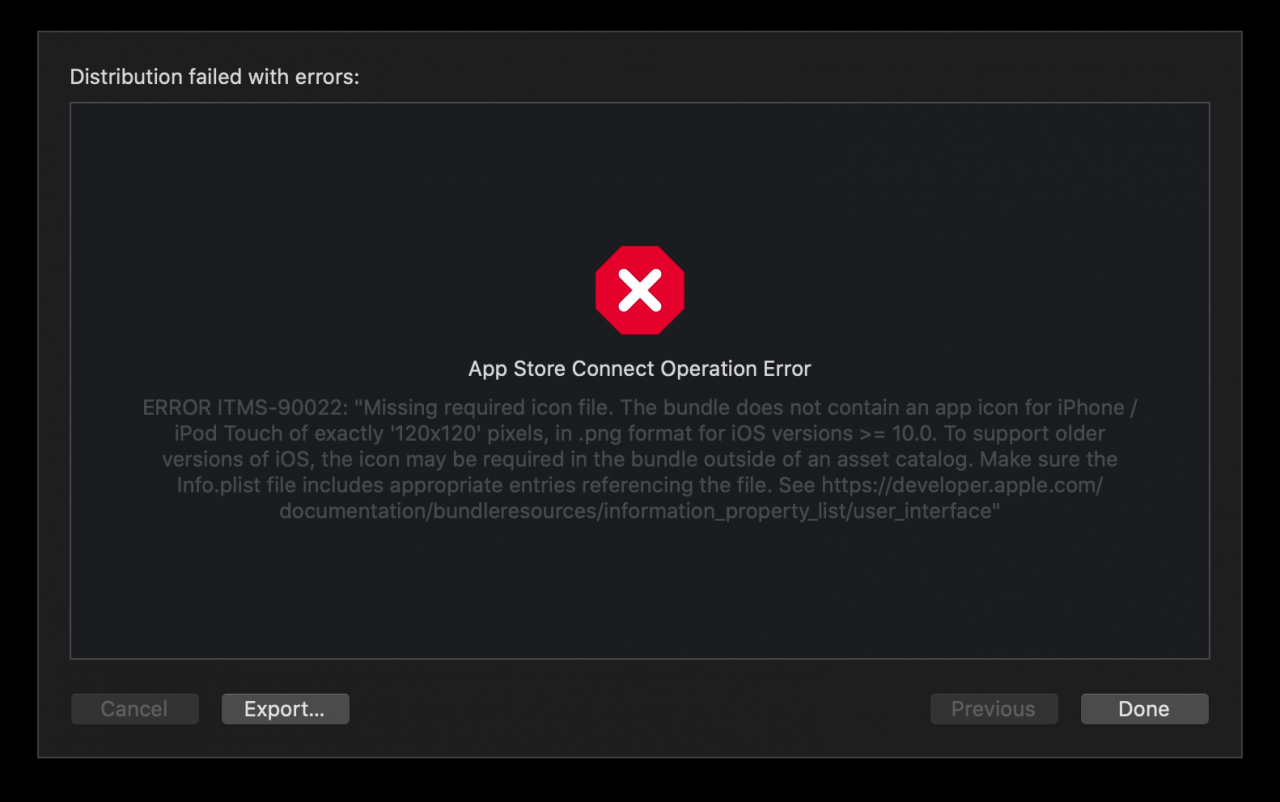
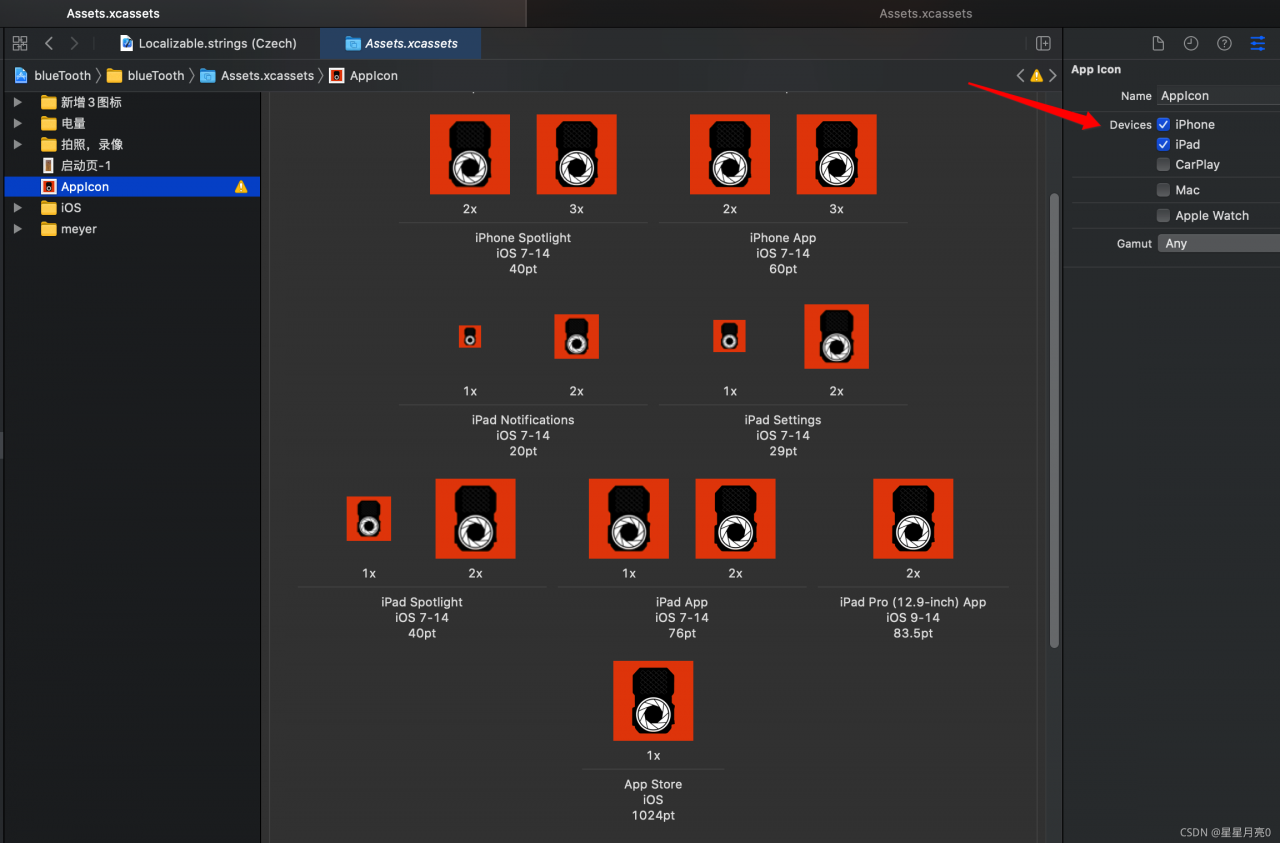
2. Solution: Just make sure there are 120×120 icons in the AppIcon
Error Message:
2021-08-30T21:37:47.238+0800 F – [main] terminate() called. An exception is active; attempting to gather more information
2021-08-30T21:37:47.258+0800 F – [main] std::exception::what(): basic_filebuf::underflow error reading the file: iostream error
Actual exception type: std::__ios_failure
Solution:
Check whether the keyfile file path is correctly configured
1. Problem description
In the process of serial communication written with MSComm control, when receiving the data sent by the serial port under the message response function OnComm function, in get_ An error reading comm develop error occurs in the input() function. The specific codes are as follows:
void XXXDlg::OnCommMscommLaser()
{
	memset(chstrLaser, 0, 1024);    //chstrLaseris a global variable.

	short i = m_mscomLaser.get_InBufferCount(); // statement 1.
	if(m_mscomLaser.get_CommEvent() == 2) // An event value of 2 means there are characters in the receive buffer.
	{
		/*m_recivedMsg = "";

		CString csstr = "";*/

		VARIANT InputData = m_mscomLaser.get_Input(); //Statement 2, read buffer.

		COleSafeArray csa = InputData; //VARIANT variable is converted to COleSafeArray variable.

		//translate to byte class.
		DWORD size = csa.GetOneDimSize();
		for(long k = 0; k < size; k++)
			csa.GetElement(&k, chstrLaser + k);
	}

    // Further processing of the received data ......

	return;
}
Each time the function is triggered, the data length of the receive buffer obtained by statement 1 is 30, which means that the receive buffer has data with a length of 30. However, the above error prompt will appear in statement 2, and the code after statement 2 will not be executed.
2.Method exploration
1. At first, I thought it was a data line problem. By changing the data line and making the data line myself, the problem could not be solved.
2. I suspected that there was a problem with the communication equipment. I also changed the equipment for debugging, but the same problem still occurred.
3. Suspected that the communication protocol was not clear.
4. Wait
3. Solution
After many serial port debugging assistants failed, I found that a serial port debugging assistant can communicate normally. I will provide the debugging assistant later. The current problem may be that the code is written incorrectly, and the data cable and equipment are OK.
Through a large number of searches, I found that one solution was to update the serial driver. After trying, I found that it was really possible. After a whole day, I finally solved this problem. I was very excited.
Here is the solution:
1. Download serial driver
My is a USB to 232 data cable, so I downloaded the prolific USB to serial comm port driver. You can download the corresponding driver according to your actual situation. Here I provide the driver that solves my problem: Click to download the serial port driver.
2. Update driver
After downloading the driver, start updating the driver:
a. Click Manage – > Click device manager -> Locate the serial port configured through the MSComm control
b. Right click the serial driver and click Update Driver Software – > Select browse computer for driver software
c. Click Browse to find the downloaded serial driver
d. Click next to solve the above problems after updating.
Question
When compiling with C + + 17, you will be prompted with “fatal error: variant: no such file or directory” error;
reason
STD:: variant is a feature of C + + 17. Although I compiled and installed gcc7.5.0, I still prompted this error
with the help of colleagues, the problem was solved because GCC did not switch to GCC 7.5.0;
apt-get install gcc-7
apt-get install gcc-7 g++-7
rm /usr/bin/g++
ln -s /usr/bin/g++-7 /usr/bin/g++
Test
1. C + + variables doesn’t like file directories
Accounting subject