Author Archives: Robins

Python asynchronous execution library asyncio


Title: python-asynchronous execution library asyncio
categories: python
tags: [python, asyncio, asynchronous, parallel]
date: 2020-09-28 14:45:34
comments: false
mathjax: true
toc: true

When writing the tool, it needs to request data for dozens of times, synchronous sequential execution, the speed is a little slow, so it is much easier to change to asynchronous parallel execution. Similarly, other designs to IO that will block can be solved by asynchronous parallel execution. Similarly, file IO can also be handled asynchronously.
Asyncio (built-in) + AIoHTTP /aiofiles (requires PIP installation) is used


code
Tool class Async_util.py (simply wrap it up)

# -*- coding: utf-8 -*-

import aiofiles
import aiohttp
import asyncio
import json
import sys
import traceback
import threading
from typing import List

from tool import utils


class CReqInfo:
    def __init__(self):
        self.url = None
        self.method = "POST"
        self.data = None
        self.extA = None  


class CRspInfo:
    def __init__(self):
        self.code: int = 0
        self.text = None
        self.extA = None  


class CFileInfo:
    def __init__(self, path, encoding="utf-8"):  
        self.path = path
        self.encoding = encoding
        self.content = None
        self.error = None
        self.extA = None 


class CCmdInfo:
    def __init__(self, cmd):
        self.code = 0
        self.msg = None
        self.cmd = cmd
        self.extA = None  


class CThreadInfo:
    def __init__(self, target, args=()):
        self.target = target
        self.args = args
        self.result = None


class CInnerThread(threading.Thread):
    # def __init__(self, autoid, target, args=()):
    def __init__(self, autoid, ti: CThreadInfo):
        super(CInnerThread, self).__init__()
        self.autoid = autoid
        self.target = ti.target
        self.args = ti.args
        self.ti: CThreadInfo = ti

    def run(self):
        try:
            self.ti.result = self.target(*self.args)
        except Exception as e:
            self.ti.result = e
            traceback.print_stack()

    def get_result(self):
        return self.autoid, self.ti


class CAsyncHttp:


    async def request(self, reqInfo: CReqInfo):
        if isinstance(reqInfo.data, dict):
            reqInfo.data = json.dumps(reqInfo.data)

        rspInfo = CRspInfo()
        try:
            async with aiohttp.request(method=reqInfo.method, url=reqInfo.url, data=reqInfo.data) as response:
                rspInfo.code = int(response.status)
                rspInfo.extA = reqInfo.extA
                rspInfo.text = await response.text()
        except Exception as e:
            rspInfo.code = -999
            rspInfo.text = e
        finally:
            return rspInfo

    def doReq(self, *reqArr) -> List[CRspInfo]:
        return CAsyncTask().doTask(*[self.request(reqInfo) for reqInfo in reqArr])


class CAsyncFileRead:


    async def read(self, fi: CFileInfo):
        try:
            async with aiofiles.open(fi.path, mode="rb") as fd:
                content = await fd.read()
                fi.content = fi.encoding is None and content or str(content, encoding=fi.encoding, errors="ignore")
        except Exception as e:
            fi.error = e
        finally:
            return fi

    def doRead(self, *fileArr) -> List[CFileInfo]:
        return CAsyncTask().doTask(*[self.read(fi) for fi in fileArr])


class CAsyncFileWrite:


    async def write(self, fi: CFileInfo):
        utils.createDirForFile(fi.path)
        try:
            async with aiofiles.open(fi.path, mode="wb") as fd:
                bts = fi.encoding is None and fi.content or fi.content.encode(
                    encoding=fi.encoding)
                await fd.write(bts)
        except Exception as e:
            fi.error = e
        finally:
            return fi

    def doWrite(self, *fileArr) -> List[CFileInfo]:
        return CAsyncTask().doTask(*[self.write(fi) for fi in fileArr])


class CAsyncCmd:


    async def run(self, ci: CCmdInfo):
        proc = await asyncio.create_subprocess_shell(
            ci.cmd,
            stdout=asyncio.subprocess.PIPE,
            stderr=asyncio.subprocess.PIPE)

        stdout, stderr = await proc.communicate()
        bts = stdout or stderr

        ci.code = proc.returncode
        ci.msg = bts is not None and str(bts, encoding="utf-8", errors="ignore")
        return ci

    def doCmd(self, *cmdArr) -> List[CCmdInfo]:
        return CAsyncTask().doTask(*[self.run(ci) for ci in cmdArr])


class CAsyncTask:


    def __init__(self):
        self.isStopProgress = False

    async def progress(self):
        symbol = ["/", "ᅳ", "\\", "|"]
        total = len(symbol)
        cnt = 0
        while not self.isStopProgress:
            sys.stdout.write(f"------ processing {symbol[cnt % total]}\r")
            sys.stdout.flush()
            await asyncio.sleep(0.1)
            cnt += 1
        print("------ processing 100%")

    async def start(self, *taskArr):
        first = asyncio.gather(*taskArr)
        second = asyncio.create_task(self.progress())

        retVal = await first
        self.isStopProgress = True
        await second

        return retVal

    def doTask(self, *taskArr):
        loop = asyncio.get_event_loop()
        res = loop.run_until_complete(self.start(*taskArr))
        # loop.close() # https 会报错: RuntimeError: Event loop is closed
        return res


class CAsyncThread:


    def doRun(self, *threadArr) -> List[CThreadInfo]:
        thdInsArr = []
        autoid = 1
        for ti in threadArr:
            thd = CInnerThread(autoid=autoid, ti=ti)
            autoid += 1
            thdInsArr.append(thd)
            thd.start()

        retDct = {}
        for thd in thdInsArr:
            thd.join()
            aid, ti = thd.get_result()
            retDct[aid] = ti

        sorted(retDct.items(), key=lambda x: x[0], reverse=False)
        return list(retDct.values())


def doTask(*taskArr):
    return CAsyncTask().doTask(*taskArr)


def doReq(*reqArr):
    return CAsyncHttp().doReq(*reqArr)


def doRead(*fileArr):
    return CAsyncFileRead().doRead(*fileArr)


def doWrite(*fileArr):
    return CAsyncFileWrite().doWrite(*fileArr)


def doCmd(*cmdArr):
    return CAsyncCmd().doCmd(*cmdArr)


def doRun(*threadArr):
    return CAsyncThread().doRun(*threadArr)

The test case

#!/usr/bin/python
# -*- coding: UTF-8 -*-
import sys
import os
import asyncio, aiohttp, aiofiles
import json
from datetime import datetime, timedelta

from time import ctime, sleep
import time
import unittest

from tool import utils, async_util

SelfPath: str = os.path.abspath(os.path.dirname(__file__))


class Test_Async(unittest.TestCase):
    def setUp(self):
        print("\n\n------------------ test result ------------------")

    def test_gather(self):
        async def count(num):
            print(f"One - {num}")
            await asyncio.sleep(1)
            print(f"Two - {num}")

        async def main():
            await asyncio.gather(count(1), count(2), count(3))  # gather Execute concurrently, returning sequential results.

        asyncio.run(main())
        print("--- finished")

    def test_createTask(self):
        async def count(num):
            print("One")
            await asyncio.sleep(num)
            print("Two")

        async def main():
            first = asyncio.create_task(count(2))  # Start executing it when you create it.
            second = asyncio.create_task(count(1))

            await first
            print(f"finished first")
            await second
            print(f"finished second")

        asyncio.run(main())
        print("--- finished")

    def test_progress(self):
        from tool.async_util import CAsyncTask, CRspInfo

        # Tasks to be performed
        async def reqFn(num):
            url = "http://149.129.147.44:8305/hotupdate"
            reqInfo = {
                "Plat": 8,
                "Os": 2,
                "Appid": 3,
                "Uid": '123123',
                "Version": '0.0.0.1',
                "Deviceid": 'wolegequ',
            }
            rspInfo = CRspInfo()
            try:
                async with aiohttp.request(method="POST", url=url, data=json.dumps(reqInfo)) as rsp:
                    print(f"--- idx: {num} code: {rsp.status}")
                    rspInfo.code = num
                    rspInfo.text = await rsp.text()
            except:
                rspInfo.code = -999
            finally:
                return rspInfo

        async def reqFn01():
            print("--- start reqFn01")
            await asyncio.sleep(20)
            return "hello01"

        async def reqFn02():
            print("--- start reqFn02")
            await asyncio.sleep(10)
            return "hello02"

        async def reqFn03():
            print("--- start reqFn03")
            await asyncio.sleep(30)
            return "hello03"

        taskArr = [reqFn(idx) for idx in range(30)]

        res = CAsyncTask().doTask(reqFn01(), reqFn02(), reqFn03(), *taskArr)
        print(f"--- finished, res: {utils.beautyJson(res)}")

    # asynchronous io http
    def test_concurrencyReq(self):
        url = "http://149.129.147.44:8305/hotupdate"  # Test
        # url = "https://www.baidu.com"  # Test

        reqInfo = {
            "Plat": 8,
            "Os": 2,
            "Appid": 3,
            "Uid": '123123',
            "Version": '0.0.0.1',
            "Deviceid": 'wolegequ',
        }

        # code, rspDct = utils.httpPost(url, utils.objToJson(reqInfo))
        # print(f"--- code: {code}, rsp: {utils.beautyJson(rspDct)}")
        # return

        async def reqFn(idx):
            try:
                # async with aiohttp.request(method="GET", url=url) as rsp:
                async with aiohttp.request(method="POST", url=url, data=json.dumps(reqInfo)) as rsp:
                    print(f"--- idx: {idx} code: {rsp.status}")
                    # response.request_info 
                    res = await rsp.text()
                    # print(f"--- res: {res}")
                    return res
            except:
                return "--- error"

        # create task 方式
        async def main01():
            taskArr = []
            for idx in range(5):
                task = asyncio.create_task(reqFn(idx))  # Start executing it when you create it.
                taskArr.append(task)

            resArr = []
            for task in taskArr:  # Waiting for all requests to complete
                res = await task
                resArr.append(res)
            return resArr

        # gather 方式
        async def main02():
            taskArr = []
            for idx in range(5):
                task = reqFn(idx)
                taskArr.append(task)
            return await asyncio.gather(*taskArr)

        # True
        loop = asyncio.get_event_loop()
        resArr = loop.run_until_complete(main02())  # Complete the event loop until the end of the last task

        # # Error: RuntimeError: Event loop is closed
        # resArr = asyncio.run(main02())

        print("--- finished")
        print(f"--- resArr: {utils.beautyJson(resArr)}")

    def test_compare_http(self):
        url = "http://149.129.147.44:8305/hotupdate"
        # url = "https://www.baidu.com"
        reqCnt = 1

        dct = {
            "Plat": 8,
            "Os": 2,
            "Appid": 3,
            "Uid": '123123',
            "Version": '0.0.0.1',
            "Deviceid": 'wolegequ',
        }

        @utils.call_cost
        def syncFn():
            print("--- syncFn start")
            for idx in range(reqCnt):
                code, rspDct = utils.httpPost(url, dct)
            print("--- syncFn end")

        @utils.call_cost
        def asyncFn():
            print("--- asyncFn start")

            reqArr = []
            for idx in range(reqCnt):
                ri = async_util.CReqInfo()
                ri.url = url
                ri.data = dct  # dict or json string
                ri.method = "POST"
                ri.extA = f"extra data {idx}"
                reqArr.append(ri)

            resArr = async_util.doReq(*reqArr)
            print("--- type: {}, len: {}".format(type(resArr), len(resArr)))
            # print(f"--- finished, resArr: {utils.beautyJson(resArr)}")
            print("--- asyncFn end")

        sync_cc = syncFn()
        print("sync: {}".format(sync_cc))

        print()
        async_cc = asyncFn()
        print("async: {}".format(async_cc))


    def test_asyncFile(self):
        async def dealFile(filePath):
            print("--- dealFile:", filePath)
            async with aiofiles.open(filePath, mode="r") as fd:  # read
                txt = await fd.read()
                print("--- read:", txt)

            async with aiofiles.open(filePath, mode="w") as fd:  # write
                await fd.write("wolegequ")

            return "done!!"

        path = utils.getDesktop("test_io2/aaa.txt")
        res = async_util.doTask(dealFile(path))
        print("--- res:", res)

    # Asynchronous io file, read by line
    def test_asyncLine(self):
        async def dealFile(filePath):
            print("--- dealFile:", filePath)
            async with aiofiles.open(filePath, mode="rb") as fd:  # write
                async for line in fd:
                    # print("--- line:", line.decode(encoding="utf-8", errors="ignore"))
                    print("--- line:", str(line, encoding="utf-8", errors="ignore"))

        path = utils.getDesktop("a_temp.lua")
        res = async_util.doTask(dealFile(path))
        print("--- res:", res)

    # Compare file reads, synchronous, asynchronous, time-consuming.
    def test_compare_readFile(self):
        dstDir = utils.getDesktop("test_io")
        fileArr = utils.getFiles(dstDir, ["*.*"])
        print("--- fileArr len: {}".format(len(fileArr)))

        @utils.call_cost
        def syncFn():
            print("--- syncFn start")
            for file in fileArr:
                # time.sleep(0.5)
                utils.readFileBytes(file)
            print("--- syncFn end")

        @utils.call_cost
        def asyncFn():
            print("--- asyncFn start")

            fiArr = [async_util.CFileInfo(file) for file in fileArr]

            res = async_util.doRead(*fiArr)
            # print("--- res:", utils.beautyJson(res))

            # 换个目录写进去
            # for fi in fiArr:
            #     fi.path = fi.path.replace("test_io2", "test_io3")
            # async_util.doWrite(*fiArr)

            print("--- asyncFn end")

        sync_cc = syncFn()
        print("sync: {}".format(sync_cc))

        print()
        async_cc = asyncFn()
        print("async: {}".format(async_cc))

    # Asynchronous parallel execution of system commands
    def test_subprocess(self):
        # official document: https://docs.python.org/3/library/asyncio-subprocess.html

        async def run(cmd):
            proc = await asyncio.create_subprocess_shell(
                cmd,
                stdout=asyncio.subprocess.PIPE,
                stderr=asyncio.subprocess.PIPE)

            stdout, stderr = await proc.communicate()

            print(f'[{cmd!r} exited with {proc.returncode}]')
            if stdout:
                print(f'[stdout]\n{stdout.decode(errors="ignore")}')
            if stderr:
                print(f'[stderr]\n{stderr.decode(errors="ignore")}')

        cmd = "git status"
        asyncio.run(run(cmd))

    def test_compare_subprocess(self):
        cnt = 5

        # cmd = "git status"
        cmd = "call {}".format(utils.getDesktop("aaa.exe")) 

        @utils.call_cost
        def asyncFn():
            cmdArr = []
            for i in range(cnt):
                ci = async_util.CCmdInfo(cmd)
                ci.extA = i
                cmdArr.append(ci)

            res = async_util.doCmd(*cmdArr)
            # print("--- res:", utils.beautyJson(res))

        @utils.call_cost
        def syncFn():
            async def run(command):
                return utils.cmdToString(command)

            res = async_util.doTask(*[run(cmd) for i in range(cnt)])
            # print("--- res:", utils.beautyJson(res))

        dt1 = syncFn()
        print("--- syncFn cost time:", dt1)  # --- syncFn cost time: 00:00:45

        dt2 = asyncFn()
        print("--- asyncFn cost time:", dt2)  # --- asyncFn cost time: 00:00:09

    # True multi-threaded parallelism.
    def test_multi_thread(self):
        def fn001(name):
            # print("--- hello 111, name: {}".format(name))
            # time.sleep(5)
            # print("--- hello 222, name: {}".format(name))

            # error
            # assert False, "--- wolegequ"
            # arr = []
            # b = arr[1]

            utils.execute("call {}".format(utils.getDesktop("aaa.exe")))
            return "world-{}".format(name)

        # res Sequential return value
        res = async_util.doRun(*[async_util.CThreadInfo(target=fn001, args=(i,)) for i in range(3)])
        # print("--- end, res: {}".format(utils.beautyJson([str(ti.result) for ti in res])))
        for ti in res:
            print("--- result is error:", utils.isError(ti.result))
            # print("--- exmsg:", utils.exmsg(ti.result))


if __name__ == "__main__":
    ins = Test_Async()
    ins.test_multi_thread()
How to Fix Oracle listener error Linux error: 111: connection reused

[oracle@rac01 admin]$ lsnrctl status

LSNRCTL for Linux: Version 10.2.0.1.0 – Production on 11-FEB-2014 15:32:40

Copyright (c) 1991, 2005, Oracle.  All rights reserved.

Connecting to (ADDRESS=(PROTOCOL=tcp)(HOST=)(PORT=1521))

TNS-12541: TNS:no listener

TNS-12560: TNS:protocol adapter error

TNS-00511: No listener

Linux Error: 111: Connection refused


Solution.

Modified the /etc/hosts file.
Back to your old ways.
127.0.0.1 localhost. localdomain localhost
Re-establishing listening.
can immediately (do sth)

npm install Error: stack Error: Can’t find Python executable “python”

NPM install Error: stack Error: Can’t find Python “Python” executable
Because of the need for node-gyp installation, it can only support python2, the official recommendation is python2.7, the download link
after the installation is complete, set the environment variable PYTHONPATH (value is the installation directory, such as C:\Python27) and PYTHON (value is %PYTHONPATH%\python.exe)
and then set it in the terminal: NPM config set python “C:\Python27\python.exe”
problem solved

On error resume next, on error goto 0, err usage

The VBScript language provides two statements and an object to handle “runtime errors,” as follows:

On Error Resume Next statement

On Error Goto 0 statement

Err object

A brief introduction to On Error Resume Next, On Error Goto 0, Err

The On Error Resume Next statement and On Error Goto 0 statements indicate what to do when “runtime Error” occurs.
When you add the On Error Resume Next statement, if the following program has a “runtime Error,” it will continue to run without interruption.
When the On Error Goto 0 statement is added, if the following program has a “runtime Error”, an “Error message” is displayed and execution of the program is stopped.
The Err object holds the error message

The following examples are used to explain On Error Resume Next, On Error Goto 0, and Err

The On Error Resume Next statement was not added

If the “On Error Resume Next” statement is not included, when “run time Error” occurs, an “Error message” is displayed and execution of the program is stopped.
Example (/test.asp) :

i = 1/0   Divide by '0', generate "runtime error", display "error message" and stop program execution.
Response.Write "After the divide is executed" 'This sentence will not be executed'
%>

Results:

Microsoft VBScript runtime error error ‘800A000b’
Be zero except
/ test. The asp, line 2

Add the On Error Resume Next statement

When we add the “On Error Resume Next” statement somewhere, subsequent programs don’t show “Error messages” and continue to run even if they do.
For example:

On Error Resume Next   The program that follows will continue to run even if a "runtime error" occurs.
i = 1/0 '0 to divide, this is a "runtime error", but because of the above On Error Resume Next, the execution will not be interrupted, but will continue to run.
Response.Write "after the divide is executed" 'This will be executed'
%>

Results:

After the division is performed

With the On Error Resume Next statement, use the Err object to get the Error message

After using On Error Resume Next, if there is an Error, the Err object will put the last Error message.
There are three important properties of Err object: Number, Source, and Description. They are error number, error source, and error description.
All you can catch are runtime errors, and If Err then is equivalent to If Err.Number then

Dim i
i = 1/0   'the fisrt wrong
undefined_function "test"   'the second wrong,Function undefined_function undefined
Response.Write Err.Description

Operation results:

Type mismatch

As you can see, it’s not being divided by zero

Use the On Error Goto 0 statement to let the system take over the handling of the Error

With the On Error Resume Next statement, the following programs will continue to run even if there is a “runtime Error.” But what if you want a later program to stop executing and display an error when it has a “runtime error”?
The answer is: use the On Error Goto 0 statement
Using the statement “On Error Goto 0”, the following program will prompt an Error and terminate the execution of the script as soon as an Error occurs.

Dim i
i = 1/0
Response.Write "After the execution of the first exclusion"
On Error Goto 0 'The statement after 'will alert for an error and end script execution as soon as an error occurs.
i = 1/0
Response.Write "After the execution of the second division"

Operation results:

After the first division is performed
Microsoft VBScript runtime error error ‘800A000b’
Be zero except
/ test. The asp, line 2

As you can see, the first response.write executes and prints the content, while the second response.write does not execute.

Talk about On Error Resume Next in detail

Scope of action for On Error Resume Next statement

The On Error Resume Next statement only applies to subsequent statements at this level. Does not apply to the function or subroutine being called, nor does it apply to the parent segment
The On Error Resume Next statement affects only this function if it appears in a function. It has no effect on either the “calling function” or the “called function”
If there is no On Error Resume Next statement in a subroutine, an Error in the subroutine will interrupt the subroutine and jump to the outer program that calls the subroutine. If the outer program contains the On Error Resume Next statement before the function call in question, it will then execute the statement after the function call. If the outer program does not have an On Error Resume Next statement before the function call that went wrong, it jumps to the outer program. This process is repeated until the environment containing the On Error Resume Next statement is found to continue running. If the outermost program also does not contain the On Error Resume Next statement, the default Error handler is used, which is to display the Error message and stop running.
For example:

 Dim i
 i = 1/0
 Response.Write "OK"
End Sub
Sub test1()
 test
 Response.Write "OK"
End Sub
On Error Resume Next
test1

Results:

After the division is performed

Neither OK is printed. Since On Error Resume Next is issued in the outermost layer, when something goes wrong with the subroutine being called, it jumps right out of the subroutine and into the outer code.
If you put an On Error Resume Next statement at the beginning of the subroutine, the runtime Error does not abort the subroutine.
For example, if you need to write a string to a file, you can access the file through a separate function to prevent errors from interrupting the entire program:

'returns True if it succeeds, or False on any error
Function WriteNewFile(strFileName, strContent)
  On Error Resume Next   'turn off the default error handler
  WiteNewFile = Flase   'default return value of function
  Set objFSO = CreateObject("scripting.FileSystemObject")
  If Err.Number = 0 Then Set objFile = objFSO.CreateTextFile(strFileName,True)
  If Err.Number = 0 Then objFile.WriteLine strContent
  If Err.Number = 0 Then objFile.Close
  If Err.Number = 0 Then WriteNewFile = True
End Function

The above program checks the Err object’s Number attribute before processing each program statement. If the value is 0 (no errors have occurred yet), then the creation and writing of the file can continue. If an error occurs, the script engine sets the value of the Err object’s property and proceeds to the next line.
The return value of the function is set to “True” as long as it works without causing an error. Otherwise, the function returns “False”.

On Error Goto 0 statement

In ASP 2.0 (although not documented) and ASP 3.0, the On Error Goto 0 statement restores the default Error handling behavior.
After running this statement, a run-time error results in default error handling, checking each nested program in the environment chain up to the home page code. If no other environment turns off the default error handling, the execution of the page will stop and the IIS default error page will be displayed.

Err object

In the previous example, after turning off default error handling, check to see if an error has occurred by checking the Number attribute of the Err object.
The Err object stores information about run-time errors
The following table shows the properties provided by the Err object.

</ th> </ th> </ tr>
Description </ td> sets or returns a string Description error </ td> </ tr> Number </ td> (default property) sets or returns a false value specified </ td> </ tr> Source </ td> Sets or returns the name of the object that generated the error

You can use these properties to check what kind of error occurred. For example, you can take different actions based on the error number, or you can provide the user with error information using the attribute values of Source and Description.

The following table shows the methods provided by the Err object.

</ th> </ th> </ tr>
Clear </ td> remove all current Err object set </ td> </ tr> Raise </ td> generate a runtime error </ td> </ tr> </ tbody> </ table>

A “custom error” is generated using the Err object.

You can generate a “custom error” using the Err object. Why do we do this?Because sometimes you want to send a custom error message to the user. You can set the Err object’s properties to whatever value you want, and then call the Raise method to cause such an error, which will stop the program and pass the error back down the call chain.
The following example shows how to handle errors when reading a text file on a server disk. Notice how to use the constant vbObjectError to make sure that the selected error number does not confuse an existing error number. By adding arbitrarily selected error Numbers to this constant, you can ensure that you are not confused with predefined errors.

  Set objFSO = CreateObject("scripting.FileSystemObject")
  Set objFile = objFSO.OpenTextFile("strFileName", ForReading)
  Select Case Err.Number
   Case 0   'OK, take no action
   Case 50,53   'standard file or path not found errors
    'create custom error values and raise error back up the call chain
    intErrNumber = vbObjectError + 1073     'custom error number
    strErrDescription = "The file has been deleted or moved. "
    strErrSource = " ReadThisFile function"
    Err.Raise intErrNumber, strErrSource, strErrDescription
    Exit Function
   Case Else   'som other error
    'raise the standard error back up the call chain
    Err.Raise Err.Number, Err.Source, Err.Description
    Exit Function
  End Select
  ReadThisFile = objFile.ReadAll   ' we opened it OK, so return the content
  objFile.Close
End Function

The code that calls this function can use the On Error Resume Next statement and catch the Error that this function produces.

strContent = ReadThisFile("myfile.txt")
If Err.Number = 0 Then
    Response.Write "File content is:<br/>" & strContent
Else
    Response.Write Err.Source & "<br/>" & Err.Description
End If

win7 error code 0x80070522

Run the CMD input with the administrator
icacls c:\ /setintegritylevel M
Icacls is a command-line tool that displays or modifies a random access Control list (DACL) on a specified file and applies the stored DACL to files in a specified directory. Icacls.exe replaces the cacls.exe tool for viewing and editing DACL. ICACLS is an updated version of the CACLS tool in Windows Server 2003 SP2 and can be used to reset account control lists (ACLs) in files from the recovery console as well as backup ACLs. Unlike CACLS, ICACLS can correctly pass changes and creation to inherited ACLs. For more information about the use of ICACLS and the commands, you can run “ICACLS /?” at the command prompt. Make a visit. C) Improved upgrade of C) Improved upgrade of C) Improved upgrade of C) Improved

Reproduced in: https://www.cnblogs.com/zedzhao/archive/2010/01/15/1648225.html

HYDU_ create_ Process (. /utils/launch/launch.c:69): execvp error on file.. Error handling

[size=medium] When the MPI program is compiled and compiled through, but the execution times are wrong

[color=red]HYDU_create_process (./utils/launch/launch.c:69): execvp error on file hello (No such file or directory)[/color]

is probably due to the fact that the absolute path is not used when executing the program.

simply execute the program using the absolute path, as follows:

$mpicc -o cpi cpi.c

$mpirun -np 4./cpi (add “./ “) [/size]

Utraiso recording DVD application area failed power calibration area error


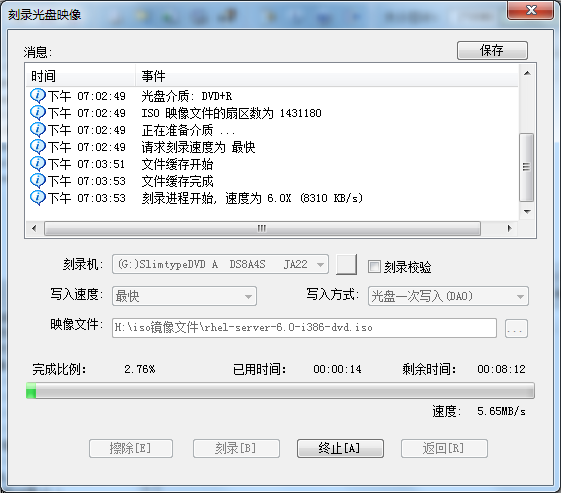
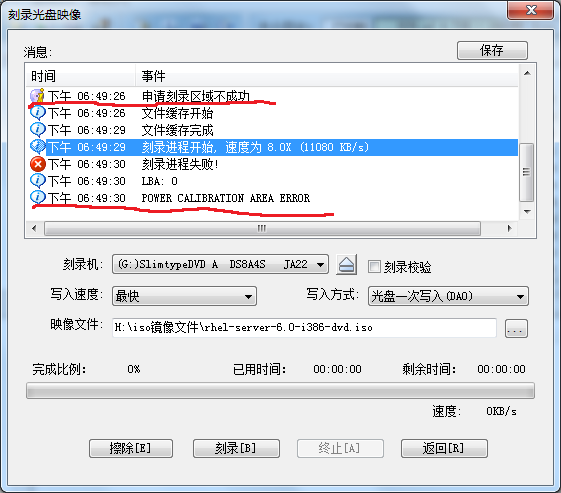
Originally was to burn a RHEL 6.0 system disk, did not expect out of this problem.
As shown in figure:
(UtraISO version 9.5)


Asked the teacher, Google’s answer is as follows: I test \ to describe the following
1, the DVD drive a, how can not burn function, DVD all don’t know how do
2, incompatible, as stated in a b
3, burner is broken c, obviously is normal
4, do not support high-speed write, reduce the speed try D, no
5, head aging e, impossible
— — — — — — — — — — — — — — — — — — — — — — — — — — — — — — — — — — — — — — — I explore solutions — — — — — — — — — — — — — — — — — — — — — — — — — — — — — — — —
Solutions:
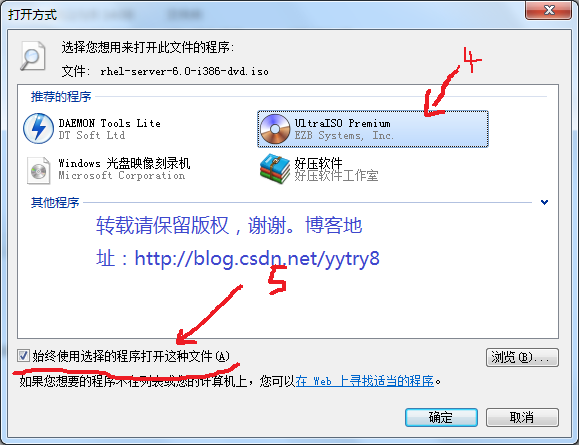
1, select the ISO file to be burned –& GT; 2, right – button –& GT; 3. Opening mode –& GT; 4, UltraISO Premium — — — — — — — — — — – & gt; 5. Always open the file using a selected program –& GT; 6. Yes.
Note: In step 5, always check the box before “Always use the selected program to open such files.”


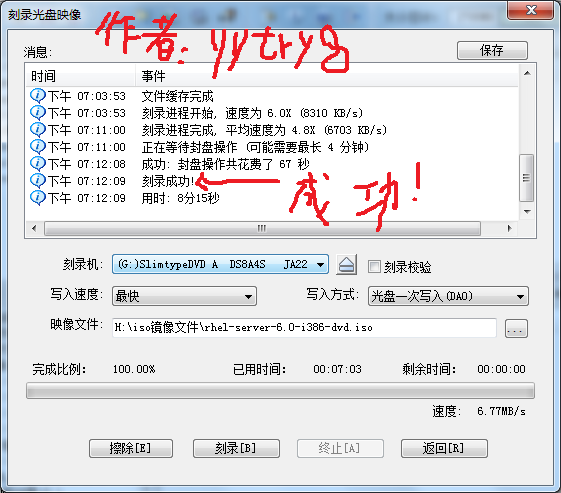
Start burning normally… Drops drops…


Ok, burn successfully.

The author’s blog: http://blog.csdn.net/yytry8

— — — — — — — — — — — — — — — — — — — — — — — — — — — — — — — — — — — — — — – but — — — — — — — — — — — — — — — — — — — — — — — — — — — — — — — — — — — — — — — — — — — — — — — — — — — — — — — — — — — — — — — — — — — — — line — — — — — — — — — — — — — — — — — — — — — — — — — — —

Lenovo-win7 system computer boot prompt error 1962: no operating

The above problem is mainly caused by the boot mode selection error (most of the problems are caused by the original UEFI boot, but the BIOS setting causes the boot failure).
(1) Press F12 and then select?Enter ?Setup?
(2) Then go to SETUP and then to STARTUP. Maybe the fourth or the fifth.
(3) Down to find CSM press enter, then select ENABLE.
(4) In this directory (my computer is, maybe different computers are different), go to BOOT PRIORITY, now go to UEFI FIRST
(5) Now press F10, now SAVE. Then try to restart it.
After this round, there should be no problem. If there are any other problems, you need to check to see if your boot option is selected to boot from hard disk.

Solve fatal error: ‘FFI. H’ file not found

Error installing Rumps in Python:

Modules/objc/libffi_support.h:4:10: fatal error: 'ffi.h' file not found
#include "ffi.h"
         ^
1 error generated.
error: Setup script exited with error: command 'cc' failed with exit status 1

The reason is the lack of libffi library, using BREW can be installed.

$ brew install pkg-config libffi
$ export PKG_CONFIG_PATH=/usr/local/Cellar/libffi/3.0.13/lib/pkgconfig/
$ pip install bcrypt

Installation user interface mode not supported solution

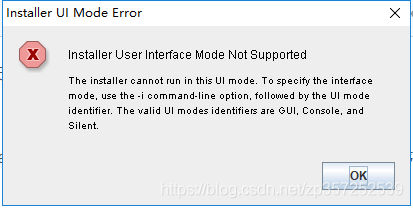
Today, while installing a program, I reported the following error:

Installer User Interface Mode Not Supported, Installer User Interface Mode Not Supported
Before is:

After:

 
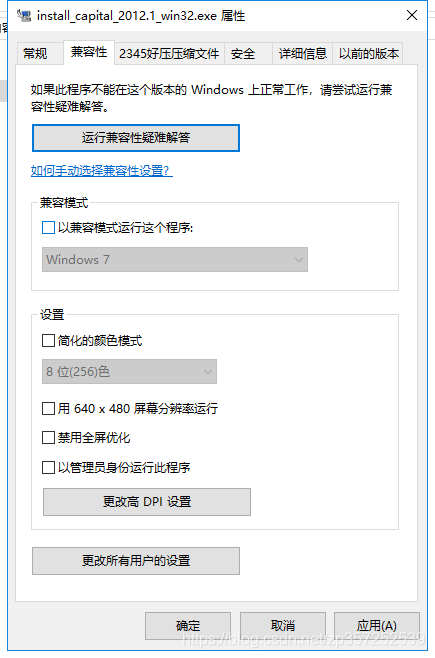
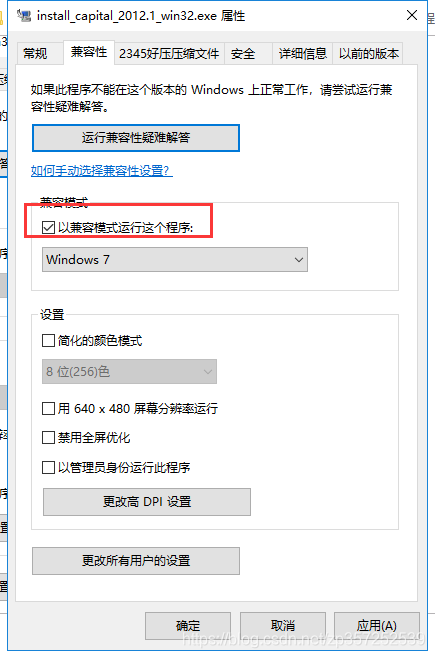
It feels like an incompatibility problem, so just follow past experience and right-click the installer — & GT; Property, under compatibility, check.
Then run it in administrator mode and it’s OK


ERROR 0210: Stuck Key 36

Saturday, December 28, 2002 at 12:02 am
Windows Me Annoyances Discussion Forum
Posted by Jack Gulley (5917 messages posted)

This is a system board POST/BIOS error code (nothing to do with Windows). The ERROR 210: is a standard POST (Power On Self Test) error message that indicates an error with the keyboard. The error condition is that a keyboard scan code was received from the keyboard when none was expected, after the keyboard was Reset. The “Stuck key 36” indicates that scancode 36 was received, indicating that the Right Shift key was stuck down or was pressed when it should not have been.
If this occurs most of the time when you power on your system, then it indicates that this key is sticking down or the key mechanical or electrical parts are broken. Some times blowing out and cleaning out around the keys will resolve this problem. Some times holding the keboard vertical with the front edge down and droping several inches will clear up the problem. Otherwise, you need to replace your keyboard with a new (or at least a working) one.
 

After compiling. Java, the following appears: Note:checkUser.java uses unchecked or unsafe operations.Note :Recompile with -Xlint :unchecked for details.


If it is shown in Chinese, it means:
Note: A.java USES unchecked or unsafe operations.
Note: For details, use -Xlint: Unchecked recompile.
JAVA5.0 generics are used, but the 5.0 generics do not do type checking. For example, ArrayList a =new ArrayList();
a.add(“hello”); There are several solutions to this warning:
1) Prefix a method with @Suppresswarnings (“unchecked”)
2) declare generic types, such as ArrayList< Object> A = new ArrayList< Object> (a);
3) Compile with 1.4 COMPATIBLE JDK, Javac-Source 1.4 test.java
4) You can also view warning messages like Javac Xlint: Unchecked test.java. This will display the detailed warning information