Author Archives: Robins

GuzzleHttp cURL error 60: SSL certificate problem: self signed certificate

An error problem
When GuzzleHttp makes an HTTPS request, it reports the following error

cURL error 60: SSL certificate problem: self signed certificate

The solution
The difference between an HTTP request and an HTTPS request is that Guzzle needs to pass in a configuration item in the constructor,

$client = new \GuzzleHttp\Client(['verify' =>false]);

Error loading in flex integration: Java / jdk1.6.0_ 35\jre\bin\server\ jvm.dll

Error loading: \ Java \ jdk1.6.0 _35 \ jre \ bin \ server \ JVM DLL

Error :
complie:
[exec] Error loading: D:\Program Files\Java\jdk1.6.0_35\jre\bin\server\ jvvm. DLL
[exec] Result: 6
Because flash builder is based on eclipse and eclipse is using Java technology and Java needs jre
to run and flash builder needs to run on a 32-bit jre if we have Java installed on 64 then this error will occur

solution
1. Download and install 32 jre
2. Edit FLEX_HOME\bin\jvm.config file and set java.home
for example :
#java.home=
java.home=D:/Program Files/Java/jre6-32

note :FLEX_HOME refers to flex SDK directory, such as D:\Program Files\Adobe Flash Builder 4.6\ SDKS \4.6.0

ERROR 2002 (HY000): Can’t connect to local MySQL server through socket ‘/var/run/mysqld/mysqld.sock’

ERROR 2002 (HY000) : Can ‘t connect to local MySQL server through socket’/var/run/mysqld/mysqld. (2) the sock ‘
The server encountered a familiar problem today
Input:

#mysql -u root -p
ERROR 2002 (HY000): Can’t connect to local MySQL server through socket ‘/var/run/mysqld/mysqld.sock’ (2)

Then he searched the Internet for answers
I’m going to try each of the methods that you’ve given me
Plan 1

#ps -A|grep mysql

Display similar to:

1829 ?       00:00:00 mysqld_safe
1876 ?       00:00:31 mysqld
#kill -9 1829
  #kill -9 1876
#/etc/init.d/mysqld restart
#mysql -u root -p

His problem is solved, mine is not solved!
keep looking for
Scheme 2
Check the/etc/rc. D/init. D/mysqld status to see if the mysql has already started.
see if other permissions problems.
— — — — — — — — — — — — — —

[root@localhost beinan]#chown -R mysql:mysql /var/lib/mysql
[root@localhost beinan]# /etc/init.d/mysqld start

Start MySQL: [OK]

[root@localhost lib]# mysqladmin -uroot password ‘123456’
[root@localhost lib]# mysql -uroot -p
Enter password:
Welcome to the MySQL monitor. Commands end with ; or /g.
Your MySQL connection id is 3 to server version: 4.1.11

Type ‘help;’ or ‘/h’ for help. Type ‘/c’ to clear the buffe

His was solved, and my troubles continued, and my search continued
Scheme 3
problem solved, but max_connections=1000. He said too much, then changed it to 500, but the problem was solved.
Still won’t do
Plan 4

	/var/lib/mysql All file permissions change to mysql.mysql

No, no
Scheme 5
abstract: Solve by mysql. The problem of the sock to connect mysql main hint is that the problem can’t ‘/ TMP/mysql. The sock’ connected to the server, and PHP standard configuration is used ‘/ TMP/mysql. The sock, but some mysql installation method will mysql. The sock in/var/lib/mysql. Where the sock or other, you can modify the/etc/my CNF file to correct it, open the file, you can see the following things:

 	[mysqld] 
	socket=/var/lib/mysql .sock 

A change would be fine, but it could also cause other problems, such as the mysql program can’t be connected. Add one more point:

	[mysql ] 
  socket=/tmp/mysql .sock 

Or you can modify the configuration in php.ini to make PHP use another mysql.sock, and you can find this for yourself
or you can do it this way:

ln -s /var/lib/mysql /mysql .sock /tmp/mysql .sock

It worked. That was ln-s /var/lib/mysql. sock/TMP/mysql. sock
OK!
Solution to MySQL. Sock loss problem under MySQL 6
[ubuntu, Linux, mysqld.sock]
MySQL. Sock loss is generally caused by inconsistent configuration files. The solution:
It is judged that ordinary people did not switch to mysql user when solving the failure, which caused some permission problems. Therefore, they could not create mysql authorization table, so they could not create/TMP/mysqlm. sock and Hostname. pid files. Therefore, the summary solution is as follows (note: using root is also acceptable) :

#su mysql
$/usr/local/bin/mysql_install_db //Reconstruction authorization table
$/usr/local/bin/mysqld_safe &
$/usr/local/bin/mysql //Test
mysq>bye;
$

The file has been solved, and the new/TMP /mysql.sock and hostname.pid
have been generated.
Share source address: https://blog.csdn.net/thanklife/article/details/69225724

The fifth plan, which I borrowed from the Internet, was not successful for me. Only the sixth one succeeded!

How to solve Magento 500 internal server errors

Many users encounter some weird Magento 500 Internal Server Errors (Error type 500). I will try to list the most common solutions. These errors are not always caused by the same reason. You should try to take a look at your server’s error logs to get some help about this error.You can get additional info about the errors by Turning on Developer Mode.  Look in the Magento bootstrap file (index.php), you’ll see lines similar to the following

#Mage::setIsDeveloperMode(true);  
#ini_set(‘display_errors’, 1);  

Uncomment these. In a production system, you’d never want to have your errors display to the browser, but while developing having an errors and warnings thrown immediately in your face is invaluable.  This way, you will see the actually problem which lead to the Internal Error Server. In almost cases, the reason is that there is an exception throw after output is sent to browser.

Solution #1

This error might be caused because you have not set the correct permissions for the magento folders. To solve this go to File Manager and then change the file permission of index.php file from 664 to 644.  Also change the permissions of downloader/index.php file to 644 as well otherwise when you will try to access System > Magento Connect >Magento Connect Manager (after magento installation) by logging to magento admin,  you will get 500 Internal Server Error.

You can also try this tool, it’s a magento cleanup utility. It will set the correct permissions for your complete magento installation:

    Download itUnzip magento-cleanup.php to the root directory of your magento installationBrowse to http://yourdomain.com/magento/magento-cleanup.php
<?php  
  
## Function to set file permissions to 0644 and folder permissions to 0755  
  
function AllDirChmod( $dir = "./", $dirModes = 0755, $fileModes = 0644 ){  
   $d = new RecursiveDirectoryIterator( $dir );  
   foreach( new RecursiveIteratorIterator( $d, 1 ) as $path ){  
      if( $path->isDir() ) chmod( $path, $dirModes );  
      else if( is_file( $path ) ) chmod( $path, $fileModes );  
  }  
}  
  
## Function to clean out the contents of specified directory  
  
function cleandir($dir) {  
  
    if ($handle = opendir($dir)) {  
        while (false !== ($file = readdir($handle))) {  
            if ($file != '.' && $file != '..' && is_file($dir.'/'.$file)) {  
                if (unlink($dir.'/'.$file)) { }  
                else { echo $dir . '/' . $file . ' (file) NOT deleted!<br />'; }  
            }  
            else if ($file != '.' && $file != '..' && is_dir($dir.'/'.$file)) {  
                cleandir($dir.'/'.$file);  
                if (rmdir($dir.'/'.$file)) { }  
                else { echo $dir . '/' . $file . ' (directory) NOT deleted!<br />'; }  
            }  
        }  
        closedir($handle);  
    }  
  
}  
  
function isDirEmpty($dir){  
     return (($files = @scandir($dir)) && count($files) <= 2);  
}  
  
echo "----------------------- CLEANUP START -------------------------<br/>";  
$start = (float) array_sum(explode(' ',microtime()));  
echo "<br/>*************** SETTING PERMISSIONS ***************<br/>";  
echo "Setting all folder permissions to 755<br/>";  
echo "Setting all file permissions to 644<br/>";  
AllDirChmod( "." );  
echo "Setting pear permissions to 550<br/>";  
chmod("pear", 550);  
  
echo "<br/>****************** CLEARING CACHE ******************<br/>";  
  
if (file_exists("var/cache")) {  
    echo "Clearing var/cache<br/>";  
    cleandir("var/cache");  
}  
  
if (file_exists("var/session")) {  
    echo "Clearing var/session<br/>";  
    cleandir("var/session");  
}  
  
if (file_exists("var/minifycache")) {  
    echo "Clearing var/minifycache<br/>";  
    cleandir("var/minifycache");  
}  
  
if (file_exists("downloader/pearlib/cache")) {  
    echo "Clearing downloader/pearlib/cache<br/>";  
    cleandir("downloader/pearlib/cache");  
}  
  
if (file_exists("downloader/pearlib/download")) {  
    echo "Clearing downloader/pearlib/download<br/>";  
    cleandir("downloader/pearlib/download");  
}  
  
if (file_exists("downloader/pearlib/pear.ini")) {  
    echo "Removing downloader/pearlib/pear.ini<br/>";  
    unlink ("downloader/pearlib/pear.ini");  
}  
  
echo "<br/>************** CHECKING FOR EXTENSIONS ***********<br/>";  
If (!isDirEmpty("app/code/local/")) {   
    echo "-= WARNING =- Overrides or extensions exist in the app/code/local folder<br/>";  
}  
If (!isDirEmpty("app/code/community/")) {   
    echo "-= WARNING =- Overrides or extensions exist in the app/code/community folder<br/>";  
}  
$end = (float) array_sum(explode(' ',microtime()));  
echo "<br/>------------------- CLEANUP COMPLETED in:". sprintf("%.4f", ($end-$start))." seconds ------------------<br/>";  
?>  

Solution #2
Your server does not support some of the magento specifications. You can easily test this using the magento check utility. Follow the steps below to check your server’s software, if there is an incompatibility this utility will show it.

Download it
Unzip magento-check.php to the root directory of your magento installation
Browse to http://yourdomain.com/magento/magento-check.php


<? 
extension_check(array(   
    'curl',  
    'dom',   
    'gd',   
    'hash',  
    'iconv',  
    'mcrypt',  
    'pcre',   
    'pdo',   
    'pdo_mysql',   
    'simplexml'  
));  
  
function extension_check($extensions) {  
    $fail = '';  
    $pass = '';  
      
    if(version_compare(phpversion(), '5.2.0', '<')) {  
        $fail .= '<li>You need<strong> PHP 5.2.0</strong> (or greater)</li>';  
    }  
    else {  
        $pass .='<li>You have<strong> PHP 5.2.0</strong> (or greater)</li>';  
    }  
  
    if(!ini_get('safe_mode')) {  
        $pass .='<li>Safe Mode is <strong>off</strong></li>';  
        preg_match('/[0-9]\.[0-9]+\.[0-9]+/', shell_exec('mysql -V'), $version);  
          
        if(version_compare($version[0], '4.1.20', '<')) {  
            $fail .= '<li>You need<strong> MySQL 4.1.20</strong> (or greater)</li>';  
        }  
        else {  
            $pass .='<li>You have<strong> MySQL 4.1.20</strong> (or greater)</li>';  
        }  
    }  
    else { $fail .= '<li>Safe Mode is <strong>on</strong></li>';  }  
  
    foreach($extensions as $extension) {  
        if(!extension_loaded($extension)) {  
            $fail .= '<li> You are missing the <strong>'.$extension.'</strong> extension</li>';  
        }  
        else{   $pass .= '<li>You have the <strong>'.$extension.'</strong> extension</li>';  
        }  
    }  
      
    if($fail) {  
        echo '<p><strong>Your server does not meet the following requirements in order to install Magento.</strong>';  
        echo '<br>The following requirements failed, please contact your hosting provider in order to receive assistance with meeting the system requirements for Magento:';  
        echo '<ul>'.$fail.'</ul></p>';  
        echo 'The following requirements were successfully met:';  
        echo '<ul>'.$pass.'</ul>';  
    } else {  
        echo '<p><strong>Congratulations!</strong> Your server meets the requirements for Magento.</p>';  
        echo '<ul>'.$pass.'</ul>';  
  
    }  
}  
?>

Solution #3
If you are getting weird 500 internal server errors on specific pages of your site, it might be a matter of resources. I was getting internal server erros on some product pages and on the http://yourdomain.com/checkout/onepage. I found out that the .htacess file of my magento installation was somehow reset and the php_value memory_limit value was set to 32M as soon as I raised it, the internal server errors vanished! You should use at least 256M for over 600-700 SKUs. Magento is very resource hungry and it is easy to get these kind of errors if you try to save some bucks from the hosting.

Solution #4
Htaccess file which is located at Magento root folder. It will be this case if you meet Internal Server Error on every page. Try to remove it for testing purpose
If your website was running file for a long time, then it must be a change at Server side, just submit a ticket to Hosting Company.

Solution #5 (Comment from Huberto)
If the curl extension is missing you can get 500 Internal server error. You can install it using the command below:

apt-get install curl libcurl3 libcurl3-dev php5-curl  

from: http://www.techjam.gr/2012/magento/solve-magento-500-internal-server-errors/
How to Fix keyerror in Python dictionary lookup

Python dictionaries usually look for keys directly, for example

dict={'a':1,'b':2,'c':3}
print(dict['a'])

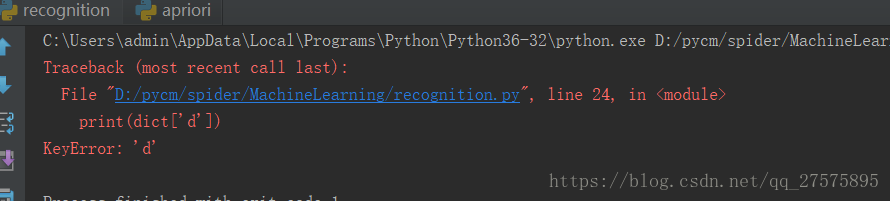
But if the key is not found, it will report: KeyError:
So you want to look at print(dict[‘d’])
Since the dict doesn’t have the key in it, it’s just going to report an error, and python gives us a great way to do that, which is to use

setdefault,The usage is as follows: dict.setdefault(key, [here set what you want the value to be if it doesn't exist, default is None]).


So here we can use this method to solve:

print(dict.setdefault('d',0))

If you want to add a new value to the dict, use setdefault. If you simply want to find the value, but the key does not exist, or you want to get a default value by reading the value through this key, then I recommend using defaultdict
I’ll start with this so-called Defaultdict from the Collections module, which is a collections module. Defaultdict (Function_factory) builds a Dictionary-like object where the value of the key is assigned by itself, but the type of value is an instance of a class in the Function_Factory and has a default value. Another concept introduced here is factory functions. Python’s factory functions are those built-in functions that are class objects, and when you call them, you’re actually creating an instance of a class. Int (), STR (),set(), etc.

import collections
s = [('yellow', 1), ('blue', 2), ('yellow', 3), ('blue', 4), ('red', 1)]
d = collections.defaultdict(list)
for k, v in s:
    d[k].append(v)
print(d['yellow'])
print(d['white'])
print(list(d.items()))

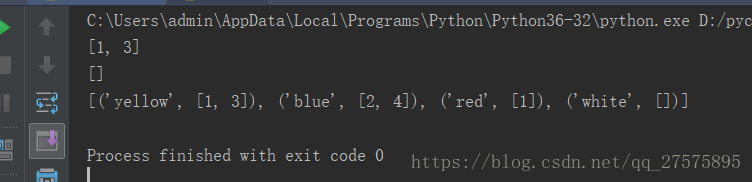
Our final output is as follows:

We can see that when d has no corresponding key, it returns an empty list, because the factory function we used when we set defaultdict is list, and the default value of list is empty list. Now let’s see what would happen if the factory function was set()

import collections
s = [('yellow', 1), ('blue', 2), ('yellow', 3), ('blue', 4), ('red', 1)]
d = collections.defaultdict(set)
for k, v in s:
    d[k].add(v)
print(d['yellow'])
print(d['white'])
print(list(d.items()))

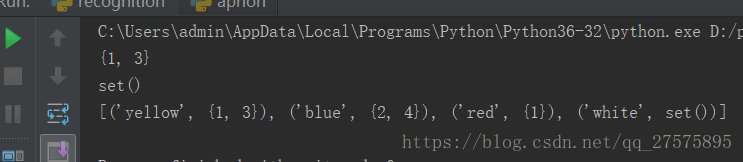
The output is as follows:

Can’t create PDF file with font Calibri bold error resolution

Error condition:

%%[ ProductName: Distiller ]%%
Mangal not found, using Courier.
%%[ Error: invalidfont; OffendingCommand: xshow ]%%

Stack:
[141 0]
()


%%[ Flushing: rest of job (to end-of-file) will be ignored ]%%
%%[ Warning: PostScript error. No PDF file produced. ] %%

How to Fix?
are you sure you have Calibri bold installed on your machine? Also, you may go to “Devices and Printers”
right click on Adobe PDF printer choose printer preferences from Adobe PDF settings tab uncheck “Rely on system fonts; do not use documents fonts”

How to Fix xterm Xt error: Can’t open display: xterm: DISPLAY is not set

When you run xterm, an error occurs as follows:
xterm Xt error: Can’t open display:
xterm: DISPLAY is not set
My system CENTOS6.2
Solutions:
1. First, make sure you have x11: yum-y install xorg-x11-xauth
2. Secondly, modify the configuration file: /etc/ssh/sshd_config
AllowTcpForwarding yes
X11Forwarding yes
ForwardX11 yes or (ForwardX11 trusted)

3. Restart

WordPress update failed 429 too many requests (How to Fix)

Why is this happening?
This is because the OFFICIAL CDN of WordPress blocks some Chinese IP. How to solve it?
1. Download the offline installation package from various channels
2. Functions.php code points to the domestic mirror installation package
The code is from WS234.com

//WordPress Custom upgrade packages
add_filter('site_transient_update_core', function($value){
    foreach ($value->updates as &$update) {
        if($update->locale == 'zh_CN'){
            $update->download   = 'https://ws234.com/img/wordpress-5.3.1-zh_CN.zip';
            $update->packages->full = 'https://ws234.com/img/wordpress-5.3.1-zh_CN.zip';
        }
    }
    return $value;
});

3. Use plug-in WP-China-Yes
“The Real Bad Guy” has set up a cache acceleration node in Mainland China to speed up the access of WordPress official service in Mainland China and avoid 429 error. This node can accelerate the “plugins and theme stores” you see in the background of the WordPress website, including the download of theme plug-ins and the loading of images in the mall, etc.
In order to enable more WordPress users to use the Mainland acceleration node, “The Real Bad Guy” has developed the WP-China-Yes plug-in, in order to help you easily and succinctly replace the service links.
Reference source:
https://www.wpdaxue.com/wordpress-org-429-too-many-requests.html#comment-30578
https://www.ibadboy.net/archives/3204.html
https://github.com/sunxiyuan/wp-china-yes
4. Use the plug-in kill 429
Lightwave recently developed a plugin, Kill 429, which solves the problem of 429 error reporting and quickly installs WordPress versions, themes and plugin updates by optimizing the network of the server in China to access the WordPress data server. The plug-in comes with its own circuit, which can be modified to its own circuit.
But it seems that the current built-in circuit is not very good
Reference source
https://www.wbolt.com/plugins/kill-429?invite=2363
https://static.wpdaxue.com/img/2013/08/kill-429.1.0.0.zip

java.util.zip.zipexception: error in opening zip file

java.util.zip.ZipException: error in opening zip fileThe literal meaning of this question is that the compression package cannot be opened,
The problem I have here is that the JAR package is corrupted and won’t open.The Linux system can use the command to determine if the JAR is normal:

jar -vtf xxx.jar

view the jar archive directory

[root@localhost classes]# jar -h
Illegal options: h
Usage: jar {ctxui}[vfmn0PMe] [jar-file] [manifest-file] [entry-point] [-C dir] files ...
Options:
    -c create new file
    -t List archive directory
    -x Extracts specified (or all) files from the archive
    -u Update existing archives
    -v Generates detailed output from standard output
    -f Specify file name of file
    -m Contains inventory information from a specified inventory file
    -n Execute Pack200 normalization after creating a new profile
    -e for standalone applications that are bundled into the executable jar file
        Specifying application entry points
    -0 Storage only; does not use any ZIP compression
    -P Preserves leading '/' (absolute path) and "..." (parent directory) components in filenames (parent directory) components
    -M Inventory file without creating entries
    -i generates index information for a specified jar file
    -C changes to the specified directory and contains the following files
If any file is a directory, it is recursively processed.
Specify the order of the list file name, file name and entry point name.
in the same order as the 'm', 'f' and 'e' tags are specified.

Example 1: Archiving two class files into a file called classes.jar: 
       jar cvf classes.jar Foo.class Bar.class 
Example 2: Using an existing manifest file 'mymanifest' and the
           Archive all files from the foo/ directory into 'classes.jar':
       jar cvfm classes.jar mymanifest -C foo/ .

if it can be opened, it means it is normal; if it cannot be opened, it means the jar package is damaged:

The following error occurs:

java.util.zip.ZipException: error in opening zip file
at java.util.zip.ZipFile.open(Native Method)
at java.util.zip.ZipFile.<init>(ZipFile.java:220)
at java.util.zip.ZipFile.<init>(ZipFile.java:150)
at java.util.jar.JarFile.<init>(JarFile.java:166)
at java.util.jar.JarFile.<init>(JarFile.java:130

The solution is to switch to a usable jar. If the jar isn’t working because of maven’s packaging, check out the blog: click the open link
Follow WeChat: community of programmers and developers

DNS server reported an error and shut down IPv6 and directory permissions

1、ipv6
[root@dns02 ~]# tail -f /var/log/messages Apr 19 10:17:27 localhost named[5470]: error (network unreachable) resolving ‘. /NS/IN’: 2001:503:ba3e::2:30#53

Apr 19 10:17:27 localhost named[5470]: validating @0x7fc4bc0008c0: . NS: no valid signature found

Apr 19 10:17:27 localhost named[5470]: error (no valid RRSIG) resolving ‘. /NS/IN’: 192.58.128.30#53

Apr 19 10:17:27 localhost named[5470]: error (network unreachable) resolving ‘. /NS/IN’: 2001:7fd::1#53

Apr 19 10:17:27 localhost named[5470]: error (network unreachable) resolving ‘. /NS/IN’: 2001:500:1::53#53

Apr 19 10:17:29 localhost named[5470]: error (network unreachable) resolving ‘. /NS/IN’: 2001:7fe::53#53

Apr 19 10:17:29 localhost named[5470]: validating @0x7fc5240008c0: . NS: no valid signature found

Apr 19 10:17:29 localhost named[5470]: error (no valid RRSIG) resolving ‘. /NS/IN’: 192.33.4.12#53

Apr 19 10:17:31 localhost named[5470]: error (network unreachable) resolving ‘. /NS/IN’: 2001:500:12::d0d#53

Apr 19 10:17:31 localhost named[5470]: error (network unreachable) resolving ‘. /NS/IN’: 2001:500:a8::e#53

Add
[root@dns02 slaves]# cat /etc/sysconfig/named
OPTIONS=”-4″

2. Authority
Apr 19 10:40:01 localhost named[21023]: dynamic/managed-keys.bind. jnl: open: permission denied
Apr 19 10:40:01 localhost named[21023]: managed-keys-zone ./IN: keyfetch_done:dns_journal_open -> unexpected error
Apr 19 10:40:02 localhost named[20752]: managed-keys-zone ./IN: No DNSKEY RRSIGs found for ‘. ‘: success
[root@dnsmaster named]# chown -R root:named dynamic/

keytool error java.io.IOException:keystore was tampered with,or password was incorre

Keytool error: Java. IO. IOException: keystore was tampered with, or the password was incorrect

The inscription 2012-01-15

D:\> Keytool – import – trustcacerts – alias javacas – the file “D:/Tomcat 6.0/conf/myserver. Cert” – keypass 123456 – keystore “% JAVA_HOME %/jre/lib/security/cacerts”

The following error occurred when keytool generated the root certificate:
Keytool error: Java. IO. IOException: keystore was tampered with, or the password was incorrect

The reason is that the cacerts file will exist in the specified directory, backup it, remove it, and then execute the command Ok