Author Archives: Robins

Some problems in using arrays

/*
* array note some issues
*/
#include < iostream>
using namespace std;
Int main()
{
const int ArraySize = 5;
// initializes the elements in the array, and the uninitialized elements are by default filled with the value 0, representing the NULL character (NULL or \0)
int arr[ArraySize] = {10,3,5};

// array name, which represents the starting address of the first element (direct array name is recommended)
cout < < “arr = ” < < arr < < endl;
// array is a collection, take the address of the array name, get is the first address of the collection represented by the array (generally not recommended to use the address of the array name)
cout < < “& arr = ” < < & arr < < endl;

{
/* array name itself is not a variable, so it does not occupy storage space, nor can it be used to store data; ,
, which simply represents a data, as a value, it represents the address of the first data element in the array. */
// for example, the following is wrong!!
/* compile times wrong: assigning to an array from the an, initializer list */
// arr = {10,16,8};
// therefore, arrays cannot be assigned, only array elements can be initialized or assigned.
}
// if an array is defined and not initialized, its output will be garbage instead of having no value
/*cout < < “No array initialization, garbage data output!” < < endl;
for(int I = 0; i ! = ArraySize; I++)
cout & lt; < arr[i] < < “‘;
cout & lt; < endl;

// input data, assign values to data elements in arr array
/* even if the number of input data elements is greater than the length of the array, cin will only extract required data from the input buffer according to the length of the array
, while the remaining data will be left in the input buffer for use next time */
//cout < < “The input data are:”;
//for(int I = 0; i ! = ArraySize; I++)
// cin & gt; > arr[i];

// below are three different ways to output the address of each array element in memory
/*cout < < “Method 1:” < < endl;
for(int I = 0; i ! = ArraySize; I++)
cout & lt; < “& arr[” << i << “] = ” < < & arr[i] < < endl;
cout & lt; < “Method two:” < < endl;
for(int I = 0; i ! = ArraySize; I++)
cout & lt; < “[arr+” << i << “] = ” < < arr+i < < endl;
cout & lt; < “Method 3:” < < endl;
for(int I = 0,*p = arr; p ! = (arr+ArraySize) & & i ! = ArraySize; I++ p++)
cout & lt; < “p -[” << i << “]= ” < < p < < endl; */

/* the following four methods of outputting elements in an array have no errors;
the compiler changes the brackets in the array at compile time :(both sides are equivalent to each other)
arr[I] < => * (arr + I)
* (arr + I) & lt; => * (I + arr)
* (I + arr) & lt; => I (arr)
arr [I] < => I [arr]
I is the offset, indicating the number of elements of the offset first element */
/*for(int I = 0; i ! = ArraySize; I++)
cout & lt; < arr[i] < < “‘;
cout & lt; < endl;
For (int I = 0; i ! = ArraySize; I++)
cout & lt; < *(arr+i) < < “‘;
cout & lt; < endl;
For (int I = 0; i ! = ArraySize; I++)
cout & lt; < i[arr] < < “‘;
cout & lt; < endl;

for(int* p = arr; p ! = (arr+ArraySize); P++)
cout & lt; < *p < < “‘;
cout & lt; < endl; * /

cout <
cout < < “The consequences of a cross-border visit!” < < endl;
int iNum = 123,iLen = 90;
int array[7] = {10,3,6,8,5,9,7};
for(int I = -2);
for(int I = -2);
for(int I = -2); i ! = 9; I++)
cout & lt; < array[i] < < “‘;
cout & lt; < endl;

cout & lt; < iNum < < “—” < < iLen < < endl;
// Out-of-bounds storage of data can result in the value of other variables, and may even cause the program to crash (which didn’t happen, which is weird!!).
for(int I = -2; i ! = 7. I++)
cin & gt; > array[i];
for(int I = 0; i ! = 7. I++)
cout & lt; < array[i] < < “‘;
cout & lt; < endl;
cout & lt; < iNum < < “—” < < iLen < < endl;
return 0;
}
530 user cannot log in. Problem connecting to FTP server

After the 2008 server builds FTP, connect FTP with FlashFxp and prompt 530 User cannot log in.
But no matter how hard I tried to confirm it, the account password was definitely correct.
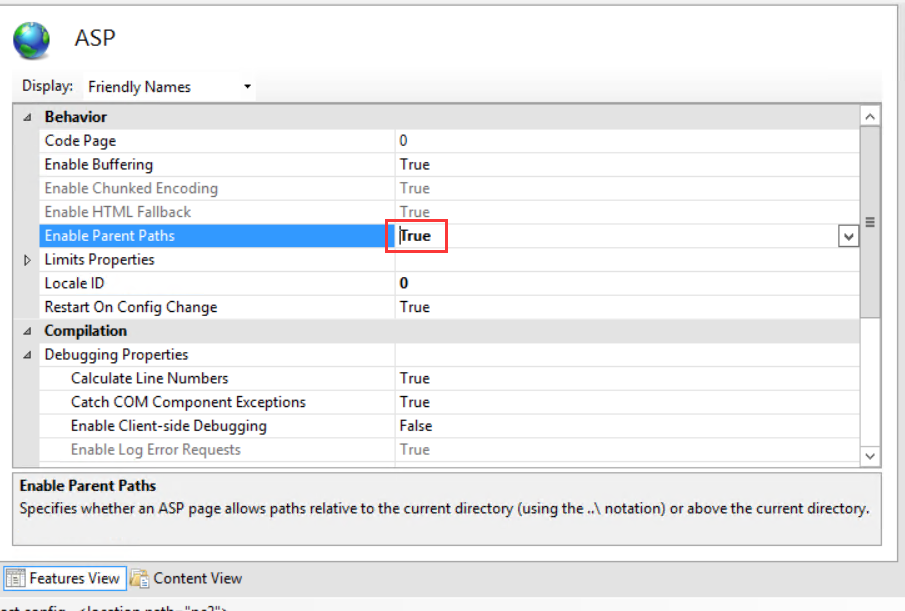
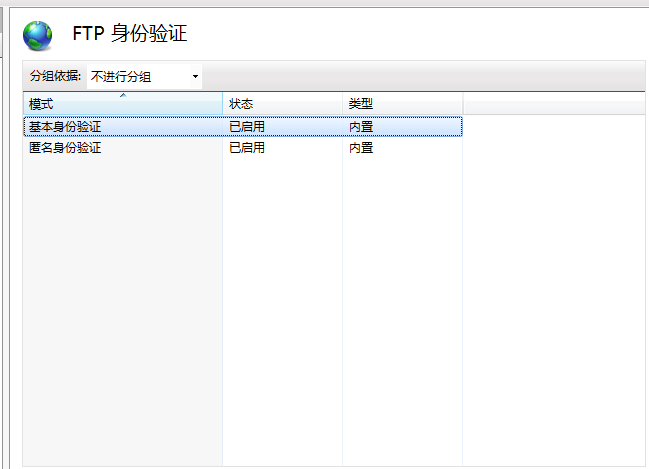
After looking up information on the Internet, I found that it was a problem of FTP authentication. The FTP authentication of IIS manager enabled both basic and anonymous authentication, and then it was very hot

Solution to the error code of 0x80040154 in COM / ole call

1. The background
In the project development, in order to make C# call the original C++ developed OLE interface program, the following method was adopted to establish C++CLI project as an intermediate DLL, with the following advantages:
(1) on the one hand, he can better use C++ to access OLE API functions, and the original C++ development of OLE programs better combination;
(2) on the other hand, C# can easily reference C++CLI DLL, so that the implementation of C# code on the old version of OLE program calls quickly;
(3) low coupling, easy to test, about the correctness of OLE interface and C++CLI, you can independently set up a test project to test.

Therefore, C# projects utilize the invocation relationship of C++ OLE as follows:
C # = = & gt; > > C + + the CLR = = & gt; > > C + +, OLE

Problem 2.
In the real project, the OLE program is developed by another TEAM, we just call it. But during the testing process, the call to OLE interface in the latest test environment failed. Debug finds that the C++CLI failed to initialize the specified OLE program when calling the OLE interface with the error code 0x80040154, which means the following:

OLE error code 0x80040154. Class is not registered.

The main online solution is to call the RegSVR32 command to register your program. The purpose of registration is to establish the mapping relationship between ProgramID and CLSID in the registry. In my understanding, ProgramID is equivalent to our name. When we use the API to call the COM/OLE interface, we pass a plain string called ProgramID, and the API internally operates on the CLSID based on the mapping stored in the registry. There is a subkey in the registry with CLSID as key and its name is LocalService32. The corresponding key value of this key stores the local full path of the final OLE program. Finally, it is found that this key value in our test environment is wrong and does not point to the real OLE program path, thus causing failure in the initialization of OLE program. Given the wrong program path, the loader must fail.

3. Solutions

Modify the CLSID stored in the OLE program full path.

Error domain = nsurlerrordomain code = – 1001 “request timeout occurred in swift alamofire get request. ” UserInfo={NSUnderlyingErro

ErrorDomain =NSURLErrorDomain Code=-1001 “request timeout.” UserInfo={NSUnderlyingError=0x1c0a48310 {Error Domain=kCFErrorDomainCFNetwork Code=-1001 “(null)” UserInfo={_kCFStreamErrorCodeKey=-2102, _kCFStreamErrorDomainKey=4}}
For this reason, I have checked for a long time. There are many posts setting timeout on the Internet. However, this GET request returns this error without timeout. Here is an introduction to encoding usage scenarios
JSONEncoding. Default is placed in HttpBody, such as post requests
2. URLEncoding. Default is concatenated address in GET, such as GET request
3. URLEncoding(destination:. MethodDependent) is a custom URLEncoding. If the value of methodDependent is in GET, HEAD, and DELETE, it will be concatenated. The other methods are in the httpBody.
4. URLEncoding(destination:.httpbody) is placed in httpBody
So I replaced the previous JSONEncoding. Default with URLEncoding. Default
Alamofire.request(url, method: .get, parameters: nil, encoding:JSONEncoding.default, headers: [“Content-Type”:”application/json”]).responseJSON { (response) in
}
Alamofire.request(url, method: .get, parameters: nil, encoding:URLEncoding.default, headers: [“Content-Type”:”application/json”]).responseJSON { (response) in
}


Typeerror: ‘module’ object is not callable

This error means that the module is called as a function, but it itself cannot be called.
The problem arises because of the import mechanism.
There are two ways to import modules into Python: Import Module and From Module Import. The difference is that the former requires the module name to be used, while the latter does not.
Try again using the following import mode, with high probability, the problem will be solved.

from module import *

reference

    on the road, WWBhuzhenwei Sprite Fsky

.
.
2019-03-19 12:57:15 written in Shanghai

Solve the problem of non system disk or disk error, replace and strike any key when ready

Non-system disk or disk error, replace and Strike any key when ready. Not system disk or disk error such as check the original hard disk everything is normal under the circumstances. That is: the system installation process is not started at all. Another way to put it: Your installation disk did not boot the installation process.
to fix this problem you must go into the BIOS to set the boot order of the disk. If that doesn’t work you have to write down the boot partition table again with DISKGEN and that’s fine.

Solution to 800b0001 failure of Windows Update

This article source: http://blog.csdn.net/chaijunkun/article/details/8621232, reproduced please indicate. As I am not regular will sort out the relevant blog, the corresponding content will be improved. It is therefore highly recommended to view this article in its original source.
Microsoft recently released Internet Explorer 10 for Windows 7 SP1. Although the Internet Explorer browser has been despair, the weird style, “different” JS, do not know how many front-end staff brought extra working hours. But now that it’s out, I want to install it. As a result, there were problems with the installation. Share solutions.

Let me start with my environment: Windows 7 64 bit flagship SP1. I made important patches before and kept updating by some steward. But when I installed IE 10, I found the following prompts:

Well, as a follow-up, I found Windows Update. Then try to get the update. The result is the following 800B0001 failure:

I searched the Internet for a whole day but didn’t find a complete solution. The solution was found in a foreign article:
http://pcrepairhub.com/windows-update-error-800b0001/
Translate the key steps:
1. Re-register DLL:
The start menu opens a command prompt by entering CMD in the search box (or by opening the “Run” tool directly in Win+R). It is best to run the environment as an administrator. Execute the following commands one at a time:
REGSVR32 SOFTPUB.DLL (for XP, Vista and Win7)

REGSVR32 mssip32. DLL (for XP, Vista and Win7)

REGSVR32 WINTRUST. Vista and Win7)

REGSVR32 initpki. DLL (for XP and Vista only)
2. Reinitialize the download folder:
Create a batch file, and the script reads as follows:
net stop wuauserv
net stop CryptSvc
ren %windir%\system32\catroot2 catroot2.old
ren %windir%\SoftwareDistribution sold.old
net start CryptSvc
net start wuauserv
pause
It also needs to be run as an administrator.
My system was up and running after the above two steps:

In the meantime, IE10 will be installed smoothly:

If that doesn’t work, try the System Update Ready Tool:
The relevant introduction and download address are:
http://windows.microsoft.com/zh-cn/windows7/What-is-the-System-Update-Readiness-Tool

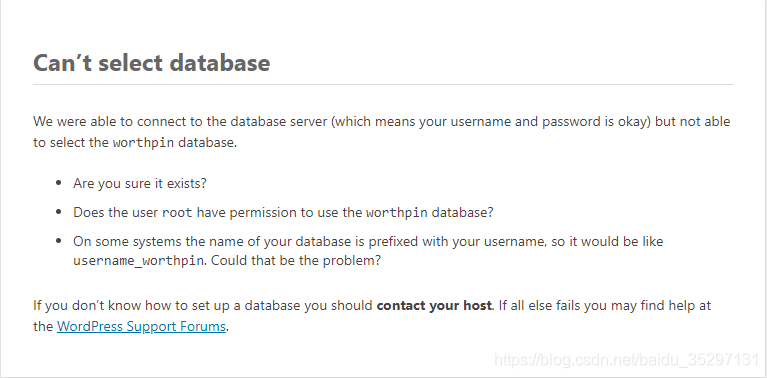
Wamp install WordPress prompt can’t select database

1. Make sure all of the following are correct when installing.

    /** The name of the database for WordPress */
    define( 'DB_NAME', 'database_name_here' );
    
    /** MySQL database username */
    define( 'DB_USER', 'username_here' );
    
    /** MySQL database password */
    define( 'DB_PASSWORD', 'password_here' );
    
    /** MySQL hostname */
    define( 'DB_HOST', 'localhost' );
    
    /** Database Charset to use in creating database tables. */
    define( 'DB_CHARSET', 'utf8' );
    
    /** The Database Collate type. Don't change this if in doubt. */
    define( 'DB_COLLATE', '' );


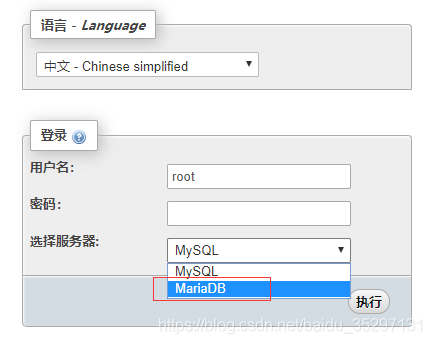
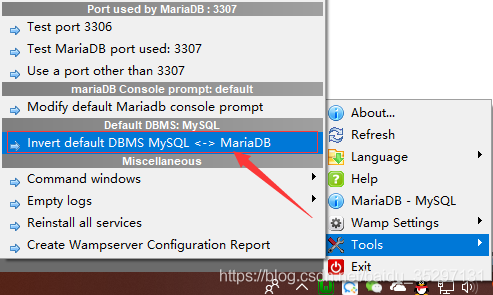
, then maybe you my hand is out of control switched the database to Mariadb, because wamp USES Mysql by default. Even though you have set up a corresponding database in Mariadb and have authorized it, it still doesn’t work.


switch back, right click, as shown in the picture below: