Author Archives: Robins

What are the web front end technologies? What are the differences between cookie and session

What are the Web front-end technologies?What’s the difference between a Cookie and a Session?Cookies and Sessions are common techniques in Web applications that can be used to track a user’s entire Session. But what’s the difference between them?Next thousand front Xiaobian will give you a brief introduction.



The main purpose
Cookie is born to solve the problem that HTTP stateless characteristics can not meet the interactive Web, mainly used for session state management (such as user login status, shopping cart, game scores or other information to record); Personalization Settings (such as user-defined Settings, themes, etc.); Browser behavior tracking (e.g., tracking and analyzing user behavior).
Session is a mechanism used by the server to record the state of the client. It is simpler to use than Cookie, and it also increases the storage pressure of the server accordingly.
If the Cookie mechanism confirms the identity of the customer by checking the “pass” on the customer, then the Session mechanism confirms the identity of the customer by checking the “customer list” on the server. Session is equivalent to a client profile created by the program on the server. When the client visits, it only needs to query the client profile table.
Usage scenarios
Cookie technology can store information in different browsers, and can achieve multiple requests for data sharing, divided into temporary cookies and long-term cookies. If a Cookie has no expiry date set, the browser will delete the Cookie when it is closed. This Cookie is called a temporary Cookie. If a Cookie has an expiration date, then the browser will keep the Cookie until the expiration date. This Cookie is called a persistent Cookie.
Session is a communication state retention mechanism based on Cookie, which can store some information of a user on the server side. After creating a Session, the server returns the Session ID to the browser in the form of Cookie. If the browser is closed, it will carry the Session ID when visiting the server again. When the server finds that the browser brings the Session ID, it will use the corresponding Session in memory to serve it.
What is the relationship between a Cookie and a Session
If a Web front-end programmer is asked “What is the relationship between Cookie and Session?” during an interview, the answer is that both are produced for client-server interaction. Cookie writes the user’s data to the user’s browser, while Session technology writes the user’s data to the user’s own Session. A Session is an object, and its properties can be of any type (cookies can only be set as strings). Cookie is stored in the client side, the disadvantage is easy to forge, not secure, Session is stored in the server side, will consume server resources, Session implementation has two ways: Cookie and URL rewriting.
If you want to know more about cookies and sessions, or want to quickly advance to the front end of the Web, you can choose a major to learn, so that you can learn efficiently and quickly get employed.
 

Firewall CMD command in CentOS 7

 
In CentOS 7
Temporarily open FTP service
# is firewall – CMD – add – service = FTP
 
Open the FTP service permanently
# is firewall – CMD – add – service = FTP – permanent
Permanent ban
# is firewall – CMD – remove – service = FTP – permanent
success
 
Enabling Settings
# systemctl restart firewalld
 
Check if the Settings are in effect
# iptables – L – n | grep 21
 
ACCEPT the TCP – 0.0.0.0/0 0.0.0.0/0 TCP DPT: 21 ctstate NEW
Check firewall status
# is firewall – CMD – state
 
running
 
# systemctl stop firewalld
 
# is firewall – CMD – state
 
not running
 
 
# is firewall – CMD – list – all
Public (default) interfaces: sources: services: dhcpv6-client FTP SSH ports: masquerade: no forward-ports: ICMP-blocks: rich rules:
 
The name of the service in FirewallD
# firewall-cmd –get-service amanda-client bacula DHCP dhcpv6 dhcpv6-client DNS FTP high-availability HTTP HTTPS iMAP ipp ipp ip-client ipsec kerberos kpasswd ldap ldaps libvirt libvirt-tls mdns mountd ms-wbt mysql nfs ntp openvpn pmcd pmproxy pmwebapi pmwebapis pop3s postgresql proxy-dhcp radius rpc-bind samba samba-client smtp ssh telnet tftp tftp-client transmission-client vnc-server wbem-https
 
Query the enabling status of the service
# firewall-cmd –query-service FTP yes # firewall-cmd –query-service SSH yes # firewall-cmd –query-service samba no # firewall-cmd –query-service HTTP no
Join the Port you want to open
# firewall-cmd –add-port=3128/ TCP # firewall-cmd –list-all public (default) interfaces: sources: services: dhcpv6-client FTP SSH ports: 3128/ TCP masquerade: no forward-ports: firewall-cmd –add-port=3128/ TCP # firewall-cmd –list-all public (default) interfaces: sources: services: dhcpv6-client FTP SSH ports: 3128/ TCP masquerade: no forward-ports: The icmp – blocks: rich rules:


Phpcms development problems and Solutions

Problem: the foreground user cannot register or log in, and the backstage member management function also fails.
Customer demand: the database is only for internal use of the school and not open to the outside world. Therefore, it is necessary to set permissions so that users can browse and use the database after logging in. Users can add the database uniformly in the background.
Solution: first solve the background can not add operation user problem, and then solve the foreground can not login problem. Find the corresponding controller method, the template output via var_dump(), and pinpoint which function and which line failed. The front page reviews the elements, looking at network and console.
Error: Missing the \phpsso_server module file and the \ PHPCMS \templates\default\content\message.html file in the root directory.
Error reason analysis: the controller to add membership and login registration will refer to the function in PHPSSO to make judgment, because the file was deleted, so the missing method led to error judgment, and the operation failed.
from my copy the file on the server came in and found still fails, and in my project running on the server, there are doubts still lack of a file or the server configuration problem, the last row of fault detection is phpsso there are database configuration, as well as the domain name configuration, problem solving after the change.
at this time there was a problem again, log in at the front desk, it found that there will be a 500 error, then there is no any other error message, at this point the server error log (\ HwsApacheMaster \ Apache \ logs \ the error log) found errors for * * “Premature end of script headers (script head early end)” * *, received at this time a bit, so online on baidu, found that writing is a bit complicated to see different, said the reasons are not enough file permissions, CGI permissions: I searched how to configure and start CGI. I first changed the configuration on my server according to the operation (that is, changed the PHP configuration) and found that it still works normally, indicating that it is not a CGI problem. File permissions also changed to find or report error.
here is a little collapsed and no more errors, didn’t also found online to effective solutions.
later still use old way: by var_dump () and die, fault line by line. \ PHPCMS \libs\functions\global.func. PHP \ PHPCMS \libs\functions\global.func. PHP \ PHPCMS \libs\functions\global.func
function showMessage (MSG,url_forward = ‘goback’, ms=1250,dialog = ‘ ‘, $returnJS = ‘) {
(defined(‘ IN_ADMIN ‘)) {
i>de (admin::admin_tpl(‘ showMessage ‘, ‘admin’));
} else {
clude (template(‘ content ‘, ‘message’));
}
exit;
>
>
>
>
>
>
>
>
>
>
>
> 2. When there is no obvious error, the most important thing to solve the problem is patience, calm down analysis will always solve. The solution is simple, use var_dump and die background output, foreground view, line by line positioning;
3. The first step can solve most problems independently, and the second step can improve the time efficiency of solving problems.
Note: the
add background user controller:/PHPCMS/modules/member/templates/member_add TPL. PHP
analysis of related documents: /phpcms/languages/zh-cn/member.lang.php
/phpcms/modules/member/member.php
/phpcms/modules/member/classes/client.class.php
/phpcms/phpcms_server/phpcms/modules/phpsso/index.php
/phpcms/templates/default/member/mini.html
/phpcms/modules/member/index.php

Failed to push some refs to

error: failed to push some refs to
error: failed to push some refs to... error: failed to push some refs to...
Summarize the causes and solutions
No code submitted
You can use git status to see if you forgot to commit your code. If you forget, just submit it.

  git add .
  git commit -m "This is a new commit"
  git push origin master

Conflicts arise between local and remote

    strong coverage

      git push -f origin master
    
      first back to pull
      git pull –-rebase origin maste
      git push origin master
    

    record

Package summary of installing python with CONDA

Install Python with Conda package summary ## title
If you want to find which package, go to the official website and download it directly to this directory (my directory location)

CD C:\ProgramData\Anaconda3\Lib
\ ProgramData\Anaconda3\Lib
\
PIP install torchvision-0.1.8-py2.py3-none-any.whl
p install torchvision-0.1.8-py2.py3-none-any.whl
PIP install torchvision-0.1.8-py2.py3-none-any.whl
PIP install torchvision-0.1.8-py2.py3-none-any.whl . (here torchvision 0.1.8 – py2 py3 – none – any. WHL, is my at https://pypi.org/project/torchvision/0.1.8/#files to download python library)
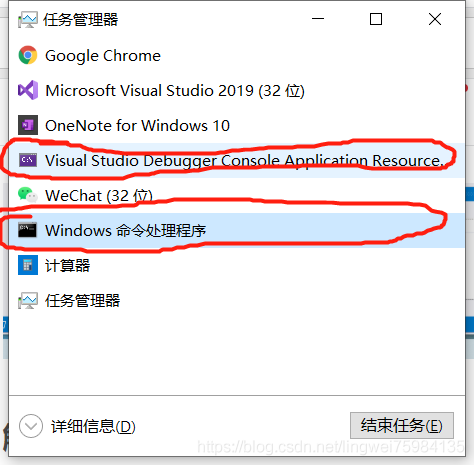
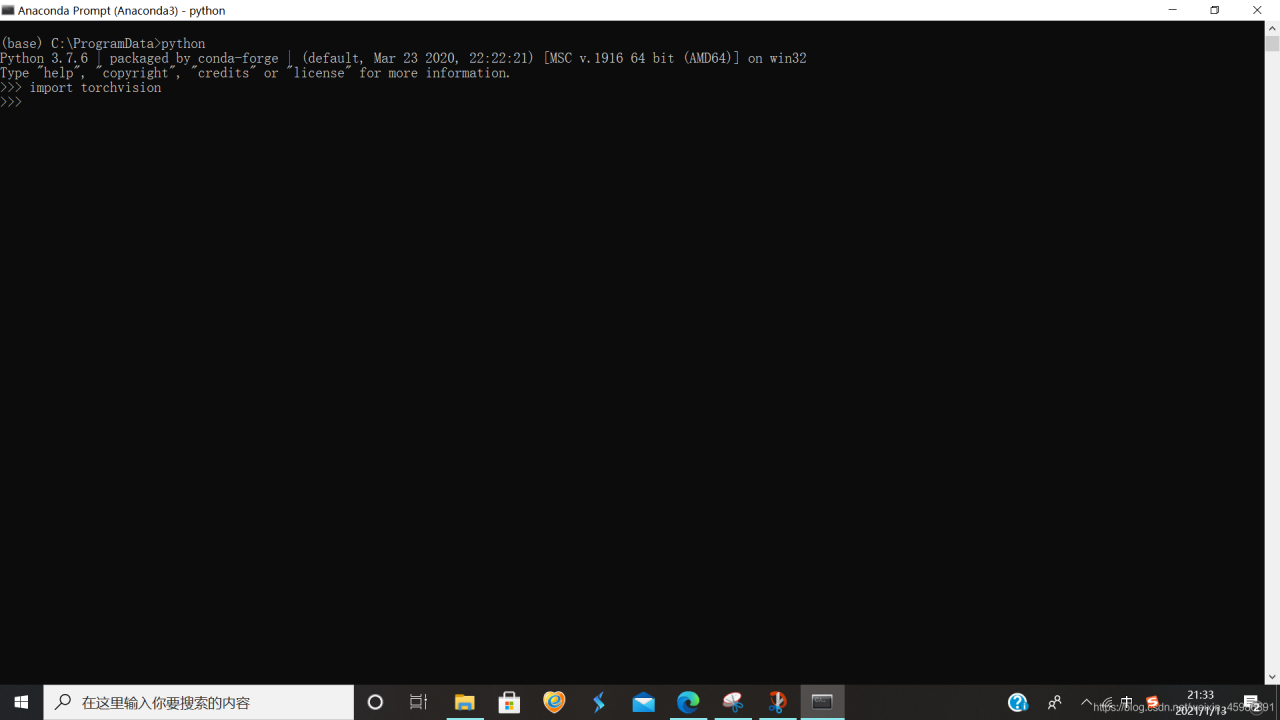
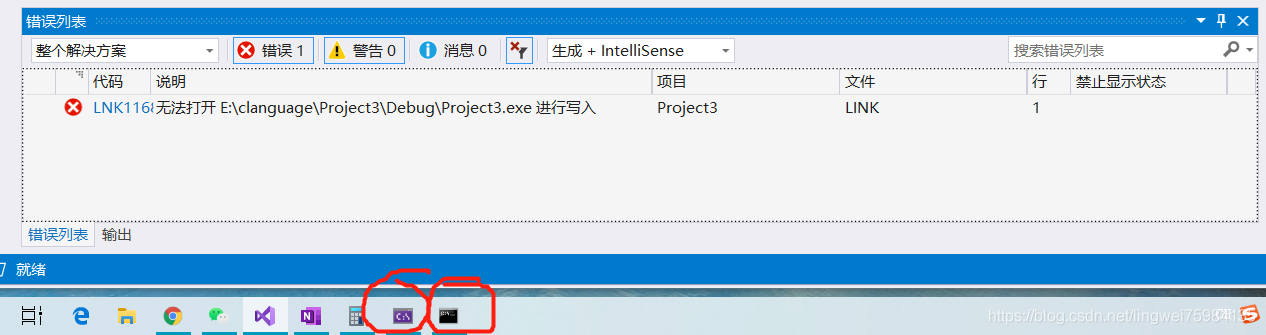
this time in the CMD import torchvision went wrong, but in the anaconda in the prompt is correct.
Everything will be all right!

Tesseract OCR text recognition using tess4j encapsulation

This paper uses Tesseract-OCR for text recognition. Tesseract is an open source OCR (Optical Character Recognition) engine that can recognize image files in multiple formats and convert them to text, and currently supports more than 60 languages (including Chinese). Tesseract was originally developed by HP, and later maintained by Google.

The first part of me first download good tesseract and jTessBosEditorFX, then prepare the training data, training data with the "temporary regulations of real estate registration" of 10 pictures, using Tesseract-OCR of the realization of the picture to text, that is, the contents of the picture translated into Chinese, Tesseract-OCR for pictures in English and digital often recognition rate is also ideal, but for Chinese existing english.traindata translation Chinese effect is not ideal, Tesseract provides training for the data, so you can first all the pictures in the first few pictures as training data, training at their own .traindata, and then use their own .traindata to give text recognition. Prepare the data

1. generate a tif file of the dataset using the jTessBoxEditer tool

2. subsequently generate 5 box files by means of the cmd command

3. Use jTessBoxEditor tool to open each tif for character and position correction, and then save

4. Then generate a TR file by command line

5. Then create a new font feature file

6. Next, extract characters from all files

7. Enter the command to generate the unicharset file, and then generate the shape file

8. Enter the command to generate shapetable file:, then generate the aggregated character feature file

9. Finally, merge all tr files to generate training results to form Traindata files

Specific operations are as follows.


1. Use jTessBosEditorFX to train the text, I trained a total of 10 sheets here, and then form the traindata file


! [insert image description here](https://img-blog.csdnimg.cn/20210112142019930.png?x-oss-process=image/watermark,type_ZmFuZ3poZW5naGVpdGk,shadow_10, text_aHR0cHM6Ly9ibG9nLmNzZG4ubmV0L3dlaXhpbl80NDgyMTkyMA==,size_16,color_FFFFFF,t_70#pic_center)

2. use Tess4j package, call tesseract to recognize text, first use the Chinese library chi_sim in tesseract to recognize

! [insert image description here](https://img-blog.csdnimg.cn/20210112142139714.png?x-oss-process=image/watermark,type_ZmFuZ3poZW5naGVpdGk,shadow_10, text_aHR0cHM6Ly9ibG9nLmNzZG4ubmV0L3dlaXhpbl80NDgyMTkyMA==,size_16,color_FFFFFF,t_70#pic_center)
3. Check the recognition results by text comparison software, the result error rate of 20%

! [insert image description here](https://img-blog.csdnimg.cn/2021011214224235.gif)
4. import 5 traindata trained by ourselves in tesseract's traindata folder for text recognition
! [insert image description here](https://img-blog.csdnimg.cn/2021011214232064.png?x-oss-process=image/watermark,type_ZmFuZ3poZW5naGVpdGk,shadow_10,text) _aHR0cHM6Ly9ibG9nLmNzZG4ubmV0L3dlaXhpbl80NDgyMTkyMA==,size_16,color_FFFFFF,t_70#pic_center)
5. Using text comparison software to check, the recognition rate is up to 98%
! [insert image description here](https://img-blog.csdnimg.cn/20210112141518372.png?x-oss-process=image/watermark,type_ZmFuZ3poZW5naGVpdGk,shadow_10,text_aHR0cHM6Ly9ibG9nLmNzZG4ubmV0L3dlaXhpbl80NDgyMTkyMA==,size_16,color_FFFFFF,t_70#pic_center)


CSS text more than 2 lines hidden and show ellipsis

Hide the text beyond two lines and show the ellipsis code as follows:

{
    overflow: hidden;
    text-overflow: ellipsis;
    word-break: break-word;
    display: -webkit-box;
    -webkit-line-clamp: 2; 
    -webkit-box-orient: vertical;
}

/* Autoprefixer: off */ If you find that two lines of text are displayed but no ellipsis is shown, add the following code:

/* autoprefixer: off */
{
    overflow: hidden;
    text-overflow: ellipsis;
    word-break: break-word;
    display: -webkit-box;
    -webkit-line-clamp: 2;
    -webkit-box-orient: vertical;
}

Configuration of springboot + Druid connection pool

# These 4 parameters key without druid can also be used, that is, you can also use the above 4 parameters
spring.datasource.druid.url=jdbc:mysql://localhost:3306/test?useUnicode=true&characterEncoding=utf-8&useSSL=false&serverTimezone=UTC
spring.datasource.druid.username=root
spring.datasource.druid.password=123456
spring.datasource.druid.driver-class-name=com.mysql.jdbc.Driver

# The number of physical connections established at initialization
spring.datasource.druid.initial-size=5
# Maximum number of connection pools
spring.datasource.druid.max-active=30
# Minimum number of connection pools
spring.datasource.druid.min-idle=5
# Maximum wait time in milliseconds when getting a connection timeout link timeout
spring.datasource.druid.max-wait=60000
# Configure how long between detections for idle connections that need to be closed, in milliseconds Timeout for detecting non-core links
# Both as the interval for detection and as the basis for testWhileIdel execution
spring.datasource.druid.time-between-eviction-runs-millis=60000
# Minimum time for a connection to remain idle and not be evicted
spring.datasource.druid.min-evictable-idle-time-millis=300000
# The sql used to check if the connection is valid, requires a query statement 8 hour question 8 hours without communication with mysql mysql will actively close the link
spring.datasource.druid.validation-query=SELECT 1 FROM DUAL
# It is recommended to configure to true to not affect performance and to ensure security. detects when a connection is requested.
# If idle time is greater than min-evictable-idle-time-millis, execute validationQuery to check if the connection is valid.
spring.datasource.druid.test-while-idle=true
# Execute validationQuery when requesting a connection to check if the connection is valid.
spring.datasource.druid.test-on-borrow=false
# Execute validationQuery when returning a connection to check if the connection is valid.
spring.datasource.druid.test-on-return=false
# Whether to cache the preparedStatement, or PSCache, which is a huge performance boost for databases that support cursors, such as oracle.
# For example, oracle. it is recommended to turn it off under mysql. Not mysql side, link side, select * from student query cache

spring.datasource.druid.pool-prepared-statements=true
# To enable PSCache, you must configure it to be greater than 0. When it is greater than 0, poolPreparedStatements automatically triggers a change to true.
spring.datasource.druid.max-pool-prepared-statement-per-connection-size=50

#Tuning related: basically any project performance bottleneck 1.io 2.cpu computing volume
# configure monitoring statistics intercepted filters, after removing the monitoring interface sql can not be counted
spring.datasource.druid.filters=stat,wall

# connectProperties property to open mergeSql function; slow SQL record Slow query: add delete change check
spring.datasource.druid.connection-properties=druid.stat.mergeSql=true;
spring.datasource.druid.filter.stat.slow-sql-millis=1

# Merge monitoring data from multiple DruidDataSource
spring.datasource.druid.use-global-data-source-stat=true
# druid connection pool monitoring
spring.datasource.druid.stat-view-servlet.login-username=admin
spring.datasource.druid.stat-view-servlet.login-password=123
# exclude some static resources for efficiency
spring.datasource.druid.web-stat-filter.exclusions=*.js,*.gif,*.jpg,*.png,*.css,*.ico,/druid/*

These dependencies were not found

ERROR Failed to compile with 2 errors
These dependencies were not found:
@/views/enterprise_users/enterprise_verify.vue in ./src/router/index.js
@/views/enterprise_users/index.vue in ./ SRC /router/index.js
Vue :
br>
Vue :
Vue :
Vue :
>

>

Solve the problem that data cannot be input in idea console

IDEA console cannot be entered
If you are using IDEA and you find that you cannot input from the console while testing with JUnit, you need to make the following changes to make the configuration successful
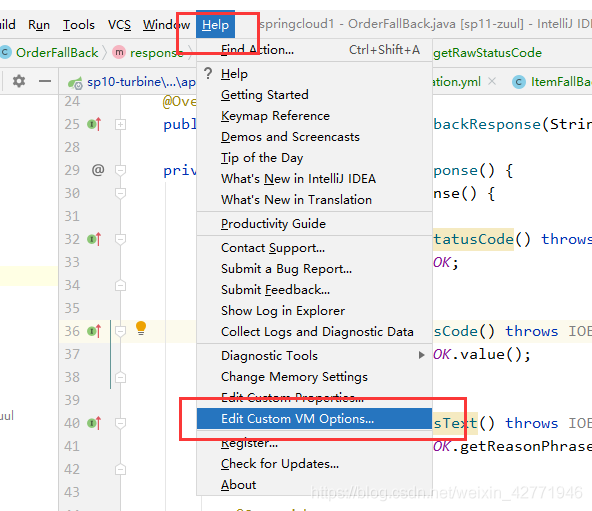
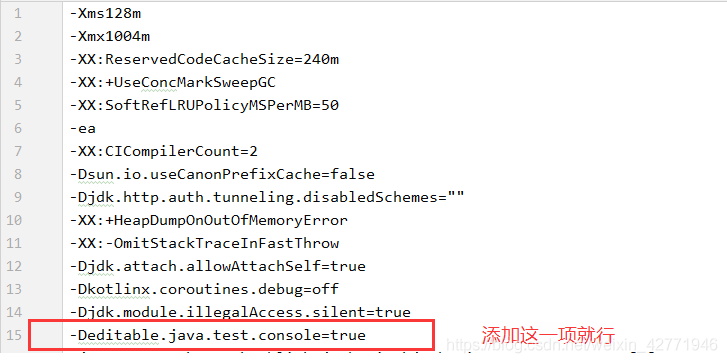
Step 1: Help –Edit Constom VM Options…

Step 2: open the configuration, add – Deditable. Java. Test. The console = true

If the configuration is successful, restart IDEA and the problem will be solved