Author Archives: Robins

Python combined with Matplotlib to add button

This article reprinted from https://www.it610.com/article/1282212275846922240.htm
if you have offended, please contact me
I looked for Matplotlib button for a long time before I found something I could understand. I don’t know if it was too simple, so no one wrote it.
ttonAxe = PLT.axes ([0.94, 0.03, 0.03, 0.03]) u>to set the position of the button.
tton1 = Button(buttonAxe, 'p2',color='khaki', overcolor='yellow') i>ed to create the Button and to set the color and the color of the Button when the mouse is over the Button.
third line tton1.on_clicked (show2) s>the function triggered after the button is clicked.
in addition to write after click the button to trigger functions should pay attention to write the event in the brackets, such as def show2 (event) :

buttonaxe = plt.axes([0.94, 0.03, 0.03, 0.03])
button1 = Button(buttonaxe, 'p2',color='khaki', hovercolor='yellow')
button1.on_clicked(show2)
Installing opencv Python in docker container

PIP opencv-python directly into docker:

pip install opencv-python

When importing cv2 again, an error will be returned:

ImportError: libgthread-2.0.so.0: cannot open shared object file: No such file or directory

>
>
>
>
>
>
>
>

pip uninstall opencv-python

To install it, use the following command:

pip install opencv-python-headless

【 reference 】

https://blog.csdn.net/Max_ZhangJF/article/details/108920050 https://github.com/Korea-Health-Datathon/KHD2020/issues/78

Jenkins series installation and deployment in docker mode

Jenkins install
1. Search for mirror

docker search jenkins

2. Pull the mirror image

docker pull jenkinsci/blueocean

3. Run

docker run -u root -d -p 8080:8080 -p 50000:50000 -v /var/jenkins-data:/var/jenkins_home -v /var/run/docker.sock:/var/run/docker.sock jenkinsci/blueocean

Browser access

http://ip:8080/

5. The initial password – this file
/var/Jenkins – data/secrets/initialAdminPassword

CONDA install torch error

If you can’t find the corresponding version, you need to add another PyTorch source

conda config --add channels https://mirrors.tuna.tsinghua.edu.cn/anaconda/cloud/pytorch/

Conda toggle Tsinghua source complete command:

conda config --add channels https://mirrors.tuna.tsinghua.edu.cn/anaconda/pkgs/free/
conda config --add channels https://mirrors.tuna.tsinghua.edu.cn/anaconda/cloud/conda-forge 
conda config --add channels https://mirrors.tuna.tsinghua.edu.cn/anaconda/cloud/msys2/
conda config --add channels https://mirrors.tuna.tsinghua.edu.cn/anaconda/cloud/pytorch/
conda config --set show_channel_urls yes

Maven’s jar package conflict; Maven’s introduction

How to resolve JAR package conflicts in Maven?Because of Maven’s implicit dependency on JARs, it can cause JAR package version conflicts in projects.
Maven comes with two ways:
Path Proximity Principle: Dependency on the path passed to the near priority.
Preference Declare Principle: Dependencies are defined in the POM file. The dependencies declared first prevail.
Manual configuration in two ways:
Method: by excluding rely on exclusion tag
lock version: through dependencyManagement lock version directly.
What is Maven and its life cycle?Maven is a project management tool that manages the entire life cycle of a project and manages the dependent JARs of a project. The life cycle of Maven includes: clean up, compile, test, package, install, and deploy with the following commands: MVN compile Java files into class files and output them to target directory. MVN test runs unit test classes. MVN package deploys include install. MVN deploy include install. And upload the project to the remote repository

Solution of MySQL data garbled problem

MySQL data garbled to solve the problem
Note for INSERT
The size of the data should be within the specified range of the column. For example, a string with master 80 cannot be inserted into a column with master 40. The data position listed in VALUES must correspond to the permutation position of the column to be added. You can use value in MySQL, but it is not recommended. It has the same function as values. Character and date data should be enclosed in single quotes. Double quotation marks can also be used as delimiters in MySQL. No column is specified or NULL is used to insert a null value.
View the encoding of MySQL’s internal Settings

show variables like 'character%';

The solution
Change the code of Client, Connection and Results to GBK to ensure that it is consistent with DOS command line code

tr> <>> set cha>er_set_connection = GBK; Set character_set_results= GBKtr> <>> set cha>er_set_results = GBK;

set

description

set GBK character_set_client =; Set character_set_connection= GBK
modify the results of the query character set GBK
Set all three at once

 set names gbk; 

Note: Exit DOS command line is invalid, need to configure each time

Spoop export hive to MySQL

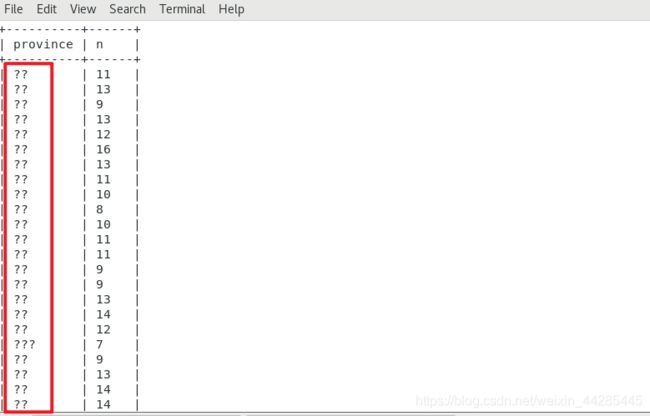
SQOOP Export: mysql> create a Hive table (????)
Like this:

 
I have modified it once before, and the method works together. However, when the server is changed and the MySQL library is newly created, method one fails to work, and method two takes effect.
 
Method one:
Create a new query window, or use the command to enter mysql> , the input

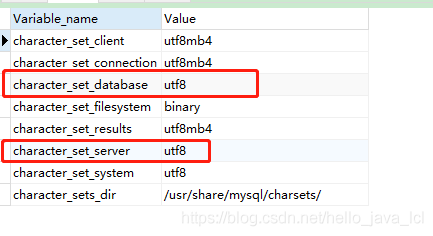
set character_set_database=utf8;
set character_set_server=utf8;

Show variables like ‘character%’; View the results:

SQOOP script with:?useUnicode=true& characterEncoding=utf-8
Import the data again without scrambling.
 
Method 2:
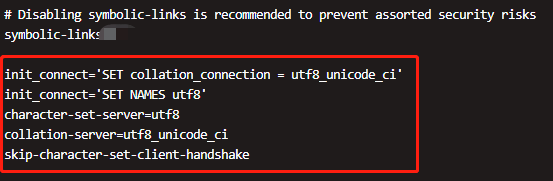
Modify the system file: /etc/my.cnf

vim /etc/my.cnf


Text:

init_connect=’SET collation_connection = utf8_unicode_ci’
init_connect=’SET NAMES utf8′
character-set-server=utf8
collation-server=utf8_unicode_ci
skip-character-set-client-handshake


Directing to /bin/systemctl Restart mysqld. Service (1) : Directing to /bin/systemctl Restart mysqld.
Sqoop plus?useUnicode=true& CharacterEncoding = UTF-8, Chinese garbled code problem resolved.
 
In the first method, the set modifies the configuration and restarts MySQL. This is probably the first reason why the configuration change does not work.