The purpose of asynchronous loading is to improve the rendering performance of web pages in some scenarios.
Common synchronous loading code:
<!DOCTYPE html>
<html lang="en">
<head>
    <meta charset="UTF-8">
    <meta http-equiv="X-UA-Compatible" content="IE=edge">
    <meta name="viewport" content="width=device-width, initial-scale=1.0">
    <title>Document</title>
    <script type="text/javascript"
        src="https://api.map.baidu.com/api?v=1.0&type=webgl&ak=Your%20key"></script>
    <style>
        html,
        body,
        #map {
            width: 100%;
            height: 100%;
            margin: 0;
            padding: 0;
        }
    </style>
</head>
<body>
    <div id="map"></div>
    <script>
        var map = new BMapGL.Map('map');
        var point = new BMapGL.Point(116.404, 39.915);
        map.centerAndZoom(point, 10);
        map.enableScrollWheelZoom(true);
    </script>
</body>
</html>
Asynchronous loading method:
idea is to avoid initialization loaded directly, but put the initialization process in the init () function (), for other contents page finished loading, add script tags and callback function calls the init function
<!DOCTYPE html>
<html lang="en">
<head>
    <meta charset="UTF-8">
    <meta http-equiv="X-UA-Compatible" content="IE=edge">
    <meta name="viewport" content="width=device-width, initial-scale=1.0">
    <title>Document</title>
    <style>
        html,
        body,
        #map {
            width: 100%;
            height: 100%;
            margin: 0;
            padding: 0;
        }
    </style>
</head>
<body>
    <div id="map"></div>
    <script>
        function init(){
            var map = new BMapGL.Map('map');
            var point = new BMapGL.Point(116.404, 39.915);
            map.centerAndZoom(point, 10);
            map.enableScrollWheelZoom(true);
        }
        window.onload = function(){
            var script = document.createElement('script')
            script.src="https://api.map.baidu.com/api?v=1.0&type=webgl&ak=Your%20key&callback=init"
            document.head.appendChild(script)
        }

    </script>
</body>
</html>
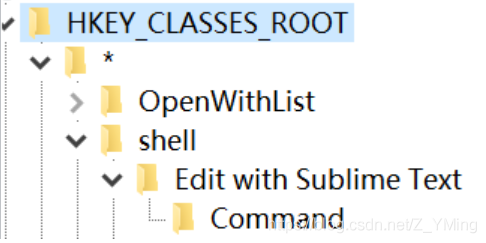
 Find the shell in “*” in “HKEY_CLASSES_ROOT”, right-click and create a new item “Edit with Sublime Text”, and right-click on “Edit with Sublime Text” and create a new item “Command”;
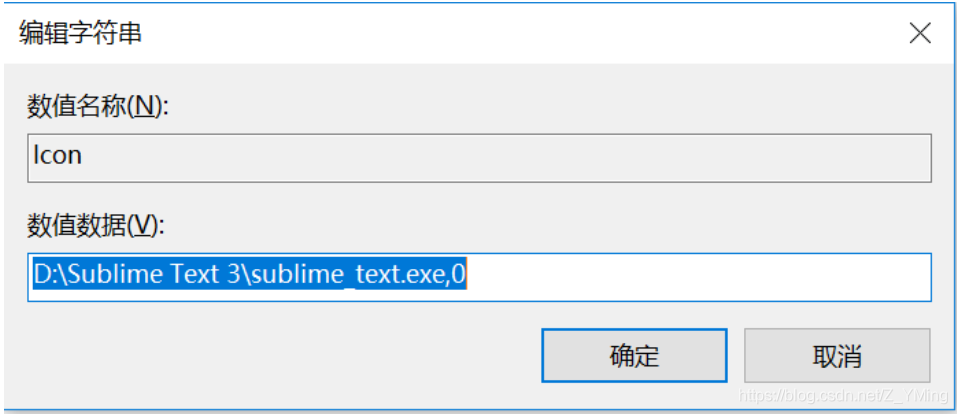
  Create a new string value in “Edit with Sublime Text” and name it “Icon”. The value is the installation path of ST, but be sure to add “,0 “after it;
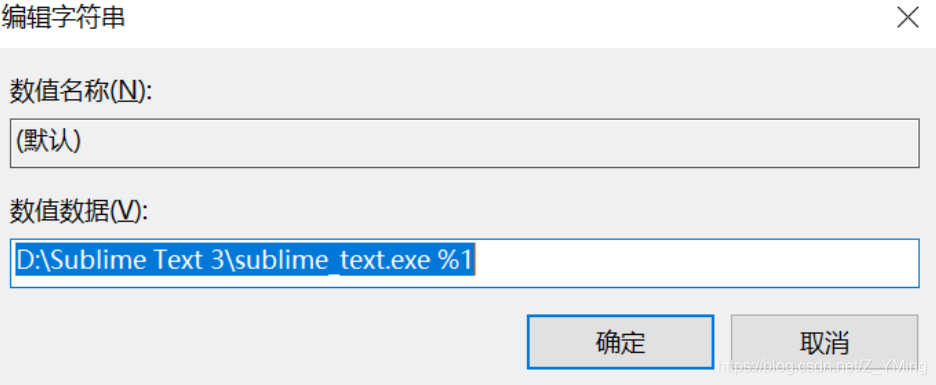
  double-click to edit the default values in the “Command”, add value for the same installation path of ST, but the back to add “% 1” – pay attention to the space;