CLion automatically adds add_executable
Install the C/C++ Single File Execution plugin, search for the C/C++ Single File Execution, find file-settings-plugins, and apply.
The preparations are complete. Next you can create a new C/ CPP file, enter the code, press Ctrl + Alt + Shift +E shortcut or right click in the code area and find Add Executable for Simple C/C++ File, then right click on the item area on the left and select Reload Cmake Project, select Auto-Reload so that it will automatically add to the executable after each right click on Add.

A method of generating subtitle file for MP3
In the current cloud computing, big data and artificial intelligence are so hot, all kinds of cloud services providing voice recognition are emerging. Recently, I tried to make a tool based on IBM Watson Speech to Text Service to help generate English MP3 subtitle files, I think it is good, and I share it as follows.
The tool is compiled in C#, and the specific idea is as follows:
Step 1: Use the embedded WebBrowser to access the relevant IBM service website: https://speech-to-text-demo.ng.bluemix.net/. The interface will look like this:
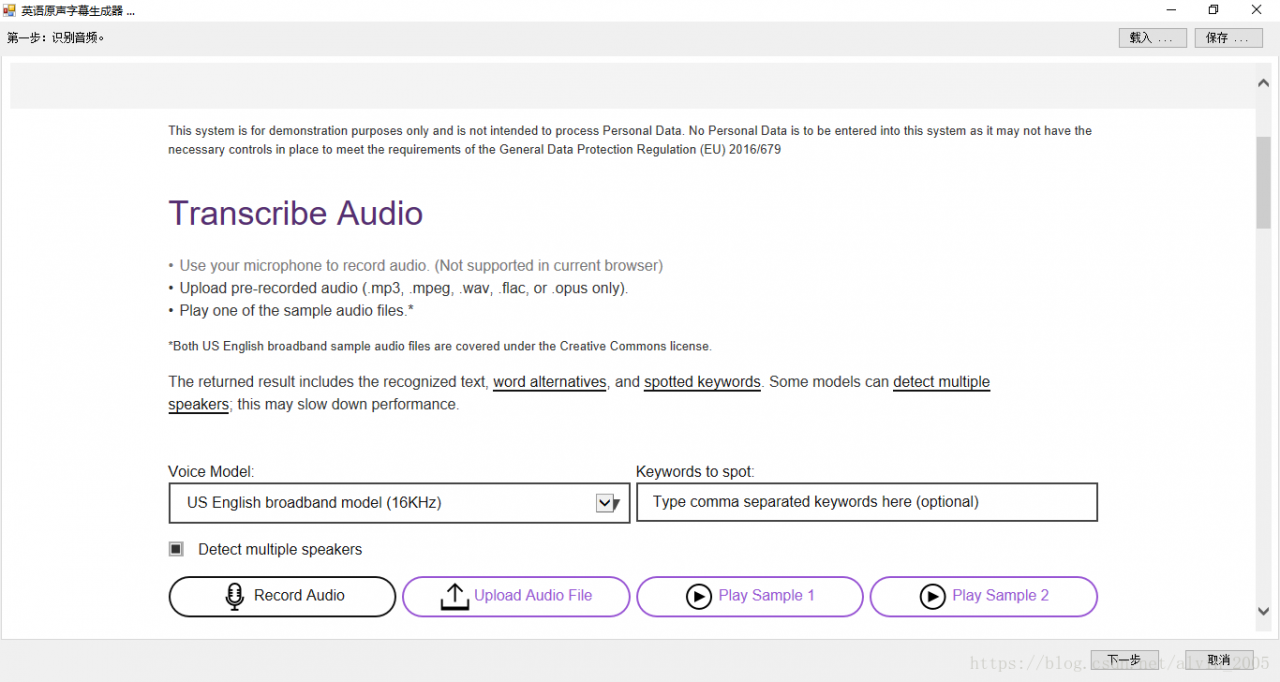
In this step, you need to manually click the “Upload Audio File” button of the webpage and select the MP3 Audio File to be subtitled. After the upload is successful, the site will start the automatic recognition process. Once you have identified the words, manually click on Word Timings and Alternatives at the bottom to see the sequence of the words you identified and the corresponding start time.
Note :(1) The save button at the top of the interface can save the identified webpage content to local HTM file, and you can click the load button to load it directly next time, without repeating the identification process.
(2) When clicking the “Next” button at the bottom of the interface, the program will automatically scan the web content to generate a dictionary list of words and time information, denoted here as lstDict, of type List< KeyValuePaire< string, string> > , each element in the list is a key-value pair, the Key stores the word, the Value stores the time information.
Step 2: Load the English manuscript. If the original is not available, copy the identified text from the Step 1 site under the Text TAB. The interface is shown below:
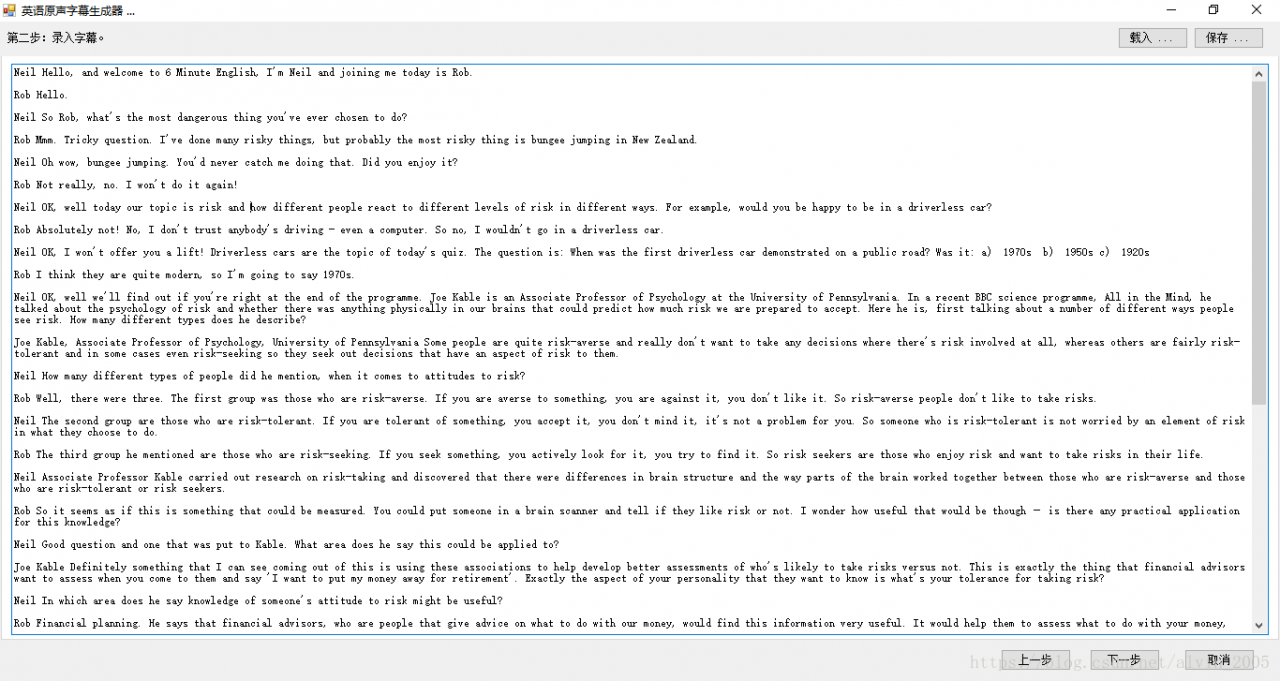
In this step, the original text as far as possible to meet the following requirements:
(1) Completely corresponding to audio text.
(2) Each line contains words as long as possible, which can improve the matching rate.
(3) Avoid non-English characters, especially Chinese or non-half-corner symbols.
Step 3. Generate the subtitles. The program will sequentially input the original line by line and the first step to identify the word time dictionary to match, in order to get the beginning time of each line of subtitles. The general idea is as follows:
(1) Word segmentation: Use regular expressions to split the current line into an array of words. The code is as follows:
string[] a = Regex.Split(value, @"\s+");(2) Denoising: remove or replace symbols that do not conform to English habits in each word in the array to symbols that conform to English specifications.
(3) Match: Match the array with the word time dictionary identified in the first step, lstDict, to get the start time of the subtitle for that line.
The following figure shows the interface of recognition result:
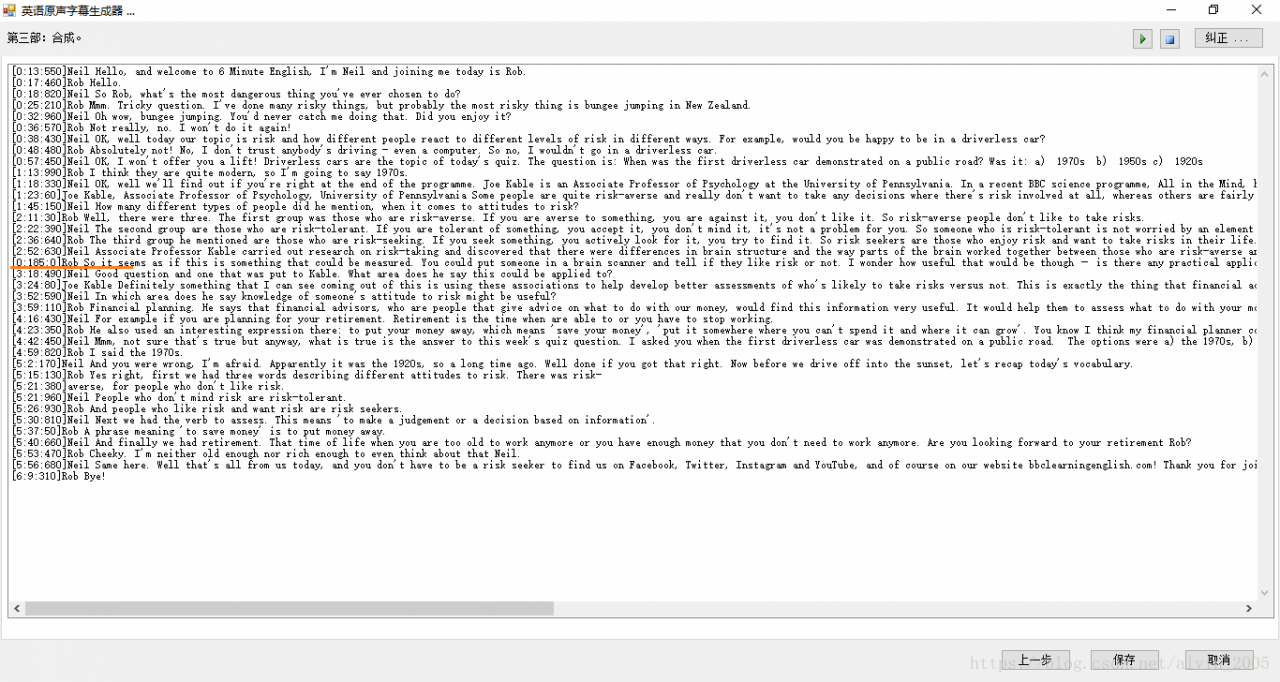
At this time, notice that the time marked in red in the figure is obviously incorrect, you can manually select the corresponding time through the “Correct” function at the top of the interface. The interface is shown below:
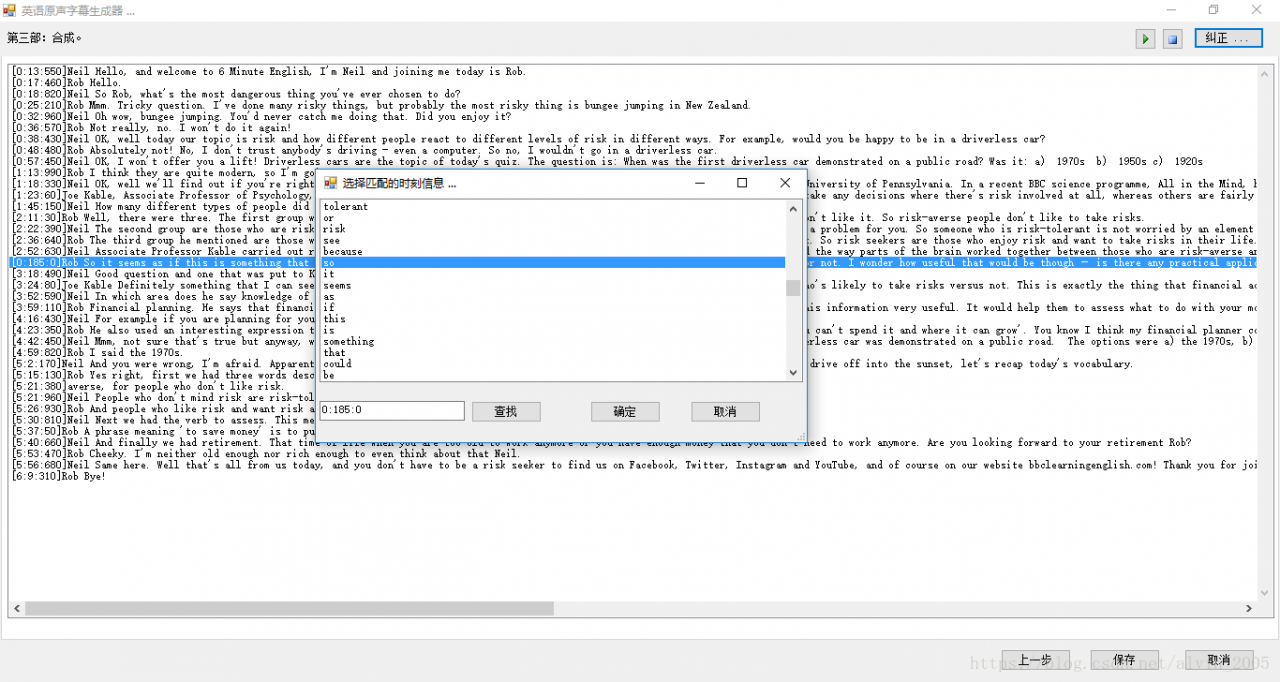
At this point, the subtitle information is matched, you can click the Save button at the bottom of the file to save the corresponding format of the subtitle file, currently provides support for.lrc and.smi formats.
Note: Click the play button at the top of the interface to select the audio file to play in real time and view the generated subtitle effect.
Finally, the download address is attached:
https://download.csdn.net/download/alvin_2005/10530316
How to Fix Cannot convert value of type Error
Error: Cannot convert value of type ‘org.apache.ibatis.session.defaults.DefaultSqlSessionFactory’ to required type ‘org.mybatis.spring. SqlSessionTemplate’ for property ‘sqlSessionTemplate’: no matching editors or conversion strategy foun
How to Fix:

It’s sqlSessionFactoryBeanName not sqlSessionTemplateBeanName
How to convert audio to subtitle (text) with Python?
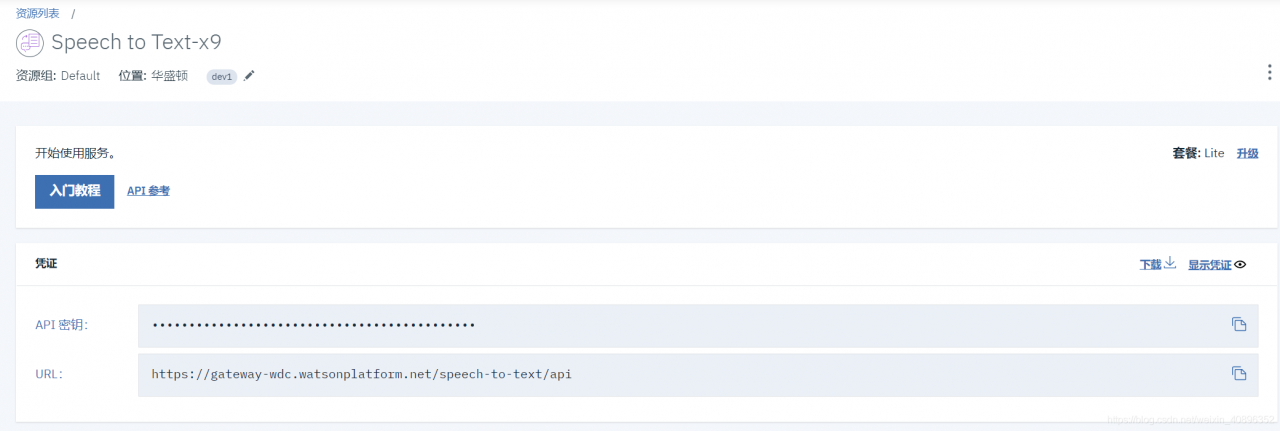
Using the curl command, you can use the URL to convert audio to text.
curl -X POST -u "apikey:{apikey}" --header "Content-Type: audio/flac" --data-binary @{path_to_file}audio-file.flac "{url}/v1/recognize"To do this, you need to use the curl command to do something that you want to do. To do this, you need to do something that you want to do. To do this, you need to do something that you want to do.
import requests

headers = {
    'Content-Type': 'audio/flac',
}

data = open('audio-file.flac', 'rb').read()
r = requests.post('https://gateway-wdc.watsonplatform.net/speech-to-text/api/v1/recognize', headers=headers, data=data, auth=('apikey', '***************************'))
print(r.text)
Test effect:
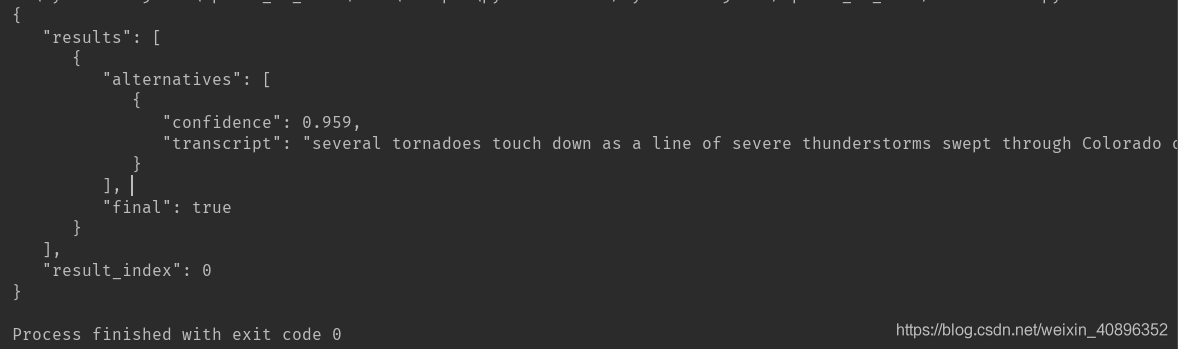
This doesn’t even need to pack well….. It’s OK to request the interface directly. Finally, attach the original version of the code to call the interface implementation method:
import speech_recognition as sr
import requests

harvard = sr.AudioFile('23.wav')
r = sr.Recognizer()
with harvard as source:
    audio = r.record(source)
print(type(audio))

IBM_USERNAME = '************************'
IBM_PASSWORD = '************************'

text = r.recognize_google(audio, username= IBM_USERNAME, password = IBM_PASSWORD, language = 'zh-CN')
print(text)
[Altium problem] “extra pin u1-22 in normal of part U1”
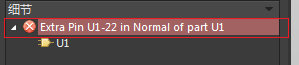
Cause analysis: the principle is that all modes of the components in the component library cannot match the introduced modes in PCB. The solution is either to complete or delete them until only one is left.
Delete solution:
1. Enter the library file. Duplicate a new component and rename it to “+Normal”.
2. Delete redundant modes:
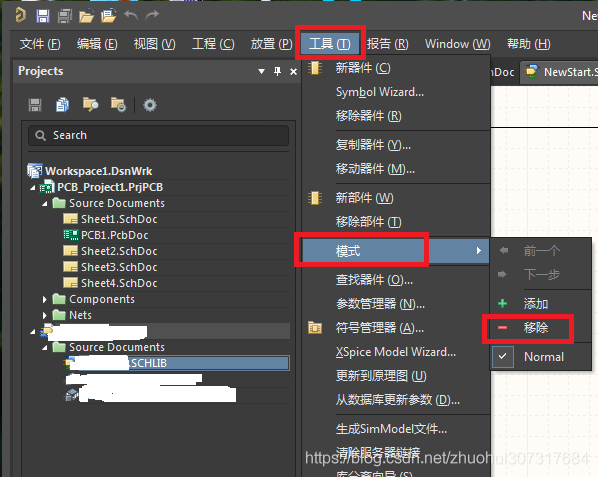
3. Then the compiler will not have this error.
Build a mybatis and it will appear session.selectOne Method error
Error:
org.apache.ibatis.exceptions.PersistenceException:
### Error querying database. Cause: java.lang. IllegalArgumentException: Mapped Statements collection does not contain value for com.helloword.mapper.UserMapper.xml
### Cause: java.lang. IllegalArgumentException: Mapped Statements collection does not contain value for com.helloword.mapper.UserMapper.xml
at org.apache.ibatis.exceptions.ExceptionFactory.wrapException(ExceptionFactory.java:30)
at org.apache.ibatis.session.defaults.DefaultSqlSession.selectList(DefaultSqlSession.java:150)
at org.apache.ibatis.session.defaults.DefaultSqlSession.selectList(DefaultSqlSession.java:141)
at org.apache.ibatis.session.defaults.DefaultSqlSession.selectOne(DefaultSqlSession.java:77)
at org.apache.ibatis.session.defaults.DefaultSqlSession.selectOne(DefaultSqlSession.java:71)
at test.Test.main(Test.java:43)
Caused by: java.lang. IllegalArgumentException: Mapped Statements collection does not contain value for com.helloword.mapper.UserMapper.xml
at org.apache.ibatis.session.Configuration$StrictMap.get(Configuration.java:888)
at org.apache.ibatis.session.Configuration.getMappedStatement(Configuration.java:721)
at org.apache.ibatis.session.Configuration.getMappedStatement(Configuration.java:714)
at org.apache.ibatis.session.defaults.DefaultSqlSession.selectList(DefaultSqlSession.java:147)
… 4 more
Solution.
See the error message, guess that it may be because there is a problem with the configuration file, first see if the <mapper> configuration in mybatis-config.xml is correct, see if there is no problem with the <mapper> configuration see if the path of namespace in UserMapper.xml is correct, check if there is no problem with UerMapper. xml is in the package of com.helloword.mapper, but this package is empty. Move the mapping file of UserMapper.xml to the package of entity class, and modify the configuration in one and two. After testing, the above error is still reported.
New error message
org.apache.ibatis.exceptions.PersistenceException:
### Error building SqlSession.
### The error may exist in com/helloworld/model/UserMapper.xml
### Cause: org.apache.ibatis.builder. BuilderException: Error parsing SQL Mapper Configuration. Cause: java.io. IOException: Could not find resource com/helloworld/model/UserMapper.xml
at org.apache.ibatis.exceptions.ExceptionFactory.wrapException(ExceptionFactory.java:30)
at org.apache.ibatis.session.SqlSessionFactoryBuilder.build(SqlSessionFactoryBuilder.java:52)
at org.apache.ibatis.session.SqlSessionFactoryBuilder.build(SqlSessionFactoryBuilder.java:36)
at test.Test.<clinit>(Test.java:30)
Caused by: org.apache.ibatis.builder. BuilderException: Error parsing SQL Mapper Configuration. Cause: java.io. IOException: Could not find resource com/helloworld/model/UserMapper.xml
at org.apache.ibatis.builder.xml.XMLConfigBuilder.parseConfiguration(XMLConfigBuilder.java:121)
at org.apache.ibatis.builder.xml.XMLConfigBuilder.parse(XMLConfigBuilder.java:99)
at org.apache.ibatis.session.SqlSessionFactoryBuilder.build(SqlSessionFactoryBuilder.java:50)
… 2 more
Caused by: java.io. IOException: Could not find resource com/helloworld/model/UserMapper.xml
at org.apache.ibatis.io.Resources.getResourceAsStream(Resources.java:114)
at org.apache.ibatis.io.Resources.getResourceAsStream(Resources.java:100)
at org.apache.ibatis.builder.xml.XMLConfigBuilder.mapperElement(XMLConfigBuilder.java:371)
at org.apache.ibatis.builder.xml.XMLConfigBuilder.parseConfiguration(XMLConfigBuilder.java:119)
… 4 more
Exception in thread “main” java.lang.NullPointerException
at test.Test.main(Test.java:41)
The error was: Problem creating SqlSession and reported a null pointer error for the main method. Solution: I was careless and wrote a wrong letter in the <mapper> configuration path of mybatis configuration file
Many unknown pins appear when converting the schematic diagram of Altium design to PCB
There were many unknown pins when the schematic diagram was converted to PCB. The first Update yesterday was still fine without any mistakes, but now it is not the second time
Solutions:
Delete the existing *.pcbdoc and create a new pcbdoc.
As to why I do that, I don’t know O
MDK keil template annotation template
When you write a program, you tend to follow certain norms. Good code style can improve the readability of the code, easy to maintain and upgrade. Here are some comment templates that mimic the code style of the STM32 official HAL library source code.
1. Add user comment template to MDK
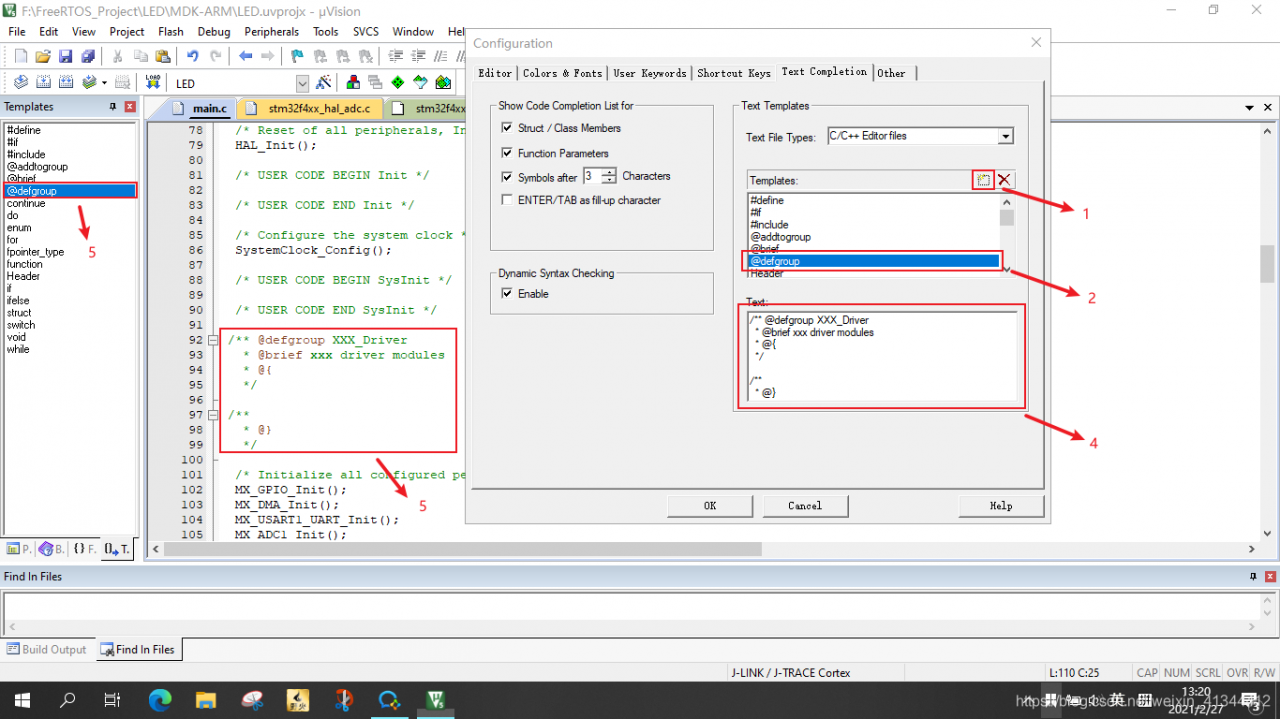
2. Use some code comment templates
Void bsp_dac1_Init(void) {void bsp_dac1_Init(void) {void bsp_dac1_Init(void) {void bsp_dac1_Init(void);
 /** @defgroup BSP_DAC_Driver
   * @brief xxx driver modules
   * @{
   */
     void bsp_dac1_Init(void);
 /**
   * @}
   */
void bsp_dac2_Init(void) is added to the BSP_DAC_Driver group.
   /** @addtogroup BSP_DAC_Driver
     * @{
     */
       void bsp_dac2_Init(void);
   /**
     * @}
     */
2.3 use formal code comments mode can enhance code can read a gender, use the following statement can be more comprehensive description.
@brief
te
@p>
@retval>>@retval
@brief
@brief
@note
@param
@retval
@retval
/**
  * @brief  Stop ADC data switch
  * @note   NONE
  * @param  NONE
  * @retval NONE
  */
void bsp_adc1_stop(void)
{
  ///
}
3, summarize
MDK’s Template function makes it easy to add a user’s code comment Template, improve the quality of the code, and facilitate subsequent maintenance and upgrade.
The element “extra pin The solution of “in normal of part” warning
Prompt a warning message in the title when the compilation of the ongoing project schematic is complete. After a search on the Internet, I found that someone had summed up the problem.
The principle is that the MODE of all the components in the component library cannot match the introduced MODE in PCB. Then what is MODE?
It’s clear when you look at the pictures you bought,
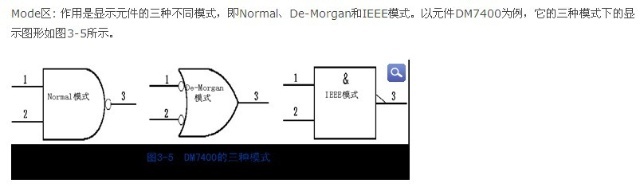
Mode means different view modes.
Then quickly open the schematic library in question components. Double-click to open the properties dialog box and you see the following
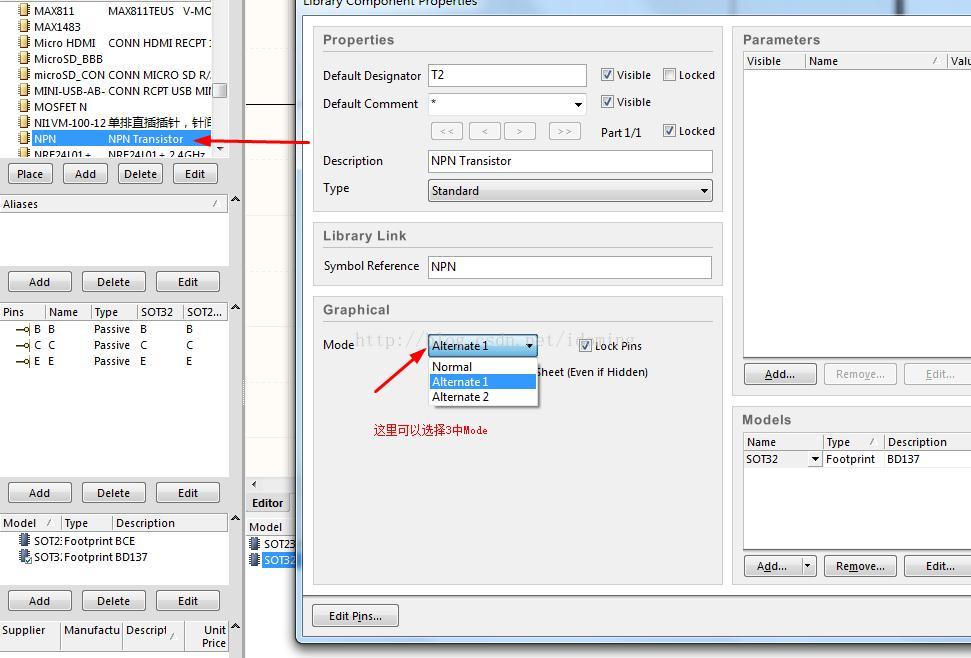
And then you have here
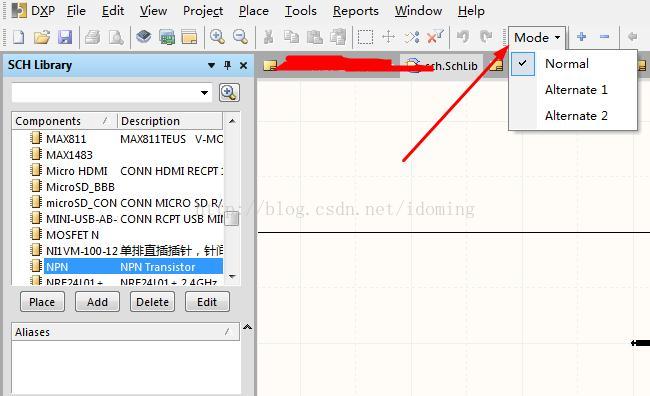
You can also select different views, select different views will find that the number of components pins in the three views is different! The analysis is the problem. The reason for this problem may be that when creating a new component, it is usually copied from other components. Only the component under Normal view is modified, but the component under other MODE is not modified at the same time. Since the device doesn’t need a few views, just delete the other views, leaving only Normal, and you should be OK. (or change the other views to have the same pin as Normal). So how do you delete it?The following figure
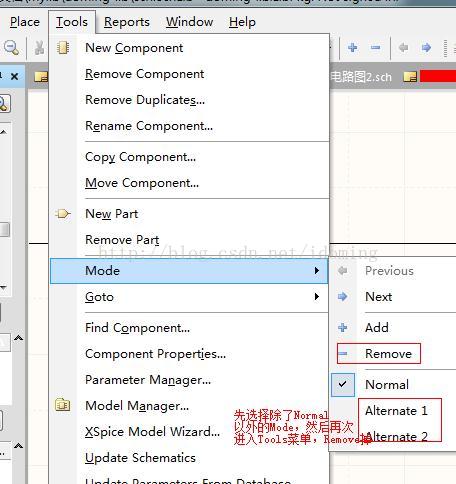
After deleting the device according to the above instructions, update the device, compile the schematic project again, and find that the problem is no longer there!
Solution of off grid pin in Ad
(1) Open AD and click “Project” – “Engineering Parameters”
(2) “Error Reporting” – “Cheesecake Associated with Others” – “Off-grid object” – Right click – “Cheesecake closed”
— — — — — — — — — — — — — — — — — — — — —
the author: Tang Lingyuan
source: CSDN
,
https://blog.csdn.net/u014473675/article/details/80629913 copyright statement: this article original articles for bloggers, reproduced please attach link to blog!
Solve the ad schematic compilation warning (off grid net label XXX at XXX)
Problem description:
AD compile schematic diagram, warning: 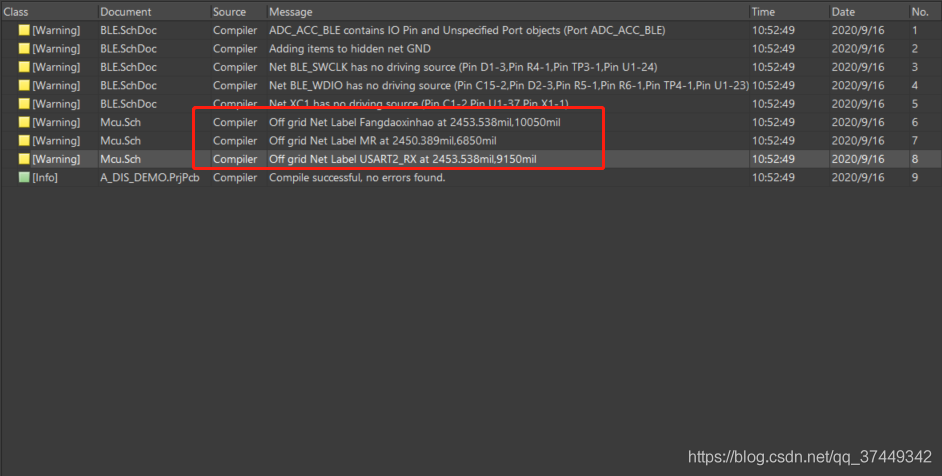
The solution
1. Double-click the corresponding Message in the dialog box to jump to the network where the warning appears
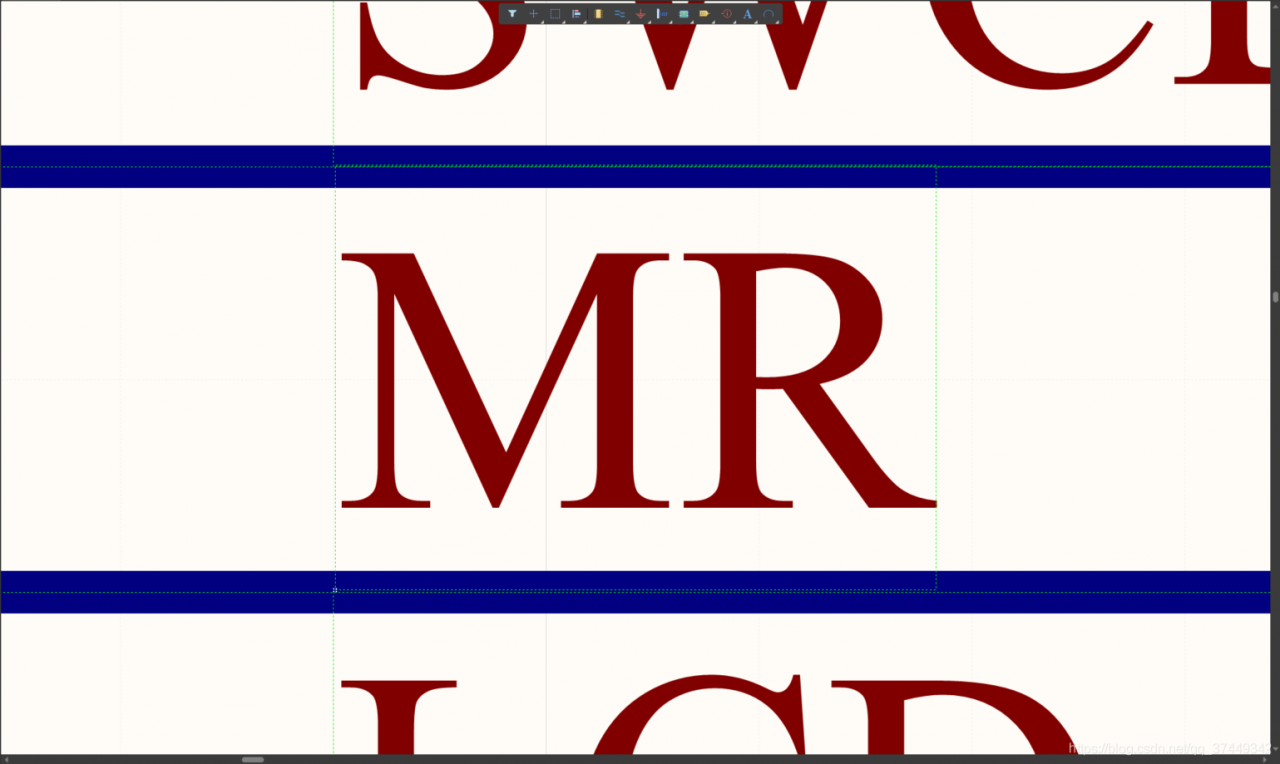
2. Select the network, then right-click and select Align To Grid
3. Recompile and erase
Altium designer 18: activeroute failed to complete any routing
Problem description:
use AD18 in PCB with Active Route automatic wiring has been unable to successfully, before using this function is normal. ActiveRoute failed to complete any routing. The fault.
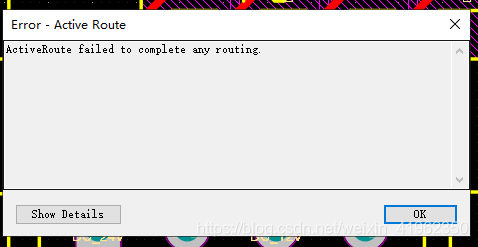
Cause of the problem:
There is something wrong with the Chinese compatibility system of AD18. If the file name is Chinese, the Active Route cannot be carried out
Solution:
Just change the name of the PCB file to pure English mode. It doesn’t matter if the path of the file name is Chinese
Reporter:
When creating the project, try to use the English file name to prevent the crash caused by Chinese problems (other problems caused by Chinese have not been found). I don’t know whether AD20 has fixed this BUG for testing