Author Archives: Robins

PHP: How to parse MHT file into HTML

PHP parsing MHT file, using the editor to open, you can see Base64 encoding, so MHT can be converted into HTML.

<?php

/**
* Parsing for Mht format files
* Example of use:
*  
*  function mhtmlParseBody($filename) {

	if (file_exists ( $filename )) {
		if (is_dir ( $filename )) return false;
		
		$filename = strtolower ( $filename );
		if (strpos ( $filename, '.mht', 1 ) == FALSE) return false;
			
		
		$o_mhtml = new mhtml ();
		$o_mhtml->set_file ( $filename );
		$o_mhtml->extract ();
		return $o_mhtml->get_part_to_file(0);

	}
	return null;
}

function mhtmlParseAll($filename) {

	if (file_exists ( $filename )) {
		if (is_dir ( $filename )) return false;

		$filename = strtolower ( $filename );
		if (strpos ( $filename, '.mht', 1 ) == FALSE) return false;
			

		$o_mhtml = new mhtml ();
		$o_mhtml->set_file ( $filename );
		$o_mhtml->extract ();
		return $o_mhtml->get_all_part_file();

	}
	return null;
}
*/

class mhtparse {

	var $file = '';
	var $boundary = '';
	var $filedata = '';
	var $countparts = 1;
	var $log = '';
	
	function extract() {
		$this->read_filedata ();
		$this->file_parts ();

		return 1;
	}
	
	function set_file($p) {
		$this->file = $p;
	}
	
	function get_log() {
		return $this->log;
	}
	
	function file_parts() {
		$lines = explode ( "\n", substr ( $this->filedata, 0, 8192 ) );
		foreach ( $lines as $line ) {
			$line = trim ( $line );
			if (strpos ( $line, '=' ) !== FALSE) {
				if (strpos ( $line, 'boundary', 0 ) !== FALSE) {
					$range = $this->getrange ( $line, '"', '"', 0 );
					$this->boundary = "--" . $range ['range'];
					$this->filedata = str_replace ( $line, '', $this->filedata );
					break;
				}
			}
		}
		if ($this->boundary != '') {
			$this->filedata = explode ( $this->boundary, $this->filedata );
			unset ( $this->filedata [0] );
			$this->filedata = array_values ( $this->filedata );
			$this->countparts = count ( $this->filedata );
		} else {
			$tmp = $this->filedata;
			$this->filedata = array (
					$tmp 
			);
		}
	}
	
	function get_all_part_file() {
		return $this->filedata;
	}
	
	function get_part_to_file($i) {
		$line_data_start = 0;
		$encoding = '';
		$part_lines = explode ( "\n", ltrim ( $this->filedata [$i] ) );
		foreach ( $part_lines as $line_id => $line ) {
			$line = trim ( $line );
			if ($line == '') {
				if (trim ( $part_lines [0] ) == '--')
					return 1;
				$line_data_start = $line_id;
				break;
			}
			if (strpos ( $line, ':' ) !== FALSE) {
				$pos = strpos ( $line, ':' );
				$k = strtolower ( trim ( substr ( $line, 0, $pos ) ) );
				$v = trim ( substr ( $line, $pos + 1, strlen ( $line ) ) );
				if ($k == 'content-transfer-encoding') {
					$encoding = $v;
				}
				if ($k == 'content-location') {
					$location = $v;
				}
				if ($k == 'content-type') {
					$contenttype = $v;
				}
			}
		}
		
		foreach ( $part_lines as $line_id => $line ) {
			if ($line_id <= $line_data_start)
				$part_lines [$line_id] = '';
		}
		
		$part_lines = implode ( '', $part_lines );
		if ($encoding == 'base64')
			$part_lines = base64_decode ( $part_lines );
		elseif ($encoding == 'quoted-printable')
			$part_lines = imap_qprint ( $part_lines );
		
		return $part_lines;
	}
	
	function read_filedata() {
		$handle = fopen ( $this->file, 'r' );
		$this->filedata = fread ( $handle, filesize ( $this->file ) );
		fclose ( $handle );
	}
	
	function getrange(&$subject, $Beginmark_str = '{', $Endmark_str = '}', $Start_pos = 0) {
		/*
		 * $str="sssss { x { xx } {xx{xx } x} x} sssss"; $range=string::getRange($str,'{','}',0); echo $range['range']; //tulem: " x { xx } {xx{xx } x} x" echo $range['behin']; //tulem: 6 echo $range['end']; //tulem: 30 (' ') -- l5pumärgist järgnev out: array('range'=>$Range,'begin'=>$Begin_firstOccurence_pos,'end'=>$End_sequel_pos) | false v1.1 2004-2006,Uku-Kaarel J5esaar,[email protected],http://www.hot.ee/ukjoesaar,+3725110693
		 */
		if (empty ( $Beginmark_str ))
			$Beginmark_str = '{';
		$Beginmark_str_len = strlen ( $Beginmark_str );
		
		if (empty ( $Endmark_str ))
			$Endmark_str = '}';
		$Endmark_str_len = strlen ( $Endmark_str );
		
		/* $Start_pos_cache = 0; */
		do {
			/* !algus */
			if (! is_int ( $Begin_firstOccurence_pos ))
				$Start_pos_cache = $Start_pos;
				
				/* ?algus-test */
			$Start_pos_cache = @strpos ( $subject, $Beginmark_str, $Start_pos_cache );
			
			/* this is possible start for range */
			if (is_int ( $Start_pos_cache )) {
				/* skip */
				$Start_pos_cache = ($Start_pos_cache + $Beginmark_str_len);
				/* test possible range start pos */
				if (is_int ( $Begin_firstOccurence_pos )) {
					if ($Start_pos_cache < $range_end_pos)
						$rangeClean = 0;
					elseif ($Start_pos_cache > $range_end_pos)
						$rangeClean = 1;
				}
				/* here it is */
				if (! is_int ( $Begin_firstOccurence_pos ))
					$Begin_firstOccurence_pos = $Start_pos_cache;
			} /* VIGA NR 0 ALGUST EI OLE */
			
			if (! is_int ( $Start_pos_cache )) {
				/* !algus */
	/* VIGA NR 1 ALGUSMARKI EI LEITUD : VIIMANE VOIMALIK ALGUS */
	if (is_int ( $Begin_firstOccurence_pos ) and ($Start_pos_cache < $range_end_pos))
					$rangeClean = 1;
				else
					return false;
			}
			if (is_int ( $Begin_firstOccurence_pos ) and ($rangeClean != 1)) {
				if (! is_int ( $End_pos_cache ))
					$End_sequel_pos = $Begin_firstOccurence_pos;
				
				$End_pos_cache = strpos ( $subject, $Endmark_str, $End_sequel_pos );
				
				/* ok */
				if (is_int ( $End_pos_cache ) and ($rangeClean != 1)) {
					$range_current_lenght = ($End_pos_cache - $Begin_firstOccurence_pos);
					$End_sequel_pos = ($End_pos_cache + $Endmark_str_len);
					$range_end_pos = $End_pos_cache;
				}
				/* VIGA NR 2 LOPPU EI LEITUD */
				if (! is_int ( $End_pos_cache ))
					if ($End_pos_cache == false)
						return false;
			}
		} while ( $rangeClean < 1 );
		
		if (is_int ( $Begin_firstOccurence_pos ) and is_int ( $range_current_lenght ))
			$Range = substr ( $subject, $Begin_firstOccurence_pos, $range_current_lenght );
		else
			return false;
		
		return array (
				'range' => $Range,
				'begin' => $Begin_firstOccurence_pos,
				'end' => $End_sequel_pos 
		);
	} // end getrange()
} // class


?>


Windows command execution bypass

"whoami"
("whoami")
who"a"mi
who"a"^mi

Double quotation marks. Brackets. The XOR combination can execute the command normally
and cannot add two. Will be treated as an escape character. Become a

Variable bypass

set a=1
echo a
echo %a%

set a=w
set b=ahomi
%a%%b%

Use environment variables to bypass.

All environment variables can be viewed via set
echo net%programfiles:~10,1%user
Takes the environment variables of programfiles starting with the 10th bit. Take one bit. It is a space. Then it becomes net user

feign.FeignException: status 404 reading XXXClient#XXMethod(String)

In a feign call, there is a requirement to query the order according to the order number. The interface is as follows:

@FeignClient(name = "order", path = "/")
public interface OrderFeignService {
	
	@GetMapping(value = "/order/{orderNumber}")
	BizOrderModel checkBizOrderExist(@PathVariable("orderNumber") String orderNumber);
}

The implementation is as follows:

@RestController
@RequestMapping("/")
public class OrderController implements OrderFeignService {	
    @Override
	@GetMapping(value = "/order/{orderNumber}")
	public BizOrderModel checkBizOrderExist(@PathVariable("orderNumber") String orderNumber) {
		return orderService.findByOrderNumber(orderNumber);
	}
}

The call is as follows:

@Service
@Slf4j
public class OrderService {

    @Autowired
    OrderFeignService orderFeignService;

    public void test(){
		if (null == orderFeignService.checkBizOrderExist(dto.getOrderNumber())) {
			LOG.ERROR("Order information does not exist");
		}
}

The exception message is as follows.
feign.FeignException: status 404 reading XXXXClient#XXXXMethod(Long)
at feign.FeignException.errorStatus(FeignException.java:62)
at feign.codec.ErrorDecoder$Default.decode(ErrorDecoder.java:91)
at feign.SynchronousMethodHandler.executeAndDecode(SynchronousMethodHandler.java:138)
at feign.SynchronousMethodHandler.invoke(SynchronousMethodHandler.java:76)
at feign.ReflectiveFeign$FeignInvocationHandler.invoke(ReflectiveFeign.java:103)
at com.sun.proxy.$Proxy97.querySpuDetailBySpuId(Unknown Source)
at XXXX(IndexService.java:41)
at XXXX(ElasticsearchTest.java:63)
at sun.reflect.NativeMethodAccessorImpl.invoke0(Native Method)
at sun.reflect.NativeMethodAccessorImpl.invoke(NativeMethodAccessorImpl.java:62)
at sun.reflect.DelegatingMethodAccessorImpl.invoke(DelegatingMethodAccessorImpl.java:43)
at java.lang.reflect.Method.invoke(Method.java:498)
at org.junit.runners.model.FrameworkMethod$1.runReflectiveCall(FrameworkMethod.java:50)
at org.junit.internal.runners.model.ReflectiveCallable.run(ReflectiveCallable.java:12)
at org.junit.runners.model.FrameworkMethod.invokeExplosively(FrameworkMethod.java:47)
at org.junit.internal.runners.statements.InvokeMethod.evaluate(InvokeMethod.java:17)
at

Anomaly Exclusion.

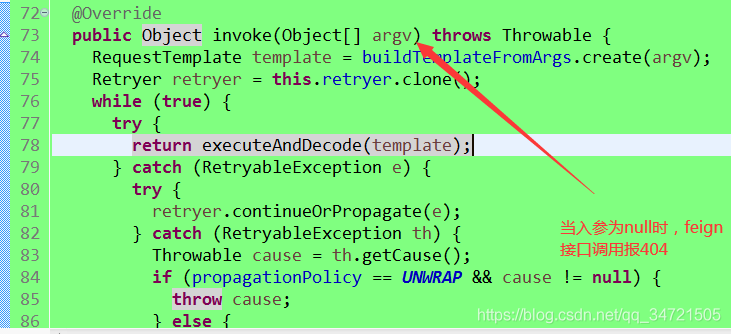
That is, when the input of the get request is null, such as the orderNumber in this example is not passed, feign call will report 404!

Httprunner output assure Report

Httprunner output assure Report

1. Install allure

Mac:

brew install allure 

Windows: https://repo.maven.apache.org/maven2/io/qameta/allure/allure-commandline/2.12.0/

After downloading, unzip, enter the bin directory, and use the allure.bat That is, the directory can be configured to an environment variable

2. Install assure pytest

pip install allure-pytest 

3. Execute httprunner command

hrun --alluredir allure-results --clean-alluredir testcasesname 

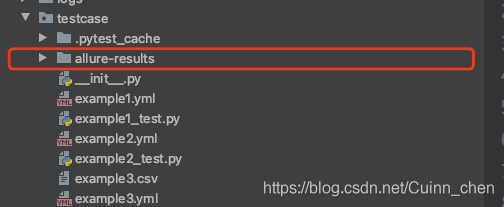
After execution, you can see that there is an assure results folder

implement

allure generate Folder for generating alure reports 

Windows can use the allure.bat generate …

Or start the static service of the report directly:

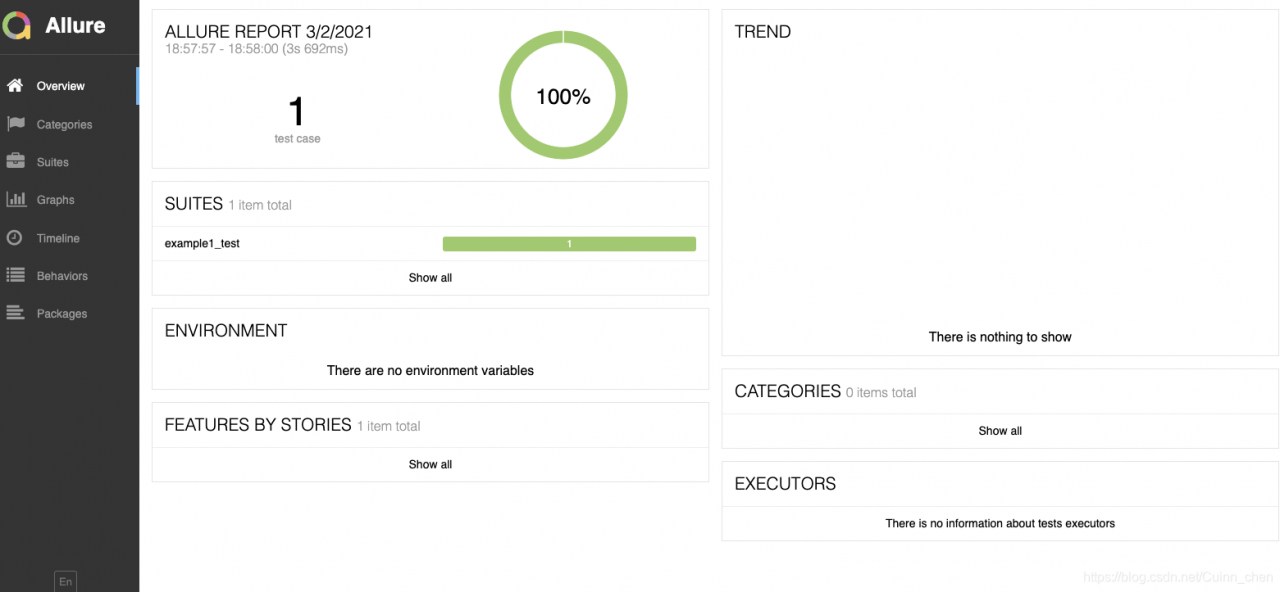
allure serve Folder for generating alure reports Generate reports.

*

*

Using Python error urlopen error unknown URL type: the solution of HTTPS

Analysis

This error has something to do with the SSL (secure sockets layer, an international standard communication protocol for encryption and identity authentication) module in Python. If you successfully install the SSL module, you can solve this problem.

resolvent

Windows system is slightly different from other UNIX like systems, but you can confirm whether SSL module is installed in the python version you are using. In the python environment, use the following command to view the installed module:

help("modules")

According to the official documents of python, SSL is a module used for network and interprocess communication in the python standard library. The Windows version of Python installation program usually includes the whole standard library, and even additional components. Other UNIX like operating systems are divided into a series of software packages, and some or all components may need to be installed through the package management tool.

Windows system

Because the Windows version of Python installation program contains SSL module, check whether the environment variables are set well.

If anaconda is used, because it already contains python, check the SSL in the installed module, and then check whether the following environment variables are added completely.

InstallPath              #Assuming InstallPath is your installation path
InstallPath\Scripts      
InstallPath\Library\bin

If there is no SSL module, or there is no problem with the above operations, and an error is still reported, you can try to re install python.

UNIX like operating system

After the default installation, the functions related to SSL cannot be used normally, and the corresponding parameters need to be added when checking the configuration before compilation.

# Add the --with-ssl parameter when installing python
./configure --prefix=/usr/local/python37 --with-ssl

Springboot uses Oracle database to report property ‘sqlsessionfactory’ or ‘sqlsessiontemplate’ are required

The first time I used springboot to do a project, this mistake is very simple, but it took me more than two hours to solve it.!!

1. According to the Convention, write a test class to test whether the connection to the database is successful


import org.junit.jupiter.api.Test;
import org.springframework.beans.factory.annotation.Autowired;
import org.springframework.boot.test.context.SpringBootTest;
import javax.sql.DataSource;

@SpringBootTest
class SpringbootThymeleaf001ApplicationTests {

	//Test database connection
	@Autowired
	DataSource dataSource;
	@Test
	void contextLoads() throws Exception{
		System.out.println("The database connection obtained is :"+dataSource.getConnection());
	}

}

The connection was tested at the beginning and the connection was successful. Then, when I started the project, there was an error, so I turned back and tested the connection again, and even reported an error!! Nothing changed in the middle!
2. Solutions

<dependency>
  <groupId>org.springframework.boot</groupId>
  <artifactId>spring-boot-starter-jdbc</artifactId>
</dependency>

Replace the above dependency with the following dependency, successfully solved!

<dependency>
	<groupId>org.mybatis.spring.boot</groupId>
	<artifactId>mybatis-spring-boot-starter</artifactId>
	<version>1.2.0</version>
</dependency>

The difference between onready or $() and onload

1. Onready or $() is executed before onload

2. Onready or $() is executed after page parsing, while onload is executed after all elements of the page are loaded

3. Onload only executes the last one, while onready or $() can execute multiple


One is the different times, $(). Ready() can be used many times in an HTML, onload can only be used once, or the only valid binding.

The other is the timing of execution. In short, $() is executed earlier than onload, because $() is executed as long as the DOM tree is loaded, and onload is executed when all elements are loaded.

Pandas generates new columns through LOC

A very convenient way to use pandas is through indexes such as LOC, iloc and IX. here is a record:

df.loc [condition, new column] = assign initial value

If the new column name is an existing column name, it will be changed on the original data column

import pandas as pd
import numpy as np
 
data = pd.DataFrame ( np.random.randint (0,100,40).reshape(10,4),columns=list(‘abcd’))
print(data)
data.loc [data. D & gt; = 50, ‘greater than 50′] =’Yes’
Print (data)

By using LOC to index, judge in the index, and then assign value to the new column according to the result of judgment. This is a very convenient and basic operation. Of course, I don’t remember it clearly recently, so I’ll record it here.


Solution to the problem that the camera can’t display when ROS running

report errors:

Unable to open camera calibration file [/home/hri/.ros/camera_ info/head_ camera.yaml ]

reference resources:

https://github.com/ros-drivers/usb_ cam/issues/53
https://answers.ros.org/question/217806/rospack-error-package-image_ view-not-found/

reason:

The main reason is that image is not installed_ View
ahaaha

terms of settlement:

sudo apt-get install ros-indigo-image-view

Flutter: How to Fix Android module can’t recognize flutter SDK source code

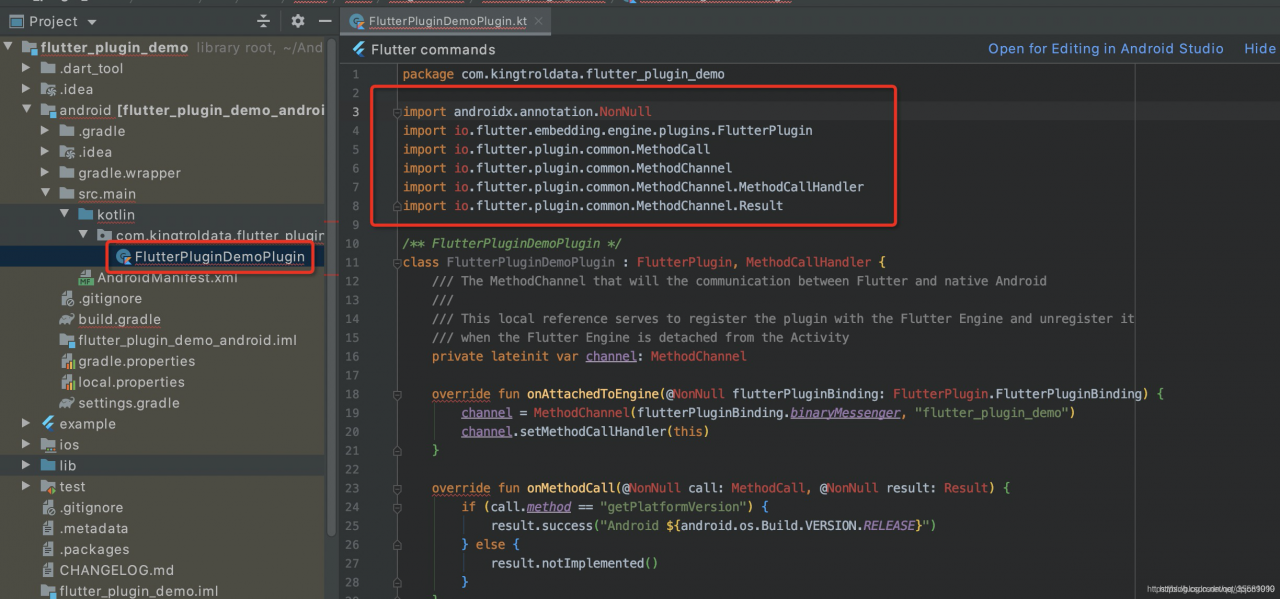
1. During the development of the flutter plug-in, when opening the Android project of the plug-in and preparing to write the native code, we found that all kinds of reports were red, the code could not jump, and the experience was very bad

The main reason is that the Android project does not rely on the flutter library and uses the local.properties In flutter.sdk Path to load

sdk.dir=C :/Users/11/AppData/Local/Android/ Sdkflutter.sdk=C :\src\flutter\flutter_ windows_ 1.22.6-stable\flutter

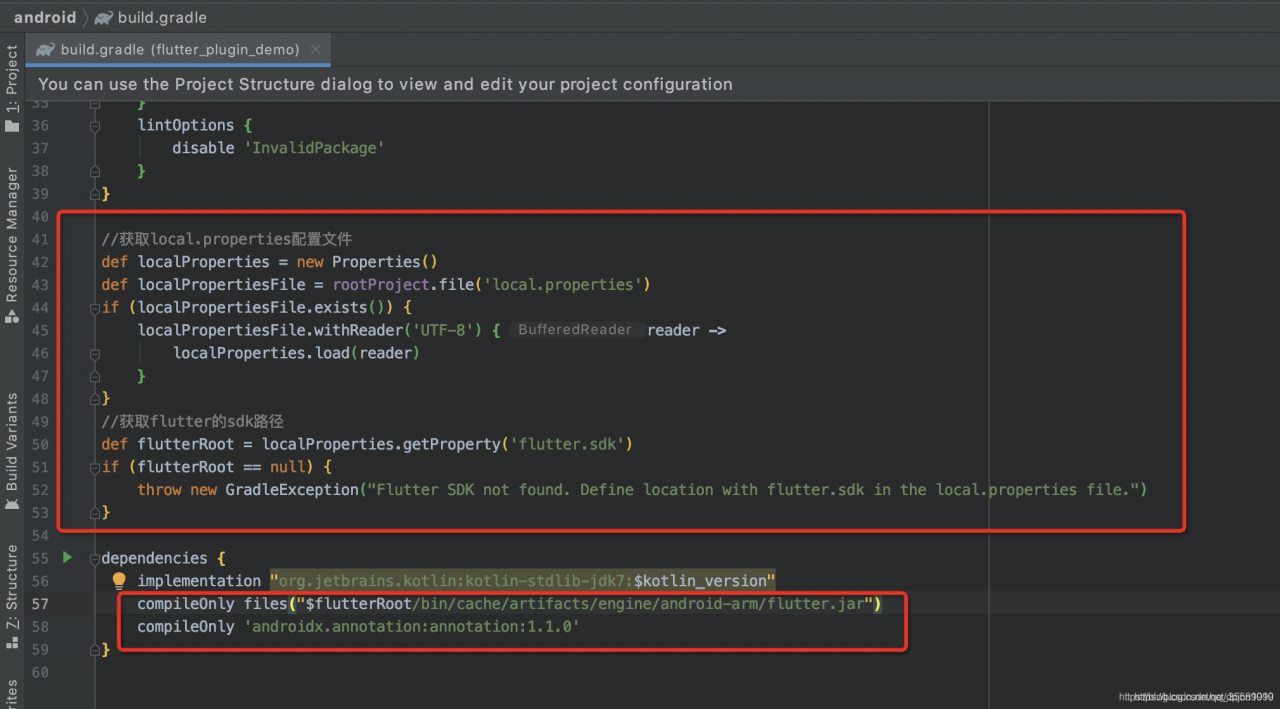
Finally, we’re on Android/ build.gradle File, write read flutter.sdk Finally, use compileonly files to rely on the local flutter library.

//Get the local.properties configuration file
def localProperties = new Properties()
def localPropertiesFile = rootProject.file('local.properties')
if (localPropertiesFile.exists()) {
    localPropertiesFile.withReader('UTF-8') { reader ->
        localProperties.load(reader)
    }
}
//Get the sdk path of flutter
def flutterRoot = localProperties.getProperty('flutter.sdk')
if (flutterRoot == null) {
    throw new GradleException("Flutter SDK not found. Define location with flutter.sdk in the local.properties file.")
}

dependencies {
    implementation "org.jetbrains.kotlin:kotlin-stdlib-jdk7:$kotlin_version"
    compileOnly files("$flutterRoot/bin/cache/artifacts/engine/android-arm/flutter.jar")
    compileOnly 'androidx.annotation:annotation:1.1.0'
}

The new sync gradle is effective.

ROS package ROS_ astra_ Camera cannot open RGB lens

ROS package ROS_ astra_ Camera cannot open RGB lens

https://github.com/orbbec/ros_ astra_ Camera
the official document mentions opening depth and RGB lens with the following command:
roslaunch Astra_ camera stereo_ s.launch

After executing the above command, use rqt_ image_ View can see the depth image, but not the RGB image, and an error is reported:
[camera / stereo]_ s-2] process has died [pid 8255, exit code 255, cmd /home/riki/gxb_ workspace/devel/lib/astra_ camera/camera_ node /camera/image_ raw:=/camera/rgb/image_ raw __ name:=stereo_ s __ log:=/home/riki/.ros/log/071dba06-7bcb-11eb-a85a-000c293dff09/camera-stereo_ s-2.log].
log file: /home/riki/.ros/log/071dba06-7bcb-11eb-a85a-000c293dff09/camera-stereo_ s-2*.log

The solution: open stereo_ s. In the launch file, change the value in this line to your device’s camera number. For example, my device’s camera number is 0x0502, so you can open the RGB lens.

The camera number can be viewed through lsusb command:
gxb_ workspace/src/ros_ astra_ camera/launch$ lsusb
Bus 001 Device 004: ID 2bc5:0403
Bus 001 Device 003: ID 2bc5:0502
Bus 001 Device 002: ID 04f2:b64f Chicony Electronics Co., Ltd
Bus 001 Device 001: ID 1d6b:0002 Linux Foundation 2.0 root hub
Bus 002 Device 004: ID 0e0f:0008 VMware, Inc.
Bus 002 Device 003: ID 0e0f:0002 VMware, Inc. Virtual USB Hub
Bus 002 Device 002: ID 0e0f:0003 VMware, Inc. Virtual Mouse
Bus 002 Device 001: ID 1d6b:0001 Linux Foundation 1.1 root hub