Author Archives: Robins

JPA transaction problems executing an update / delete query

If JPA prompts executing an update / delete query, it must be because @ transactional and @ modifying are not added to the service layer.

Abnormal scene

When spring-boot2 + JPA performs add modify delete operation:

public interface UserRepository extends JpaRepository<User , Integer>{

    @Modifying
    @Query(value="update User c set c.state = ?1,c.lastupdatetime = ?2 where c.user_no= ?3")
    void updateUser(int state,Date nowDate,String user_no);

}

Exception: executing an update / delete query

Solution

Because JPA requires “no transaction support, update and delete operations cannot be performed”.

So on the other hand, @ transactional must be added to the service layer or repository layer to represent that this is a transaction level operation. Addition, deletion, modification and query are all transaction level except for query. It is OK to regard this as a specification.

The shell gets the current time of the system and formats it

time=$(date “+%Y%m%d-%H%M%S”)

or

time=$(date “+%Y-%m-%d %H:%M:%S”)

… and other formats you want

echo “${time}”

The above two lines of simple code are shell to get the current time and output it in the format you want.

Several points need to be noted

There is a space after

    date, otherwise the command cannot be recognized, and the shell is very strict on spaces. Y shows 4-digit year, such as 2018; y shows 2-digit year, such as 18. M is the month; m is the minute. D is the day, and D is the current date, such as 1 / 18 / 18 (2018.1.18). H is the hour and H is the month. S displays the current second in milliseconds; s displays the current second in seconds.

Solution of invalid host header in vue-cli3

Discovery scene

Recently, a project has been built with vue-cli3. As a result, it keeps reporting errors. The error information is as follows:

Invalid Host/Origin header

At the same time, we also found another problem, that is, the hot update also failed

Causes

The new version of webpack dev server adds security verification. By default, the host name is checked. If the host name is not in the configuration, the access will be interrupted.

Solution

Create a file in the root directory vue.config.js , and then fill in the following

module.exports = {
    devServer: {
        disableHostCheck: true,
    }
}

Restart the service and find hot updates.

Several ways to check the IP address of raspberry pie

Method 1: get raspberry pie IP through ARP scan

Environment: computer and raspberry pie link in the same network; ARP protocol is a data link layer protocol, responsible for the conversion of IP address and MAC address.

ARP scan tool can scan all IP addresses of LAN;

To install ARP scan:

mac os
brew install arp-scanUbuntu
sudo apt-get arp-scan

Scan Ethernet IP address:

arp-scan --interface en0 --localnet 

Here, en0 is the device name of the network card, which can be obtained by ifconfig command. When there are multiple network cards, be careful not to write them wrongly;
when there are multiple network cards, en0 is the device name of the network card

The MAC address of raspberry pie usually starts with B8, so I matched B8. My implementation results are shown in the figure

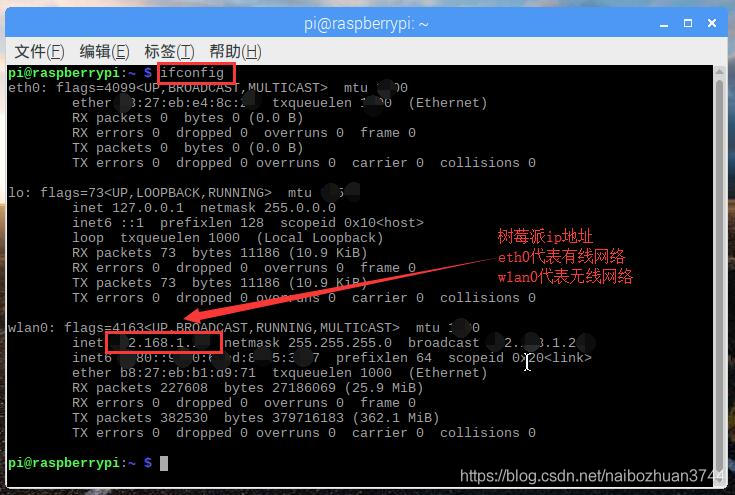
Raspberry pie view IP address (command ifconfig) and exit Ping

1.1 raspberry pie view IP address with the following command:

ifconfig

The results are as follows


Note: Raspberry pie uses the command ifconfig to view the IP address, while the windows CMD command ipconfig to view the IP address.


1.2 the raspberry pie will continue to loop after the IP address is specified. If you want to exit the Ping loop, press the keyboard assembly: Ctrl + Z.


Reference content:

http://www.cnblogs.com/ma6174/archive/2013/09/29/3345278.html (Reference: View raspberry pie address command ifconfig)

The solution of undefined reference to error

Chen Yunwen


When compiling programs under Linux, we often encounter “undefined reference to XXX” error,

Here is a summary of some possible reasons and solutions for those in need:


Speaking of undefined reference error, let’s first mention the link rules of Linux GCC


The search order of links is as follows:


    – L to find the path specified by the environment variable library from left to right_ Path, use the ‘:’ partition to find / etc from left to right/ ld.so.conf The specified path order is / lib and / usr / lib (64 bit is / lib64 and / usr / lib64)

Search order of dynamic library calls:


The path specified by the – rpath parameter of

    LD is the path specified by the LD script that is written dead in the code_ LIBRARY_ Path / etc/ ld.so.conf The specified paths / lib and / usr / lib (64 bit is / lib64 and / usr / lib64)
are

In general, we use the – L method to specify the search path when linking, and use LD when calling dynamic link library_ LIBRARY_ Path to specify the link path

Another problem to note is that as long as the first one is found, it will be returned, and the later ones will not be found. For example, – L. / a – L. / B – LX has libx in a, libx. A and libx. A in B libx.so In this case, libx. A in. / a will be used instead of following the principle of dynamic library priority, because. / A is found first and there is no dynamic inventory with the same name in


For dynamic link library, the actual symbol positioning is carried out at run time. When compiling. So, if the library it needs is not associated with it, such as libx.so You need to use uldict, But forget to compile libx.so Add – luldit when compiling libx.so I won’t make a mistake when I’m here, because at this time libx.so It is considered as a library, in which there are some symbols that do not know the specific implementation, which are legal and can be specified at runtime or when compiling other binary programs

If G + + – lpath – LX is used The linker will find that the required uldict symbol table can not be found and report an error. However, if the program is loaded in dlopen mode, the program will run directly in this place and report an error because it is in runtime. Another case is that an external interface has been declared and defined in the dynamic library, but it has forgotten to implement it. At this time, the Similar mistakes can occur

If such an error is reported in the runtime, we should pay attention to whether it is due to the fact that some libraries are not linked or some interfaces are not implemented


With the above foundation, it is not difficult to see that the reasons for the undefined reference error are as follows:

    no corresponding library (. O /. A /. So) uses the entity defined in the library, but no library (- LXXX) or library path (- lyyy) is specified, which will lead to this error. The order of connecting library parameters is not right. By default, the more basic the library is, the more it should be written later, Whether it is static or dynamic, the version of GCC / LD does not match the compatibility of the version of GCC / LD. Due to the compatibility problems of the large versions of GCC 2 to GCC 3 (in fact, there are some problems in GCC 3.2 to 3.4), when using the low version of the machine on the high version machine, such errors will be caused. This problem is more common in the 32-bit environment, In addition, the 64 bit library is used carelessly in the 32-bit environment, or vice versa. The C / C + + interdependence and the mixed use of linking GCC and G + + compilation results need to ensure that both sides of extern “C” can use the interface. In our 64 bit environment, the GCC linking G + + library also needs to add – lstdc + +, For details, please refer to the description of hybrid compilation in the previous article. The problem of runtime error is basically due to the program using dlopen mode to load. So, but. So does not link all the required libraries. Please refer to the description of hybrid use of static library and dynamic library in the above section

     

Solutions for undefined reference to ‘xxx’ encountered during linking

The solution of undefined reference to ‘xxx’ encountered when linking.

Note: when adding the library, remember to add the address of the library.

1.undefined reference to `cuInit’

Plus Library

-lcuda


2.  undefined reference to symbol ‘_ ZN5boost6system15system_ categoryEv’

Solution: Add Link Library:

-lboost_system

3.undefined reference to ‘cv::String::allocate(unsigned long)’

Solution: Add Link Library:

-lopencv_core -lopencv_highgui -lopencv_imgproc -lopencv_videoio -lopencv_imgcodecs

[UNK]

[UNK]

[UNK]

[UNK]

[UNK]

[UNK]

Python error: permissionerror: [errno 13] detailed explanation of permission denied solution

Error information

In the process of using Python to do data set, the following error is reported:

Cause of error

The error is translated as follows:

Permission error: [errno 13] permission denied:

The cause of the error is that the file cannot be opened. The possible cause is that the file cannot be found, or it is occupied, or it has no permission to access, or it is not a file but a directory that is opened.


Solution

The solution is as follows:

1. Check whether the file in the corresponding path exists and is occupied. If the file does not exist, the corresponding file can be found; if the file exists and is occupied, the occupied program will be closed temporarily.

2. Modify the permission of CMD to run as an administrator.

3. Check whether the folder is open. ——Check whether other software is viewing this folder
or not


Solutions for permission denied

Get an installation file that ends with. Run and give it executable permission. If the SELinux module is enabled, please disable it first!

For example:

# chmod +x NVIDIA-Linux-x86_ 64-295.59.run

When pasting files to a directory (myresources), such a prompt appears

Permission denied

The permission is not set, just copy and paste a file, how can it be like this?

solutions:

$ sudo chmod -R 777 myResources

Among them,
– R refers to all subdirectories and files cascaded to the directory,
777 means that all users have the highest permissions

PHP use __Sleep() and __wakeup() method serializes the object

If: Notice: serialize(): “DIY” returned as member variable from__ The solution of sleep() but do error

<?php
header('content-type:text/html;charset=utf-8');
class SportObject{
	protected $type="DIY";
	public function getType(){
		return $this->type;
	}
	public function __sleep(){
		echo 'Use the serialize() function to save the object to a text file, database, etc. <br>';
		return array('type'); //Note here, this should return an array, not return $this on the ebook Of course the paper book is the correct way to write it.
	}
	public function __wakeup(){
		echo 'When this data is needed, use the unserialize() function on the serialized string to convert it back to an object<br>';
	}
}
$mybook=new SportObject();
$a=serialize($mybook);
echo 'Serialized string: '. $a."<br>";
$b=unserialize($a);
echo 'Restored member variable.'.$b->getType();
?>

Output results:

Use the serialize() function to save the object, which can be stored in text files, databases, etc.
the serialized string: O: 11: “sportobject”: 1: {s: 7: “* type”; s: 3: “DIY”;}
when the data is needed, use the unserialize() function to operate the serialized string and convert it back to the object
restored member variable: DIY

How to Use filechannel to copy files

Filechannel is the content in javanio. Javanio (newio) is actually an IO multiplexing model. I won’t elaborate on this. If you want to know something about it, you can baidu.
This paper mainly uses buffer and channel in Java NiO to copy files.
The following is the code for copying the file:

package ch03;

import lombok.extern.slf4j.Slf4j;

import java.io.*;
import java.nio.ByteBuffer;
import java.nio.channels.FileChannel;
@Slf4j
public class FileCopy {
    private FileInputStream inputStream = null;
    private FileOutputStream outputStream = null;
    private FileChannel inChannel = null;
    private FileChannel outChannel = null;
    private double startTime;
    public void Copy(String src, String dest){
        startTime = System.currentTimeMillis();
        CopyFile(src,dest);
        log.info("the total time is " + (System.currentTimeMillis() - startTime) + "ms" );
    }

    private void CopyFile(String src,String dest){
        try {
            inputStream = new FileInputStream(new File(src));
            outputStream = new FileOutputStream(new File(dest));
            inChannel = inputStream.getChannel();
            outChannel = outputStream.getChannel();
            ByteBuffer buffer = ByteBuffer.allocate(1024);
            int readLength = -1;
            while (-1 != (readLength = inChannel.read(buffer))){
                buffer.flip();//Switching from read mode to write mode
                int outLength = 0;
                while (0 != (outLength = outChannel.write(buffer))){
                log.info("写入了 --->"+ outLength +"KB" );
                }
                buffer.clear();
            }
            outChannel.force(true);
        } catch (FileNotFoundException e) {
            e.printStackTrace();
        } catch (IOException e) {
            e.printStackTrace();
        }finally {
            try {
                inputStream.close();
                outputStream.close();
                inChannel.close();
                outChannel.close();
            } catch (IOException e) {
                e.printStackTrace();
            }
        }
    }
}