Author Archives: Robins

The method println(boolean) in the type PrintStream is not applicable for the arguments (void) Error

Problem

An error occurred when I tried the following code.

public class PrimeFactorization {
	
	public static void primefactory(int m) {
		for (int i = 2; i < m; i++) {
			if (m % i == 0) {
				System.out.print(i+"*");
				m = m / i;
				i = 1;
				continue;
			}
			else if (i == (m-1)) {
				System.out.print(m);
			}
			else {
				continue;
			}
		}
	}
	
	public static void main(String[] args) {
		int k;
		System.out.println("Please enter the number to be decomposed into prime factors:");
		
		Scanner scanner = new Scanner(System.in);
		k = scanner.nextInt();
		
		System.out.print(k+" The result of decomposing the prime factors is"+primefactory(k));
		scanner.close();
	}
}

The error is line 27: the method println (Boolean) in the type printstream is not applicable for the arguments (void)

Solution

The return type of the primefactory() function in the program is “void”, which means that it is defined as having no return value. So instantiate the object PF in line 9 of the figure below, and call the primefactory() function through PF to make the program run smoothly.


	public static void main(String[] args) {
		int k;
		System.out.println("Please enter the number to be decomposed into prime factors.");
		
		Scanner scanner = new Scanner(System.in);
		k = scanner.nextInt();
		
		PrimeFactorization pf = new PrimeFactorization();
		System.out.print(k+" The result of decomposing the prime factors is");
		pf.primefactory(k);
		scanner.close();
	}
}

[How to Fix]Unable to find the requested Boost libraries

CMake Error at /usr/local/share/cmake-3.14/Modules/FindBoost.cmake:2147 (message):
Unable to find the requested Boost libraries.
Boost version: 0.0.0
Boost include path: /usr/include
Detected version of Boost is too old.  Requested version was 1.58 (or
newer).
Call Stack (most recent call first):
CMakeLists.txt:33 (find_package)
Solution:
Just make a link
sudo ln -s /usr/local/include/boost /usr/include/boost

Latex: How to Set text Center

Click to view the original link

\centerline

Syntax: \centerline{text}
This is the original TeX command for centering short text.

center environment

Syntax
\begin{center}
First line \\\
second line \\\
\end{center}

The center environment allows multiple rows to be centered.
In the center environment, if the "first line" is too long, it will automatically wrap, and the text of the wrap is still centered, so this is a very common way to do it.

How to use Latex to Write Matrices

brief introduction

Latex’s formula function is very powerful. It’s not easy to talk about it all at once. These functions of latex are divided into smaller independent parts, which are convenient for you to consult separately on the one hand; on the other hand, all [CSDN] functions are easy to read_ [markdown] related articles are all put under the same column: CSDN markdown online editing, for your convenience.

This paper mainly introduces how to use latex formula command to obtain matrix in the markdown editor of CSDN.


Simple matrix

Use $$$begin {matrix} \End {matrix} $$ to generate a matrix, where ... represents the matrix command of latex, each line in the matrix command ends with \ \ and the elements of the matrix are separated by & amp; .

For example:

$$
  \begin{matrix}
   1 & 2 & 3 \\
   4 & 5 & 6 \\
   7 & 8 & 9
  \end{matrix} \tag{1}
$$

The results are as follows

147258369(1)


Matrix with brackets

I feel that the matrix in (1) is not very beautiful. You can add brackets to the matrix. There are many ways to add brackets, which can be roughly divided into two kinds: use - left... - right or change matrix in formula command to pMatrix , bMatrix , bMatrix , vmatrix , vmatrix , etc.


Use - left... - right

1. {… }

example:

$$
 \left\{
 \begin{matrix}
   1 & 2 & 3 \\
   4 & 5 & 6 \\
   7 & 8 & 9
  \end{matrix}
  \right\} \tag{2}
$$

The results are as follows

⎧⎩⎨⎪⎪147258369⎫⎭⎬⎪⎪(2)

2. [… ]

example:

$$
 \left[
 \begin{matrix}
   1 & 2 & 3 \\
   4 & 5 & 6 \\
   7 & 8 & 9
  \end{matrix}
  \right] \tag{3}
$$

The results are as follows

⎡⎣⎢147258369⎤⎦⎥(3)


Replace matrix

1. [… ]

example:

$$
 \begin{bmatrix}
   1 & 2 & 3 \\
   4 & 5 & 6 \\
   7 & 8 & 9
  \end{bmatrix} \tag{4}
$$

The results are as follows

⎡⎣⎢147258369⎤⎦⎥(4)

2. {… }

example:

$$
 \begin{Bmatrix}
   1 & 2 & 3 \\
   4 & 5 & 6 \\
   7 & 8 & 9
  \end{Bmatrix} \tag{5}
$$

The results are as follows

⎧⎩⎨⎪⎪147258369⎫⎭⎬⎪⎪(5)


Matrix with Ellipsis

If there are too many elements in the matrix, you can use

\ddots

\vdots

And so on.

For example:

$$
\left[
\begin{matrix}
 1      & 2      & \cdots & 4      \\
 7      & 6      & \cdots & 5      \\
 \vdots & \vdots & \ddots & \vdots \\
 8      & 9      & \cdots & 0      \\
\end{matrix}
\right]
$$

The results are as follows

⎡⎣⎢⎢⎢⎢⎢17⋮826⋮9⋯⋯⋱⋯45⋮0⎤⎦⎥⎥⎥⎥⎥(6)


Matrix with parameters

For example, to write an augmented matrix, you may need to consider the rightmost column separately. You can use the array command to process:

$$ 
\left[
    \begin{array}{cc|c}
      1 & 2 & 3 \\
      4 & 5 & 6
    \end{array}
\right] \tag{7}
$$

The results are as follows

[142536](7)

The C in represents the center aligned element, and | is used as the symbol to split the column.


Inter row matrix

You can use - bigl (,

For example:

We use the matrix $\bigl( \begin{smallmatrix} a & b \\ c & d \end{smallmatrix} \bigr)$ As a factor matrix, then...

The results are as follows

We use matrices

(acbd)

As a factor matrix, it is


summary

This paper mainly introduces how to use latex command to generate matrix in markdown editor. Mainly use and other commands to define the matrix. For more information, please refer to: http://www.ctan.org/pkg/lshort

How to Solve differential equations with MATLAB

1. Solve function

This is the simplest way to solve differential equations – symbolic solution. Generally speaking, there are two methods to solve ordinary differential equations in MATLAB, one is symbolic solution, the other is numerical solution. In the undergraduate stage of differential mathematics problems, basically can be solved by symbolic solution.

The key command of symbolic solution to ordinary differential problem with MATLAB is dslove command. In this command, D can be used to represent the differential symbol, where D2 represents the second order differential, D3 represents the third order differential, and so on. It is worth noting that the differential is derived from the independent variable t by default, and it can be easily changed to other variables in the command.

① Seeking analytic solution

y’‘= a*y+ bx;

s = dsolve(‘D2y=a*y+b*x’,’x’);

D2y is used to represent the second derivative of Y. by default, t is the independent variable, so it is better to indicate that the independent variable is X


② Initial value problem

y’ = y – 2*t / y , y(0) = 1;

s = dsolve(‘Dy == y – 2*t / y’,’y(0) ==1′);


③ Boundary value problem

x*y’’ – 3*y’ = x^2 , y(1) = 0 , y(5) = 0;

s = dsolve(‘x*D2y – 3*Dy ==x^2′,’y(1)=0′,’y(5) == 0′,’x’);

The last argument to the function indicates that the argument is X


④ Higher order equation

The solution is y ‘= cos (2x) – y, y (0) = 1, y’ (0) = 0;

s=dsolve(‘D2y == cos(2*x) – y’,’y(0) =1′,’Dy(0) = 0′,’x’);

simplify(s);


⑤ System of equations problem

f’ = f + g , g’ = -f + g,f(0) = 1, g(0) =2;

[f,g]= dsolve(‘Df == f + g’,’Dg = -f + g’,’f(0)==1′,’g(0) == 2′,’x’);


In addition, for linear differential equations with constant coefficients, especially for higher-order linear differential equations with constant coefficients, the fundamental solutions of the corresponding homogeneous differential equations can be obtained by the eigenvalue method, and then the special solutions can be obtained by the constant variation method.

For example:

The general solution of X ” + 0.2x ‘+ 3.92x = 0

Solution: the characteristic equation is: x ^ 2 + 0.2x + 3.92 = 0

roots( [ 1 0.2 3.92 ] )  

Then work it out and keep doing it.


2.ode45

The common format [T, y] = ode45 (odefun, tspan, Y0)
is as follows:

odefun is used to represent the function handle or inline function I of F (T, y), where t is scalar and Y is scalar or vector
tspan if it is a two-dimensional vector [T0, TF], it represents the initial value t0 and final value TF of the independent variable; if it is a high-dimensional vector [T0, T1, The output node column vector (T0, T1,…, TN) ^ t
Y0 initial value vector Y0
T represents the node column vector (T0, T1,…, TN) ^ t
y numerical solution matrix, and each column corresponds to a component of Y


Ode is the most commonly used instruction to solve differential equations. It adopts variable step Runge Kutta felhberg method of fourth and fifth order, which is suitable for high accuracy problems. Ode23 is similar to ode45, but its accuracy is lower.


For example:
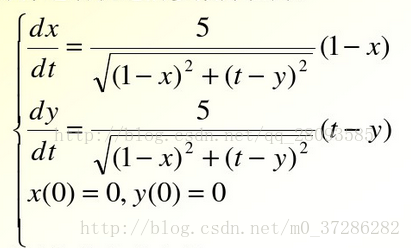
1. Create a function file eq2. M to describe the differential equations of the solution in the function file

%eq2.m File
% Describe the system of differential equations

function dy=eq2(t,y) 
 % illustrate that the differential variables are two-dimensional, such that y(1)=x,y(2)=y
dy=zeros(2,1); 
% System of differential equations
dy(1)=5*(1-y(1))/sqrt((1-y(1))^2+(t-y(2))^2);
dy(2)=5*(1-y(2))/sqrt((1-y(1))^2+(t-y(2))^2);
end


2. Call ode45 function to solve differential equations

[t,y]=ode45(@eq2,[0,2],[0,0]);


Ode45 Function Description: the first parameter is the name of the equation, the second parameter is the range of T when solving, and the third group of parameters is the initial value of each element in y.

[t,y]=ode45(@eq2,[t1,t2],[y1(0),y2(0)]);


Part of it comes from http://blog.csdn.net/qq_ 28093585/article/details/70276454。

 

Java error: unable to find or load main class (package name in source file)

1. Problem orientation

This type of error occurs when compiling (javac) and executing (Java) Java programs: the main class cannot be found or loaded:

First of all, the problem caused by improper configuration of environment variables is excluded. As long as the command line interface can recognize javac / Java commands, there is no problem with the configuration of environment variables. This problem often occurs because there is a package name in the Java source file, such as the file C:: code\ Hello.java :

package com.example;

public class Hello{
    public static void main(String[]args){
        System.out.println("Hello");
    }
}

It seems that there is no problem

C:\code>javac Hello.java
C:\code>java Hello
Error: Main class not found or could not be loaded Hello

2. Solutions

Delete the package name from the source file (not recommended); create a file path structure with the same package name under code (C:: – Code ⁃ com ⁃ example)\ Hello.java )

Compilation:C:\code>javac com/example/Hello.java
Run:C:\code>java com.example.Hello

Python 3.X error: valueerror: data type must provide an itemsize

1. Overview

The error occurs when multiplying the acquired data;
the reason for the error is that the data matrix is a string (read from the file);
the solution is to convert the data in batch, line by line, and convert the string data into floating point or integer.

2. Solutions

2.1 error code
#!/usr/bin/env python3
# -*- coding: utf-8 -*-
# @Time    : 2019/2/21 14:16
# @Author  : Arrow and Bullet
# @FileName: error.py
# @Software: PyCharm


def loadDataSet(fileName):
    fr = open(fileName)
    dataMat = []
    for line in fr.readlines():
        currLineListStr = line.strip().split("\t") 
        dataMat.append(currLineListStr[0:numFeat])
    return dataMat

The data read out here are all strings, for example:

# [['1.000000', '0.067732'], ['1.000000', '0.427810']]

Then, when you multiply a matrix like this, the error data type must provide an itemsize will be reported.

2.2 correct code (solution)

1

def loadDataSet(fileName):
    fr = open(fileName)
    dataMat = []
    for line in fr.readlines():
        currLineListStr = line.strip().split("\t") 
        currLineListFloat = []
        for i in currLineListStr:  # Convert string data to floating point numbers line by line
            currLineListFloat.append(float(i))
        dataMat.append(currLineListFloat[0:numFeat])
    return dataMat

The data read out here are all floating-point numbers, for example:

# [[1.0, 0.067732], [1.0, 0.42781]]

Then when you multiply with such a matrix, there is no error.

I hope I can help you. If you have any questions, you can comment on them directly. If you like, you can praise them for more people to see. If you are not detailed enough, you can also say that I will reply in time.

[How to Fix]Type error: must use keyword argument for key function

The reason may be the version problem of Python 2 and 3
chestnut 1: call sorted() and pass in reversed()_ CMP can achieve reverse order sorting

def reversed_cmp(x, y):
    if x > y:
        return 1
    if x < y:
        return -1
    return 0

L1 = [16, 5, 120, 9, 66]
print(sorted(L1, reversed_cmp))

terms of settlement:

L1 = [16, 5, 120, 9, 66]
print(sorted(L1, reverse=True))

The results were as follows

[120, 66, 16, 9, 5]

Maybe it’s too simple. Python doesn’t bother to use custom functions…
in continuous update...

Chestnut 2: using sorted() higher-order function to realize the algorithm of ignoring case sorting

def cmp_ignore_case(s1, s2):
    if s1[0].lower() > s2[0].lower():
        return -1
    if s1[0].lower() < s2[0].lower():
        return 1
    return 0

print(sorted(['haha', 'about', 'TIM', 'Credit'], cmp_ignore_case))

terms of settlement:

def com_flag(s):
    return s.lower()
# key represents the key function, the default is None, reverse represents whether to reverse the order, the default is False
# The following functions are arranged in reverse order
print(sorted(['haha', 'about', 'TIM', 'Credit'], key=com_flag, reverse=True))

The results were as follows

['Zoo', 'Credit', 'bob', 'about']

How to Fix Error in python3 | PIP install Dlib

Error in python3 PIP install Dlib:

Dlib has been installed before. It takes a long time. When you re install it, you forget some necessary conditions. This time, please make a note.

The error information is as follows:

Collecting dlib
  Downloading https://files.pythonhosted.org/packages/05/57/e8a8caa3c89a27f80bc78da39c423e2553f482a3705adc619176a3a24b36/dlib-19.17.0.tar.gz (3.4MB)
     |████████████████████████████████| 3.4MB 14kB/s
Building wheels for collected packages: dlib
  Building wheel for dlib (setup.py) ... error
  ERROR: Complete output from command 'f:\python36\python.exe' -u -c 'import setuptools, tokenize;__file__='"'"'C:\\Users\\fu\\AppData\\Local\\Temp\\pip-install-t50q34ym\\dlib\\setup.py'"'"';f=getattr(tokenize, '"'"'open'"'"', open)(__file__);code=f.read().replace('"'"'\r\n'"'"', '"'"'\n'"'"');f.close();exec(compile(code, __file__, '"'"'exec'"'"'))' bdist_wheel -d 'C:\Users\fu\AppData\Local\Temp\pip-wheel-g2i4oztb' --python-tag cp36:
  ERROR: running bdist_wheel
  running build
  running build_py
  package init file 'dlib\__init__.py' not found (or not a regular file)
  running build_ext
  Traceback (most recent call last):
    File "C:\Users\fu\AppData\Local\Temp\pip-install-t50q34ym\dlib\setup.py", line 120, in get_cmake_version
      out = subprocess.check_output(['cmake', '--version'])
    File "f:\python36\lib\subprocess.py", line 356, in check_output
      **kwargs).stdout
    File "f:\python36\lib\subprocess.py", line 423, in run
      with Popen(*popenargs, **kwargs) as process:
    File "f:\python36\lib\subprocess.py", line 729, in __init__
      restore_signals, start_new_session)
    File "f:\python36\lib\subprocess.py", line 1017, in _execute_child
      startupinfo)
  FileNotFoundError: [WinError 2] The system cannot find the specified file.

  During handling of the above exception, another exception occurred:

  Traceback (most recent call last):
    File "<string>", line 1, in <module>
    File "C:\Users\fu\AppData\Local\Temp\pip-install-t50q34ym\dlib\setup.py", line 261, in <module>
      'Topic :: Software Development',
    File "f:\python36\lib\site-packages\setuptools\__init__.py", line 143, in setup
      return distutils.core.setup(**attrs)
    File "f:\python36\lib\distutils\core.py", line 148, in setup
      dist.run_commands()
    File "f:\python36\lib\distutils\dist.py", line 955, in run_commands
      self.run_command(cmd)
    File "f:\python36\lib\distutils\dist.py", line 974, in run_command
      cmd_obj.run()
    File "f:\python36\lib\site-packages\wheel\bdist_wheel.py", line 192, in run
      self.run_command('build')
    File "f:\python36\lib\distutils\cmd.py", line 313, in run_command
      self.distribution.run_command(command)
    File "f:\python36\lib\distutils\dist.py", line 974, in run_command
      cmd_obj.run()
    File "f:\python36\lib\distutils\command\build.py", line 135, in run
      self.run_command(cmd_name)
    File "f:\python36\lib\distutils\cmd.py", line 313, in run_command
      self.distribution.run_command(command)
    File "f:\python36\lib\distutils\dist.py", line 974, in run_command
      cmd_obj.run()
    File "C:\Users\fu\AppData\Local\Temp\pip-install-t50q34ym\dlib\setup.py", line 129, in run
      cmake_version = self.get_cmake_version()
    File "C:\Users\fu\AppData\Local\Temp\pip-install-t50q34ym\dlib\setup.py", line 125, in get_cmake_version
      "\n*******************************************************************\n")
  RuntimeError:
  *******************************************************************
   CMake must be installed to build the following extensions: dlib
  *******************************************************************

  ----------------------------------------
  ERROR: Failed building wheel for dlib
  Running setup.py clean for dlib
Failed to build dlib
Installing collected packages: dlib
  Running setup.py install for dlib ... error
    ERROR: Complete output from command 'f:\python36\python.exe' -u -c 'import setuptools, tokenize;__file__='"'"'C:\\Users\\fu\\AppData\\Local\\Temp\\pip-install-t50q34ym\\dlib\\setup.py'"'"';f=getattr(tokenize, '"'"'open'"'"', open)(__file__);code=f.read().replace('"'"'\r\n'"'"', '"'"'\n'"'"');f.close();exec(compile(code, __file__, '"'"'exec'"'"'))' install --record 'C:\Users\fu\AppData\Local\Temp\pip-record-4kwg7hfv\install-record.txt' --single-version-externally-managed --compile:
    ERROR: running install
    running build
    running build_py
    package init file 'dlib\__init__.py' not found (or not a regular file)
    running build_ext
    Traceback (most recent call last):
      File "C:\Users\fu\AppData\Local\Temp\pip-install-t50q34ym\dlib\setup.py", line 120, in get_cmake_version
        out = subprocess.check_output(['cmake', '--version'])
      File "f:\python36\lib\subprocess.py", line 356, in check_output
        **kwargs).stdout
      File "f:\python36\lib\subprocess.py", line 423, in run
        with Popen(*popenargs, **kwargs) as process:
      File "f:\python36\lib\subprocess.py", line 729, in __init__
        restore_signals, start_new_session)
      File "f:\python36\lib\subprocess.py", line 1017, in _execute_child
        startupinfo)
    FileNotFoundError: [WinError 2] The system cannot find the specified file.

    During handling of the above exception, another exception occurred:

    Traceback (most recent call last):
      File "<string>", line 1, in <module>
      File "C:\Users\fu\AppData\Local\Temp\pip-install-t50q34ym\dlib\setup.py", line 261, in <module>
        'Topic :: Software Development',
      File "f:\python36\lib\site-packages\setuptools\__init__.py", line 143, in setup
        return distutils.core.setup(**attrs)
      File "f:\python36\lib\distutils\core.py", line 148, in setup
        dist.run_commands()
      File "f:\python36\lib\distutils\dist.py", line 955, in run_commands
        self.run_command(cmd)
      File "f:\python36\lib\distutils\dist.py", line 974, in run_command
        cmd_obj.run()
      File "f:\python36\lib\site-packages\setuptools\command\install.py", line 61, in run
        return orig.install.run(self)
      File "f:\python36\lib\distutils\command\install.py", line 545, in run
        self.run_command('build')
      File "f:\python36\lib\distutils\cmd.py", line 313, in run_command
        self.distribution.run_command(command)
      File "f:\python36\lib\distutils\dist.py", line 974, in run_command
        cmd_obj.run()
      File "f:\python36\lib\distutils\command\build.py", line 135, in run
        self.run_command(cmd_name)
      File "f:\python36\lib\distutils\cmd.py", line 313, in run_command
        self.distribution.run_command(command)
      File "f:\python36\lib\distutils\dist.py", line 974, in run_command
        cmd_obj.run()
      File "C:\Users\fu\AppData\Local\Temp\pip-install-t50q34ym\dlib\setup.py", line 129, in run
        cmake_version = self.get_cmake_version()
      File "C:\Users\fu\AppData\Local\Temp\pip-install-t50q34ym\dlib\setup.py", line 125, in get_cmake_version
        "\n*******************************************************************\n")
    RuntimeError:
    *******************************************************************
     CMake must be installed to build the following extensions: dlib
    *******************************************************************

    ----------------------------------------
ERROR: Command "'f:\python36\python.exe' -u -c 'import setuptools, tokenize;__file__='"'"'C:\\Users\\fu\\AppData\\Local\\Temp\\pip-install-t50q34ym\\dlib\\setup.py'"'"';f=getattr(tokenize, '"'"'open'"'"', open)(__file__);code=f.read().replace('"'"'\r\n'"'"', '"'"'\n'"'"');f.close();exec(compile(code, __file__, '"'"'exec'"'"'))' install --record 'C:\Users\fu\AppData\Local\Temp\pip-record-4kwg7hfv\install-record.txt' --single-version-externally-managed --compile" failed with error code 1 in C:\Users\fu\AppData\Local\Temp\pip-install-t50q34ym\dlib\
WARNING: You are using pip version 19.1, however version 19.1.1 is available.
You should consider upgrading via the 'python -m pip install --upgrade pip' command.

Cmake and boost need to be installed before Dlib is installed. Then Dlib can be installed correctly

pip install boost
pip install cmake
pip install dib

Test installation results:

C:\Users\fu>python
Python 3.6.8 (tags/v3.6.8:3c6b436a57, Dec 24 2018, 00:16:47) [MSC v.1916 64 bit (AMD64)] on win32
Type "help", "copyright", "credits" or "license" for more information.
>>> import dlib
>>>

How to Solve attributeerror: ‘list’ object has no attribute ‘shape‘

Explanation:

AttributeError: ‘list’ object has no attribute ‘shape’

Property error: the ‘list’ object does not have the property ‘shape’

resolvent:

Use numpy or panda np.array Or dataframe has shape, which can be multi-dimensional, while list is one-dimensional and cannot be converted

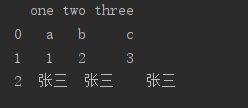
If conversion is needed, list is converted to dataframe. Example:

a = [['a', 'b', 'c'], ['1', '2', '3'], ['张三', '张三', '张三']]
df = pd.DataFrame(a, columns=['one', 'two', 'three'])
print(df)

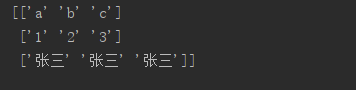
List to numpy example:

a = [['a', 'b', 'c'], ['1', '2', '3'], ['张三', '张三', '张三']]
data = np.array(a)
print(data)

Note: shape is a dimension. Only data frame and matrix have dimensions, while list is a slice single dimension

[How to Fix]RuntimeError: Python is not installed as a framework, If you are using (Ana)Conda

Error:

RuntimeError: Python is not installed as a framework. The Mac OS X backend will not be able to function correctly if Python is not installed as a framework. See the Python documentation for more information on installing Python as a framework on Mac OS X. Please either reinstall Python as a framework, or try one of the other backends. If you are using (Ana)Conda please install python.app and replace the use of ‘python’ with ‘pythonw’. See ‘Working with Matplotlib on OSX’ in t

How to Fix:

vim ~/.matplotlib/matplotlibrc
Then input the code below:
backend: TkAgg