Author Archives: Robins

JavaScript removes the number specified in the array

code

Method 1: return a new array
/ / remove all elements in array arr whose values are equal to item. Do not modify the array arr directly, and the result will return a new array
instead**

function clearArrItem(arr,item){
	var arrs=[];
	for(var i = 0;i<arr.length;i++){
		if(arr[i] !== item){
			arrs.push(arr[i])
		}
	}
	return arrs
}
var arrs = [1,2,5,4,2,1,5,2,1,2,5,42,1,4,11,1,1,1,1,11];
console.log(clearArrItem(arrs,1));

**

Method 2: operate in the original array
/ / remove all the elements in the array arr whose values are equal to the item, directly operate on the given arr array, and return the result
to the user**

function clearArrItem2(arr,item){
	var index;
	for(var i = 0;i<arr.length;i++){
		if(arr[i] === item){
			if(arr[i+1] === item){
				arr.splice(i,1);
				i--;
				continue;
			}
			arr.splice(i,1);
		}
	}
	return arr;
}
var arrs = [1,5,6,3,5,4,1,1,1,1,1,1,1,5,8,4,5,1,5,1,5,1,1];
console.log(clearArrItem2(arrs,1));

**

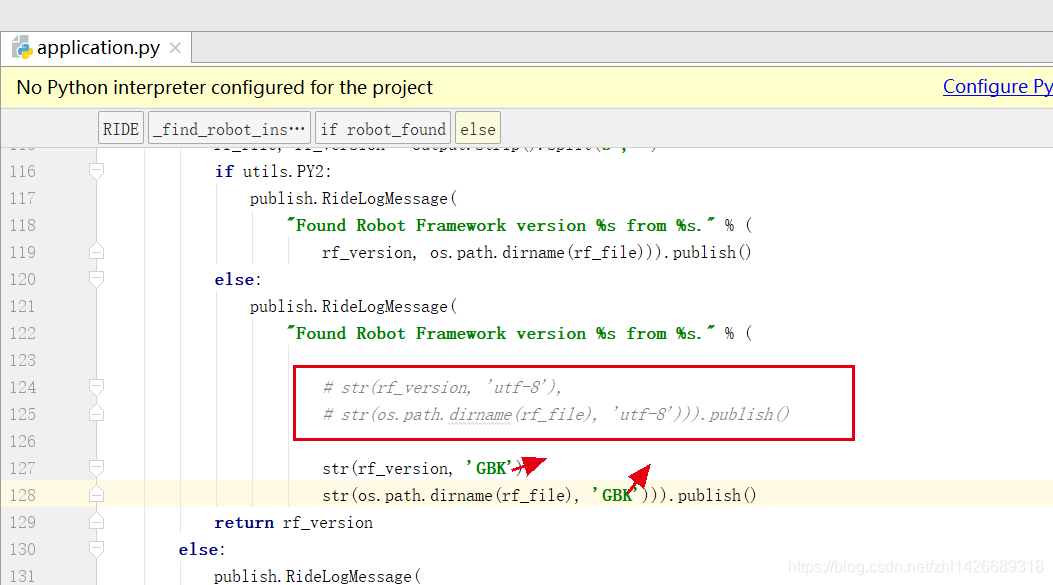
UTF-8 encoding error when starting robotframework ride

Record the error when starting the robot framework ride

start-up ride.py The following error occurred

D:\Program Files(x86)\python\Scripts>python ride.py
Traceback (most recent call last):
  File “D:\Program Files(x86)\python\lib\site-packages\robotide\application\ application.py “, line 70, in OnInit
    self._ find_ robot_ installation()
  File “D:\Program Files(x86)\python\lib\site-packages\robotide\application\ application.py “, line 124, in _ find_ robot_ installation
    str( os.path.dirname (rf_ file), ‘utf-8’))).publish()
UnicodeDecodeError: ‘utf-8’ codec can’t decode byte 0xa3 in position 20: invalid start byte
OnInit returned false, exiting…
Error in atexit._ run_ exitfuncs:
wx._ core.wxAssertionError : C++ assertion “GetEventHandler() == this” failed at ..\..\src\common\ wincmn.cpp (478) in wxWindowBase::~wxWindowBase(): any pushed event handlers must have been removed


Check the log. UTF-8 can’t encode 20,

Therefore, we tried the next step application.py The UTF-8 coding form in the file is changed to “GBK”, restart ride.py After that, ride is turned on

Cloning failed using an SSH key for authentication

Cloning failed using an ssh key for authentication, enter your GitHub credentials to access private repos
Head to https://github.com/settings/tokens/new?scopes=repo&description=Composer+on+ Name + time
to retrieve a token. It will be stored in “C”: / users / administrator / appdata / roaming / composer/ auth.json ” for future use by Composer.

Log in to GitHub and open the following link
below https://github.com/settings/tokens
Generate a token
and execute the following code

composer config --global --auth github-oauth.github.com <token>

Correct writing

composer config --global --auth github-oauth.github.com 441be92d716e*****853ec70ffa

Then read the error message in the newspaper

C:/Users/Administrator/AppData/Roaming/Composer/auth.jso

Is there any change in the following file? If so, there will be no problem,

error C4996: ‘inet_addr‘: Use inet_pton() or InetPton() instead or define _WINSOCK_D

[questions]

Vs2015 appears when writing socket client. (this is the second time I have encountered this problem. Last time vs2017, I must remember it to facilitate myself to check in the future: P)

SOCKADDR_ IN ClientAddr;
ClientAddr.sin_ family = AF_ INET;
ClientAddr.sin_ addr.S_ un.S_ addr = inet_ addr(“127.0.0.1”);
ClientAddr.sin_ Port = htons (port);
error c4996: ‘INET_ addr’: Use inet_ pton() or InetPton() instead or define _ WINSOCK_ DEPRECATED_ NO_ WARNINGS to disable deprecated API warnings

[reason]

In the version after vs2013, INET is added_ New functions such as Pton () and inetpton () are used for IP address conversion between “dotted decimal” and “binary integer”, and can handle IPv4 and IPv6. And INET_ Addr is an old function. Higher version vs uses a new function by default when compiling, so this error will be reported.

[solution 1]

Replace INET with the new function suggested_ Addr function.

[solution 2]

Modify the vs configuration and tell it I want the old function

1. Modification method: Item – & gt; attribute – & gt; C / C + + – & gt; general – & gt; SDL check, change “yes” to “no”.
2. Property page of file_ CRT_ SECURE_ NO_ “Warnings” plus
– – –
copyright notice: This is CSDN blogger Rani_ The original article of “ZZ” follows CC 4.0 by-sa copyright agreement. Please attach the link of original source and this statement.
Link to the original text: https://blog.csdn.net/weixin_ 42731241/article/details/96143934

Troubleshooting of ROS rosdep init / update

Problem description
operating system: ubuntu16.04/ubuntu18.04/ubuntu20.04
ROS version: kinetic / melodic / noetic
recently, I was learning how to install and use orb-slam2. During the compilation process, I found that the rosdep command is needed under ROS

sudo rosdep init

The following error is reported:

ERROR: cannot download default sources list from:
https://raw.githubusercontent.com/ros/rosdistro/master/rosdep/sources.list.d/20-default.list
Website may be down.

Gu Yue bloggers have sorted out this problem, but according to the current network environment, there are still problems.
Reference article:
1 https://www.guyuehome.com/12640
https://blog.csdn.net/JanKin_ BY/article/details/105509383

The root cause is that the network is blocked. If the above articles are not helpful, please refer to the following solutions:
1. Take the computer to the University Campus (the suffix of the university website is edu.cn Use its campus network to use the rosdep command;
2. Try to use mobile hot spots (China Mobile, China Unicom and China Telecom).

Hope it helps!

Centos8 modifying the host name

When you modify the host name, you can directly use the tools provided by the system.  

[root@localhost centos]# hostnamectl
   Static hostname: localhost.localdomain
         Icon name: computer-vm
           Chassis: vm
        Machine ID: 89bf177f78dc49f6b4954e1e9511e267
           Boot ID: 8f46edc8b7b648f58d5d4c1f3c15cbee
    Virtualization: vmware
  Operating System: CentOS Linux 8
       CPE OS Name: cpe:/o:centos:centos:8
            Kernel: Linux 4.18.0-240.10.1.el8_3.x86_64
      Architecture: x86-64
[root@localhost centos]# sudo hostnamectl set-hostname k8s-slave
[root@localhost centos]# hostnamectl
   Static hostname: k8s-slave
         Icon name: computer-vm
           Chassis: vm
        Machine ID: 89bf177f78dc49f6b4954e1e9511e267
           Boot ID: 8f46edc8b7b648f58d5d4c1f3c15cbee
    Virtualization: vmware
  Operating System: CentOS Linux 8
       CPE OS Name: cpe:/o:centos:centos:8
            Kernel: Linux 4.18.0-240.10.1.el8_3.x86_64
      Architecture: x86-64
[root@localhost centos]# cat /etc/hostname 
k8s-slave
[root@localhost centos]# cat /etc/hosts
127.0.0.1   localhost localhost.localdomain localhost4 localhost4.localdomain4
::1         localhost localhost.localdomain localhost6 localhost6.localdomain6
[root@localhost centos]# vi /etc/hosts
[root@localhost centos]# cat /etc/hosts
127.0.0.1   localhost localhost.localdomain localhost4 localhost4.localdomain4
::1         localhost localhost.localdomain localhost6 localhost6.localdomain6

192.168.187.151  k8s-slave
[root@localhost centos]#


“NPM err! Error: eperm: operation not permitted” problem solving

Solution of “NPM err! Error: eperm: operation not permitted”


Error occurred when NPM running Vue cli to create project under Windows system

npm ERR! Windows_ NT 10.0.14393
npm ERR! argv “C:\\Program Files\\nodejs\\ node.exe ” “C:\\Program Files\\nodejs\\node_ modules\\npm\\bin\\npm- cli.js ” “uninstall” “express” “-g”
npm ERR! node v6.9.1
npm ERR! npm  v3.10.8
npm ERR! path C:\Program Files\nodejs\node_ cache\_ locks
npm ERR! code EPERM
npm ERR! errno -4048
npm ERR! syscall mkdir
npm ERR! Error: EPERM: operation not permitted, mkdir ‘C:\Program Files\nodejs\node_ cache\_ locks’
npm ERR!     at Error (native)
npm ERR!  { Error: EPERM: operation not permitted, mkdir ‘C:\Program Files\nodejs\node_ cache\_ locks’
npm ERR!     at Error (native)
npm ERR!   errno: -4048,
npm ERR!   code: ‘EPERM’,
npm ERR!   syscall: ‘mkdir’,
npm ERR!   path: ‘C:\\Program Files\\nodejs\\node_ cache\\_ locks’ }
npm ERR!
npm ERR! Please try running this command again as root/Administrator.
npm ERR! Please include the following file with any support request:
npm ERR!     C:\Users\admin\npm- debug.log


The key point is: operation not permitted.


Solution: use Win + X, select the command prompt (administrator), and run the command in it.
 

“ XX.app ”It is damaged and cannot be opened. You should move it to the wastebasket.

    MacOS Mojave 10.14 and the following systems:
    open the terminal.app, enter the following command and enter, enter the power on password and enter
    sudo spctl -- Master disable

    MacOS Catalina 10.15 system:
    open terminal.app, enter the following command and enter, enter the power on password and enter
    sudo xattr - Rd com.apple.quarantine Space software path
    such as Sketch.app
    sudo xattr -rd com.apple.quarantine /Applications/ Sketch.app
    Software path acquisition: drag the software into the “terminal app” to obtain the path

    MacOS Catalina 10.15.4 system:
    if the software exits unexpectedly after updating the 10.15.4 system, you can sign the software according to the following method
    1. Open the “terminal app” and enter the following command:
    Xcode select -- install
    2. Sign the software
    open the terminal tool and enter and execute the following command:
    sudo codesign -- force -- deep -- sign- (application path)

Integration openfeign failed to start

Using the open feign development interface, the direct startup fails, and the following exception is thrown:

nested exception is java.lang.IllegalStateException: No Feign Client for loadBalancing defined. Did you forget to include spring-cloud-starter-loadbalancer?

The problem is obviously that spring cloud starter loadbalancer is not added, so in the pom.xml Add the following dependencies to:

<dependency>
    <groupId>org.springframework.cloud</groupId>
    <artifactId>spring-cloud-loadbalancer</artifactId>
</dependency>

After re importing the dependency, it starts successfully, but the calling interface still reports an error:

java.lang.AbstractMethodError: org.springframework.cloud.netflix.ribbon.RibbonLoadBalancerClient.choose(Ljava/lang/String;Lorg/springframework/cloud/client/loadbalancer/Request;)Lorg/springframework/cloud/client/ServiceInstance;

This is because spring cloud replaces the load balancing component from ribbon to loadbalancer. You need to exclude the ribbon component in spring cloud starter Alibaba Nacos discovery, otherwise loadbalancer will not work.

<dependency>
    <groupId>com.alibaba.cloud</groupId>
    <artifactId>spring-cloud-starter-alibaba-nacos-discovery</artifactId>
    <exclusions>
        <exclusion>
            <groupId>org.springframework.cloud</groupId>
            <artifactId>spring-cloud-starter-netflix-ribbon</artifactId>
        </exclusion>
    </exclusions>
</dependency>

After re importing the dependency, restart the project and call successfully.

Python: How to Set Line breaks and tabs for Strings

First of all, I would like to raise a question as follows.

With Python program code:

   print("I'm Bob. What's your name?") 

The output of the previous line is as follows:

      I’m Bob. What’s your name?

The output above does not wrap. If you want to wrap before what, the effect is:

     I’m Bob.
What’s your name?

What should we do?

Knock back before what, OK? No, the effect of this carriage return is to wrap the statement, not the output.

The solution of using newline character

The solution to this problem is to insert a newline before what. It is written as follows:

   print("I'm Bob.\nWhat's your name?")

Have you noticed the word in front of what? It’s a character combination, a combination of backslashes and n letters. However, the meaning of this combination is only one character, that is, the newline character.

Again, it’s a combination of two characters in writing, but only one character in meaning.

In Python language, in addition to the newline character, there are many cases where “the writing method is a combination of two characters, but the meaning is only one character”, and the tab character is one of them.

Tab

Tab also belongs to the situation that “the writing method is a combination of two characters, but the meaning is only one character”. It’s written as “ T”, a combination of backslash and T, and t means table. It means a character, called a tab. Its function is to align the columns of the table data. Run the following code, you should understand what tab is.

#The table-making character is written as \t and serves to align the columns of the table.
print("number\tname\t-a\t-b\t-c")
print("2017001\t1\t99\t\t88\t\t0")
print("2017002\t2\t92\t\t45\t\t93")
print("2017008\t3\t77\t\t82\t\t100")

Running the above code produces the following output:

Student number: Chinese, mathematics, English
2017001 Cao Cao 99 88 0
2017002 Zhou Yu 92 45 93
2017008 Huang Gai 77 82 100

note that the writing of line breaks and tabs only works within quotation marks and is considered a character.

Latex: How to Modify the Size of the Font

There are these types of fonts in latex:

\tiny
\scriptsize
\footnotesize
\small
\normalsize
\large
\Large
\LARGE
\huge
\Huge

Generally speaking, the default font size is \normalsize. We can redefine the default font size at the beginning:

\documnetclass[12pt]{article}

Just change the value of 12pt. Latex provides three sizes: 10 / 11 / 12pt

Or directly define the text size:

\fontsize{5.0pt}{\baselineskip}\selectfont  text

Change 0.5 to the number you want.

Matlab: Three forms of random number generated (Rand, Randi and Randn)

There are three kinds of library functions about random number generation in MATLAB. Let’s take a look at their forms:
1, Rand (…) 
it is to generate pseudo-random numbers with uniform distribution between 0 and 1 (open-loop, excluding 0 and 1), that is, infinite tests, in which the probability of each number is the same.
its function format is as follows:

 R = rand(N)              % Generate an N×N matrix of random numbers, where each element lies between 0 and 1
 R = rand([M,N,P,...])    % Generate M×N×P×... of matrix random numbers
 R = rand(M,N,P,...)      % As above, the brackets are not required
 R = rand(... , CLASSNAME) % Generate a random number of type CLASSNAME, e.g. 'double' or 'single' 

for example, generate a double type of 5 × 3 evenly distributed random number between 0 and 1:

R = rand(5,3,'double');

similarly, we want to generate 100 data between [a, b], which can be expressed as:

R = a + (b-a).*rand(100,1);

2.randi(…)
Randi (n) is a pseudo-random number evenly distributed among the generated (0, n), and the numbers are all integers, so each number is between 1 and n. It can be expressed in the following ways:

R = randi(iMax)            % Generate a uniformly distributed random number between 1:iMax
R = randi(iMax,m,n) % Generate a uniformly distributed random number between 1:iMax for m×n
R = randi([iMin,iMax],m,n) % Generate a uniformly distributed random number between iMin:iMax for m×n

for example:

R1 = randi(10,5,1); % Generate a 5×1 random number between 1:10
R2 = randi([10,20],2,3); % Generate a 2×3 random number between 10:20

3.randn(… )
sometimes we want to generate random numbers with normal distribution instead of random distribution, so we need to use randn function. The overall probability of the random number generated by it is normal distribution, the mean value is 0, and the variance is 1. That is to say, the probability of 0 in the generated number is the largest, and the more infinite or negative infinite the probability is smaller, but the random number may be all real numbers, but the probability of occurrence is different. Its format is as follows:

R = randn(N)   % Generate N x N normally distributed random numbers
R = randn(M,N) % Generate M×N normally distributed random numbers

for example:

R = randi(3); % Generate 3×3 normally distributed random numbers

4. Stable restart distribution RNG
here, let’s see how to make the random number generated by each program run the same, mainly with the help of the Lang function, and the format is as follows: 1

rng('default');
R = rand(1,5); % Generate a constant 1×5 random number per program run

in addition, there are expressions that generate the same distribution:

s = rng;
R1 = rand(1,5);
rng(s);
R2 = rand(1,5); % R1 and R2 random numbers are the same