Author Archives: Robins

Redis: How to Implementate LRU Caching Mechanism Manually

preface

recently, I saw the interview questions about redis when I visited the blog. It was mentioned that redis will use LRU and other elimination mechanisms when its memory reaches the maximum limit. Then I found some information about this to share with you. LRU is generally like this: the most recently used ones are put in the front, and the most recently unused ones are put in the back. If a new number comes and the memory is full at this time, the old number needs to be eliminated. In order to move data conveniently, you must use a data structure similar to linked list. In addition, to judge whether the data is the latest or the oldest, you should also use keys such as HashMap -Data structure in the form of value.

Implementation of the first method using HashMap

public class LRUCache {

    int capacity;
    Map<Integer,Integer> map;

    public LRUCache(int capacity){
        this.capacity = capacity;
        map = new LinkedHashMap<>();
    }

    public int get(int key){
        //If not found
        if (!map.containsKey(key)){
            return -1;
        }
        //refresh data if found
        Integer value = map.remove(key);
        map.put(key,value);
        return value;
    }

    public void put(int key,int value){
        if (map.containsKey(key)){
            map.remove(key);
            map.put(key,value);
            return;
        }
        map.put(key,value);
        //exceeds the capacity, delete the longest useless that is the first, or you can override the removeEldestEntry method
        if (map.size() > capacity){
            map.remove(map.entrySet().iterator().next().getKey());
        }
    }

    public static void main(String[] args) {
        LRUCache lruCache = new LRUCache(10);
        for (int i = 0; i < 10; i++) {
            lruCache.map.put(i,i);
            System.out.println(lruCache.map.size());
        }
        System.out.println(lruCache.map);
        lruCache.put(10,200);
        System.out.println(lruCache.map);
    }

The second implementation (double linked list + HashMap)

public class LRUCache {

    private int capacity;
    private Map<Integer,ListNode>map;
    private ListNode head;
    private ListNode tail;

    public LRUCache2(int capacity){
        this.capacity = capacity;
        map = new HashMap<>();
        head = new ListNode(-1,-1);
        tail = new ListNode(-1,-1);
        head.next = tail;
        tail.pre = head;
    }

    public int get(int key){
        if (!map.containsKey(key)){
            return -1;
        }
        ListNode node = map.get(key);
        node.pre.next = node.next;
        node.next.pre = node.pre;
        return node.val;
    }

    public void put(int key,int value){
        if (get(key)!=-1){
            map.get(key).val = value;
            return;
        }
        ListNode node = new ListNode(key,value);
        map.put(key,node);
        moveToTail(node);

        if (map.size() > capacity){
            map.remove(head.next.key);
            head.next = head.next.next;
            head.next.pre = head;
        }
    }

    //Move the node to the tail
    private void moveToTail(ListNode node) {
        node.pre = tail.pre;
        tail.pre = node;
        node.pre.next = node;
        node.next = tail;
    }

    //Define bidirectional linked table nodes
    private class ListNode{
        int key;
        int val;
        ListNode pre;
        ListNode next;

        //Initializing a two-way linked table
        public ListNode(int key,int val){
            this.key = key;
            this.val = val;
            pre = null;
            next = null;
        }
    }
}

like the first method, it will be easier to copy removeeldestentry. Here is a brief demonstration

public class LRUCache extends LinkedHashMap<Integer,Integer> {


    private int capacity;
    
    @Override
    protected boolean removeEldestEntry(Map.Entry<Integer, Integer> eldest) {
        return size() > capacity;
    }
}
[. Net] Several Ways to Generate GUID

preface

 1、GUID:Global Unique Identifier (GUID, Globally Unique Identifier)
 2. The format of GUID is "xxxxxxxxx-xxxx-xxxx-xxxx-xxxxxxxxxxxxxxxx", where each x is a hexadecimal number or character in the range 0-9 or a-f

How to generate guids

var uuid = Guid.NewGuid().ToString(); // 9af7f46a-ea52-4aa3-b8c3-9fd484c2af12  
  
var uuidN = Guid.NewGuid().ToString("N"); // e0a953c3ee6040eaa9fae2b667060e09   
  
var uuidD = Guid.NewGuid().ToString("D"); // 9af7f46a-ea52-4aa3-b8c3-9fd484c2af12  
  
var uuidB = Guid.NewGuid().ToString("B"); // {734fd453-a4f8-4c5d-9c98-3fe2d7079760}  
  
var uuidP = Guid.NewGuid().ToString("P"); //  (ade24d16-db0f-40af-8794-1e08e2040df3)  
  
var uuidX = Guid.NewGuid().ToString("X"); // {0x3fa412e3,0x8356,0x428f,{0xaa,0x34,0xb7,0x40,0xda,0xaf,0x45,0x6f}} 

Vue-cli2 sub environment packaging

1. Configure environment variables with cross Env and install cross env

 npm install cross-env –save-dev 

2. Create a new file in the config file testProd.env.js The contents are as follows

'use strict'
module.exports = {
  NODE_ENV: '"testProd"',
  ENV_CONFIG: '"testProd"'
}

3. Create a new file in the config file prod.env.js The contents are as follows

 'use strict'
 module.exports = {
  NODE_ENV: '"production"',
  ENV_CONFIG: '"prod"'
}

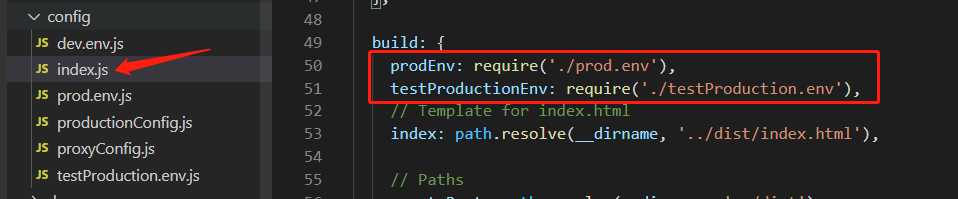
4. Modify the configuration/ index.js file

Add the following code:

prodEnv: require('./prod.env'),
testProdEnv: require('./testProd.env')

5. Modify bulid/ webpack.prod.conf . JS file

//const env = require('../config/prod.env'); //Annotate this line
const env = config.build[process.env.env_config + 'Env'] //change to this code

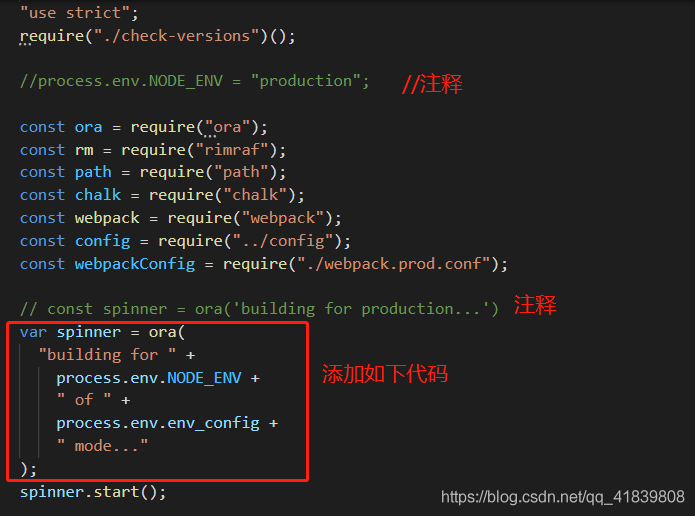
6. Modify build/ build.js file

//process.env.NODE_ENV = "production";  //Annotate this line
//const spinner = ora('building for production...')  //Annotate this line and change to these codes below
var spinner = ora(
  'building for ' +
    process.env.NODE_ENV +
    ' of ' +
    process.env.env_config +
    ' mode...'
)  

7. Modification package.json And packing command

 "build": "cross-env NODE_ENV=prod env_config=prod node build/build.js",
 "build:testProd": "cross-env NODE_ENV=testProd env_config=testProd node build/build.js"

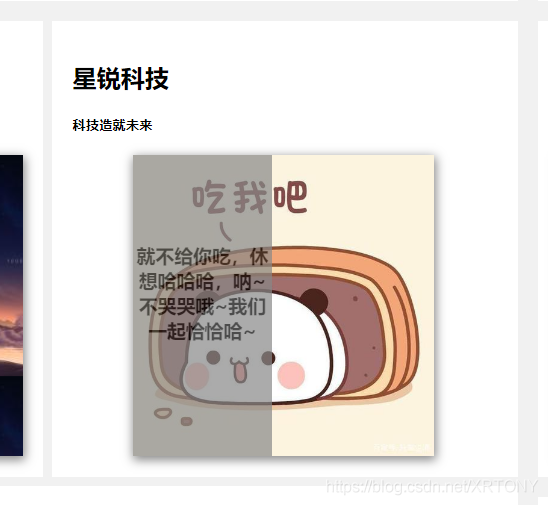
CSS to achieve dynamic display of picture text by mouse touch

CSS to achieve dynamic display of picture text by mouse touch

These days, I want to prepare a small gift for my girlfriend, so I want to develop a website to express my love to her. Let’s have a try!

In fact, this is to add another page to your original page. As long as you define the scrolling speed with transition, let’s take a look.

<!DOCTYPE html>
<html>
	<head>
		<meta charset="utf-8" />
		<style>
			* {
			  box-sizing: border-box;
			}
			
			body{
				margin: 0;
				font-family: Arial;
				padding: 10px;
				background: #f1f1f1;
			}
			
			.clearfix {
			  overflow: auto;
			}
			.shadow_box{
				box-shadow: 0px 3px 10px 1px #888888;
			}
			.up-leader {
			  background-color: #333; 
			  list-style-type: none;
			  text-align: center;
			  position:sticky;
			  margin: 0;
			  padding: 0;
			  border-radius: 10px;
			  z-index: 10;
			}
			
			.up-leader li:not(.dropdown) {
			  display: inline-block;
			  font-size: 20px;
			  padding: 20px;
			  z-index: 10;
			}
			.up-leader li a, .dropbtn{
				display: inline-block;
				  color: white;
				  text-align: center;
				  padding: 14px 16px;
				  text-decoration: none;
			}
			.up-leader li.dropdown{
				display: inline-block;
				font-size: 20px;
			    padding: 20px;
			}
			
			.dropdown-content {
			  display: none;
			  position: absolute;
			  background-color: #f9f9f9;
			  min-width: 160px;
			  box-shadow: 0px 8px 16px 0px rgba(0,0,0,0.2);
			  z-index: 1;
			}
			
			div.dropdown-content a {
			  color:#000000;
			  padding: 12px 16px;
			  text-decoration: none;
			  display: block;
			  text-align: left;
			}
			.dropdown-content a:hover {background-color: #f1f1f1;}
			.dropdown:hover .dropdown-content {
			  display:block;
			}
			div.sticky{
				
				position: sticky;
				top: 0;
				
				background:azure;
				text-align: center;
				
				
			}
			.img1{
				float:left;
				clear:both;
				position:static;
				
				display: flex;
				justify-content: center;
				opacity: 0.8;
				overflow: auto;
				
			}
			
			.side-leader ul{
				
				list-style-type: 0;
				margin-top: 10px;
				padding: 0;
				width: 7%;
				height: 170%;
				background-color:#333 ;
				box-shadow: 0px 0px 1px 0px #888888;
				position:absolute;
				overflow: auto;
				border-radius: 25px;
				float: left;
				z-index: 4;


			}
			
			.side-leader ul li a{
				display: block;
				color:white;
				padding: 8px 16px;
				text-decoration: none;
				font-family:"黑体";
				
			}
			li:hover{
				background-color: #555;
				color: white;
				
			}
			
			.leftcolumn{
				
			    float: left;
			    width: 8%;
				
			}
			.midcolumn {   
			  float: left;
			  width: 50%;
			}
			
			/* 右列 */
			.rightcolumn {
			  float: left;
			  width: 42%;
			  background-color: #f1f1f1;
			  padding-left: 20px;
			}
			.avercolumn{
			  float: left;
			  width: 50%;
			  background-color: #f1f1f1;


			}
			.aver_column{
			  float: left;
			  width: 49%;
			  background-color: #f1f1f1;
			  margin-left: 1%;
			  
				
			}
			.aver2column{
			  float: left;
			  width: 68%;
			  background-color: #f1f1f1;
			  
				
			}
			.aver3column{
			  margin-left: 2%;
			  width: 27%;
			  
			  background-color: #f1f1f1;
			  padding-left: 20px;
			  box-shadow:2px 2px 10px 0px #888888 ;
			  
			  
			  display: inline-block;
			}
			
			/* 伪图像 */
			.fakeimg1 {
			  /*background-color: #aaa;*/
			  width: 852px;
			  background: url(img/6.jpg);
			  box-shadow:1px 3px 15px 1px #888888 ;
			  
			
			  padding: 20px;
			}
			.fakeimg2{
				background: url(img/5.jpg);
				box-shadow:1px 3px 15px 1px #888888 ;
				
			}
			.imgall{
				box-shadow:1px 3px 15px 1px #888888;
			}
			/* 为文章添加卡片效果 */
			.card {
			  background-color: white;
			  padding: 20px;
			  margin-top: 20px;
			  /*box-shadow: 0px 0px 1px 0px #888888;*/
			}
			/* 清除列之后的浮动 */
			.row:after {
			  content: "";
			  display: table;
			  clear: both;
			}
			
			/* 页脚 */
			.footer {
				margin: 20%;
			  
			  text-align: center;
			  background: white;
			  
			}
			#myImg {
			  border-radius: 5px;
			  cursor: pointer;
			  transition: 0.3s;
			}
			
			#myImg:hover {opacity: 0.7;}
			
			/* The Modal (background) */
			.modal {
			  display: none; /* Hidden by default */
			  position: fixed; /* Stay in place */
			  z-index: 1; /* Sit on top */
			  padding-top: 100px; /* Location of the box */
			  left: 0;
			  top: 0;
			  width: 100%; /* Full width */
			  height: 100%; /* Full height */
			  overflow: auto; /* Enable scroll if needed */
			  background-color: rgb(0,0,0); /* Fallback color */
			  background-color: rgba(0,0,0,0.9); /* Black w/ opacity */
			}
			
			/* Modal Content (image) */
			.modal-content {
			  margin: auto;
			  display: block;
			  width: 80%;
			  max-width: 1500px;
			}
			
			/* Caption of Modal Image */
			#caption {
			  margin: auto;
			  display: block;
			  width: 80%;
			  max-width: 700px;
			  text-align: center;
			  color: #ccc;
			  padding: 10px 0;
			  height: 150px;
			}
			
			/* Add Animation */
			.modal-content, #caption {  
			  animation-name: zoom;
			  animation-duration: 0.6s;
			}
			
			@keyframes zoom {
			  from {transform: scale(0.1)} 
			  to {transform: scale(1)}
			}
			
			/* The Close Button */
			.close {
			  position: absolute;
			  top: 15px;
			  right: 35px;
			  color: #f1f1f1;
			  font-size: 40px;
			  font-weight: bold;
			  transition: 0.3s;
			}
			
			.close:hover,
			.close:focus {
			  color: #bbb;
			  text-decoration: none;
			  cursor: pointer;
			}
			
			/* 100% Image Width on Smaller Screens */
			@media only screen and (max-width: 700px){
			  .modal-content {
			    width: 100%;
			  }
			}
			
			.container {
			  position: relative;
			  left: 60px;
			  float: inherit;
			  text-align: center;
			  width:71%;
			  z-index:0;
			}
			
			.image {
			  display: block;
			  
			  
			  height: auto;
			}
			
			.overlay {
			  text-align: center;
			  position: absolute;
			  bottom: 0;
			  left: 0;
			  right: 0;
			  background-color:#888888;
			  opacity: 0.7;
			  overflow: hidden;
			  width: 0;
			  height: 100%;
			  transition: 0.5s ease;
			}
			
			.container:hover .overlay {
				
			  width: 100%;
			}
			
			.text{
				text-align: center;
				top: 50%;
				font-family: "微软雅黑";
			}
		</style>
		<title>XR官网</title>
	</head>
	
	
	<body>
		
		<div class=" clearfix shadow_box">
			<a  href="#1">
			<img class="img1"  src="img/下载.jpg"   width=1920px height=900px>
			
			</a>
		</div>
		<div class="sticky" style="z-index: 10;">
			<a name="1" >
			<ul class="up-leader"  >
			  <li><a href="https://blog.csdn.net/XRTONY?spm=1000.2115.3001.5343" >Home</a></li>
			  <li><a href="#news">News</a></li>
			  <li><a href="https://blog.csdn.net/XRTONY?spm=1000.2115.3001.5343">Contact</a></li>
			  <li class="dropdown">
			  	<a class="dropbtn" href="index.html">Our World</a>
			  	 <div class="dropdown-content">
			        <a href="https://blog.csdn.net/XRTONY?spm=1000.2115.3001.5343">Link 1</a>
			      	<a href="#">Link 2</a>
			      	<a href="#">Link 3</a>
			    </div>
			  </li>
			</ul>
			</a>
			</div>
			<div class=" side-leader ">
			<ul >
				<li><a href="https://blog.csdn.net/XRTONY?spm=1000.2115.3001.5343">核心科技</a></li>
				<li><a href="index.html">党政板块</a></li>
				<li><a href="index.html">经营情况</a></li>
				<li><a href="index.html">未来发展</a></li>
				<li><a href="index.html">联系我们</a></li>
			</ul>
			
		  </div>
		<div style="">
			<div class="leftcolumn">
				<p></p>
			</div>
			<div class="midcolumn">
				<div class="card">
					<h2>title1</h2>
					<h5>hello world1</h5>
					<div class="fakeimg1" style="height:300px;"></div>
				</div>
				<div class="avercolumn card">
					<h2>title2</h2>
					<h5>hello world2</h5>
					<div class="fakeimg2" style="height:300px;"></div>
				</div>
				<div class="aver_column card">
					<h2>title3</h2>
					<h5>hello world3</h5>
					<div class="container" style="height:300px;text-align: center;">
						<img  class="imgall image" src="img/u=140318467,4274089430&fm=26&gp=0%20(1).jpg" style="height: 300px;text-align: center;"/>
						<div class="overlay">
						    <div class="" style="">
						    <h3 style="padding-top: 50%;font-family: '微软雅黑';">就不给你吃,休想哈哈哈,呐~不哭哭哦~我们一起恰恰哈~</h3>
						    </div>
						  </div>
					</div>
				</div>
				<div class="card" style="float: left;width: 100%; margin-top: 1%;height: 100%;margin-right: 1%;">
					<video width=100% height=100% controls="controls" <!--autoplay="autoplay"-->>
					  <source src="/i/movie.ogg" type="video/ogg" />
					  <source src="img/Europa%20Universalis%20IV%202021-03-02%2010-03-59_Trim.mp4" type="video/mp4" />
					  <source src="/i/movie.webm" type="video/webm" />
					  <object data="/i/movie.mp4" width="320" height="240">
					    <embed width=100% height=100% src="img/Europa%20Universalis%20IV%202021-03-02%2010-03-59_Trim.mp4" />
					  </object>
					</video>
				</div>
				
					
				</div>
				
				
			</div>
			<div class="rightcolumn">
				<div class="card">
					<h2>title1</h2>
					<h5>hello world1</h5>
					<div class="fakeimg2" style="height:300px;"></div>
				</div>
				<div class="aver2column card">
					<h2>title2</h2>
					<h5>hello world2</h5>
					<div class="fakeimg2" style="height:300px;"></div>
				</div>
				<div class="aver2column card" style="">
					<img src="img/u=1814211770,2732480941&fm=26&gp=0.jpg%20" id="myImg" style="height:100%;widows: 100%;"/>
				</div>
				<div id="myModal" class="modal">
				  <span class="close">×</span>
				  <img class="modal-content" id="img01">
				  <div id="caption"></div>
				</div>
				
				<script>
				// Get the modal
				var modal = document.getElementById('myModal');
				
				// Get the image and insert it inside the modal - use its "alt" text as a caption
				var img = document.getElementById('myImg');
				var modalImg = document.getElementById("img01");
				var captionText = document.getElementById("caption");
				img.onclick = function(){
				  modal.style.display = "block";
				  modalImg.src = this.src;
				  captionText.innerHTML = this.alt;
				}
				
				// Get the <span> element that closes the modal
				var span = document.getElementsByClassName("close")[0];
				
				// When the user clicks on <span> (x), close the modal
				span.onclick = function() { 
				  modal.style.display = "none";
				}
				</script>
				
				
				<div class="aver3column card" style="height: 1000px; ">
					<h2>title</h2>
					<h5>hello world11</h5>
					<div class="fakeimg2" style="height:300px; src: ;"></div>
				</div>
				
				
			</div>
			</div>
			<div style="padding-bottom: 1000px;">
				<p>
					
				</p>
			</div>


		</div>


	</body>
</html>

Extracting TF-IDF keywords from text using Jieba

First install dependencies:

pip install -i https://pypi.tuna.tsinghua.edu.cn/simple/ jieba

Then use the following code:

import jieba.analyse


def tfidf_ana(content):
    content_s = "".join(content).strip()
    title_keys = jieba.analyse.extract_tags(content_s, topK=6, withWeight=False)  # topK is the number of keywords expected to be obtained
    title_keys = ','.join(title_keys)
    return title_keys


# begin to test
data = tfidf_ana("2019年,复杂的外部环境、全球经济放缓的较大可能性,叠加中国经济前期不利因素的累积效应,经济下行"
                 "压力进一步凸显,但是变中危和机同生共存,紧扣重要战略机遇新内涵,做好“六稳”工作,变压力为加快推动"
                 "经济高质量发展的动力。一是进一步发展好对外贸易关系,推进新全球化,以经贸关系为主线稳定外部环境。"
                 "稳妥应对外部经济环境变化,稳步发展“一带一路”贸易畅通,积极参与全球经济和贸易治理体系变革与发展,"
                 "坚持维护WTO的多边机制,维护中国在外贸中的合理权益和地位。二是稳妥处置地方政府债务风险和衍生金融风险。"
                 "为地方政府“开前门、堵后门”,辅以金融政策支持,为之构建合理的债务处置出口;合理划分中央和地方各级政府的财权、"
                 "事权,使地方政府的事权和财权相匹配,并有资源能够化解已有的债务问题,使之成为中国经济发展的助推器,而非风险源。"
                 "三是加快经济的深化改革和扩大开放。我国经济韧性强健,产业门类齐全,人员技能熟练,经济纵深宽广,抗风险能力强大,"
                 "加快经济的深化改革和扩大开放,深化国资国企、财税金融、土地、市场准入、社会管理等领域改革,推动体制机制创新,"
                 "不仅能进一步激发全社会的发展活力,为实现“六稳”目标打下坚实的基础,还能吸引中国经济对国际社会的吸引力,"
                 "形成互惠互利,提升中国应对全球经济衰退风险的能力,提高中国在推进新型全球化进程中的权益。
print(data)

Prometheus auto discovery and re labeling based on consumer

# add meta informations
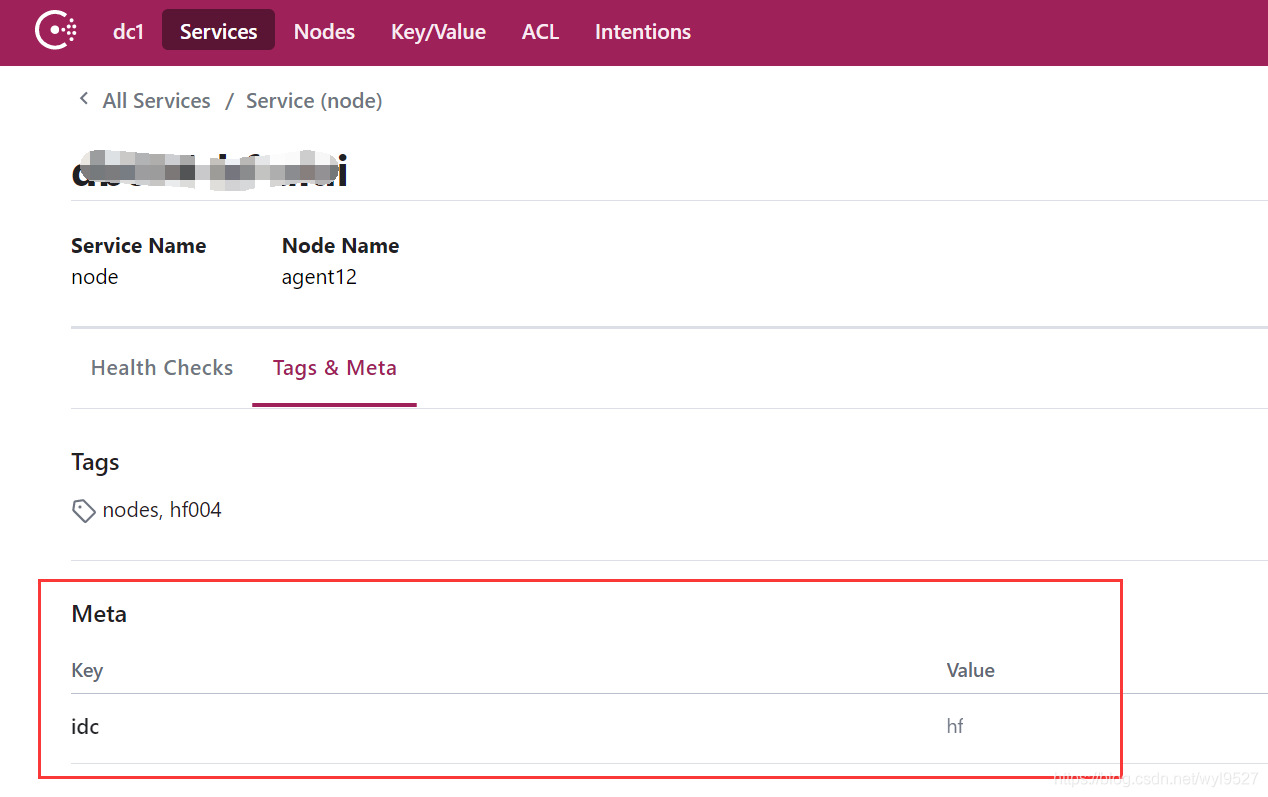
curl -X PUT -d '{"id": "db004-hf","name": "node","address": "172.16.168.15","port": 9101,"tags": ["nodes","hf004"],"meta":{"idc":"hf"},"checks": [{"http": "http://172.16.168.15:9101/metrics", "interval": "5s"}]}'  http://172.16.168.10:8500/v1/agent/service/register

scrape_configs:
- job_name: 'consul-node'
  consul_sd_configs:
  - server: '172.16.168.10:8500'
    tags:
    - "nodes"
    refresh_interval: 3s
  relabel_configs:
    - source_labels: [__meta_consul_tags]
      regex: .*hf004.*
      action: keep
    - regex: __meta_consul_service_metadata_(.+)
      action: labelmap

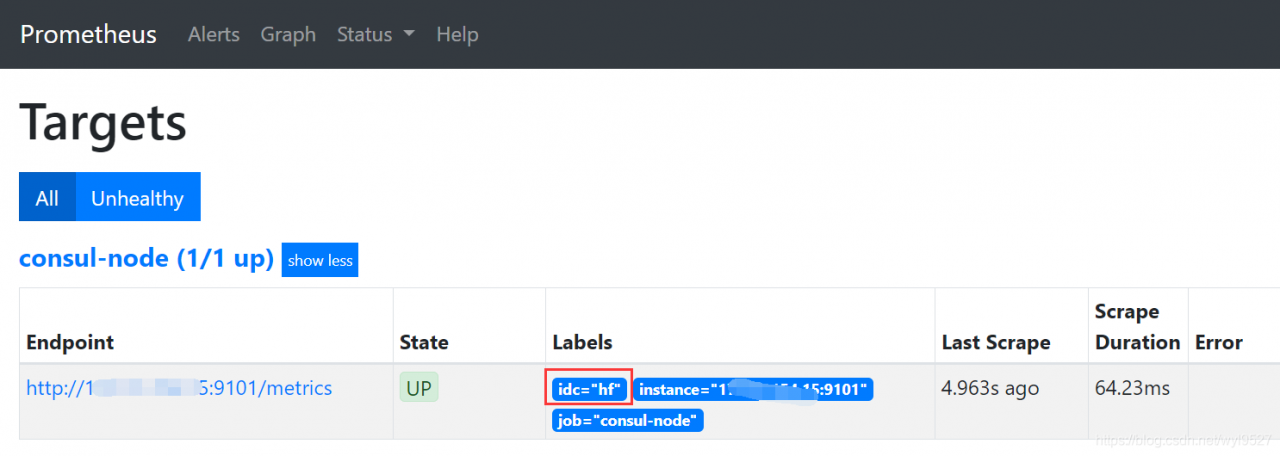
After restarting Prometheus, you can see that the label is automatically marked.

How to Set Time Zone in Golang

About me

Article launch | my blog | welcome to pay attention

Go language time.Now () returns the local time zone

time.Now().Format("2006-01-02 15:04:05")

Time setting custom time zone

var cstSh, _ = time.LoadLocation("Asia/Shanghai") //ShangHai
fmt.Println("SH : ", time.Now().In(cstSh).Format("2006-01-02 15:04:05"))

There is a problem with load location. It depends on IANA time zone database (tzdata for short). Generally, Linux system has it, but windows system does not. Therefore, if the go environment is not installed in the windows system, an error will be reported by calling loadlocation.

The current solutions include:

1. We can put the tzdata file into our own program directory, and then let the time package load the time zone file from our own program directory.

The file directory can be set through the environment variable. In the main method:

os.Setenv("ZONEINFO", '/home/tz/data.zip')

Then call the loadlocation method.

Download tzdata

2. Use time zone mode recommended mode

var cstZone = time.FixedZone("CST", 8*3600)       // East 8 District
fmt.Println("SH : ", time.Now().In(cstZone).Format("2006-01-02 15:04:05"))

Global settings

If you want to set the global time zone configuration, what should you do?

main.go Add an initialization method (at the main function)

func initInMain() {
	var cstZone = time.FixedZone("CST", 8*3600) // East 8 District
	time.Local = cstZone
}

Assign the defined time zone instance to the time.Local

Recommended reading

Redis: a new open source charging tool

Star’s top engineer skill map on GitHub

Chinese programmers are most likely to send wrong words

Recommended! Markdown icon Index Website

Implementation of Kalman Filter in Python

Kalman filtering

In learning the principle of Kalman filtering, I hope to deepen the understanding of the formula and principle through python.

Take notes

import numpy as np
import math
import matplotlib.pyplot as plt

'''
    dynam_params:The dimensions of the state space.
    measure_params: the dimension of the measure value; 
    control_params: the dimension of the control vector, default is 0.
'''
class Kalman(object):
    '''
        INIT KALMAN
    '''
    def __init__(self, dynam_params, measure_params,control_params = 0,type = np.float32):
        self.dynam_params = dynam_params
        self.measure_params = measure_params
        self.control_params = control_params
        # self

        ### The following should all be able to determine the dimension based on the input dimension value
        if(control_params ! = 0):
            self.controlMatrix = np.mat(np.zeros((dynam_params, control_params)),type) # control matrix
        else:
            self.controlMatrix = None
        self.errorCovPost =  np.mat(np.zeros((dynam_params, dynam_params)),type) # P_K
        self.errorCovPre =  np.mat(np.zeros((dynam_params, dynam_params)),type) # P_k-1
        self.gain =  np.mat(np.zeros((dynam_params, measure_params)),type) # K

        self.measurementMatrix =  np.mat(np.zeros((measure_params, dynam_params)),type) 
        self.measurementNoiseCov =  np.mat(np.zeros((measure_params, measure_params)),type) 
        self.processNoiseCov =  np.mat(np.zeros((dynam_params, dynam_params)),type) 
        self.transitionMatrix =  np.mat(np.zeros((dynam_params, dynam_params)),type)

        self.statePost =  np.array(np.zeros((dynam_params, 1)),type)
        self.statePre =  np.array(np.zeros((dynam_params, 1)),type)
        
        # The diagonal is initialized to 1
        ## np.diag_indices returns the index of the main diagonal as a tuple
        ### F state transfer matrix diagonal initialized to 1
        row,col = np.diag_indices(self.transitionMatrix.shape[0])
        self.transitionMatrix[row,col] = np.array(np.ones(self.transitionMatrix.shape[0]))
        ### R measure noise Diagonal initialized to 1
        row,col = np.diag_indices(self.measurementNoiseCov.shape[0])
        self.measurementNoiseCov[row,col] = np.array(np.ones(self.measurementNoiseCov.shape[0]))
        ### Q Process noise Diagonal initialized to 1
        row,col = np.diag_indices(self.processNoiseCov.shape[0])
        self.processNoiseCov[row,col] = np.array(np.ones(self.processNoiseCov.shape[0]))
    
    def predict(self,control_vector = None):
        '''
            PREDICT
        '''
        # Predicted value
        F = self.transitionMatrix
        x_update = self.statePost
        B = self.controlMatrix

        if(self.control_params == 0):
            x_predict = F * x_update
        else:
            x_predict = F * x_update + B * control_vector
        self.statePre = x_predict

        # P_k
        P_k_minus = self.errorCovPost
        Q = self.processNoiseCov
        self.errorCovPre = F * P_k_minus * F.T + Q

        self.statePost = self.statePre
        self.errorCovPost = self.errorCovPre
        return x_predict

    def correct(self,mes):
        '''
            CORRECT
        '''
        # K update
        K = self.gain
        P_k = self.errorCovPost
        H = self.transitionMatrix
        R = self.measurementNoiseCov
        K = P_k * H.T * np.linalg.inv(H * P_k * H.T + R)
        self.gain = K

        # Calculate the estimated value of State
        x_predict = self.statePre
        x_update = x_predict +  K * (mes - H * x_predict)
        self.statePost = x_update

        # P_k update
        P_pre = self.errorCovPre
        P_k_post = P_pre - K * H * P_pre
        self.errorCovPost = P_k_post
        return x_update

if __name__ == '__main__':
    
    pos = np.array([
        [10,    50],
        [12,    49],    
        [11,    52],     
        [13,    52.2],     
        [12.9,  50]], np.float32)
    kalman = Kalman(2,2)
    kalman.measurementMatrix = np.mat([[1,0],[0,1]],np.float32)
    kalman.transitionMatrix = np.mat([[1,0],[0,1]], np.float32)
    kalman.processNoiseCov = np.mat([[1,0],[0,1]], np.float32) * 1e-4
    kalman.measurementNoiseCov = np.mat([[1,0],[0,1]], np.float32) * 1e-4 
    kalman.statePre =  np.mat([[6],[6]],np.float32)
   #kalman.statePre =  np.mat([[6],[6]],np.float32)
    for i in range(len(pos)):
        mes = np.reshape(pos[i,:],(2,1))
        y = kalman.predict()
        
        print("before correct mes",mes[0],mes[1])
        x = kalman.correct(mes)
        print (kalman.statePost[0],kalman.statePost[1])
        print (kalman.statePre[0],kalman.statePre[1])
        print ('measurement:\t',mes[0],mes[1])  
        print ('correct:\t',x[0],x[1])
        print ('predict:\t',y[0],y[1])     
        print ('='*30)  
    

JAVA: How to use the third-party font library method (using the third-party TTF / TTC font library method)

Java using the third-party font library method, using the third-party TTF/TTC font library method

Sometimes we use Java fonts in our programs, but not in all font systems. We may use external custom fonts, so we will work less in program migration and deployment. Recently, we used custom font files in a project. If we straighten them out, remember them.

class Loadfont
{
    public static Font loadFont(String fontFileName, float fontSize)  //The first parameter is the external font name, the second is the font size
    {
        try
        {
            File file = new File(fontFileName);
            FileInputStream aixing = new FileInputStream(file);
            Font dynamicFont = Font.createFont(Font.TRUETYPE_FONT, aixing);
            Font dynamicFontPt = dynamicFont.deriveFont(fontSize);
            aixing.close();
            return dynamicFontPt;
        }
        catch(Exception e)
        {
            e.printStackTrace();
            return new java.awt.Font("宋体", Font.PLAIN, 12);
        }
    }
    public static java.awt.Font Font(){
        String root=System.getProperty("user.dir");//Project root path
        System.out.println(root);
        Font font = Loadfont.loadFont(root+"/simsun.ttc", 12f);//call
        return font;//return the font
    }
    public static java.awt.Font Font2(){
        String root=System.getProperty("user.dir");//Project root path
        System.out.println(root);
        Font font = Loadfont.loadFont(root+"/simsun.ttc", 12f);
        return font;//return the font
    }
}

usage method:

String root= System.getProperty (” user.dir “);
String fontname = “Droid Serif”;
Font font = Loadfont.loadFont (root+”/ xx.ttf “, 16F); — & gt; to the required xx.ttf Font library file.
If not, you can try to double-click the TTF file, install it (the previous question is Windows system), the above internal class, test can, do not need to install the TTF file.

Or directly put the TTF file into the JRE/lib/fonts directory. If there is no directory, you can MKDIR

In new font (“DDD”, XX, XX); – & gt; DDD is double-click aa.ttf The file font name, not the file name.


Vue: How to Solve Error uncaught (in promise) cancel

Delete a piece of data
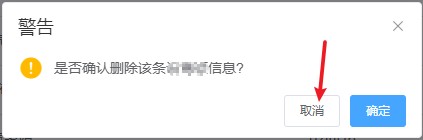
pop up delete prompt box
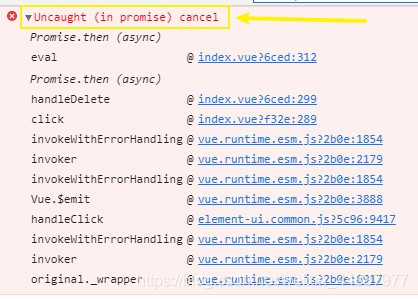
click Cancel
browser console error


error reason:

This.$confirm method has a built-in promise method.
So you can't remove the .catch() (because when the operation is cancelled, it can't be caught))

Solution:
Add catch after delete method, and add method body () = & gt; {} in catch

/** Delete button operation */
handleDelete(row) {
  const eCodes = row.eCode || this.ids;
  this.$confirm('Do you want to confirm the deletion of this data?' , "warning", {
    confirmButtonText: "OK",
    cancelButtonText: "Cancel",
    type: "warning"
  }).then(function() {
    return deleteEquipment(eCodes);
  }).then(() => {
    this.getList();
    this.msgSuccess("Deleted successfully");
  }).catch(()=>{}) //---here's the kicker---
},

[jQuery] jQuery operates on JSON strings or JSON objects

preface

Most of the time, you need to convert a JSON string to a JSON object, and then process it in a loop, or convert a JSON object to a JSON string as a parameter and pass it to the relevant interface. Next, we will introduce several conversion methods

Assume that the JSON string is

Var jsonstr = ‘[{“Id”: 1, “title”: “Zhang San”, “sex”: “male”}, {“Id”: 2, “title”: “Li Si”, “sex”: “male”}]’;

Assume that the JSON object is

Var jsonobj = [
{
“Id”: 1,
“title”: “Zhang San”,
“sex”: “male”
},
{
“Id”: 2,
“title”: “Li Si”,
“sex”: “male”
}
]

1、 Convert JSON string to JSON array object

1、eval()

var jsonObj = eval('(' + jsonStr + ')');

2、JSON.parse()

var jsonObj = JSON.parse(jsonStr);

Prev

var jsonObj = JSON.parse(jsonStr);

2、 Convert JSON object to JSON string

JSON.stringify ()

var jsonStr = JSON.stringify(jsonObj);

3、 Loop JSON object

for (var i = 0; i < jsonObj.length; i++) {

    var name= jsonObj[i].Title;

}


MySQL local connection Error 1130_ The solution of MySQL 1130 error report when remote connection through Navicat for MySQL

Solution of MySQL 1130 error report when remote connection through Navicat for MySQL

Navicat for MySQL 1130 error: using Navicat to connect to remote mysql, the following error is prompted. I thought it was my own firewall problem, but when it was turned off, it still couldn’t work.

I think this paragraph of English is a bit misleading and makes people feel that there is something wrong with them.

Look at the solution

ERROR 1130: Host ‘192.168.1.3’ is not allowed to connect to thisMySQL server

resolvent:

1。 Change the table method. Maybe your account is not allowed to log in from remote, only in localhost. At this time, just log in to MySQL on the computer of localhost, change the “host” item in the “user” table in the “MySQL” database, and change the name from “localhost” to “%”

mysql -u root -pvmwaremysql>usemysql;mysql>update user set host = ‘%’ where user =’root’;mysql>select host, user from user;

2. Authorization law. For example, if you want myuser to connect to the MySQL server from any host using mypassword.

Grant all privileges on *. * to identified by ‘mypassword’ with grant option; if you want to allow user myuser to connect to MySQL server from the host with IP 192.168.1.3, and use mypassword as password

GRANT ALL PRIVILEGES ON *.* TO IDENTIFIED BY’mypassword’ WITH GRANT OPTION;

Method 2

The error code is 1130, Error 1130: host xxx.xxx.xxx . XXX is not allowed to connect to this MySQL server

Authorization to users

I use the root password 123456

The preferred syntax is:

SQL code

GRANT ALL PRIVILEGES ON *.* TO ‘myuser’@’%’ IDENTIFIED BY ‘mypassword’ WITH GRANT OPTION;

Example: