Author Archives: Robins

Non real time fast synchronization scheme for mobile devices

For reprint, please indicate the source: http://blog.csdn.NET/itas109  

QQ technology exchange group: 129518033
Recently, we encountered a problem in the development process

The mobile terminal needs to synchronize the data of the server (only for query and subject to the data of the server), but with the increasing amount of data, the speed of synchronization will be slower and slower. It is mainly time-consuming to load the mobile device to operate the database and synchronize with the server.

Solutions:

In view of the pain points of the above problems, we mainly solve the time-consuming operation of the mobile terminal to the database and the time-consuming synchronization of the server for many times. Therefore, here we will give a lot of computing work to the server, that is, to solve this problem by using a way of database replacement. Generate a suitable database (such as sqllite) on the server and replace it after downloading. In this way, the time of the whole synchronization system is only the time of downloading and replacing database files, which can be shortened to a very short time.

Applicable conditions:

1. Synchronization is required for non real time, because it takes time for the server to generate database files.

2. The mobile terminal supports databases like sqllite, which can be replaced as a whole

For reprint, please indicate the source: http://blog.csdn.NET/itas109  

QQ technology exchange group: 129518033
[solution] coursera webpage can’t be posted, video can’t be opened -20.05.23-

115 coursera epidemic free open courses were ordered, and the deadline was July 31

Preparation: first of all, we should adjust the HTTP proxy to the global mode, otherwise we can’t open the website QAQ

Principle introduction

In order to facilitate the memory of users, we will IP address into a domain name, users do not need to remember the complex number of IP, the work to the computer to do. After we type in the domain name, the computer converts the domain name into the corresponding IP. DNS (domain name server) on the network is used for domain name resolution. Among the several blocking methods of GFW (wall), one is DNS pollution. GFW will interfere with the domain name resolution process, and the host will not be able to obtain resources. The main reason why the web page can’t be opened and the video loading fails is DNS cache pollution. In short, the DNS server’s processing is chaotic, that is, the corresponding relationship between the domain name and the server’s IP is wrong. The solution is to manually locate the domain name to the server. We use a simpler way to avoid DNS pollution, that is, modify the hosts file. Hosts is equivalent to a local DNS. When a user opens a browser to log on to a website, the system will first automatically find the corresponding IP address from the local hosts file. Once found, the corresponding web page will be opened immediately. If not found, the web address will be submitted to the DNS server for IP address resolution. Therefore, if we directly add the correct IP address to the hosts file, we don’t need to go to the DNS server to find it, and we can bypass the restrictions of GFW and avoid DNS pollution. This method is applicable to coursera. The principle is that coursera will go to D3 when opening the website njjcbhbojbot.cloudfront.net this server requests resources. Although the website is not blocked, it is slow to open. When you play the video, you will go to d3c33hcgiwev3 cloudfront.net this server requests resources, and the URL supported by this video is blocked, so you can log in to C Oursera but can't play the video.

The web page can't be opened

    find IP
    open the command prompt (press Win + R, and then enter CMD), and enter the code:

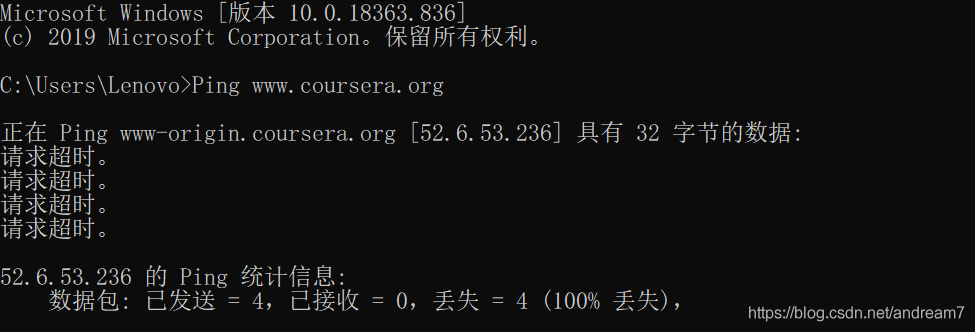
    Ping www.coursera.org
    

    The interface is as follows:

    the Ping here is an attempt to connect, but it obviously failed here, and [52.6.53.236] is the wrong IP cached in the DNS server, but we found that Ping can help us find the IP address.
    So, you can find the correct IP and continue to enter the code:

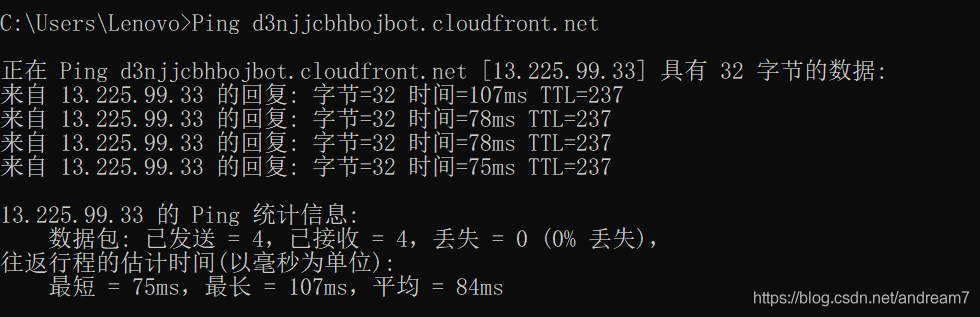
    Ping d3njjcbhbojbot.cloudfront.net
    

    This time, the connection is successful:

    this shows that [13.225.99.33] is the IP we are looking for, so we just need to change the http://www.coursera.org can be directed to this IP, which can be realized by modifying the hosts file. Modify the hosts file
    to find the hosts file in C: windows, system32, drivers, etc. do not double-click it. Open the hosts file in Notepad, add the code at the end, match the previously found IP with the domain name, and then save the CTRL + s:

    13.225.99.33    www.coursera.org
    

    Enter at the command prompt

    ipconfig/flushdns
    

    Enter refreshes DNS to take effect.

The video cannot be opened

    copy these lines of code into the hosts file

    52.84.246.90    d3c33hcgiwev3.cloudfront.net
    52.84.246.252    d3c33hcgiwev3.cloudfront.net
    52.84.246.144    d3c33hcgiwev3.cloudfront.net
    52.84.246.72    d3c33hcgiwev3.cloudfront.net
    52.84.246.106    d3c33hcgiwev3.cloudfront.net
    52.84.246.135    d3c33hcgiwev3.cloudfront.net
    52.84.246.114    d3c33hcgiwev3.cloudfront.net
    52.84.246.90    d3c33hcgiwev3.cloudfront.net
    52.84.246.227    d3c33hcgiwev3.cloudfront.net
    

    Don't forget to refresh DNS at last. At the command prompt, enter:

    ipconfig/flushdns
    

Enter coursera and start to study happily!

Course recommendation

Source: Zhihu: what courses are recommended on coursera?

    use Mysql to manage big data
    Jana schaich Borg, Duke University. It's a very good basic course of data analysis. The professor used two practical examples of data analysis, one is to analyze the data of a retailer for one year, and the other is to analyze the data of a pet website. Through these two examples, we can fully master the ability of SQL and data analysis. Lu Shihao, National Taiwan University. A baptism of humanity, after listening to this course, at least during the course, you won't often complain and worry. The first is why we study history in order to make better decisions. You can assume that you are a historical figure, what choices you will make in that scene at that time, and what choices the real historical figures have made, and how the results are compared with each other can help you make choices in your daily life. It's worth listening to. Algorithm, the first part is algorithm, and the second part is
    these two courses are all taught by Robert Sedgewick, the big guy of algorithm class. How wonderful is the old man. He just goes up and down, and suddenly finds out, eh, isn't the inventor of this algorithm himself. At that time, coursera also had Stanford's algorithms: design and analysis. I also watched some videos of this course, and I feel that the old man's lecture is better than the old man's. In particular, algorithms II talks about graph related algorithms, tries and string matching algorithms, which are really very clear.

Shrio | java.io.IOException: Resource [classpath:shiro.ini] could not be found

case

case

java.io.IOException: Resource [classpath:shiro.ini] could not be found

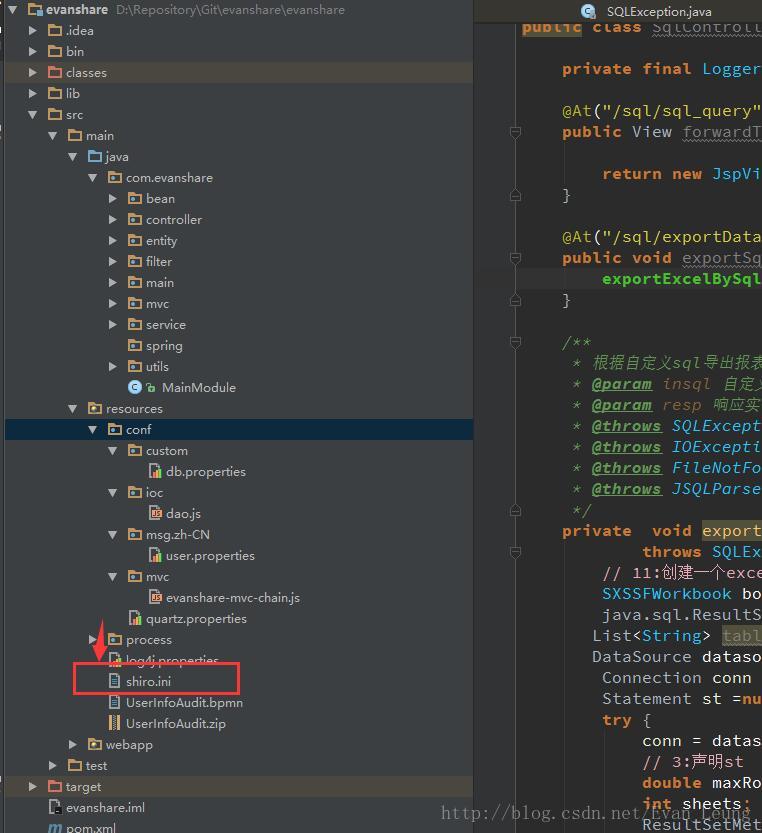
Directory of Shiro file:

Solution

After troubleshooting, there is no problem with the file storage directory structure, but the bytecode file directory under target is still the old storage location, under conf/instead of the class directory. Therefore, you can know that this exception must be a compilation problem. Just delete the whole target directory and recompile it

The introduction of third-party jar package in mavn project results in classnotfoundexception

Cases

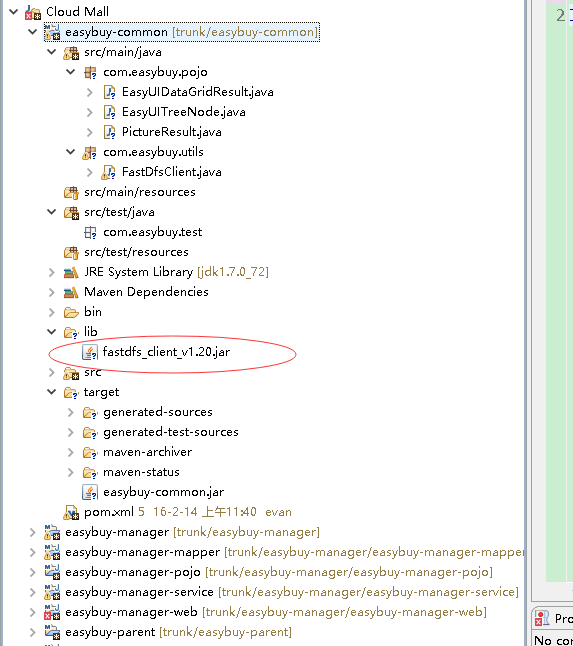
I have a maven built project. There are dependencies between the project modules. I need to use a local jar package, which cannot be configured pom.xml The file is automatically downloaded from the remote warehouse, so I directly import the jar package to one of the projects without passing the pom.xml As a result, other modules that depend on the module cannot reference the jar, and classnotfoundexception appears tion

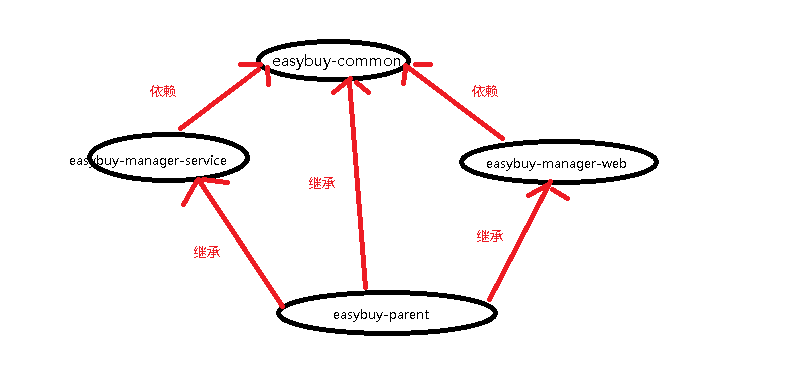
In this project, there are the following dependencies between modules:

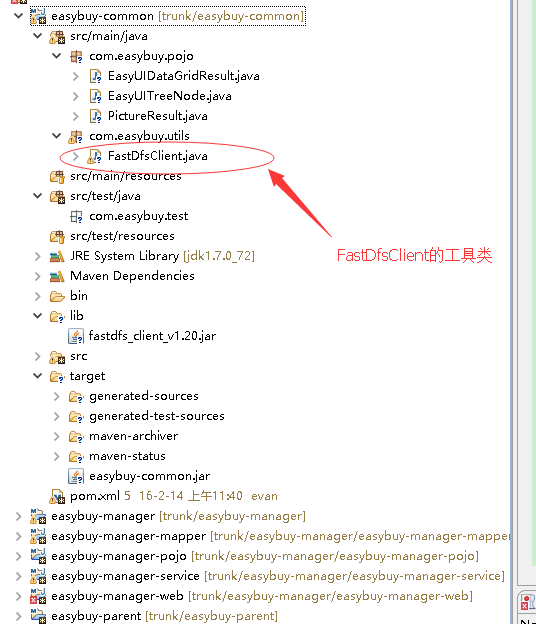
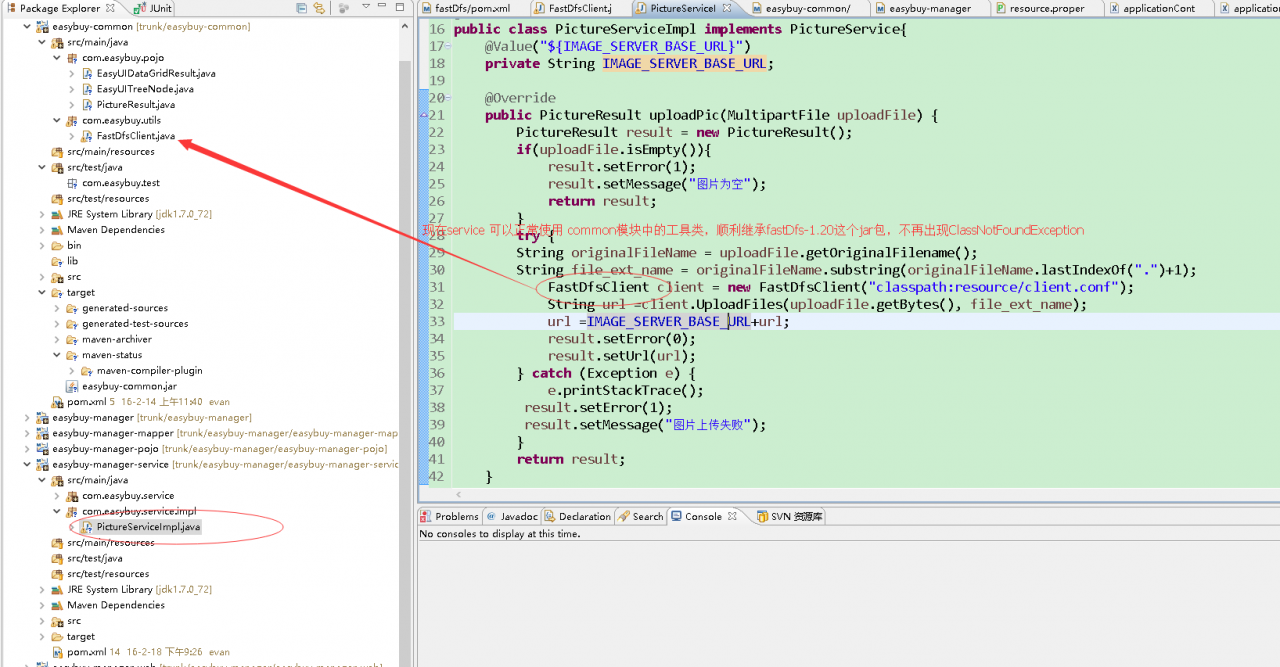
The project needs to introduce fastdfs_ client_ V1.20.jar package is used to operate the fastdfs distributed file system. Both service and controller are involved in the operation. So now we want to put the operation tool class of fastdfs in the common module for sharing. But now the common module directly uses fastdfs_ client_ If v1.20.jar is imported through lib, because this method is not built through maven, so service In other words, even if the tool class is placed in the common module, neither the service nor the web module can access the tool class and import the corresponding package. When running the whole web project and uploading the file to the fastdfs system, classnotfoundexception will appear, unless both the service and the web module can inherit Fastdfs in common module_ client_ The jar package v1.20.jar

Solutions

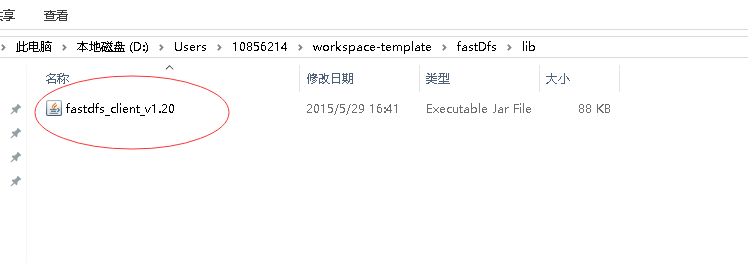
1. Find the specific location of the package

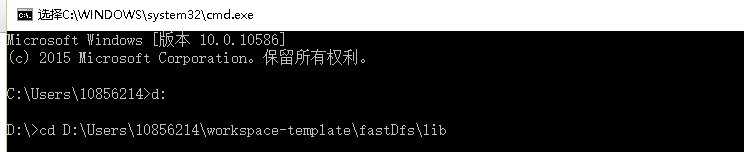
2. Open the CMD and enter the directory of the third party jar package

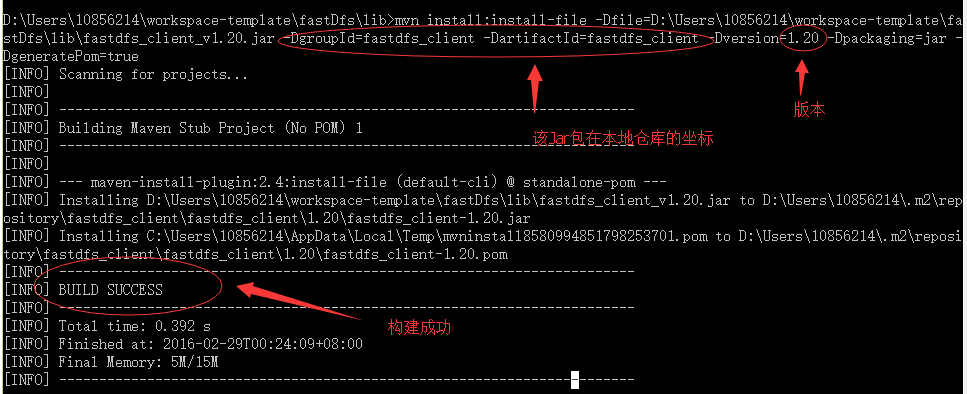
3. Run the command to build the jar package manually

mvn install:install-file -Dfile=D:\Users\10856214\workspace-template\fastDfs\lib\fastdfs_client_v1.20.jar -DgroupId=fastdfs_client -DartifactId=fastdfs_client -Dversion=1.20 -Dpackaging=jar -DgeneratePom=true

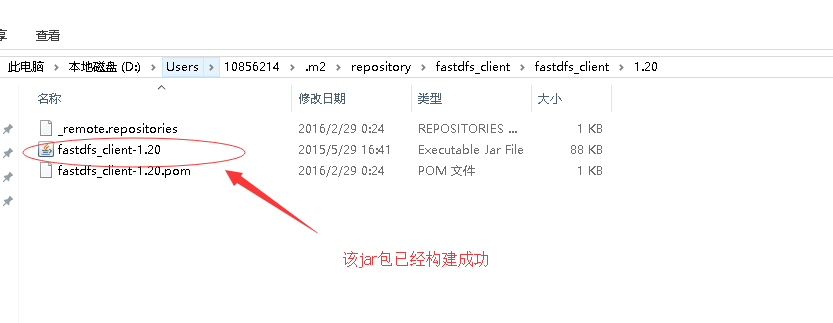
4. Check the local warehouse to see if the jar package has been added to the local warehouse folder

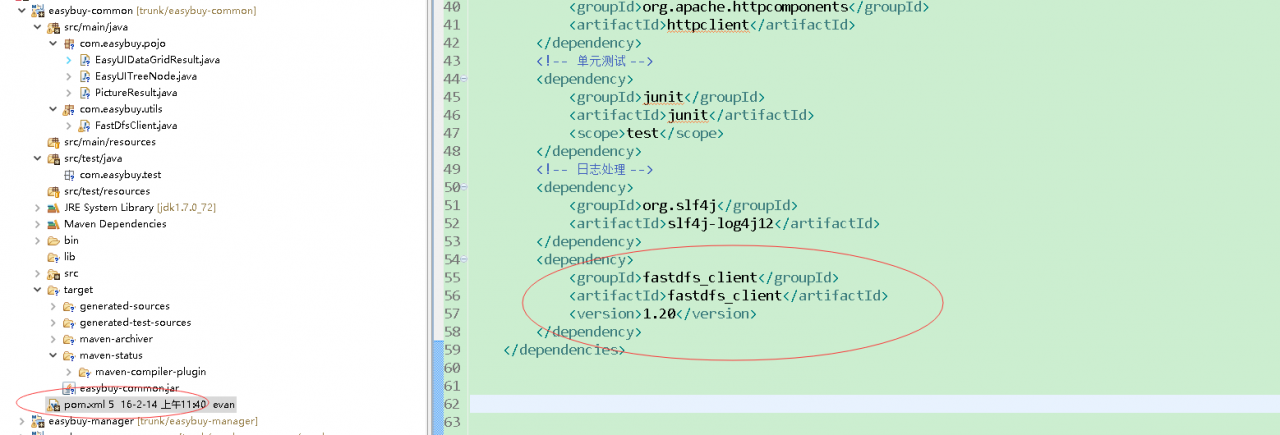
5. Give the jar package to Maven for management and add it to pom.xml in

<span style="white-space:pre">		</span><dependency>
<span style="white-space:pre">			</span><groupId>fastdfs_client</groupId>
<span style="white-space:pre">			</span><artifactId>fastdfs_client</artifactId>
<span style="white-space:pre">			</span><version>1.20</version>
<span style="white-space:pre">		</span></dependency>

6. Restart Maven install common module to see if the service and web modules have been imported into the common module’s tool classes

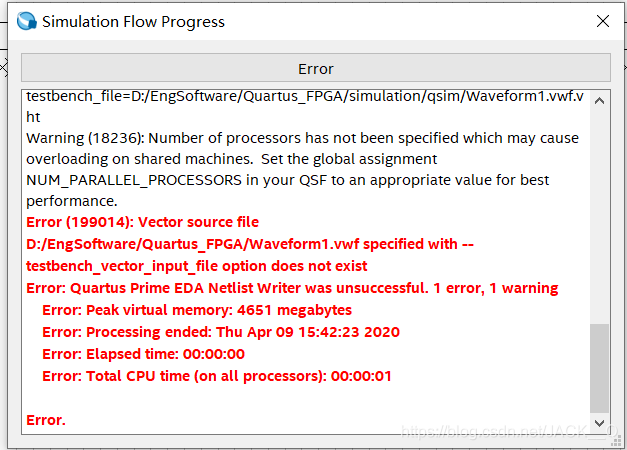
Quartus Error: Quartus_FPGA/Waveform.vwf specified with –testbench_vector_input_file option does not exist

Error when using Quartus simulation: The

Insert picture description here

solution is simple: when you click Run Functional Simulation again, a window will pop up to let you save the .vwf simulation file. When saving the .vwf simulation file, use the default path and the default file name (don’t modify it yourself) and no error will be reported.

[Solved] AS Warning: String literal in setText can not be translated. Use Android resources instead.

error

String literal in setText can not be translated. Use Android resources instead.

Cause of

When the TextView object refers to the setText method, the string is directly passed in.

Example

        TextView textView = new TextView(this);
        textView.setText("text");    // Error: String literal in setText can not be translated. Use Android resources instead.

【Solution】

1. Add strings to the strings.xml file in the values ​​folder in the res folder.

<resources>
<string name="txtText">text</string>
</resources>

2. When the TextView object references the setText method, pass in the getString method.

        TextView textView = new TextView(this);
        textView.setText(getString(R.string.txtText));

How to Solve “Status bar could not find cached time string image. Rendering in-process.” in Xcode

Recently, when I created a new Swift project on Xcode 9.4.1 version, I found that after the new project was created, it would be found that the console would pop up a sentence at intervals.

The status bar could not find cached time string image. Rendering in-process.

It is said that the status bar cannot find the cache during the process rendering. I checked some information on the Internet and said that the [[UIApplication sharedApplication] setStatusBarOrientation method was used in the project, and set the View controller-based status bar appearance in info.plist to YES . Then call the following method in the base class or the required page

-(BOOL)prefersStatusBarHidden{
    return NO;
} 

After using it, I found it was useless . Later I found that even if I created a new empty project, this problem would occur without writing a single line of code, and I was confused in an instant.

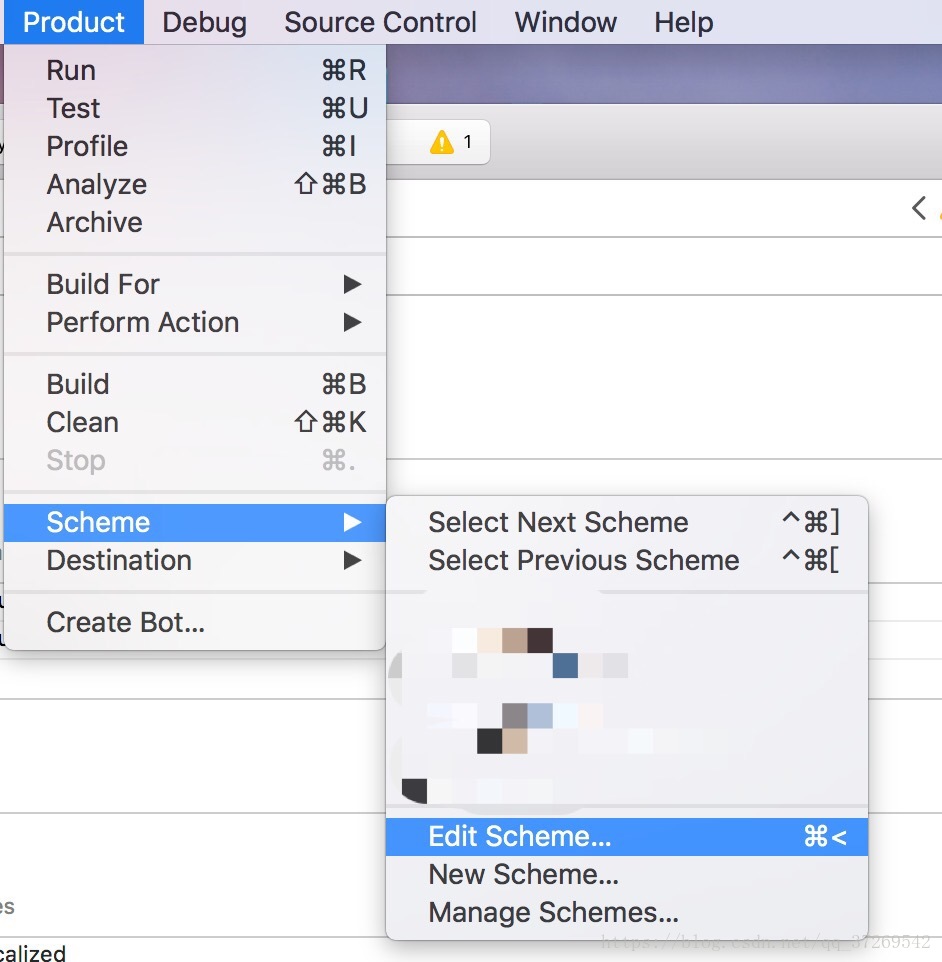
Don’t talk nonsense and just talk about the solution. In fact, this is not your fault, but the operating system log record, so just turn it off. The specific solution is:

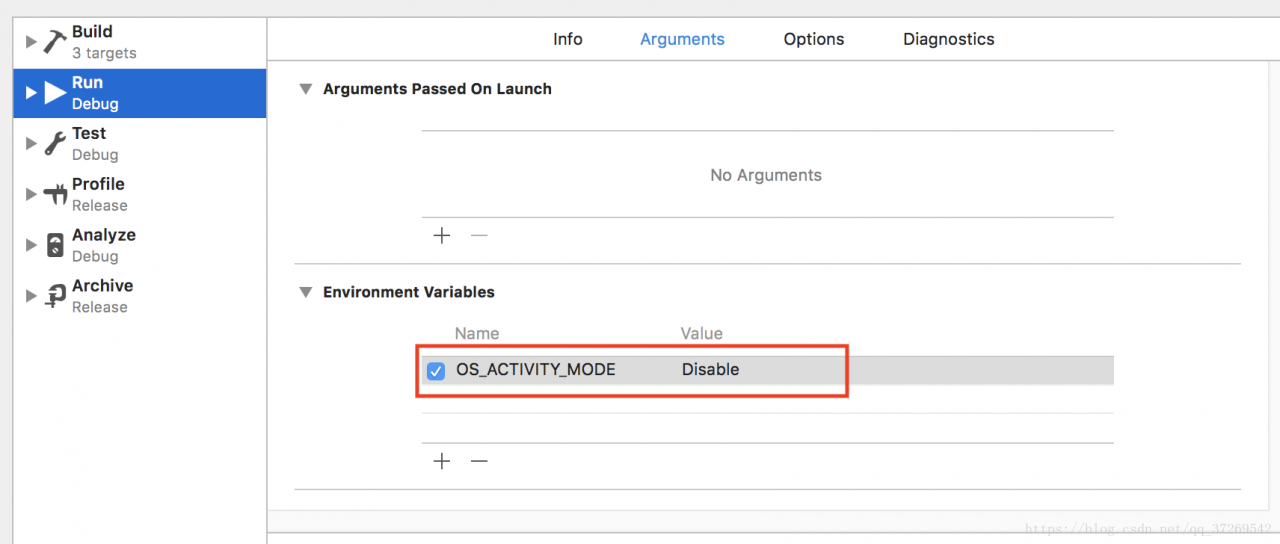
Add in Product -> Scheme -> Edit Scheme -> Run -> Arguments -> Environment Variables

OS_ACTIVITY_MODE: disable.

The specific operation screenshots are as follows:

If there is an error message that cannot be printed, check it and cancel it first, or set the View controller-based status bar appearance to No in the info.plist.

[Solution] VUE.js Load a local image with parameters in the script

Basic knowledge:
1, VUE.js When loading the local image path in the script, you need to use require, but not in the HTML tag;
2, VUE.js In principle, it is not supported to load the local image path containing parameters. Even if require is used, an error will still be reported because require.js
and
respectively 3. In many cases, we need to take data from the database and compile it, including pictures. In general, in addition to the URL of the network image and the binary image, it may also contain the local image path.

Specific operation:

<template>
  <img :src="imgA"/>
</template>

<script>
export default {
  computed: {
    the name of your function (optional parameter) {
      return require('local folder within some project (aka root)' + arguments)
    }
  },
  methods: {
    your function name2 (optional parameter2) {
      this.imgA = your function name (optional parameter)
    }
  }
}
</script>

Several key points:
1. Functions must be stored in computed, which is a dynamic calculation block. Unlike methods, require contains dynamic parameters and will not report errors;
2 2. A root directory must be provided, and the following parts can be played as you like. The root directory is necessary. During the operation, it will actually get all the files under the root directory, and then find what you need;
3. When calling, assign the function name (optional parameter) of this. You to the image path parameter (IMGA in this example).

If there is any unclear description, please leave a message.

Docker Create tomcat Error standard_init_linux.go:211: exec user process caused “no such file or directory”

Using the command before Tomcat creates a container

docker pull tomcat
docker run -it -P tomcat

Report the following error: Standard_ init_ linux.go:211 : exec user process caused “no such file or directory”

Solution:

Use other Tomcat images to create Tomcat container and run it successfully

docker run -d --name tomcat -p 8888:8080 registry.cn-hangzhou.aliyuncs.com/youdao/tomcat

Speculation: before using the docker hub with the highest number of stars, there was a problem, indicating that this kind of file and directory could not be found. Maybe the image was damaged when downloading

If we use the new container to download and run, it’s OK

Personal test!!! This error is the download image is damaged! The docker needs to be unloaded clearly. Remember to clear all the associated file directories

[Solved] MySQL Error: Client does not support authentication protocol requested by server

#Client does not support authentication protocol requested by server; consider upgrading MySQL client

Background: unknown, only my personal situation for reference. The question is not sure if it is related to Noje.js , that is, ES6 is directly related, and whether it is inevitable or not is uncertain Node.js When developing the server, the parameters such as the domain name (localhost), port (3306), user name (root), password, etc. are set correctly, but still an error is reported.

Premise: the computer has installed (1) MySQL (current version 8.0). It is recommended to install (2) MySQL database visualization software, such as Navicat.

#Solution steps:
[solution]
connect to the database (best through third-party software like Navicat or console), and input the following contents:

mysql> ALTER USER ‘root’@‘localhost’ IDENTIFIED WITH mysql_native_password BY ‘New root password’; 

(here “;” please note)

It is recommended to close the running server (if it exists, whether it is successfully started or not), check the new database password, and then restart
refer to stack overflow https://stackoverflow.com/questions/50093144/mysql-8-0-client-does-not-support-authentication-protocol-requested-by-server

#Note:
I don’t quite understand the cause of this problem and how it was solved. So I suggest that you follow the example.
Theoretically, this command only resets the password of root. If the password before and after reset is the same, it should not report an error at the beginning

Please try this solution first, if it is invalid, then consider upgrading MySQL version.