Author Archives: Robins

Solve the problem of using logback console to print log Chinese characters in IDEA as garbled characters

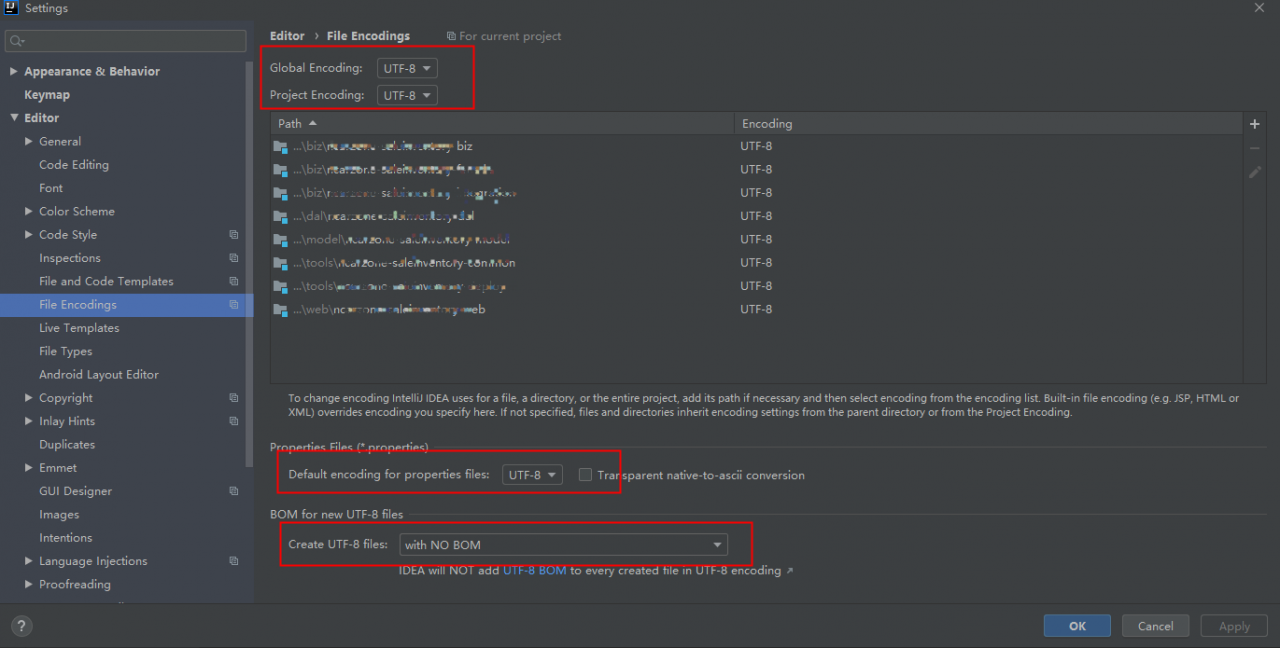
The first step is to set the idea to open File->Settings->Editor->File Encodings

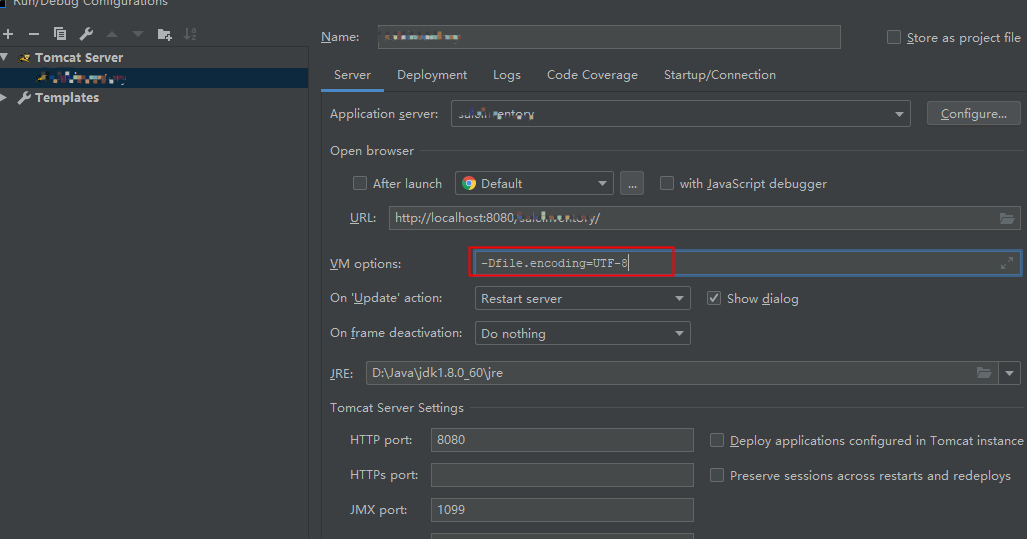
The second step is to set the tomcat VM options,

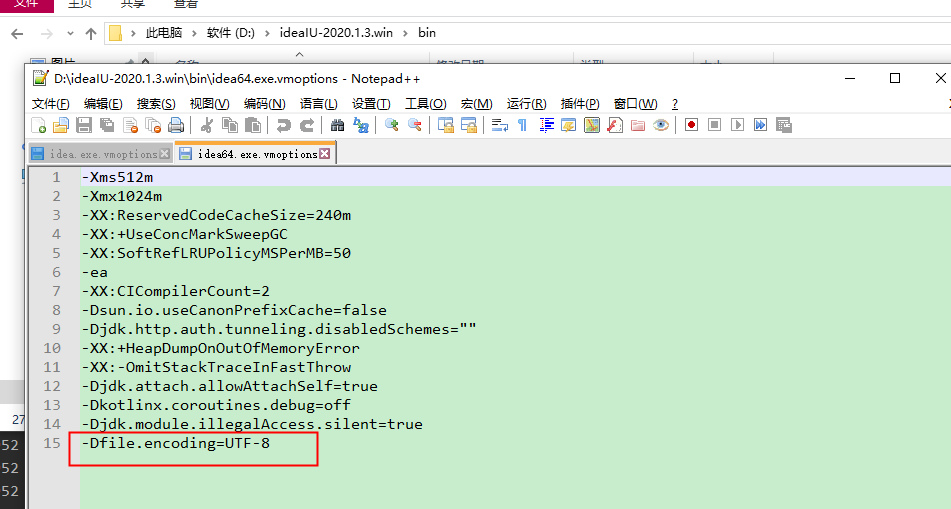
The third step is to set idea, idea64.exe.vmoptions or idea.exe.vmoptions

The fourth step, the configuration of the first three steps is usually OK, if it is still garbled, under the configuration custom_vmoptions,

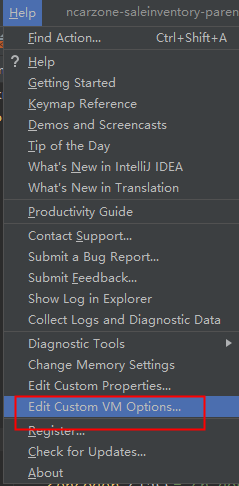
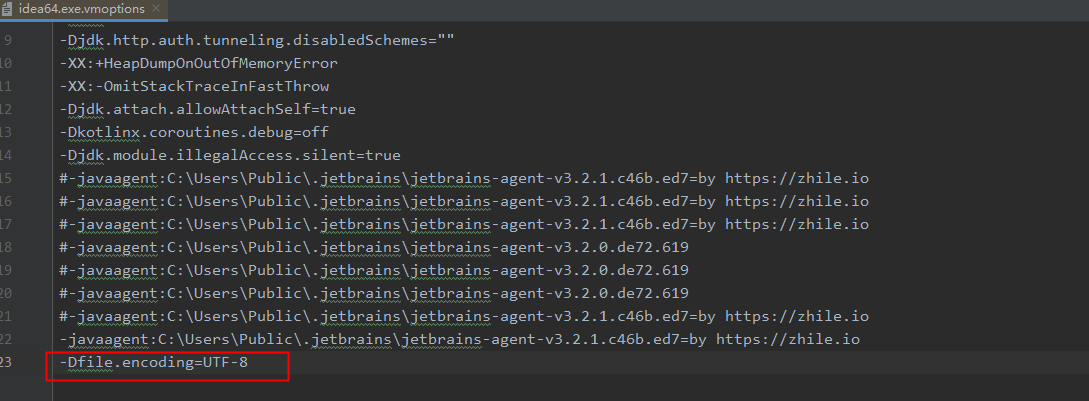
Idea configuration open help->Edit Custom vm Options 

Add to the open file 

The above configuration is all OK, basically it can solve the UTF-8 garbled problem

Keil’s duplicate definition problem: Error: L6200E: Symbol F6x8 multiply defined

I encountered it in driving the OLED and capacitive buttons, so I recorded this error and I would not be at a loss if I encountered it again later.

Keil’s Debug picture
image

Is the definition repeated? I didn’t see it anyway when I was looking for the file

The problem is solved. The reason is that I did not declare in the header file, but directly defined the variable, and the corresponding C file did not have the definition of the variable, so this error occurred. The
solution is to move the variable in the header file directly to In the c file, and then declare in the header file, for example, in the c file, it is const unsigned char F6x8[][16]declared in the header file extern const unsigned char F6x8[][16], and that’s it!

The @RestControllerAdvice annotation does not take effect in the Springboot project

Description:

When writing business logic in the back-end, you may encounter exceptions. The back-end usually throws an exception through throw, and then annotates the custom class with the @RestControllerAdvice annotation for unified processing, and the front-end parses the received results .

Exception handling class

@RestControllerAdvice
@Slf4j
public class GlobalExceptionHandler {
    /**
     * error
     */
    @ExceptionHandler(BaseException.class)
    public ResultVo baseException(BaseException e) {
        log.error("base exception: {}", e.getMessage());
        return ResultVo.error(e.getMessage());
    }
}

Troubleshooting ideas

  1. Check whether the exception handling class is managed by Spring, @SpringbootApplication scans this package and sub-packages by default; if it is found, use @SpringbootApplication(scanBasePackages=”xxx.xxx”)
  2. Check the aspect programming in the project to see if an exception is try-catch in a certain aspect, and then it is not thrown out. It is common to wrap around the aspect, catching an exception and forgetting to throw it.

My question: Use the surround processing of the aspect to record the log. The log is divided into success, failure, and exception, and all exceptions are captured and processed.
Solution: After catching the exception, then throw the exception.

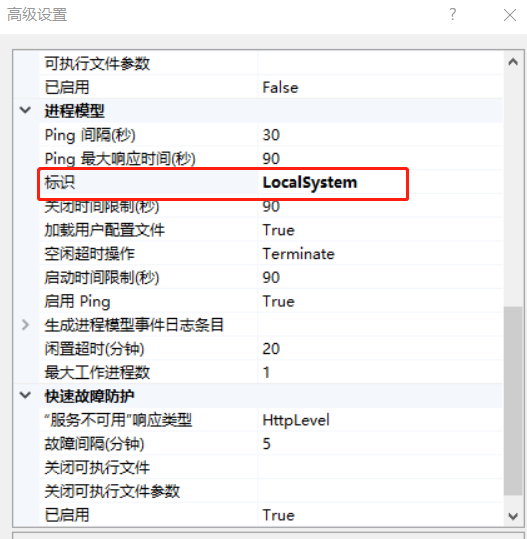
Failed to load file or assembly “Microsoft.Office.Interop.Excel” Solution

The project reported an error. At first I thought it was a dll problem, but it didn’t work.

Later, I checked the information and found out that it was necessary to set the representation in the application pool corresponding to the website to LocalSystem

Set it once, and set it to others later

Record the bits and pieces of programming and experience the joy of learning

Plink Error: Multiple instances of ‘_’ in sample ID.?

Preface

When converting vcf to plink format, the command is as follows:

plink --vcf  snp.vcf --recode --allow-extra-chr --out test

An error occurred:

Error: Multiple instances of '_' in sample ID.
If you do not want '_' to be treated as a FID/IID delimiter, use --double-id or
--const-fid to choose a different method of converting VCF sample IDs to PLINK
IDs, or --id-delim to change the FID/IID delimiter.

the reason

There is a hint in the error message.

By default, plink uses underscores to separate the sample names. The two separated fields are used as the family id and sample id in the ped file. If the sample name in the vcf contains multiple underscores, it cannot be divided correctly, the software will report an error.

Solution

Method 1: Modify the sample name

Assuming that the sample name of your vcf file is on line 7:

sed -i '7s/_/-/g' snp.vcf

Method 2: Modify –id-delim

The –id-delim parameter sets the default delimiter to be an underscore, which can be set to other characters to achieve the purpose of correct distinction.

Method 3: Add –double_id or –const-fid parameter

There are two kinds of parameters to specify the setting method of family_id by adding parameters.

The first type-double_id, keep the family id and sample id the same. For plant genome analysis, parents are often ignored, just add this parameter:

plink --vcf  snp.vcf --recode --allow-extra-chr --double_id --out test

The second type – const-fid sets the family id to a constant (the default value is 0).

When sending an email, an error was reported: AttributeError:’list’ object has no attribute’encode’

An error occurred when sending emails using Tencent Enterprise Mailbox: AttributeError:’list’ object has no attribute’encode’


Reason: The recipient cannot store data in a list, it needs to be converted to a string, separated by commas


Solution:

Convert the recipient list into a string, separated by commas

msg['to'= ','.join(to_list)


Complete code:

import smtplib
 from email.mime.text import MIMEText
 from email.header import Header

name = ' [email protected] ' 
pwd = ' xxx ' 
to_list = [ ' [email protected] ' ]

content = ' <html><head><title>test</title></head><body>This is the test email content</body></html> ' 
msg = MIMEText(content, ' html ' , ' utf -8 ' )
msg[ ' form ' ] = Header( ' huyang ' , ' utf-8 ' )
msg[ ' to ' ] = ' , ' .join(to_list) # The focus is on this position
msg[ ' subject ' ] = Header( ' Test mail ' , ' utf-8 ' )

# ---Send 
smtp = smtplib.SMTP_SSL( ' smtp.exmail.qq.com ' , 465 )
smtp.login(name, pwd)
smtp.sendmail(name, to_list, msg.as_string())
print ( ' Send successfully! ' )


Ecilpse: All Common Shortcut keys

Alt + ?   #Code tips

ctrl + l #Go to a line

ctrl + D #delete the line where the cursor is

ctrl + shift + r #Access a file

ctrl + shiif + f #Formatting

ctrl + shift + o #Package introduction

alt + arrow keys down # Move the cursor down the line

alt + arrow keys up # Move the cursor up the line

ctrl + alt + arrow keys down # Copy down the line where the cursor is

ctrl + alt + arrow keys up # Copy cursor row up

alt + shift + R # Rename method name

ctrl +/ #Add single line comment, uncomment if comment is already added

Ctrl + 1 # Quick fix

Shift + Enter # insert empty line in the next line of the current line (this time the mouse can be anywhere in the current line, not necessarily at the end) 

Shift+Ctrl+Enter # insert a blank line in the current line (same principle as the previous article)

Ctrl+M # Maximize the current Edit or View (press again to do the opposite)

Ctrl+H #Search in the whole project

A solution to automatically convert special characters into Unicode when taking out data from MySQL and encapsulating it into JSON

    @Test
    public void xxx() throws ParseException, UnsupportedEncodingException, Exception {
        ArrayList<JSONObject> list = new ArrayList<>();
        String s = "Appliances jerry-built, poor quality clothing ...... still believe that "e-commerce custom products" more affordable";
        JSONObject json = new JSONObject();
        json.put("title", s);
        JSONObject json1 = new JSONObject();
        json1.put("title", s);
        list.add(json);
        list.add(json1);
        System.out.println("old:"+list.toString());
        System.out.println("new"+StringEscapeUtils.unescapeJava(list.toString()));
    }

Output:
before transformation: [{“title”: “home appliances cut corners and poor clothing quality”}]
after transformation [{“title”: “home appliances cut corners and poor clothing quality”}]
after transformation [{“title”: “home appliances cut corners and poor clothing quality”} Also believe that “e-commerce customized products” are more affordable “}, {” title “:” home appliances cut corners, poor quality of clothing Also believe that “e-commerce customized products” are more affordable “}]

Pytorch failed to specify GPU resolution

Recently, I ran pytorch’s training code on an 8-card server without any problem. However, after the CUDA is re installed, it is impossible to specify which GPU to run on. It can only be used from Block 0 in order. After checking some information, the problem has been solved.

1. To specify which GPU to run on in Python program, the following methods are usually adopted:

import os
import torch

os.environ["CUDA_VISIBLE_DEVICES"] = "4,5,6,7"

Or execute the following commands directly from the command line (not recommended):

export CUDA_VISIBLE_DEVICES=4,5,6,7

2. According to the previous writing method, suddenly the above code is invalid. No matter how to modify the visible GPU number, the final program is used from Block 0 in order. The problem lies in the location of the specified GPU line of code“ os.environ [“CUDA_ VISIBLE_ Devices “] =” 4,5,6,7 “” move to import torch and other codes, followed by import OS, that is, in the following way:

import os

os.environ["CUDA_VISIBLE_DEVICES"] = "4,5,6,7"

import torch

3. Some common instructions for viewing GPU information are attached for later use, as follows:

import torch

torch.cuda.is_available()  # Check if cuda is available

torch.cuda.device_count() # Returns the number of GPUs

torch.cuda.get_device_name(0) # Return the GPU name, the device index starts from 0 by default

torch.cuda.current_device() # Returns the current device index

How to Solve ModuleNotFoundError: No module named ‘_bz2‘

When running pytorch code, “modulenotfoundererror: no module named” is reported_ Bz2 ‘”error, the complete error message is as follows:

Traceback (most recent call last):
  File "stat_model.py", line 1, in <module>
    from torchstat import stat
  File "/usr/local/lib/python3.7/site-packages/torchstat/__init__.py", line 11, in <module>
    from torchstat.reporter import report_format
  File "/usr/local/lib/python3.7/site-packages/torchstat/reporter.py", line 1, in <module>
    import pandas as pd
  File "/usr/local/lib/python3.7/site-packages/pandas/__init__.py", line 55, in <module>
    from pandas.core.api import (
  File "/usr/local/lib/python3.7/site-packages/pandas/core/api.py", line 24, in <module>
    from pandas.core.groupby import Grouper, NamedAgg
  File "/usr/local/lib/python3.7/site-packages/pandas/core/groupby/__init__.py", line 1, in <module>
    from pandas.core.groupby.generic import (  # noqa: F401
  File "/usr/local/lib/python3.7/site-packages/pandas/core/groupby/generic.py", line 44, in <module>
    from pandas.core.frame import DataFrame
  File "/usr/local/lib/python3.7/site-packages/pandas/core/frame.py", line 88, in <module>
    from pandas.core.generic import NDFrame, _shared_docs
  File "/usr/local/lib/python3.7/site-packages/pandas/core/generic.py", line 70, in <module>
    from pandas.io.formats.format import DataFrameFormatter, format_percentiles
  File "/usr/local/lib/python3.7/site-packages/pandas/io/formats/format.py", line 48, in <module>
    from pandas.io.common import _expand_user, _stringify_path
  File "/usr/local/lib/python3.7/site-packages/pandas/io/common.py", line 3, in <module>
    import bz2
  File "/usr/local/lib/python3.7/bz2.py", line 19, in <module>
    from _bz2 import BZ2Compressor, BZ2Decompressor
ModuleNotFoundError: No module named '_bz2'

The reason for this error is that I use Python 3.7, but bz2 is installed in Python 3.6, so I can’t find it. In order to solve this problem, we need to copy the BZ Library in Python 3.6 to Python 3.7. The specific process is as follows:

1. Find the BZ library file in the path of python3.6, that is, the_ bz2.cpython-36m-x86_ 64-linux- gnu.so ”。

ls /usr/lib/python3.6/lib-dynload/

You can see that “- 36m” in the file name corresponds to Python 3.6.

2. Switch to the path corresponding to python3.7 and copy the file to the directory

cd /usr/local/lib/python3.7/lib-dynload

sudo cp /usr/lib/python3.6/lib-dynload/_bz2.cpython-36m-x86_64-linux-gnu.so ./

3. Modify the file name and change “- 36m” to “- 37m”

sudo mv _bz2.cpython-36m-x86_64-linux-gnu.so _bz2.cpython-37m-x86_64-linux-gnu.so

So far, the problem has been solved.


It should be noted that there is also a path/usr/lib/python3.7/lib-dynload. It is useless to copy the file to this directory. I need to copy it to the/usr/local/lib/python3.7/lib-dynload directory here.
Web Crawler: How to get the data in the web page and disguise the header, disguise as a browser to visit many times, avoid a single visit leading to IP blocked

User agent: user agent. It is a kind of identification that provides information such as browser type, operating system and version, CPU type, browser rendering engine, browser language, browser plug-in, etc. The UA string is sent to the server every time the browser makes an HTTP request

Referer: http referer is a part of the header. When a browser sends a request to a web server, it usually brings a referer to tell the server which page I’m linking from, so that the server can get some information for processing

	public static String getHtmls(String url) throws IOException {
		RequestConfig globalConfig = RequestConfig.custom().setCookieSpec(CookieSpecs.IGNORE_COOKIES).build();
		String html = "";
		CloseableHttpClient httpClient = HttpClients.custom().setDefaultRequestConfig(globalConfig).build();
		HttpGet httpget = new HttpGet(url);
		//Browser identifier (OS identifier; encryption level identifier; browser language) Rendering engine identifier Version information
		httpget.setHeader("User-Agent","Mozilla/5.0 (Linux; U; Android 2.3.6; zh-cn; GT-S5660 Build/GINGERBREAD) AppleWebKit/533.1 (KHTML, like Gecko) Version/4.0 Mobile Safari/533.1 MicroMessenger/4.5.255");
	    // Camouflage head
		httpget.setHeader("Referer", "https://mp.weixin.qq.com");
		
		try {
			HttpResponse responce = httpClient.execute(httpget);//
			int resStatu = responce.getStatusLine().getStatusCode();
			if (resStatu == HttpStatus.SC_OK) {

				HttpEntity entity = responce.getEntity();
				if (entity != null) {
					html = EntityUtils.toString(entity);// Get html source code
				}
			}
		} catch (Exception e) {
			System.out.println("request " + url + " error!");
			e.printStackTrace();
		} finally {
			// close
			httpClient.close();
		}
		return html;
	}