Author Archives: Robins

SpringMVc @RequestMapping url of regular expression pattern

@RequestMapping(method = RequestMethod.GET,value="/{provinceId}_{levelId}.htm")
    public Map<String, Appointment> test() {
        return appointmentBook.getAppointmentsForToday();
    }
@RequestMapping(method = RequestMethod.GET,value="/{provinceId}_{levelId}_s{id}.htm")
    public Map<String, Appointment> test1() {
        return appointmentBook.getAppointmentsForToday();
    }

  As with the above two URLs, when I enter /2_3_s1.htm on the browser (here omitting the thing in front of the URL), I always enter the first method, and the order of your two methods is also the same, always enter the first method. One, the problem is not difficult to see. In fact, the first URL contains the first one. Both methods of the request link of /2_3_s1.htm are consistent (equivalent to treating 3_s1 as a whole, so the first method is also consistent). As for why it entered the first One, it should be that the first URL contains the second, which is equivalent to a parent-child relationship.
Solution:

Change the first method to the following

1
2
3
4
@RequestMapping(method = RequestMethod.GET,value="/{provinceId}_{levelId:\\d*}.htm")
    public Map<String, Appointment> test() {
        return appointmentBook.getAppointmentsForToday();
    }

  It is to add \\d* after levelId, which means that levelId can only match integers. If written in this way, our previous link/2_3_s1.htm will enter the second method, because you treat 3_s1 even as A link does not meet the condition of an integer, so it will enter the second method.
\\d{6}: Represents 6 digits
\\?-[0,9]d: Represents a negative integer
[az]{3}: Three letters,
etc.

The @value annotation of springboot adds the default value to solve the startup error caused by the non-existent key

@value injection, when the configuration file cannot be submitted

If the configuration file of a multi-person collaborative development project is not submitted, it will cause the startup of other people’s projects to fail. You can provide a default value for the class attribute @value

1
2
3
4
5
//The null value is wrapped in #{}, if not parsed as a string by default
@Value("${cpris.docRootPath:#{null}}")
private String rootPath;
@Value("${cpris.ip:1}")
private String ip;

The spring project is normal locally, and the bean cannot be found error is thrown when entering the docker container

The error message is as follows:

1
Error creating bean with name 'messageServiceImpl': Lookup method resolution failed; nested exception is java.lang.IllegalStateException: Failed to introspect Class [com.qianxiao.blogwebscoket.service.impl.MessageServiceImpl] from ClassLoader [org.springframework.boot.loader.LaunchedURLClassLoader@41cf53f9]

The two environments are not local development

1
2
3
java version "1.8.0_281"
Java(TM) SE Runtime Environment (build 1.8.0_281-b09)
Java HotSpot(TM) Client VM (build 25.281-b09, mixed mode, sharing)

docker container environment

1
2
3
openjdk version "1.8.0_111"
OpenJDK Runtime Environment (build 1.8.0_111-8u111-b14-2~bpo8+1-b14)
OpenJDK 64-Bit Server VM (build 25.111-b14, mixed mode)

Looks like there is nothing wrong with this version

But when I add @Service annotation to the MessageServiceImpl class, I get an error at runtime.

Remove the @Service annotation and start normally

I have been looking for a problem for a long time; in the end, the problem lies in the use of the CallBack callback parameter in this implementation class. It is normal to remove this parameter and compile and restart! ! !

Springboot WARNING: An illegal reflective access operation has occurred


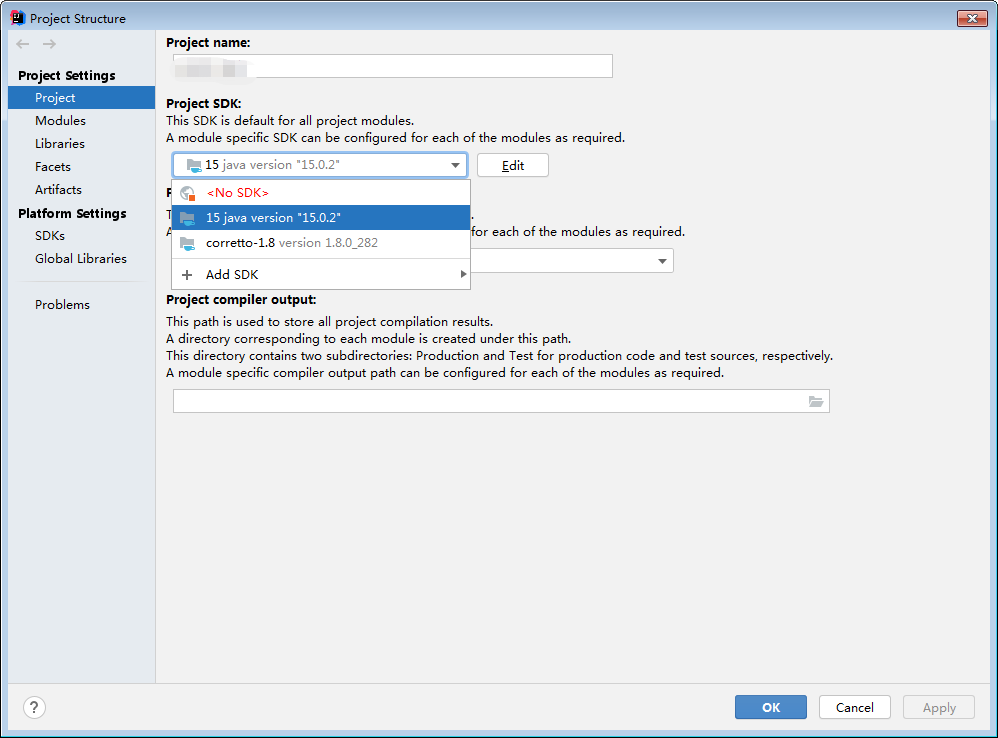
The warning is shown in the figure. The warning is because the jdk version is too high (I use 15.0, and it is said that it will be the same for 9.0). The specific principle has not been studied. It does not affect the normal operation of the project, but it looks very sad There is wood there~~~~

The solution is to reduce the project jdk to 1.8 and below, 1.8 is recommended.

NULL value exception occurs when freemarker renders the page globally in the springboot project

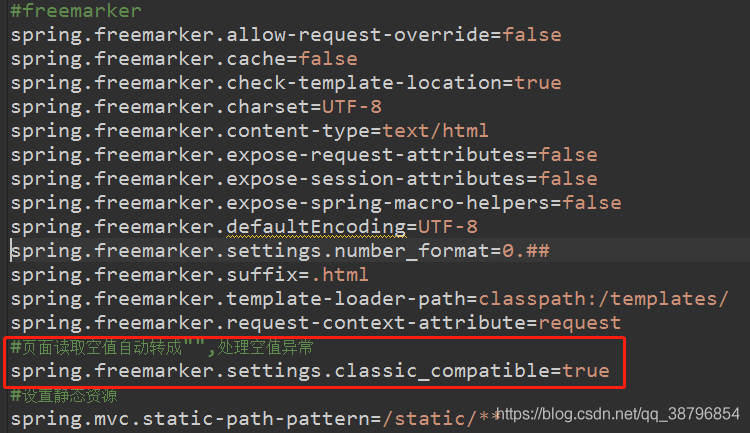
When using freemarker in the springboot project recently, when a certain null value is taken in the page for judgment, an exception will be reported, and all the exception information will be displayed on the page. Through a configuration, it can be solved globally
by adding in the freemarker property configuration of application.properties:

spring.freemarker.settings.classic_compatible=true

Java: How to use itext to export PDF text absolute positioning (implementation method)

jar: itext-4.2.1.jar

Absolute positioning is required for the signing of many official documents, so record this code as follows:

PdfWriter writer = PdfWriter.getInstance(document, new FileOutputStream( "test.pdf" ));
PdfContentByte cb = writer.getDirectContent();
BaseFont bf = BaseFont.createFont( "STSong-Light" , "UniGB-UCS2-H" ,BaseFont.EMBEDDED);
cb .beginText();
cb .setFontAndSize(bf, 12 );
cb .showTextAligned(PdfContentByte.ALIGN_CENTER, text + "This text is centered" , 250 , 700 , 0 );
cb .endText();

Sometimes the absolute positioning of the picture (official seal) is also needed:

Image image = Image.getInstance(request.getSession().getServletContext().getRealPath( "/" )+ "common/images/starpilot/signet.png" ); 
image .scaleAbsolute(mmTopx( 40 ), mmTopx( 39 ));
image .setAbsolutePosition( 400 , flagHeight);
document .add(image);

log4j:WARN No appenders could be found for logger (freemarker.cache)

The freemarker dependency package is introduced into the project. However, the red warning caused by the corresponding log level is not configured in the log4j.properties file. as follows:

< dependency >
   < groupId > org.springframework.boot </ groupId >
   < artifactId > spring-boot-starter-freemarker </ artifactId >
</ dependency >
log4j :WARN No appenders could be found for logger (freemarker.cache).
log4j :WARN Please initialize the log4j system properly.
log4j : WARN See HTTP : //logging.apache.org/log4j/1.2/faq.html#noconfig for More info.


Solution: log4j.properties plus the corresponding configuration

log4j.logger.freemarker.cache =ERROR
log4j.logger.freemarker.beans =ERROR

How to compare the time in two TimeStamp format?

    Calendar calendar = Calendar.getInstance();
    //Subtract 3 months from the current time. If it is a negative number, the year will be pushed forward. For example, January-3, 2010 will become October 2009
    calendar. add (Calendar.MONTH, -3 );
    Timestamp time = new Timestamp(calendar.getTimeInMillis());
    //Get the customer's last order time---orderTime
    CustomerOrder cusOrder = this .df.getCustomerOrderDao(). get (customerId);
    Timestamp orderTime = cusOrder.getTime();
    //Determine whether it has expired, true means more than 3 months
    if (time.after(orderTime)){
    };

hint: Updates were rejected because the remote contains work that you do To XXX

his error reported when using webstorm or idea push code

The reason is to manually create git and specify the remote project

Open Terminal

git init # Initialize the local warehouse
git remote -v # View the associated warehouse address
git remote add origin https://gitee.com/xjseo/personnel-management.git # Add remote warehouse address

Then restart the editor and it will appear in the upper right corner

Then click the checkmark commit to submit all the code to the temporary storage,

Then click the third arrow to push

Will be fail to push

Checking the git log will find the following errors:

error: failed to push some refs to 'https://gitee.com/xjseo/personnel-management.git'
hint: Updates were rejected because the remote contains work that you do
To https://gitee.com/xjseo/personnel-management.git
hint: not have locally. This is usually caused by another repository pushing
!    refs/heads/master:refs/heads/master    [rejected] (fetch first)
Done
hint: to the same ref. You may want to first integrate the remote changes
hint: (e.g., 'git pull ...') before pushing again.
hint: See the 'Note about fast-forwards' in 'git push --help' for details.

The general idea is that you should pull the warehouse code and synchronize the local code.

So then click the first one to pull the following and then click the third push to succeed.

The body of a for-in should be wrapped in an if statement to filter unwanted properties from the pro

In ESLint mode, for in will report an error when traversing the object, which can be solved as follows:

let  val  = { shu: [ 1 , 2 , 3 ]} ;
for  (let  item  in  val) {
  if  (val.hasOwnProperty(item)) { 
    console.log(item);
  }
}

Because we should judge whether the object has its own properties (non-inheritance) before traversing an object. If the object is an empty object, then there is no need to traverse it to improve the efficiency of the code.