Author Archives: Robins

[How to Solve] Nodejs: interface error CORS error

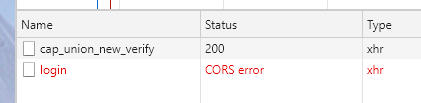
Background: local Vue calls local nodejs interface and reports cross domain error.


first, check that nodejs service has been configured: “access control allow origin”, “*”

2、 Check that nodejs service has been configured: “access control allow headers”, “*”

	Access-Control-Allow-Headers Not for the * sign, be careful to check whether the front-end header and the value configured here is consistent, otherwise it will also report cross-domain. In particular, some projects require header pass-through parameters

[Solved] Docker ubuntu swoole fatal error: openssl/ssl.h: No such file or directory

Dockerfile

RUN apt-get update -y
RUN apt-get install -y libssl-dev
RUN cd /tmp/ && rm -rf ./swoole-src
&& curl -o ./swoole.tar.gz https://github.com/swoole/swoole-src/archive/master.tar.gz -L
&& tar zxvf ./swoole.tar.gz
&& mv swoole-src* swoole-src
&& cd swoole-src
&& phpize
&& ./configure –enable-openssl –with-openssl-dir=/usr/lib/ssl –enable-http2
&& make && make install
&& docker-php-ext-enable swoole

Although openssl has been installed, but the corresponding libs are missing, looking for half a day to know the need to install libssl-dev (centos is openssl-devel)

openssl version -a

@requestbody: How to Use or Not Use

First of all, note that @ requestbody accepts the JSON string
so write this

dataType:"json",
contentType: 'application/json',
data: JSON.stringify(data.field),

Instead of @ requestbody, you can directly receive the JSON type

dataType:"json",
data: data.field,

The situation of not using @ requestbody
front end page

$.ajax({
		url: "http://localhost:8081/role//saveOrUpdate",
		method:"post",
	   dataType:"json",     
			// contentType: 'application/json',
		data: data.field,   
		success(data){
			console.log("======================")
				console.log(data.field)
			if(data.code == 200){
			layer.msg('add success', function () {
			 window.location = 'list.html';
				}); 
				}
		},
error(data){
	console.log(data)
	if(data.code != 200){
layer.msg(data); 
								}
								}
							});

Back end:

@PostMapping("/saveOrUpdate")
    public Result saveOrUpdate(Roles roles){
        System.out.println(roles);
        boolean saveOrUpdate = roleService.saveOrUpdate(roles);
        if(saveOrUpdate == true)
            return Result.succ(null);
        else
            return Result.fail("failed to add");
    }

Using @ requestbody
front end:

$.ajax({
								url: "http://localhost:8081/role//saveOrUpdate",
								method:"post",
								dataType:"json",
								contentType: 'application/json',   
								data: JSON.stringify(data.field),  
								success(data){
									console.log("======================")
									console.log(data.field)
									if(data.code == 200){
										layer.msg('add success', function () {
										    window.location = 'list.html';
										}); 
									}
								},
								error(data){
									console.log(data)
									if(data.code != 200){
										layer.msg(data); 
								}
								}
							});

back-end

@PostMapping("/saveOrUpdate")
    public Result saveOrUpdate(@RequestBody Roles roles){
        System.out.println(roles);
        boolean saveOrUpdate = roleService.saveOrUpdate(roles);
        if(saveOrUpdate == true)
            return Result.succ(null);
        else
            return Result.fail("failed to add");
    }
Keras import a custom metric model error: unknown metric function: Please ensure this object is passed to`custom_object‘

Keras’s model defines metric or loss,
there is no problem when saving to H5, but when using load_ When importing the model, an error will be reported:

unknown metric function: HammingScore. Please ensure this object is passed to the custom_ objects argument.

This is because the custom parameters are not passed in. There are two solutions:

          1. if you only need to predict and no longer train, you can add

        compile = false directly

model = keras.models.load_model('model.h5', compile = False)

If you need further training or modification, add your own metrics code and compile it again

model.compile(loss='binary_crossentropy',
              optimizer=Ada,
              metrics=[HammingScore]) # 这里HammingScore是我自定义的metric
      1. when importing, the user-defined metric/loss is passed into

Custom as a key value_ objects

      1. :
model = keras.models.load_model('model.h5', custom_objects={'HammingScore': HammingScore} )

Note that the key value should be consistent

How to Solve PyInstaller Package Error: ModuleNotFoundError: No module named ‘xxxx‘

In the venv environment, there is no exception in the packaging process when the command line pyinstaler is used to execute the packaging command. However, after the packaging is successful, it is executed. In the venv environment, the packaging process is normal when the command line pyinstaler is used to execute the packaging command. After the packaging is successful, the following similar errors appear when the dist/xxx.exe file is executed:

Traceback (most recent call last):
  File "main.py", line 4, in <module>
    import jcw
  File "PyInstaller\loader\pyimod03_importers.py", line 531, in exec_module
  File "jcw.py", line 3, in <module>
    import pandas as pd
ModuleNotFoundError: No module named 'pandas'

Solution:

Because the running environment is venv virtual environment, the command line packaging may use the installation environment of Python in the computer, that is, the global environment and dependency library, which leads to the failure to include the required modules in the packaging.

Use another packaging method of pyinstaler official website, Python code to run the packaging command, such as:

#!/usr/bin/python3
# -*- coding: utf-8 -*-

import PyInstaller.__main__
import os


if __name__ == '__main__':
    pyi_args = [
        '--upx-dir=F:\\soft\\upx-3.96-win64',
        '--clean',
        '--add-data={0};.'.format(os.path.realpath('cfg.ini')),
        '--add-binary={0};driver'.format(os.path.realpath('driver/chromedriver.exe')),
        '--name=demo',
        'main.py',
        '-y'
    ]
    print("pyinstaller " + " ".join(pyi_args))
    PyInstaller.__main__.run(pyi_args=pyi_args)

Several ways of online search don’t work (you can try your own environment or not)

1.Move the import statement from the file header to the code block

2.Command line use — hidden import = missing module


[Solved] Wwagger error: java.lang.NumberFormatException: For input string: ““

I have been reporting this error before, but I haven’t found out the reason. After looking at the code given by a senior, I found that the following two jar packages are missing, and then I won’t report any more errors.

        <dependency>
            <groupId>io.swagger</groupId>
            <artifactId>swagger-annotations</artifactId>
            <version>1.5.21</version>
        </dependency>
        <dependency>
            <groupId>io.swagger</groupId>
            <artifactId>swagger-models</artifactId>
            <version>1.5.21</version>
        </dependency>

After joining, click in again and you won’t report an error again.

Djangorestframework-simplejwt: ‘str‘ object has no attribute ‘decode‘ [Solved]

Problem description

Python v3.6.6Django v3.2.4djangorestframework v3.12.4djangorestframework-simplejwt v4.4.0

When testing the interface after running runserver command, the error of background printing is as follows

Traceback (most recent call last):
  File "D:\Program Files\Python36\lib\site-packages\django\core\handlers\exception.py", line 47, in inner
    response = get_response(request)
  File "D:\Program Files\Python36\lib\site-packages\django\core\handlers\base.py", line 181, in _get_response
    response = wrapped_callback(request, *callback_args, **callback_kwargs)
  File "D:\Program Files\Python36\lib\site-packages\django\views\decorators\csrf.py", line 54, in wrapped_view
    return view_func(*args, **kwargs)
  File "D:\Program Files\Python36\lib\site-packages\django\views\generic\base.py", line 70, in view
    return self.dispatch(request, *args, **kwargs)
  File "D:\Program Files\Python36\lib\site-packages\rest_framework\views.py", line 509, in dispatch
    response = self.handle_exception(exc)
  File "D:\Program Files\Python36\lib\site-packages\rest_framework\views.py", line 469, in handle_exception
    self.raise_uncaught_exception(exc)
  File "D:\Program Files\Python36\lib\site-packages\rest_framework\views.py", line 480, in raise_uncaught_exception
    raise exc
  File "D:\Program Files\Python36\lib\site-packages\rest_framework\views.py", line 506, in dispatch
    response = handler(request, *args, **kwargs)
  File "D:\Program Files\Python36\lib\site-packages\rest_framework_simplejwt\views.py", line 27, in post
    serializer.is_valid(raise_exception=True)
  File "D:\Program Files\Python36\lib\site-packages\rest_framework\serializers.py", line 220, in is_valid
    self._validated_data = self.run_validation(self.initial_data)
  File "D:\Program Files\Python36\lib\site-packages\rest_framework\serializers.py", line 422, in run_validation
    value = self.validate(value)
  File "D:\Program Files\Python36\lib\site-packages\rest_framework_simplejwt\serializers.py", line 75, in validate
    data['refresh'] = str(refresh)
  File "D:\Program Files\Python36\lib\site-packages\rest_framework_simplejwt\tokens.py", line 82, in __str__
    return token_backend.encode(self.payload)
  File "D:\Program Files\Python36\lib\site-packages\rest_framework_simplejwt\backends.py", line 43, in encode
    return token.decode('utf-8')
AttributeError: 'str' object has no attribute 'decode'

terms of settlement

Method 1

Upgrade the djangorestframework simplejwt version to 4.6.0 +

Method 2

Open
D:// program files/Python 36/lib/site packages/rest_ framework_ simplejwt\backends.py

File, edit line 43. take

return token.decode('utf-8')

It can be amended as follows

return token

explain

Android’s viewpager slides to determine whether the current stop page is the last page

Step 1: write several global variables to record:

   /**
     * Record if the sliding page is the last page
     */
    private boolean isHomeLastPage = false;
    private boolean isHomeDragPage = false;

The second step is to get the last element by implementing the listening onpageselected() in VP

@Override
	     public void onPageSelected(int position) {
	            super.onPageSelected(position);
	
	            Log.e("videoPositionposition", position + "");
	            //get the last page/position equals the last element
	            isHomeLastPage = position == datas.size() - 1;
	      }

The third step is to implement the listening onpagescrollstatechanged() in VP to determine whether the current sliding state is in,

   @Override
            public void onPageScrollStateChanged(int state) {
                // 0: do nothing 1: start sliding 2: end sliding Scrolling listener
                isHomeDragPage = state == ViewPager2.SCROLL_STATE_DRAGGING;
                //judge that the last one will not be loaded
            }

The fourth step is to implement onpagescrolled() 1.
1. Judge whether it is the last element
2. Whether it is in sliding state,
3. The offset of posionoffsetpixels is 0.
the work is done, and the judgment of VP sliding to the last page has been done

 @Override
 public void onPageScrolled(int position, float positionOffset, int positionOffsetPixels) {

       //Determine the last element and slide state, and the offset is 0
       Log.e("vp2CCC", "vp2CCC" + isHomeLastPage + " " + isHomeDragPage + " " + positionOffsetPixels);
       if (isHomeLastPage && isHomeDragPage && positionOffsetPixels == 0) { //the current page is the last page and is dragging and the pixel offset is 0
           Toast.makeText(getActivity(), "The current page is the last page", Toast.LENGTH_SHORT).show();
       } else {
       }
   }

Migration admin.0001_initial is applied before its dependency xxx.0001_initial on database ‘default‘

Problem orientation

Developed in Django framework, a user table is defined to replace the user table automatically generated by the framework, which appears when the migrate command is executed to synchronize the database. Details of the error are as follows

E:\SweetYaya\MyProj01> python manage.py migrate
Traceback (most recent call last):
  File "manage.py", line 22, in <module>
    main()
  File "manage.py", line 18, in main
    execute_from_command_line(sys.argv)
  File "D:\Program Files\Python36\lib\site-packages\django\core\management\__init__.py", line 419, in execute_from_command_line
    utility.execute()
  File "D:\Program Files\Python36\lib\site-packages\django\core\management\__init__.py", line 413, in execute
    self.fetch_command(subcommand).run_from_argv(self.argv)
  File "D:\Program Files\Python36\lib\site-packages\django\core\management\base.py", line 354, in run_from_argv
    self.execute(*args, **cmd_options)
  File "D:\Program Files\Python36\lib\site-packages\django\core\management\base.py", line 398, in execute
    output = self.handle(*args, **options)
  File "D:\Program Files\Python36\lib\site-packages\django\core\management\base.py", line 89, in wrapped
    res = handle_func(*args, **kwargs)
  File "D:\Program Files\Python36\lib\site-packages\django\core\management\commands\migrate.py", line 95, in handle
    executor.loader.check_consistent_history(connection)
  File "D:\Program Files\Python36\lib\site-packages\django\db\migrations\loader.py", line 310, in check_consistent_history
    connection.alias,
django.db.migrations.exceptions.InconsistentMigrationHistory: Migration admin.0001_initial is applied before its dependency MyApp.0001_initial on database 'default'.

terms of settlement

Method 1

delete database , delete all Auth in the database_ and Django_ and re execute it. It's rough. It's not good.

Method 2

First makemigrations Open settings. Py and comment out install_ In apps,
'django. Contrib. Admin ', Open URLs. Py , comment out the admin in urlpatterns, and then migrate will not report an error. Finally, pay attention to recover the comment content