Author Archives: Robins

Tencent cloud container easyexcel export excel error NoClassDefFoundError: could not initialize class sun.awt.x11fontmanager

Development environment:

springboot 2.4.3easyexcel 2.2.7jdk8


Problem Description:

1. There is no local problem. An error was reported after the release of Tencent cloud container.

        EasyExcel.write(response.getOutputStream(), ViewDatass.class).sheet("xxx明细").doWrite(datas);

2. Error report log

[Request processing failed; nested exception is com.alibaba.excel.exception.ExcelGenerateException: java.lang.NoClassDefFoundError: Could not initialize class sun.awt.X11FontManager] with root cause
java.lang.NoClassDefFoundError: Could not initialize class sun.awt.X11FontManager
        at java.lang.Class.forName0(Native Method)
        at java.lang.Class.forName(Class.java:348)
        at sun.font.FontManagerFactory$1.run(FontManagerFactory.java:82)
        at java.security.AccessController.doPrivileged(Native Method)
        at sun.font.FontManagerFactory.getInstance(FontManagerFactory.java:74)
        at java.awt.Font.getFont2D(Font.java:491)
        at java.awt.Font.canDisplayUpTo(Font.java:2060)
        at java.awt.font.TextLayout.singleFont(TextLayout.java:470)
        at java.awt.font.TextLayout.<init>(TextLayout.java:531)
        at org.apache.poi.ss.util.SheetUtil.getDefaultCharWidth(SheetUtil.java:275)
        at org.apache.poi.xssf.streaming.AutoSizeColumnTracker.<init>(AutoSizeColumnTracker.java:117)
        at org.apache.poi.xssf.streaming.SXSSFSheet.<init>(SXSSFSheet.java:82)
        at org.apache.poi.xssf.streaming.SXSSFWorkbook.createAndRegisterSXSSFSheet(SXSSFWorkbook.java:658)
        at org.apache.poi.xssf.streaming.SXSSFWorkbook.createSheet(SXSSFWorkbook.java:679)
        at org.apache.poi.xssf.streaming.SXSSFWorkbook.createSheet(SXSSFWorkbook.java:90)
        at com.alibaba.excel.util.WorkBookUtil.createSheet(WorkBookUtil.java:66)
        at com.alibaba.excel.context.WriteContextImpl.createSheet(WriteContextImpl.java:205)
        at com.alibaba.excel.context.WriteContextImpl.initSheet(WriteContextImpl.java:185)
        at com.alibaba.excel.context.WriteContextImpl.currentSheet(WriteContextImpl.java:122)
        at com.alibaba.excel.write.ExcelBuilderImpl.addContent(ExcelBuilderImpl.java:53)
        at com.alibaba.excel.ExcelWriter.write(ExcelWriter.java:161)
        at com.alibaba.excel.ExcelWriter.write(ExcelWriter.java:146)
        at com.alibaba.excel.write.builder.ExcelWriterSheetBuilder.doWrite(ExcelWriterSheetBuilder.java:61)
        at sun.reflect.NativeMethodAccessorImpl.invoke0(Native Method)
        at sun.reflect.NativeMethodAccessorImpl.invoke(NativeMethodAccessorImpl.java:62)
        at sun.reflect.DelegatingMethodAccessorImpl.invoke(DelegatingMethodAccessorImpl.java:43)
        at java.lang.reflect.Method.invoke(Method.java:498)
        at org.springframework.web.method.support.InvocableHandlerMethod.doInvoke(InvocableHandlerMethod.java:197)
        at org.springframework.web.method.support.InvocableHandlerMethod.invokeForRequest(InvocableHandlerMethod.java:141)
        at org.springframework.web.servlet.mvc.method.annotation.ServletInvocableHandlerMethod.invokeAndHandle(ServletInvocableHandlerMethod.java:106)
        at org.springframework.web.servlet.mvc.method.annotation.RequestMappingHandlerAdapter.invokeHandlerMethod(RequestMappingHandlerAdapter.java:894)
        at org.springframework.web.servlet.mvc.method.annotation.RequestMappingHandlerAdapter.handleInternal(RequestMappingHandlerAdapter.java:808)
        at org.springframework.web.servlet.mvc.method.AbstractHandlerMethodAdapter.handle(AbstractHandlerMethodAdapter.java:87)
        at org.springframework.web.servlet.DispatcherServlet.doDispatch(DispatcherServlet.java:1060)
        at org.springframework.web.servlet.DispatcherServlet.doService(DispatcherServlet.java:962)
        at org.springframework.web.servlet.FrameworkServlet.processRequest(FrameworkServlet.java:1006)
        at org.springframework.web.servlet.FrameworkServlet.doGet(FrameworkServlet.java:898)
        at javax.servlet.http.HttpServlet.service(HttpServlet.java:626)
        at org.springframework.web.servlet.FrameworkServlet.service(FrameworkServlet.java:883)
        at javax.servlet.http.HttpServlet.service(HttpServlet.java:733)
        at org.apache.catalina.core.ApplicationFilterChain.internalDoFilter(ApplicationFilterChain.java:227)
        at org.apache.catalina.core.ApplicationFilterChain.doFilter(ApplicationFilterChain.java:162)
        at org.apache.tomcat.websocket.server.WsFilter.doFilter(WsFilter.java:53)
        at org.apache.catalina.core.ApplicationFilterChain.internalDoFilter(ApplicationFilterChain.java:189)
        at org.apache.catalina.core.ApplicationFilterChain.doFilter(ApplicationFilterChain.java:162)

Cause analysis:

There is no local error report. When you publish it to Tencent cloud container, you can report an error. If you look at the prompt, it should be a certain font. As a result, Excel can’t render it. Interestingly, there are several errors reported in the middle, which leads to many detours…

com.alibaba.excel.exception.ExcelGenerateException: java.lang.UnsatisfiedLinkError: /usr/local/java/xxx/jre/lib/amd64/libfontmanager.so: libfreetype.so.6: cannot open shared object file: No such file or directory

Solution:

The problem is solved by adding fonts to the docker file.

# Add font
RUN yum install dejavu-sans-fonts fontconfig -y
[Solved] Using / for division is deprecated and will be removed in Dart Sass 2.0.0.

Problem Description:

I used node sass before, and later changed it to dart sass. This product started to be stupid. Fortunately, some big guy has solved it. Let’s record it

40% building 1/4 modules 3 active ...-app-class-teaching-activity-history-records-list\src\components\headerSelectExercise\headerSelectExercise.vue?vue&type=style&index=0&id=04fdc1ef&scoped=true&lang=scss&D
EPRECATION WARNING: Using/for division is deprecated and will be removed in Dart Sass 2.0.0.

Recommendation: math.div($px, $html-font-size)

More info and automated migrator: https://sass-lang.com/d/slash-div

   ╷
18 │   @return $px/$html-font-size * 1rem;
   │           ^^^^^^^^^^^^^^^^^^^^^
   ╵
    src\assets\scss\variable.scss 18:11  computer()
    src\assets\scss\coverAntd.scss 4:16  @import
    src\assets\scss\index.scss 8:9       @import
    stdin 477:9                          root stylesheet


Solution:

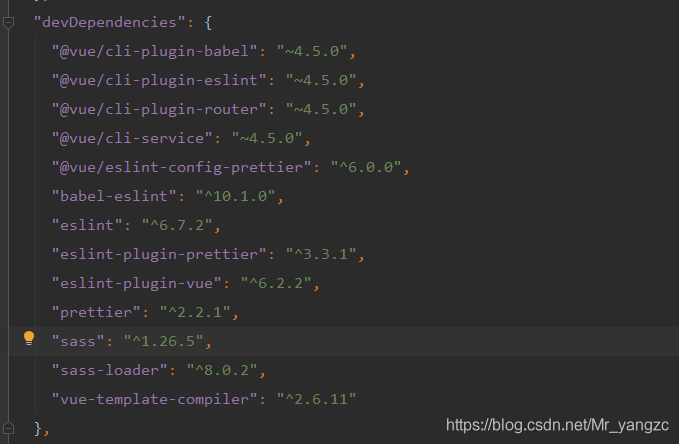
"sass": "^1.26.5",    replace to   "sass": "~1.26.5",

[Solved] Plugin requires missing class loader for ‘Python‘

plugin requires missing class loader for ‘Python’

Original Cause Solution

Original cause

Remove the original pycharm on linux, reinstall tar.zip, and run pycharm.sh in the bin directory and get an error

solve

The reason for this is that there are residual files left over when removing pycharm.
After deleting the ~/.local/share/JetBrains and ~/.cache/JetBrains folders, re-run pycharm.sh and you're good to go.

[Solved] Mavenwas cached in the local repository

Today I was prompted with an error message when compiling a maven project using the command mvn compile:

 was cached in the local repository, resolution will not be reattempted until the update interval of


Cause of the problem :
By default, Maven will use the local cached repository to compile the project, for the last failed library download, maven will create xxx.lastUpdated file in ~/.m2/repository/<group>/<artifact>/<version>/ directory. Once this file exists, the dependencies will not be updated until the next nexus update. Add the following. <repositories> <repository> <id>public</id> <url>地址</url> <releases> <enabled>true</enabled> <updatePolicy>always</updatePolicy> </releases> <snapshots> <enabled>true</enabled> <updatePolicy>always</updatePolicy> </snapshots> </repository> </repositories>

[Solved] There is a problem with mysql8.0 without password in Navicat connection

There is a problem with mysql8.0 without password in Navicat connection

**Problem: * * connect to mysql8.0 with Navicat, but the test connection fails
* * reason: * * when installing mysql8.0, there is no password set, and there is no random password under data in the MySQL installation directory

Solutions:
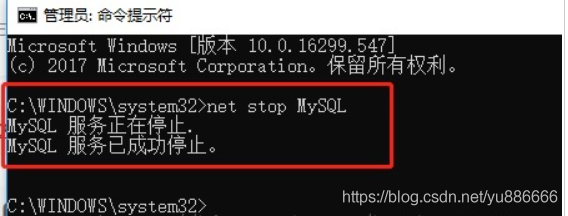
1. Stop the MySQL service
open the CMD as an administrator and close it or close the windows service page

C:\Users\xxx>net stop mysql`

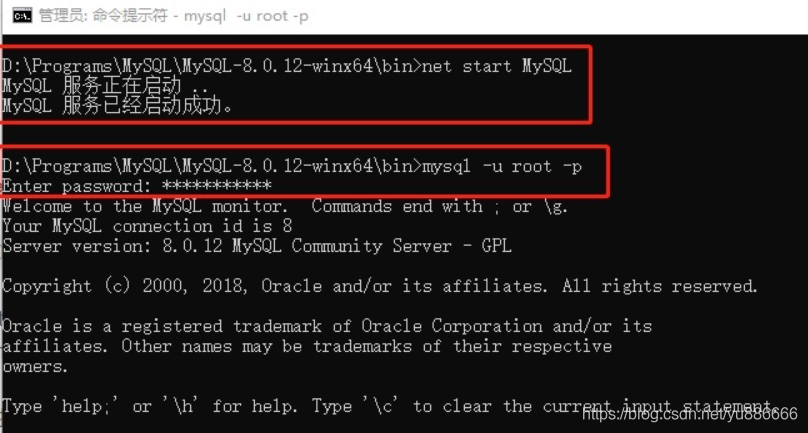
2. As an administrator, open the CMD page and enter the following command to start MySQL without password

C:\Users\xxx>mysqld --console --skip-grant-tables --shared-memory

Take a look at the following screen:

3. Open a new CMD page and enter the following statement:

mysql> flush privileges; -- Modify Permissions
Query OK, 0 rows affected (0.16 sec)
 
mysql> ALTER USER "root"@"localhost" IDENTIFIED BY "123456"; -- Modify Password
Query OK, 0 rows affected (0.08 sec)

Then the login password is 123456

4. After setting, start the MySQL service normally, and use the user name and password to verify whether the setting is successful

[Solved] Pytorch-geometric Error: No module named torch_sparse

Error report using Python geometric: no module named torch_ Sparse solution:
1) define your torch version and GPU version or CPU
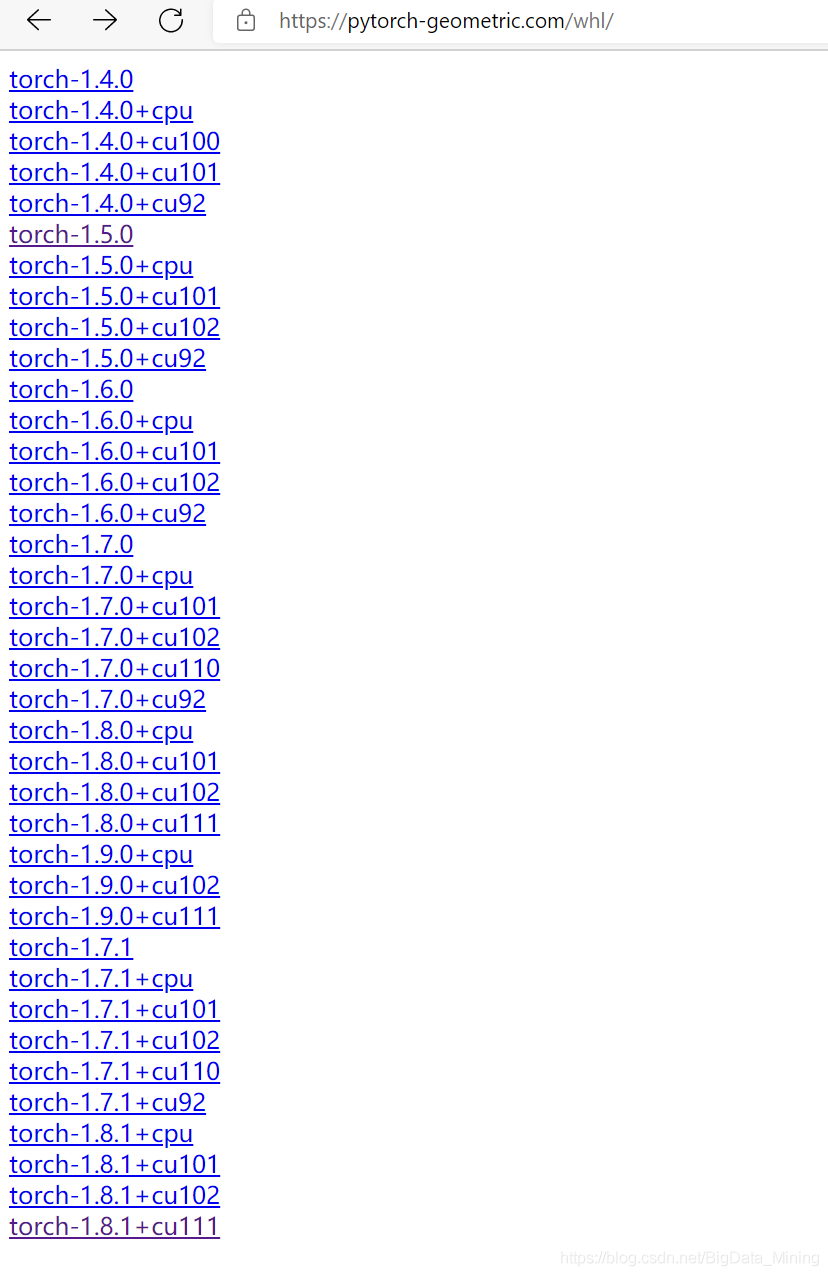
2) enter the download link and click to enter the same sub link as your version:

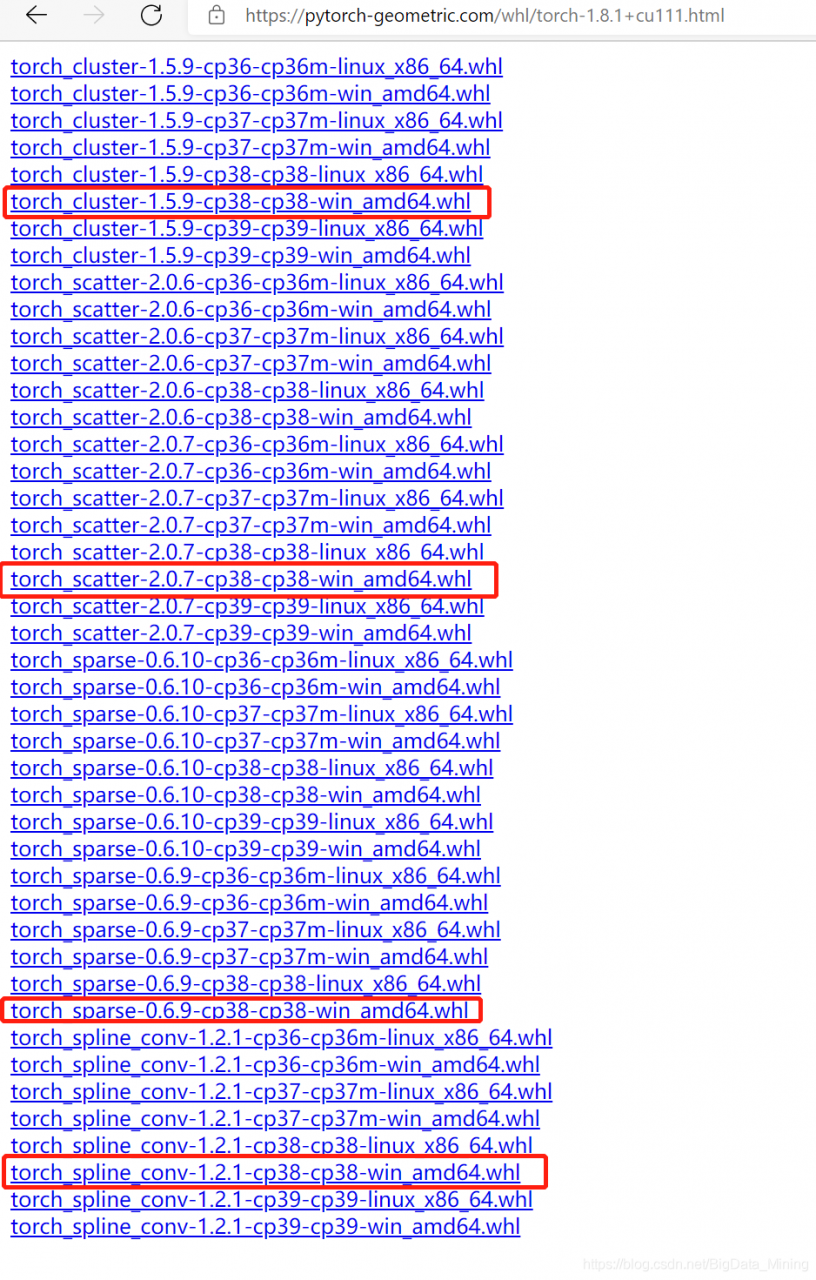
3) download the four WHL files according to the version number

4) use

pip install XX.whl

Command to install the four files, and then execute the

pip install torch-geometric

That’s it!

[How to Solve] ashx Http Delete method not allowed

Reference answer 1 (invalid)

<system.webServer>
	<security>
		<requestFiltering>
			<verbs allowUnlisted="false">
				<add verb="GET" allowed="true" />
				<add verb="POST" allowed="true" />
				<add verb="DELETE" allowed="true" />
				<add verb="PUT" allowed="true" />
				<add verb="OPTIONS" allowed="true" />
				<add verb="TRACE" allowed="true" />
			</verbs>
		</requestFiltering>
	</security>
</system.webServer>

Reference answer 2 (invalid)

<system.webServer>
	<handlers>
		<remove name="WebDAV" />
		<remove name="OPTIONSVerbHandler" />
		<remove name="TRACEVerbHandler" />
        <add name="ExtensionlessUrlHandler-Integrated-4.0" path="*." verb="*" type="System.Web.Handlers.TransferRequestHandler" preCondition="integratedMode,runtimeVersionv4.0" />
	</handlers>
	<modules>
		<remove name="WebDAVModule" />
	</modules>
</system.webServer>

Using. Net 4.0 asp.net technology, no “webdavmodule” module was found

Correct answer

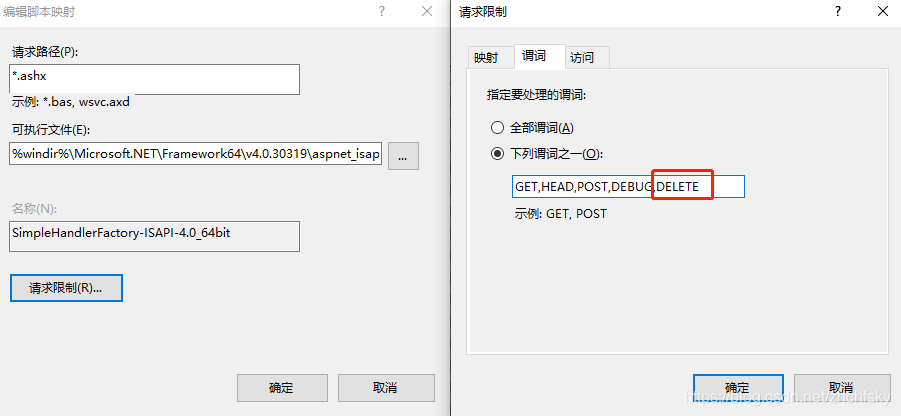
It is obvious that the error of ashx message is called to modify the handler of mapping “. Ashx” file, so the following items are found

Each of them should be revised

Or modify the web.config system.webserver configuration section:

<system.webServer>
    <handlers>
		<remove name="SimpleHandlerFactory-ISAPI-2.0-64" />
		<remove name="SimpleHandlerFactory-ISAPI-2.0" />
		<remove name="SimpleHandlerFactory-Integrated" />
		<remove name="SimpleHandlerFactory-ISAPI-4.0_32bit" />
		<remove name="SimpleHandlerFactory-Integrated-4.0" />
		<remove name="SimpleHandlerFactory-ISAPI-4.0_64bit" />
		<add name="SimpleHandlerFactory-ISAPI-4.0_64bit" path="*.ashx" verb="GET,HEAD,POST,DEBUG,DELETE" modules="IsapiModule" scriptProcessor="%windir%\Microsoft.NET\Framework64\v4.0.30319\aspnet_isapi.dll" resourceType="Unspecified" requireAccess="Script" preCondition="classicMode,runtimeVersionv4.0,bitness64" responseBufferLimit="0" />
		<add name="SimpleHandlerFactory-Integrated-4.0" path="*.ashx" verb="GET,HEAD,POST,DEBUG,DELETE" type="System.Web.UI.SimpleHandlerFactory" resourceType="Unspecified" requireAccess="Script" preCondition="integratedMode,runtimeVersionv4.0" />
		<add name="SimpleHandlerFactory-ISAPI-4.0_32bit" path="*.ashx" verb="GET,HEAD,POST,DEBUG,DELETE" modules="IsapiModule" scriptProcessor="%windir%\Microsoft.NET\Framework\v4.0.30319\aspnet_isapi.dll" resourceType="Unspecified" requireAccess="Script" preCondition="classicMode,runtimeVersionv4.0,bitness32" responseBufferLimit="0" />
		<add name="SimpleHandlerFactory-Integrated" path="*.ashx" verb="GET,HEAD,POST,DEBUG,DELETE" type="System.Web.UI.SimpleHandlerFactory" resourceType="Unspecified" requireAccess="Script" preCondition="integratedMode,runtimeVersionv2.0" />
		<add name="SimpleHandlerFactory-ISAPI-2.0" path="*.ashx" verb="GET,HEAD,POST,DEBUG,DELETE" modules="IsapiModule" scriptProcessor="%windir%\Microsoft.NET\Framework\v2.0.50727\aspnet_isapi.dll" resourceType="Unspecified" requireAccess="Script" preCondition="classicMode,runtimeVersionv2.0,bitness32" responseBufferLimit="0" />
		<add name="SimpleHandlerFactory-ISAPI-2.0-64" path="*.ashx" verb="GET,HEAD,POST,DEBUG,DELETE" modules="IsapiModule" scriptProcessor="%windir%\Microsoft.NET\Framework64\v2.0.50727\aspnet_isapi.dll" resourceType="Unspecified" requireAccess="Script" preCondition="classicMode,runtimeVersionv2.0,bitness64" responseBufferLimit="0" />
	</handlers>
</system.webServer>

Solution (- V -)

[Solved] Golang Error: The system cannot find the path specified. [mkdir C:/xx/yy/]:

The system cannot find the path specified

If you report an error when creating a directory, it is recommended that you check the following:

err := os.Mkdir(path, perm)

If you use the above method, you can only create a single level directory
if you want to create a directory such as XX/YY, XX/YY/ZZ,…
please enter the following method

err := os.MkdirAll(path, perm)

OK! Problem solved!

[Solved] Backtrader_plotting Error: RuntimeError: Unexpected data type

During installation and use of backtrader_plotting, an error was reported.
Traceback (most recent call last):
File “main.py”, line 86, in
cerebro.plot(b)
File “C:\ProgramData\Anaconda3\lib\site-packages\backtrader\cerebro.py”, line 991, in plot
start=start, end=end, use=use)
File “C:\ProgramData\Anaconda3\lib\site-packages\backtrader_plotting-2.0.0-py3.7.egg\backtrader_plotting\bokeh\bokeh.py”,
line 516, in plot
self._blueprint_strategy(obj, start, end, tradingdomain, **kwargs)
File “C:\ProgramData\Anaconda3\lib\site-packages\backtrader_plotting-2.0.0-py3.7.egg\backtrader_plotting\bokeh\bokeh.py”,
line 228, in _blueprint_strategy
figureenv.plot(master)
File “C:\ProgramData\Anaconda3\lib\site-packages\backtrader_plotting-2.0.0-py3.7.egg\backtrader_plotting\bokeh\figure.py”, line 180, in plot
self.plot_data(obj)
File “C:\ProgramData\Anaconda3\lib\site-packages\backtrader_plotting-2.0.0-py3.7.egg\backtrader_plotting\bokeh\figure.py”, line 253, in plot_data
title = sanitize_source_name(labelizer.label(data))
File “C:\ProgramData\Anaconda3\lib\site-packages\backtrader_plotting-2.0.0-py3.7.egg\backtrader_plotting\bokeh\labelizer.py”, line 84, in label
primary = _label_datafeed(obj)
File “C:\ProgramData\Anaconda3\lib\site-packages\backtrader_plotting-2.0.0-py3.7.egg\backtrader_plotting\bokeh\labelizer.py”, line 52, in _label_datafeed
raise RuntimeError(f’Unexpected data type: {data.__class__}’)
RuntimeError: Unexpected data type:

Check that it is the getattr(data, n, “”) statement that cannot get the name of the data, so it needs to be actively assigned, modifying the main code.
# Load data
cerebro.adddata(data)
for
# Load data
codename=’510300′
cerebro.adddata(data,name=codename)
Problem solved.


Postgres Multiple data insertion error: The ‘default‘ dialect with current database version settings does not support

Error report of inserting multiple data into postges database by Python

Solutions for error reporting related information

Information related to error reporting

Error report content: the 'default' dialect with current database version settings does not support
Python version: 3.7
psotgres version: 13
specific situation: single data insertion is normal, multiple data insertion may report errors once, but not every time.

Solution

At first, I thought there was a problem with the database version, but I still couldn’t change Postgres 10

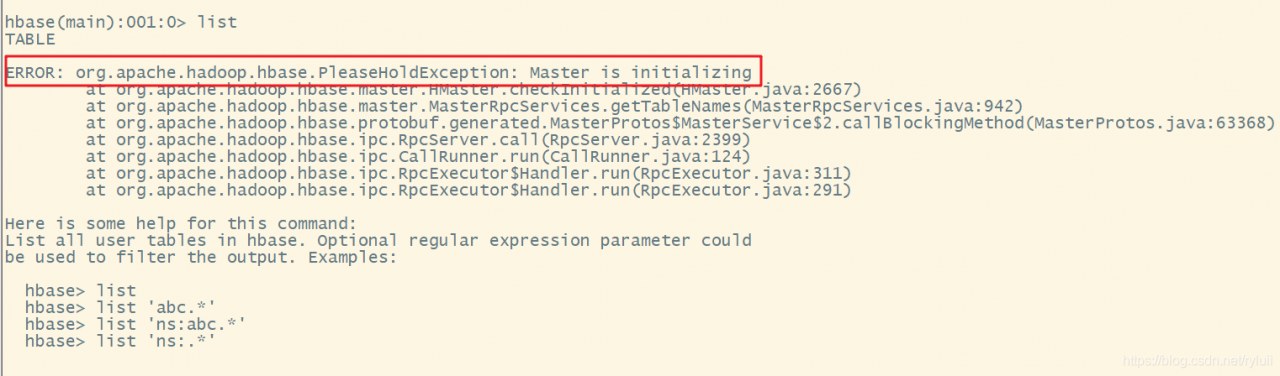
HBase shell Find ERROR: org.apache.hadoop.hbase.PleaseHoldException: Master is initializing

Problem description

Because of the HBase version, after I changed the HBase version, I opened the HBase shell query table and reported the following error:

How to solve it

The above problems are generally the cause of the failure of hregionserver node.

    1. first step, JPS checks whether its hregionserver node is normally opened (mostly hung up) and looks at the configuration file hbase-site.xml (my problem is here, because the installation has changed the version, and it has not been integrated with Phoneix yet, it is necessary to comment out all the Phoenix mapping configuration in the configuration file, otherwise hregionserver will not start normally)


    1. the following is a positive list Exact configuration file </ OL>
<?xml version="1.0"?>
<?xml-stylesheet type="text/xsl" href="configuration.xsl"?>
<!--
/**
 *
 * Licensed to the Apache Software Foundation (ASF) under one
 * or more contributor license agreements.  See the NOTICE file
 * distributed with this work for additional information
 * regarding copyright ownership.  The ASF licenses this file
 * to you under the Apache License, Version 2.0 (the
 * "License"); you may not use this file except in compliance
 * with the License.  You may obtain a copy of the License at
 *
 *     http://www.apache.org/licenses/LICENSE-2.0
 *
 * Unless required by applicable law or agreed to in writing, software
 * distributed under the License is distributed on an "AS IS" BASIS,
 * WITHOUT WARRANTIES OR CONDITIONS OF ANY KIND, either express or implied.
 * See the License for the specific language governing permissions and
 * limitations under the License.
 */
-->
<configuration>
  <property>
    <name>hbase.cluster.distributed</name>
    <value>true</value>
  </property>
  <property>
    <name>hbase.tmp.dir</name>
    <value>/export/data/hbase/tmp</value>
   <!--This tmp temporary file should be created in the hbase installation directory-->
  </property>
  <property>
    <name>hbase.master</name>
    <value>node1:16010</value>
  </property>
  <property>
    <name>hbase.unsafe.stream.capability.enforce</name>
    <value>false</value>
  </property>
    <property>
    <name>hbase.rootdir</name>
    <value>hdfs://node1:9000/hbase</value>
  </property>
    <property>
    <name>hbase.zookeeper.quorum</name>
    <value>node1,node2,node3:2181</value>
  </property>
  <property>
    <name>hbase.unsafe.stream.capability.enforce</name>
	<value>false</value>
  </property>
  <property>
	<name>hbase.zookeeper.property.dataDir</name>
	<value>/export/servers/zookeeper/data</value>
  </property>
</configuration>

3. Close HBase, delete/HBase on HDFS and restart HBase

--Close hbase
stop-hbase.sh
--delete /hbase
hadoop fs -rm -r /hbase
--start hbase
start-hbase.sh

Note: in case of this kind of error, check whether the configuration file is correct, restart HBase (restart needs to delete/HBase), that is, follow step 3 to do it again.

[Solved] ModuleNotFoundError: No module named ‘requests‘

environment

MacOS 11.4
has been implemented:

pip3 install requests

It’s still wrong.

This reminds me that there are two PIP3

report errors:

import requests
ModuleNotFoundError: No module named ‘requests’

terms of settlement

Execute the following code

/Library/Frameworks/Python.framework/Versions/3.9/bin/pip3 install requests

It was solved successfully.

Cause analysis:
there are two versions of python3 on my computer. I guess one comes with the system. One is that I use brew to install it automatically due to dependency.

The environment variable is /usr/local/opt/ [email protected]/bin/pip3 script is executed in /Library/Frameworks/Python.framework/Versions/3.9/bin/pip3.

The following test shows that my python3 and PIP3 paths do not match.

itkey@ycmit: ~ $ which python3                                                                           [16:43:26]
/usr/local/bin/python3
itkey@ycmit: ~ $ ls -all /usr/local/bin/python3                                                          [16:43:29]
lrwxr-xr-x  1 itkey  admin  69 12 22  2020 /usr/local/bin/python3 -> ../../../Library/Frameworks/Python.framework/Versions/3.9/bin/python3
itkey@ycmit: ~ $ which pip3                                                                              [16:43:32]
/usr/local/bin/pip3
itkey@ycmit: ~ $ ls -all /usr/local/bin/pip3                                                             [16:43:54]
lrwxr-xr-x  1 itkey  admin  35  4 24 08:25 /usr/local/bin/pip3 -> ../Cellar/[email protected]/3.9.4/bin/pip3

cut the weeds and dig up the roots

Now that the above reason analysis has shown that python3 and PIP3 in my path do not match, just modify them to match.

Put brew before the environment variable

#python3 Use brew
export PATH="/usr/local/Cellar/[email protected]/3.9.4/bin:$PATH"