Author Archives: Robins

Failed in Android compilation: solution to setup Jack server problem

        The following error occurred when compiling Android:

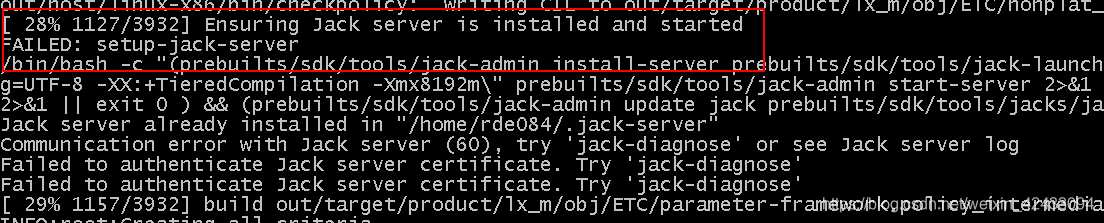
[ 28% 1127/3932] Ensuring Jack server is installed and started
FAILED: setup-jack-server

Picture:


Reason: when Jack compiles, there may be multiple people compiling at the same time. At this time, there may be two people using the same port, resulting in port conflict and timeout.

Solution: modify the port number (modify the. Jack settings and. Jack server/config. Properties files)  

Step 1:

        Open the. Jack settings file in the root directory of the project, and modify Jack. Server. Service. Port and   Jack.server.admin.port port. Set the port number as large as possible to reduce the probability of port collision. For example, I set jack.server.service.port to 28078 and jack.server.admin.port to 28079

# Server settings
SERVER_HOST=localhost
SERVER_PORT_SERVICE=28078
SERVER_PORT_ADMIN=28079

# Internal, do not touch
SETTING_VERSION=4

  Step 2:

        Open the. Jack-server/config.properties file in the root directory of the project, and set jack.server.service.port and jack.server.admin.port to the same values as the steps.

jack.server.idle=180
jack.server.max-service.by-mem=1\=2147483648\:2\=3221225472\:3\=4294967296
jack.server.shutdown=21600
jack.server.time-out=7200
jack.server.max-jars-size=104857600
jack.server.service.port=28078
jack.server.admin.port=28079
jack.server.config.version=4
jack.server.max-service=4
jack.server.deep-idle=900

  After modification, if there is no conflict, you can compile normally.

[Solved] IDEA Error: java: Compilation failed: internal java compiler error

In the project, use gradle to build the project. When we want to change the version of the JDK, the following error is reported:

Information:Using javac 1.8.0_111 to compile java sources
Information:java: javacTask: source release 1.8 requires target release 1.8
Information:java: Errors occurred while compiling module’Spring_1_main’
Information:2018/1/4 18:46-Compilation completed with 1 error and 0 warnings in 3s 768ms
Error:java: Compilation failed: internal java compiler error

In fact, there are a few things that need to be changed:

1. Change the build.gradle file

    sourceCompatibility = 1.8

2. Change the .idea/compiler.xml file

< bytecodeTargetLevel > 
      < module name ="common_main" target ="1.8"  /> 
      < module name ="common_test" target ="1.8"  /> 
      < module name ="questionnaire_main" target ="1.8"  /> 
      < module name =" questionnaire_test" target ="1.8"  /> 
</ bytecodeTargetLevel >

3. Change File->Project Structure->Project Settings->Modules->Project name->Dependencies->Module SDK on the right

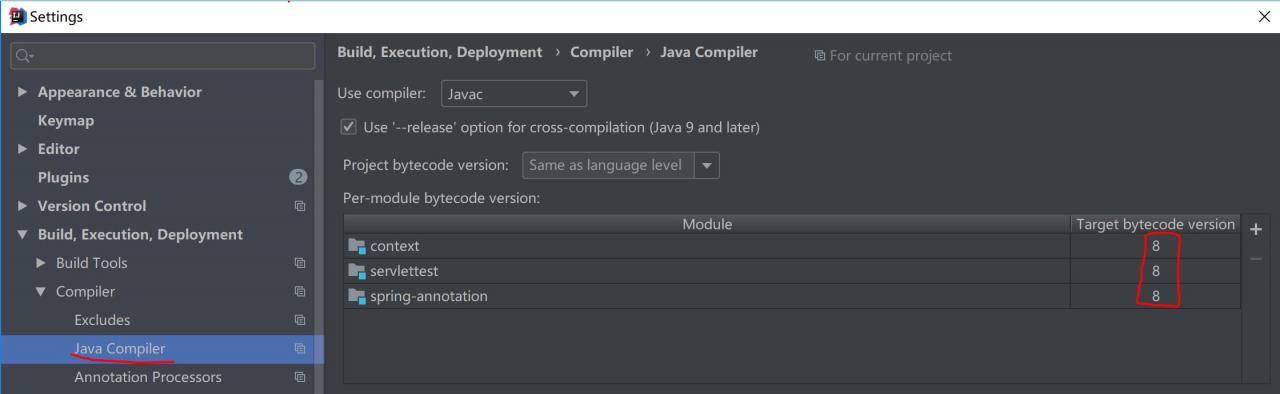
4. Set the Target bytecode version of Module in Settings->Buile, Execution, Deployment->Compiler->Java Compiler

Quartz: ERROR threw an unhandled Exception [How to Solve]

The detailed error message is as follows:

 1  2016 - 06 - 28  . 17 : 18 is : 13.366 [DefaultQuartzScheduler_Worker- . 1 ] ERROR org.quartz.core.JobRunShell: 211 - the Job group1.job1 threw AN Unhandled Exception: 
 2  java.lang.NullPointerException
 3      AT com.starunion.java. service.timer.JobEndConference.execute(JobEndConference.java: 45 ) ~[bin/:? ]
 4      at org.quartz.core.JobRunShell.run(JobRunShell.java: 202 ) [quartz- 2.2 . 1 .jar:? ]
 5     org.quartz.simpl.SimpleThreadPool $ WorkerThread.run AT (SimpleThreadPool.java: 573 ) [quartz- 2.2 . . 1 .jar :? ]
 6  2016 - 06 - 28  . 17 : 18 is : 13.374 [DefaultQuartzScheduler_Worker- . 1 ] ERROR org.quartz .core.ErrorLogger: 2425 - Job (group1.job1 threw an exception.
 7  org.quartz.SchedulerException: Job threw an unhandled exception.
 8      at org.quartz.core.JobRunShell.run(JobRunShell.java: 213 ) [quartz- 2.2 . 1 .jar:?]
 9      at org.quartz.simpl.SimpleThreadPool$WorkerThread.run(SimpleThreadPool.java: 573 ) [quartz- 2.2 . 1 .jar:? ]
 10  Caused by: java.lang.NullPointerException
 11      at com.starunion.java.service .timer.JobEndConference.execute(JobEndConference.java: 45 ) ~[bin/:? ]
 12      at org.quartz.core.JobRunShell.run(JobRunShell.java: 202 ) ~[quartz- 2.2 . 1 .jar:?]

Talk about my solution process:

1. The reason is obvious: the null object is called.

According to the log information, locate the specified line of my Job object class, line 21 in the following figure:

1  @Component
2  public  class JobEndConference implements Job {
3  
4      @Autowired
5      CallableFsExecCmdProc procExecTask;
6  
7      @Override
8      public  void execute(JobExecutionContext JEContext) throws JobExecutionException {
9  
10          JobDataMap map = JEContext.getJobDetail().getJobDataMap();
11  
12          String meetName = (String) map. get ( " meetName " );
13  
14          StringBuffer buff = newStringBuffer();
15          buff.append( " bgapi conference " );
16          buff.append(meetName);
17          buff.append( " kick all " );
18          // buff.append(ConstantUtil.FS_CMD_TAIL); 
19          20          // SocketFsTcp4SendCMD.fsSendCommand(buff.toString()); 
21          procExecTask.setSendCmd(buff.toString());
22          Future<Integer> future = StarProxy.executor.submit(procExecTask);
23          try {
24              future. get ( 5000, TimeUnit.MILLISECONDS);
25          } catch (InterruptedException | ExecutionException | TimeoutException e) {
26              e.printStackTrace();
27          }
28  
29      }
30  
31 }

This object is empty, which means that it has not been properly initialized through Spring annotations.

Make sure that this annotation is written correctly, all other classes are written this way.

2. Where is the problem?

Check up to see how this class is called.

. 1  ......
 2 the JobDetail jobDetail = newJob (JobEndConference. Class ) .withIdentity ( " the jobs that job1 " , " named group1 " ) .setJobData (DM) .build ();
 . 3 ......

The reason is that the object parameter passed in by newJob is not the object loaded by the Spring annotation.

3. Solution:

Method 1. Obtain the JobEndConference object from Spring’s ApplicationContext.

Method 2. Cancel the annotation of JobEndConference itself and parameters, and initialize with new.

[How to Solve] Error: Invalid or corrupt jarfile…

After using IDEA to create a quickstart project through MAVEN and adding Artifacts, it was found that the generated jar package could not be run, and the following error occurred:

Error: Invalid or corrupt jarfile D:\WorkSpace\JavaStudy\*\out\artifacts\*_jar\*.jar

So I tried a lot of methods first, and found that there is no META_INF folder in the jar package at all through comparison, which is the root cause of the jar’s inability to run;

Solutions:

Make sure your MANIFEST.MF is  in : 
src /main/resources/META_INF/ 

NOT 
src /main/java/META_INF/


Problem Analysis:
IDEA, when adding artifacts in File\Project Structure\Artifacts\, the default will be to create a directory under src/main/java/META_INF/, but this directory (src/main/java/) has been marked as Sources Root, compile only.
So you should cut src/main/java/META_INF to src/main/resources/META_INF/, src/main/resources/ is Resources Root and will copy to the out directory

[Solved] Redis startup error Creating Server TCP listening socket 127.0.0.1:6379: bind: No error

When installing Redis under windows, an error is reported at the first startup:

[2368] 21 Apr 02:57:05.611 # Creating Server TCP listening socket 127.0.0.1:6379: bind: No error

Solution: Run in the command line

redis-cli.exe

127.0.0.1:6379>shutdown

not connected>exit

Then re-run redis-server.exe redis.windows.conf, the startup is successful!

Start Redis

Open the command window directly in the directory above, and run:

  1. redis – server redis windows conf

The results on the tragedy, QForkMasterInit: system error caught. error code=0x000005af, message=VirtualAllocEx failed.: unknown error tips: . The reason is the memory allocation problem (if your computer is powerful enough, it may not be a problem). There are two solutions. First: Use --maxmemory commands to limit Redis memory at startup :

  1. redis – server redis windows conf  – maxmemory  200m

The second method is to modify the configuration file redis.windows.conf :

  1. maxmemory  209715200

Note that the unit is byte, after the change is as follows:

Then run redis-server redis.windows.conf it to start:

But here comes the problem again. Redis will be closed when the cmd window is closed. Is it necessary to keep the server open? This is obviously unscientific, let’s see how to deploy on the server.

Deploy Redis

In fact, Redis can be installed as a windows service. It starts automatically after booting. The command is as follows:

  1. redis – server  – service – install redis windows conf

After the installation is complete, you can see that Redis has been used as a windows service:

But after the installation, Redis did not start, the startup command is as follows:

  1. redis – server  – service – start

Stop command:

  1. redis – server  – service – stop

[Tomcat] Unrecognized Windows Sockets error: 10106: Socket creation failed

The following error was reported during tomcat8 startup

30 -Nov- 2017  22 : 45 : 52.892 Serious [main] org.apache.catalina.core.StandardServer. await StandardServer. await : create[localhost: 8005 ]:
 java.net.SocketException: Unrecognized Windows Sockets error: 10106 : create
at java.net.ServerSocket.createImpl(ServerSocket.java: 307 )
at java.net.ServerSocket.getImpl(ServerSocket.java: 257 )
at java.net.ServerSocket.bind(ServerSocket.java: 375 )
at java.net.ServerSocket. <init>(ServerSocket.java: 237 )
at org.apache.catalina.core.StandardServer. await (StandardServer.java: 441 )
at org.apache.catalina.startup.Catalina. await (Catalina.java: 758 )
at org.apache.catalina.startup.Catalina.start(Catalina.java: 704 )
at sun.reflect.NativeMethodAccessorImpl.invoke0(Native Method)
at sun.reflect.NativeMethodAccessorImpl.invoke(NativeMethodAccessorImpl.java: 62 )
at sun.reflect.DelegatingMethodAccessorImpl.invoke(DelegatingMethodAccessorImpl.java: 43 )
at java.lang.reflect.Method.invoke(Method.java: 498 )
at org.apache.catalina.startup.Bootstrap.start(Bootstrap.java: 355 )
at org.apache.catalina.startup.Bootstrap.main(Bootstrap.java: 495 )

Solution: 1. Open the command prompt 2 as an administrator
         , enter netsh winsock reset  
         3 , and restart the computer.

Winsock is a Windows network programming interface. Winsock works at the application layer. It provides a high-level data transmission programming interface that has nothing to do with the underlying transmission protocol. Netsh winsock reset restores it to the default state.


error:unknow filesystem grub rescue> [How to Solve]

Symptom: The
boot display: GRUB loading

error: unknow filesystem

grub rescue>

Reason:
The following operations have been found to cause this problem:
1. I want to delete ubuntu, so I directly delete/format the partition where ubuntu is located under windows.
2. Adjust the disk, use tools to merge/divide/adjust/delete partitions, so that the number of disk partitions has changed.
3. Reinstall the system and install linux to the new partition. The original partition has been formatted, but grub2 has not been reinstalled.
4. Use ubuntu backup tools/derivative manufacturing tools, etc., to restore the main partition to the old version of 8.X. As a result, the old version of grub is grub1, so grub2 is destroyed.

All in all, because the operator does not know that grub2 is divided into two parts, one part (in general) is written on mbr, and the other part is written in the /boot/grub directory of a certain partition (if /boot is partitioned separately, write directly In the /grub directory of the corresponding partition). Due to the above operations, the part in the mbr of grub2 cannot find the part in the /grub directory (or the part has been deleted).

Idea:
Method 1, delete grub2 completely, so that this prompt no longer appears: It is
suitable for people who no longer want to use ubuntu and want to switch back to windows.
This is very simple, as long as you have a Windows boot disk (not Ghost), use it to start, to select the installation location, do not need to actually install, just exit and restart.
Or use it to boot to the fault repair station, run fixboot or fixmbr.
Under the win7 command line, it is executed: BootRec.exe /fixmbr
(/Fixmbr to repair mbr, /FixBoot to repair boot sector, /ScanOs to detect installed win7, /RebuildBcd to rebuild bcd.)
Note: In the installation interface, use shift+F10 to enter the dos interface and enter the command.

Method 2, reinstall and repair grub2
1. First use the ls command to find which partition Ubuntu is installed on:
enter the following command under grub rescue>:

Code: ls

Will list all disk partition information, for example:

Quote: (hd0,1),(hd0,5),(hd0,3),(hd0,2)

2. Then call the following commands in turn: X means each partition number.
If there is no separate partition for /boot, use the following command:

Code: ls (hd0,X)/boot/grub

If /boot is partitioned separately, use the following command:

Code: ls (hd0,X)/grub

Under normal circumstances, hundreds of files will be listed. Many of the file extensions are .mod, .lst and .img, and one file is grub.cfg. Assuming that when (hd0,5) is found, the files in the folder are displayed, which means that Linux is installed in this partition.

4. If you find the correct grub directory, try to temporarily associate the two parts of grub as follows: The
following is the command for /boot without a separate partition:

Reference: grub rescue>set root=(hd0,5)
grub rescue>set prefix=(hd0,5)/boot/grub
grub rescue>insmod /boot/grub/normal.mod

The following is the command for a separate partition of /boot: (These sentences need to be verified)

Reference: grub rescue>set root=(hd0,5)
grub rescue>set prefix=(hd0,5)/grub
grub rescue>insmod /grub/normal.mod

Then call the following command to display the missing grub menu.
grub rescue>normal
But don’t be happy. If you restart at this time, the problem still exists, we need to enter Linux to repair grub.
Start up, after entering ubuntu, execute in the terminal:

Code: sudo update-grub
sudo grub-install /dev/sda

(Sda is your hard disk number, do not specify the partition number, for example, sda1, sda5, etc. are not correct)
Has the restart test restored the grub boot menu? Congratulations on your successful recovery!
5. If you can’t find the correct /grub directory, such as the third and fourth misoperations, try to find whether there are Linux core files, and then call the following commands in turn: X means each partition number:
grub rescue>, enter:
if /boot has no separate partition:

Code: ls (hd0,X)/boot

If /boot is partitioned separately, then:

Code: ls (hd0,X)

Find a file with a name similar to vmlinuz-3.0.0-12-generic. This is the linux core file. If found, write down the X value in (hd0,X). Suppose that when (hd0,5) is found, the files in the folder are displayed.

Then start with live cd or live usb, and enter the following commands in the ubuntu terminal of live cd (the “5” in sda5 must be changed to the value recorded above) (the two sentences need to be verified):
if there is no separate partition for /boot :

Code: sudo mount /dev/sda5 /mnt
sudo grub-install –boot-directory=/mnt/boot /dev/sda

If /boot is partitioned separately, then:

Code: sudo mount /dev/sda5 /mnt
sudo grub-install –boot-directory=/mnt /dev/sda

Then restart it.

(The above two commands can also solve the problem that grub is installed in the wrong location when ubuntu is installed, and grub is not installed to /dev/sda, which causes the problem of ubuntu startup items directly entering windows during startup, but you need to determine the “5 “Change to what number.)
6. If there is no linux core file, then reinstall it completely.

Solution for Visual Studio 2012 compilation error [error C4996:’scanf’: This function or variable may be unsafe.]

When compiling a C language project in VS 2012, if the scanf function is used, the following error will be prompted when compiling:

error C4996:’scanf’: This function or variable may be unsafe. Consider using scanf_s instead. To disable deprecation, use _CRT_SECURE_NO_WARNINGS. See online help for details.

The reason is that Visual C++ 2012 uses more secure run-time library routines. For the new Security CRT functions (that is, those with the “_s” suffix), see:

” Security Enhanced Version of CRT Function “

The solution to this problem is given below:

Method 1: Replace the original old functions with new Security CRT functions.

Method 2: Use the following methods to block this warning:

    1. Define the following macros in the precompiled header file stdafx.h (note: it must be before including any header files):

#define _CRT_SECURE_NO_DEPRECATE

    2. Or declare #pragma warning(disable:4996)

    3. Change the preprocessing definition:

        Project -> Properties -> Configuration Properties -> C/C++ -> Preprocessor -> Preprocessor Definition, add:

_CRT_SECURE_NO_DEPRECATE

Method three: Method two does not use the more secure CRT function, which is obviously not a good method worth recommending, but we don’t want to change the function names one by one. Here is an easier method:

Define the following macros in the precompiled header file stdafx.h (also before including any header files):

#define _CRT_SECURE_CPP_OVERLOAD_STANDARD_NAMES 1

When linking, it will automatically replace the old functions with Security CRT functions.

Note : Although this method uses a new function, it cannot eliminate the warning (see the red letter for the reason). You have to use method two (-_-) at the same time. In other words, the following two sentences should actually be added to the precompiled header file stdafx.h:

#define _CRT_SECURE_NO_DEPRECATE

#define _CRT_SECURE_CPP_OVERLOAD_STANDARD_NAMES 1


Explanation of the cause of the error:

This kind of warning from Microsoft is mainly because of the functions of the C library. Many functions do not perform parameter detection (including out-of-bounds). Microsoft is worried that using these will cause memory exceptions, so it rewrites the functions of the same function. The function of has carried out parameter detection, and it is safer and more convenient to use these new functions. You don’t need to memorize these rewritten functions specifically, because the compiler will tell you the corresponding safe function when it gives a warning for each function. You can get it by checking the warning message. You can also check MSDN for details when you use it.

[Solved] HTTP Error 405.0-Method Not Allowed occurs in the Put operation of the REST service on IIS7.5

WebDAV is a set of extensions of the Hypertext Transfer Protocol (HTTP), which provides a standard for editing and file management between computers on the Internet. Using this protocol, users can perform remote basic file operations through the Web, such as copy, move, delete, etc. . In IIS 7.0, WebDAV is used as an independent extension module and needs to be downloaded separately. In IIS 7.5, WebDAV will be integrated. However, WebDav clicks Put and Delete. So the RESTful services (WCF Data Service, WCF Rest Service, ASP.NET Web API, ASP.NET MVC) deployed on IIS 7.5 are tragic. When a Put request is sent, an HTTP Error 405.0-Method Not Allowed error will occur. Solve The method is also very simple, add the following settings in Web.config:

<system.webServer>
  <modules>
    <remove name="WebDAVModule" />
  </modules>
  <handlers>
    <remove name="WebDAV" />
  </handlers>
</system.webServer>

Compilation failed: internal java compiler error[How to Solve]

This error occurred when compiling in Idea: Error: java: Compilation failed: internal java compiler error.

1
2
3
4
5
6
Information:Using javac 1.7.0_79 to compile java sources
Information:java: javacTask: Source distribution 1.6 requires target distribution 1.6
Information:java: Errors occurred while compiling module 'MyThrift'
Information:Module "MyThrift" was fully rebuilt due to project configuration/dependencies changes
Information:2015/8/27 10:43 - Compilation completed with 1 error and 0 warnings in 4s 240ms
Error:java: Compilation failed: internal java compiler error

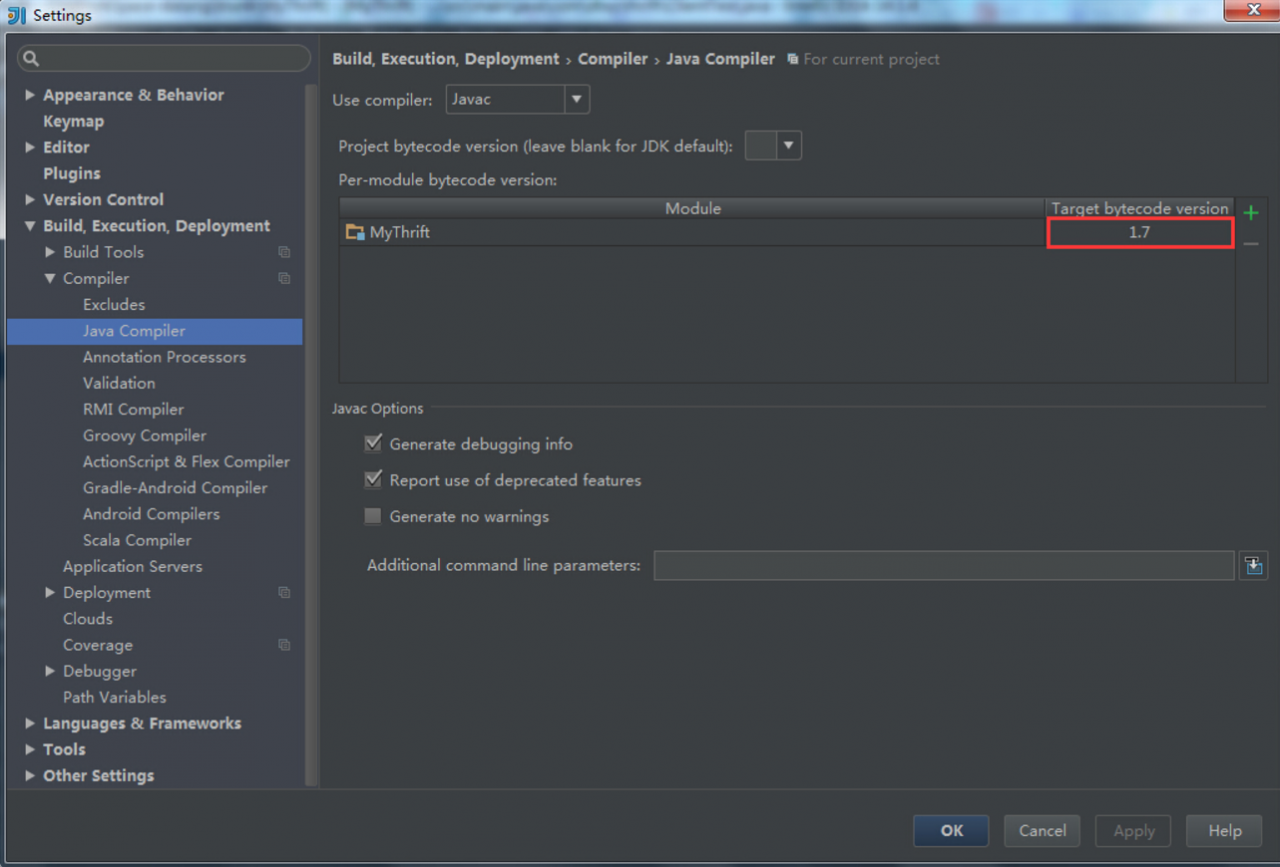
The solution is very simple: File–>Setting…–>Build,Execution,Deployment–>Compiler–>Java Compiler

Set the appropriate version of the target bytecode version of the corresponding Module (consistent with your jkd version), here I changed it to version 1.7.

[Solved] Webpack compilation Error: Cannot find module’webpack-cli/bin/config-yargs’

Problems encountered during operation npm run dev: Error: Cannot find module’webpack-cli/bin/config-yargs’

// package.json
​
"devDependencies": {
    "webpack": "^5.2.0",
    "webpack-cli": "^4.1.0",
    "webpack-dev-server": "^3.11.0"
}


Problem solving reference: Error: Cannot find module’webpack-cli/bin/config-yargs’ #1948

If you upgrade webpack to 5. *, and webpack cli to 4. *, an error will be reported:

Error: Cannot find module 'webpack-cli/bin/config-yargs'

Temporary solution: Back off webpack cli to version 3. * for example:

"webpack-cli": "^ 3.3.12"

  Solution:

  1. Uninstall the current webpack-cli npm uninstall webpack-cli

  2. Install webpack-cli 3.* version npm install webpack-cli@3 -D

// package.json
​
"devDependencies": {
    "webpack": "^5.2.0",
    "webpack-cli": "^3.3.12",
    "webpack-dev-server": "^3.11.0"
}

[Solved] (error) MISCONF Redis is configured to save RDB snapshots, but is currently not able to persist on disk.

n error occurred while running Redis today. The error message is as follows:

(error) MISCONF Redis is configured to save RDB snapshots, but is currently not able to persist on disk. Commands that may modify the data set are disabled. Please check Redis logs for details about the error.

Redis is configured to save database snapshots, but it currently cannot be persisted to the hard disk. The command used to modify the collection data cannot be used. Please check the detailed error information in the Redis log.


the reason:

Forcibly shutting down Redis snapshots results in inability to persist.


solution:

After running the config set stop-writes-on-bgsave-error no command , close the configuration item stop-writes-on-bgsave-error to solve the problem.

root@ubuntu:/usr/local/redis/bin# ./redis-cli
127.0.0.1:6379> config set stop-writes-on-bgsave-error no
OK
127.0.0.1:6379> lpush myColour “red”
(integer ) 1