Author Archives: Robins

[Solved] Hadoop Mapreduce Error: GC overhead limit exceeded

When running mapreduce, Error: GC overhead limit exceeded appears. Check the log and find that the abnormal information is

2015-12-11 11:48:44,716 FATAL [main] org.apache.hadoop.mapred.YarnChild: Error running child: java.lang.OutOfMemoryError: GC overhead limit exceeded 
    at java.io.DataInputStream.readUTF(DataInputStream.java : 661 )
    at java.io.DataInputStream.readUTF(DataInputStream.java: 564 )
     at xxxx.readFields(DateDimension.java: 186)
    at xxxx.readFields(StatsUserDimension.java:67)
    at xxxx.readFields(StatsBrowserDimension.java:68 ) 
    at org.apache.hadoop.io.WritableComparator.compare(WritableComparator.java: 158 )
    at org.apache.hadoop.mapreduce.task.ReduceContextImpl.nextKeyValue(ReduceContextImpl.java: 158 )
    at org.apache.hadoop.mapreduce.task.ReduceContextImpl$ValueIterator.next(ReduceContextImpl.java: 239 )
    at xxx.reduce(BrowserReducer.java: 37)
    at xxx.reduce(BrowserReducer.java:16 ) 
    at org.apache.hadoop.mapreduce.Reducer.run(Reducer.java: 171 )
    at org.apache.hadoop.mapred.ReduceTask.runNewReducer(ReduceTask.java: 627 )
    at org.apache.hadoop.mapred.ReduceTask.run(ReduceTask.java: 389 )
    at org.apache.hadoop.mapred.YarnChild$ 2.run(YarnChild.java:168 )
    at java.security.AccessController.doPrivileged(Native Method)
    at javax.security.auth.Subject.doAs(Subject.java: 415 )
    at org.apache.hadoop.security.UserGroupInformation.doAs(UserGroupInformation.java: 1614 )
    at org.apache.hadoop.mapred.YarnChild.main(YarnChild.java: 163)

From the exception, we can see that when reduce reads the next data, there is a problem of insufficient memory. From the code, I found that the reduce side uses a read map set, which will cause the problem of insufficient memory. In hadoop2.x, the default container’s yarn child jvm heap size is 200M, which is specified by the parameter mapred.child.java.opts, which can be given when the job is submitted. It is a client-side effective parameter, which is configured in mapred-site. In the xml file, by modifying the parameter to -Xms200m -Xmx1000m to change the jvm heap size, the exception is resolved.

parameter name Defaults description
mapred.child.java.opts -Xmx200m Define the execution jvm parameters of the container container executed by mapreduce
mapred.map.child.java.opts Separately specify the execution jvm parameters of the map phase
mapred.reduce.child.java.opts Separately specify the execution jvm parameters of the reduce phase
mapreduce.admin.map.child.java.opts
-Djava.net.preferIPv4Stack=true -Dhadoop.metrics.log.level=WARN
The administrator specifies the jvm parameters executed in the map phase
mapreduce.admin.reduce.child.java.opts
-Djava.net.preferIPv4Stack=true -Dhadoop.metrics.log.level=WARN
The administrator specifies the execution jvm parameters of the reduce phase


 The respective execution order of the above five parameters taking effect is:

map stage: mapreduce.admin.map.child.java.opts <mapred.child.java.opts <mapred.map.child.java.opts, which means that the definition of mapred.map.child.java.opts will be used eventually jvm parameters, if there is a conflict.

Reduce phase: mapreduce.admin.reduce.child.java.opts <mapred.child.java.opts <mapred.reduce.child.java.opts

 Hadoop source code reference: org.apache.hadoop.mapred.MapReduceChildJVM.getChildJavaOpts method.

private  static String getChildJavaOpts(JobConf jobConf, boolean isMapTask) {
    String userClasspath = "" ;
    String adminClasspath = "" ;
     if (isMapTask) {
        userClasspath = jobConf.get(JobConf.MAPRED_MAP_TASK_JAVA_OPTS,
                jobConf.get(JobConf.MAPRED_TASK_JAVA_OPTS,
                        JobConf.DEFAULT_MAPRED_TASK_JAVA_OPTS));
        adminClasspath = jobConf.get(
                MRJobConfig.MAPRED_MAP_ADMIN_JAVA_OPTS,
                MRJobConfig.DEFAULT_MAPRED_ADMIN_JAVA_OPTS);
    } else {
        userClasspath = jobConf.get(JobConf.MAPRED_REDUCE_TASK_JAVA_OPTS,
                jobConf.get(JobConf.MAPRED_TASK_JAVA_OPTS,
                        JobConf.DEFAULT_MAPRED_TASK_JAVA_OPTS));
        adminClasspath = jobConf.get(
                MRJobConfig.MAPRED_REDUCE_ADMIN_JAVA_OPTS,
                MRJobConfig.DEFAULT_MAPRED_ADMIN_JAVA_OPTS);
    }

    // Add admin classpath first so it can be overridden by user. 
    return adminClasspath + "" + userClasspath;
}

How to Solve FreeMarker template error

In the process of using freemarker, the following errors are often seen:

11 Dec 2015 15:53:09,674 ERROR freemarker.runtime:98 - Error executing FreeMarker template  
FreeMarker template error:  
The following has evaluated to null or missing:  
==> sex  [in template "freemarker3.html" at line 10, column 3]  
  
Tip: If the failing expression is known to be legally null/missing, either specify a default value with myOptionalVar!myDefault, or use <#if myOptionalVar??>when-present<#else>when-missing</#if>. (These only cover the last step of the expression; to cover the whole expression, use parenthessis: (myOptionVar.foo)!myDefault, (myOptionVar.foo)??


The template code is as follows:

<!DOCTYPE html>  
<html>  
<head>  
<meta charset="UTF-8">  
<title>freemarker demo</title>  
</head>  
<body>  
${username} <br />  
${age}<br />  
${sex}  
</body>  
</html>

 Root cause: sex is not set, so an error is reported

Solution:

Add an exclamation mark after undeclared variables

${sex!}


 You can also set the default value, add the default value after the exclamation mark

${sex!'abc'}

Git error: unpack failed: error Missing tree [How to Solve]

I recently created a new warehouse and encountered the following problems when I pushed it. I tried many methods and finally found a solution on stackoverflow, but I tried this method at the beginning, but it didn’t work. As for why this error occurred, I still don’t understand the reason.

git.exe push –progress  “origin” release:refs/for/release%r=xxx

Counting objects: 3, done.
Delta compression using up to 4 threads.
Compressing objects: 100% (3/3), done.
Writing objects: 100% (3/3), 663 bytes | 0 bytes/s, done.
Total 3 (delta 0), reused 0 (delta 0)
error: unpack failed: error Missing tree 4201fba85e02299e016f0129621858ec21ac94ae
To (url)
! [remote rejected] release -> refs/for/release%r=xxx(n/a (unpacker error))
error: failed to push some refs to ‘(url)’

git did not exit cleanly (exit code 1) (593 ms @ 2015/5/15 9:51:12)


Solution: git push –no-thin origin HEAD:refs/for/release

[Solved] Vue.js error: Module build failed: Error: No parser and no file path given, couldn’t infer a parser.

ERROR Failed to compile with 2 errors                                                                          12 : 00 : 33

 error   in ./src/ App.vue

Module build failed: Error: No parser and no file path given, couldn ' t infer a parser. 
    at normalize (C:\Users\admin\Desktop\ 222 \demo\node_modules\prettier\index.js: 7051 : 13 )
    at formatWithCursor (C:\Users\admin\Desktop\ 222 \demo\node_modules\prettier\index.js: 10370 : 12 )
    at C:\Users\admin\Desktop\ 222 \demo\node_modules\prettier\index.js: 31115 : 15 
    at Object.format (C:\Users\admin\Desktop\ 222 \demo\node_modules\prettier\index.js : 31134 : 12 )
    at Object.module.exports (C:\Users\admin\Desktop\ 222 \demo\node_modules\vue-loader\lib\template-compiler\index.js: 80 : 23 )

 @. /Src/App.vue 11 : 0 - 354 
 @. / Src / main.js
 @ multi (webpack) -dev-server/client?http: // localhost:8081 webpack/hot/dev-server ./src/main.js 

 error   in ./src/components/ HelloWorld.vue

Module build failed: Error: No parser and no file path given, couldn ' t infer a parser. 
    at normalize (C:\Users\admin\Desktop\ 222 \demo\node_modules\prettier\index.js: 7051 : 13 )
    at formatWithCursor (C:\Users\admin\Desktop\ 222 \demo\node_modules\prettier\index.js: 10370 : 12 )
    at C:\Users\admin\Desktop\ 222 \demo\node_modules\prettier\index.js: 31115 : 15 
    at Object.format (C:\Users\admin\Desktop\ 222 \demo\node_modules\prettier\index.js : 31134 : 12 )
    at Object.module.exports (C:\Users\admin\Desktop\ 222 \demo\node_modules\vue-loader\lib\template-compiler\index.js: 80 : 23 )

 @. /Src/components/HelloWorld.vue 11 : 0 - 366 
 @. / Src / Router / index.js
 @. /src/ main.js
 @ multi (webpack) -dev-server/client?http: // localhost:8081 webpack/hot/dev-server ./src/main.js

Ways to resolve consciousness:

npm i prettier@~ 1.12 . 0

Re-run:

npm run dev


[Solved] ERROR 2002 (HY000): Can’t connect to local MySQL server through socket’/var/lib/mysql/mysql.sock’ (2)

Sometimes, when we use “mysql”, “mysqladmin”, “mysqldump” and other commands to manage the database, the server throws an error similar to the following:

1. Error on-site restoration:
Below we connect in three ways, and then observe the prompt error message:

  • 1. Use the “mysql” command directly without the host name parameter;
  • 2. Use the “mysql -h localhost” command with the host name “localhost” parameter;
  • 3. Use the “mysql -h 127.0.0.1” command with the host name “127.0.0.1” parameter.

1. [root@lam7 opt]# mysql
ERROR 2002 (HY000): Can’t connect to local MySQL server through socket’/

var/lib/mysql/mysql.sock ‘ (2) 2. [root@lam7 opt]# mysql -h localhost
ERROR 2002 (HY000): Can’t connect to local MySQL server through socket’/var/lib/mysql/mysql.sock’ (2)

[root@lam7 opt]# mysql -h 127.0.0.1 (This method can be used to enter MariaDB, you can ignore this problem after entering)
Welcome to the MariaDB monitor. Commands end with; or \g.
Your MariaDB connection id is 244
Server version: 10.1.19-MariaDB Source distribution

Copyright (c) 2000, 2013, Oracle, Monty Program Ab and others.

Type’help;’ or’\h’ for help. Type’\c’ to clear the current input statement.


3. [root@lam7 opt]# mysql -h 127.0.0.1 (PS: Some users also have this problem)
ERROR 1045 (28000): Access denied for user’root’@’localhost’ (using password: NO)

Through the above experiment, it can be seen that the first two methods can produce errors in the title, and the third method of connection will not produce errors in the title (the third method here produces an error of denying access due to password problems. information)

2. Analysis of the cause of the error:
   This is because the host name parameter we use to connect to the database is “localhost”, or the host name parameter is not used, and the server uses “localhost” as the host name by default. When the hostname parameter is “localhost” to connect to the mysql server, the mysql client will think it is connecting to the machine, so it will try to connect in socket file mode (socket file connection method is more efficient than “ip: port” method) At this time, according to the path of the configuration file “/etc/mysql.cnf”, if the corresponding socket file is not found, this error will be triggered.

3. Preparation before repairing the fault:
1. Check whether the mysql service is running:
  Since the “socket” file is created when the mysql service is running, if it prompts “ERROR 2002 (HY000): Can’t connect to local MySQL server through socket'” ***’ (2)”, the “socket” file cannot be found. The first thing we need to confirm is whether the mysql service is running.

#1: Is the port open?

[root@lam7 opt]# lsof -i:3306
COMMAND PID USER FD TYPE DEVICE SIZE/OFF NODE NAME
mysqld 57436 mysql 17u IPv6 160456 0t0 TCP *:mysql (LISTEN)

#2: Is the mysqld service running (Xiaoqi uses centos7 here, so it will prompt to use “/bin/systemctl status mysqld.service”)

[root@lam7 opt]# service mysqld status
Redirecting to /bin/systemctl status mysqld.service
mysqld.service
Loaded: not-found (Reason: No such file or directory)
Active: inactive (dead)

#3: If mariaDB, check whether the service is running in the same way:

[root@lam7 opt]# service mariadb status
Redirecting to /bin/systemctl status mariadb.service
mariadb.service-MariaDB database server
Loaded: loaded (/usr/lib/systemd/system/mariadb.service; disabled)
Active: inactive ( dead)

#4mysqld service is running (this status is the normal operation of mysql service)

[root@lam7 opt]# service mariadb status
Redirecting to /bin/systemctl status mariadb.service
● mariadb.service-MariaDB database server
Loaded: loaded (/usr/lib/systemd/system/mariadb.service; disabled; vendor preset: disabled)
Active: active (running) since two 2016-11-22 20:09:01 CST; 10min ago

2. Determine the correct location of the “socket” file: After
  confirming that the mysql service is running normally, the only cause of this error is that the path of the “socket” file is incorrect. We can use the “find” command or the “lsof” command to determine the socket file The correct path:

[root@lam7 opt]# lsof -c mysqld|grep sock$
lsof: WARNING: can’t stat() fuse.gvfsd-fuse file system /run/user/1000/gvfs
Output information may be incomplete.
mysqld 57436 mysql 18u unix 0xffff88000b55f440 0t0 160457 /opt/lampp/var/mysql/mysql.sock

[root@lam7 opt]# find / -name’*.sock’
/storage/db/mysql/mysql.sock

Fourth, the troubleshooting method:
Solution 1:
  Modify the “/etc/my.cnf” configuration file, find “mysql.default_socket” under the “[MySQL]” item in the /etc/php.ini file, and set its value to point to The correct mysql service socket file is enough, add the “[client]” option and the “[mysql]” option in the configuration file, and use the “socket” parameter value under these two options, and the “[mysqld]” option under The “socket” parameter value points to the same socket file path. as follows: 

[mysqld]
datadir=/storage/db/mysql
socket=/storage/db/mysql/mysql.sock
… omit n rows

[client]
default-character-set=utf8
socket=/storage/db/mysql/mysql. sock

[mysql]
default-character-set=utf8
socket=/storage/db/mysql/mysql.sock

After modification, restart the mysqld service to solve this problem.

Solution 2: (Little Seven is a problem solved by this method)
  Use the “ln -s /storage/db/mysql/mysql.sock /var/lib/mysql/mysql.sock” command to set the correct socket file location, This problem can be solved by soft linking to the path location of the socket file indicating the error:

[root@lam7 opt]# ls /var/lib/mysql/mysql.sock
ls: Cannot access /var/lib/mysql/mysql.sock: No such file or directory

[root@lam7 opt]# ln -s /storage/db/mysql/mysql.sock /var/lib/mysql/mysql.sock
[root@lam7 opt]# ls /var/lib/mysql/mysql.sock
/var /lib/mysql/mysql.sock

K8s Install Error: Error: unknown flag: –experimental-upload-certs

When installing the k8sV1.16 version today, the execution suddenly found that the command was wrong. It was possible to install V1.15 before, which may be the reason for the version upgrade.

Solution:

unknown flag: –experimental-upload-certs, replace –experimental-upload-certs with –upload-certs

[root@k8s-master opt]# kubeadm init --config=kubeadm-config.yaml --experimental-upload-certs | tee kubeadm-init.log
Error: unknown flag: --experimental-upload-certs
Usage:
  kubeadm init [flags]
  kubeadm init [command]

Available Commands:
  phase       Use this command to invoke single phase of the init workflow

Flags:
      --apiserver-advertise-address string   The IP address the API Server will advertise it's listening on. If not set the default network interface will be used.
      --apiserver-bind-port int32            Port for the API Server to bind to. (default 6443)
      --apiserver-cert-extra-sans strings    Optional extra Subject Alternative Names (SANs) to use for the API Server serving certificate. Can be both IP addresses and DNS names.
      --cert-dir string                      The path where to save and store the certificates. (default "/etc/kubernetes/pki")
      --certificate-key string               Key used to encrypt the control-plane certificates in the kubeadm-certs Secret.
      --config string                        Path to a kubeadm configuration file.
      --control-plane-endpoint string        Specify a stable IP address or DNS name for the control plane.
      --cri-socket string                    Path to the CRI socket to connect. If empty kubeadm will try to auto-detect this value; use this option only if you have more than one CRI installed or if you have non-standard CRI socket.
      --dry-run                              Don't apply any changes; just output what would be done.
  -k, --experimental-kustomize string        The path where kustomize patches for static pod manifests are stored.
      --feature-gates string                 A set of key=value pairs that describe feature gates for various features. Options are:
                                             IPv6DualStack=true|false (ALPHA - default=false)
  -h, --help                                 help for init
      --ignore-preflight-errors strings      A list of checks whose errors will be shown as warnings. Example: 'IsPrivilegedUser,Swap'. Value 'all' ignores errors from all checks.
      --image-repository string              Choose a container registry to pull control plane images from (default "k8s.gcr.io")
      --kubernetes-version string            Choose a specific Kubernetes version for the control plane. (default "stable-1")
      --node-name string                     Specify the node name.
      --pod-network-cidr string              Specify range of IP addresses for the pod network. If set, the control plane will automatically allocate CIDRs for every node.
      --service-cidr string                  Use alternative range of IP address for service VIPs. (default "10.96.0.0/12")
      --service-dns-domain string            Use alternative domain for services, e.g. "myorg.internal". (default "cluster.local")
      --skip-certificate-key-print           Don't print the key used to encrypt the control-plane certificates.
      --skip-phases strings                  List of phases to be skipped
      --skip-token-print                     Skip printing of the default bootstrap token generated by 'kubeadm init'.
      --token string                         The token to use for establishing bidirectional trust between nodes and control-plane nodes. The format is [a-z0-9]{6}\.[a-z0-9]{16} - e.g. abcdef.0123456789abcdef
      --token-ttl duration                   The duration before the token is automatically deleted (e.g. 1s, 2m, 3h). If set to '0', the token will never expire (default 24h0m0s)
      --upload-certs                         Upload control-plane certificates to the kubeadm-certs Secret.

Global Flags:
      --add-dir-header           If true, adds the file directory to the header
      --log-file string          If non-empty, use this log file
      --log-file-max-size uint   Defines the maximum size a log file can grow to. Unit is megabytes. If the value is 0, the maximum file size is unlimited. (default 1800)
      --rootfs string            [EXPERIMENTAL] The path to the 'real' host root filesystem.
      --skip-headers             If true, avoid header prefixes in the log messages
      --skip-log-headers         If true, avoid headers when opening log files
  -v, --v Level                  number for the log level verbosity

Use "kubeadm init [command] --help" for more information about a command.

unknown flag: --experimental-upload-certs
To see the stack trace of this error execute with --v=5 or higher
[root@k8s-master opt]# kubeadm init --config=kubeadm-config.yaml --upload-certs | tee kubeadm-init.log
[init] Using Kubernetes version : v1 .16 .1
[preflight] Running pre-flight checks
        [WARNING IsDockerSystemdCheck]: detected "cgroupfs" as the Docker cgroup driver. The recommended driver is "systemd". Please follow the guide at https://kubernetes.io/docs/setup/cri/
[preflight] Pulling images required for setting up a Kubernetes cluster
[preflight] This might take a minute or two, depending on the speed of your internet connection
[preflight] You can also perform this action in beforehand using 'kubeadm config images pull'
[kubelet- start ] Writing kubelet environment file  with flags to  file  "/var/lib/kubelet/kubeadm-flags.env"
[kubelet- start ] Writing kubelet configuration to  file  "/var/lib/kubelet/config.yaml"
[kubelet- start ] Activating the kubelet service
[certs] Using certificateDir folder "/etc/kubernetes/pki"
[certs] Generating "ca" certificate and key
[certs] Generating "apiserver" certificate and key
[certs] apiserver serving cert is signed for DNS names [k8s-master kubernetes kubernetes.default kubernetes.default.svc kubernetes.default.svc.cluster.local] and IPs [10.96.0.1 192.168.180.121]
[certs] Generating "apiserver-kubelet-client" certificate and key
[certs] Generating "front-proxy-ca" certificate and key
[certs] Generating "front-proxy-client" certificate and key
[certs] Generating "etcd/ca" certificate and key
[certs] Generating "etcd/server" certificate and key
[certs] etcd/server serving cert is signed for DNS names [k8s-master localhost] and IPs [192.168.180.121 127.0.0.1 ::1]
[certs] Generating "etcd/peer" certificate and key
[certs] etcd/peer serving cert is signed for DNS names [k8s-master localhost] and IPs [192.168.180.121 127.0.0.1 ::1]
[certs] Generating "etcd/healthcheck-client" certificate and key
[certs] Generating "apiserver-etcd-client" certificate and key
[certs] Generating "sa" key and public key
[kubeconfig] Using kubeconfig folder "/etc/kubernetes"
[kubeconfig] Writing "admin.conf" kubeconfig file


[Solved] Error while trying to retrieve text for error ORA-01019

This problem involves problems caused by 64-bit oracle services and 32-bit clients.

The environment is as follows: win8.1 + 64-bit oracle 11.1 as the server, the client uses 32-bit programs and does not support 64-bit oracle clients, so the 32-bit 10.2 instantclient package is used.

Problem phenomenon: Cannot connect to oracle server, plsql and sqlplus are connected normally, error while trying to retrieve text for error ORA-01019 is reported when the program is connected.

The description of this error in the Oracle documentation is:

ORA-01019: unable to allocate memory in the user
Cause: The user side memory allocator returned error.

Action: Increase the processes heap size or switch to the old set of calls.


Solution:

The reason for this problem seems to be that ODBC does not use the driver provided by Oracle, but uses the driver provided by the system other than ORACLE_HOME. Obviously it is not a memory issue. So solve the first step:

1. Add ORACLE_HOME to the environment variable to point to the 64-bit installation directory instead of the instantclient directory. I think this step can let windows use the matching file to drive

   After doing the first step, and then connecting again, the error message becomes an error that memory cannot be allocated. Then the second step

2. Replace 10.2 Instantclinet package with 11.1 matching 32-bit instantclient package

    After changing, the connection is normal.


Both tns_admin and path in the environment variables can point to the location path of the 32-bit instantclient package.

Solve pytorch multiprocess valueerror: error initializing torch.distributed using env: //rendezvou… Error

error message: ValueError: Error initializing torch.distributed using env:// rendezvous: environment variable MASTER_ADDR expected, but not set
Solution 1:
Use in the code

import os

os.environ['MASTER_ADDR'] = 'localhost'
os.environ['MASTER_PORT'] = '5678'

Solution 2:

If you are running the command line, you can use:

export MASTER_ADDR=localhost
export MASTER_PORT=5678

How to Add custom middleware for GRPC server

1. Objective:

a. To customize a middleware to capture global code 500 error (panic error) in grpc server.

b. Grpc middleware is different from HTTP gin middleware. Gin can use use use or handlerfunc to enable middleware, but grpc can’t. Here we use the go grpc middleware plug-in to demonstrate.

c. Grpc client is only an active calling interface, so it is unnecessary to be a middleware.

2. Writing middleware

Install plug-in dependencies:

go get github.com/grpc-ecosystem/go-grpc-middleware

All the codes of middleware, in which the return value type is fixed (the return value form of go grpc middleware plug-in is the maximum value form)

package middlewares

import (
	"context"
	"fmt"

	"google.golang.org/grpc"
)


// StreamGSError500 Catching Fatal Errors in Streaming Code
func StreamGSError500(address string) grpc.StreamServerInterceptor {
	return func(srv interface{}, stream grpc.ServerStream, info *grpc.StreamServerInfo, handler grpc.StreamHandler) (err error) {
		
		fmt.Println("StreamGSError500 The service has been added to the listener===")
		defer func() {
			if err := recover(); err != nil {
				//Print error stack information
				fmt.Println(err)
				
			}
		}()

		err = handler(srv, stream)
		return err
	}
}

// UnaryGSError500 Catching fatal errors in simple code
func UnaryGSError500(address string) grpc.UnaryServerInterceptor {
	return func(ctx context.Context, req interface{}, info *grpc.UnaryServerInfo, handler grpc.UnaryHandler) (_ interface{}, err error) {

		fmt.Println("UnaryGSError500 The service has been added to the listener===")
		defer func() {
			if err := recover(); err != nil {
				//Print error stack information
				fmt.Println(err)
				
			}
		}()

		resp, err := handler(ctx, req)
		return resp, err
	}
}

3. Add middleware when starting grpc server

introduce:

import (
    "github.com/grpc-ecosystem/go-grpc-middleware"
	grpcRecovery "github.com/grpc-ecosystem/go-grpc-middleware/recovery"
	"google.golang.org/grpc"

)

Startup:

    var address string = "127.0.0.1:9600"


	// Instantiate the grpc server and insert the median price
	grpcServer := grpc.NewServer(
		grpc.StreamInterceptor(grpc_middleware.ChainStreamServer( // Stream Interceptor
			middlewares.StreamGSError500(address),
            grpcRecovery.StreamServerInterceptor(),
		)),
		grpc.UnaryInterceptor(grpc_middleware.ChainUnaryServer( // Simple Interceptor
			middlewares.UnaryGSError500(address),
            grpcRecovery.StreamServerInterceptor(),
		)),
	)

The solution of insufficient disk space of docker in Ubuntu

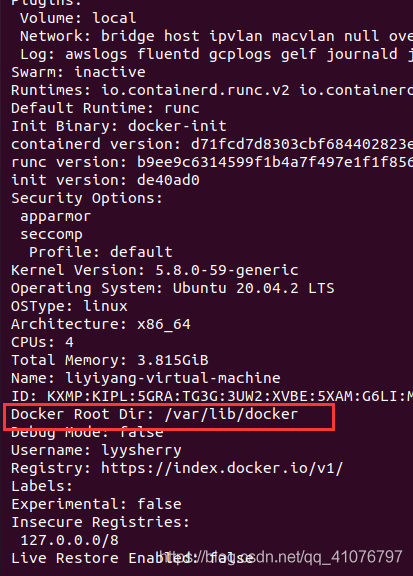
First, check the docker location:

docker info

Stop docker service

systemctl stop docker

Look at the high capacity location and create a transfer directory on it

df -h
mkdir -p /home/docker

Take/home/docker as an example. I will transfer the docker of/var/lib/docker to here later.

Migrate the files in/var/lib/docker directory to the target location

sudo rsync -avz /var/lib/docker /home/docker

Create a new/etc/docker/daemon.json file and edit it

There is no such file by default, so you can create and edit it directly with vim
sudo vim /etc/docker/daemon.json
Here is how to use vim.
Press i to enter the insert state and copy the following list into the file
{
  "graph":"/docker/lib/docker"

}
Press Esc to exit the insert state, then press shift+:
and then press wq! Enter to force save the file.
PS. If you encounter any swap file already open when inserting, then sudo rm file name to delete the file

Reload docker and restart docker

systemctl daemon-reload && systemctl restart docker

Check whether the docker is changed to a new directory

docker info

Delete old docker directory

rm -rf /var/lib/docker

MYSQL Slave is not configured or failed to initialize properly. You must at least set –server-id

1.Background of the problem

When creating the MySQL replication link from the node, because the virtual machine is copied from a template, the server ID is the same.

2. Solutions
# edit/etc/my.cnf
vi /etc/my.cnf

# Add the following 2 lines of code
# server-id here, as long as it is not the same, my mysql master node is 1, here I set it to 2
log-bin=mysql-bin
server-id=2

#restart mysql

systemctl restart mysql

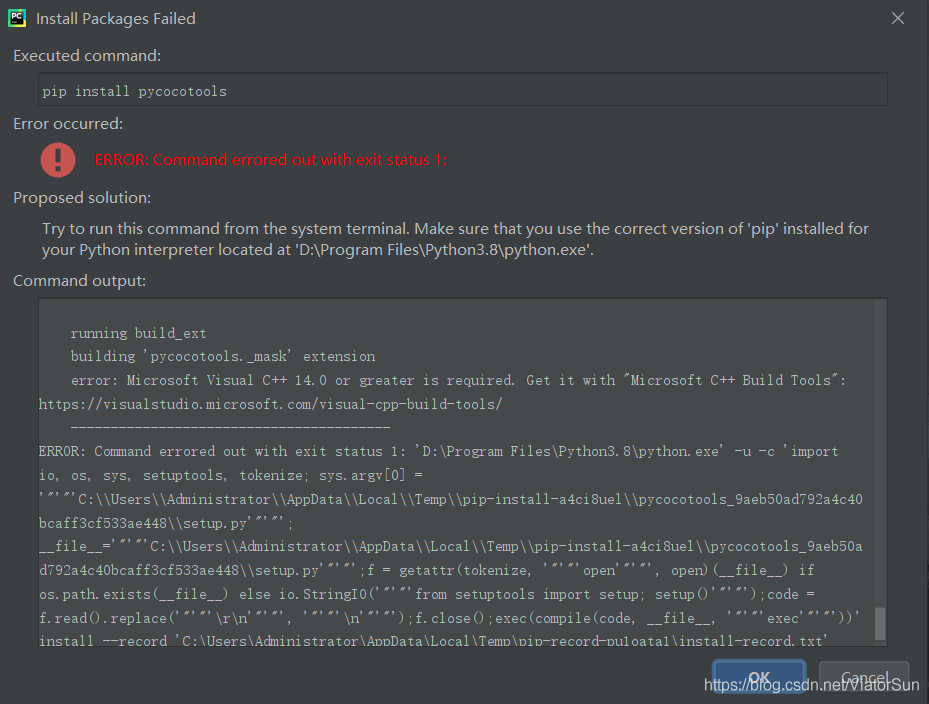
[Solved] error: Microsoft Visual C++ 14.0 or greater is required

error: Microsoft Visual C++ 14.0 or greater is required. Get it with “Microsoft C++ Build Tools”: https://visualstudio.microsoft.com/visual-cpp-build-tools/

For the problem of error: Microsoft C + + build tools  error, most of the partners have tried to install Microsoft C + + build tools 3.13mb, but it seems that they can’t continue to use it at present. Here, the author provides a new version of Microsoft C + + build tools 2017/2019. This version of Microsoft C + + build tools is downward compatible with Microsoft C + + build tools. If you need, you can try it

First download: Microsoft Visual C + + build tools. If the link fails, you can go to to download from this link

Here, we only need to select visual c + + generation tool, and the installation location can be modified by ourselves

You can see that the installation size is about 4GB

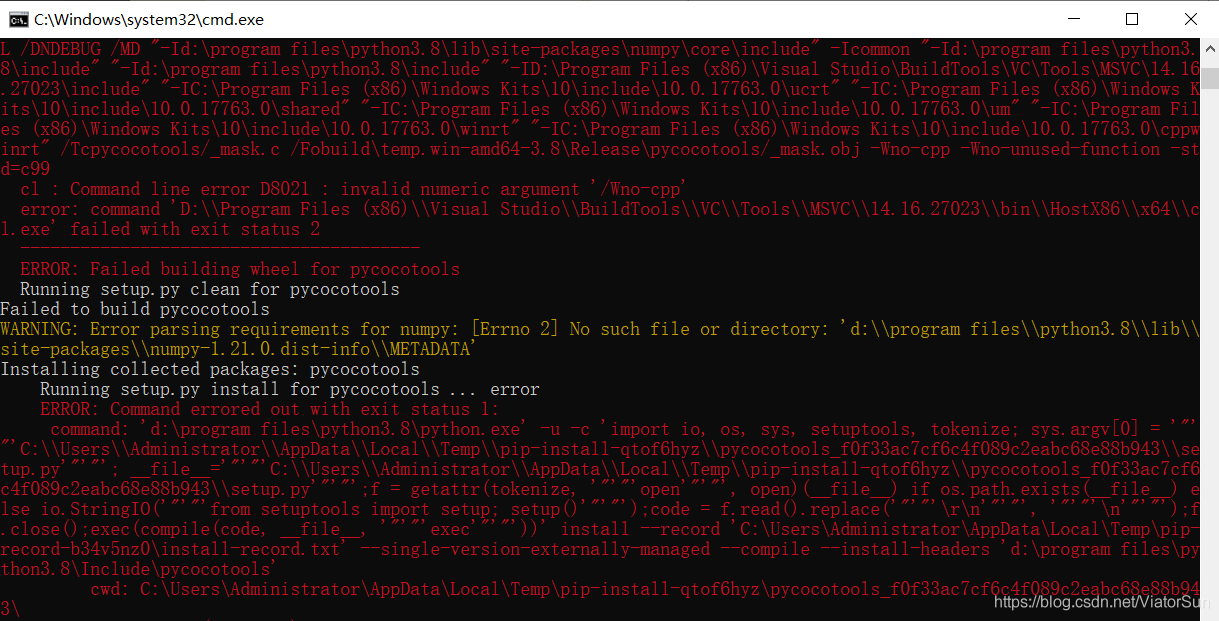
The following errors may occur during the installation. This is only because there is no corresponding file. It is because of the library version problem. You can view it in the corresponding location or change the version to solve it (not a problem)

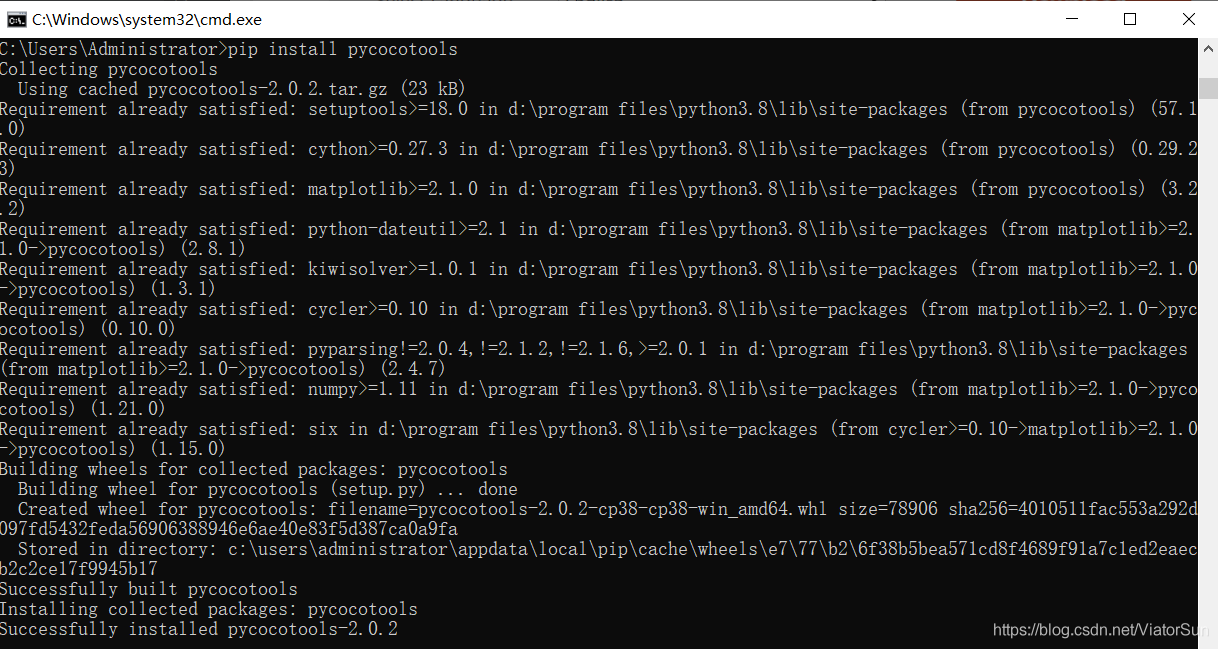
If there is no such problem, you can easily solve it by installing the python library again

Good luck!