Author Archives: Robins

[Solved] Access denied for user ‘root‘@‘localhost‘ (using password: YES)

1. Find the my.ini file in the MySQL installation directory, and add a line of skip grant tables.

2. Press win, then enter CMD, and right-click to run in administrator mode.

3. Enter the command: net stop Mysql to stop the service first. Next, enter net start Mysql to start the service.

4. After MySQL – uroot – P, enter directly, and then enter.

5. Use MySQL select the MySQL library and execute it. Update user set password = password (“123456”) where user = ‘root’;

6. After the above operations are successful, find the my.ini file in the MySQL installation directory, and then delete skip grant tables.

7. After the above operations are completed, enter the command: net stop Mysql to stop the service first. Next, enter net start Mysql to start the service.

[Solved] Conda Upgrade Error: PackageNotInstalledError: Package is not installed in prefix.

Use CONDA update CONDA to update CONDA. If you encounter a packagenotinstallederror problem, record it here!

Problem description

conda update –prefix /Users/omeiko/opt/miniconda3 anaconda
PackageNotInstalledError: Package is not installed in prefix.
prefix: /Users/omeiko/opt/miniconda3
package name: anaconda

When you run CONDA update, you will be prompted whether you want to run CONDA update — prefix/users/omeiko/opt/minicanda3 anaconda. After running, the above error prompt will be displayed
the reason for the problem is that you installed miniconda instead of anaconda.


Solution:

Method 1
execute CONDA install anaconda, install anaconda, and then run again.

Method 2
execute CONDA update — prefix/users/omeiko/opt/miniconda3 CONDA. There is no need to update anaconda
or execute CONDA update — name base CONDA (I solved it myself with this command) to update the base command

Bazel error executing command /usr/bin/gcc @bazel-out/k8-fastbuild/bin/flashroute/flashroute-2.p

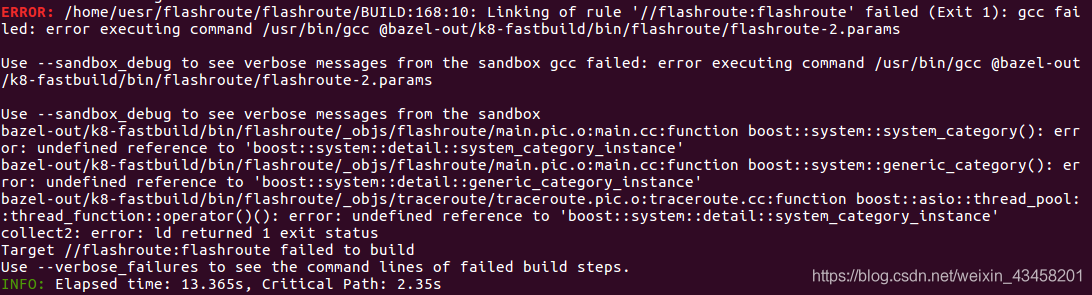
When executing the command bazel build //flashroute:flashroute reports an error.
error executing command /usr/bin/gcc @bazel-out/k8-fastbuild/bin/flashroute/flashroute-
FAILED: Build did NOT complete successfully

Solution:
it is a system problem.“On some systems, the default version of C++ is not set to 14, in this case, you may specify it in --cxxopt.”
change the command to:

bazel build --cxxopt="--std=c++14" flashroute

Done!

Error: A cross-origin error was thrown. React doesn’t have access to the actual error object in deve

In the react project, you sometimes see the following errors:

Error: A cross-origin error was thrown. React doesn’t have access to the actual error object in development. See https://fb.me/react-crossorigin-error for more information.

In case of such an error message, first check whether you have such a code: JSON. Parse (xxx), which is mostly caused by this problem.

The corresponding processing method can use try catch to catch exceptions

     try {
        // You can interrupt the point to see that the execution has reported an error when you get here
        let copyObj = JSON.parse(obj)
        if (copyObj === null) {
          return <span>-</span>
        } else {
          let str = ''
          Object.keys(copyObj).forEach(
            key => (str += key + ': ' + copyObj[key] + ',')
          )
          return str.slice(0, -1)
        }
      } catch (e) {
        message.error('xxxx Parsing error')
        return obj
      }

[Solved] Pylint Warning: An attribute defined in json.encoder line 158 hides this methodpylint(method-hidden)

code:

class Encoder(JSONEncoder):
    def default(self, o): 
        if isinstance(o, ObjectId):
            o = str(o)
            return o

Pylint tip:

An attribute defined in json.encoder line 158 hides this methodpylint(method-hidden)

The code check may not pass. In addition, obsessive-compulsive disorder is completely unacceptable.

Solution: add # pylint: disable = e0202. As follows:

class Encoder(JSONEncoder):
    def default(self, o):                     # pylint: disable=E0202
        if isinstance(o, ObjectId):
            o = str(o)
            return o

[Solved] Pygame Install Error: Command errored out with exit status 255: hg clone –noupdate -q https://bitbucket.o

report errors:

ERROR: Command errored out with exit status 255: hg clone –noupdate -q https://bitbucket.org/pygame/pygame /private/var/folders/jt/s0hr2mwx2f91p9xjm0r09vqr0000gn/T/pip-req-build-17brj_ kp Check the logs for full command output.

context:

Learn Python Programming: from introduction to practice. When you start the example practice in Chapter 12, you need to install the pyGame environment. You always report errors according to the methods in the book and cannot install normally.

terms of settlement:

Do not use the method in the book:
PIP3 install — user Hg+ https://bitbucket.org/pygame/pygame

Direct use

pip3 install pygame

I’m really good at installing it successfully

[Solved] AndroidStudio Error: Could not initialize class com.android.sdklib.repository.AndroidSdkHandler

Error: Could not initialize class com.android.sdklib.repository. AndroidSdkHandler@TOC

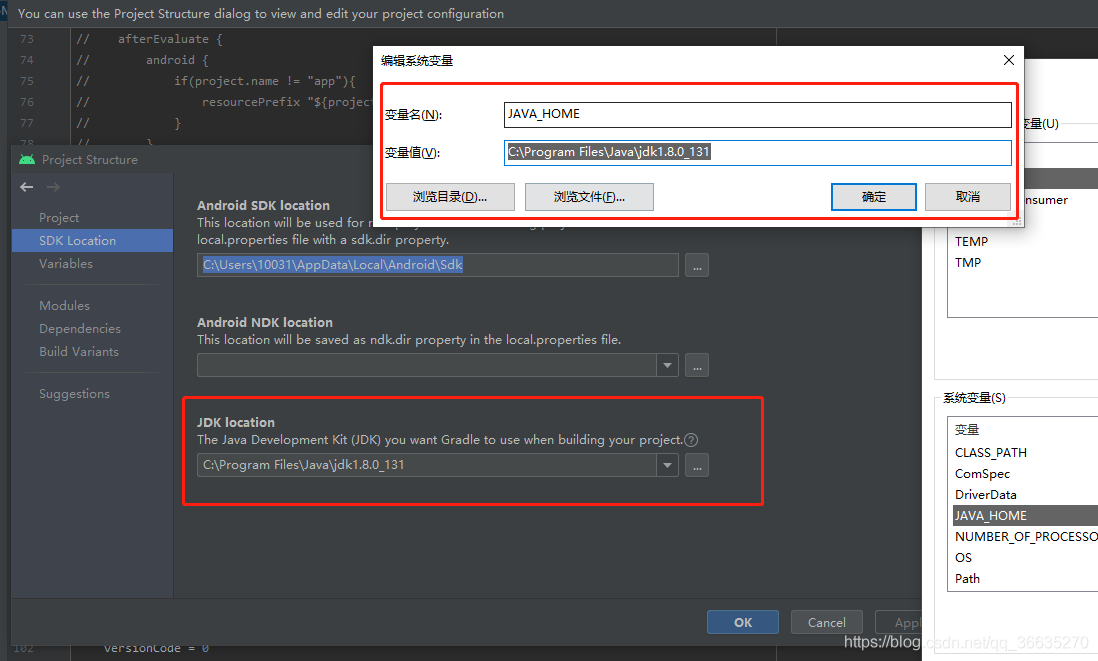
After studio installs or upgrades to 4.2 + for the first time, an error is reported in the construction project. The reason is very simple, because the Java path configured for the project is wrong

because the default JDK path of the project will become the JDK path of studio after updating the version. At this time, you need to add your SDK as Java in the “environment variable”_ Home, and then the JDK path of the project must be the same as Java_Home remains the same and error is eliminated

Turn off eslint checksum and resolve formatting conflicts

Turn off eslint verification

1. Modify the following code for index.js in config

    useEslint: false,

2. The universal method is to write in the first line of the error reporting JS file

/* eslint-disable */

3. There is a file. Eslintignore file in the root directory. You can add files that you do not need to verify.
for example, if you do not want it to verify Vue files, add. Vue. Of course, this will make all Vue files not verified. Similarly,. JS does not verify all JS files.
4. Open the extension of vscode editor and enter eslint search, Disable the eslint extension to solve the problem fundamentally
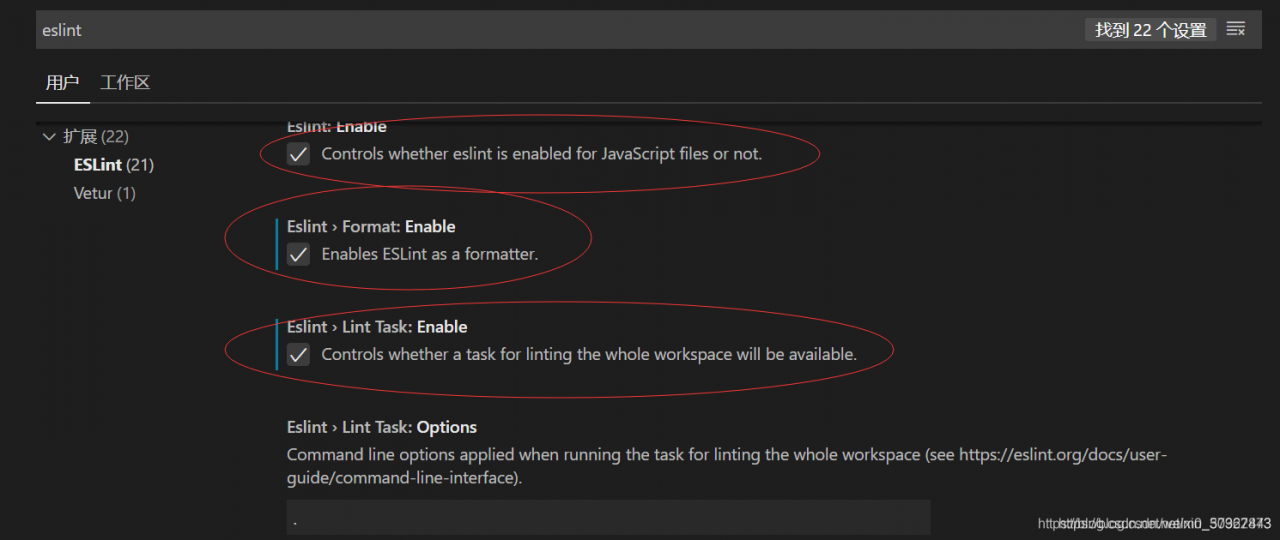
5. Check as shown in the figure to cancel the error reporting, restart vscode, and no error will be reported during compilation
6. Change the verification rule to 0 (0 means no verification, 1 means warning, 2 means error reporting)

 rules: {
    'vue/html-self-closing': 0,
    'vue/html-indent': 0,
    'vue/max-attributes-per-line': [
      1,
      {
        singleline: 10,
        multiline: {
          max: 4,
          allowFirstLine: true
        }
      }
    ],
  }

7. Directly modify the configuration file vue.config.js

module.exports = {
  lintOnSave: false
}

Causes and solutions of configuration conflict between eslint and prettier in vscode

Vscode uses the eslint plug-in and the prettier plug-in. The settings.json configuration of the editor is as follows:

{
  "editor.formatOnSave": true, // Auto-formatting on save
    "[javascript]": {
    "editor.defaultFormatter": "esbenp.prettier-vscode", // use prettier when formatting
  },
  "editor.codeActionsOnSave": {
        "source.fixAll.eslint": true // use eslint to verify files when saving
    }
}

Eslint, prettier, eslint config prettier, eslint plugin prettier
are installed in the project. Pretierrc is added to the root directory

{
    "singleQuote": true,
    "semi": true,
}
Mac Upgrade pip WARNING: You are using pip version 21.1.1; however, version 21.1.3 is available. You s

error:
WARNING: You are using pip version 21.1.1; however, version 21.1.3 is available.
You should consider upgrading via the ‘/usr/local/opt/[email protected]/bin/python3.9 -m pip install –upgrade pip’ command.
Error solution
I also used the Windows upgrade method and found that it didn’t work, what a fucking headache!
Windows pip upgrade link

The right solution
pip3 install –upgrade pip

[Solved] Can’t reconnect until invalid transaction is rolled back

The reason is that there is no call

session.rollback()

Solution:

@contextmanager
    def session_scope(self):
        self.db_engine = create_engine(self.db_config, pool_pre_ping=True) # echo=True if needed to see background SQL        
        Session = sessionmaker(bind=self.db_engine)
        session = Session()
        try:
            # this is where the "work" happens!
            yield session
            # always commit changes!
            session.commit()
        except:
            # if any kind of exception occurs, rollback transaction
            session.rollback()
            raise
        finally:
            session.close()

Another form:

        try:
        	......
            ......
            ......
            ......
        except Exception:
            import traceback
            traceback.print_exc()
            db.session.rollback()
            pass
        finally:
            db.session.close()
            pass