Author Archives: Robins

Solve the error of Chinese file uploaded by springboot

Springboot version: 2.3.0.release

Front end use   File upload with unityengine.wwwform

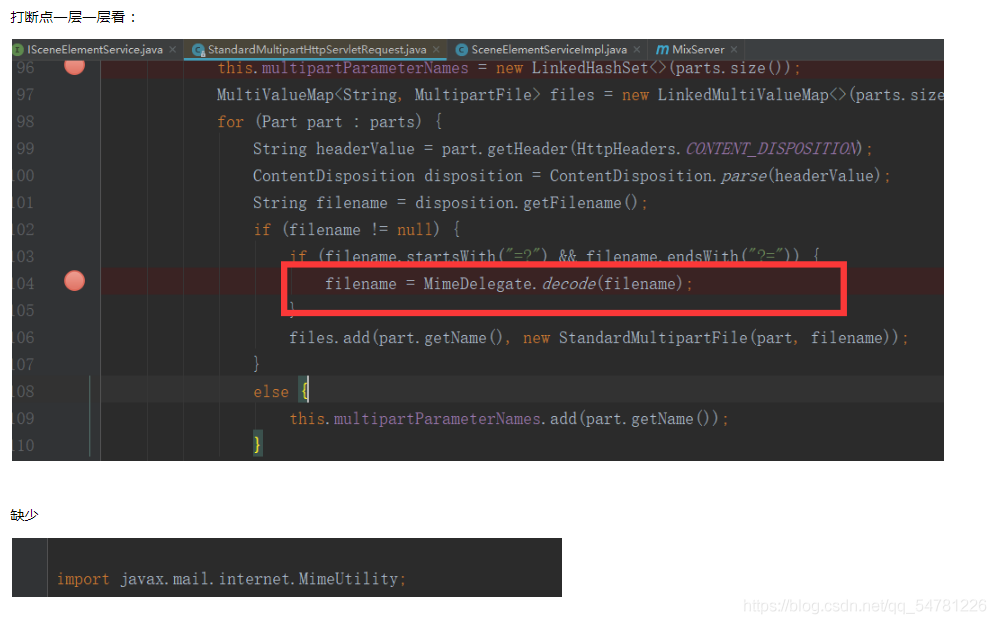
Service error:

org.springframework.web.multipart.MultipartException: Failed to parse multipart servlet request; nested exception is java.lang.NoClassDefFoundError: javax/mail/internet/MimeUtility

Positioning questions:

POM file import dependency

        <dependency>
            <groupId>javax.mail</groupId>
            <artifactId>mail</artifactId>
            <version>1.4.7</version>
        </dependency>

Re run and solve the problem (* ^ ▽ ^ *)~~

Resolve Vue error empty block XXXX

1. Reason for error reporting
under the strict syntax mode of Vue, empty code blocks are not allowed. For example, if (true) {
} how can Vue report this error when the if condition is true
2. The solution is to modify the code logic by itself. The specific modification should be determined according to the specific code, as long as it is ensured that there are no empty code blocks

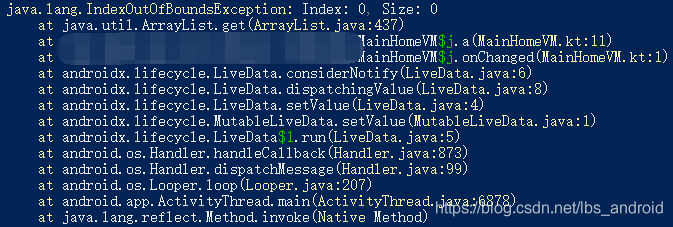
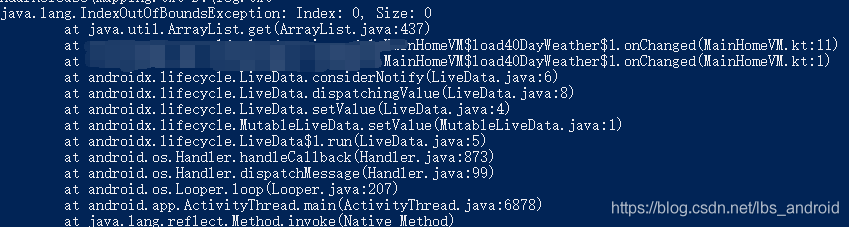
View the error report after Android APK confusion

It is not convenient for APK to view the log after confusion, and the class and method names are shortened
you can view the corresponding class names and method names before and after confusion in the mapping.txt file generated during confusion
you can also use the retract in the SDK \ tools \ Proguard \ bin path to recover the original class name and method name. First copy the error log to a TXT file, such as log.txt. You can then use the command:

Trace mapping file path log file path, such as

retrace D:\mapping.txt D:\log.txt

Before treatment

After treatment

The web project removal server reports an error, and the web project in eclipse cannot be automatically deployed to Tomcat

1. In the servers view at the bottom of eclipse, remove all deployed projects, as shown in the figure:

two   On the server, right-click and select open, or press F3 in the blank space, or double-click to open the following page:

three   Select “use Tomcat installation” in “server locations”, and you can clearly see that the default is “use”   Workspace metadata “, that is, the directory mentioned above. Then write webapps at the path of deploy, as shown in the following figure:

After modification, save it. In this way, future projects will be published to webapps under Tomcat.

Note: 1. In eclipse, publishing a web project in this way will divide the conf folder of the original server into a backup folder, and create a new folder to configure the web project published by eclipse. So you still need to write a Java Web project using MyEclipse

2. Sometimes, nothing can be selected under the server locations project. You can delete the server, add the Tomcat server again, and then right-click to open it and modify it.

Reference website:

If JavaScript exceeds the length of the array, no error will be reported

If JavaScript exceeds the length of the array, no error will be reported

Today, I encountered such a problem when I was doing the problem

 while (sum < target) {
 	right++;
	sum += nums[right];
}

Here, the while loop does not add the limit when the right index exceeds the length of the array, but there is still no error. The program can run normally.

The following reasons are checked here. It is found that when right exceeds the range, the output of num [right] is undefined

console.log(nums[nums.length]) //undefined

When undefined is added to the number, it becomes Nan

console.log(10+nums[nums.length]) // NaN

In the judgment conditions of the while loop, comparing Nan with the number will directly return false, so you can exit the loop without affecting the result.

console.log(NaN>10) //false

Title: 209. Minimum length subarray
https://leetcode-cn.com/problems/minimum-size-subarray-sum/


When trying to abbreviate it as suffix increment, I forgot to change the initial value of right from – 1 to 0. JavaScript cannot traverse the array through the negative index and will directly return undefined. Therefore, combined with the above example, it will directly exit the first small while loop. Right remains unchanged and will fall into an endless loop.

Error demonstration:

var minSubArrayLen = function(target, nums) {
    let left = 0, right = -1;
    let sum = 0;
    let res = nums.length+1;
    while (right<nums.length) {
        while (sum < target) {
            // right++;
            sum += nums[++right];
        }
        while (sum>=target) {
            res = (res>right-left+1)?right-left+1 : res;
            sum -= nums[left];
            left ++;
            
        }
    }
    return res>nums.length ?0 : res; 
}
Mongo connection remote address error

The remote address is clearly configured, but it is still connected to the localhost

Error log:

[localhost:27017] org.mongodb.driver.cluster               : Exception in monitor thread while connecting to server localhost:27017

com.mongodb.MongoSocketOpenException: Exception opening socket

terms of settlement:

1. Springboot startup class, remove these two configuration classes

@SpringBootApplication(exclude = {MongoAutoConfiguration.class, MongoDataAutoConfiguration.class})

2. Add mongoconfiguration.java configuration class, and then you can connect it. Next, enjoy mongotemplate

@Configuration
public class MongoConfiguration {
    @Value("${spring.data.mongodb.uri}")
    private String mongodbUri;

    @Value("${spring.data.mongodb.option.min-connection-per-host}")
    private Integer minConnectionPerHost;

    @Value("${spring.data.mongodb.option.max-connection-per-host}")
    private Integer maxConnectionPerHost;

    @Bean
    public MongoTemplate mongoTemplate() throws Exception {
        MongoClientOptions.Builder builder = new Builder();
        builder.minConnectionsPerHost(minConnectionPerHost);
        builder.connectionsPerHost(maxConnectionPerHost);
        final SimpleMongoDbFactory simpleMongoDbFactory = new SimpleMongoDbFactory(new MongoClientURI(mongodbUri, builder));
        MongoTemplate mongoTemplate = new MongoTemplate(simpleMongoDbFactory);
        return mongoTemplate;
    }
}

Troubleshooting of Ubuntu wrk installation error

Installation Preferences

https://blog.csdn.net/qq_41030861/article/details/90553510

git clone https://github.com/wg/wrk.git 

cd mrk
make
ln -s /xxx/mrk/mrk  /usr/local/bin

be careful

The compilation environment
needs to be installed, including C, C + +
related C libraries, Lua, etc

report errors

echo LuaJIT-2.1
LuaJIT-2.1
make: unzip: Command not found
Makefile:81: recipe for target ‘obj/LuaJIT-2.1’ failed
make: *** [obj/LuaJIT-2.1] Error 127

Error reporting solution

Linux system does not have its own compression and decompression tools; We need to install it ourselves; When Zip or unzip is used, unzip: command not found or zip: command not found will appear if it is not installed; This happens because unzip and zip are not installed;

sudo apt-get install zip

Python scatter chart error: TypeError: object of type ‘NoneType’ has no len()

housing.plot(kind="scatter", x="longitude", y="latitude", alpha=0.4,
             s=housing["population"]/100, label="population", figsize=(10,7),
             c="median_house_value", cmap=plt.get_cmap("jet"), colorbar=True,
             sharex=False)
plt.legend()

TypeError: object of type ‘NoneType’ has no len()

After removing label =’population ‘, the picture can be displayed

but a new warning appears

No handles with labels found to put in legend.

I didn’t finish the adjustment for two hours until I updated Matplotlib:) it is OK.