Author Archives: Robins

[Solved] Jupyter Kernel error: kernel Cannot Connect—-import win32api; ImportError: DLL load failed…

The kernel is not connected

Error original

Traceback (most recent call last):
  File "D:\Anaconda\envs\tf2\lib\runpy.py", line 193, in _run_module_as_main
    "__main__", mod_spec)
  File "D:\Anaconda\envs\tf2\lib\runpy.py", line 85, in _run_code
    exec(code, run_globals)
  File "D:\Anaconda\envs\tf2\lib\site-packages\ipykernel_launcher.py", line 16, in <module>
    app.launch_new_instance()
  File "D:\Anaconda\envs\tf2\lib\site-packages\traitlets\config\application.py", line 844, in launch_instance
    app.initialize(argv)
  File "D:\Anaconda\envs\tf2\lib\site-packages\traitlets\config\application.py", line 87, in inner
    return method(app, *args, **kwargs)
  File "D:\Anaconda\envs\tf2\lib\site-packages\ipykernel\kernelapp.py", line 625, in initialize
    self.write_connection_file()
  File "D:\Anaconda\envs\tf2\lib\site-packages\ipykernel\kernelapp.py", line 236, in write_connection_file
    iopub_port=self.iopub_port, control_port=self.control_port)
  File "D:\Anaconda\envs\tf2\lib\site-packages\jupyter_client\connect.py", line 136, in write_connection_file
    with secure_write(fname) as f:
  File "D:\Anaconda\envs\tf2\lib\contextlib.py", line 112, in __enter__
    return next(self.gen)
  File "D:\Anaconda\envs\tf2\lib\site-packages\jupyter_core\paths.py", line 461, in secure_write
    win32_restrict_file_to_user(fname)
  File "D:\Anaconda\envs\tf2\lib\site-packages\jupyter_core\paths.py", line 387, in win32_restrict_file_to_user
    import win32api
ImportError: DLL load failed: 找不到指定的程序。
[I 16:31:42.557 NotebookApp] KernelRestarter: restarting kernel (1/5), new random ports
[IPKernelApp] ERROR | Failed to load connection file: 'C:\\Users\\YJF\\AppData\\Roaming\\jupyter\\runtime\\kernel-edcd3c8f-6a6b-4512-a376-4a71c0a0b1d5.json'
Traceback (most recent call last):
  File "D:\Anaconda\envs\tf2\lib\site-packages\ipykernel\kernelapp.py", line 261, in init_connection_file
    self.load_connection_file()
  File "D:\Anaconda\envs\tf2\lib\site-packages\jupyter_client\connect.py", line 494, in load_connection_file
    info = json.load(f)
  File "D:\Anaconda\envs\tf2\lib\json\__init__.py", line 296, in load
    parse_constant=parse_constant, object_pairs_hook=object_pairs_hook, **kw)
  File "D:\Anaconda\envs\tf2\lib\json\__init__.py", line 348, in loads
    return _default_decoder.decode(s)
  File "D:\Anaconda\envs\tf2\lib\json\decoder.py", line 337, in decode
    obj, end = self.raw_decode(s, idx=_w(s, 0).end())
  File "D:\Anaconda\envs\tf2\lib\json\decoder.py", line 355, in raw_decode
    raise JSONDecodeError("Expecting value", s, err.value) from None
json.decoder.JSONDecodeError: Expecting value: line 1 column 1 (char 0)
[I 16:31:45.568 NotebookApp] KernelRestarter: restarting kernel (2/5), new random ports
[IPKernelApp] ERROR | Failed to load connection file: 'C:\\Users\\YJF\\AppData\\Roaming\\jupyter\\runtime\\kernel-edcd3c8f-6a6b-4512-a376-4a71c0a0b1d5.json'
Traceback (most recent call last):
  File "D:\Anaconda\envs\tf2\lib\site-packages\ipykernel\kernelapp.py", line 261, in init_connection_file
    self.load_connection_file()
  File "D:\Anaconda\envs\tf2\lib\site-packages\jupyter_client\connect.py", line 494, in load_connection_file
    info = json.load(f)
  File "D:\Anaconda\envs\tf2\lib\json\__init__.py", line 296, in load
    parse_constant=parse_constant, object_pairs_hook=object_pairs_hook, **kw)
  File "D:\Anaconda\envs\tf2\lib\json\__init__.py", line 348, in loads
    return _default_decoder.decode(s)
  File "D:\Anaconda\envs\tf2\lib\json\decoder.py", line 337, in decode
    obj, end = self.raw_decode(s, idx=_w(s, 0).end())
  File "D:\Anaconda\envs\tf2\lib\json\decoder.py", line 355, in raw_decode
    raise JSONDecodeError("Expecting value", s, err.value) from None
json.decoder.JSONDecodeError: Expecting value: line 1 column 1 (char 0)
[I 16:31:48.584 NotebookApp] KernelRestarter: restarting kernel (3/5), new random ports
[IPKernelApp] ERROR | Failed to load connection file: 'C:\\Users\\YJF\\AppData\\Roaming\\jupyter\\runtime\\kernel-edcd3c8f-6a6b-4512-a376-4a71c0a0b1d5.json'
Traceback (most recent call last):
  File "D:\Anaconda\envs\tf2\lib\site-packages\ipykernel\kernelapp.py", line 261, in init_connection_file
    self.load_connection_file()
  File "D:\Anaconda\envs\tf2\lib\site-packages\jupyter_client\connect.py", line 494, in load_connection_file
    info = json.load(f)
  File "D:\Anaconda\envs\tf2\lib\json\__init__.py", line 296, in load
    parse_constant=parse_constant, object_pairs_hook=object_pairs_hook, **kw)
  File "D:\Anaconda\envs\tf2\lib\json\__init__.py", line 348, in loads
    return _default_decoder.decode(s)
  File "D:\Anaconda\envs\tf2\lib\json\decoder.py", line 337, in decode
    obj, end = self.raw_decode(s, idx=_w(s, 0).end())
  File "D:\Anaconda\envs\tf2\lib\json\decoder.py", line 355, in raw_decode
    raise JSONDecodeError("Expecting value", s, err.value) from None
json.decoder.JSONDecodeError: Expecting value: line 1 column 1 (char 0)
[I 16:31:51.595 NotebookApp] KernelRestarter: restarting kernel (4/5), new random ports
[IPKernelApp] ERROR | Failed to load connection file: 'C:\\Users\\YJF\\AppData\\Roaming\\jupyter\\runtime\\kernel-edcd3c8f-6a6b-4512-a376-4a71c0a0b1d5.json'
Traceback (most recent call last):
  File "D:\Anaconda\envs\tf2\lib\site-packages\ipykernel\kernelapp.py", line 261, in init_connection_file
    self.load_connection_file()
  File "D:\Anaconda\envs\tf2\lib\site-packages\jupyter_client\connect.py", line 494, in load_connection_file
    info = json.load(f)
  File "D:\Anaconda\envs\tf2\lib\json\__init__.py", line 296, in load
    parse_constant=parse_constant, object_pairs_hook=object_pairs_hook, **kw)
  File "D:\Anaconda\envs\tf2\lib\json\__init__.py", line 348, in loads
    return _default_decoder.decode(s)
  File "D:\Anaconda\envs\tf2\lib\json\decoder.py", line 337, in decode
    obj, end = self.raw_decode(s, idx=_w(s, 0).end())
  File "D:\Anaconda\envs\tf2\lib\json\decoder.py", line 355, in raw_decode
    raise JSONDecodeError("Expecting value", s, err.value) from None
json.decoder.JSONDecodeError: Expecting value: line 1 column 1 (char 0)
[W 16:31:54.603 NotebookApp] KernelRestarter: restart failed
[W 16:31:54.603 NotebookApp] Kernel edcd3c8f-6a6b-4512-a376-4a71c0a0b1d5 died, removing from map.
[W 16:32:22.967 NotebookApp] Config option `template_path` not recognized by `ExporterCollapsibleHeadings`.  Did you mean one of: `extra_template_paths, template_name, template_paths`?
[W 16:32:22.977 NotebookApp] Config option `template_path` not recognized by `ExporterCollapsibleHeadings`.  Did you mean one of: `extra_template_paths, template_name, template_paths`?
[W 16:32:23.024 NotebookApp] Config option `template_path` not recognized by `TocExporter`.  Did you mean one of: `extra_template_paths, template_name, template_paths`?
[W 16:32:23.031 NotebookApp] Config option `template_path` not recognized by `TocExporter`.  Did you mean one of: `extra_template_paths, template_name, template_paths`?
[W 16:32:23.052 NotebookApp] Config option `template_path` not recognized by `LenvsHTMLExporter`.  Did you mean one of: `extra_template_paths, template_name, template_paths`?
[W 16:32:23.062 NotebookApp] Config option `template_path` not recognized by `LenvsHTMLExporter`.  Did you mean one of: `extra_template_paths, template_name, template_paths`?
[W 16:32:23.088 NotebookApp] Config option `template_path` not recognized by `LenvsTocHTMLExporter`.  Did you mean one of: `extra_template_paths, template_name, template_paths`?
[W 16:32:23.098 NotebookApp] Config option `template_path` not recognized by `LenvsTocHTMLExporter`.  Did you mean one of: `extra_template_paths, template_name, template_paths`?
[W 16:32:23.151 NotebookApp] Config option `template_path` not recognized by `LenvsLatexExporter`.  Did you mean one of: `extra_template_paths, template_name, template_paths`?
[W 16:32:23.157 NotebookApp] Config option `template_path` not recognized by `LenvsLatexExporter`.  Did you mean one of: `extra_template_paths, template_name, template_paths`?
[W 16:32:23.380 NotebookApp] Config option `template_path` not recognized by `LenvsSlidesExporter`.  Did you mean one of: `extra_template_paths, template_name, template_paths`?
[W 16:32:23.388 NotebookApp] Config option `template_path` not recognized by `LenvsSlidesExporter`.  Did you mean one of: `extra_template_paths, template_name, template_paths`?
[W 16:32:23.515 NotebookApp] Config option `template_path` not recognized by `ExporterCollapsibleHeadings`.  Did you mean one of: `extra_template_paths, template_name, template_paths`?
[W 16:32:23.523 NotebookApp] Config option `template_path` not recognized by `ExporterCollapsibleHeadings`.  Did you mean one of: `extra_template_paths, template_name, template_paths`?
[W 16:32:23.570 NotebookApp] Config option `template_path` not recognized by `TocExporter`.  Did you mean one of: `extra_template_paths, template_name, template_paths`?
[W 16:32:23.577 NotebookApp] Config option `template_path` not recognized by `TocExporter`.  Did you mean one of: `extra_template_paths, template_name, template_paths`?
[W 16:32:23.598 NotebookApp] Config option `template_path` not recognized by `LenvsHTMLExporter`.  Did you mean one of: `extra_template_paths, template_name, template_paths`?
[W 16:32:23.609 NotebookApp] Config option `template_path` not recognized by `LenvsHTMLExporter`.  Did you mean one of: `extra_template_paths, template_name, template_paths`?
[W 16:32:23.633 NotebookApp] Config option `template_path` not recognized by `LenvsTocHTMLExporter`.  Did you mean one of: `extra_template_paths, template_name, template_paths`?
[W 16:32:23.643 NotebookApp] Config option `template_path` not recognized by `LenvsTocHTMLExporter`.  Did you mean one of: `extra_template_paths, template_name, template_paths`?
[W 16:32:23.694 NotebookApp] Config option `template_path` not recognized by `LenvsLatexExporter`.  Did you mean one of: `extra_template_paths, template_name, template_paths`?
[W 16:32:23.700 NotebookApp] Config option `template_path` not recognized by `LenvsLatexExporter`.  Did you mean one of: `extra_template_paths, template_name, template_paths`?
[W 16:32:23.921 NotebookApp] Config option `template_path` not recognized by `LenvsSlidesExporter`.  Did you mean one of: `extra_template_paths, template_name, template_paths`?
[W 16:32:23.928 NotebookApp] Config option `template_path` not recognized by `LenvsSlidesExporter`.  Did you mean one of: `extra_template_paths, template_name, template_paths`?

Error reporting reason

    import win32api
ImportError: DLL load failed: The specified program could not be found.

This is caused by the incompatibility between the python version and the pywin32 version.

Solution:

Reinstall the latest version of pywin32 = = 301 in the TF2 environment with CONDA error. Solution: CONDA install pywin32 = = 301
Vue Uncaught (in promise) Error: Navigation cancelled from “/home“ to “/login“ with a new navigation

1. Initialize the entry item, redirect to the login page after the login expires, and the routing error is reported

import Vue from 'vue'
import VueRouter from 'vue-router'
Vue.use(VueRouter)

//Solve the situation that programmatic routing to the same address will report an error
const originalPush = VueRouter.prototype.push;
const originalReplace = VueRouter.prototype.replace;
//push
VueRouter.prototype.push = function push(location, onResolve, onReject) {
  if (onResolve || onReject)
    return originalPush.call(this, location, onResolve, onReject);
  return originalPush.call(this, location).catch(err => err);
};
//replace
VueRouter.prototype.replace = function push(location, onResolve, onReject) {
  if (onResolve || onReject)
    return originalReplace.call(this, location, onResolve, onReject);
  return originalReplace.call(this, location).catch(err => err);
};

Sublime text4 install package error [How to Solve]

Problem introduction

sublime Text4 when installing install package control , you may encounter the following errors:

an error occurred installing package control.
Visit https://packagecontrol.io/installation for manual instructions

Problem-solving

For the above problems, it may be due to network problems. At this time, try adding the following two lines to the hosts file.

50.116.34.243 sublime.wbond.net
50.116.34.243 packagecontrol.io

Parsing error: await is a reserved word [How to Solve]

Problem: the error message is that a red wavy line appears in the editing of vscade. When the mouse is placed, it will prompt: parsing error: await is a reserved word. Parsing error: await is a reserved word, indicating that the editor does not recognize it and takes it as a keyword

Because an async keyword is added to the function outside the form verification, you want to write synchronization code in the callback function, but an error is reported.

// save
async save() {
  this.$refs.form.validateForm((valid) => {
    if (valid) {
      // The purpose of adding await is to wait for the save to complete before refreshing the list
      await /* this async reports an error */ this.saveRecord()
      this.$emit('closeModal')
      this.reset()
    }
  })
}

After modification:

save() {
// The async should be defined in front of the callback function (anonymous function) at this point.
// The external function and the callback function form two separate scopes.
// The function defined externally and the callback function form two block scopes,
// At this point, await and aysnc are not in the same scope, so they cannot be paired and an error is reported
 this.$refs.form.validateForm(async (valid) => {
   if (valid) {
   	 // The purpose of adding await is to wait for the save to complete before refreshing the list
     await /* No error is reported here for async */ this.saveRecord()
     this.$emit('closeModal')
     this.reset()
   }
 })
}

Summary: if you want to write synchronization code inside the callback function, you need to put the async keyword in front of the callback function to make async and await in the same scope

[Solved] Whitelabel Error PageThis application has no explicit mapping for /error, so you are seeing this

Problem Description:

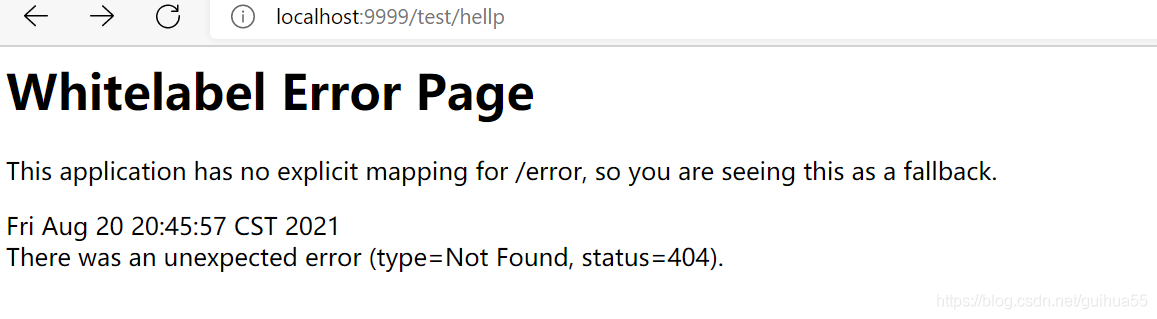
Bloggers appear when running springbootweb:

Whitelabel Error Page

This application has no explicit mapping for /error, so you are seeing this as a fallback.

As follows:

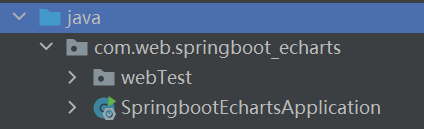
It is found that the input URL is incorrect. After repeatedly confirming that the path in the file is written correctly, it is found that the location of the main running class of springboot is incorrect:

i see:

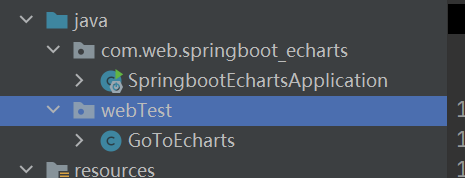
The package name was set when the springboot was created, but the self tested controller is in another self created package, but the spring boot will automatically load all components under the package where the startup class is located and its sub packages, so an error is reported

Solution:
just put the WebTest package on com.web.springboot_ Just under echarts

The purpose is to make the application contain all sub packages!!

[Solved] configure: error: no acceptable C compiler found in $PATH

Error: configure: error: no acceptable C compiler found in $PATH

root@ubuntuserver4:/usr/local/pcre-8.01# sudo ./configure
checking for a BSD-compatible install... /usr/bin/install -c
checking whether build environment is sane... yes
checking for a thread-safe mkdir -p... /bin/mkdir -p
checking for gawk... gawk
checking whether make sets $(MAKE)... yes
checking for gcc... no
checking for cc... no
checking for cl.exe... no
configure: error: in `/usr/local/pcre-8.01':
configure: error: no acceptable C compiler found in $PATH
See `config.log' for more details.

Solution: install GCC software suite

Method 1. Yum install GCC
method 2. Apt get install GCC

root@ubuntuserver4:~# apt-get install gcc
Reading package lists... Done
Building dependency tree
Reading state information... Done
The following extra packages will be installed:
  binutils cpp cpp-4.8 gcc-4.8 libasan0 libatomic1 libcloog-isl4
  libgcc-4.8-dev libgmp10 libisl10 libitm1 libmpc3 libmpfr4 libquadmath0
  libtsan0
Suggested packages:
  binutils-doc cpp-doc gcc-4.8-locales gcc-multilib manpages-dev autoconf
  automake1.9 libtool flex bison gdb gcc-doc gcc-4.8-multilib gcc-4.8-doc
  libgcc1-dbg libgomp1-dbg libitm1-dbg libatomic1-dbg libasan0-dbg
  libtsan0-dbg libquadmath0-dbg
The following NEW packages will be installed:
  binutils cpp cpp-4.8 gcc gcc-4.8 libasan0 libatomic1 libcloog-isl4
  libgcc-4.8-dev libgmp10 libisl10 libitm1 libmpc3 libmpfr4 libquadmath0
  libtsan0
0 upgraded, 16 newly installed, 0 to remove and 171 not upgraded.
Need to get 14.5 MB of archives.
After this operation, 51.9 MB of additional disk space will be used.
Do you want to continue?[Y/n] y
WARNING: The following packages cannot be authenticated!
  libasan0 libatomic1 libitm1 libquadmath0 libtsan0 binutils cpp-4.8
  libgcc-4.8-dev gcc-4.8
Install these packages without verification?[y/N] y
Get:1 http://us.archive.ubuntu.com/ubuntu/ trusty-updates/main libasan0 amd64 4.8.4-2ubuntu1~14.04.4 [63.1 kB]
Get:2 http://us.archive.ubuntu.com/ubuntu/ trusty-updates/main libatomic1 amd64 4.8.4-2ubuntu1~14.04.4 [8,630 B]
Get:3 http://us.archive.ubuntu.com/ubuntu/ trusty/main libgmp10 amd64 2:5.1.3+dfsg-1ubuntu1 [218 kB]
Get:4 http://us.archive.ubuntu.com/ubuntu/ trusty/main libisl10 amd64 0.12.2-1 [419 kB]
Get:5 http://us.archive.ubuntu.com/ubuntu/ trusty/main libcloog-isl4 amd64 0.18.2-1 [57.5 kB]
Get:6 http://us.archive.ubuntu.com/ubuntu/ trusty-updates/main libitm1 amd64 4.8.4-2ubuntu1~14.04.4 [28.6 kB]
Get:7 http://us.archive.ubuntu.com/ubuntu/ trusty/main libmpfr4 amd64 3.1.2-1 [203 kB]
Get:8 http://us.archive.ubuntu.com/ubuntu/ trusty-updates/main libquadmath0 amd64 4.8.4-2ubuntu1~14.04.4 [126 kB]
Get:9 http://us.archive.ubuntu.com/ubuntu/ trusty-updates/main libtsan0 amd64 4.8.4-2ubuntu1~14.04.4 [94.8 kB]
Get:10 http://us.archive.ubuntu.com/ubuntu/ trusty/main libmpc3 amd64 1.0.1-1ubuntu1 [38.4 kB]
Get:11 http://us.archive.ubuntu.com/ubuntu/ trusty-updates/main binutils amd64 2.24-5ubuntu14.2 [2,076 kB]
Get:12 http://us.archive.ubuntu.com/ubuntu/ trusty-updates/main cpp-4.8 amd64 4.8.4-2ubuntu1~14.04.4 [4,452 kB]
Get:13 http://us.archive.ubuntu.com/ubuntu/ trusty/main cpp amd64 4:4.8.2-1ubuntu6 [27.5 kB]
Get:14 http://us.archive.ubuntu.com/ubuntu/ trusty-updates/main libgcc-4.8-dev amd64 4.8.4-2ubuntu1~14.04.4 [1,688 kB]
Get:15 http://us.archive.ubuntu.com/ubuntu/ trusty-updates/main gcc-4.8 amd64 4.8.4-2ubuntu1~14.04.4 [5,040 kB]
Get:16 http://us.archive.ubuntu.com/ubuntu/ trusty/main gcc amd64 4:4.8.2-1ubuntu6 [5,098 B]
Fetched 14.5 MB in 8s (1,771 kB/s)
Selecting previously unselected package libasan0:amd64.
(Reading database ... 60337 files and directories currently installed.)
Preparing to unpack .../libasan0_4.8.4-2ubuntu1~14.04.4_amd64.deb ...
Unpacking libasan0:amd64 (4.8.4-2ubuntu1~14.04.4) ...
Selecting previously unselected package libatomic1:amd64.
Preparing to unpack .../libatomic1_4.8.4-2ubuntu1~14.04.4_amd64.deb ...
Unpacking libatomic1:amd64 (4.8.4-2ubuntu1~14.04.4) ...
Selecting previously unselected package libgmp10:amd64.
Preparing to unpack .../libgmp10_2%3a5.1.3+dfsg-1ubuntu1_amd64.deb ...
Unpacking libgmp10:amd64 (2:5.1.3+dfsg-1ubuntu1) ...
Selecting previously unselected package libisl10:amd64.
Preparing to unpack .../libisl10_0.12.2-1_amd64.deb ...
Unpacking libisl10:amd64 (0.12.2-1) ...
Selecting previously unselected package libcloog-isl4:amd64.
Preparing to unpack .../libcloog-isl4_0.18.2-1_amd64.deb ...
Unpacking libcloog-isl4:amd64 (0.18.2-1) ...
Selecting previously unselected package libitm1:amd64.
Preparing to unpack .../libitm1_4.8.4-2ubuntu1~14.04.4_amd64.deb ...
Unpacking libitm1:amd64 (4.8.4-2ubuntu1~14.04.4) ...
Selecting previously unselected package libmpfr4:amd64.
Preparing to unpack .../libmpfr4_3.1.2-1_amd64.deb ...
Unpacking libmpfr4:amd64 (3.1.2-1) ...
Selecting previously unselected package libquadmath0:amd64.
Preparing to unpack .../libquadmath0_4.8.4-2ubuntu1~14.04.4_amd64.deb ...
Unpacking libquadmath0:amd64 (4.8.4-2ubuntu1~14.04.4) ...
Selecting previously unselected package libtsan0:amd64.
Preparing to unpack .../libtsan0_4.8.4-2ubuntu1~14.04.4_amd64.deb ...
Unpacking libtsan0:amd64 (4.8.4-2ubuntu1~14.04.4) ...
Selecting previously unselected package libmpc3:amd64.
Preparing to unpack .../libmpc3_1.0.1-1ubuntu1_amd64.deb ...
Unpacking libmpc3:amd64 (1.0.1-1ubuntu1) ...
Selecting previously unselected package binutils.
Preparing to unpack .../binutils_2.24-5ubuntu14.2_amd64.deb ...
Unpacking binutils (2.24-5ubuntu14.2) ...
Selecting previously unselected package cpp-4.8.
Preparing to unpack .../cpp-4.8_4.8.4-2ubuntu1~14.04.4_amd64.deb ...
Unpacking cpp-4.8 (4.8.4-2ubuntu1~14.04.4) ...
Selecting previously unselected package cpp.
Preparing to unpack .../cpp_4%3a4.8.2-1ubuntu6_amd64.deb ...
Unpacking cpp (4:4.8.2-1ubuntu6) ...
Selecting previously unselected package libgcc-4.8-dev:amd64.
Preparing to unpack .../libgcc-4.8-dev_4.8.4-2ubuntu1~14.04.4_amd64.deb ...
Unpacking libgcc-4.8-dev:amd64 (4.8.4-2ubuntu1~14.04.4) ...
Selecting previously unselected package gcc-4.8.
Preparing to unpack .../gcc-4.8_4.8.4-2ubuntu1~14.04.4_amd64.deb ...
Unpacking gcc-4.8 (4.8.4-2ubuntu1~14.04.4) ...
Selecting previously unselected package gcc.
Preparing to unpack .../gcc_4%3a4.8.2-1ubuntu6_amd64.deb ...
Unpacking gcc (4:4.8.2-1ubuntu6) ...
Processing triggers for man-db (2.6.7.1-1) ...
Setting up libasan0:amd64 (4.8.4-2ubuntu1~14.04.4) ...
Setting up libatomic1:amd64 (4.8.4-2ubuntu1~14.04.4) ...
Setting up libgmp10:amd64 (2:5.1.3+dfsg-1ubuntu1) ...
Setting up libisl10:amd64 (0.12.2-1) ...
Setting up libcloog-isl4:amd64 (0.18.2-1) ...
Setting up libitm1:amd64 (4.8.4-2ubuntu1~14.04.4) ...
Setting up libmpfr4:amd64 (3.1.2-1) ...
Setting up libquadmath0:amd64 (4.8.4-2ubuntu1~14.04.4) ...
Setting up libtsan0:amd64 (4.8.4-2ubuntu1~14.04.4) ...
Setting up libmpc3:amd64 (1.0.1-1ubuntu1) ...
Setting up binutils (2.24-5ubuntu14.2) ...
Setting up cpp-4.8 (4.8.4-2ubuntu1~14.04.4) ...
Setting up cpp (4:4.8.2-1ubuntu6) ...
Setting up libgcc-4.8-dev:amd64 (4.8.4-2ubuntu1~14.04.4) ...
Setting up gcc-4.8 (4.8.4-2ubuntu1~14.04.4) ...
Setting up gcc (4:4.8.2-1ubuntu6) ...
Processing triggers for libc-bin (2.19-0ubuntu6.9) ...

You can execute it after installation

root@ubuntuserver4:~# cd /usr/local/pcre-8.01/
root@ubuntuserver4:/usr/local/pcre-8.01# sudo ./configure
checking for a BSD-compatible install... /usr/bin/install -c
checking whether build environment is sane... yes
checking for a thread-safe mkdir -p... /bin/mkdir -p
checking for gawk... gawk
checking whether make sets $(MAKE)... yes
checking for gcc... gcc
checking for C compiler default output file name... a.out
checking whether the C compiler works... yes
checking whether we are cross compiling... no
checking for suffix of executables...
checking for suffix of object files... o
checking whether we are using the GNU C compiler... yes
checking whether gcc accepts -g... yes
checking for gcc option to accept ISO C89... none needed
checking for style of include used by make... GNU
checking dependency style of gcc... gcc3
checking for g++... no
checking for c++... no
checking for gpp... no
checking for aCC... no
checking for CC... no
checking for cxx... no
checking for cc++... no
checking for cl.exe... no
checking for FCC... no
checking for KCC... no
checking for RCC... no
checking for xlC_r... no
checking for xlC... no
checking whether we are using the GNU C++ compiler... no
checking whether g++ accepts -g... no
checking dependency style of g++... none
checking how to run the C preprocessor... gcc -E
checking for grep that handles long lines and -e... /bin/grep
checking for egrep... /bin/grep -E
checking for ANSI C header files... yes
checking for sys/types.h... yes
checking for sys/stat.h... yes
checking for stdlib.h... yes
checking for string.h... yes
checking for memory.h... yes
checking for strings.h... yes
checking for inttypes.h... yes
checking for stdint.h... yes
checking for unistd.h... yes
checking for int64_t... yes
checking for a BSD-compatible install... /usr/bin/install -c
checking build system type... x86_64-unknown-linux-gnu
checking host system type... x86_64-unknown-linux-gnu
checking for a sed that does not truncate output... /bin/sed
checking for fgrep... /bin/grep -F
checking for ld used by gcc... /usr/bin/ld
checking if the linker (/usr/bin/ld) is GNU ld... yes
checking for BSD- or MS-compatible name lister (nm)... /usr/bin/nm -B
checking the name lister (/usr/bin/nm -B) interface... BSD nm
checking whether ln -s works... yes
checking the maximum length of command line arguments... 1572864
checking whether the shell understands some XSI constructs... yes
checking whether the shell understands "+="... yes
checking for /usr/bin/ld option to reload object files... -r
checking for objdump... objdump
checking how to recognize dependent libraries... pass_all
checking for ar... ar
checking for strip... strip
checking for ranlib... ranlib
checking command to parse /usr/bin/nm -B output from gcc object... ok
checking for dlfcn.h... yes
checking for g++... no
checking for c++... no
checking for gpp... no
checking for aCC... no
checking for CC... no
checking for cxx... no
checking for cc++... no
checking for cl.exe... no
checking for FCC... no
checking for KCC... no
checking for RCC... no
checking for xlC_r... no
checking for xlC... no
checking whether we are using the GNU C++ compiler... (cached) no
checking whether g++ accepts -g... (cached) no
checking dependency style of g++... (cached) none
checking for objdir... .libs
checking if gcc supports -fno-rtti -fno-exceptions... no
checking for gcc option to produce PIC... -fPIC -DPIC
checking if gcc PIC flag -fPIC -DPIC works... yes
checking if gcc static flag -static works... yes
checking if gcc supports -c -o file.o... yes
checking if gcc supports -c -o file.o... (cached) yes
checking whether the gcc linker (/usr/bin/ld -m elf_x86_64) supports shared libraries... yes
checking whether -lc should be explicitly linked in... no
checking dynamic linker characteristics... GNU/Linux ld.so
checking how to hardcode library paths into programs... immediate
checking whether stripping libraries is possible... yes
checking if libtool supports shared libraries... yes
checking whether to build shared libraries... yes
checking whether to build static libraries... yes
checking whether ln -s works... yes
checking for ANSI C header files... (cached) yes
checking limits.h usability... yes
checking limits.h presence... yes
checking for limits.h... yes
checking for sys/types.h... (cached) yes
checking for sys/stat.h... (cached) yes
checking dirent.h usability... yes
checking dirent.h presence... yes
checking for dirent.h... yes
checking windows.h usability... no
checking windows.h presence... no
checking for windows.h... no
checking for alias support in the linker... no
checking string usability... no
checking string presence... no
checking for string... no
checking bits/type_traits.h usability... no
checking bits/type_traits.h presence... no
checking for bits/type_traits.h... no
checking type_traits.h usability... no
checking type_traits.h presence... no
checking for type_traits.h... no
checking for srtoq... no
checking for strtoll... no
checking for _strtoi64... no
checking for strtoimax... no
checking for an ANSI C-conforming const... yes
checking for size_t... yes
checking for bcopy... yes
checking for memmove... yes
checking for strerror... yes
checking zlib.h usability... yes
checking zlib.h presence... yes
checking for zlib.h... yes
checking for gzopen in -lz... yes
checking bzlib.h usability... no
checking bzlib.h presence... no
checking for bzlib.h... no
checking for libbz2... no
checking readline/readline.h usability... no
checking readline/readline.h presence... no
checking for readline/readline.h... no
checking readline/history.h usability... no
checking readline/history.h presence... no
checking for readline/history.h... no
checking for readline in -lreadline... no
configure: creating ./config.status
config.status: creating Makefile
config.status: creating libpcre.pc
config.status: creating libpcreposix.pc
config.status: creating libpcrecpp.pc
config.status: creating pcre-config
config.status: creating pcre.h
config.status: creating pcre_stringpiece.h
config.status: creating pcrecpparg.h
config.status: creating config.h
config.status: executing depfiles commands
config.status: executing libtool commands
config.status: executing script-chmod commands
config.status: executing delete-old-chartables commands

pcre-8.01 configuration summary:

    Install prefix .................. : /usr/local
    C preprocessor .................. : gcc -E
    C compiler ...................... : gcc
    C++ preprocessor ................ :
    C++ compiler .................... : g++
    Linker .......................... : /usr/bin/ld -m elf_x86_64
    C preprocessor flags ............ :
    C compiler flags ................ : -O2
    C++ compiler flags .............. :
    Linker flags .................... :
    Extra libraries ................. :

    Build C++ library ............... : yes
    Enable UTF-8 support ............ : no
    Unicode properties .............. : no
    Newline char/sequence ........... : lf
    \R matches only ANYCRLF ......... : no
    EBCDIC coding ................... : no
    Rebuild char tables ............. : no
    Use stack recursion ............. : yes
    POSIX mem threshold ............. : 10
    Internal link size .............. : 2
    Match limit ..................... : 10000000
    Match limit recursion ........... : MATCH_LIMIT
    Build shared libs ............... : yes
    Build static libs ............... : yes
    Link pcregrep with libz ......... : no
    Link pcregrep with libbz2 ....... : no
    Link pcretest with libreadline .. : no

How to Solve Docker delete container image error: Error response from daemon: conflict: unable to delete 7cc1942f1ed5 (must be forced)

I don’t know if you have encountered an error when
docker deletes the container image

docker RMI container image ID

Details of error reporting:

Error response from daemon: conflict: unable to delete 7cc1942f1ed5 (must be forced) – image is referenced in multiple repositories

Solution:

First docker PS - a
see several containers with the same image ID. what the hell, There must be a mistake during the construction, and then stop the container using the container image (if it has stopped, please go to the next step)
docker stop the ID of the container using the container image and RM drop
docker RM the ID of the container using the container image and
docker RMI the container image ID

Discovery or error


Well, the ultimate solution (that’s the point of this article)

docker rmi -f This container image ID

It is the above command with the – f parameter that forcibly deletes all container images with the container image ID

Redis Startup Error: Creating Server TCP listening socket 127.0.0.1:6379: bind: No error

Today, the redis service started in the window and reported an error:
Creating server TCP listening socket 127.0.0.1:6379: bind no error

The reason is that redis did not shut down normally after it was started;

The solution is as follows: enter the following commands in order to connect successfully

redis-cli.exe
shutdown
exit

Redis closes normally, exits, and then re-enter the command to start
redis-server.exe redis.windows.conf

OK!

[Solved] Segyio Error: Runtime Error trace count inconsistent with file size, trace lengths … #401

Article catalog

Run segyio to read segy files and report errors. Troubleshooting error cause reference

An error occurs when running segyio to read the segy file

"RuntimeError: trace count inconsistent with file size, trace lengths possibly of non-uniform"

Solution:

(1) Add: endian ='little '

with segyio.open('test.sgy','r',ignore_geometry=True,endian='little') as f:

(2) If it still fails:
check the length of the data trace. Segyio’s default trace has the same number and format of sampling points. If the length of the trace in the segy file is inconsistent, it may lead to reading errors.

Error reason

Detailed explanation of big endian and little endian
the default bytes of files read by segyio are encoded according to big endian, while your files are written according to little endian bytes

Error 1 error MSB3721: Command ““C:\Program Files\NVIDIA GPU Computing Toolkit\CUDA\v9.0\bin\nvcc.exe” -genco

Error 1 error msb3721: command “C:\program files\NVIDIA GPU computing toolkit\CUDA\v9.0\bin\nvcc. Exe” – gencode = arch = compute_ 20,code=“sm_ 20,compute_20” -gencode=arch=compute_ 30,code=“sm_30,compute_30” -gencode=arch=compute_50,code=“sm_50,compute_50” –use-local-env -ccbin “C:\Program Files
(cuda9.0targets 707)

Windows10 + cuda9.0 + cudnn + visual stdio2015 (originally, visual stdio2017 was used. Some blogs said no and changed it. If you downloaded 2017, you can directly change it at the change place. A single component will be OK under 2015. Some blogs talked about it and you can search it)

My computer graphics card version is gtx1050

After query, I changed compute and SM to compute_30,sm_30; compute_61,sm_ But it seems useless, but some bloggers say it’s useful, mainly because of different mistakes. You can try it.

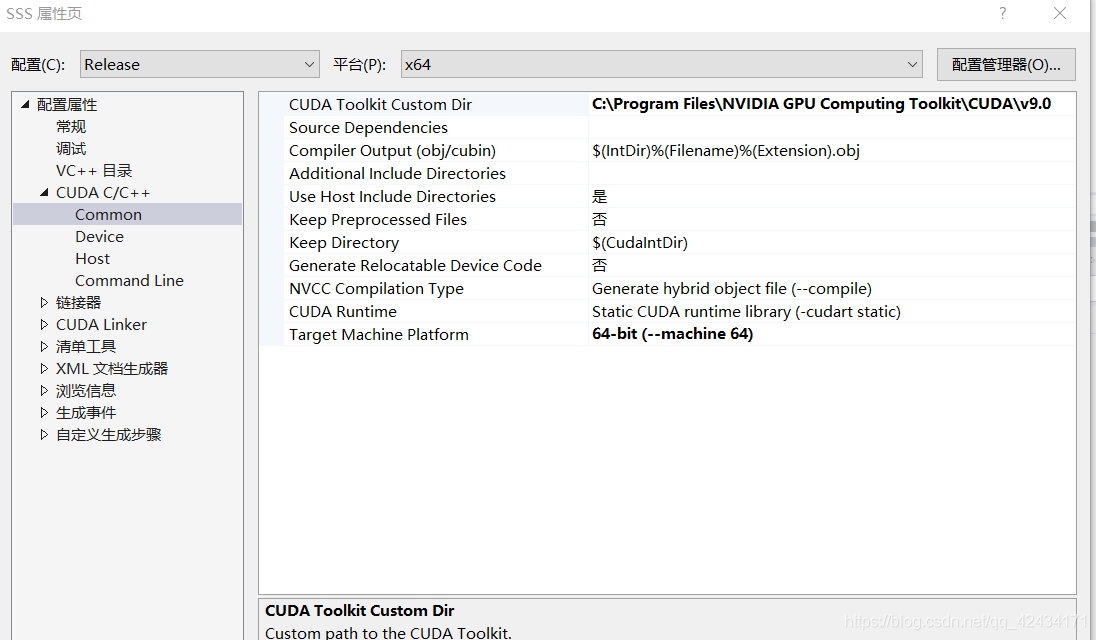
I set the CUDA toolkit custom dir to C: \program files\NVIDIA GPU computing toolkit\CUDA at the beginning. When I opened the file, I found an error. It needs to be set to C: \program files\NVIDIA GPU computing toolkit\CUDA\v9.0

Then it’s solved. It’s been busy for two days. I’ve read a lot of blogs. I hope it can inspire you!!!