Author Archives: Robins

[Solved] Console error: syntax error: illegal return statement

Problem Description:

When you run the code containing the return statement directly in the script tag or in the browser console, an error is reported:

SyntaxError: Illegal return statement

if (!NaN) {
	console.log('went into the conditional statement')
	return "Ollie gives!"
}

reason:

In JavaScript, the return statement can only be placed in the function, otherwise the following error will pop up.

SyntaxError: Illegal return statement

Solution:
package the modified code block in function.

(function () {
	if (!NaN) {
		console.log('went into the conditional statement')
	return "Ollie gives!"
	}
})()

// Run results 
It goes into the conditional statement
"Ollie gives!"

JS: How to Solve split, join, toString Use error

1. Upload the array bound by multiple pictures: shopimg: [] and send it to the background. The background needs string. Comma segmentation will report an error
when using join (“-“), it will report an error. Change it to tostring() method

code:

this.personalForm.shopImg = this.personalForm.shopImg.toString();//Store photo-array to string, join will report an error, toString default comma split

2. Time array, businesstime: [“17:03”, “18:03”]
the string format of “17:03-18:03” is required in the background, and an error is reported in the join segmentation; (if you find that the store has the same business hours, you will be prompted that there are the same business hours. Then you will change the business hours and click the submit button again, and you will go through the segmentation twice. At this time, the businesstime is no longer an array, and the join method is not found – an error is reported)

if(this.personalForm.businessTime.length == 2){//After printing the error, go through the split twice and judge the length == 2 before splitting
  // console.log(this.personalForm.businessTime,'this.personalForm.businessTime time ===========');
  this.personalForm.businessTime = this.personalForm.businessTime.join("-");// business time, background to "17:03-18:03" this form
}

[Solved] Zabbix Error: Cannot parse list of active checks

Question:

There is no data reported by the virtual machine, and an error is reported:

Cannot parse list of active checks

Solution:

1. Search the forum. The comment shows that there is a problem with the 10051 interface to the server. Check the firewall and no problem is found

2. The architecture adopts the mode of agent channel machine IP1 serverip2,

On the agent machine:

 tcping IP1 10051端口

The display is turned on. Continue troubleshooting

3. On the server machine, check the port status

tcping IP2 10051端口

It is found that the 10051 port is not open. Locate the problem, that is, the server problem. Restart the httpd service and solve it

systemctl restart httpd

How to Solve Mybatis error: invalid bound statement (not found)

Solve the mybatis error invalid bound statement (not found)

Reason for this error

1. XML file does not exist

2. The XML file and mapper are not mapped

Namespace specifies the path of mapper. The error ID is inconsistent with the method name in mapper

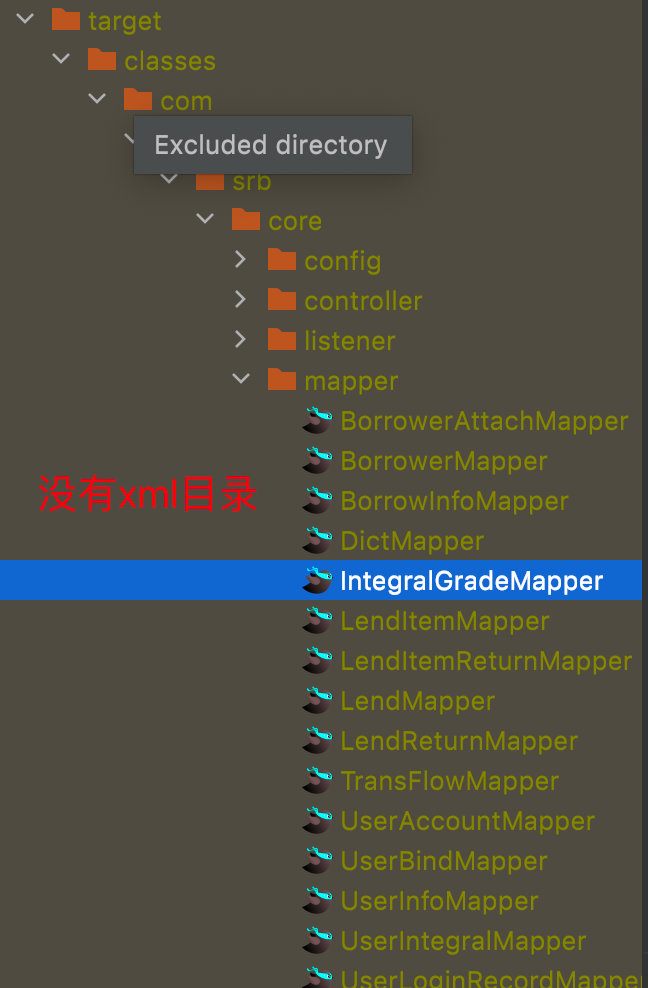
3. The XML file is in the Java directory instead of the resource directory, so there is no XML in the generated target

Scene

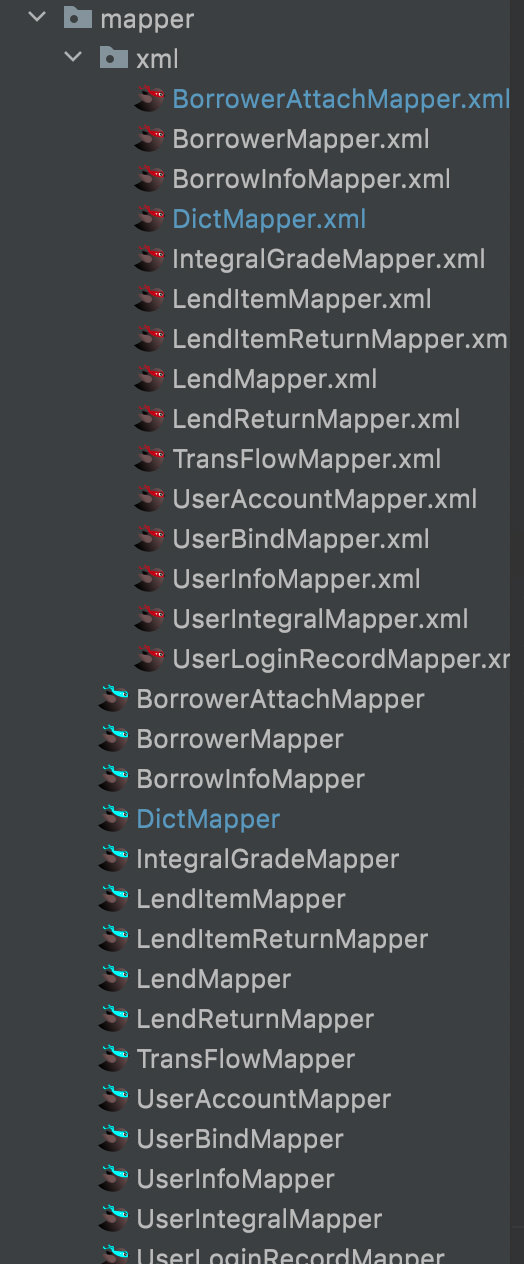
When using the mybatis plus framework, when customizing the mapper interface and XM file, because the MP automatic code generation plug-in is used, the mapper interface and XML file are in the Java directory. During compilation, the XML file under the Java path will not be automatically compiled, and the compilation will only identify the. Java file, Only XML files under resource can be compiled when packaged.

The following figure shows the XML and mapper directories of the MP auto generated code plug-in (no longer in the resource)

The compiled target directory is as follows:

Solution:

1. Add in POM file

    <build>
        <!-- The *.xml file in the java directory will also be packaged when the project is packaged -->
        <resources>
            <resource>
                <directory>src/main/java</directory>
                <includes>
                    <include>**/*.xml</include>
                </includes>
                <filtering>false</filtering>
            </resource>
        </resources>
    </build>

2. Manually move the XML file in the Java directory to the resource directory and add it to the configuration file in spring boot

mybatis-plus:
	mapper-locations: classpath:**/*.xml //After the classpath add the directory of your xml file

The directory in mapper locations must be consistent with the directory where you place XML files, otherwise this error will occur even if there are XML files in target!!!

How to Solve MySQL version 5.7+ Group by group error

MySQL-this is incompatible with sql_mode=only_full_group_By error resolution

1. Principle level
this error occurs in MySQL version 5.7 and above:

   The default sql configuration for mysql 5.7 is: sql_mode="ONLY_FULL_GROUP_BY", which strictly enforces the "SQL92 standard".

   When upgrading from 5.6 to 5.7, most of them choose to adjust sql_mode to make it consistent with 5.6 in order to be as compatible as possible with the program.

2. SQL level

    In sql execution, the cause appears.

    Simply put: the output is called target list, which is the field followed by select, and a place group by column, which is

    group by followed by the field. Because the ONLY_FULL_GROUP_BY setting is turned on, so if a field is not in the target list 

    and group by fields, or the value of the aggregation function, then this sql query is considered illegal by mysql and will report an error.

Translated with www.DeepL.com/Translator (free version)

1. View the statement of SQL_mode is as follows

select @@GLOBAL.sql_mode;

Second, the solution – (recommended solution two)
① solution one: sql statement temporarily modify sql_mode
set @@GLOBAL.sql_mode=STRICT_TRANS_TABLES,NO_ZERO_IN_DATE,NO_ZERO_DATE,ERROR_FOR_DIVISION_BY_ZERO,NO_AUTO_CREATE_USER,NO_ENGINE_SUBSTITUTION
Question.

          After restarting the mysql database service, ONLY_FULL_GROUP_BY will still appear.

② Solution 2: perfect solution.

To modify the MySQL configuration file, add SQL manually_ Mode is mandatory. Only is not required_ FULL_ GROUP_ By attribute,
VI/etc/my. CNF
Add or modify configuration file:
sql_mode =‘STRICT_TRANS_TABLES,NO_ZERO_IN_DATE,NO_ZERO_DATE,ERROR_FOR_DIVISIN_BY_ZERO,NO_AUTO_CREATE_USER,NO_ENGINE_SUBSTITUTION’

Restart the MySQL service and solve it successfully.

	service mysqld restart

[Solved] Android 9.0 APP Install Android 4.4 Error: IllegalArgumentException


Problem Description.
App works on Android 9.0, but the installation to version 4.4 program crashes with the error:

IllegalArgumentException
10-25 17:07:12.475 14178 14178 E AndroidRuntime: FATAL EXCEPTION: main
10-25 17:07:12.475 14178 14178 E AndroidRuntime: Process: com.xx.app, PID: 14178
10-25 17:07:12.475 14178 14178 E AndroidRuntime: java.lang.RuntimeException: Unable to create service com.xx.service.XXService: java.lang.IllegalArgumentException:


Stack:

10-25 17:07:12.475 14178 14178 E AndroidRuntime: FATAL EXCEPTION: main
10-25 17:07:12.475 14178 14178 E AndroidRuntime: Process: com.xx.app, PID: 14178
10-25 17:07:12.475 14178 14178 E AndroidRuntime: java.lang.RuntimeException: Unable to create service com.xx.service.XXService: java.lang.IllegalArgumentException: MediaButtonReceiver component may not be null
10-25 17:07:12.475 14178 14178 E AndroidRuntime:     at android.app.ActivityThread.handleCreateService(ActivityThread.java:2582)
10-25 17:07:12.475 14178 14178 E AndroidRuntime:     at android.app.ActivityThread.access$1800(ActivityThread.java:135)
10-25 17:07:12.475 14178 14178 E AndroidRuntime:     at android.app.ActivityThread$H.handleMessage(ActivityThread.java:1278)
10-25 17:07:12.475 14178 14178 E AndroidRuntime:     at android.os.Handler.dispatchMessage(Handler.java:102)
10-25 17:07:12.475 14178 14178 E AndroidRuntime:     at android.os.Looper.loop(Looper.java:136)
10-25 17:07:12.475 14178 14178 E AndroidRuntime:     at android.app.ActivityThread.main(ActivityThread.java:5047)
10-25 17:07:12.475 14178 14178 E AndroidRuntime:     at java.lang.reflect.Method.invokeNative(Native Method)
10-25 17:07:12.475 14178 14178 E AndroidRuntime:     at java.lang.reflect.Method.invoke(Method.java:515)
10-25 17:07:12.475 14178 14178 E AndroidRuntime:     at com.android.internal.os.ZygoteInit$MethodAndArgsCaller.run(ZygoteInit.java:842)
10-25 17:07:12.475 14178 14178 E AndroidRuntime:     at com.android.internal.os.ZygoteInit.main(ZygoteInit.java:658)


Solution:
Register MediaButtonReceiver in Manifest

<receiver android:name="androidx.media.session.MediaButtonReceiver" >
    <intent-filter>
        <action android:name="android.intent.action.MEDIA_BUTTON" />
    </intent-filter>
</receiver>

[Solved] AndroidStudio Error: checkDebugAarMetadata & CheckAarMetadataWorkAction

Description

Execution failed for task ':app:checkDebugAarMetadata'.

> Multiple task action failures occurred:

   > A failure occurred while executing com.android.build.gradle.internal.tasks.CheckAarMetadataWorkAction

      > The minCompileSdk (31) specified in a

        dependency's AAR metadata (META-INF/com/android/build/gradle/aar-metadata.properties)

        is greater than this module's compileSdkVersion (android-30).

        Dependency: androidx.recyclerview:recyclerview:1.3.0-alpha02.

If you upgrade to compilesdk 31 according to the prompt, you are faced with a large number of Android 12 and below are not available, and upgrade the current jdk8 to jdk11 or above, but the set of source code was still available more than 2 months ago. Now it is not available for no reason, which is not in line with the routine.

If the current compilesdk is kept at 30 or 28, gradle compiles and passes, but the above error is reported when running debugging.

I can’t understand it.

Solution:

Take the following three steps to finally solve the problem
1. keep the current compilesdk at 30 or 28.

2. lower the corresponding version number of dependent components, such as dependency: Android. Recyclerview: recyclerview: 1.3.0-alpha02. Change the original version number of the corresponding gradle file from 1. + to 1.2. +, that is, lower the version number by one. Shape such as

The original gradle file is implementation 'androidx.recyclerview:recyclerview:1.+'// means 1.xx latest version, maybe 1.0, 1.1, 1.2, 1.3, 1.4, 1.5 in that order

Now read
implementation 'androidx.recyclerview:recyclerview:1.2.+'// means 1.2.xx latest version, maybe 1.2.0, 1.2.1, 1.2.2, 1.2.3, 1.2.4, 1.2.5 in that order

3. After recompiling, debug and run again, and the prompt of the dependent component does not appear again, indicating that the modification is effective. By analogy, reduce the version number of other dependent components until similar prompt no longer appears, and the problem is solved.

[Solved] Grid Search Error (GridSearchCV): ‘ascii‘ codec can‘t encode characters in position 18-20: ordinal not in r

Grid Search Error: UnicodeEncodeError: ‘ascii’ codec can’t encode characters in position 18-20: ordinal not in range(128)

E:\DLstudy\Scripts\python.exe E:/PycharmProjects/DLstudy/run/train_model.py
[INFO] tuning hyperparameters...
Traceback (most recent call last):
  File "E:\PycharmProjects\DLstudy\run\train_model.py", line 22, in <module>
    model.fit(trainX, trainY)
  File "E:\DLstudy\lib\site-packages\sklearn\model_selection\_search.py", line 820, in fit
    with parallel:
  File "E:\DLstudy\lib\site-packages\joblib\parallel.py", line 725, in __enter__
    self._initialize_backend()
  File "E:\DLstudy\lib\site-packages\joblib\parallel.py", line 735, in _initialize_backend
    n_jobs = self._backend.configure(n_jobs=self.n_jobs, parallel=self,
  File "E:\DLstudy\lib\site-packages\joblib\_parallel_backends.py", line 494, in configure
    self._workers = get_memmapping_executor(
  File "E:\DLstudy\lib\site-packages\joblib\executor.py", line 20, in get_memmapping_executor
    return MemmappingExecutor.get_memmapping_executor(n_jobs, **kwargs)
  File "E:\DLstudy\lib\site-packages\joblib\executor.py", line 42, in get_memmapping_executor
    manager = TemporaryResourcesManager(temp_folder)
  File "E:\DLstudy\lib\site-packages\joblib\_memmapping_reducer.py", line 531, in __init__
    self.set_current_context(context_id)
  File "E:\DLstudy\lib\site-packages\joblib\_memmapping_reducer.py", line 535, in set_current_context
    self.register_new_context(context_id)
  File "E:\DLstudy\lib\site-packages\joblib\_memmapping_reducer.py", line 560, in register_new_context
    self.register_folder_finalizer(new_folder_path, context_id)
  File "E:\DLstudy\lib\site-packages\joblib\_memmapping_reducer.py", line 590, in register_folder_finalizer
    resource_tracker.register(pool_subfolder, "folder")
  File "E:\DLstudy\lib\site-packages\joblib\externals\loky\backend\resource_tracker.py", line 191, in register
    self._send('REGISTER', name, rtype)
  File "E:\DLstudy\lib\site-packages\joblib\externals\loky\backend\resource_tracker.py", line 204, in _send
    msg = '{0}:{1}:{2}\n'.format(cmd, name, rtype).encode('ascii')
UnicodeEncodeError: 'ascii' codec can't encode characters in position 18-20: ordinal not in range(128)

Process finished with exit code 1

Solutioin:

Original error code:

model = GridSearchCV(LogisticRegression(), params, cv=3, n_jobs=-1)

Set parameter n_jobs = - 1 parameter can be deleted and changed to:

model = GridSearchCV(LogisticRegression(), params, cv=3)

After a look, this parameter indicates how many processors we need to work


n_jobs : int, default=None
        Number of jobs to run in parallel.
        ``None`` means 1 unless in a :obj:`joblib.parallel_backend` context.
        ``-1`` means using all processors. See :term:`Glossary <n_jobs>`
        for more details.

If n_jobs = – 1 is specified, there is a step at the bottom to use ASCII for coding, but the coding fails every time
therefore, if we do not specify this parameter, one processor will be used by default.

If you really want to specify multiple processors

Then we need to modify the code of the path with the problem in our error message
for example, in our error messages:

  File "E:\DLstudy\lib\site-packages\joblib\externals\loky\backend\resource_tracker.py", line 204, in _send
    msg = '{0}:{1}:{2}\n'.format(cmd, name, rtype).encode('ascii')
UnicodeEncodeError: 'ascii' codec can't encode characters in position 18-20: ordinal not in range(128)

Note the location of my error is e:\dlstudy\lib\site packages\joblib\externals\rocky\backend\resource_Line 204 of tracker.py In the _send method, click
Source code of _send function:

  def _send(self, cmd, name, rtype):
        msg = '{0}:{1}:{2}\n'.format(cmd, name, rtype).encode('ascii')
        if len(name) > 512:
            # posix guarantees that writes to a pipe of less than PIPE_BUF
            # bytes are atomic, and that PIPE_BUF >= 512
            raise ValueError('name too long')
        nbytes = os.write(self._fd, msg)
        assert nbytes == len(msg)

Change
msg = '{0}:{1}:{2}\n'.format(cmd, name, rtype).encode('ascii')
to
msg = '{0}:{1}:{2}\n'.format(cmd, name, rtype).encode('utf8')
That is, the encoding is changed to utf-8, and the changed code is as follows.

```python
  def _send(self, cmd, name, rtype):
        msg = '{0}:{1}:{2}\n'.format(cmd, name, rtype).encode('utf8')
        if len(name) > 512:
            # posix guarantees that writes to a pipe of less than PIPE_BUF
            # bytes are atomic, and that PIPE_BUF >= 512
            raise ValueError('name too long')
        nbytes = os.write(self._fd, msg)
        assert nbytes == len(msg)

Then run the code again
don’t worry, you will still report errors. Because we only modified the encoding method, but not the decoding method
the error information is as follows:

     .............(...)
    splitted = line.strip().decode('ascii').split(':')
UnicodeDecodeError: 'ascii' codec can't decode byte 0xe5 in position 18: ordinal not in range(128)
Traceback (most recent call last):
  File "E:\DLstudy\lib\site-packages\joblib\externals\loky\backend\resource_tracker.py", line 253, in main
    splitted = line.strip().decode('ascii').split(':')
UnicodeDecodeError: 'ascii' codec can't decode byte 0xe5 in position 18: ordinal not in range(128)

Similarly, find the error path in the error message: e:\dlstudy\lib\sitepackages\joblib\externals\loky\backend\resource

There is an error in line 253 of the tracker.py file. We found the corresponding location:

......(...)
       with open(fd, 'rb') as f:
            while True:
                line = f.readline()
                if line == b'':  # EOF
                    break
                try:
                    splitted = line.strip().decode('ascii').split(':')
                    # name can potentially contain separator symbols (for
                    # instance folders on Windows)
                    cmd, name, rtype = (
                        splitted[0], ':'.join(splitted[1:-1]), splitted[-1])
......(...)

We just need to replace
line. Strip(). Decode ('ascii '). Split (': ')
with
line. Strip(). Decode (' 'utf8). Split (': ') ,
Run the file again to succeed.


[Solved] Vue project deploys nginx to refresh the interface 404 Error

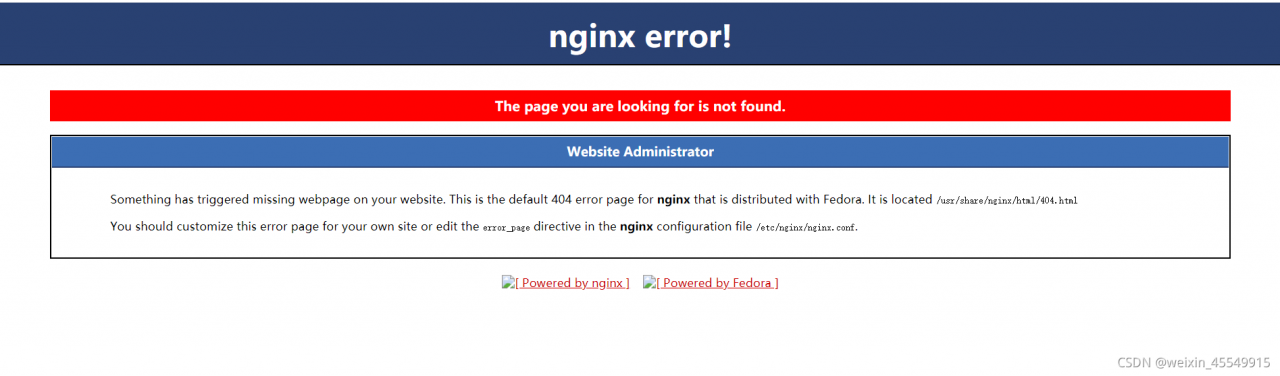
1. Phenomenon

2. Solution

http {
    log_format  main  '$remote_addr - $remote_user [$time_local] "$request" '
                      '$status $body_bytes_sent "$http_referer" '
                      '"$http_user_agent" "$http_x_forwarded_for"';

    access_log  /var/log/nginx/access.log  main;

    sendfile            on;
    tcp_nopush          on;
    tcp_nodelay         on;
    keepalive_timeout   65;
    types_hash_max_size 4096;

    include             /etc/nginx/mime.types;
    default_type        application/octet-stream;

    # Load modular configuration files from the /etc/nginx/conf.d directory.
    # See http://nginx.org/en/docs/ngx_core_module.html#include
    # for more information.
    include /etc/nginx/conf.d/*.conf;

    server {
        listen       8071;
        server_name  101.42.104.247;
        location/{
            root /home/intelligent_evaluation_of_rock_burst/development_project/dist;
            index index.html index.htm;
            try_files $uri $uri/ /index.html; //Add this line
        }
        #Dynamic requests
        location /api{
          include uwsgi_params;
          uwsgi_pass 127.0.0.1:5000;
        }

        # Load configuration files for the default server block.
        include /etc/nginx/default.d/*.conf;

Nginx – s reload nginx

Nginx – t test whether nginx is normal

[Solved] Error in installing docker requires: fuse overlayfs >= 0.7

Cause: there is an error docker during installation, and the docker of CentOS 7.9 installation reports an error. Requirements: fuse overlays> = 0.7

el7.x86_64
---> Package docker-scan-plugin.x86_64 0:0.8.0-3.el7 will be installed
---> Package libcgroup.x86_64 0:0.41-21.el7 will be installed
---> Package libseccomp.x86_64 0:2.3.1-4.el7 will be installed
--> Finished Dependency Resolution
Error: Package: 3:docker-ce-20.10.8-3.el7.x86_64 (docker-ce-stable)
           Requires: container-selinux >= 2:2.74
Error: Package: docker-ce-rootless-extras-20.10.8-3.el7.x86_64 (docker-ce-stable)
           Requires: fuse-overlayfs >= 0.7
Error: Package: docker-ce-rootless-extras-20.10.8-3.el7.x86_64 (docker-ce-stable)
           Requires: slirp4netns >= 0.4
Error: Package: containerd.io-1.4.9-3.1.el7.x86_64 (docker-ce-stable)


Solution:

#Go to the yum source configuration folder
cd /etc/yum.repos.d
mv CentOS-Base.repo CentOS-Base.repo_bak

Add an entry to /etc/yum.repos.d/docker-ce.repo at the top of the file, as follows
[centos-extras]
name=Centos extras - $basearch
baseurl=http://mirror.centos.org/centos/7/extras/x86_64
enabled=1
gpgcheck=0

# save and quit


#Then install the command:
yum -y install slirp4netns fuse-overlayfs container-selinux