Author Archives: Robins

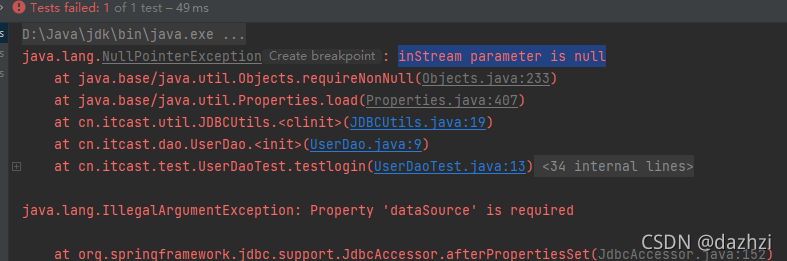
[Solved] Javaweb Error: inStream parameter is null

Solution:

Put the druid.properties file in the SRC directory

Change to absolute path:

   Properties pro =new Properties();
//          InputStream is= JDBCUtils.class.getClassLoader().getResourceAsStream("src/main/druid.properties");
//          pro.load(is);
          pro.load(new FileReader("src/druid.properties"));

         ds= DruidDataSourceFactory.createDataSource(pro);
How to Solve elasticsearch-7.15.1 operation errors

Error 1:

WARNING: A terminally deprecated method in java.lang.System has been called
WARNING: System::setSecurityManager has been called by org.elasticsearch.bootstrap.Elasticsearch (file:/root/tools/elasticsearch-7.15.1/lib/elasticsearch-7.15.1.jar)
WARNING: Please consider reporting this to the maintainers of org.elasticsearch.bootstrap.Elasticsearch
WARNING: System::setSecurityManager will be removed in a future release
[2021-10-27T10:39:13,960][ERROR][o.e.b.ElasticsearchUncaughtExceptionHandler] [elk-node01] uncaught exception in thread [main]
org.elasticsearch.bootstrap.StartupException: java.lang.RuntimeException: can not run elasticsearch as root
at org.elasticsearch.bootstrap.Elasticsearch.init(Elasticsearch.java:171) ~[elasticsearch-7.15.1.jar:7.15.1]
at org.elasticsearch.bootstrap.Elasticsearch.execute(Elasticsearch.java:158) ~[elasticsearch-7.15.1.jar:7.15.1]
at org.elasticsearch.cli.EnvironmentAwareCommand.execute(EnvironmentAwareCommand.java:75) ~[elasticsearch-7.15.1.jar:7.15.1]
at org.elasticsearch.cli.Command.mainWithoutErrorHandling(Command.java:114) ~[elasticsearch-cli-7.15.1.jar:7.15.1]
at org.elasticsearch.cli.Command.main(Command.java:79) ~[elasticsearch-cli-7.15.1.jar:7.15.1]
at org.elasticsearch.bootstrap.Elasticsearch.main(Elasticsearch.java:123) ~[elasticsearch-7.15.1.jar:7.15.1]
at org.elasticsearch.bootstrap.Elasticsearch.main(Elasticsearch.java:81) ~[elasticsearch-7.15.1.jar:7.15.1]
Caused by: java.lang.RuntimeException: can not run elasticsearch as root
at org.elasticsearch.bootstrap.Bootstrap.initializeNatives(Bootstrap.java:103) ~[elasticsearch-7.15.1.jar:7.15.1]
at org.elasticsearch.bootstrap.Bootstrap.setup(Bootstrap.java:170) ~[elasticsearch-7.15.1.jar:7.15.1]
at org.elasticsearch.bootstrap.Bootstrap.init(Bootstrap.java:399) ~[elasticsearch-7.15.1.jar:7.15.1]
at org.elasticsearch.bootstrap.Elasticsearch.init(Elasticsearch.java:167) ~[elasticsearch-7.15.1.jar:7.15.1]
... 6 more
uncaught exception in thread [main]
java.lang.RuntimeException: can not run elasticsearch as root
at org.elasticsearch.bootstrap.Bootstrap.initializeNatives(Bootstrap.java:103)
at org.elasticsearch.bootstrap.Bootstrap.setup(Bootstrap.java:170)
at org.elasticsearch.bootstrap.Bootstrap.init(Bootstrap.java:399)
at org.elasticsearch.bootstrap.Elasticsearch.init(Elasticsearch.java:167)
at org.elasticsearch.bootstrap.Elasticsearch.execute(Elasticsearch.java:158)
at org.elasticsearch.cli.EnvironmentAwareCommand.execute(EnvironmentAwareCommand.java:75)
at org.elasticsearch.cli.Command.mainWithoutErrorHandling(Command.java:114)
at org.elasticsearch.cli.Command.main(Command.java:79)
at org.elasticsearch.bootstrap.Elasticsearch.main(Elasticsearch.java:123)
at org.elasticsearch.bootstrap.Elasticsearch.main(Elasticsearch.java:81)
For complete error details, refer to the log at /data/elk_data/logs/my-elk-cluster.log

Solution: elastic refuses to run with the root user, you need to create a separate user and group for elastic.
————————————————————————————————————————
[root@elk-node01 ~]# groupadd elastic
[root@elk-node01 ~]# useradd -d /data -g elastic elastic


Error 2:

ERROR: [2] bootstrap checks failed. You must address the points described in the following [2] lines before starting Elasticsearch.
bootstrap check failure [1] of [2]: max file descriptors [4096] for elasticsearch process is too low, increase to at least [65535]
bootstrap check failure [2] of [2]: max virtual memory areas vm.max_map_count [65530] is too low, increase to at least [262144]
ERROR: Elasticsearch did not exit normally - check the logs at /data/es_data/logs/my-elk-cluster.log
[2021-10-27T10:46:55,882][INFO ][o.e.n.Node               ] [elk-node01] stopping ...
[2021-10-27T10:46:55,898][INFO ][o.e.n.Node               ] [elk-node01] stopped
[2021-10-27T10:46:55,898][INFO ][o.e.n.Node               ] [elk-node01] closing ...
[2021-10-27T10:46:55,915][INFO ][o.e.n.Node               ] [elk-node01] closed

Solution: Modify the system kernel parameters and configure them as required.
———————————————————————————————————————————- ——-
vi /etc/security/limits.conf, add the following four lines before # End of file
* soft nofile 65535
* hard nofile 131072
* soft nproc 65535
* hard nproc 65535
vi /etc/sysctl.conf, add the following line at the end of the document
vm.max_map_count=262145
Execute sysctl -p
Note: Use ulimit -n to check the number of file handles setting, if it is still 1024, then you need to restart the VM.

[Solved] Vuepress Package Error: document is not defined

Write a description document for the component library, but an error is reported when packaging and deployment: the document is not defined. You can only find out the reason after checking the data, because vuepress is rendered through the node.js server when packaging, and an error is reported because there is no document object in node.js. The final solution is as follows:. Vuepress/enhanceapp.js folder

import ElementUI from 'element-ui'
import 'element-ui/lib/theme-chalk/index.css'
//The way it was introduced before - will cause an error to be reported
// import CommonUI from 'vue-common-ui'
import 'vue-common-ui/lib/vue-common-ui.css'
export default async ({ Vue }) => {
  if (typeof process === 'undefined') {
    Vue.use(ElementUI) 
    // Solve the problem of introducing your own components with the error document not found
    Vue.mixin({
      mounted() {
        import('vue-common-ui').then(function(m) {
          Vue.use(m.default)
        })
      }
    })
  }
}

After modifying the introduction method of Vue common UI components, the online address of the component library is normally packaged

M1 Computer: How to Solve pod update

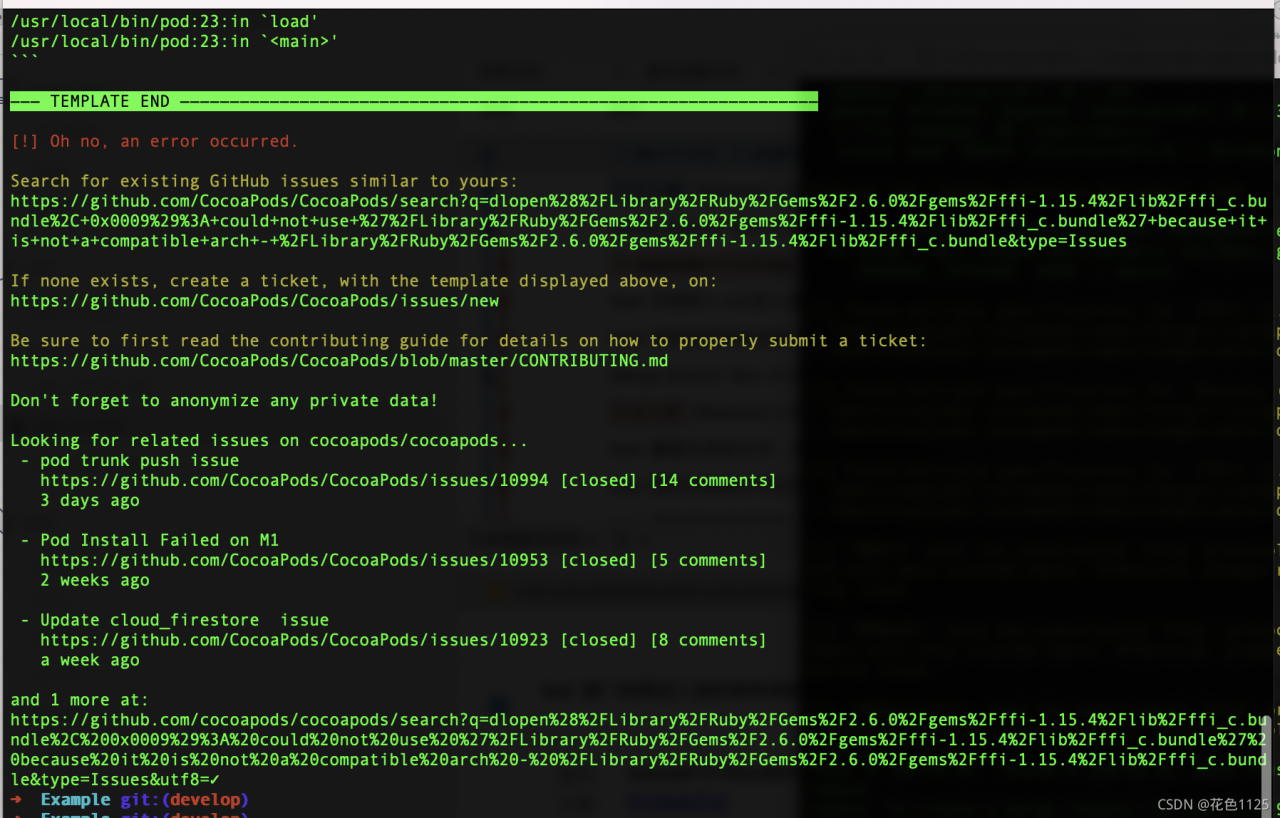
Error Messages:

Solution:

Method 1: A simple and straightforward solution
Add arch -x86_64 in front of the pod command
e.g. arch -x86_64 pod update

Method 2: reinstall cocoaPods

Answering my own question. I fixed the ffi issue by uninstalling my faulty Ruby version and CocoaPods, then I used the -x86_64 arch to reinstall ffi and CocoaPods.
These are the steps I did to get back to a working state (and to apply the M1 workarounds for ffi):

Uninstall Ruby with: brew uninstall ruby –force
Uninstall CocoaPods. At first, try to list all CocoaPods versions / components with gem list –local | grep cocoapods. Then uninstall them one by one, in my case:
sudo gem uninstall cocoapods
sudo gem uninstall cocoapods-core
sudo gem uninstall cocoapods-downloader
etc.
As a next step I was able to reinstall ffi and then CocoaPods with:
sudo arch -x86_64 gem install ffi
sudo arch -x86_64 gem install cocoapods
Once done, I could run pod install as expected. Note that I had the Terminal open all the time in standard mode – no Rosetta required

Android 9.0 APP Install Android 4.4 Error: classnotfoundexception

App on Android 9.0 can run, but the installation to version 4.4 program crashes, the error isClassNotFoundException,
java.lang.RuntimeException: Unable to instantiate activity ComponentInfo{com.xx.app/com.xx.view.splash.SplashActivity}: java.lang.ClassNotFoundException: Didn’t find class “com.xx.view.splash.SplashActivity” on path: DexPathList[[zip file “/data/app/com.xx.app-1.apk”],nativeLibraryDirectories=[/data/app-lib/com.xx.app-1, /vendor/lib, /system/lib]]
Stack.
E/AndroidRuntime( 9741):     at android.app.ActivityThread.performLaunchActivity(ActivityThread.java:2121)
E/AndroidRuntime( 9741):     at android.app.ActivityThread.handleLaunchActivity(ActivityThread.java:2245)
E/AndroidRuntime( 9741):     at android.app.ActivityThread.access$800(ActivityThread.java:135)
E/AndroidRuntime( 9741):     at android.app.ActivityThread$H.handleMessage(ActivityThread.java:1196)
E/AndroidRuntime( 9741):     at android.os.Handler.dispatchMessage(Handler.java:102)
E/AndroidRuntime( 9741):     at android.os.Looper.loop(Looper.java:136)
E/AndroidRuntime( 9741):     at android.app.ActivityThread.main(ActivityThread.java:5047)
E/AndroidRuntime( 9741):     at java.lang.reflect.Method.invokeNative(Native Method)
E/AndroidRuntime( 9741):     at java.lang.reflect.Method.invoke(Method.java:515)
E/AndroidRuntime( 9741):     at com.android.internal.os.ZygoteInit$MethodAndArgsCaller.run(ZygoteInit.java:842)
E/AndroidRuntime( 9741):     at com.android.internal.os.ZygoteInit.main(ZygoteInit.java:658)
E/AndroidRuntime( 9741):     at dalvik.system.NativeStart.main(Native Method)

Solution:
Change the version of androidx.constraintlayout:constraintlayout from 2.0.4 to 2.1.1, the problem is solved

[Solved] Druid connection pooling Error: com.mysql.cj.jdbc.exceptions.CommunicationsException: Communications link failure

Scene restatement

In the morning, I checked the actual operation log of the previous day of the project and found that an exception was generated in the Druid connection pool and MySQL in the springboot project. The reconnection did not affect the system temporarily
the following is the specific error message:

com.mysql.cj.jdbc.exceptions.CommunicationsException: Communications link failure

The last packet successfully received from the server was 178,478,007 milliseconds ago.  The last packet sent successfully to the server was 4 milliseconds ago.
	at com.mysql.cj.jdbc.exceptions.SQLError.createCommunicationsException(SQLError.java:172)
	at com.mysql.cj.jdbc.exceptions.SQLExceptionsMapping.translateException(SQLExceptionsMapping.java:64)
	at com.mysql.cj.jdbc.StatementImpl.executeQuery(StatementImpl.java:1247)
	at com.alibaba.druid.filter.FilterChainImpl.statement_executeQuery(FilterChainImpl.java:2363)
	at com.alibaba.druid.filter.FilterAdapter.statement_executeQuery(FilterAdapter.java:2481)
	at com.alibaba.druid.filter.FilterEventAdapter.statement_executeQuery(FilterEventAdapter.java:302)
	at com.alibaba.druid.filter.FilterChainImpl.statement_executeQuery(FilterChainImpl.java:2360)
	at com.alibaba.druid.wall.WallFilter.statement_executeQuery(WallFilter.java:498)
	at com.alibaba.druid.filter.FilterChainImpl.statement_executeQuery(FilterChainImpl.java:2360)
	at com.alibaba.druid.filter.FilterAdapter.statement_executeQuery(FilterAdapter.java:2481)
	at com.alibaba.druid.filter.FilterEventAdapter.statement_executeQuery(FilterEventAdapter.java:302)
	at com.alibaba.druid.filter.FilterChainImpl.statement_executeQuery(FilterChainImpl.java:2360)
	at com.alibaba.druid.proxy.jdbc.StatementProxyImpl.executeQuery(StatementProxyImpl.java:211)
	at com.alibaba.druid.pool.DruidAbstractDataSource.testConnectionInternal(DruidAbstractDataSource.java:1270)
	at com.alibaba.druid.pool.DruidDataSource.getConnectionDirect(DruidDataSource.java:966)
	at com.alibaba.druid.filter.FilterChainImpl.dataSource_connect(FilterChainImpl.java:4544)
	at com.alibaba.druid.filter.logging.LogFilter.dataSource_getConnection(LogFilter.java:827)
	at com.alibaba.druid.filter.FilterChainImpl.dataSource_connect(FilterChainImpl.java:4540)
	at com.alibaba.druid.filter.FilterAdapter.dataSource_getConnection(FilterAdapter.java:2723)
	at com.alibaba.druid.filter.FilterChainImpl.dataSource_connect(FilterChainImpl.java:4540)
	at com.alibaba.druid.filter.stat.StatFilter.dataSource_getConnection(StatFilter.java:661)
	at com.alibaba.druid.filter.FilterChainImpl.dataSource_connect(FilterChainImpl.java:4540)
	at com.alibaba.druid.pool.DruidDataSource.getConnection(DruidDataSource.java:931)
	at com.alibaba.druid.pool.DruidDataSource.getConnection(DruidDataSource.java:923)
	at com.alibaba.druid.pool.DruidDataSource.getConnection(DruidDataSource.java:100)
	at org.springframework.jdbc.datasource.DataSourceUtils.fetchConnection(DataSourceUtils.java:158)
	at org.springframework.jdbc.datasource.DataSourceUtils.doGetConnection(DataSourceUtils.java:116)
	at org.springframework.jdbc.datasource.DataSourceUtils.getConnection(DataSourceUtils.java:79)
	at org.mybatis.spring.transaction.SpringManagedTransaction.openConnection(SpringManagedTransaction.java:82)
	at org.mybatis.spring.transaction.SpringManagedTransaction.getConnection(SpringManagedTransaction.java:68)
	at org.apache.ibatis.executor.BaseExecutor.getConnection(BaseExecutor.java:338)
	at org.apache.ibatis.executor.SimpleExecutor.prepareStatement(SimpleExecutor.java:84)
	at org.apache.ibatis.executor.SimpleExecutor.doQuery(SimpleExecutor.java:62)
	at org.apache.ibatis.executor.BaseExecutor.queryFromDatabase(BaseExecutor.java:326)
	at org.apache.ibatis.executor.BaseExecutor.query(BaseExecutor.java:156)
	at org.apache.ibatis.executor.CachingExecutor.query(CachingExecutor.java:109)
	at org.apache.ibatis.executor.CachingExecutor.query(CachingExecutor.java:83)
	at org.apache.ibatis.session.defaults.DefaultSqlSession.selectList(DefaultSqlSession.java:148)
	at org.apache.ibatis.session.defaults.DefaultSqlSession.selectList(DefaultSqlSession.java:141)
	at sun.reflect.GeneratedMethodAccessor100.invoke(Unknown Source)
	at sun.reflect.DelegatingMethodAccessorImpl.invoke(DelegatingMethodAccessorImpl.java:43)
	at java.lang.reflect.Method.invoke(Method.java:498)
	at org.mybatis.spring.SqlSessionTemplate$SqlSessionInterceptor.invoke(SqlSessionTemplate.java:433)
	at com.sun.proxy.$Proxy83.selectList(Unknown Source)
	at org.mybatis.spring.SqlSessionTemplate.selectList(SqlSessionTemplate.java:230)
	at org.apache.ibatis.binding.MapperMethod.executeForMany(MapperMethod.java:139)
	at org.apache.ibatis.binding.MapperMethod.execute(MapperMethod.java:76)
	at org.apache.ibatis.binding.MapperProxy.invoke(MapperProxy.java:59)
	at com.sun.proxy.$Proxy91.getTerminalTotalList(Unknown Source)
	at com.tsing.demo.service.DevicesService.getTerminalTotalList(DevicesService.java:118)
	at com.tsing.demo.controller.DevicesTimeMessageController.getDeviceTotalData(DevicesTimeMessageController.java:166)
	at sun.reflect.GeneratedMethodAccessor129.invoke(Unknown Source)
	at sun.reflect.DelegatingMethodAccessorImpl.invoke(DelegatingMethodAccessorImpl.java:43)
	at java.lang.reflect.Method.invoke(Method.java:498)
	at org.springframework.web.method.support.InvocableHandlerMethod.doInvoke(InvocableHandlerMethod.java:197)
	at org.springframework.web.method.support.InvocableHandlerMethod.invokeForRequest(InvocableHandlerMethod.java:141)
	at org.springframework.web.servlet.mvc.method.annotation.ServletInvocableHandlerMethod.invokeAndHandle(ServletInvocableHandlerMethod.java:106)
	at org.springframework.web.servlet.mvc.method.annotation.RequestMappingHandlerAdapter.invokeHandlerMethod(RequestMappingHandlerAdapter.java:894)
	at org.springframework.web.servlet.mvc.method.annotation.RequestMappingHandlerAdapter.handleInternal(RequestMappingHandlerAdapter.java:808)
	at org.springframework.web.servlet.mvc.method.AbstractHandlerMethodAdapter.handle(AbstractHandlerMethodAdapter.java:87)
	at org.springframework.web.servlet.DispatcherServlet.doDispatch(DispatcherServlet.java:1061)
	at org.springframework.web.servlet.DispatcherServlet.doService(DispatcherServlet.java:961)
	at org.springframework.web.servlet.FrameworkServlet.processRequest(FrameworkServlet.java:1006)
	at org.springframework.web.servlet.FrameworkServlet.doGet(FrameworkServlet.java:898)
	at javax.servlet.http.HttpServlet.service(HttpServlet.java:626)
	at org.springframework.web.servlet.FrameworkServlet.service(FrameworkServlet.java:883)
	at javax.servlet.http.HttpServlet.service(HttpServlet.java:733)
	at org.apache.catalina.core.ApplicationFilterChain.internalDoFilter(ApplicationFilterChain.java:231)
	at org.apache.catalina.core.ApplicationFilterChain.doFilter(ApplicationFilterChain.java:166)
	at org.apache.tomcat.websocket.server.WsFilter.doFilter(WsFilter.java:53)
	at org.apache.catalina.core.ApplicationFilterChain.internalDoFilter(ApplicationFilterChain.java:193)
	at org.apache.catalina.core.ApplicationFilterChain.doFilter(ApplicationFilterChain.java:166)
	at com.alibaba.druid.support.http.WebStatFilter.doFilter(WebStatFilter.java:123)
	at org.apache.catalina.core.ApplicationFilterChain.internalDoFilter(ApplicationFilterChain.java:193)
	at org.apache.catalina.core.ApplicationFilterChain.doFilter(ApplicationFilterChain.java:166)
	at org.springframework.web.filter.RequestContextFilter.doFilterInternal(RequestContextFilter.java:100)
	at org.springframework.web.filter.OncePerRequestFilter.doFilter(OncePerRequestFilter.java:119)
	at org.apache.catalina.core.ApplicationFilterChain.internalDoFilter(ApplicationFilterChain.java:193)
	at org.apache.catalina.core.ApplicationFilterChain.doFilter(ApplicationFilterChain.java:166)
	at org.springframework.web.filter.FormContentFilter.doFilterInternal(FormContentFilter.java:93)
	at org.springframework.web.filter.OncePerRequestFilter.doFilter(OncePerRequestFilter.java:119)
	at org.apache.catalina.core.ApplicationFilterChain.internalDoFilter(ApplicationFilterChain.java:193)
	at org.apache.catalina.core.ApplicationFilterChain.doFilter(ApplicationFilterChain.java:166)
	at org.springframework.web.filter.CharacterEncodingFilter.doFilterInternal(CharacterEncodingFilter.java:201)
	at org.springframework.web.filter.OncePerRequestFilter.doFilter(OncePerRequestFilter.java:119)
	at org.apache.catalina.core.ApplicationFilterChain.internalDoFilter(ApplicationFilterChain.java:193)
	at org.apache.catalina.core.ApplicationFilterChain.doFilter(ApplicationFilterChain.java:166)
	at org.apache.catalina.core.StandardWrapperValve.invoke(StandardWrapperValve.java:202)
	at org.apache.catalina.core.StandardContextValve.invoke(StandardContextValve.java:97)
	at org.apache.catalina.authenticator.AuthenticatorBase.invoke(AuthenticatorBase.java:542)
	at org.apache.catalina.core.StandardHostValve.invoke(StandardHostValve.java:143)
	at org.apache.catalina.valves.ErrorReportValve.invoke(ErrorReportValve.java:92)
	at org.apache.catalina.core.StandardEngineValve.invoke(StandardEngineValve.java:78)
	at org.apache.catalina.connector.CoyoteAdapter.service(CoyoteAdapter.java:343)
	at org.apache.coyote.http11.Http11Processor.service(Http11Processor.java:374)
	at org.apache.coyote.AbstractProcessorLight.process(AbstractProcessorLight.java:65)
	at org.apache.coyote.AbstractProtocol$ConnectionHandler.process(AbstractProtocol.java:888)
	at org.apache.tomcat.util.net.NioEndpoint$SocketProcessor.doRun(NioEndpoint.java:1597)
	at org.apache.tomcat.util.net.SocketProcessorBase.run(SocketProcessorBase.java:49)
	at java.util.concurrent.ThreadPoolExecutor.runWorker(ThreadPoolExecutor.java:1142)
	at java.util.concurrent.ThreadPoolExecutor$Worker.run(ThreadPoolExecutor.java:617)
	at org.apache.tomcat.util.threads.TaskThread$WrappingRunnable.run(TaskThread.java:61)
	at java.lang.Thread.run(Thread.java:745)
Caused by: com.mysql.cj.exceptions.CJCommunicationsException: Communications link failure

Analyze the cause of the error

Combined with their own understanding and the analysis of others on the Internet, the positioning is as follows:

    1. since the project uses MySQL database, the “wait_timeout” of MySQL is set to 8 hours without modifying the configuration file. In other words, when a connection is idle for more than 8 hours, it will be automatically closed and recycled by mysql. We use the Druid connection pool to manage the database connection. When MySQL closes a timeout connection, the client just requests the connection from the connection pool. Because the connection pool does not know that the connection is closed by mysql, it will reassign the invalid connection, so this exception will be reported

Solution

1 from the perspective of reason, the simplest solution is to directly modify the MySQL configuration file my.ini and directly set the “wait_timeout” to a larger value, which can be set to about 24 days. However, this does not eliminate such abnormalities from the root, but delays the number and time of abnormal “explosion”
2 modify the Druid connection pool to reduce the connection cycle in the connection pool and recycle invalid connections as much as possible
make the maximum connection lifetime less than the “wait_timeout” time of MySQL.

# Configure the minimum time, in milliseconds, for a connection to survive in the pool
spring.datasource.minEvictableIdleTimeMillis=30000
spring.datasource.maxEvictableIdleTimeMillis=180000

DRF uses paging function Error: unorderedobjectlistwarning

UnorderedObjectListWarning: Pagination may yield inconsistent results with an unordered object_list: <class ‘myapp.models.Power’> QuerySet.
paginator = self.django_paginator_class(queryset, page_size)

The reason is that you are not sorting.

Solution.
(a) add ordering to the design of the model

class test(models.Model):
    ...

    class Meta:
        ...
        ordering=["xx"]

(b) Add order_by to the query set for sorting

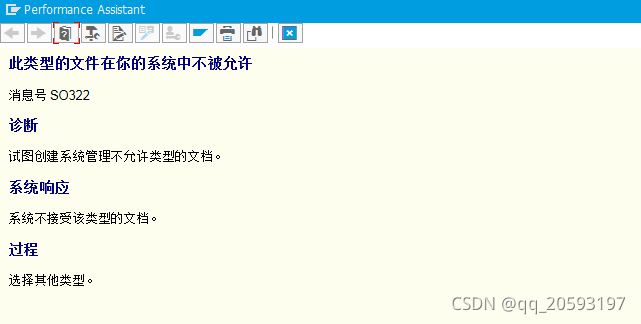
SAP: How to Solve error Message Number SO322

This type of file is not allowed on your system
Message number SO322
Diagnosis
An attempt was made to create a document of a type not allowed by system administration.
System Response
The system does not accept documents of this type.
Procedure
Select another type.


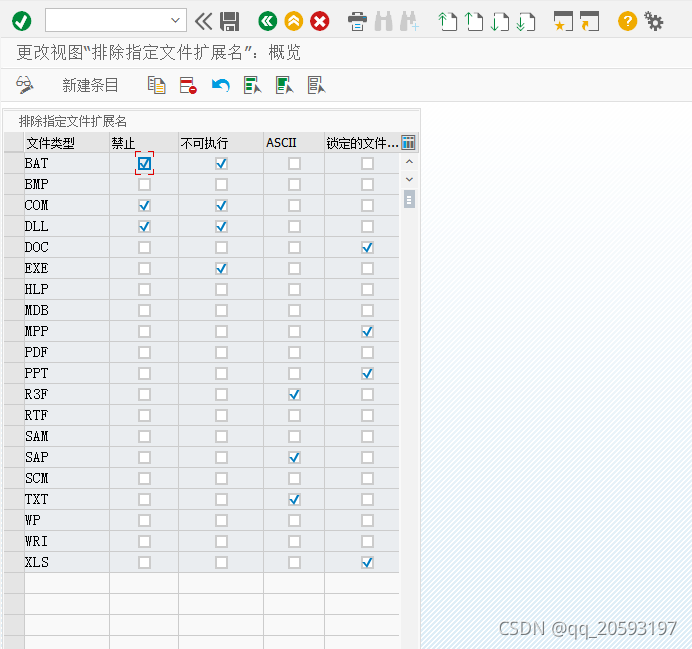
Solution:
Just use the transaction code SOPE to add the postfix of the error report file

See SAP Notes 2184005
2184005 – Error message: Documents of this type are not allowed in your system (SO322) for attachments
Symptom
Error message: Documents of this type are not allowed in your system (SO322) displayed when creating attachment in GOS.
Environment
SAP Basis release independent
Reproducing the Issue

    In any application transaction where GOS is available open the GOS Toolbox menuWith the service New -> Create Attachment add a new file

OR

    In transaction SO01 or SBWP create a New MessageAdd a new attachment

Cause
The file type (extension) is not allowed in transaction SOPE
See Also
If the file type (extension) is allowed in SOPE, but the error message is still received check the Knowledge
Provider (KPro) errors in transaction SLG1 for the timeframe when the error occured. It’s possible to block
some file types and MIME-Types on content server side.
Consider the system customizing referring to KBA 1634908.
For specific Knowledge Provider (KPro) issues refer to KBAs:
1482012 – ContentServer: How to check the connection to content server
1800664 – Error: HTTP/1.1 401 Authorization Required SsfVerify failed: rc=5 when accessing a content repository
Keywords
SO 322, Dokumente dieses Typs sind in Ihrem System nicht erlaubt
Products
SAP NetWeaver Application Server for ABAP 7.1
SAP NetWeaver Application Server for ABAP 7.2
SAP NetWeaver Application Server for ABAP 7.4 for SAP Business Suite
SAP NetWeaver Application Server for ABAP 7.4, OEM version 1.0
SAP NetWeaver Application Server for ABAP 7.6 for SAP S/4HANA Cloud
SAP NetWeaver Application Server for ABAP 7.61 for SAP S/4HANA Cloud
SAP NetWeaver Application Server for ABAP 7.62 for SAP S/4HANA
SAP enhancement package 1 for SAP NetWeaver Application Server for ABAP 7.1

How to Solve Project Upgrade to flutter2.5.0 Error

Record an error report about the error report after the project is upgraded to 2.5.0

error message 1:

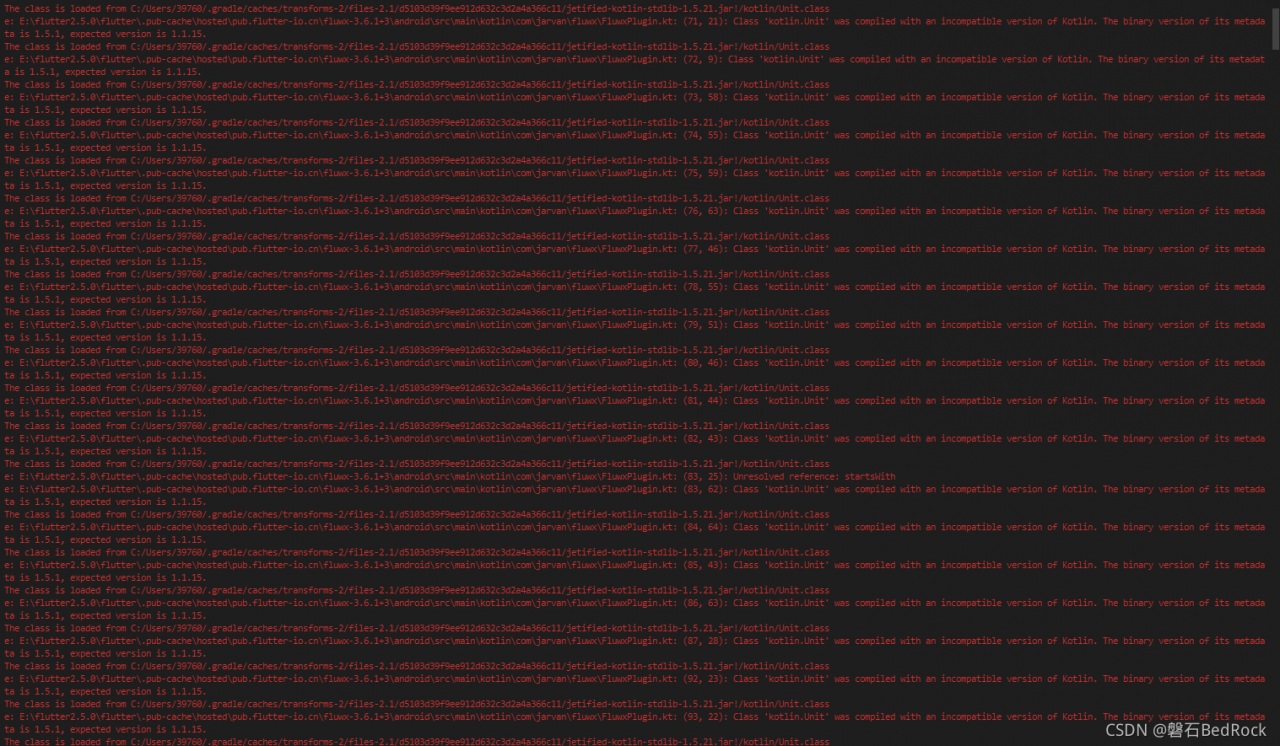
Class 'kotlin.Unit' was compiled with an incompatible version of Kotlin. The binary version of its metadata is 1.5.1, expected version is 1.1.15.

Solution:
in your project level gradle file, just increase ext.kotlin.version from any version you have to "1.4.32" or any latest version available. Path:/Android/build. Gradle

buildscript {
    // ext.kotlin_version = '1.3.50'
    ext.kotlin_version = '1.4.32'
    repositories {
        maven { url 'https://maven.aliyun.com/repository/google'}
        maven { url 'https://maven.aliyun.com/repository/jcenter'}
        maven { url 'http://maven.aliyun.com/nexus/content/groups/public'}
        // google()
        // mavenCentral()
    }

    dependencies {
        classpath 'com.android.tools.build:gradle:4.1.0'
        classpath "org.jetbrains.kotlin:kotlin-gradle-plugin:$kotlin_version"
    }
}

allprojects {
    repositories {
        maven { url 'https://maven.aliyun.com/repository/google'}
        maven { url 'https://maven.aliyun.com/repository/jcenter'}
        maven { url 'http://maven.aliyun.com/nexus/content/groups/public'}
        // google()
        // mavenCentral()
    }
}

rootProject.buildDir = '../build'
subprojects {
    project.buildDir = "${rootProject.buildDir}/${project.name}"
    project.evaluationDependsOn(':app')
}

task clean(type: Delete) {
    delete rootProject.buildDir
}

Error Message 2:
D8: Cannot fit requested classes in a single dex file (# methods: 76688 > 65536) com.android.builder.dexing.DexArchiveMergerException: Error while merging dex archives:
The shrinker may have failed to optimize the Java bytecode.
Solution
Path: /android/app/build.gradle,Change the minSdkVersion version to a larger one, e.g. 21

    defaultConfig {
        // TODO: Specify your own unique Application ID (https://developer.android.com/studio/build/application-id.html).
        applicationId "com.example.good_commodity"
        minSdkVersion 21
        targetSdkVersion 30
        versionCode flutterVersionCode.toInteger()
        versionName flutterVersionName
    }

Pytorch torch.cuda.FloatTensor Error: RuntimeError: one of the variables needed for gradient computation has…

pytorch 1.9 Error:
RuntimeError: one of the variables needed for gradient computation has been modified by an inplace operation: [torch.cuda.FloatTensor [4, 512, 16, 16]], which is output 0 of ConstantPadNdBackward, is at version 1; expected version 0 instead. Hint: enable anomaly detection to find the operation that failed to compute its gradient, with torch.autograd.set_detect_anomaly(True). #23
At first I thought it was the input z = torch.randn(batch_size, 128,1,1).to(device).
Solution:
pip install torch == 1.4 torchvision = 0.05

[Solved] Android9.0 App Install Android4.4 Error: InflateException-You must supply a layout_height attribute.

Problem description: Android 9.0 application installed to Android 4.4 reports an error InflateException, prompting you must provide a layout_height property.
Android9.0 application installed to Android4.4 reports an error InflateException, prompting you must provide a layout_height property.
Stack.

0-26 11:19:23.312 10710 10710 E AndroidRuntime: FATAL EXCEPTION: main
10-26 11:19:23.312 10710 10710 E AndroidRuntime: Process: com.XX.app, PID: 10710
10-26 11:19:23.312 10710 10710 E AndroidRuntime: java.lang.RuntimeException: Unable to start activity ComponentInfo{com.XX.app/com.XX.view.player.VideoPlayActivity}: android.view.InflateException: Binary XML file line #16: Error inflating class com.XX.widget.TvXXControlView
10-26 11:19:23.312 10710 10710 E AndroidRuntime:     at android.app.ActivityThread.performLaunchActivity(ActivityThread.java:2195)
10-26 11:19:23.312 10710 10710 E AndroidRuntime:     at android.app.ActivityThread.handleLaunchActivity(ActivityThread.java:2245)
10-26 11:19:23.312 10710 10710 E AndroidRuntime:     at android.app.ActivityThread.access$800(ActivityThread.java:135)
10-26 11:19:23.312 10710 10710 E AndroidRuntime:     at android.app.ActivityThread$H.handleMessage(ActivityThread.java:1196)
10-26 11:19:23.312 10710 10710 E AndroidRuntime:     at android.os.Handler.dispatchMessage(Handler.java:102)
10-26 11:19:23.312 10710 10710 E AndroidRuntime:     at android.os.Looper.loop(Looper.java:136)
10-26 11:19:23.312 10710 10710 E AndroidRuntime:     at android.app.ActivityThread.main(ActivityThread.java:5047)
10-26 11:19:23.312 10710 10710 E AndroidRuntime:     at java.lang.reflect.Method.invokeNative(Native Method)
10-26 11:19:23.312 10710 10710 E AndroidRuntime:     at java.lang.reflect.Method.invoke(Method.java:515)
10-26 11:19:23.312 10710 10710 E AndroidRuntime:     at com.android.internal.os.ZygoteInit$MethodAndArgsCaller.run(ZygoteInit.java:842)
10-26 11:19:23.312 10710 10710 E AndroidRuntime:     at com.android.internal.os.ZygoteInit.main(ZygoteInit.java:658)
10-26 11:19:23.312 10710 10710 E AndroidRuntime:     at dalvik.system.NativeStart.main(Native Method)
10-26 11:19:23.312 10710 10710 E AndroidRuntime: Caused by: android.view.InflateException: Binary XML file line #16: Error inflating class com.XX.widget.TvControlView
10-26 11:19:23.312 10710 10710 E AndroidRuntime:     at android.view.LayoutInflater.createView(LayoutInflater.java:620)
10-26 11:19:23.312 10710 10710 E AndroidRuntime:     at android.view.LayoutInflater.createViewFromTag(LayoutInflater.java:696)
10-26 11:19:23.312 10710 10710 E AndroidRuntime:     at android.view.LayoutInflater.rInflate(LayoutInflater.java:755)
10-26 11:19:23.312 10710 10710 E AndroidRuntime:     at android.view.LayoutInflater.inflate(LayoutInflater.java:492)
10-26 11:19:23.312 10710 10710 E AndroidRuntime:     at android.view.LayoutInflater.inflate(LayoutInflater.java:397)
10-26 11:19:23.312 10710 10710 E AndroidRuntime:     at android.view.LayoutInflater.inflate(LayoutInflater.java:353)
10-26 11:19:23.312 10710 10710 E AndroidRuntime:     at androidx.appcompat.app.AppCompatDelegateImpl.setContentView(AppCompatDelegateImpl.java:696)
10-26 11:19:23.312 10710 10710 E AndroidRuntime:     at androidx.appcompat.app.AppCompatActivity.setContentView(AppCompatActivity.java:170)
10-26 11:19:23.312 10710 10710 E AndroidRuntime:     at com.XX.view.player.BaseVideoPlayActivity.onCreate(BaseVideoPlayActivity.java:90)
10-26 11:19:23.312 10710 10710 E AndroidRuntime:     at android.app.Activity.performCreate(Activity.java:5294)
10-26 11:19:23.312 10710 10710 E AndroidRuntime:     at android.app.Instrumentation.callActivityOnCreate(Instrumentation.java:1101)
10-26 11:19:23.312 10710 10710 E AndroidRuntime:     at android.app.ActivityThread.performLaunchActivity(ActivityThread.java:2159)
10-26 11:19:23.312 10710 10710 E AndroidRuntime:     ... 11 more
10-26 11:19:23.312 10710 10710 E AndroidRuntime: Caused by: java.lang.reflect.InvocationTargetException
10-26 11:19:23.312 10710 10710 E AndroidRuntime:     at java.lang.reflect.Constructor.constructNative(Native Method)
10-26 11:19:23.312 10710 10710 E AndroidRuntime:     at java.lang.reflect.Constructor.newInstance(Constructor.java:423)
10-26 11:19:23.312 10710 10710 E AndroidRuntime:     at android.view.LayoutInflater.createView(LayoutInflater.java:594)
10-26 11:19:23.312 10710 10710 E AndroidRuntime:     ... 22 more
10-26 11:19:23.312 10710 10710 E AndroidRuntime: Caused by: java.lang.RuntimeException: Binary XML file line #17: You must supply a layout_height attribute.
10-26 11:19:23.312 10710 10710 E AndroidRuntime:     at android.content.res.TypedArray.getLayoutDimension(TypedArray.java:492)
10-26 11:19:23.312 10710 10710 E AndroidRuntime:     at android.view.ViewGroup$LayoutParams.setBaseAttributes(ViewGroup.java:5949)
10-26 11:19:23.312 10710 10710 E AndroidRuntime:     at android.view.ViewGroup$MarginLayoutParams.<init>(ViewGroup.java:6117)
10-26 11:19:23.312 10710 10710 E AndroidRuntime:     at android.widget.RelativeLayout$LayoutParams.<init>(RelativeLayout.java:1225)
10-26 11:19:23.312 10710 10710 E AndroidRuntime:     at android.widget.RelativeLayout.generateLayoutParams(RelativeLayout.java:1062)
10-26 11:19:23.312 10710 10710 E AndroidRuntime:     at android.widget.RelativeLayout.generateLayoutParams(RelativeLayout.java:82)
10-26 11:19:23.312 10710 10710 E AndroidRuntime:     at android.view.LayoutInflater.rInflate(LayoutInflater.java:757)
10-26 11:19:23.312 10710 10710 E AndroidRuntime:     at android.view.LayoutInflater.inflate(LayoutInflater.java:492)
10-26 11:19:23.312 10710 10710 E AndroidRuntime:     at android.view.LayoutInflater.inflate(LayoutInflater.java:397)
10-26 11:19:23.312 10710 10710 E AndroidRuntime:     at android.view.LayoutInflater.inflate(LayoutInflater.java:353)
10-26 11:19:23.312 10710 10710 E AndroidRuntime:     at android.view.View.inflate(View.java:17465)
10-26 11:19:23.312 10710 10710 E AndroidRuntime:     at com.xx.widget.TvControlView.<init>(TvControlView.java:132)
10-26 11:19:23.312 10710 10710 E AndroidRuntime:     at com.xx.widget.TvXXControlView.<init>(TvXXControlView.java:64)


Solution:
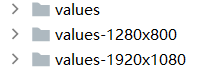
This problem actually has nothing to do with the version, but with the screen allocation rate. The layout xml defines the layout_height referencing the constant defined in the values, but the definition is only defined in the directory of the specific resolution. So the solution Define the referenced value in the values directory