Author Archives: Robins

[Solved] org.springframework.beans.factory.BeanCreationException: Error creating bean with name ‘dataSource‘


Nov 01, 2021 11:56:38 PM org.springframework.context.support.ClassPathXmlApplicationContext prepareRefresh
Message: Refreshing org.springframework.context.support.ClassPathXmlApplicationContext@3b22cdd0: startup date [Mon Nov 01 23:56:38 CST 2021]; root of context hierarchy
Nov 01, 2021 11:56:38 PM org.springframework.beans.factory.xml.XmlBeanDefinitionReader loadBeanDefinitions
Message: Loading XML bean definitions from class path resource [ioc3.xml]
org.springframework.beans.factory.BeanCreationException: Error creating bean with name ‘dataSource’ defined in class path resource [ioc3.xml]: Instantiation of bean failed; nested exception is java.lang.NoClassDefFoundError: com/mchange/v2/ser/Indirector
at org.springframework.beans.factory.support.AbstractAutowireCapableBeanFactory.instantiateBean(AbstractAutowireCapableBeanFactory.java:1076)
at org.springframework.beans.factory.support.AbstractAutowireCapableBeanFactory.createBeanInstance(AbstractAutowireCapableBeanFactory.java:1021)
at org.springframework.beans.factory.support.AbstractAutowireCapableBeanFactory.doCreateBean(AbstractAutowireCapableBeanFactory.java:504)
at org.springframework.beans.factory.support.AbstractAutowireCapableBeanFactory.createBean(AbstractAutowireCapableBeanFactory.java:475)
at org.springframework.beans.factory.support.AbstractBeanFactory$1.getObject(AbstractBeanFactory.java:304)
at org.springframework.beans.factory.support.DefaultSingletonBeanRegistry.getSingleton(DefaultSingletonBeanRegistry.java:228)
at org.springframework.beans.factory.support.AbstractBeanFactory.doGetBean(AbstractBeanFactory.java:300)
at org.springframework.beans.factory.support.AbstractBeanFactory.getBean(AbstractBeanFactory.java:195)
at org.springframework.beans.factory.support.DefaultListableBeanFactory.preInstantiateSingletons(DefaultListableBeanFactory.java:700)
at org.springframework.context.support.AbstractApplicationContext.finishBeanFactoryInitialization(AbstractApplicationContext.java:760)
at org.springframework.context.support.AbstractApplicationContext.refresh(AbstractApplicationContext.java:482)
at org.springframework.context.support.ClassPathXmlApplicationContext.<init>(ClassPathXmlApplicationContext.java:139)
at org.springframework.context.support.ClassPathXmlApplicationContext.<init>(ClassPathXmlApplicationContext.java:83)
at com.rtl.test.IOCTest.test04(IOCTest.java:44)
at sun.reflect.NativeMethodAccessorImpl.invoke0(Native Method)
at sun.reflect.NativeMethodAccessorImpl.invoke(NativeMethodAccessorImpl.java:62)
at sun.reflect.DelegatingMethodAccessorImpl.invoke(DelegatingMethodAccessorImpl.java:43)
at java.lang.reflect.Method.invoke(Method.java:498)
at org.junit.runners.model.FrameworkMethod$1.runReflectiveCall(FrameworkMethod.java:45)
at org.junit.internal.runners.model.ReflectiveCallable.run(ReflectiveCallable.java:15)
at org.junit.runners.model.FrameworkMethod.invokeExplosively(FrameworkMethod.java:42)
at org.junit.internal.runners.statements.InvokeMethod.evaluate(InvokeMethod.java:20)
at org.junit.runners.ParentRunner.runLeaf(ParentRunner.java:263)
at org.junit.runners.BlockJUnit4ClassRunner.runChild(BlockJUnit4ClassRunner.java:68)
at org.junit.runners.BlockJUnit4ClassRunner.runChild(BlockJUnit4ClassRunner.java:47)
at org.junit.runners.ParentRunner$3.run(ParentRunner.java:231)
at org.junit.runners.ParentRunner$1.schedule(ParentRunner.java:60)
at org.junit.runners.ParentRunner.runChildren(ParentRunner.java:229)
at org.junit.runners.ParentRunner.access$000(ParentRunner.java:50)
at org.junit.runners.ParentRunner$2.evaluate(ParentRunner.java:222)
at org.junit.runners.ParentRunner.run(ParentRunner.java:300)
at org.junit.runner.JUnitCore.run(JUnitCore.java:157)
at com.intellij.junit4.JUnit4IdeaTestRunner.startRunnerWithArgs(JUnit4IdeaTestRunner.java:69)
at com.intellij.rt.junit.IdeaTestRunner$Repeater.startRunnerWithArgs(IdeaTestRunner.java:33)
at com.intellij.rt.junit.JUnitStarter.prepareStreamsAndStart(JUnitStarter.java:235)
at com.intellij.rt.junit.JUnitStarter.main(JUnitStarter.java:54)

Caused by: java.lang.NoClassDefFoundError: com/mchange/v2/ser/Indirector
at java.lang.Class.getDeclaredConstructors0(Native Method)
at java.lang.Class.privateGetDeclaredConstructors(Class.java:2699)
at java.lang.Class.getConstructor0(Class.java:3103)
at java.lang.Class.getDeclaredConstructor(Class.java:2206)
at org.springframework.beans.factory.support.SimpleInstantiationStrategy.instantiate(SimpleInstantiationStrategy.java:80)
at org.springframework.beans.factory.support.AbstractAutowireCapableBeanFactory.instantiateBean(AbstractAutowireCapableBeanFactory.java:1069)
… 35 more
Caused by: java.lang.ClassNotFoundException: com.mchange.v2.ser.Indirector
at java.net.URLClassLoader.findClass(URLClassLoader.java:382)
at java.lang.ClassLoader.loadClass(ClassLoader.java:418)
at sun.misc.Launcher$AppClassLoader.loadClass(Launcher.java:352)
at java.lang.ClassLoader.loadClass(ClassLoader.java:351)
… 41 more
Process finished with exit code -1

Solution.
Add a jar package.

[Solved] Linux Error: tar: Error Is Not Recoverable: Exiting Now

Under the Linux operating system, download the xx.tar.gz file and execute tar -zxvf xx.tar.gz. The following errors occur during execution:

xxx.tar.gz: EOF tar with exception in archive file: error is not recoverable: exiting now

There are two solutions.

Solution 1: remove the Z in the decompression parameters and execute the command as tar – xvf xx.tar.gz.

The reason for this scheme is that the downloaded file is not “filtered and archived through gzip”, so adding the parameter Z cannot decompress normally but generally, this problem does not occur when downloading from the official website. Be sure to download the full version from the official website.

If the scheme still fails to decompress normally, try the second scheme.

Solution 2: re download or upload compressed files

this scheme is aimed at downloading compressed files that are not complete, that is, they are not downloaded normally. You can download it again in another way. For example, after downloading through WGet, the above problems occur during execution. You can try to download it directly on other machines, upload it to the target server, and then execute the above decompression command.

[Solved] Use the truss console to connect to the public blockchain network error: mnemonic invalid or undefined

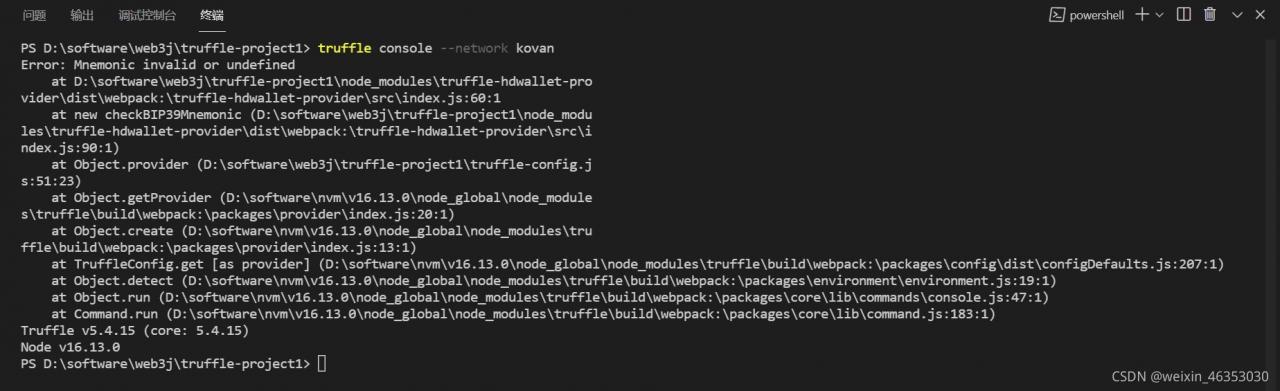
Error prompt

Error: Mnemonic invalid or undefined

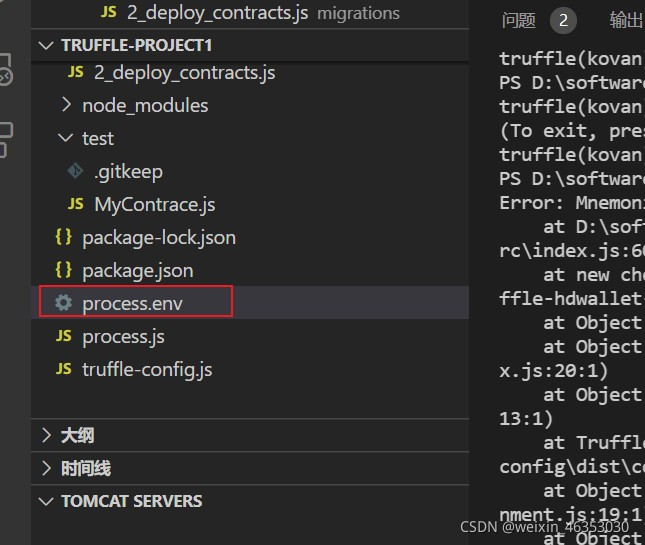
Cause:. Env file naming error

Change the process.env file name directly to .Env and then execute the truss console --network Kovan command

Steps for connecting the common chain of truss
Install dotenv and truffle-hdwallet-provider

npm install dotenv --save-dev -g
npm install truffle-hdwallet-provider --save-dev -g

Note: The windows system may need to restart these two dependent packages to take effect in the project

Create an .env file in the project of root directory, write Mnemonic and INFURA_API_KEY via Form of key-value pairs in the .env file

INFURA_API_KEY= your infura_api_key
MNEMONIC="your mnemonic"

Configure in truffle-config.jsor or truffle.js file:

// Import the dotenv library created to read the settings in the `.env` file
require('dotenv').config();
// import the truffle-hdwallet-provider library to rebuild the wallet
const HDWalletProvider = require('truffle-hdwallet-provider');

module.exports = {
  networks: {
    development: {
     host: "127.0.0.1",     // Localhost (default: none)
     port: 7545,            // Standard Ethereum port (default: none)
     network_id: "*",       // Any network (default: none)
    },
    // Useful for deploying to a public network.
    // NB: It's important to wrap the provider as a function.
    kovan: {
      provider: () => new HDWalletProvider(
        process.env.MNEMONIC, 
        process.env.INFURA_API_KEY
      ),
      gas: 5000000,
      gasPrice: 25000000000,
      network_id: 42
    },
  },
  solc: {
    optimizer: {
      enabled: true,
      runs: 200
    }
  }
}

Enter truffle console --network kovan in the console to connect to the public chain, and you can enter web3.eth.getBlock('latest').then(console.log) for verification. If the following content is returned, the connection is successful:

{ author: '0x03801efb0efe2a25ede5dd3a003ae880c0292e4d',
  difficulty: '340282366920938463463374607431768211454',
  extraData:
   '0xde830206028f5061726974792d457468657265756d86312e33362e30826c69',
  gasLimit: '0x7a1200',
  gasUsed: '0x17d23',
  hash:
   '0xc7390c4f492c8c1da60608135fc9e05930123b645b39f221cba33d8b3c577b2a',
  logsBloom:
   '0x00000000000000000000000000000000000000000000000000000000000000000000000000000000000000000000000000000000000000000000000000000800000000000000000000000000080000000000000000000100000008000000000000000000080000000000000000000000000000000000000000000000000000000000000000000000000000000000000000000000000000000000000000000000000000000000000400800000000000010000000000000080000000000000000000000000000000000000000000000000000000000000000000000000000000000000000000000000000000000000000000000000000000009000000008000000',
  receiptsRoot:
   '0x3d05bb2ed4fcc90234eea6d840e7d0e3ce7f598a15e5314536b17bcd11c78b5b',
  sealFields:
   [ '0x84175e8801',
     '0xb84155a8cdb108dccec1d314124058fa6f22e7400ee200db0a94b7b165e4c3454c1818cc05f815cb7ce48f7a88b8401515740311a3566d9cf079428d506a6daca50101' ],
  sha3Uncles:
   '0x1dcc4de8dec75d7aab85b567b6ccd41ad312451b948a7413f0a142fd40d49347',
  signature:
   '55a8cdb108dccec1d314124058fa6f22e7400ee200db0a94b7b165e4c3454c1818cc05f815cb7ce48f7a88b8401515740311a3566d9cf079428d506a6daca50101',
  size: 877,
  stateRoot:
   '0x03af5adce52a81ce5d332cddb9955e344214bff00859b78868116e1e839efdf7',
  step: '392071169',
  timestamp: 1568284676,
  totalDifficulty: '4524524338444961608702071789512829094373049115',
  transactions:
   [ '0xded7fed0842fd65ec808bc3652ec4175bc190acc11345c49c44b1fb5d954610f',
     '0x7e9112a46fa3c07aad813ea86355b15eebb44023c040d198ee7d15d379bbc2be' ],
  transactionsRoot:
   '0x0dd10d90686dda2684bd0ba70d1c9e1d9a5302c30ca75eb2c5b07a7b6e4498b9',
  uncles: [] }

Note: every time you want to call the contents of the. Env file, you must first import the dotenv Library in the JS file, otherwise you cannot read the contents of the file

General error: 2006 MySQL server has gone away [How to Solve]

Congratulations on your journey;

There are many reasons for this. Let’s not talk about the others. Let’s talk about the problems that occurred today; Eliminate the problem of the database itself (my MySQL does not go down at this time.) it is the problem of the program. This problem is that the process always exists, but it has not operated the database for too long, resulting in the disconnection of the database, but suddenly a piece of data comes. At this time, the process will not re link the database, but use the original link (disconnected at this time), so there is no way to find the database, so this error is reported.

Solution:

$round = mt_rand(1, 10);
if ($round == 6) {
    // Query a sql to avoid unavailability of the process due to connection timeout
    $dividend = Db::query("select id from think_member_group where  `id` = 1");
}

A random number. The core of this method is to let your process check the database every few seconds so that the link will not be disconnected.

[Solved] QT Programme Error: error: no matching function for call to…

The following error occurred in the binding mechanism between signal and slot function:

error: no matching function for call to 'Widget::connect(QPushButton*&, void (QAbstractButton::*)(bool), Widget*, <unresolved overloaded function type>)'

The reason for the error is that when making a response call, you do not know which function to call, indicating that function reuse occurs.

void classover();
void classover(QString food);

For the above two functions, you can mask one. Which one?

When signals correspond to slot functions, two characteristics need to be noted:
1. The parameter types of signals and slots must correspond one by one
2. The number of parameters of signals and slots can be different, but the number of signal parameters must be more than that of slot functions

To sum up, the nonparametric function is retained to achieve the correct result.

MYSQL Use cmd to change root password error: ERROR 1064 (42000): You have an error in your SQL syntax; check the manual tha

MYSQL Use cmd to change root password error:ERROR 1064 (42000): You have an error in your SQL syntax; check the manual that corresponds to your MySQL server version for the right syntax to use near ‘(“123456”) where user = “root”‘ at line 1

Prompt for SQL syntax error
Change the password with another command

ALTER USER 'root'@'localhost' IDENTIFIED BY '123456';

Modified successfully

OTA Pack Compile Error: ExternalError: Failed to run signapk.jar: return code 1:Error: A JNI error has occurred

Android 11 reports an error during OTA package:

ExternalError: Failed to run signapk.jar: return code 1:
Error: A JNI error has occurred, please check your installation and try again
Exception in thread "main" java.lang.UnsupportedClassVersionError: com/android/signapk/SignApk has been compiled by a more recent version of the Java Runtime (class file version 53.0), this version of the Java Runtime only recognizes class file versions up to 52.0
	at java.lang.ClassLoader.defineClass1(Native Method)
	at java.lang.ClassLoader.defineClass(ClassLoader.java:756)
	at java.security.SecureClassLoader.defineClass(SecureClassLoader.java:142)
	at java.net.URLClassLoader.defineClass(URLClassLoader.java:468)
	at java.net.URLClassLoader.access$100(URLClassLoader.java:74)
	at java.net.URLClassLoader$1.run(URLClassLoader.java:369)
	at java.net.URLClassLoader$1.run(URLClassLoader.java:363)
	at java.security.AccessController.doPrivileged(Native Method)
	at java.net.URLClassLoader.findClass(URLClassLoader.java:362)
	at java.lang.ClassLoader.loadClass(ClassLoader.java:418)
	at sun.misc.Launcher$AppClassLoader.loadClass(Launcher.java:352)
	at java.lang.ClassLoader.loadClass(ClassLoader.java:351)
	at sun.launcher.LauncherHelper.checkAndLoadMain(LauncherHelper.java:601)

According to the error analysis, it is caused by the jdk version.

1. First check the jdk version: java –version My previous version was openjdk-8
2. Use sudo apt-get install openjdk-11-jdk to install openjdk-11
3. Configure linux default jdk version: sudo update-alternatives –config java, select the JDK version you need
4. Configure the default java version: sudo update-alternatives –config javac, select the java version you need.

Just do the ota package again.

[Solved] Runtimeerror during dcgan training: found dtype long but expected float

When using dcgan for network training, the following errors occur:

RuntimeError: Found dtype Long but expected Float

The code snippet for this error is as follows:

label = torch.full((b_size,), real_label, device=device)
        # Input the batch with positive samples into the discriminant network for forward computation and put the result into the variable output
        output = netD(real_cpu).view(-1)
    
        # Calculate the loss
        errD_real = criterion(output, label)

The reason is that the data type of the input output data and tag value into the loss function does not match the required data type. What is required is float type data, and what is passed in is long type data
therefore, we need to convert the incoming data to float type
the modified code is as follows:

label = torch.full((b_size,), real_label, device=device)
        # Input the batch with positive samples into the discriminant network for forward computation and put the result into the variable output
        output = netD(real_cpu).view(-1)
        # Convert the incoming data to float type
        output = output.to(torch.float32)
        label = label.to(torch.float32)
        # Calculate the loss
        errD_real = criterion(output, label)

Problem solved!

[Solved] Python urllib sending request Error: urllib.error.urlerror: <urlopen error [SSL: certificate_verify_failed]….>

Error:urllib.error.URLError: <urlopen error [SSL: CERTIFICATE_VERIFY_FAILED] certificate verify failed (_ssl.c:xxx)>

Solution:
Add the following codes before you use urllib.request.Request(url):

import ssl
ssl._create_default_https_context = ssl._create_unverified_context

Problem analysis

This is because the website visited is HTTPS://, which requires SSL authentication, and using urllib directly will lead to local authentication failure (the specific reason is not found out), so SSL is used_create_unverified_Context turn off authentication

Error recurrence

When request = urllib.Request.Request (URL, data) is executed, an error is reported. Cancel the comments in the upper two lines to solve the problem

import json
import urllib


def baidu_search():
    url = "https://www.baidu.com/s?"
    data = {"wd": "AHA"}
    data = json.dumps(data).encode('GBK')
    # import ssl
    # ssl._create_default_https_context = ssl._create_unverified_context  # If these two lines are not added, the next line reports an error
    request = urllib.request.Request(url, data)
    response = urllib.request.urlopen(request)
    content = response.read()
    print(str(content))


if __name__ == '__main__':
    baidu_search()

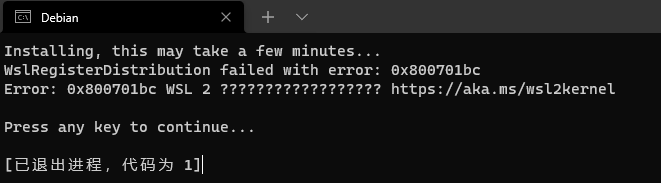
Win10 Start Linux error: Error: 0x800701bc WSL 2 [How to Solve]

Error: 0x800701bc WSL 2

Manual installation of wsl

Step 1 - Enable the Windows subsystem for Linux
Step 2 - Check the requirements to run WSL 2
Step 3 - Enable the virtual machine feature
Step 4 - Download the Linux kernel update package
Step 5 - Set WSL 2 as the default version
Step 6 - Install the selected Linux distribution

Error when downloading the built-in dataset of pytoch = urllib.error.urlerror: urlopen error [SSL: certificate_verify_failed]

Error reason:

This is an SSL certificate validation error. When an HTTPS site is requested, but the certificate validation error occurs, such an error will be reported.

Solution:

Just add the following two lines to the code to skip the certificate check and successfully access the web page.

# Global removal of certificate validation
import ssl
ssl._create_default_https_context = ssl._create_unverified_context