Author Archives: Robins

SVN Update Error Please execute the ‘Cleanup‘ command [How to Solve]

Question

SVN Update Error: Please execute the ‘Cleanup’ command

Detailed description
when using SVN to update files, you will encounter failure (maybe because the last pull was forcibly interrupted). You will be prompted to need cleanup, but when you clean up, you will be prompted that the folder has been locked. At this time, you go to release lock, but still fail. You will be prompted to please execute the ‘cleanup’ command. (TMD is really difficult to use)

Solution:
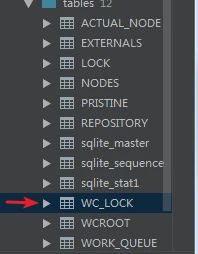
obviously, this cannot be operated because the SVN file is locked and needs to be released, but manual release does not work, so you need to enter the SVN root directory where the locked folder is located, and then set the hidden files to be visible find the .SVN folder, and link wc.db with database management tools such as Navicat, DataGrid and other ides. This is a SQLite database. Find WC_Lock table

Delete locked records and submit updates to the database
it’s OK to update the code or file again

[Solved] Mybatis add dependencies Error: org.apache.ibatis.builder.BuilderException: Error parsing SQL Mapper Configuration.

Mybatis generates an error after adding a dependency: org.springframework.core.nestedioexception: failed to parse config resource: class path resource [mybatis/mybatis config. XML]; Needed exception is org.apache.ibatis.builder.builderexception: error parsing SQL mapper configuration. Cause: org.apache.ibatis.logging.logexception: error setting log implementation. Cause: java.lang.reflect.invocationtargetexceptionlog4j


Attachment: springboot running error:

Problem recurrence

After adding logs for mybatis configuration

<settings>
    <setting name="logImpl" value="LOG4J" />
</settings>

Dependencies in Maven will have red wavy lines: log4j:log4j:unknown

Check the dependency of log4j in pom.xml

<dependency>
    <groupId>log4j</groupId>
    <artifactId>log4j</artifactId>
    <scope>compile</scope>
</dependency>

Causes and Solutions

The version number is not written. After consulting the data, it is found that:

Because:
log4j has changed the jar package since version 1.2.17.
for example, the MVN dependency of versions 1.2.17 and earlier is written as follows:

<!-- https://mvnrepository.com/artifact/log4j/log4j -->
<dependency>
    <groupId>log4j</groupId>
    <artifactId>log4j</artifactId>
    <version>1.2.17</version>
</dependency>

However, the MVN dependency of versions after 1.2.17 is written as follows:

<!-- https://mvnrepository.com/artifact/org.apache.logging.log4j/log4j-core -->
<dependency>
    <groupId>org.apache.logging.log4j</groupId>
    <artifactId>log4j-core</artifactId>
    <version>2.13.1</version>
</dependency>

Therefore, the declaration displayed according to the first method uses version 1.2.17, and the problem is solved.

Later, I want to modify the dependency settings in POM to reproduce the problem. I guess the reason is that Maven has handled the relevant dependencies and needs Maven clean operation

Investigate the reasons:

We know that the dependency in springboot does not need to write the version number because of its automatic version arbitration mechanism. We click the parent project of the project

<parent>
    <groupId>org.springframework.boot</groupId>
    <artifactId>spring-boot-starter-parent</artifactId>
    <version>2.5.4</version>
    <relativePath/> <!-- lookup parent from repository -->
</parent>

CTRL + left click spring boot starter parent to find that the project also has a parent project spring boot dependencies

<parent>
  <groupId>org.springframework.boot</groupId>
  <artifactId>spring-boot-dependencies</artifactId>
  <version>2.5.4</version>
</parent>

After entering spring boot dependencies, you can see that it declares the version number and dependencies of jar packages commonly used in the development process

We searched log4j and found that

<log4j2.version>2.14.1</log4j2.version>

It looks like the same reason as we found before.
P.S. SpringBoot runs reporting errors:
org.springframework.beans.factory.UnsatisfiedDependencyException: Error creating bean with name 'bookController': Unsatisfied dependency expressed through field 'bookService'; nested exception is org.springframework.beans.factory.UnsatisfiedDependencyException: Error creating bean with name 'bookService': Unsatisfied dependency expressed through field 'bookMapper'; nested exception is org.springframework.beans.factory.UnsatisfiedDependencyException: Error creating bean with name 'bookMapper' defined in file [D:\tsgl\target\classes\com\by\tsgl\mapper\BookMapper.class]: Unsatisfied dependency expressed through bean property 'sqlSessionFactory'; nested exception is org.springframework.beans.factory.BeanCreationException: Error creating bean with name 'sqlSessionFactory' defined in class path resource [org/mybatis/spring/boot/autoconfigure/MybatisAutoConfiguration.class]: Bean instantiation via factory method failed; nested exception is org.springframework.beans.BeanInstantiationException: Failed to instantiate [org.apache.ibatis.session.SqlSessionFactory]: Factory method 'sqlSessionFactory' threw exception; nested exception is org.springframework.core.NestedIOException: Failed to parse config resource: class path resource [mybatis/mybatis-config.xml]; nested exception is org.apache.ibatis.builder.BuilderException: Error parsing SQL Mapper Configuration. Cause: org.apache.ibatis.logging.LogException: Error setting Log implementation. Cause: java.lang.reflect.InvocationTargetException

[Solved] error: ‘QStringLiteral’ was not declared in this scope

The following problem occurs with QT compilation:

error: ‘QStringLiteral’ was not declared in this scope
resmodel->setHorizontalHeaderLabels(QStringList()<<QStringLiteral(Name)<<QStringLiteral(Size));
^
QMetaObject::Connection connRet = QObject::connect(naManager, SIGNAL(finished(QNetworkReply*)), this, SLOT(requestFinished(QNetworkReply*)));
error: ‘connRet’ was not declared in this scope
Q_ASSERT(connRet);
^
/usr/include/qt4/QtCore/qglobal.h:1940:32: note: in definition of macro ‘Q_ASSERT’
define Q_ASSERT(cond) ((!(cond)) ?qt_assert(#cond,FILE,LINE) : qt_noop())
error: ‘class QComboBox’ has no member named ‘setCurrentText’; did you mean ‘setCurrentIndex’?
CombBox->setCurrentText(curX);

There is a situation that is caused by using QT4 to compile code written in QT5 environment, some operating systems have both QT4, QT5, just switch to QT5 is fine
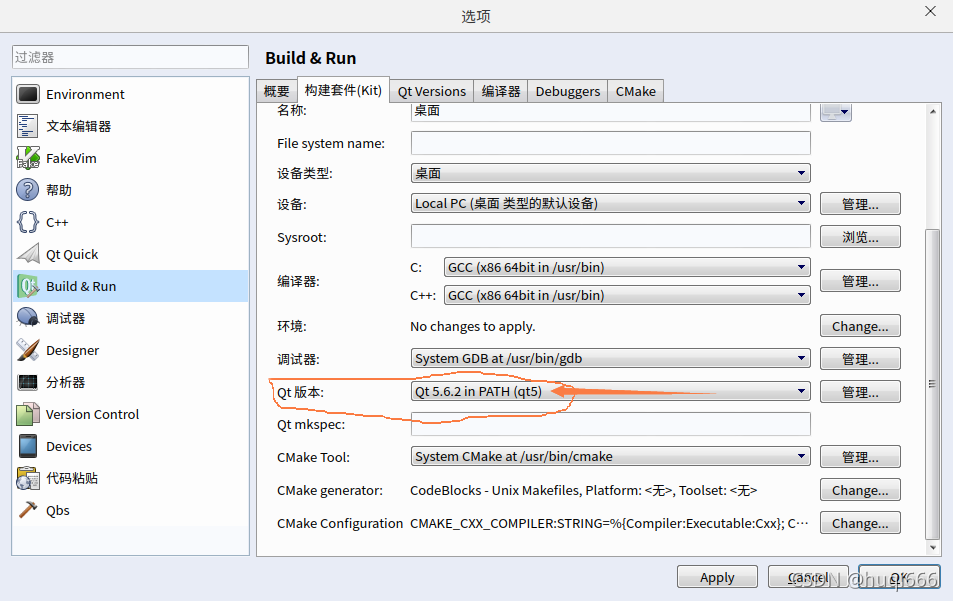
QT Creator “Tools” —- “Options” —- “build&run” – “Build Kit ( kit)”-“qt version” select QT5 on it

Error: one input ui-file must be specified [How to Solve]

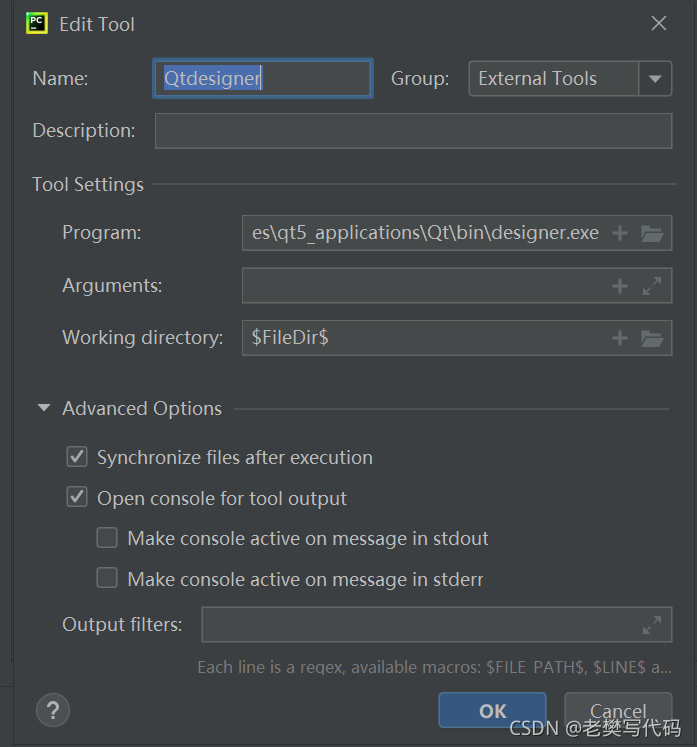
QT designer installed   After success, install PIP anyway   install PyQt5   And pip   Install pyqt5 designer is useless

So consider whether the installation path of QT designer is wrong. Therefore, searching designer.exe in the folder unexpectedly found 2 files.

The first path has been used before, but the UI file cannot be converted to py file. The link below was replaced.

OK after running the test

Hope to help you!

[Solved] RuntimeError: 1only batches of spatial targets supported (non-empty 3D tensors) but got targets of s

catalogue

An error is reported when running unet3 + for multi classification training

RuntimeError: 1only batches of spatial targets supported (non-empty 3D tensors) but got targets of size xxx

1. Modify train.py

2. Modify predict.py

3. Modify eval.py

Then run the following statement to start the training:

[experiment record] u-net (pytorch)


An error is reported when running unet3 + for multi classification training

RuntimeError: 1only batches of spatial targets supported (non-empty 3D tensors) but got targets of size xxx

After many times of reference, trial and error, the following solutions are obtained:

Unet3 + source code has a small bug for multi classification tasks, which is slightly modified here. (unet3 + code comes from githubgithub – avbuffer/unet3plus_pth: unet3 +/UNET + +/UNET, used in deep automatic portal matching in Python)

1. Modify train.py

# line 56
if net.n_classes > 1:
        criterion = nn.CrossEntropyLoss()  
    else:
        criterion = nn.BCEWithLogitsLoss()

# line 79
loss = criterion(masks_pred, torch.squeeze(true_masks))   

# line 153
net = UNet(n_channels=3, n_classes=3)   

The reason for using the torch. Squeeze() function is that when crossentropy is used as the loss function, the output of output = net (input) should be [batchsize, n_class, height, weight], while the label is [batchsize, height, weight], and the label is a single channel gray map; Both bceloss and cross-entropy loss are used for classification problems. Bceloss is a special case of cross-entropy loss, which is only used for binary classification problems, and cross-entropy loss can be used for binary classification or multi-classification.

NN. Crossentropyloss() function to calculate cross entropy loss example:

Use.
# output is the output of the network, size=[batch_size, class]
# If the batch size of the network is 128 and the data is divided into 10 classes, then size=[128, 10]
 
# target is the real label of the data, which is scalar, size=[batch_size]
# If the batch size of the network is 128, then size=[128]
 
criterion=nn.CrossEntropyLoss()
crossentropyloss_output=criterion(output,target)

2. Modify predict.py

os.environ['CUDA_VISIBLE_DEVICES'] = str(gpu_id)
if unet_type == 'v2':
    net = UNet2Plus(n_channels=3, n_classes=1)
elif unet_type == 'v3':
# line93
    net = UNet3Plus(n_channels=3, n_classes=20)   
    #net = UNet3Plus_DeepSup(n_channels=3, n_classes=1)
    #net = UNet3Plus_DeepSup_CGM(n_channels=3, n_classes=1)
else:
    net = UNet(n_channels=3, n_classes=1)

3. Modify eval.py

for true_mask, pred in zip(true_masks, mask_pred):
    pred = (pred > 0.5).float()
    if net.n_classes > 1:
# line26
    tot += F.cross_entropy(pred.unsqueeze(dim=0), true_mask).item()
    # tot += F.cross_entropy(pred.unsqueeze(dim=0), true_mask.unsqueeze(dim=0)).item()
    else:
        tot += dice_coeff(pred, true_mask.squeeze(dim=1)).item()

Then run the following statement to start the training:

python train.py -g 0 -u v3 -e 400 -b 2 -l 0.1 -s 0.5 -v 15.0
[Solved] Linux Error: mipsel-linux-gcc: fatal error: no input files

Error: “:mipsel-linux-gcc -DON_BGIAD_CLIENT -DINET_6 -I./…/include -I./…/common_modules/target/h -I./…/common_modules/gkgeneral/h -I./…/common_modules/gkconfig -I./…/common_modules -I./…/common_modules/msgexchange -I./…/common_modules/libntp/h -I./…/common_modules/libdhcp/h -I./…/common_modules/libppp/h -I./…/common_modules/libipv6/h -I./…/common_modules/libunixcomm -I./…/common_modules/gkmemoryshare -I./…/common_modules/dllist -I./…/app/uart_func -I./…/common_modules/libmqtt -DMY_DEF -D__DEVICE_IAD__ -D_MG6002W_L_ -DMT7628 -DDTU -g -fPIC -fno-builtin -Wall -c -D_GNU_SOURCE -c -o modbus_top.o
mipsel-linux-gcc: fatal error: no input files

Reason: make dep execution report error
Solution:
Re-make dep to check the error
Found that uart_config.h is missing half of the parentheses

[Solved] Jetson Nano catkin_make Error: internal compiler error

When Jetson Nano compiles with catkin_make, if the default is 4 threads (catkin_make -j4), internal compiler error is prone to occur. At this time, you can modify ~/.bashrc to change the number of threads compiled by the system to limit the maximum thread. Thus it compiles smoothly. Proceed as follows:
1. Open terminal

vim ~/.bashrc

2. Add the following command, n is the number of threads you want to set, for example, it is better to set it to 2 or less for Nano:

export ROS_PARALLEL_JOBS=-jn  # Nano n=2

3. Source it to take effect:

source ~/.bashrc

OK, you can experiment happily~

How to Solve creating bean with name ‘mappingjackson2httpmessageconverter’ error when elasticsearch advanced client starts‘

When learning elasticsearch, write the code to ehcahce index. When starting the project, an error is reported in the error creating bean with name ‘mappingjackson2httpmessageconverter’.

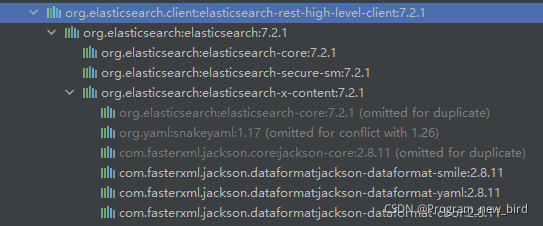
So I looked for the jar package in lib and found that Jackson’s package was introduced. However, no dependency is introduced into the POM file. I checked the related dependencies and found that they were introduced from the high-level client

It seems to be a necessary package for elastic advanced client. To test this conjecture, I deleted all the jar packages of Jackson and started it. The project did start successfully, but an error occurred when sending the index request, that is, in this line of code indexrequest.Source (JSON).

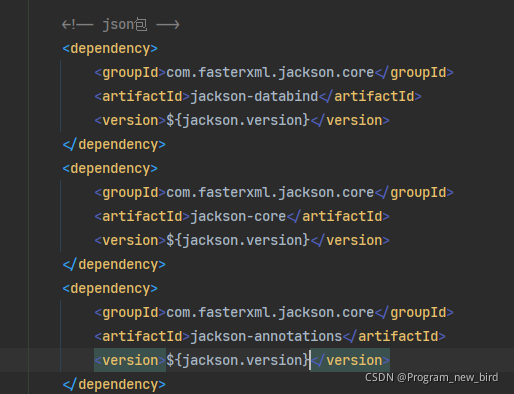
It seems that it is a necessary package. But I didn’t find the right answer on the Internet. To solve this problem, I manually introduced Jackson into

Then delete all the jar packages that do not belong to my imported Jackson.
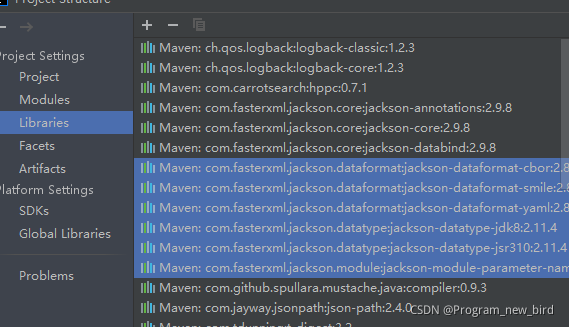
the red box part is the jar package I manually imported, and the blue part is the jar package automatically imported by the advanced client. Manually delete the jar package in blue. The measured items can be started normally and the index request can be sent

However, there is a fatal problem, that is, if reload maven, the jar package in the blue part will be automatically introduced. To solve this problem, we must first find out which jar packages are introduced into our POM file, and then ignore these jar packages using the exclusion method. Finally, my POM file is shown below


    <dependencies>
        <dependency>
            <groupId>org.springframework.boot</groupId>
            <artifactId>spring-boot-starter-web</artifactId>
            <version>2.3.12.RELEASE</version>
            <exclusions>
                <exclusion>
                    <groupId>com.fasterxml.jackson.datatype</groupId>
                    <artifactId>jackson-datatype-jdk8</artifactId>
                </exclusion>
                <exclusion>
                    <groupId>com.fasterxml.jackson.datatype</groupId>
                    <artifactId>jackson-datatype-jsr310</artifactId>
                </exclusion>
            </exclusions>
        </dependency>

        <dependency>
            <groupId>org.elasticsearch.client</groupId>
            <artifactId>elasticsearch-rest-high-level-client</artifactId>
            <version>7.2.1</version>
            <exclusions>
                <exclusion>
                    <groupId>com.fasterxml</groupId>
                    <artifactId>jackson-xml-databind</artifactId>
                </exclusion>
                <exclusion>
                    <groupId>com.fasterxml.jackson.core</groupId>
                    <artifactId>jackson-core</artifactId>
                </exclusion>
                <exclusion>
                    <groupId>com.fasterxml.jackson.dataformat</groupId>
                    <artifactId>jackson-dataformat-smile</artifactId>
                </exclusion>
                <exclusion>
                    <groupId>com.fasterxml.jackson.dataformat</groupId>
                    <artifactId>jackson-dataformat-yaml</artifactId>
                </exclusion>
                <exclusion>
                    <groupId>com.fasterxml.jackson.dataformat</groupId>
                    <artifactId>jackson-dataformat-cbor</artifactId>
                </exclusion>
            </exclusions>
        </dependency>

        <!-- json包 -->
        <dependency>
            <groupId>com.fasterxml.jackson.core</groupId>
            <artifactId>jackson-databind</artifactId>
            <version>${jackson.version}</version>
        </dependency>
        <dependency>
            <groupId>com.fasterxml.jackson.core</groupId>
            <artifactId>jackson-core</artifactId>
            <version>${jackson.version}</version>
        </dependency>
        <dependency>
            <groupId>com.fasterxml.jackson.core</groupId>
            <artifactId>jackson-annotations</artifactId>
            <version>${jackson.version}</version>
        </dependency>
    </dependencies>

AttributeError: type object ‘Image‘ has no attribute ‘open‘

AttributeError: type object ‘Image‘ has no attribute ‘open‘

Cause analysis: the calling sequence of image is wrong, because the from PIL import image in the first line conflicts with Tkinter import * in the second line, and Tkinter also contains image class, so you use tkinter.image

Solution: from PIL import image as IMIM

Original call sequence

try:
    from PIL import Image
except ImportError:
    import Image

import tkinter as tk
from tkinter import *
from tkinter import filedialog

Original call sequence

import tkinter as tk
from tkinter import *
from tkinter import filedialog

try:
    from PIL import Image
except ImportError:
    import Image