Author Archives: Robins

[Solved] CentOS Install pycrypto Error: RuntimeError: autoconf error

Solution:  yum -y install gcc


File "/usr/lib64/python3.6/distutils/dist.py", line 974, in run_command
cmd_obj.run()
File "/usr/lib64/python3.6/distutils/command/build.py", line 135, in run
self.run_command(cmd_name)
File "/usr/lib64/python3.6/distutils/cmd.py", line 313, in run_command
self.distribution.run_command(command)
File "/usr/lib64/python3.6/distutils/dist.py", line 974, in run_command
cmd_obj.run()
File "/tmp/pip-build-ydg0qryh/pycrypto/setup.py", line 251, in run
self.run_command(cmd_name)
File "/usr/lib64/python3.6/distutils/cmd.py", line 313, in run_command
self.distribution.run_command(command)
File "/usr/lib64/python3.6/distutils/dist.py", line 974, in run_command
cmd_obj.run()
File "/tmp/pip-build-ydg0qryh/pycrypto/setup.py", line 278, in run
raise RuntimeError("autoconf error")
RuntimeError: autoconf error

----------------------------------------
Command "/usr/bin/python3.6 -u -c "import setuptools, tokenize;__file__='/tmp/pip-build-ydg0qryh/pycrypto/setup.py';f=getattr(tokenize, 'open', open)(__file__);code=f.read().replace('\r\n', '\n');f.close();exec(compile(code, __file__, 'exec'))" install --record /tmp/pip-544nn9hj-record/install-record.txt --single-version-externally-managed --compile" failed with error code 1 in /tmp/pip-build-ydg0qryh/pycrypto/
[Solved] Vue3.0 Error: The component has been registered but not used vue/no-unused-components, Close eslint

Background

When eslint is selected when creating a project, an error will be reported when there are defined but unused components or defined but unused variables.

Note: I use vue3.0.

Cause analysis

That is, the eslint default rule leads to unnecessary error reporting.

Solution:

Modify rules

If eslint is enabled and component is added, an error is reported:

The “EchartsDemo” component has been registered but not used   vue/no-unused-components

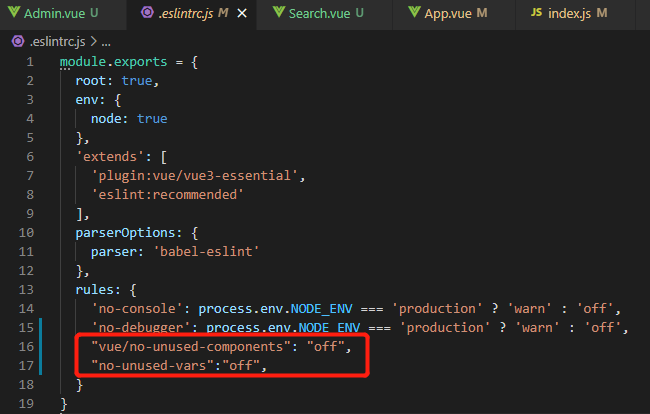
Solution: add the following under eslintconfig of package.JSON or .Eslintrc.JS (if this file exists):

    "rules": {
      "vue/no-unused-components": "off", // Turn off error reporting when there are components defined but not used
      "no-unused-vars": "off" // turn off error reporting when there are defined but unused variables
    }

Note: if both files are modified, eslintrc.JS files have higher priority.

How do I close eslint?

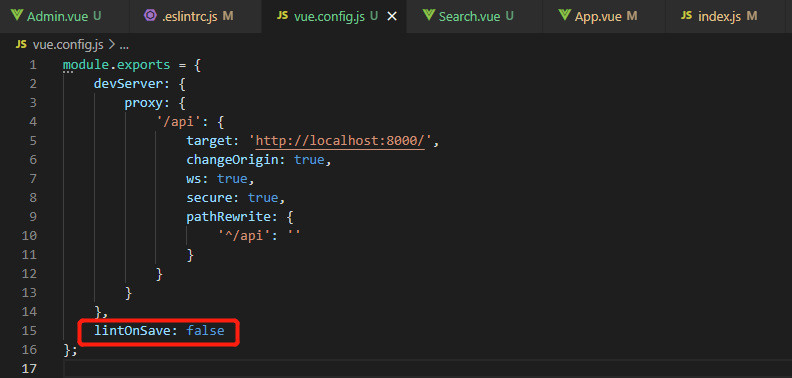
Scheme 1: do not use eslint, of course, you can not select eslint when creating a project, but generally encounter this problem, which is obviously the introduction of eslint.. Scheme 2: close eslint, and add a line of configuration in Vue.Config.JS : lintonsave: false .

[Solved] java.sql.SQLException: Unsupported character encoding ‘utf-8

An error is reported when running connection pool in idea: java.sql.sqlexception: Unsupported character encoding ‘UTF-8’

//run   
public static void main(String[] args) throws SQLException {
        ConPool pool = new ConPool("mysql");
        pool.initPool(5);
        PoolCon borrow = pool.borrow();
        ResultSet resultSet = borrow.getCon().createStatement().executeQuery("select * from master_tab");
        while (resultSet.next()) {
            System.out.println(resultSet.getString("name"));
        }
    }

Error reporting interface:

java.sql.SQLException: Unsupported character encoding 'utf-8
			'.
	at com.mysql.jdbc.SQLError.createSQLException(SQLError.java:965)
	at com.mysql.jdbc.SQLError.createSQLException(SQLError.java:898)
	at com.mysql.jdbc.SQLError.createSQLException(SQLError.java:887)
	at com.mysql.jdbc.SQLError.createSQLException(SQLError.java:861)
	at com.mysql.jdbc.ConnectionPropertiesImpl.postInitialization(ConnectionPropertiesImpl.java:2575)
	at com.mysql.jdbc.ConnectionPropertiesImpl.initializeProperties(ConnectionPropertiesImpl.java:2545)
	at com.mysql.jdbc.ConnectionImpl.initializeDriverProperties(ConnectionImpl.java:3143)
	at com.mysql.jdbc.ConnectionImpl.<init>(ConnectionImpl.java:762)
	at com.mysql.jdbc.JDBC4Connection.<init>(JDBC4Connection.java:47)
	at sun.reflect.NativeConstructorAccessorImpl.newInstance0(Native Method)
	at sun.reflect.NativeConstructorAccessorImpl.newInstance(NativeConstructorAccessorImpl.java:62)
	at sun.reflect.DelegatingConstructorAccessorImpl.newInstance(DelegatingConstructorAccessorImpl.java:45)
	at java.lang.reflect.Constructor.newInstance(Constructor.java:423)
	at com.mysql.jdbc.Util.handleNewInstance(Util.java:425)
	at com.mysql.jdbc.ConnectionImpl.getInstance(ConnectionImpl.java:386)
	at com.mysql.jdbc.NonRegisteringDriver.connect(NonRegisteringDriver.java:330)
	at java.sql.DriverManager.getConnection(DriverManager.java:664)
	at java.sql.DriverManager.getConnection(DriverManager.java:247)
	at cn.kgc.base.ConPool.con(ConPool.java:82)
	at cn.kgc.base.ConPool.initPool(ConPool.java:96)
	at cn.kgc.base.ConPool.main(ConPool.java:149)
java.sql.SQLException: Unsupported character encoding 'utf-8
			'.
	at com.mysql.jdbc.SQLError.createSQLException(SQLError.java:965)
	at com.mysql.jdbc.SQLError.createSQLException(SQLError.java:898)
	at com.mysql.jdbc.SQLError.createSQLException(SQLError.java:887)
	at com.mysql.jdbc.SQLError.createSQLException(SQLError.java:861)
	at com.mysql.jdbc.ConnectionPropertiesImpl.postInitialization(ConnectionPropertiesImpl.java:2575)
	at com.mysql.jdbc.ConnectionPropertiesImpl.initializeProperties(ConnectionPropertiesImpl.java:2545)
	at com.mysql.jdbc.ConnectionImpl.initializeDriverProperties(ConnectionImpl.java:3143)
	at com.mysql.jdbc.ConnectionImpl.<init>(ConnectionImpl.java:762)
	at com.mysql.jdbc.JDBC4Connection.<init>(JDBC4Connection.java:47)
	at sun.reflect.NativeConstructorAccessorImpl.newInstance0(Native Method)
	at sun.reflect.NativeConstructorAccessorImpl.newInstance(NativeConstructorAccessorImpl.java:62)
	at sun.reflect.DelegatingConstructorAccessorImpl.newInstance(DelegatingConstructorAccessorImpl.java:45)
	at java.lang.reflect.Constructor.newInstance(Constructor.java:423)
	at com.mysql.jdbc.Util.handleNewInstance(Util.java:425)
	at com.mysql.jdbc.ConnectionImpl.getInstance(ConnectionImpl.java:386)
	at com.mysql.jdbc.NonRegisteringDriver.connect(NonRegisteringDriver.java:330)
	at java.sql.DriverManager.getConnection(DriverManager.java:664)
	at java.sql.DriverManager.getConnection(DriverManager.java:247)
	at cn.kgc.base.ConPool.con(ConPool.java:82)
	at cn.kgc.base.ConPool.initPool(ConPool.java:96)
	at cn.kgc.base.ConPool.main(ConPool.java:149)
java.sql.SQLException: Unsupported character encoding 'utf-8
			'.
	at com.mysql.jdbc.SQLError.createSQLException(SQLError.java:965)
	at com.mysql.jdbc.SQLError.createSQLException(SQLError.java:898)
	at com.mysql.jdbc.SQLError.createSQLException(SQLError.java:887)
	at com.mysql.jdbc.SQLError.createSQLException(SQLError.java:861)
	at com.mysql.jdbc.ConnectionPropertiesImpl.postInitialization(ConnectionPropertiesImpl.java:2575)
	at com.mysql.jdbc.ConnectionPropertiesImpl.initializeProperties(ConnectionPropertiesImpl.java:2545)
	at com.mysql.jdbc.ConnectionImpl.initializeDriverProperties(ConnectionImpl.java:3143)
	at com.mysql.jdbc.ConnectionImpl.<init>(ConnectionImpl.java:762)
	at com.mysql.jdbc.JDBC4Connection.<init>(JDBC4Connection.java:47)
	at sun.reflect.NativeConstructorAccessorImpl.newInstance0(Native Method)
	at sun.reflect.NativeConstructorAccessorImpl.newInstance(NativeConstructorAccessorImpl.java:62)
	at sun.reflect.DelegatingConstructorAccessorImpl.newInstance(DelegatingConstructorAccessorImpl.java:45)
	at java.lang.reflect.Constructor.newInstance(Constructor.java:423)
	at com.mysql.jdbc.Util.handleNewInstance(Util.java:425)
	at com.mysql.jdbc.ConnectionImpl.getInstance(ConnectionImpl.java:386)
	at com.mysql.jdbc.NonRegisteringDriver.connect(NonRegisteringDriver.java:330)
	at java.sql.DriverManager.getConnection(DriverManager.java:664)
	at java.sql.DriverManager.getConnection(DriverManager.java:247)
	at cn.kgc.base.ConPool.con(ConPool.java:82)
	at cn.kgc.base.ConPool.initPool(ConPool.java:96)
	at cn.kgc.base.ConPool.main(ConPool.java:149)
java.sql.SQLException: Unsupported character encoding 'utf-8
			'.
	at com.mysql.jdbc.SQLError.createSQLException(SQLError.java:965)
	at com.mysql.jdbc.SQLError.createSQLException(SQLError.java:898)
	at com.mysql.jdbc.SQLError.createSQLException(SQLError.java:887)
	at com.mysql.jdbc.SQLError.createSQLException(SQLError.java:861)
	at com.mysql.jdbc.ConnectionPropertiesImpl.postInitialization(ConnectionPropertiesImpl.java:2575)
	at com.mysql.jdbc.ConnectionPropertiesImpl.initializeProperties(ConnectionPropertiesImpl.java:2545)
	at com.mysql.jdbc.ConnectionImpl.initializeDriverProperties(ConnectionImpl.java:3143)
	at com.mysql.jdbc.ConnectionImpl.<init>(ConnectionImpl.java:762)
	at com.mysql.jdbc.JDBC4Connection.<init>(JDBC4Connection.java:47)
	at sun.reflect.NativeConstructorAccessorImpl.newInstance0(Native Method)
	at sun.reflect.NativeConstructorAccessorImpl.newInstance(NativeConstructorAccessorImpl.java:62)
	at sun.reflect.DelegatingConstructorAccessorImpl.newInstance(DelegatingConstructorAccessorImpl.java:45)
	at java.lang.reflect.Constructor.newInstance(Constructor.java:423)
	at com.mysql.jdbc.Util.handleNewInstance(Util.java:425)
	at com.mysql.jdbc.ConnectionImpl.getInstance(ConnectionImpl.java:386)
	at com.mysql.jdbc.NonRegisteringDriver.connect(NonRegisteringDriver.java:330)
	at java.sql.DriverManager.getConnection(DriverManager.java:664)
	at java.sql.DriverManager.getConnection(DriverManager.java:247)
	at cn.kgc.base.ConPool.con(ConPool.java:82)
	at cn.kgc.base.ConPool.initPool(ConPool.java:96)
	at cn.kgc.base.ConPool.main(ConPool.java:149)
java.sql.SQLException: Unsupported character encoding 'utf-8
			'.
	at com.mysql.jdbc.SQLError.createSQLException(SQLError.java:965)
	at com.mysql.jdbc.SQLError.createSQLException(SQLError.java:898)
	at com.mysql.jdbc.SQLError.createSQLException(SQLError.java:887)
	at com.mysql.jdbc.SQLError.createSQLException(SQLError.java:861)
	at com.mysql.jdbc.ConnectionPropertiesImpl.postInitialization(ConnectionPropertiesImpl.java:2575)
	at com.mysql.jdbc.ConnectionPropertiesImpl.initializeProperties(ConnectionPropertiesImpl.java:2545)
	at com.mysql.jdbc.ConnectionImpl.initializeDriverProperties(ConnectionImpl.java:3143)
	at com.mysql.jdbc.ConnectionImpl.<init>(ConnectionImpl.java:762)
	at com.mysql.jdbc.JDBC4Connection.<init>(JDBC4Connection.java:47)
	at sun.reflect.NativeConstructorAccessorImpl.newInstance0(Native Method)
	at sun.reflect.NativeConstructorAccessorImpl.newInstance(NativeConstructorAccessorImpl.java:62)
	at sun.reflect.DelegatingConstructorAccessorImpl.newInstance(DelegatingConstructorAccessorImpl.java:45)
	at java.lang.reflect.Constructor.newInstance(Constructor.java:423)
	at com.mysql.jdbc.Util.handleNewInstance(Util.java:425)
	at com.mysql.jdbc.ConnectionImpl.getInstance(ConnectionImpl.java:386)
	at com.mysql.jdbc.NonRegisteringDriver.connect(NonRegisteringDriver.java:330)
	at java.sql.DriverManager.getConnection(DriverManager.java:664)
	at java.sql.DriverManager.getConnection(DriverManager.java:247)
	at cn.kgc.base.ConPool.con(ConPool.java:82)
	at cn.kgc.base.ConPool.initPool(ConPool.java:96)
	at cn.kgc.base.ConPool.main(ConPool.java:149)
Pool connection object initialization not yet halfway exception

Process finished with exit code -4

Problems found in XML file: <value></value> The code is too long when writing, and the </value> Line breaks were made.

<configuration>
	<datasource id="mysql">
		<property>
			<name>driver</name>
			<value>com.mysql.jdbc.Driver</value>
		</property>
		<property>
			<name>url</name>
			<value>jdbc:mysql://192.168.1.200:3306/master_slave_copy?useSSL=true&amp;useUnicode=true&amp;characterEncoding=utf-8
			</value>//Error
		</property>
		<property>
			<name>username</name>
			<value>root</value>
		</property>
		<property>
			<name>password</name>
			<value>ok</value>
		</property>
	</datasource>
	<datasource id="oracle"></datasource>
</configuration>

Solution: add </value> Adjust to <value> Same line

<configuration>
	<datasource id="mysql">
		<property>
			<name>driver</name>
			<value>com.mysql.jdbc.Driver</value>
		</property>
		<property>
			<name>url</name>
			<value>jdbc:mysql://192.168.1.200:3306/master_slave_copy?useSSL=true&amp;useUnicode=true&amp;characterEncoding=utf-8</value>
		</property>
		<property>
			<name>username</name>
			<value>root</value>
		</property>
		<property>
			<name>password</name>
			<value>ok</value>
		</property>
	</datasource>
	<datasource id="oracle"></datasource>
</configuration>

Run successfully!

Android Error: META-INF/DEPENDENCIES [How to Solve]

3 files found with path ‘META-INF/DEPENDENCIES’.
Adding a packagingOptions block may help, please refer to
https://google.github.io/android-gradle-dsl/current/com.android.build.gradle.internal.dsl.PackagingOptions.html
for more information

Probably means: Error: Multiple files found in OS independent path ‘META-INF/DEPENDENCIES’
Solution:
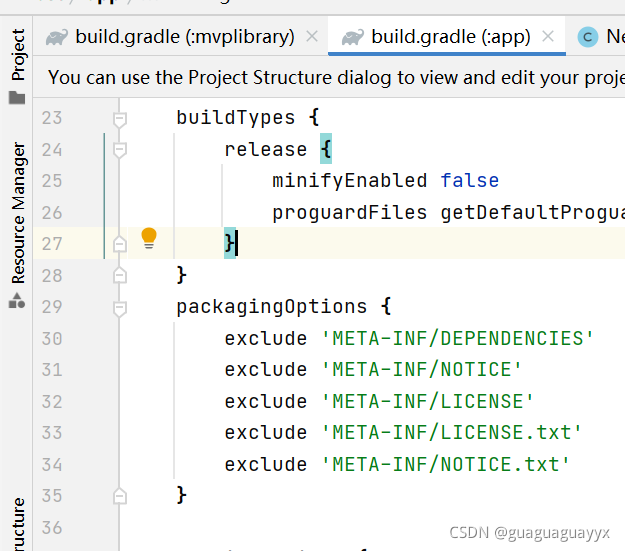
Add to the build.gradle where the problem occurs

packagingOptions {
    exclude 'META-INF/DEPENDENCIES'
    exclude 'META-INF/NOTICE'
    exclude 'META-INF/LICENSE'
    exclude 'META-INF/LICENSE.txt'
    exclude 'META-INF/NOTICE.txt'
}

The general principle is:

In Android gradle construction, it is not allowed to include the same file with the same path in the output multiple times. In your construction, there are two meta-inf/dependencies files from different places. Since your application does not need this file at all, the easiest way is to tell the construction system to ignore it completely, which is the role of the exclude instruction

Another PickFirst instruction tells the build system to keep one copy; There are some details in Android gradle plug-in 0.7.0: “duplicate files during APK packaging”

[Solved] OpenCV VideoWriter Error: FFMPEG: tag ‘MP4V‘ is not supported with codec id 12 and format mp4

1. Problem code

A few months ago, a piece of code could be executed normally. Some of the codes are as follows:

def buildVideoByCV():
    videoMake = cv2.VideoWriter()
    fourcc = cv2.VideoWriter_fourcc(*'MP4V') #https://blog.csdn.net/whudee/article/details/108689420
    fps = 12
    videoMake.open(r"g:\video\lightShowCV.MP4", fourcc, fps, (800,600))

    for t in range(65*fps):
        img = makeframe(t*1.0/fps)
        videoMake.write(img)
        if t%20==0:print(f'\r视频制作进度:{(t*100.0)/(66*fps):4.2f}%',end='')
    videoMake.release()

2. Error message

Error in execution today:

Video production progress: 95.96%OpenCV: FFMPEG: tag 0x5634504d/'MP4V' is not supported with codec id 12 and format 'mp4/MP4 (MPEG-4 Part 14)'
OpenCV: FFMPEG: fallback to use tag 0x7634706d/'mp4v'

3. Solution

Set FourCC = cv2.videowriter_FourCC (*'mp4v') is changed to: FourCC = CV2.Videowriter_FourCC (*'mp4v') , just change the encoded uppercase mp4v to lowercase.

4. Summary

This paper introduces the solution to the error reported by opencv videowriter: ffmpeg: tag ‘mp4v’ is not supported. You only need to replace the code ‘mp4v’ with ‘mp4v’.

Vue Install less Error: While resolving: [email protected]

Vue Install  less Error: While resolving: [email protected]

F:\Workspace\project\hhhs\wudslyh5\big-data\hblvbigdata>npm install less less-loader --save-dev
npm ERR! code ERESOLVE
npm ERR! ERESOLVE could not resolve
npm ERR!
npm ERR! While resolving: [email protected]
npm ERR! Found: [email protected]
npm ERR! node_modules/webpack
npm ERR!   peer webpack@"^4.0.0" from @intervolga/[email protected]
npm ERR!   node_modules/@intervolga/optimize-cssnano-plugin
npm ERR!     @intervolga/optimize-cssnano-plugin@"^1.0.5" from @vue/[email protected]
npm ERR!     node_modules/@vue/cli-service
npm ERR!       peer @vue/cli-service@"^3.0.0 || ^4.0.0-0" from @vue/[email protected]
npm ERR!       node_modules/@vue/cli-plugin-babel
npm ERR!         dev @vue/cli-plugin-babel@"~4.5.0" from the root project
npm ERR!       4 more (@vue/cli-plugin-eslint, @vue/cli-plugin-router, ...)
npm ERR!   peer webpack@"^4.0.0 || ^5.0.0" from @soda/[email protected]
npm ERR!   node_modules/@soda/friendly-errors-webpack-plugin
npm ERR!     @soda/friendly-errors-webpack-plugin@"^1.7.1" from @vue/[email protected]
npm ERR!     node_modules/@vue/cli-service
npm ERR!       peer @vue/cli-service@"^3.0.0 || ^4.0.0-0" from @vue/[email protected]
npm ERR!       node_modules/@vue/cli-plugin-babel
npm ERR!         dev @vue/cli-plugin-babel@"~4.5.0" from the root project
npm ERR!       4 more (@vue/cli-plugin-eslint, @vue/cli-plugin-router, ...)
npm ERR!   19 more (@vue/cli-plugin-babel, @vue/cli-plugin-eslint, ...)
npm ERR!
npm ERR! Could not resolve dependency:
npm ERR! dev less-loader@"*" from the root project
npm ERR!
npm ERR! Conflicting peer dependency: [email protected]
npm ERR! node_modules/webpack
npm ERR!   peer webpack@"^5.0.0" from [email protected]
npm ERR!   node_modules/less-loader
npm ERR!     dev less-loader@"*" from the root project
npm ERR!
npm ERR! Fix the upstream dependency conflict, or retry
npm ERR! this command with --force, or --legacy-peer-deps
npm ERR! to accept an incorrect (and potentially broken) dependency resolution.
npm ERR!
npm ERR! See C:\Users\Administrator\AppData\Local\npm-cache\eresolve-report.txt for a full report.

npm ERR! A complete log of this run can be found in:
npm ERR!     C:\Users\Administrator\AppData\Local\npm-cache\_logs\2021-11-30T09_15_59_630Z-debug.log

Solution:

Error reason: the installed version is too high

Solution:

Delete the previous version: NPM uninstall less loader download the specified version: NPM install less- [email protected] -D

If an error is still reported, the file node_Modules can be removed, Download NPM install again

How to Solve QT uses MSVC compiler to code error

QT uses MSVC compiler, and the code reports an error

1. Premise

After inspection, it is confirmed that your code is correct, and the error reported by QT creator is a pure false alarm.

2. Error examples

[error] Constants with newlines
[error] xxx is not a member of xxx
[error] Syntax error, missing ;
...

3. Solutions

Add the following configuration in *.Pro file.

win32-msvc*: {
    QMAKE_CFLAGS *= /utf-8
    QMAKE_CXXFLAGS *= /utf-8
}

[Solved] Sqlyog always reports an error when creating a new connection.

Case 1:

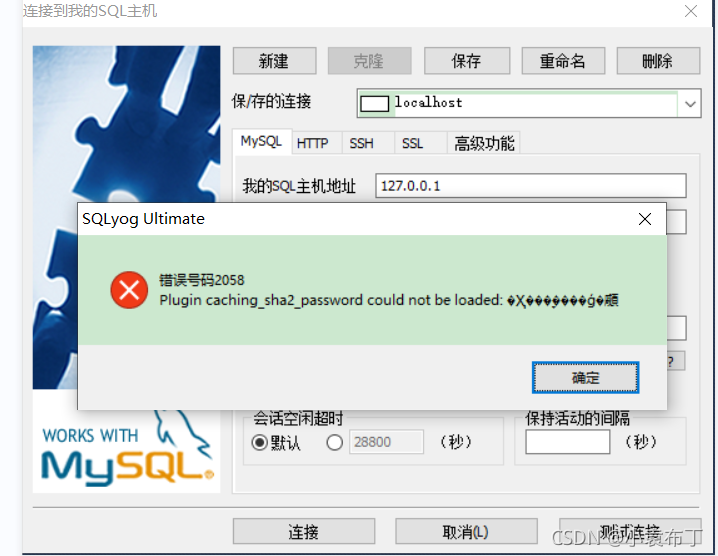
In versions before MySQL 8, the encryption rule is mysql_native_Password, and after MySQL 8, the encryption rule is caching_sha2_password。 There are two ways to solve the problem. The first is to upgrade the graphical interface tool version, and the second is to restore the MySQL user login password encryption rules to MySQL_native_password.
the second solution is as follows. After logging into MySQL database with the command line, execute the following command to modify the user password encryption rules and update the user password. Here, modify the user name as“ root@localhost ”The user password rule of is “mysql_native_password”, and the password value is “OK”, as shown in the figure.

//Using mysql database
USE mysql; 

//change the password rule and password for the 'root'@'localhost' user
ALTER USER 'root'@'localhost' IDENTIFIED WITH mysql_native_password BY 'ok'; 

//refresh permissions
FLUSH PRIVILEGES;

Situation II

The virtual machine MySQL is connected, and you need to perform the authorization operation
authorize the root user:
grant all on. To ‘root’ @ ‘%’ identified by ‘use password’
flush privileges;

bandersnatch Error: No module Named [How to Solve]

ERROR: Unable to load entry point swift_plugin = bandersnatch_storage_plugins.swift:SwiftStorage: No module named ‘keystoneauth1’
This solution is missing at the time of installation due to python version, solution:
pip3 install keystoneauth1
Collecting keystoneauth1
Downloading https://files.pythonhosted.org/packages/7c/2e/dcfd2412941244e8a00a568654ce1687a1cab7be05d634ada0b5a078d0a3/keystoneauth1-4.4.0-py3-none-any.whl (314kB)
100% |████████████████████████████████| 317kB 240kB/s
Collecting pbr!=2.1.0,>=2.0.0 (from keystoneauth1)
Downloading https://files.pythonhosted.org/packages/73/c3/d45171501210b0305f4c93fafe50950f0c2228e87034ceb51744bd03ff08/pbr-5.8.0-py2.py3-none-any.whl (112kB)
100% |████████████████████████████████| 122kB 184kB/s
Requirement already satisfied: requests>=2.14.2 in /usr/lib/python3/dist-packages (from keystoneauth1)
Collecting stevedore>=1.20.0 (from keystoneauth1)
Downloading https://files.pythonhosted.org/packages/7a/bc/fcce9e50da73ea23af6d236e05e15db8a02da1099a5e0a479451bcea3833/stevedore-3.5.0-py3-none-any.whl (49kB)
100% |████████████████████████████████| 51kB 166kB/s
Requirement already satisfied: six>=1.10.0 in /usr/lib/python3/dist-packages (from keystoneauth1)
Collecting iso8601>=0.1.11 (from keystoneauth1)
Downloading https://files.pythonhosted.org/packages/df/e5/589bc81d410139ec4e4f37d9af5a50987566abf6d087b3c4fbed708109a9/iso8601-1.0.2-py3-none-any.whl
Collecting os-service-types>=1.2.0 (from keystoneauth1)
Downloading https://files.pythonhosted.org/packages/10/2d/318b2b631f68e0fc221ba8f45d163bf810cdb795cf242fe85ad3e5d45639/os_service_types-1.7.0-py2.py3-none-any.whl
Collecting importlib-metadata>=1.7.0; python_version < “3.8” (from stevedore>=1.20.0->keystoneauth1)
Downloading https://files.pythonhosted.org/packages/c4/1f/e2238896149df09953efcc53bdcc7d23597d6c53e428c30e572eda5ec6eb/importlib_metadata-4.8.2-py3-none-any.whl
Collecting zipp>=0.5 (from importlib-metadata>=1.7.0; python_version < “3.8”->stevedore>=1.20.0->keystoneauth1)
Using cached https://files.pythonhosted.org/packages/bd/df/d4a4974a3e3957fd1c1fa3082366d7fff6e428ddb55f074bf64876f8e8ad/zipp-3.6.0-py3-none-any.whl
Requirement already satisfied: typing-extensions>=3.6.4; python_version < “3.8” in /usr/local/lib/python3.7/dist-packages (from importlib-metadata>=1.7.0; python_version < “3.8”->stevedore>=1.20.0->keystoneauth1)
Installing collected packages: pbr, zipp, importlib-metadata, stevedore, iso8601, os-service-types, keystoneauth1
Successfully installed importlib-metadata-4.8.2 iso8601-1.0.2 keystoneauth1-4.4.0 os-service-types-1.7.0 pbr-5.8.0 stevedore-3.5.0 zipp-3.6.0


ERROR: Unable to load entry point swift_plugin = bandersnatch_storage_plugins.swift:SwiftStorage: No module named ‘swiftclient’
This one was installed with python-swiftclient missing.
Solution:
pip3 install python-swiftclient
Collecting python-swiftclient
Downloading https://files.pythonhosted.org/packages/f6/5f/6784a830e618a89272f8efee784930e614be285a6d3e82986916076fe69e/python_swiftclient-3.13.0-py2.py3-none-any.whl (86kB)
100% |████████████████████████████████| 92kB 281kB/s
Requirement already satisfied: six>=1.9.0 in /usr/lib/python3/dist-packages (from python-swiftclient)
Requirement already satisfied: requests>=1.1.0 in /usr/lib/python3/dist-packages (from python-swiftclient)
Installing collected packages: python-swiftclient
Successfully installed python-swiftclient-3.13.0

[Solved] nodejs express Error: MulterError: Unexpected field

Problems encountered when using express to write and upload files

The front-end Axios and the back-end express use the multer middleware. They always report the error of the server 500 when uploading. They repeatedly check the code and check the multer documents, and finally find the problem.

No more nonsense, just go to the code:

Back end:

router.post('/upload',upload.single('img'),function(req,res,next){
    console.log(req.file);
})

front end:

formdata.append('img',imgfile);

here, the name in upload.Single() should be consistent with the field name in the front end formdata