Author Archives: Robins

[Solved] MySQL workbench Error: SSL connection error: SSL is required but the server doesn‘t support it.

Question:

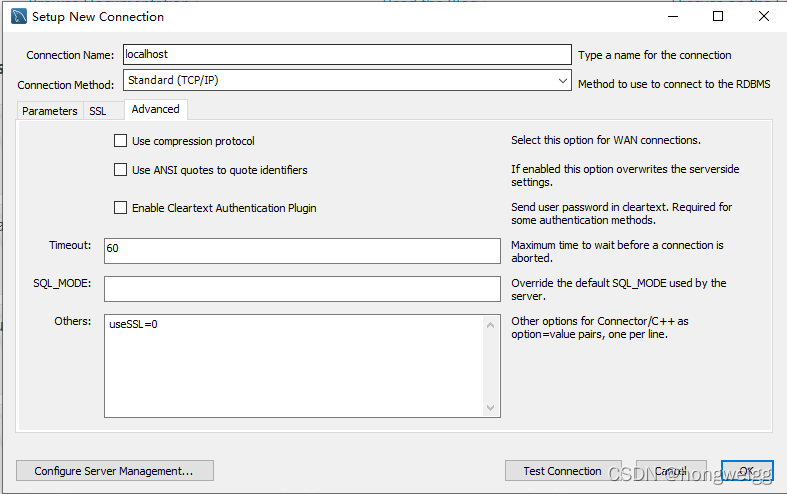
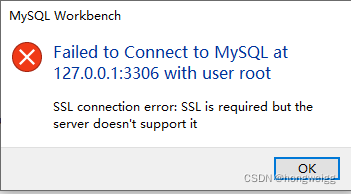
MySQL workbench 8.0. The 27 version connects to the local MySQL database and reports SSL connection error: SSL is required but the server doesn’t support it

Solution:

If SSL is not enabled, enter the parameter: usessl = 0 in the others box on the advance tab page, and then you can connect.

How to Solve Error: RuntimeError CUDA out of memory

Error: RuntimeError: CUDA out of memory.
Error Messages:

Traceback (most recent call last):
  File "xxx.py", line 110, in <module>
    loss.backward()
  File "/nfsshare/apps/anaconda3/lib/python3.7/site-packages/torch/tensor.py", line 185, in backward
    torch.autograd.backward(self, gradient, retain_graph, create_graph)
  File "/nfsshare/apps/anaconda3/lib/python3.7/site-packages/torch/autograd/__init__.py", line 127, in backward
    allow_unreachable=True)  # allow_unreachable flag
RuntimeError: CUDA out of memory. Tried to allocate 132.00 MiB (GPU 0; 15.78 GiB total capacity; 13.69 GiB already allocated; 91.50 MiB free; 14.53 GiB reserved in total by PyTorch)
Exception raised from malloc at /pytorch/c10/cuda/CUDACachingAllocator.cpp:272 (most recent call first):
frame #0: c10::Error::Error(c10::SourceLocation, std::string) + 0x42 (0x14c9ce19a1e2 in /nfsshare/apps/anaconda3/lib/python3.7/site-packages/torch/lib/libc10.so)
frame #1: <unknown function> + 0x1e64b (0x14c9ce3f064b in /nfsshare/apps/anaconda3/lib/python3.7/site-packages/torch/lib/libc10_cuda.so)
frame #2: <unknown function> + 0x1f464 (0x14c9ce3f1464 in /nfsshare/apps/anaconda3/lib/python3.7/site-packages/torch/lib/libc10_cuda.so)
frame #3: <unknown function> + 0x1faa1 (0x14c9ce3f1aa1 in /nfsshare/apps/anaconda3/lib/python3.7/site-packages/torch/lib/libc10_cuda.so)
frame #4: at::native::empty_cuda(c10::ArrayRef<long>, c10::TensorOptions const&, c10::optional<c10::MemoryFormat>) + 0x11e (0x14c9d10fc90e in /nfsshare/apps/anaconda3/lib/python3.7/site-packages/torch/lib/libtorch_cuda.so)
frame #5: <unknown function> + 0xf33949 (0x14c9cf536949 in /nfsshare/apps/anaconda3/lib/python3.7/site-packages/torch/lib/libtorch_cuda.so)
frame #6: <unknown function> + 0xf4d777 (0x14c9cf550777 in /nfsshare/apps/anaconda3/lib/python3.7/site-packages/torch/lib/libtorch_cuda.so)
frame #7: <unknown function> + 0x10e9c7d (0x14ca0a2ecc7d in /nfsshare/apps/anaconda3/lib/python3.7/site-packages/torch/lib/libtorch_cpu.so)
frame #8: <unknown function> + 0x10e9f97 (0x14ca0a2ecf97 in /nfsshare/apps/anaconda3/lib/python3.7/site-packages/torch/lib/libtorch_cpu.so)
frame #9: at::empty(c10::ArrayRef<long>, c10::TensorOptions const&, c10::optional<c10::MemoryFormat>) + 0xfa (0x14ca0a3f7a1a in /nfsshare/apps/anaconda3/lib/python3.7/site-packages/torch/lib/libtorch_cpu.so)
frame #10: at::native::mm_cuda(at::Tensor const&, at::Tensor const&) + 0x6c (0x14c9d05ebffc in /nfsshare/apps/anaconda3/lib/python3.7/site-packages/torch/lib/libtorch_cuda.so)
frame #11: <unknown function> + 0xf22a20 (0x14c9cf525a20 in /nfsshare/apps/anaconda3/lib/python3.7/site-packages/torch/lib/libtorch_cuda.so)
frame #12: <unknown function> + 0xa56530 (0x14ca09c59530 in /nfsshare/apps/anaconda3/lib/python3.7/site-packages/torch/lib/libtorch_cpu.so)
frame #13: at::Tensor c10::Dispatcher::call<at::Tensor, at::Tensor const&, at::Tensor const&>(c10::TypedOperatorHandle<at::Tensor (at::Tensor const&, at::Tensor const&)> const&, at::Tensor const&, at::Tensor const&) const + 0xbc (0x14ca0a44181c in /nfsshare/apps/anaconda3/lib/python3.7/site-packages/torch/lib/libtorch_cpu.so)
frame #14: at::mm(at::Tensor const&, at::Tensor const&) + 0x4b (0x14ca0a3926ab in /nfsshare/apps/anaconda3/lib/python3.7/site-packages/torch/lib/libtorch_cpu.so)
frame #15: <unknown function> + 0x2ed0a2f (0x14ca0c0d3a2f in /nfsshare/apps/anaconda3/lib/python3.7/site-packages/torch/lib/libtorch_cpu.so)
frame #16: <unknown function> + 0xa56530 (0x14ca09c59530 in /nfsshare/apps/anaconda3/lib/python3.7/site-packages/torch/lib/libtorch_cpu.so)
frame #17: at::Tensor c10::Dispatcher::call<at::Tensor, at::Tensor const&, at::Tensor const&>(c10::TypedOperatorHandle<at::Tensor (at::Tensor const&, at::Tensor const&)> const&, at::Tensor const&, at::Tensor const&) const + 0xbc (0x14ca0a44181c in /nfsshare/apps/anaconda3/lib/python3.7/site-packages/torch/lib/libtorch_cpu.so)
frame #18: at::Tensor::mm(at::Tensor const&) const + 0x4b (0x14ca0a527cab in /nfsshare/apps/anaconda3/lib/python3.7/site-packages/torch/lib/libtorch_cpu.so)
frame #19: <unknown function> + 0x2d11c34 (0x14ca0bf14c34 in /nfsshare/apps/anaconda3/lib/python3.7/site-packages/torch/lib/libtorch_cpu.so)
frame #20: torch::autograd::generated::MmBackward::apply(std::vector<at::Tensor, std::allocator<at::Tensor> >&&) + 0x294 (0x14ca0bf30814 in /nfsshare/apps/anaconda3/lib/python3.7/site-packages/torch/lib/libtorch_cpu.so)
frame #21: <unknown function> + 0x3375bb7 (0x14ca0c578bb7 in /nfsshare/apps/anaconda3/lib/python3.7/site-packages/torch/lib/libtorch_cpu.so)
frame #22: torch::autograd::Engine::evaluate_function(std::shared_ptr<torch::autograd::GraphTask>&, torch::autograd::Node*, torch::autograd::InputBuffer&, std::shared_ptr<torch::autograd::ReadyQueue> const&) + 0x1400 (0x14ca0c574400 in /nfsshare/apps/anaconda3/lib/python3.7/site-packages/torch/lib/libtorch_cpu.so)
frame #23: torch::autograd::Engine::thread_main(std::shared_ptr<torch::autograd::GraphTask> const&) + 0x451 (0x14ca0c574fa1 in /nfsshare/apps/anaconda3/lib/python3.7/site-packages/torch/lib/libtorch_cpu.so)
frame #24: torch::autograd::Engine::thread_init(int, std::shared_ptr<torch::autograd::ReadyQueue> const&, bool) + 0x89 (0x14ca0c56d119 in /nfsshare/apps/anaconda3/lib/python3.7/site-packages/torch/lib/libtorch_cpu.so)
frame #25: torch::autograd::python::PythonEngine::thread_init(int, std::shared_ptr<torch::autograd::ReadyQueue> const&, bool) + 0x4a (0x14ca19d0ddea in /nfsshare/apps/anaconda3/lib/python3.7/site-packages/torch/lib/libtorch_python.so)
frame #26: <unknown function> + 0xbd6df (0x14ca5616b6df in /usr/lib/x86_64-linux-gnu/libstdc++.so.6)
frame #27: <unknown function> + 0x76db (0x14ca5a6356db in /lib/x86_64-linux-gnu/libpthread.so.0)
frame #28: clone + 0x3f (0x14ca5a35ea3f in /lib/x86_64-linux-gnu/libc.so.6)

Solution:
CUDA_LAUNCH_BLOCKING=1 python xx.py failed
Reduce the batch size to solve the problem.

db2 rollforward bufferpool error [How to Solve]

1. Problem: After transferring the online db2 backup file and logs from server A to server B for restoration, no error was reported during the restore process, but an error was reported during the rollforward process of the database, reporting sql1218n there are no pages currently available in bufferpool “”. sqlstate=57011 error, check db2diag report no available free pages, etc.

2. Analysis of the reasons: A server on the library bufferpool set relatively large, in B server is not so large memory, so it will report an error, in forward with topas or nmon for memory observation can be analyzed.

3. Solution: db2 has a global variable db2_override_bpf, you can set this variable, how much to set, according to the memory of the B server for planning, you need to restart db2 after setting to make it effective. Now, according to a backup file, it takes more than three months to rollforward the data, but now it takes one day to roll forward the data of less than 5 days.

4. Then observe the progress of rollforward.

[Solved] Vue Project startup error: no eslint configuration found

rimraf node_ Modules delete node_ modules

Delete package lock json

npm init -y

npm install eslint –save-dev

Add manually the following code is configured for the eslintrc.js  file. The rules can be configured by themselves

module.exports = {
    root: true,
    parserOptions: {
      parser: 'babel-eslint',
      sourceType: 'module'
    },
    env: {
      browser: true,
      node: true,
      es6: true,
    },
    extends: ['plugin:vue/recommended', 'eslint:recommended'],
  
    // add your custom rules here
    //it is base on https://github.com/vuejs/eslint-config-vue
    rules: {
      "vue/max-attributes-per-line": [2, {
        "singleline": 10,
        "multiline": {
          "max": 1,
          "allowFirstLine": false
        }
      }],
      "vue/singleline-html-element-content-newline": "off",
      "vue/multiline-html-element-content-newline":"off",
      "vue/name-property-casing": ["error", "PascalCase"],
      "vue/no-v-html": "off",
      'accessor-pairs': 2,
      'arrow-spacing': [2, {
        'before': true,
        'after': true
      }],
      'block-spacing': [2, 'always'],
      'brace-style': [2, '1tbs', {
        'allowSingleLine': true
      }],
      'camelcase': [0, {
        'properties': 'always'
      }],
      'comma-dangle': [2, 'never'],
      'comma-spacing': [2, {
        'before': false,
        'after': true
      }],
      'comma-style': [2, 'last'],
      'constructor-super': 2,
      'curly': [2, 'multi-line'],
      'dot-location': [2, 'property'],
      'eol-last': 2,
      'eqeqeq': ["error", "always", {"null": "ignore"}],
      'generator-star-spacing': [2, {
        'before': true,
        'after': true
      }],
      'handle-callback-err': [2, '^(err|error)$'],
      'indent': [2, 2, {
        'SwitchCase': 1
      }],
      'jsx-quotes': [2, 'prefer-single'],
      'key-spacing': [2, {
        'beforeColon': false,
        'afterColon': true
      }],
      'keyword-spacing': [2, {
        'before': true,
        'after': true
      }],
      'new-cap': [2, {
        'newIsCap': true,
        'capIsNew': false
      }],
      'new-parens': 2,
      'no-array-constructor': 2,
      'no-caller': 2,
      'no-console': 'off',
      'no-class-assign': 2,
      'no-cond-assign': 2,
      'no-const-assign': 2,
      'no-control-regex': 0,
      'no-delete-var': 2,
      'no-dupe-args': 2,
      'no-dupe-class-members': 2,
      'no-dupe-keys': 2,
      'no-duplicate-case': 2,
      'no-empty-character-class': 2,
      'no-empty-pattern': 2,
      'no-eval': 2,
      'no-ex-assign': 2,
      'no-extend-native': 2,
      'no-extra-bind': 2,
      'no-extra-boolean-cast': 2,
      'no-extra-parens': [2, 'functions'],
      'no-fallthrough': 2,
      'no-floating-decimal': 2,
      'no-func-assign': 2,
      'no-implied-eval': 2,
      'no-inner-declarations': [2, 'functions'],
      'no-invalid-regexp': 2,
      'no-irregular-whitespace': 2,
      'no-iterator': 2,
      'no-label-var': 2,
      'no-labels': [2, {
        'allowLoop': false,
        'allowSwitch': false
      }],
      'no-lone-blocks': 2,
      'no-mixed-spaces-and-tabs': 2,
      'no-multi-spaces': 2,
      'no-multi-str': 2,
      'no-multiple-empty-lines': [2, {
        'max': 1
      }],
      'no-native-reassign': 2,
      'no-negated-in-lhs': 2,
      'no-new-object': 2,
      'no-new-require': 2,
      'no-new-symbol': 2,
      'no-new-wrappers': 2,
      'no-obj-calls': 2,
      'no-octal': 2,
      'no-octal-escape': 2,
      'no-path-concat': 2,
      'no-proto': 2,
      'no-redeclare': 2,
      'no-regex-spaces': 2,
      'no-return-assign': [2, 'except-parens'],
      'no-self-assign': 2,
      'no-self-compare': 2,
      'no-sequences': 2,
      'no-shadow-restricted-names': 2,
      'no-spaced-func': 2,
      'no-sparse-arrays': 2,
      'no-this-before-super': 2,
      'no-throw-literal': 2,
      'no-trailing-spaces': 2,
      'no-undef': 2,
      'no-undef-init': 2,
      'no-unexpected-multiline': 2,
      'no-unmodified-loop-condition': 2,
      'no-unneeded-ternary': [2, {
        'defaultAssignment': false
      }],
      'no-unreachable': 2,
      'no-unsafe-finally': 2,
      'no-unused-vars': [2, {
        'vars': 'all',
        'args': 'none'
      }],
      'no-useless-call': 2,
      'no-useless-computed-key': 2,
      'no-useless-constructor': 2,
      'no-useless-escape': 0,
      'no-whitespace-before-property': 2,
      'no-with': 2,
      'one-var': [2, {
        'initialized': 'never'
      }],
      'operator-linebreak': [2, 'after', {
        'overrides': {
          '?': 'before',
          ':': 'before'
        }
      }],
      'padded-blocks': [2, 'never'],
      'quotes': [2, 'single', {
        'avoidEscape': true,
        'allowTemplateLiterals': true
      }],
      'semi': [2, 'never'],
      'semi-spacing': [2, {
        'before': false,
        'after': true
      }],
      'space-before-blocks': [2, 'always'],
      'space-before-function-paren': [2, 'never'],
      'space-in-parens': [2, 'never'],
      'space-infix-ops': 2,
      'space-unary-ops': [2, {
        'words': true,
        'nonwords': false
      }],
      'spaced-comment': [2, 'always', {
        'markers': ['global', 'globals', 'eslint', 'eslint-disable', '*package', '!', ',']
      }],
      'template-curly-spacing': [2, 'never'],
      'use-isnan': 2,
      'valid-typeof': 2,
      'wrap-iife': [2, 'any'],
      'yield-star-spacing': [2, 'both'],
      'yoda': [2, 'never'],
      'prefer-const': 2,
      'no-debugger': process.env.NODE_ENV === 'production' ?2 : 0,
      'object-curly-spacing': [2, 'always', {
        objectsInObjects: false
      }],
      'array-bracket-spacing': [2, 'never']
    },
    globals: {
      'AMap': false,
      'AMapUI': false,
      '__webpack_public_path__': true
    }
  }
  

Qdox parseexception: syntax error [How to Solve]

preface

Recently, I saw several open source Maven plug-ins that generate Yapi documents. The basic operation is to read the comments in Java code, sort them into corresponding JSON according to the format required by Yapi, and then push them to Yapi server. On a whim, I pulled an open source code library, and then encountered many problems in the process of use, This article talks about how the code parsing library Qbox handles parsing exceptions when parsing code

Open joint

Qbox code base address: https://github.com/paul-hammant/qdox
Exception information thrown

Caused by: com.thoughtworks.qdox.parser.ParseException: syntax error @[10,1] in file:/*****/A.java
    at com.thoughtworks.qdox.parser.impl.Parser.yyerror (Parser.java:1963)
    at com.thoughtworks.qdox.parser.impl.Parser.yyparse (Parser.java:2085)
    at com.thoughtworks.qdox.parser.impl.Parser.parse (Parser.java:1944)
    at com.thoughtworks.qdox.library.SourceLibrary.parse (SourceLibrary.java:232)
    at com.thoughtworks.qdox.library.SourceLibrary.parse (SourceLibrary.java:209)
    at com.thoughtworks.qdox.library.SourceLibrary.addSource (SourceLibrary.java:159)
    at com.thoughtworks.qdox.library.SortedClassLibraryBuilder.addSource (SortedClassLibraryBuilder.java:174)
    at com.thoughtworks.qdox.JavaProjectBuilder.addSource (JavaProjectBuilder.java:151)
    at com.thoughtworks.qdox.JavaProjectBuilder$2.visitFile (JavaProjectBuilder.java:224)
    at com.thoughtworks.qdox.directorywalker.DirectoryScanner.walk (DirectoryScanner.java:103)
    at com.thoughtworks.qdox.directorywalker.DirectoryScanner.walk (DirectoryScanner.java:91)
    at com.thoughtworks.qdox.directorywalker.DirectoryScanner.walk (DirectoryScanner.java:91)
    at com.thoughtworks.qdox.directorywalker.DirectoryScanner.walk (DirectoryScanner.java:91)
    at com.thoughtworks.qdox.directorywalker.DirectoryScanner.walk (DirectoryScanner.java:91)
    at com.thoughtworks.qdox.directorywalker.DirectoryScanner.walk (DirectoryScanner.java:91)
    at com.thoughtworks.qdox.directorywalker.DirectoryScanner.walk (DirectoryScanner.java:91)
    at com.thoughtworks.qdox.directorywalker.DirectoryScanner.walk (DirectoryScanner.java:91)
    at com.thoughtworks.qdox.directorywalker.DirectoryScanner.scan (DirectoryScanner.java:81)
    at com.thoughtworks.qdox.JavaProjectBuilder.addSourceTree (JavaProjectBuilder.java:218)
    at com.thoughtworks.qdox.JavaProjectBuilder.addSourceTree (JavaProjectBuilder.java:205)

Parse exception code file

//package com.example.test.proxy;
//
///**
// *  MyClass
// *
// * @author you_name 2021-12-21 20:02
// */
//public class A {
//}  // line 9  line 10 is blank line


Solution:

        JavaProjectBuilder builder = new JavaProjectBuilder();
        builder.setErrorHandler((e) -> log.warn(e.getMessage()));

Optimize it.

		JavaProjectBuilder builder = new JavaProjectBuilder();
        builder.setErrorHandler((e) -> {
            if (e.getClass().isAssignableFrom(ParseException.class)) {
                log.warn(e.getMessage());
                return;
            }
            throw e;
        });

Error in invoking target [How to Solve]

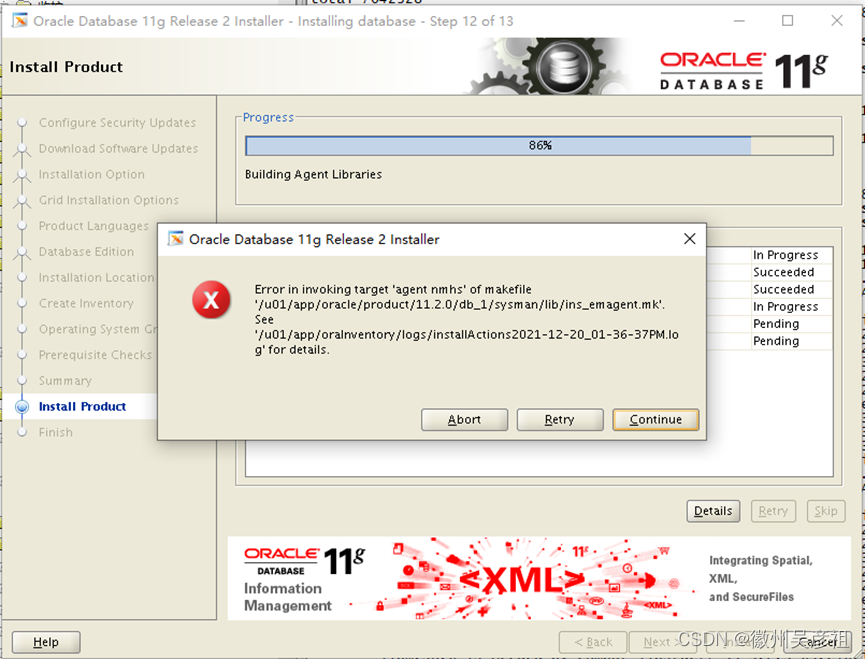
When Oracle 11g is installed on Linux 7, an error in invoking target is reported when the installation process reaches 86%. The screenshot is as follows

solution:

[oracle@emrtest ~]$ cd $ORACLE_HOME/sysman/lib/
[oracle@emrtest lib]$ vi ins_emagent.mk

Find:
$(SYSMANBIN)emdctl:
        $(MK_EMAGENT_NMECTL)

Modify to:
$(SYSMANBIN)emdctl:
        $(MK_EMAGENT_NMECTL) -lnnz11

Click Retry after the change

[Solved] ERROR #42601 syntax error at or near “)“


Background

orm:go-pg

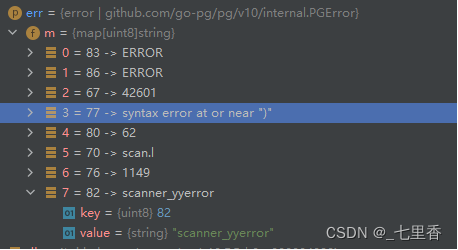
Execute whereIn error: Error #42601} syntax} error at} or “near”)

As shown in the figure

The query is as follows:

err = db.Model(&model.Abc{}).WhereIn(“id in (?)”, ids).Column(“id”).Column(“name”).Select(&records)

If IDS is an empty slice, this error will be reported at this time

Solution:

The slices passed in should not be empty. From the business point of view, the length of the list of condition ids to be checked is 0 then the results must not be checked, so you can make a judgment in the outer layer, ids length is 0 then do not take the sql query can be.

SpringBoot :Error parsing HTTP request header [How to Solve]

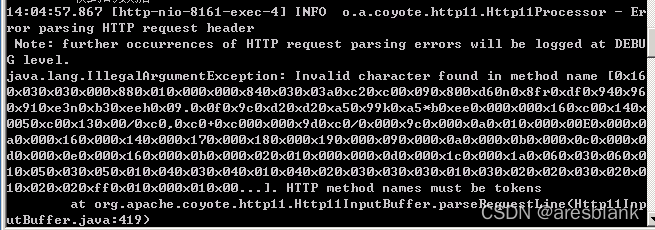
Most of these problems are container problems. There are two solutions:

1. Maybe the header cache in Tomcat is not enough

  tomcat:
    # URI encoding of tomcat
     uri-encoding: UTF-8
     # tomcat maximum number of threads, the default is 200
     max-threads: 800
     # Tomcat starts the number of threads to initialize, the default value is 25
    min-spare-threads: 30
    max-http-form-post-size: 2MB
    max-http-header-size: 8096

2. If it hasn’t been solved

@Configuration
public class TomcatConfigurer {

    @Bean
    public TomcatServletWebServerFactory webServerFactory() {
        TomcatServletWebServerFactory factory = new TomcatServletWebServerFactory();
        factory.addConnectorCustomizers((Connector connector) -> {
            connector.setProperty("relaxedPathChars", "\"<>[\\]^`{|}");
            connector.setProperty("relaxedQueryChars", "\"<>[\\]^`{|}");
        });
        return factory;
    }

}

[Solved] TwinCAT3 Error: Ads error: 4115 (0x1013, RTIME: system clock setup fails.

Error 15 27/01/2015 23:23:48 551 ms | 'TwinCAT System' (10000): Sending ams command >> Init4\RTime: Start Interrupt: Ticker started >> Ads error: 4115 (0x1013, RTIME: system clock setup fails.

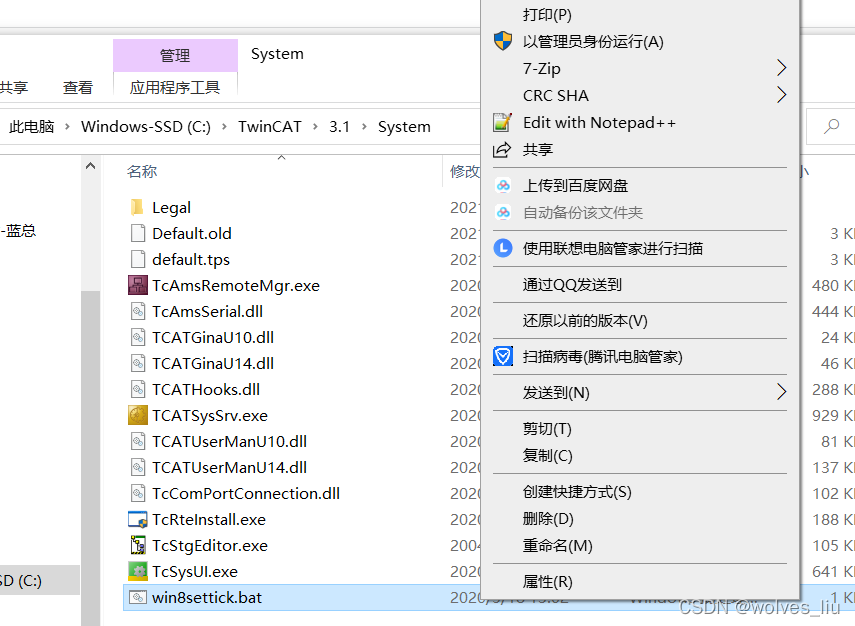
Hint: On Windows8 system execute win8settick.bat in TwinCAT\3.1\System as administrator and reboot.) << failed!


Solution: Go to TwinCaT folder in C drive, TwinCaT>3.1>system, run win8settick.bat as administrator, and restart the computer.

Note: if the same error is reported after restart, run it several times and restart. That’s how I restarted it twice.

How to Solve mysqld — console command error

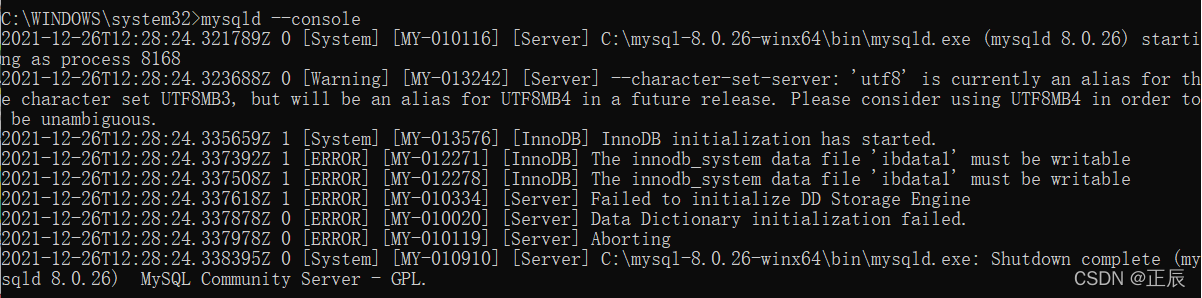
My error report is like the following picture

The prompt is as follows: an error is reported

 2021-12-26T12:28:24.321789Z 0 [System] [MY-010116] [Server] C:\mysql-8.0.26-winx64\bin\mysqld.exe (mysqld 8.0.26) starting as process 8168
2021-12-26T12:28:24.323688Z 0 [Warning] [MY-013242] [Server] --character-set-server: 'utf8' is currently an alias for the character set UTF8MB3, but will be an alias for UTF8MB4 in a future release. Please consider using UTF8MB4 in order to be unambiguous.
2021-12-26T12:28:24.335659Z 1 [System] [MY-013576] [InnoDB] InnoDB initialization has started.
2021-12-26T12:28:24.337392Z 1 [ERROR] [MY-012271] [InnoDB] The innodb_system data file 'ibdata1' must be writable
2021-12-26T12:28:24.337508Z 1 [ERROR] [MY-012278] [InnoDB] The innodb_system data file 'ibdata1' must be writable
2021-12-26T12:28:24.337618Z 1 [ERROR] [MY-010334] [Server] Failed to initialize DD Storage Engine
2021-12-26T12:28:24.337878Z 0 [ERROR] [MY-010020] [Server] Data Dictionary initialization failed.
2021-12-26T12:28:24.337978Z 0 [ERROR] [MY-010119] [Server] Aborting
2021-12-26T12:28:24.338395Z 0 [System] [MY-010910] [Server] C:\mysql-8.0.26-winx64\bin\mysqld.exe: Shutdown complete (mysqld 8.0.26)  MySQL Community Server - GPL.

Reason guess:

The MySQL service is always turned on (it starts automatically after startup), so when it is turned on, an error will be reported when the command line is started

Solution:

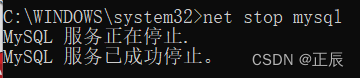
Enter the command prompt in administrator mode and enter the following command to close the MySQL service

net stop mysql

So far, the problem has been solved. Entering mysqld — console again will open the MySQL service normally

[Solved] Error during WebSocket handshake Unexpected response code 404

Problem Description: the websocket project was well deployed before. When it was transplanted to the domain name specified by the government cloud SLB, an error occurred:
error during websocket handshake unexpected response code 404

Solution

1. Configure nginx

In any case, configure nginx:
proxy_http_version 1.1;
proxy_set_header Connection "upgrade";
proxy_set_header Upgrade $http_upgrade;

location /xxx{
    proxy_pass http://127.0.0.1:7071/xxx;
    proxy_redirect    off;
    proxy_set_header X-Real-IP $remote_addr;
    proxy_set_header Host $host;
    proxy_set_header X-Forwarded-For $proxy_add_x_forwarded_for;

    proxy_http_version 1.1;
    proxy_set_header Connection "upgrade";
    proxy_set_header Upgrade $http_upgrade;
    
    proxy_connect_timeout 60s;
    proxy_read_timeout 7200s;
    proxy_send_timeout 600s;
    
    # 再不行的话就把下面的设置试一下
    #proxy_set_header Upgrade websocket;
    #proxy_pass_request_headers on;
    #access_log off;
    #proxy_buffering off;
    
}

2. Websocket configuration

We use springboot, and all configurations cannot be less

import com.fh.websocket.session.MySpringConfigurator;
import org.springframework.context.annotation.Bean;
import org.springframework.context.annotation.Configuration;
import org.springframework.web.socket.server.standard.ServerEndpointExporter;

/**
 * enable WebSocket support
 */
@Configuration
public class WebSocketConfig {

	@Bean
	public ServerEndpointExporter serverEndpointExporter() {
		return new ServerEndpointExporter();
	}

	@Bean
	public MySpringConfigurator mySpringConfigurator() {
		return new MySpringConfigurator();
	}
}

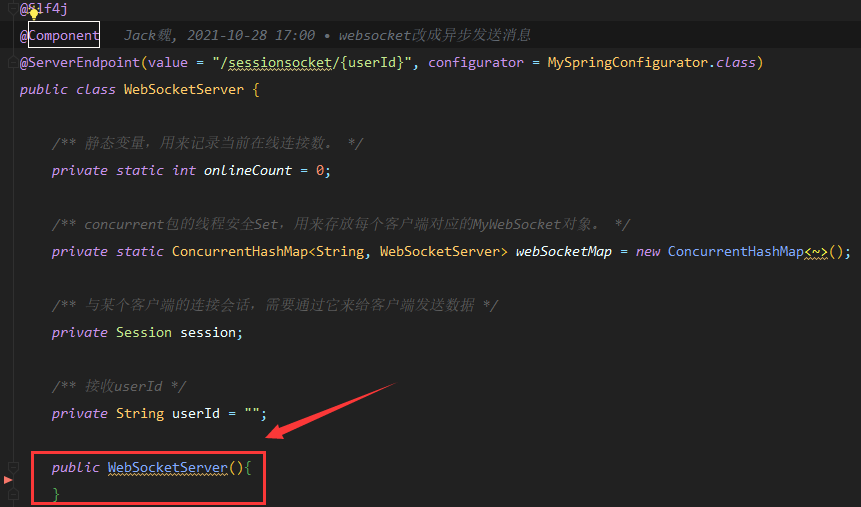
3. Websocketserver needs to add a parameterless constructor

This is a pit, and it is normal to deploy to another
transplanting will not work in the past.

[Solved] paddle:FatalError: `Segmentation fault` is detected by the operating system.

Question

When using the paddle framework for relevant model training, an error is reported when using the GPU:

C++ Traceback (most recent call last):
--------------------------------------
0 std::thread::_Impl<std::_Bind_simple<ThreadPool::ThreadPool(unsigned long)::{lambda()#1} ()> >::_M_run()
1 std::__future_base::_State_baseV2::_M_do_set(std::function<std::unique_ptr<std::__future_base::_Result_base, std::__future_base::_Result_base::_Deleter> ()>*, bool*)
2 paddle::framework::SignalHandle(char const*, int)
3 paddle::platform::GetCurrentTraceBackString[abi:cxx11]()

----------------------
Error Message Summary:
----------------------
FatalError: `Segmentation fault` is detected by the operating system.
[TimeInfo: *** Aborted at 1639543591 (unix time) try "date -d @1639543591" if you are using GNU date ***]
[SignalInfo: *** SIGSEGV (@0x0) received by PID 168238 (TID 0x7fc05d8c5700) from PID 0 ***]

edition:

python=3.8 paddlepaddle-gpu=2.2.1 cuda=10.1 cudnn=7.6

Check the issue and find that many of these situations occur. Make a record here

Solution:

Reinstall using CONDA.

Execute command:

conda install paddlepaddle-gpu==2.2.1 cudatoolkit=10.1 --channel https://mirrors.tuna.tsinghua.edu.cn/anaconda/cloud/Paddle/