Author Archives: Robins

[Solved] pxp_lib.h:19:10: fatal error: linux/pxp_device.h: No such file or directory


ERROR: imx-lib-1_5.8+AUTOINC+3f777974c0-r0 do_compile: oe_runmake failed
ERROR: imx-lib-1_5.8+AUTOINC+3f777974c0-r0 do_compile: Execution of '/sd1/jarvis-workspace/build-x11/tmp/work/cortexa7t2hf-neon-mx6ul-fsl-linux-gnueabi/imx-lib/1_5.8+AUTOINC+3f777974c0-r0/temp/run.do_compile.612337' failed with exit code 1
ERROR: Logfile of failure stored in: /sd1/jarvis-workspace/build-x11/tmp/work/cortexa7t2hf-neon-mx6ul-fsl-linux-gnueabi/imx-lib/1_5.8+AUTOINC+3f777974c0-r0/temp/log.do_compile.612337
Log data follows:
| DEBUG: Executing shell function do_compile
| NOTE: make -j 1 CROSS_COMPILE=arm-fsl-linux-gnueabi- PLATFORM= INCLUDE=-I/sd1/jarvis-workspace/build-x11/tmp/work/cortexa7t2hf-neon-mx6ul-fsl-linux-gnueabi/imx-lib/1_5.8+AUTOINC+3f777974c0-r0/recipe-sysroot/usr/include/imx all
| make -C pxp all
| make[1]: Entering directory '/sd1/jarvis-workspace/build-x11/tmp/work/cortexa7t2hf-neon-mx6ul-fsl-linux-gnueabi/imx-lib/1_5.8+AUTOINC+3f777974c0-r0/git/pxp'
| arm-fsl-linux-gnueabi-gcc  -mthumb -mfpu=neon -mfloat-abi=hard -mcpu=cortex-a7 -fstack-protector-strong  -D_FORTIFY_SOURCE=2 -Wformat -Wformat-security -Werror=format-security --sysroot=/sd1/jarvis-workspace/build-x11/tmp/work/cortexa7t2hf-neon-mx6ul-fsl-linux-gnueabi/imx-lib/1_5.8+AUTOINC+3f777974c0-r0/recipe-sysroot -D -I/sd1/jarvis-workspace/build-x11/tmp/work/cortexa7t2hf-neon-mx6ul-fsl-linux-gnueabi/imx-lib/1_5.8+AUTOINC+3f777974c0-r0/recipe-sysroot/usr/include/imx -Wall -fPIC  -O2 -pipe -g -feliminate-unused-debug-types -fmacro-prefix-map=/sd1/jarvis-workspace/build-x11/tmp/work/cortexa7t2hf-neon-mx6ul-fsl-linux-gnueabi/imx-lib/1_5.8+AUTOINC+3f777974c0-r0=/usr/src/debug/imx-lib/1_5.8+AUTOINC+3f777974c0-r0                      -fdebug-prefix-map=/sd1/jarvis-workspace/build-x11/tmp/work/cortexa7t2hf-neon-mx6ul-fsl-linux-gnueabi/imx-lib/1_5.8+AUTOINC+3f777974c0-r0=/usr/src/debug/imx-lib/1_5.8+AUTOINC+3f777974c0-r0                      -fdebug-prefix-map=/sd1/jarvis-workspace/build-x11/tmp/work/cortexa7t2hf-neon-mx6ul-fsl-linux-gnueabi/imx-lib/1_5.8+AUTOINC+3f777974c0-r0/recipe-sysroot=                      -fdebug-prefix-map=/sd1/jarvis-workspace/build-x11/tmp/work/cortexa7t2hf-neon-mx6ul-fsl-linux-gnueabi/imx-lib/1_5.8+AUTOINC+3f777974c0-r0/recipe-sysroot-native=  -c pxp_lib.c -o pxp_lib.o
| <command-line>: error: macro names must be identifiers
| In file included from pxp_lib.c:26:
| pxp_lib.h:19:10: fatal error: linux/pxp_device.h: No such file or directory
|    19 | #include <linux/pxp_device.h>
|       |          ^~~~~~~~~~~~~~~~~~~~
| compilation terminated.
| make[1]: *** [Makefile:30: pxp_lib.o] Error 1
| make[1]: Leaving directory '/sd1/jarvis-workspace/build-x11/tmp/work/cortexa7t2hf-neon-mx6ul-fsl-linux-gnueabi/imx-lib/1_5.8+AUTOINC+3f777974c0-r0/git/pxp'
| make: *** [Makefile:17: pxp] Error 2
| ERROR: oe_runmake failed
| WARNING: exit code 1 from a shell command.
| ERROR: Execution of '/sd1/jarvis-workspace/build-x11/tmp/work/cortexa7t2hf-neon-mx6ul-fsl-linux-gnueabi/imx-lib/1_5.8+AUTOINC+3f777974c0-r0/temp/run.do_compile.612337' failed with exit code 1

Error resolution:

meta-jarvis/recipes-bsp/imx-lib/imx-lib_git.bbappend


ADD:


PLATFORM_mx6ull = "IMX6UL"

[Solved] Windows Android Studio Cannot Start Error: Internal error. Please refer to https://code.google.com/p/android/issue

environment

win10AS 4.2

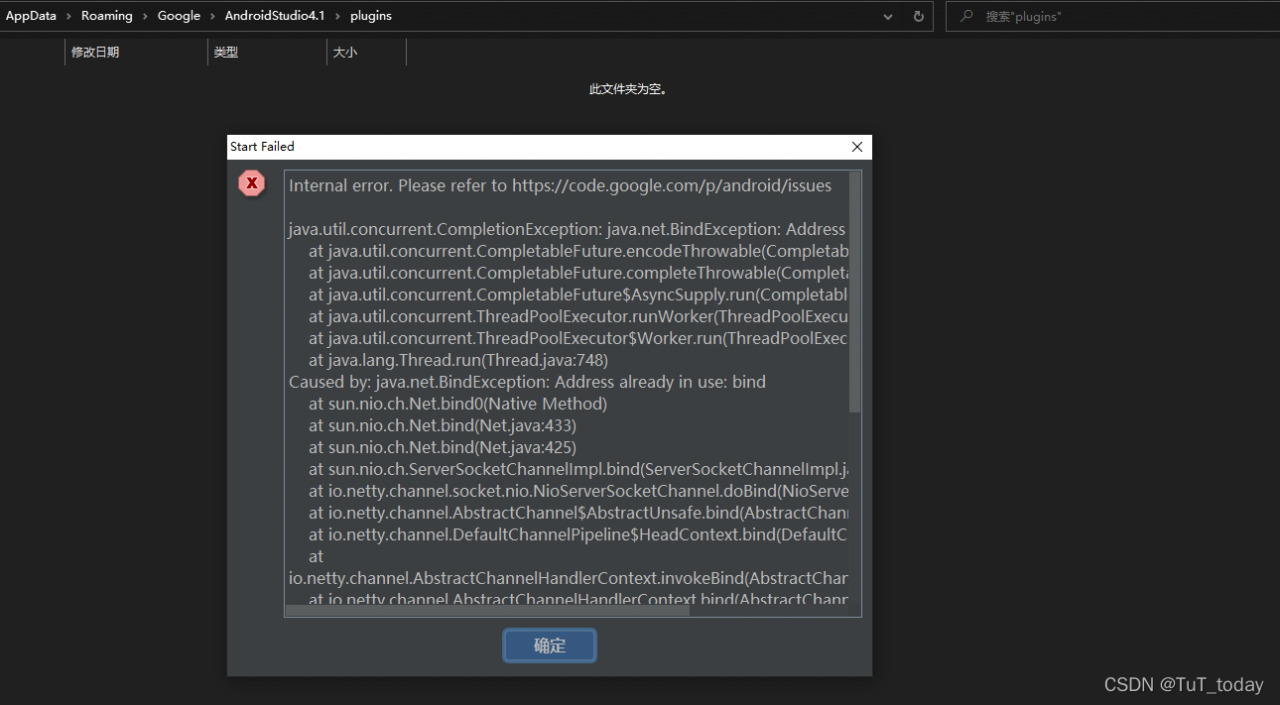
Error screenshot
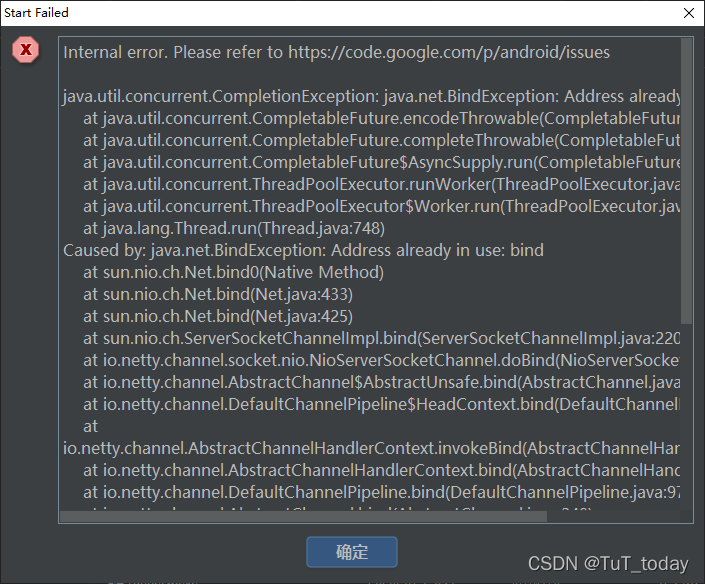
Internal error. Please refer to https://code.google.com/p/android/issues

java.util.concurrent.CompletionException: java.net.BindException: Address already in use: bind
    at java.util.concurrent.CompletableFuture.encodeThrowable(CompletableFuture.java:273)
    at java.util.concurrent.CompletableFuture.completeThrowable(CompletableFuture.java:280)
    at java.util.concurrent.CompletableFuture$AsyncSupply.run(CompletableFuture.java:1606)
    at java.util.concurrent.ThreadPoolExecutor.runWorker(ThreadPoolExecutor.java:1149)
    at java.util.concurrent.ThreadPoolExecutor$Worker.run(ThreadPoolExecutor.java:624)
    at java.lang.Thread.run(Thread.java:748)
Caused by: java.net.BindException: Address already in use: bind
    at sun.nio.ch.Net.bind0(Native Method)
    at sun.nio.ch.Net.bind(Net.java:433)
    at sun.nio.ch.Net.bind(Net.java:425)
    at sun.nio.ch.ServerSocketChannelImpl.bind(ServerSocketChannelImpl.java:220)
    at io.netty.channel.socket.nio.NioServerSocketChannel.doBind(NioServerSocketChannel.java:134)
    at io.netty.channel.AbstractChannel$AbstractUnsafe.bind(AbstractChannel.java:550)
    at io.netty.channel.DefaultChannelPipeline$HeadContext.bind(DefaultChannelPipeline.java:1334)
    at io.netty.channel.AbstractChannelHandlerContext.invokeBind(AbstractChannelHandlerContext.java:506)
    at io.netty.channel.AbstractChannelHandlerContext.bind(AbstractChannelHandlerContext.java:491)
    at io.netty.channel.DefaultChannelPipeline.bind(DefaultChannelPipeline.java:973)
    at io.netty.channel.AbstractChannel.bind(AbstractChannel.java:248)
    at io.netty.bootstrap.AbstractBootstrap$2.run(AbstractBootstrap.java:356)
    at io.netty.util.concurrent.AbstractEventExecutor.safeExecute(AbstractEventExecutor.java:164)
    at io.netty.util.concurrent.SingleThreadEventExecutor.runAllTasks(SingleThreadEventExecutor.java:472)
    at io.netty.channel.nio.NioEventLoop.run(NioEventLoop.java:500)
    at io.netty.util.concurrent.SingleThreadEventExecutor$4.run(SingleThreadEventExecutor.java:989)
    at io.netty.util.internal.ThreadExecutorMap$2.run(ThreadExecutorMap.java:74)
    at io.netty.util.concurrent.FastThreadLocalRunnable.run(FastThreadLocalRunnable.java:30)
    ... 1 more

-----
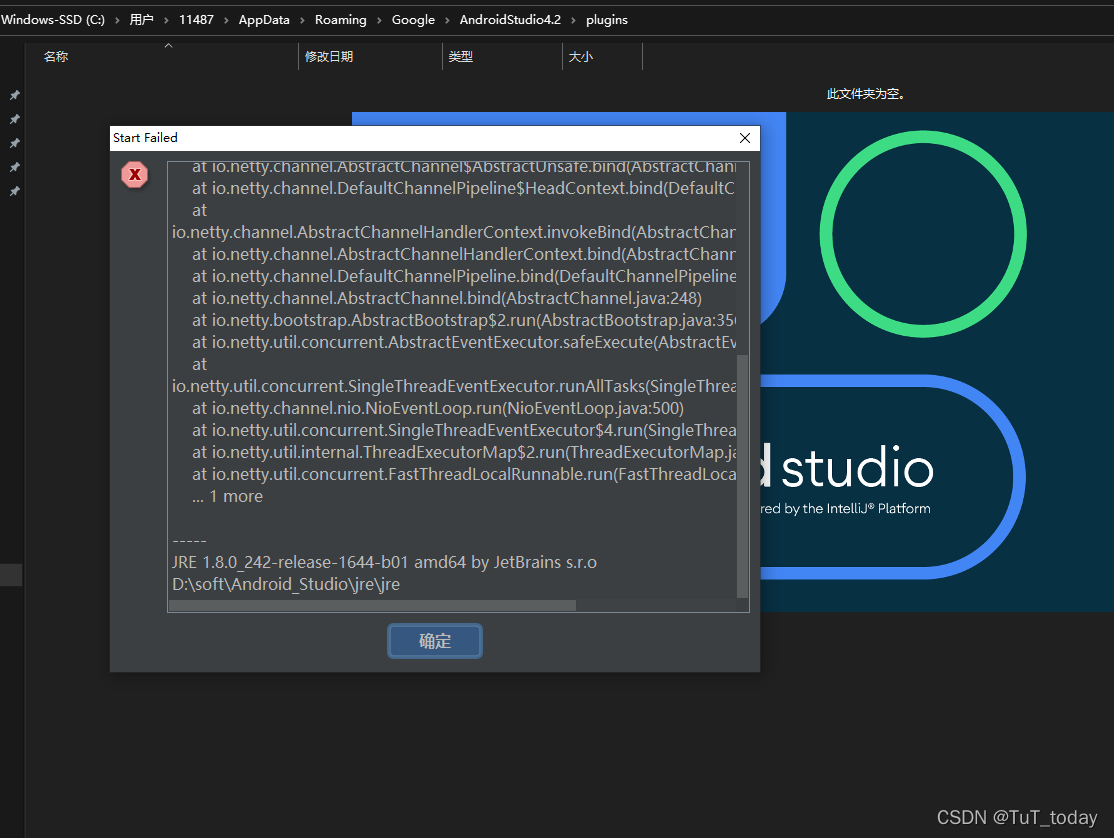
JRE 1.8.0_242-release-1644-b01 amd64 by JetBrains s.r.o
D:\soft\Android_Studio\jre\jre


Solution:

View the mentioned directory C:\users\{user}\appdata\roaming\Google\androidstudio4.1\plugins found two different versions
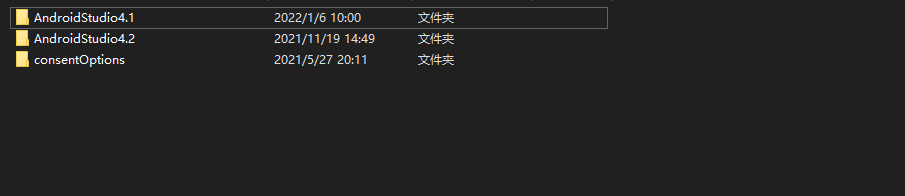
tried to back up the lower version 4.1, and deleted the problem. The corresponding 4.1 results were generated again. Refer to the search results and delete the files under plugins. Still not resolved
try backup and delete the plugins file under 4.2. Still not resolved
restore the original file. Find the directory where the as software is installed and check whether the problem is caused by the plug-in provided by the as. First backup, then delete, and start as. The results are as follows . I have 50 plug-in files. Copy the first 25 first
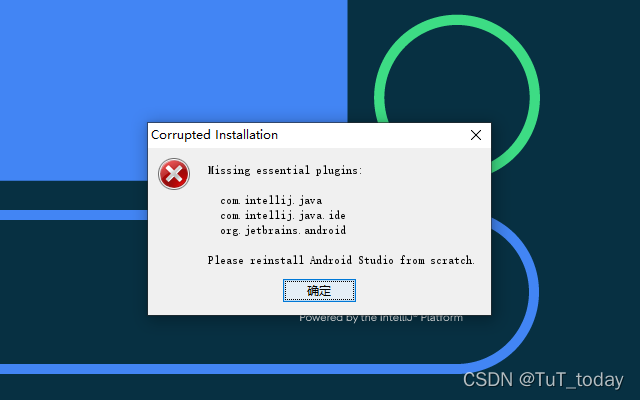
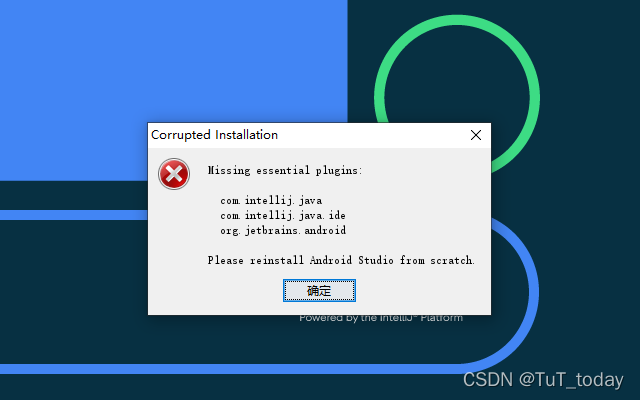
it seems that some necessary documents are needed Copy the java related plug-ins into it
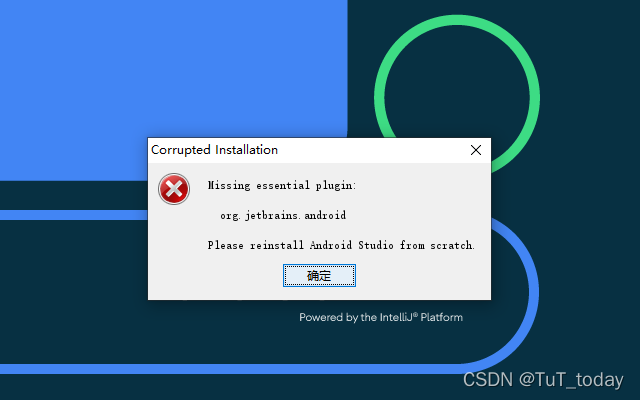
copy the relevant plug-ins according to the prompts. (the corresponding plug-in is not found) continue to try, move in all the rest, and report the initial error. Therefore, find the plug-in excluded from use, and then delete it. But there is still a lack of plug-ins org.jetbrains.android search problem, but the corresponding disabled cannot be found locally_plugins.txt go back to the problem and find it on stackoverflow

Finally, bow to reality and reload Dafa.

However, it still can’t start. Download the latest version

Internal error. Please refer to https://code.google.com/p/android/issues

java.util.concurrent.CompletionException: java.net.BindException: Address already in use: bind
    at java.base/java.util.concurrent.CompletableFuture.encodeThrowable(CompletableFuture.java:314)
    at java.base/java.util.concurrent.CompletableFuture.completeThrowable(CompletableFuture.java:319)
    at java.base/java.util.concurrent.CompletableFuture$AsyncSupply.run(CompletableFuture.java:1702)
    at java.base/java.util.concurrent.ThreadPoolExecutor.runWorker(ThreadPoolExecutor.java:1128)
    at java.base/java.util.concurrent.ThreadPoolExecutor$Worker.run(ThreadPoolExecutor.java:628)
    at java.base/java.util.concurrent.Executors$PrivilegedThreadFactory$1$1.run(Executors.java:668)
    at java.base/java.util.concurrent.Executors$PrivilegedThreadFactory$1$1.run(Executors.java:665)
    at java.base/java.security.AccessController.doPrivileged(Native Method)
    at java.base/java.util.concurrent.Executors$PrivilegedThreadFactory$1.run(Executors.java:665)
    at java.base/java.lang.Thread.run(Thread.java:834)
Caused by: java.net.BindException: Address already in use: bind
    at java.base/sun.nio.ch.Net.bind0(Native Method)
    at java.base/sun.nio.ch.Net.bind(Net.java:455)
    at java.base/sun.nio.ch.Net.bind(Net.java:447)
    at java.base/sun.nio.ch.ServerSocketChannelImpl.bind(ServerSocketChannelImpl.java:227)
    at io.netty.channel.socket.nio.NioServerSocketChannel.doBind(NioServerSocketChannel.java:134)
    at io.netty.channel.AbstractChannel$AbstractUnsafe.bind(AbstractChannel.java:550)
    at io.netty.channel.DefaultChannelPipeline$HeadContext.bind(DefaultChannelPipeline.java:1334)
    at io.netty.channel.AbstractChannelHandlerContext.invokeBind(AbstractChannelHandlerContext.java:506)
    at io.netty.channel.AbstractChannelHandlerContext.bind(AbstractChannelHandlerContext.java:491)
    at io.netty.channel.DefaultChannelPipeline.bind(DefaultChannelPipeline.java:973)
    at io.netty.channel.AbstractChannel.bind(AbstractChannel.java:248)
    at io.netty.bootstrap.AbstractBootstrap$2.run(AbstractBootstrap.java:356)
    at io.netty.util.concurrent.AbstractEventExecutor.safeExecute(AbstractEventExecutor.java:164)
    at io.netty.util.concurrent.SingleThreadEventExecutor.runAllTasks(SingleThreadEventExecutor.java:472)
    at io.netty.channel.nio.NioEventLoop.run(NioEventLoop.java:500)
    at io.netty.util.concurrent.SingleThreadEventExecutor$4.run(SingleThreadEventExecutor.java:989)
    at io.netty.util.internal.ThreadExecutorMap$2.run(ThreadExecutorMap.java:74)
    at io.netty.util.concurrent.FastThreadLocalRunnable.run(FastThreadLocalRunnable.java:30)
    ... 1 more

-----
Your JRE: 11.0.10+0-b96-7249189 amd64 (Oracle Corporation)
D:\soft\Android_studio\jre

Replace the Android studio RC version to solve

other

This time, the application software cannot be used due to win10 system update. It is recommended to turn off win10 automatic update.

[Solved] Git error: bad signature 0x00000000 fatal: index file corrupt

Git error : bad signature 0x00000000 fatal: index file corrupt

Problem-solving method

Question

After the computer blue screen restarts, resubmit the code prompt bad signature 0x00000000 fatal: index file corrupt

Solution:

Delete the old index file and rebuild the index file
under Windows

# Delete old index files
del .git\index
# Rebuild index file
git reset

Problem-solving

[Solved] igb Compile Error: igb_main.c:10044:7: error: implicit declaration of function ‘isdigit’

Recently, the IGB compiler driver found this problem:

zacha@Superman:~/igb/igb-5.7.2/src$ make
#@+ echo "*** The target kernel has CONFIG_MODULE_SIG_ALL enabled, but" ; echo "*** the signing key cannot be found. Module signing has been" ; echo "*** disabled for this build." ; make  ccflags-y="" -C "/lib/modules/4.15.0-142-generic/build" CONFIG_IGB=m CONFIG_MODULE_SIG=n CONFIG_MODULE_SIG_ALL= M="/home/zacha/igb/igb-5.7.2/src"   modules  
make -C /home/zacha/yulong810/kernel M=/home/zacha/igb/igb-5.7.2/src CROSS_COMPILE=arm-linux-gnueabihf- ARCH=arm
make[1]: Entering directory '/home/zacha/yulong810/kernel'
  CC [M]  /home/zacha/igb/igb-5.7.2/src/igb_main.o
/home/zacha/igb/igb-5.7.2/src/igb_main.c: In function ‘igb_get_os_driver_version’:
/home/zacha/igb/igb-5.7.2/src/igb_main.c:10044:7: error: implicit declaration of function ‘isdigit’ [-Werror=implicit-function-declaration]
   if(!isdigit(*c) && *c != '.')
       ^~~~~~~
cc1: some warnings being treated as errors
scripts/Makefile.build:303: recipe for target '/home/zacha/igb/igb-5.7.2/src/igb_main.o' failed
make[2]: *** [/home/zacha/igb/igb-5.7.2/src/igb_main.o] Error 1
Makefile:1519: recipe for target '_module_/home/zacha/igb/igb-5.7.2/src' failed
make[1]: *** [_module_/home/zacha/igb/igb-5.7.2/src] Error 2
make[1]: Leaving directory '/home/zacha/yulong810/kernel'
Makefile:88: recipe for target 'default' failed
make: *** [default] Error 2

There are also solutions online:
https://github.com/geerlingguy/raspberry-pi-pcie-devices/issues/3

Solution:

Add #include <linux/ctype.h> inigb)main.c
then compile and generate IGB.ko

zacha@Superman:~/igb/igb-5.7.2/src$ make
#@+ echo "*** The target kernel has CONFIG_MODULE_SIG_ALL enabled, but" ; echo "*** the signing key cannot be found. Module signing has been" ; echo "*** disabled for this build." ; make  ccflags-y="" -C "/lib/modules/4.15.0-142-generic/build" CONFIG_IGB=m CONFIG_MODULE_SIG=n CONFIG_MODULE_SIG_ALL= M="/home/zacha/igb/igb-5.7.2/src"   modules  
make -C /home/zacha/yulong810/kernel M=/home/zacha/igb/igb-5.7.2/src CROSS_COMPILE=arm-linux-gnueabihf- ARCH=arm
make[1]: Entering directory '/home/zacha/yulong810/kernel'
  CC [M]  /home/zacha/igb/igb-5.7.2/src/igb_main.o
  CC [M]  /home/zacha/igb/igb-5.7.2/src/e1000_api.o
  CC [M]  /home/zacha/igb/igb-5.7.2/src/igb_ethtool.o
  CC [M]  /home/zacha/igb/igb-5.7.2/src/igb_hwmon.o
  CC [M]  /home/zacha/igb/igb-5.7.2/src/e1000_mbx.o
  CC [M]  /home/zacha/igb/igb-5.7.2/src/e1000_mac.o
  CC [M]  /home/zacha/igb/igb-5.7.2/src/e1000_manage.o
  CC [M]  /home/zacha/igb/igb-5.7.2/src/e1000_nvm.o
  CC [M]  /home/zacha/igb/igb-5.7.2/src/igb_param.o
  CC [M]  /home/zacha/igb/igb-5.7.2/src/e1000_phy.o
  CC [M]  /home/zacha/igb/igb-5.7.2/src/igb_procfs.o
  CC [M]  /home/zacha/igb/igb-5.7.2/src/igb_vmdq.o
  CC [M]  /home/zacha/igb/igb-5.7.2/src/e1000_82575.o
  CC [M]  /home/zacha/igb/igb-5.7.2/src/e1000_i210.o
  CC [M]  /home/zacha/igb/igb-5.7.2/src/igb_debugfs.o
  CC [M]  /home/zacha/igb/igb-5.7.2/src/igb_ptp.o
  CC [M]  /home/zacha/igb/igb-5.7.2/src/kcompat.o
  LD [M]  /home/zacha/igb/igb-5.7.2/src/igb.o
  Building modules, stage 2.
  MODPOST 1 modules
  CC      /home/zacha/igb/igb-5.7.2/src/igb.mod.o
  LD [M]  /home/zacha/igb/igb-5.7.2/src/igb.ko
make[1]: Leaving directory '/home/zacha/yulong810/kernel'

[Solved] Shell loop execute error: syntax error: bad for loop variable

#!/bin/bash

for ((i = 10 ; i>=0 ; i--))
do
	echo $i
done

Syntax error: bad for loop variable

The reason is that since Ubuntu 6.10, Ubuntu has replaced the previous default bash shell with dash shell; It shows that the/bin/sh link reverses/bin/dash instead of the traditional/bin/bash.

Question 1: why #/ Bin/bash doesn’t work?

./execution will read #/ Bin/bash specifies the shell parser, and the script needs execution permission

Executing with SH will not read #/ Bin/bash, which is equivalent to executing the/bin/sh shell script and passing it in as a parameter. The script does not need execution permission, but only reading permission

Solution 1:

Execute sudo dpkg reconfigure dash and select No

Solution 2:

Modify cycle


for i in `seq 1 10`                                                                                                
do                                                                                                               
        echo $i                                                                                                  
done                                                                                                             
         
OR
                                                                                                        
for i in {0..10}                                                                                                 
do                                                                                                               
        echo $i                                                                                                  
done  

[Solved] RuntimeError: scatter(): Expected dtype int64 for index


RuntimeError: scatter(): Expected dtype int64 for index

1. Error reporting reason:

Scatter requires the data to be of type Int64, and I wrote torch when defining tensor Tensor (x) should be written as torch Longtensor (x), specified as Int64 type.

2. Solutions

Find the definition method of the original data and change it
generally, dtype = NP int64; dtype=np.
in float32 (most definition functions have dtype attribute)
it is better to have the same number of bits of int and float

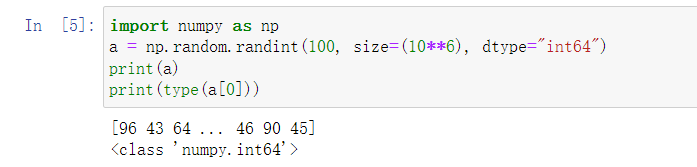
import numpy as np
a = np.random.randint(100, size=(10**6), dtype="int64")
print(a)
print(type(a[0]))

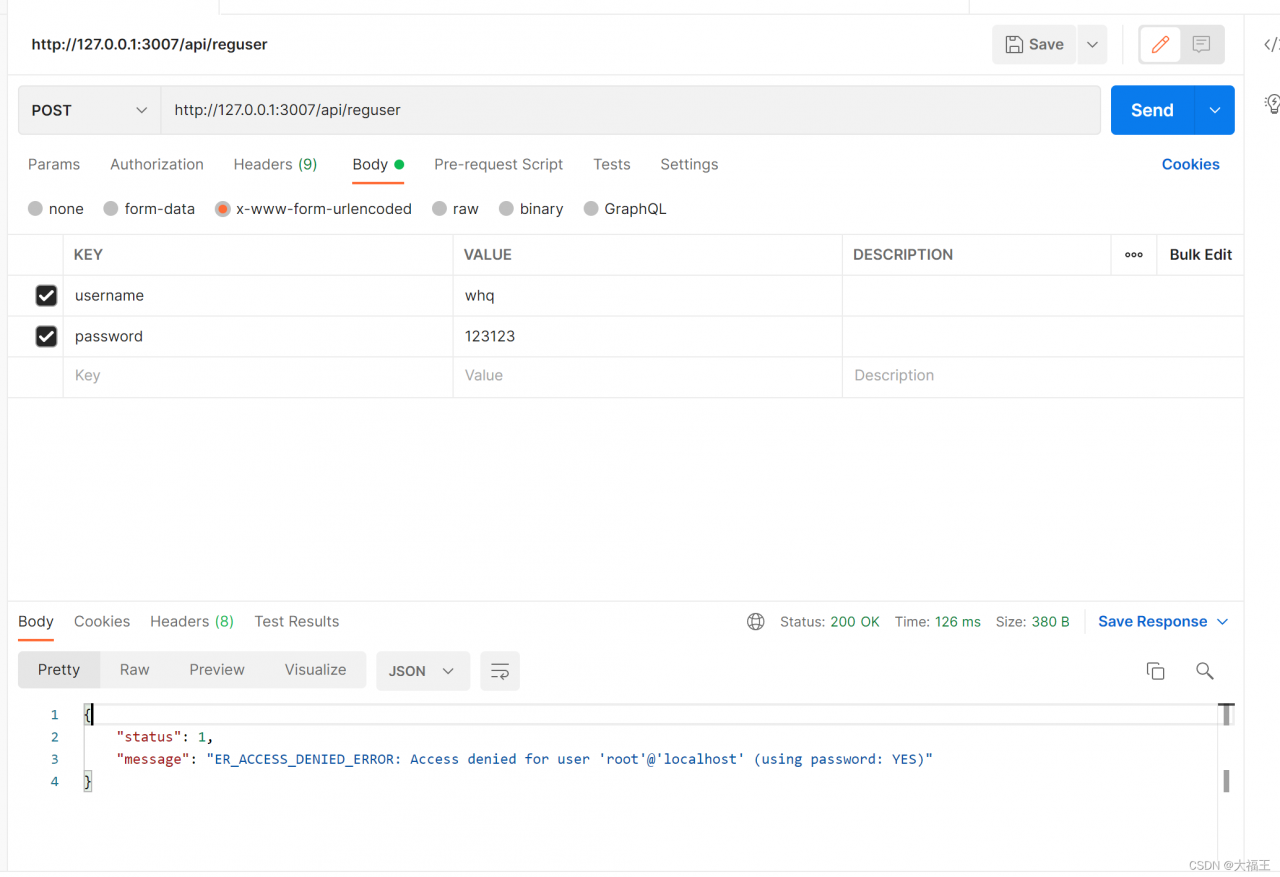
[Solved] Error: ER_ACCESS_DENIED_ERROR: Access denied for user ‘root’@‘localhost’ (using password: YES)

Add the port number when configuring the server file

// Create the connection of database
const mysql=require('mysql')
const db=mysql.createPool({
  host:'127.0.0.1',
  port:'3307',
  user:'root',
  password:'admin123',
  database:'my_db'
})
module.exports=db

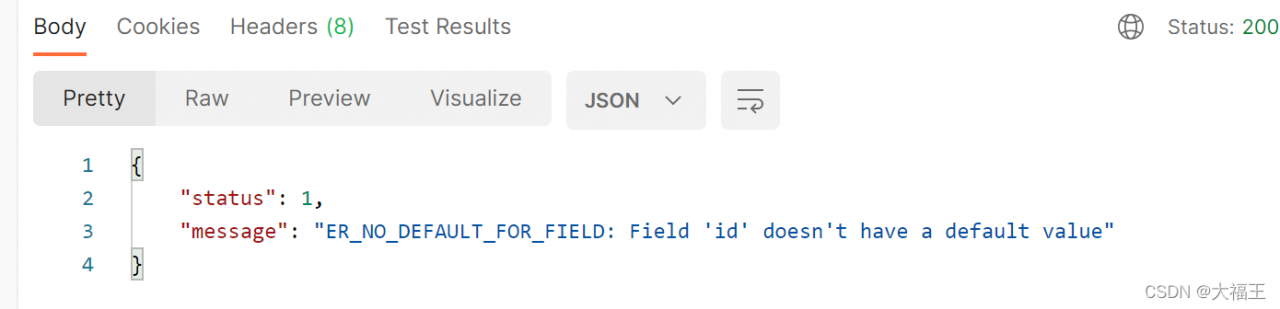
When creating a table, check the ID and increment options

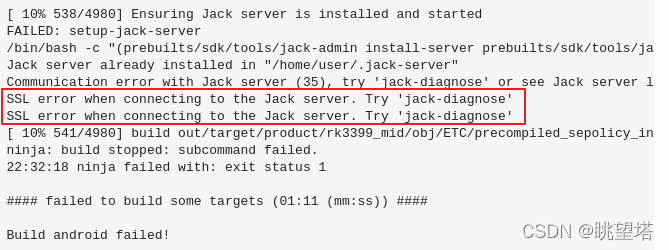
[Solved] Android8.1 Compile Error: SSL error when connecting to the Jack server

An error occurs when compiling the source code of RK embedded development board
problem:

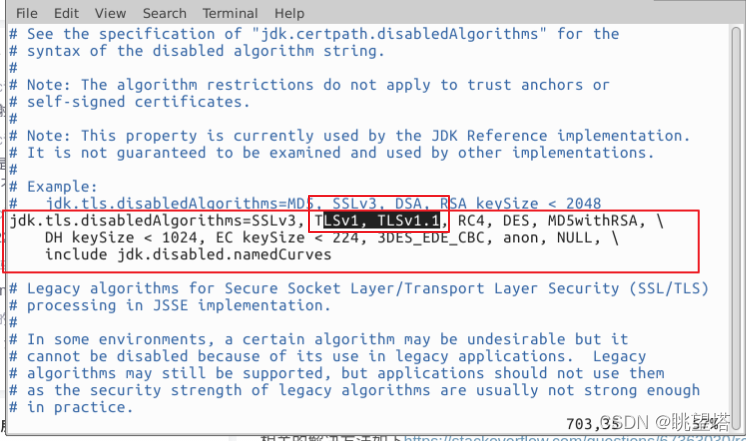
Solution:

CD/etc/java-8-openjdk/security/to this directory; sudo vim java. Security (note that it needs to be opened and modified by the root user); Delete the “tlsv1, tlsv1.1” configurations and save to exit:
restart the jack server:

cd /prebuilts/sdk/tools/ 
./jack-admin kill-server 
./jack-admin start-server 

After recompiling the source code, the problem will no longer be reported

[Solved] unesolved external symbol _imp_fprintf referenced in funciton _showerror

There are two problems when debugging projects written in ffmpeg with vs2015:

Question 1:

“LNK2019 unresolved external symbol __imp____iob_func reference in function _ShowError”

Solution: add this sentence to the source code: extern “C” {file _iob_func [3] = {* stdin, * stdout, * stderr};}

Question 2:

“unesolved external symbol _imp_fprintf referenced in funciton _showerror”

Solution: right-click the item — properties — configuration — linker — input — additional dependencies to add the library legacy_stdio_definitions.lib

[Solved] VSCode Edit LaTeX Error: Recipe terminated with error.

Recipe terminated with error encountered while editing latex in vscode Problem handling method

Question:

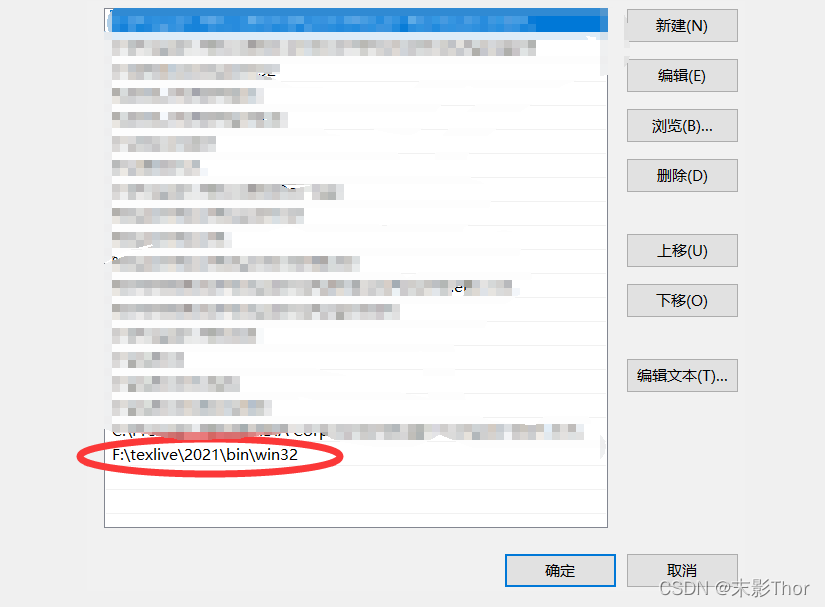
After texlive is installed, the command error is displayed in tex – V in the CMD file, but the version information can be displayed normally by opening tex live command line and entering tex – V. This indicates that texlive is installed successfully but the environment variables are configured incorrectly, so the error in the title appears

it is not feasible to add environment variables directly in user variables or system variables;

Solution:

After adding the above text

in the path of the system environment variable, it seems that you don’t need to restart the computer. You can display the information of Tex-V in CMD, and then restart vscode.

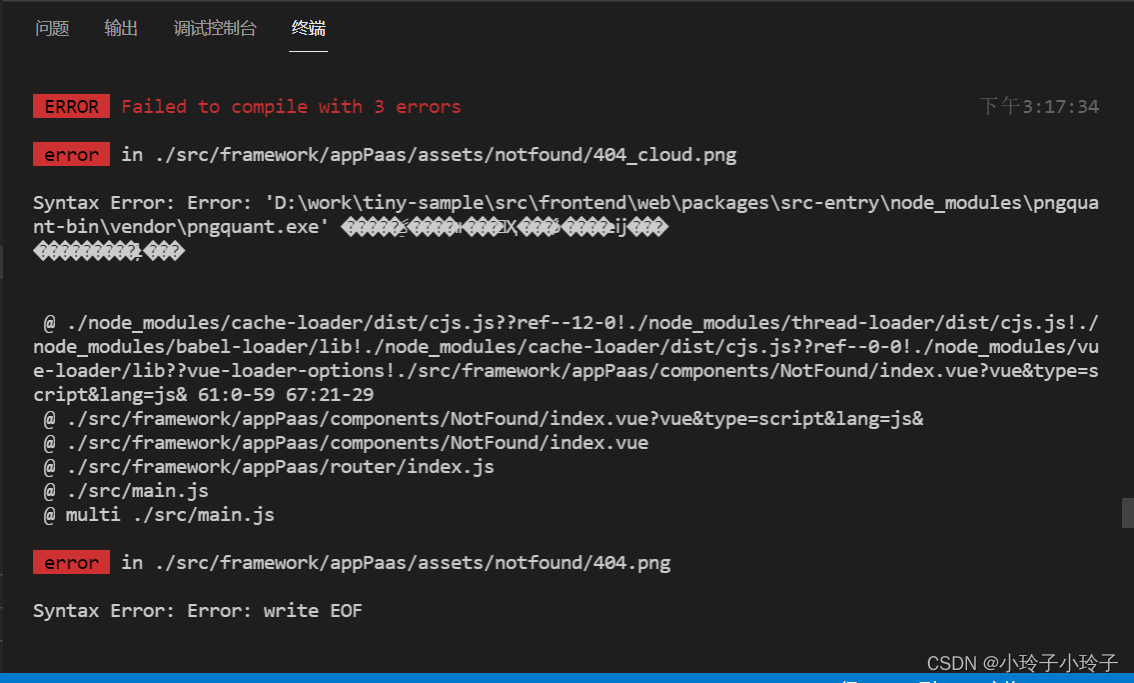
Vue Package Image Error: Syntax Error: Error: ‘**\node_modules\pngquant-bin\vendor\pngquant.exe‘

When packaging, an error is displayed at a picture path
Syntax Error: Error: ‘D:\work\tiny-sample\src\frontend\web\packages\src-entry\node_modules\pngquant-bin\vendor\pngquant.exe’

It can be seen that the package pngquant-bin reports an error, and the package is derived from the dependency of image-webpack-loader, so the root cause is image-webpack-loader.
Solution: delete the dependency image-webpack-loader, and then reinstall it. If it doesn’t work, try a few more times.

npm uninstall image-webpack-loader
npm install image-webpack-loader

If it still fails, set the image for NPM and repeat the above two steps