The project occupies too much memory, resulting in memory overflow during compilation
1. Modify the compilation space
location: settings -> Compiler -> Build process heap size (Mbytes):
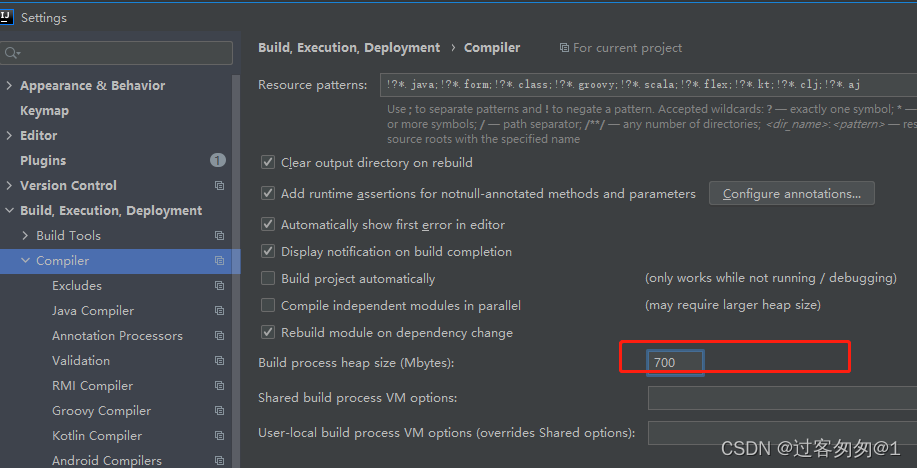
Note: I change 700 to 1000 and just run it again.
Author Archives: Robins
[Solved] Eslint Error: Strings must use singlequote.
Error Description:
Strings must use singlequote.
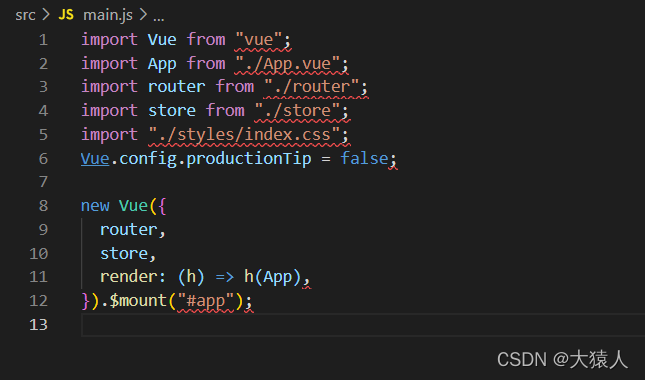
Solution:
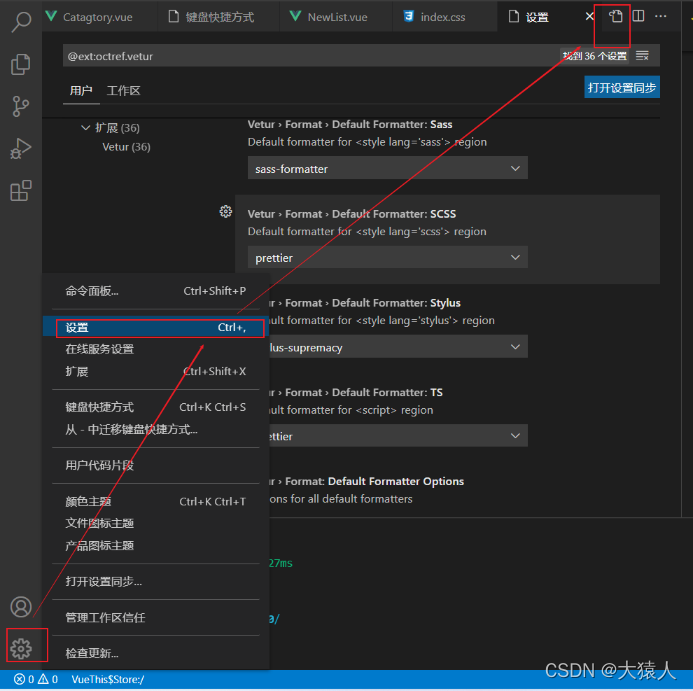
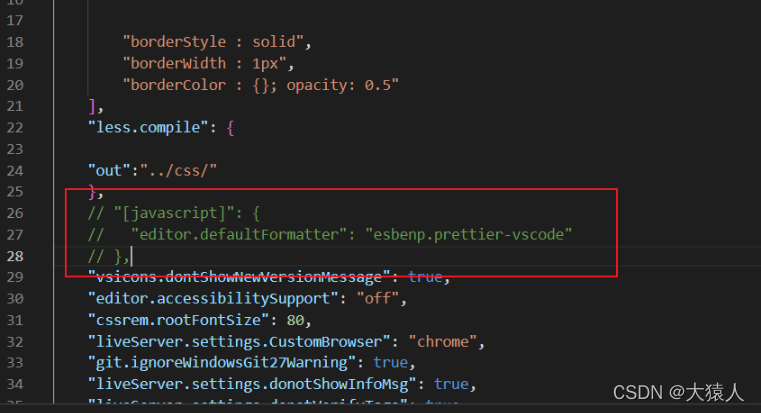
Click setting — select setting — click the button in the upper right corner — enter setting.js, find the following code and comment it out:
[Solved] Powermock error: Java.Lang.linkageerror: load constraint violation
Use powermock to report an error Java Lang. linkageerror: load constraint violation
Error reporting information (limited to deletion of space): analysis and solution extension
Error reporting information (limited to deletion of space):
java.lang.LinkageError: Loading constraint violation: loaders“org/powermock/core/classloader/javassist/JavassistMockClassLoader@47ab16ce”先前已启动由装入器“com/ibm/oti/vm/BootstrapClassLoader@ba626924”定义的名为“javax/security/auth/x500/X500Principal”的另一种类型的装入

\tat java.lang.ClassLoader.defineClassImpl(Native Method)
\tat java.lang.ClassLoader.defineClass(ClassLoader.java:346)
\tat org.powermock.core.classloader.javassist.JavassistMockClassLoader.loadUnmockedClass(JavassistMockClassLoader.java:90)
\tat org.powermock.core.classloader.MockClassLoader.loadClassByThisClassLoader(MockClassLoader.java:104)
\tat 、ock.core.MockInvocation.init(MockInvocation.java:31)
\tat org.powermock.core.MockInvocation.<init>(MockInvocation.java:22)
\tat org.powermock.core.MockGateway.doMethodCall(MockGateway.java:155)
\tat org.powermock.core.MockGateway.methodCall(MockGateway.java:138)
analysis
java.Lang.linkageerror this exception is often encountered in applications using multiple classloaders
the reason for this error is the class conflict caused by the cross use of class classes with the same qualified name after being loaded by multiple different classloaders. Classes with the same qualified name belong to different class instances in different classloaders. When loading a class, the JVM needs to load all imported classes. In this case, if there is a class with the same qualified name in the custom classloader as that in the parent classloader, Java. Net will be thrown Lang.LinkageError.
from the error message, you can see that the javax/security/auth/X500/X500 principal class is loaded by the classloader and bootstrapclassloader customized by powermock at the same time.
Solution:
Use @powermockignore to make javassistmockclassloader ignore the loading of javax/security/auth/X500/X500 principal:
@PowerMockIgnore({"javax.security.*"})
[Solved] Activity jump permission UID Error: ActivityTaskmanager: Permission Denied
Scenario.
Settings application’s interface, pulling up Dialer’s interface reports an error.
Error Messages:
//Fail log:Settings->ApnEditorActivity
01-11 16:46:07.938 1044 6380 W ActivityTaskManager: Permission Denial: package=com.android.settings does not belong to uid=1001
//Pass log: Settings->ApnSettingsActivity
01-11 16:46:03.997 1044 1694 I ActivityTaskManager: START u0 {act=android.intent.action.CALL_BUTTON flg=0x10000000 cmp=com.android.dialer/.app.DialpadActivity} from uid 1000
UI corresponding process configuration
<!--AndroidManifest.xml-->
<activity android:name="Settings$ApnEditorActivity"
    android:process="com.android.phone">
Cause analysis:
UI on COM android. Settings, Android: process = “com. Android. Phone” is configured, and they are in different processes.
Source code reference: XRef:/packages/apps/settings/androidmanifest xml (revision 939136b)
<!--xref: /packages/apps/Settings/AndroidManifest.xml (revision 939136b3)-->
<manifest xmlns:android="http://schemas.android.com/apk/res/android"
        xmlns:androidprv="http://schemas.android.com/apk/prv/res/android"
        package="com.android.settings"
        coreApp="true"
        android:sharedUserId="android.uid.system">
The settings application is in system and the phone belongs to radio
adb shell
top # Check the progress
// top
PID USER PR NI VIRT RES SHR S[%CPU] %MEM TIME+ ARGS
6558 system 20 0 1.0G 137M 110M S 0.0 15.6 0:06.92 com.android.settings
6138 radio 20 0 1.1G 113M 98M S 0.3 12.9 1:19.43 com.android.phone
Solution:
According to the log ActivityTaskManager: Permission Denial: package=com.android.settings does not belong to uid=1001, it should be a package and process mismatch. Remove the configuration of android:process=”com.android.phone”.
Wechat Payment V2 Error: No appropriate protocol [How to Solve]
Error message:
An error is reported when the refund interface calls the certificate:
no approve protocol (protocol is disabled or cipher suits are inappropriate)
Solution:
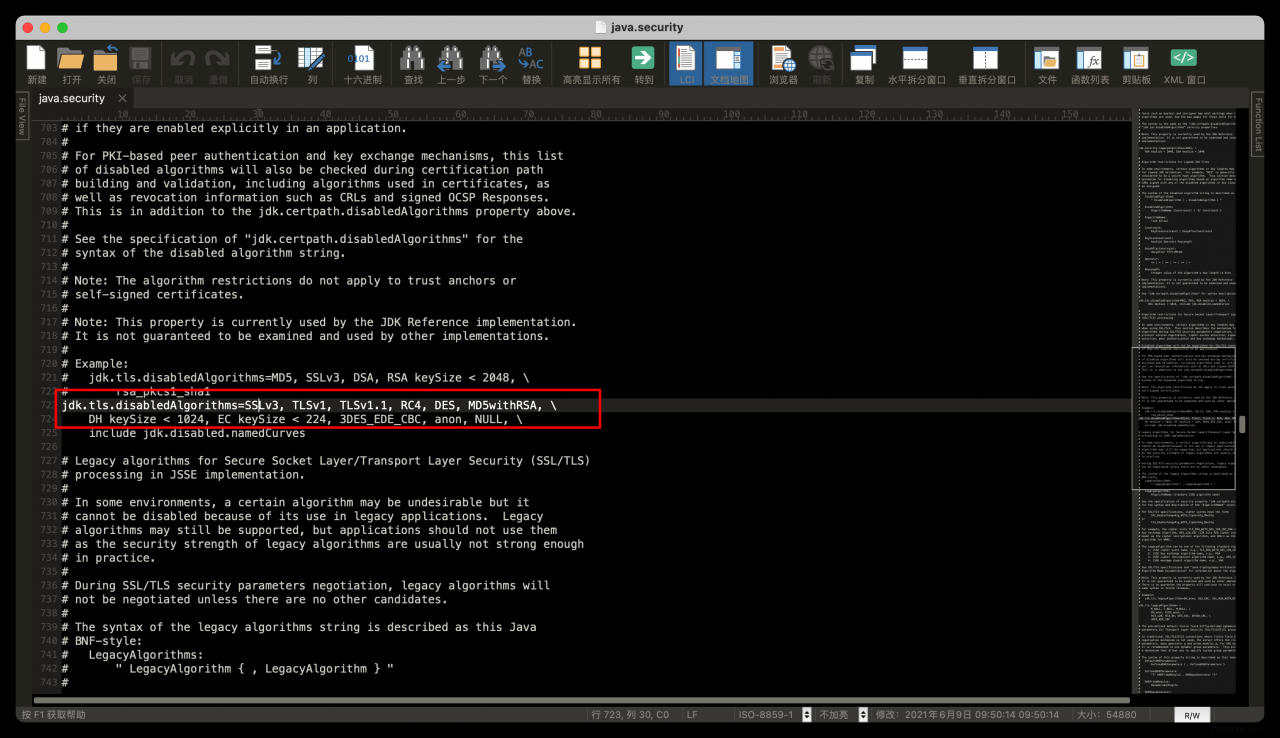
1. [not recommended] Find jdk/jre/lib/security/java.security file to modify , remove the TLSv1 , so the production environment still have to change, so give up this method.
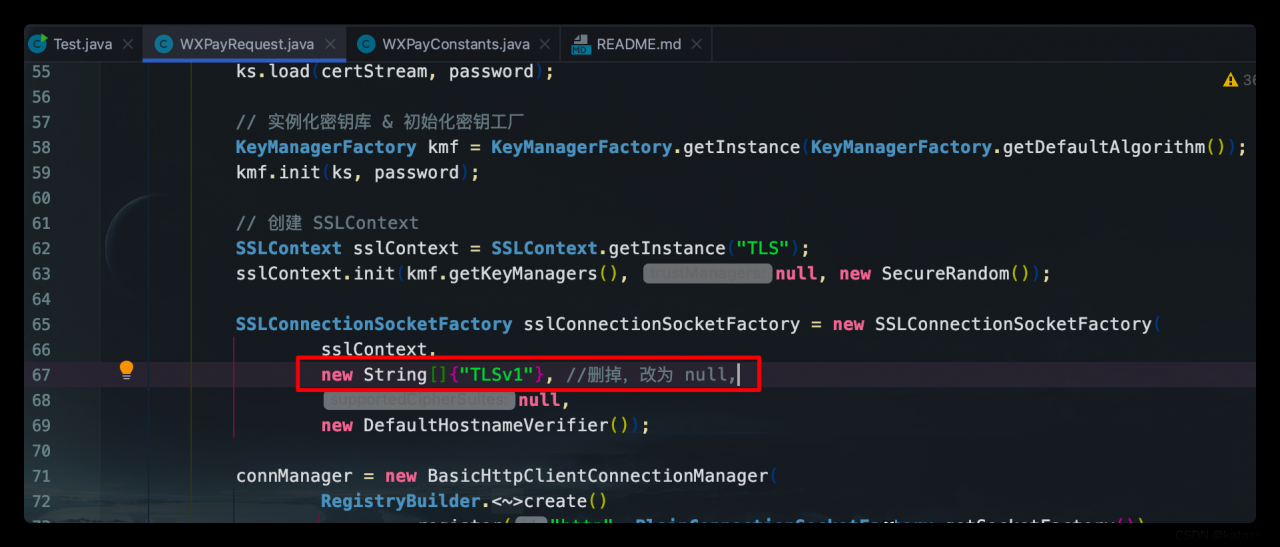
2. [recommended] solution: find the class corresponding to the SDK and modify it according to the following figure
[Solved] C++ Compile Error: prerequisites are different [How to Solve]
Scene
When adding new x.h/x.hpp/X.C/x.cpp files to the UE4 project, even if there are no other files to include these new files, the following errors may appear during compilation (both build and rebuild):
unrealbuildtool prerequisites are different
this error occurs when the x.obj file is compiled, but the link operation cannot be performed correctly
reason
As the name suggests, there is no problem with the code itself, but that the code block cannot be integrated into the existing project. UE4 has preprocessing on the path for the include file. If the path name of the file is duplicate, this problem will occur. For example:
1. Proto/error.pb.h already exists under module
2. try to add Server/XXServer/proto/error.pb.h
According to the include rule of UE4, #include "proto/error.Pb.H" may point to two files at the same time (when the files in the server/xxserver directory are imported), so it cannot be judged accurately, and an error is reported during compilation.
Note: unrealbuildtool under Windows does not judge case, and the paths of proto/and proto/are the same
Solution:
- directory paths should not overlap. Try to avoid the path with the same name.
-
- There should be no files with the same name under the path
javaweb Connect Datas Error: che.catalina.loader.WebappClassLoaderBase.loadClass(WebappClassLoaderBase.java:1444)
1. Jar package is not imported
2 Multiple versions conflict
3 Version mismatch between idea and Tomcat
java.lang.ClassNotFoundException: com.mysql.cj.jdbc.Driver
	at org.apache.catalina.loader.WebappClassLoaderBase.loadClass(WebappClassLoaderBase.java:1444)
	at org.apache.catalina.loader.WebappClassLoaderBase.loadClass(WebappClassLoaderBase.java:1252)
Error reporting check
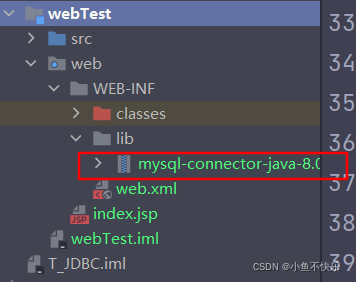
1. Check whether you have introduced MySQL-connector-Java.Jar package
This is used to link the database
2. Check the position of the bag
be sure to check
3. See if there are more spaces in the incoming string
[Solved] No module named ‘pywt‘ or ModuleNotFoundError: No module named ‘skimage.metrics‘
Solution:
pip install pywavelets
or
pip install scikit-image
The relevant dependencies pywavelets will be installed automatically
If an error is reported later:
modulenotfounderror: no module named ‘skimage metrics‘
If the skimage version is too low, update to the latest version (or 0.18+):
pip install scikit-image --upgrade
[Solved] MySQL: datetime (0) null default NULL
Resolve the MySQL: datetime (0) null default null error
Remove the database from mysql5 7 is exported as SQL in mysql5 When importing on 5, there will be an error of datetime (0) null default null. The main reason for the error is mysql5 7 and mysql5 Datetime and timestamp of 5 are incompatible, mysql5 7. The exported format is datetime (0) and mysql5 5, the syntax is not recognized
Solution:
1) Change datetime(0) to datetime, or timestamp(0) to timestamp in the export statement
2) Keep database version consistent
be careful
When datetime is set to CURRENT_TIMESTAMP by default, the length of CURRENT_TIMESTAMP cannot be specified as 0 as well.
datetime(0) NULL DEFAULT CURRENT_TIMESTAMP(0)
Correct grammar
datetime NULL DEFAULT CURRENT_TIMESTAMP
[Solved] Vue binding dynamic inline style Error: transform:rotate()
reason:
V-bind or ‘:’ is followed by the written JS code, which is written in the form of key value pairs. The key is the CSS style attribute name of the tag, and the key is the attribute value. The key value must be a string or a variable (provided that the variable must be declared in the data first): style = “{transform: rotate()}” this writing browser calls rotate as a function rotate(), so an error will be reported
Solution:
//String mode
:style="{transform: 'rotate(60deg)'}
//Variable form
:style="{transform: `rotate(${Variable}deg)`}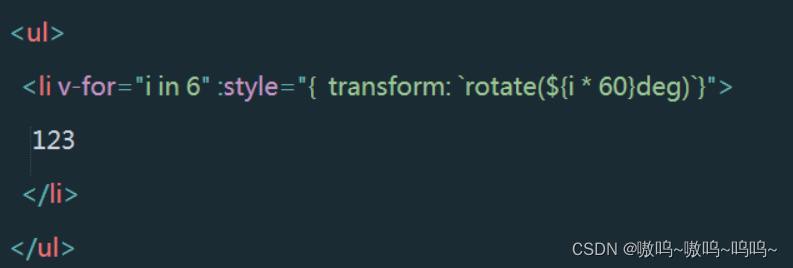
[Solved] yolo Error: IndexError: invalid index to scalar variable.
code:
yolo_layers = [layers[i[0] - 1] for i in network.getUnconnectedOutLayers()]
report errors:
Traceback (most recent call last):
  File "Run.py", line 201, in <module>
    main()
  File "Run.py", line 137, in main
    detections = yolo.detect(yolo_img)
  File "code/3D-BoundingBox-master/yolo/yolo.py", line 34, in detect
    ln = [ln[i[0] - 1] for i in self.net.getUnconnectedOutLayers()]
  File "code/3D-BoundingBox-master/yolo/yolo.py", line 34, in <listcomp>
    ln = [ln[i[0] - 1] for i in self.net.getUnconnectedOutLayers()]
IndexError: invalid index to scalar variable.
Reason:
different opencv versions cause different output formats
Solution:
yolo_layers = [layers[i - 1] for i in network.getUnconnectedOutLayers()]
Reference:
https://stackoverflow.com/questions/69834335/loading-yolo-invalid-index-to-scalar-variable
[Solved] Unity Error: “Not allowed to access vertices on mesh”
The error “not allowed to access vertices on mesh” is reported

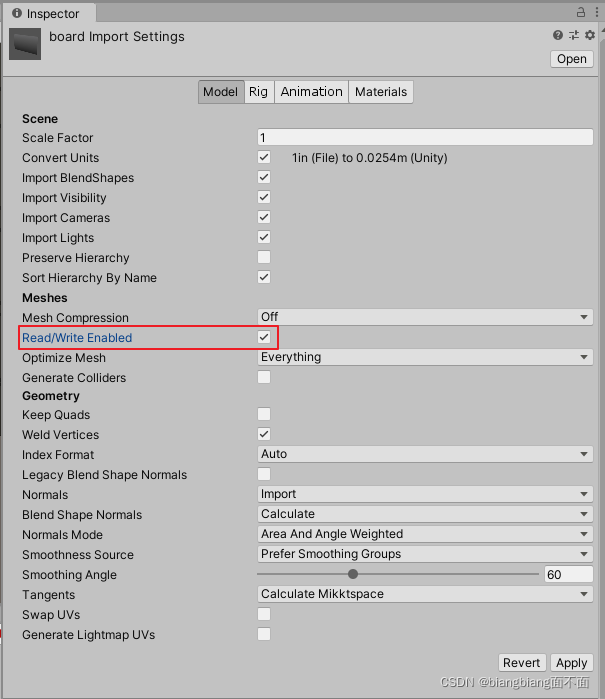
the reason is that the preform is not allowed to be read or written. Click the preform and check here