Author Archives: Robins

Yarn vue3 modify the name of the source file Error [Solved]

ERROR Failed to compile with 1 error PM 6:26:46
This relative module was not found:
* ./RoleFormDialog in ./node_modules/cache-loader/dist/cjs.js??ref–13-0!./node_modules/babel-loader/lib!./node_modules/cache-loader/dist/cjs.js??ref–1-0!./node_modules/@vue/cli-service/node_modules/vue-loader-v16/dist??ref–1-1!./src/views/Role/List.vue?vue&type=script&lang=js

Solution:
Also change the directory where the source file is located to any other name (here it is changing Role to RoleAAA) and then change back to the original name (here it is changing back to Role), yarn will automatically clear the cache and the problem is solved.


How to Solve “RIP Address Out Of Range” Error

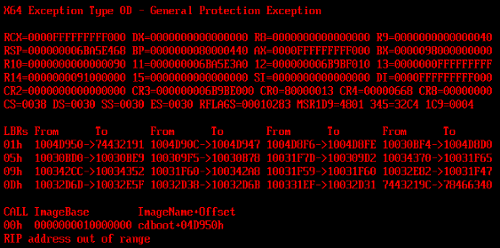
When restarting Windows Server 2008 R2, you see this error on the HP ProLiant} dl388 Gen 9 server. The error may display several messages that do not mean much to you, such as:

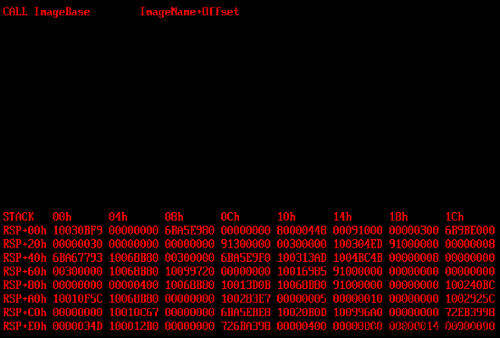
X64 exception type 0d – General protection exception

Rip address out of range

RIP Address Out Of Range

This error was seen when Windows Server 2008 R2 was restarted

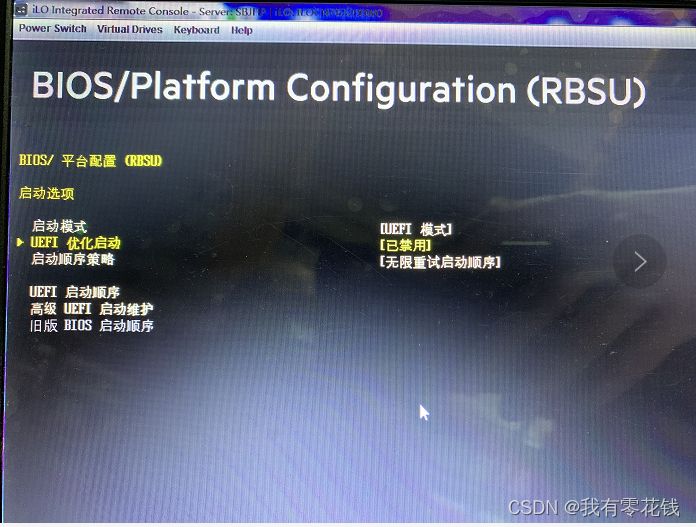
To resolve this error, disable the following settings in the BIOS:

UEFI optimization startup

[Solved] MongoDB Error: FaileError: dToParse: Password must be URL Encoded for mongodb:// URL:

Mongodb – error failedtoparse: password must be URL encoded for mongodb:// URL:

Problem background:
when you log in to mongodb with @ password, an error is reported. Failedtoparse: password must be URL encoded for mongodb:// URL:

Problem analysis:
official: https://docs.mongodb.com/manual/reference/connection-string/#examples

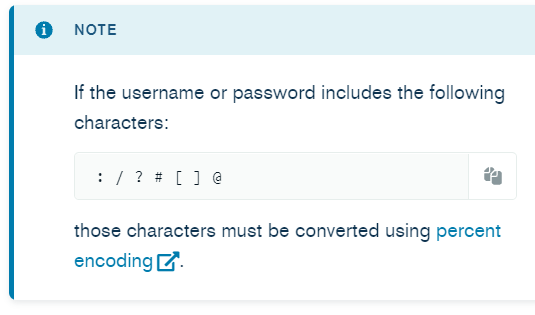
If the username or password includes the following characters:

@ is %40

Solution:
we can replace the login password @ with %40.

After creating an Iam ordinary user, you can execute the following commands to log in to mongodb through the Iam user:

$ mongo --quiet mongodb://iam:'aaa%40intah'@127.0.0.1:27017/iam_analytics?authSource=iam_analytics

[Solved] nvidia-docker runtime Error: (Unknown runtime specified nvidia)

1. An error is reported when running the docker command

root@test:~# docker run --runtime=nvidia -ti  -v $(pwd):/workspace -w /workspace -v /nfs:/nfs $@ --privileged -v /var/run/docker.sock:/var/run/docker.sock registry.test.cn/mla/cxx_toolchains:latest
docker: Error response from daemon: Unknown runtime specified nvidia.
See 'docker run --help'.

According to the error prompt, check whether NVIDIA-docker is installed

root@test:~# nvidia-docker
nvidia-docker: command not found
root@test:~# 

Obviously, it is not installed

2 execute the script and install NVIDIA-docker

root@test:~# cat install-nvidia-docker.sh
sudo curl -s -L https://nvidia.github.io/nvidia-docker/gpgkey | sudo apt-key add -
distribution=$(. /etc/os-release;echo $ID$VERSION_ID)
sudo curl -s -L https://nvidia.github.io/nvidia-docker/$distribution/nvidia-docker.list | sudo tee /etc/apt/sources.list.d/nvidia-docker.list
sudo apt-get update
sudo apt-get install -y nvidia-docker2
sudo pkill -SIGHUP dockerd
root@test:~#

Check that NVIDIA-docker and NVIDIA-container-Runtim are installed successfully

root@test:~# which nvidia-docker
/usr/bin/nvidia-docker
root@test:~# which nvidia-container-runtime
/usr/bin/nvidia-container-runtime
root@test:~#

3 edit /etc/docker/daemon.JSON is as follows

root@test:~# cat /etc/docker/daemon.json
{
  "insecure-registries": ["registry.test.cn"],
  "max-concurrent-downloads": 10,
  "log-driver": "json-file",
  "log-level": "warn",
  "log-opts": {
    "max-size": "10m",
    "max-file": "3"
  },
  "live-restore": true,
  "metrics-addr": "0.0.0.0:9323",
  "default-runtime": "nvidia",
  "experimental": true,
    "runtimes": {
        "nvidia": {
            "path": "/usr/bin/nvidia-container-runtime",
            "runtimeArgs": []
        }
    }
}
root@test:~#

4 restart docker

root@test:~# systemctl daemon-reload
root@test:~# systemctl restart docker

5 verification

root@test:~# docker run --runtime=nvidia -ti  -v $(pwd):/workspace -w /workspace -v /nfs:/nfs $@ --privileged -v /var/run/docker.sock:/var/run/docker.sock registry.test.cn/mla/cxx_toolchains:latest
root@c3a43f4564a8:/workspace#
root@c3a43f4564a8:/workspace# ls
root@c3a43f4564a8:/workspace# pwd
/workspace
root@c3a43f4564a8:/workspace#
Error: Cannot find module ‘./application‘ [How to Solve]

1. Background:

Run in PowerShell: PS e: \ vscode \ Vue \ day4 \ code \ myapi & gt; nodemon . \index. JS
error reporting

2. Error reporting content:

PS E:\vscode\vue\day4\code\myapi> node .\index.js
node:internal/modules/cjs/loader:936
  throw err;
  ^

Error: Cannot find module './application'
Require stack:
- E:\vscode\vue\day4\code\myapi\node_modules\express\lib\express.js
- E:\vscode\vue\day4\code\myapi\node_modules\express\index.js
- E:\vscode\vue\day4\code\myapi\index.js
[90m    at Function.Module._resolveFilename (node:internal/modules/cjs/loader:933:15)[39m
[90m    at Function.Module._load (node:internal/modules/cjs/loader:778:27)[39m
[90m    at Module.require (node:internal/modules/cjs/loader:1005:19)[39m
[90m    at require (node:internal/modules/cjs/helpers:102:18)[39m
    at Object.<anonymous> (E:\vscode\vue\day4\code\myapi\node_modules\[4mexpress[24m\lib\express.js:18:13)
[90m    at Module._compile (node:internal/modules/cjs/loader:1101:14)[39m
[90m    at Object.Module._extensions..js (node:internal/modules/cjs/loader:1153:10)[39m
[90m    at Module.load (node:internal/modules/cjs/loader:981:32)[39m
[90m    at Function.Module._load (node:internal/modules/cjs/loader:822:12)[39m
[90m    at Module.require (node:internal/modules/cjs/loader:1005:19)[39m {
  code: [32m'MODULE_NOT_FOUND'[39m,
  requireStack: [
    [32m'E:\\vscode\\vue\\day4\\code\\myapi\\node_modules\\express\\lib\\express.js'[39m,
    [32m'E:\\vscode\\vue\\day4\\code\\myapi\\node_modules\\express\\index.js'[39m,
    [32m'E:\\vscode\\vue\\day4\\code\\myapi\\index.js'[39m
  ]
}

3. Solution:

1. Prompt for finding the error point: error: cannot find module ‘/ application’
2. According to the error prompt, baidu solved the first blog

4. Causes:

Execute node \index. JS, PowerShell did not find ‘/ Application ‘this module should be index JS file runtime calls
node_ The dependent module in the modules folder is not found, so an error is reported

5. Solution:

1. Delete node_Modules folder (because dependencies are placed here)
2 There is a package Run in the folder of JSON file: PS e:\vscode\Vue\day4\code\myapi > npm install
3. The previous step is based on package JSON file re download dependency

[Solved] VMware Create a Virtual Machine Error: unsuccessful

VMware encountered a classic error when creating a virtual machine:

Attempting to start up from:
EFI VMware Virtual SCSI Hard Drive (0.0) … unsuccessful.
EFI VMware Virtual SATA CDROM Drive (1.0) … unsuccessful.
EFI Network…

Solution:
1 Find the VMX file in the installation directory of the virtual machine
2 Delete firmware = “EFI”
3 Save and restart the virtual machine to install normally

Springboot mybatis Integrate Error: Invalid bound statement (not found): com…DepartmentMapper.save

Error message:

org.apache.ibatis.binding.BindingException: Invalid bound statement (not found): com.qf.java2107.springboot.mapper.DepartmentMapper.save

	at org.apache.ibatis.binding.MapperMethod$SqlCommand.<init>(MapperMethod.java:235)
	at org.apache.ibatis.binding.MapperMethod.<init>(MapperMethod.java:53)
	at org.apache.ibatis.binding.MapperProxy.lambda$cachedInvoker$0(MapperProxy.java:115)
	at java.util.concurrent.ConcurrentHashMap.computeIfAbsent(ConcurrentHashMap.java:1660)
	at org.apache.ibatis.binding.MapperProxy.cachedInvoker(MapperProxy.java:102)
	at org.apache.ibatis.binding.MapperProxy.invoke(MapperProxy.java:85)
	at com.sun.proxy.$Proxy74.save(Unknown Source)
	at com.qf.java2107.springboot.SpringbootDemo01QuickApplicationTests.saveTest(SpringbootDemo01QuickApplicationTests.java:23)
	at sun.reflect.NativeMethodAccessorImpl.invoke0(Native Method)
	at sun.reflect.NativeMethodAccessorImpl.invoke(NativeMethodAccessorImpl.java:62)
	at sun.reflect.DelegatingMethodAccessorImpl.invoke(DelegatingMethodAccessorImpl.java:43)
	at java.lang.reflect.Method.invoke(Method.java:498)
	at org.junit.platform.commons.util.ReflectionUtils.invokeMethod(ReflectionUtils.java:725)
	at org.junit.jupiter.engine.execution.MethodInvocation.proceed(MethodInvocation.java:60)
	at org.junit.jupiter.engine.execution.InvocationInterceptorChain$ValidatingInvocation.proceed(InvocationInterceptorChain.java:131)
	at org.junit.jupiter.engine.extension.TimeoutExtension.intercept(TimeoutExtension.java:149)
	at org.junit.jupiter.engine.extension.TimeoutExtension.interceptTestableMethod(TimeoutExtension.java:140)
	at org.junit.jupiter.engine.extension.TimeoutExtension.interceptTestMethod(TimeoutExtension.java:84)
	at org.junit.jupiter.engine.execution.ExecutableInvoker$ReflectiveInterceptorCall.lambda$ofVoidMethod$0(ExecutableInvoker.java:115)
	at org.junit.jupiter.engine.execution.ExecutableInvoker.lambda$invoke$0(ExecutableInvoker.java:105)
	at org.junit.jupiter.engine.execution.InvocationInterceptorChain$InterceptedInvocation.proceed(InvocationInterceptorChain.java:106)
	at org.junit.jupiter.engine.execution.InvocationInterceptorChain.proceed(InvocationInterceptorChain.java:64)
	at org.junit.jupiter.engine.execution.InvocationInterceptorChain.chainAndInvoke(InvocationInterceptorChain.java:45)
	at org.junit.jupiter.engine.execution.InvocationInterceptorChain.invoke(InvocationInterceptorChain.java:37)
	at org.junit.jupiter.engine.execution.ExecutableInvoker.invoke(ExecutableInvoker.java:104)
	at org.junit.jupiter.engine.execution.ExecutableInvoker.invoke(ExecutableInvoker.java:98)
	at org.junit.jupiter.engine.descriptor.TestMethodTestDescriptor.lambda$invokeTestMethod$7(TestMethodTestDescriptor.java:214)
	at org.junit.platform.engine.support.hierarchical.ThrowableCollector.execute(ThrowableCollector.java:73)
	at org.junit.jupiter.engine.descriptor.TestMethodTestDescriptor.invokeTestMethod(TestMethodTestDescriptor.java:210)
	at org.junit.jupiter.engine.descriptor.TestMethodTestDescriptor.execute(TestMethodTestDescriptor.java:135)
	at org.junit.jupiter.engine.descriptor.TestMethodTestDescriptor.execute(TestMethodTestDescriptor.java:66)
	at org.junit.platform.engine.support.hierarchical.NodeTestTask.lambda$executeRecursively$6(NodeTestTask.java:151)
	at org.junit.platform.engine.support.hierarchical.ThrowableCollector.execute(ThrowableCollector.java:73)
	at org.junit.platform.engine.support.hierarchical.NodeTestTask.lambda$executeRecursively$8(NodeTestTask.java:141)
	at org.junit.platform.engine.support.hierarchical.Node.around(Node.java:137)
	at org.junit.platform.engine.support.hierarchical.NodeTestTask.lambda$executeRecursively$9(NodeTestTask.java:139)
	at org.junit.platform.engine.support.hierarchical.ThrowableCollector.execute(ThrowableCollector.java:73)
	at org.junit.platform.engine.support.hierarchical.NodeTestTask.executeRecursively(NodeTestTask.java:138)
	at org.junit.platform.engine.support.hierarchical.NodeTestTask.execute(NodeTestTask.java:95)
	at java.util.ArrayList.forEach(ArrayList.java:1259)
	at org.junit.platform.engine.support.hierarchical.SameThreadHierarchicalTestExecutorService.invokeAll(SameThreadHierarchicalTestExecutorService.java:41)
	at org.junit.platform.engine.support.hierarchical.NodeTestTask.lambda$executeRecursively$6(NodeTestTask.java:155)
	at org.junit.platform.engine.support.hierarchical.ThrowableCollector.execute(ThrowableCollector.java:73)
	at org.junit.platform.engine.support.hierarchical.NodeTestTask.lambda$executeRecursively$8(NodeTestTask.java:141)
	at org.junit.platform.engine.support.hierarchical.Node.around(Node.java:137)
	at org.junit.platform.engine.support.hierarchical.NodeTestTask.lambda$executeRecursively$9(NodeTestTask.java:139)
	at org.junit.platform.engine.support.hierarchical.ThrowableCollector.execute(ThrowableCollector.java:73)
	at org.junit.platform.engine.support.hierarchical.NodeTestTask.executeRecursively(NodeTestTask.java:138)
	at org.junit.platform.engine.support.hierarchical.NodeTestTask.execute(NodeTestTask.java:95)
	at java.util.ArrayList.forEach(ArrayList.java:1259)
	at org.junit.platform.engine.support.hierarchical.SameThreadHierarchicalTestExecutorService.invokeAll(SameThreadHierarchicalTestExecutorService.java:41)
	at org.junit.platform.engine.support.hierarchical.NodeTestTask.lambda$executeRecursively$6(NodeTestTask.java:155)
	at org.junit.platform.engine.support.hierarchical.ThrowableCollector.execute(ThrowableCollector.java:73)
	at org.junit.platform.engine.support.hierarchical.NodeTestTask.lambda$executeRecursively$8(NodeTestTask.java:141)
	at org.junit.platform.engine.support.hierarchical.Node.around(Node.java:137)
	at org.junit.platform.engine.support.hierarchical.NodeTestTask.lambda$executeRecursively$9(NodeTestTask.java:139)
	at org.junit.platform.engine.support.hierarchical.ThrowableCollector.execute(ThrowableCollector.java:73)
	at org.junit.platform.engine.support.hierarchical.NodeTestTask.executeRecursively(NodeTestTask.java:138)
	at org.junit.platform.engine.support.hierarchical.NodeTestTask.execute(NodeTestTask.java:95)
	at org.junit.platform.engine.support.hierarchical.SameThreadHierarchicalTestExecutorService.submit(SameThreadHierarchicalTestExecutorService.java:35)
	at org.junit.platform.engine.support.hierarchical.HierarchicalTestExecutor.execute(HierarchicalTestExecutor.java:57)
	at org.junit.platform.engine.support.hierarchical.HierarchicalTestEngine.execute(HierarchicalTestEngine.java:54)
	at org.junit.platform.launcher.core.EngineExecutionOrchestrator.execute(EngineExecutionOrchestrator.java:107)
	at org.junit.platform.launcher.core.EngineExecutionOrchestrator.execute(EngineExecutionOrchestrator.java:88)
	at org.junit.platform.launcher.core.EngineExecutionOrchestrator.lambda$execute$0(EngineExecutionOrchestrator.java:54)
	at org.junit.platform.launcher.core.EngineExecutionOrchestrator.withInterceptedStreams(EngineExecutionOrchestrator.java:67)
	at org.junit.platform.launcher.core.EngineExecutionOrchestrator.execute(EngineExecutionOrchestrator.java:52)
	at org.junit.platform.launcher.core.DefaultLauncher.execute(DefaultLauncher.java:114)
	at org.junit.platform.launcher.core.DefaultLauncher.execute(DefaultLauncher.java:86)
	at org.junit.platform.launcher.core.DefaultLauncherSession$DelegatingLauncher.execute(DefaultLauncherSession.java:86)
	at org.junit.platform.launcher.core.SessionPerRequestLauncher.execute(SessionPerRequestLauncher.java:53)
	at com.intellij.junit5.JUnit5IdeaTestRunner.startRunnerWithArgs(JUnit5IdeaTestRunner.java:69)
	at com.intellij.rt.junit.IdeaTestRunner$Repeater.startRunnerWithArgs(IdeaTestRunner.java:33)
	at com.intellij.rt.junit.JUnitStarter.prepareStreamsAndStart(JUnitStarter.java:230)
	at com.intellij.rt.junit.JUnitStarter.main(JUnitStarter.java:58)

Error reason: the namespace of mapper mapping file is written incorrectly

<mapper namespace="com.qf.java2107.springboot.demo02.mapper.DepartmentMapper">

After modification, it is successful

<mapper namespace="com.qf.java2107.springboot.mapper.DepartmentMapper">

MySQL startup error: vcruntime140_1.dll cannot be found, unable to continue code execution

Build a MySQL development environment under Windows environment and report an error when executing mysqld. The error content is:

Vcruntime140 not found_ 1.dll, unable to continue code execution

The reason is that there is no vcruntime140_1.DLL file under C:\Windows\System32 of windows.

Solution: Download vcruntime140_1.dll from the official Website and put it in C:\Windows\System32.

Linux: How to Solve vim ~/.bashrc Execute Error

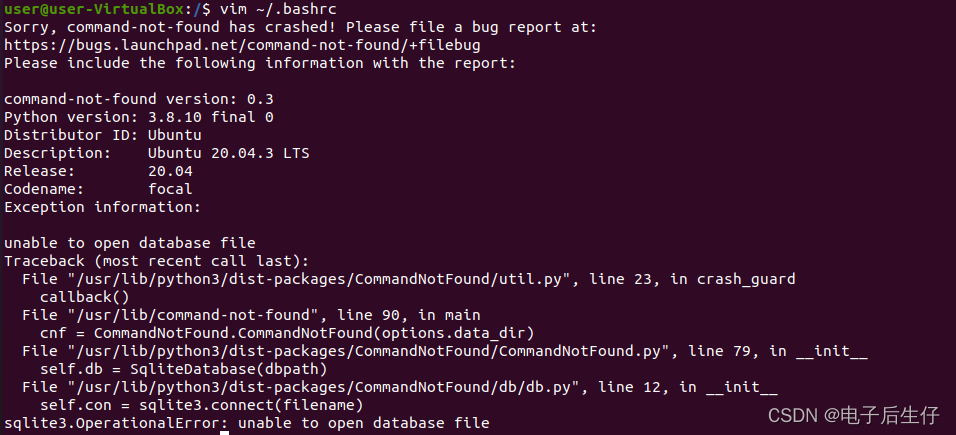
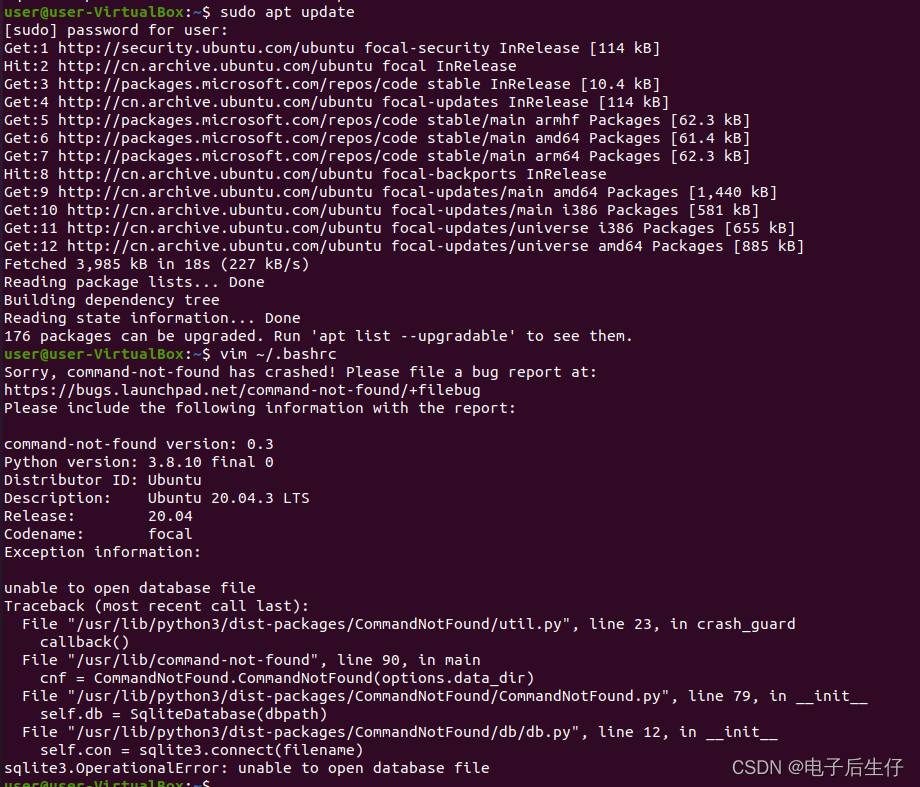
1. If you want to add environment variables under Linux, execute VIM ~/The bashrc command has the following error:

2. Execute sudo apt update first to see what happens

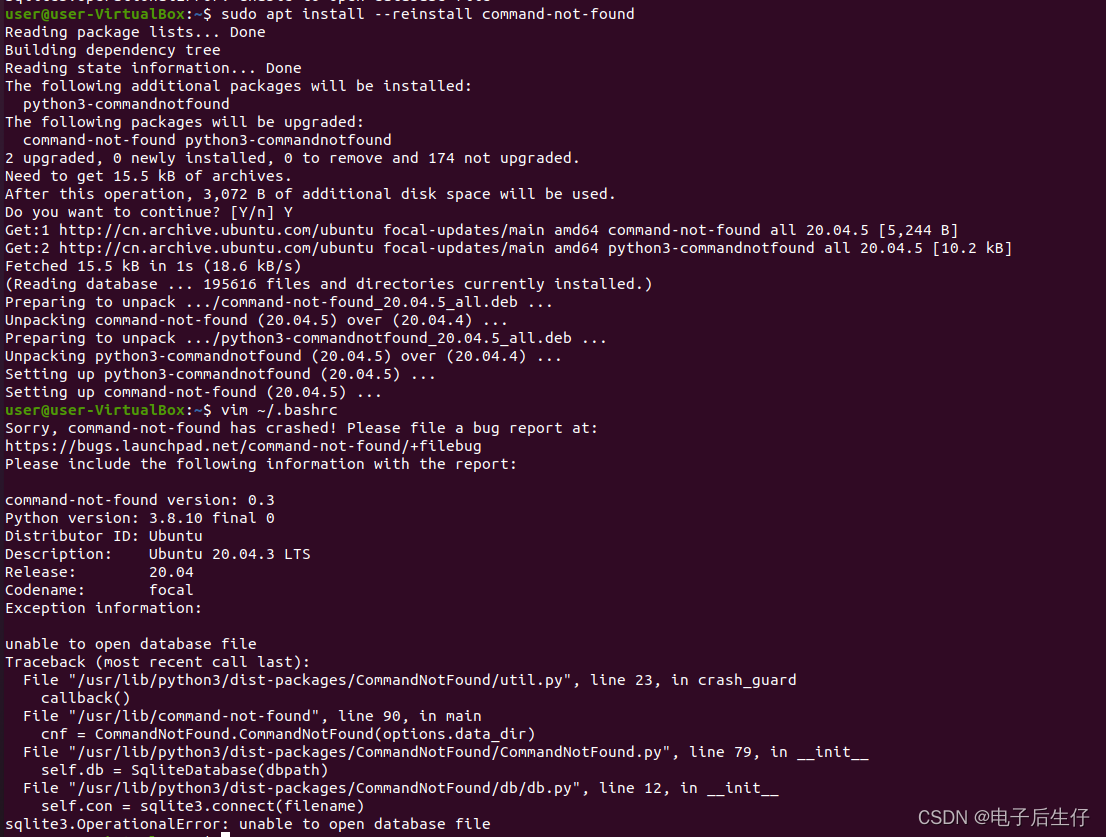
3. Execute sudo apt install — reinstall command not found

4. Finally, execute sudo sudo chmod -R o+r /var/lib/command-not-found/ to successfully solve the problem!