Author Archives: Robins

[Solved] VScode Error: build constraints exclude all Go files in syscall\js

When developing golang webassembly in vscode, an error is reported when importing the package. The code is as follows:

// main.go
package main

import "syscall/js"

func main() {
	alert := js.Global().Get("alert")
	alert.Invoke("Hello World!")
}

The error information is as follows:

could not import syscall/js (cannot find package "syscall/js" in any of 
	E:\Go\src\syscall\js (from $GOROOT)
	F:\go\Gopath\src\syscall\js (from $GOPATH))
error while importing syscall/js: build constraints exclude all Go files in E:\Go\src\syscall\js

The solution is as follows:

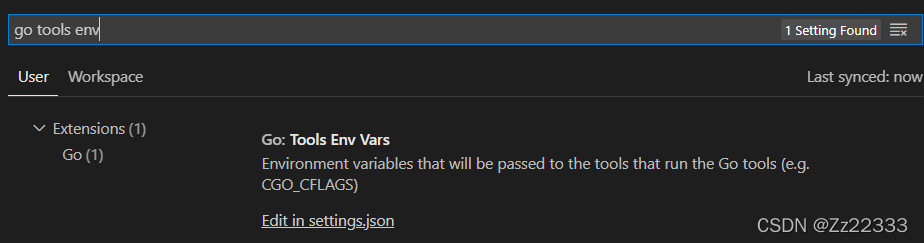
Open setting and enter go tools env

Open settings.JSON file, write in the file:

{
  "go.toolsEnvVars": {
    "GOOS":"js",
    "GOARCH":"wasm"
  }
}

Then reopen vscode.

Python Use sqlalchemy Error: pymssql.ProgrammingError: (102, b“Incorrect syntax near ‘(‘.DB-Lib error

As shown below, use create in Sqlalchemy_ Engine creates a database connection;

conn = create_engine('mssql+pymssql://' + dbuser + ':' + dbpassword + '@' + dbhost + '/' + database)

Then through pandas’ to_SQL method to the database,

df = pd.read_csv(filename, sep='|', header=0, quoting=3)

df.to_sql(name=filename + ty, con=conn, if_exists='replace', index=True)

Result error:

Traceback (most recent call last):
  File "src\pymssql.pyx", line 450, in pymssql.Cursor.execute
  File "src\_mssql.pyx", line 1064, in _mssql.MSSQLConnection.execute_query
  File "src\_mssql.pyx", line 1095, in _mssql.MSSQLConnection.execute_query
  File "src\_mssql.pyx", line 1228, in _mssql.MSSQLConnection.format_and_run_query
  File "src\_mssql.pyx", line 1639, in _mssql.check_cancel_and_raise
  File "src\_mssql.pyx", line 1683, in _mssql.maybe_raise_MSSQLDatabaseException
_mssql.MSSQLDatabaseException: (102, b"Incorrect syntax near '('.DB-Lib error message 20018, severity 15:\nGeneral SQL Server error: Check messages from the SQL Server\n")

During handling of the above exception, another exception occurred:

Traceback (most recent call last):

Supplementary error reporting exception information:

Traceback (most recent call last):
  File "C:\Users\****\AppData\Local\Programs\Python\Python37-32\lib\site-packages\sqlalchemy\engine\base.py", line 1264, in _execute_context
    cursor, statement, parameters, context
  File "C:\Users\****\AppData\Local\Programs\Python\Python37-32\lib\site-packages\sqlalchemy\engine\default.py", line 587, in do_executemany
    cursor.executemany(statement, parameters)
  File "src\pymssql.pyx", line 476, in pymssql.Cursor.executemany
  File "src\pymssql.pyx", line 465, in pymssql.Cursor.execute
pymssql.ProgrammingError: (102, b"Incorrect syntax near '('.DB-Lib error message 20018, severity 15:\nGeneral SQL Server error: Check messages from the SQL Server\n")

The above exception was the direct cause of the following exception:

Traceback (most recent call last):
  File "C:\Users\****\AppData\Local\Programs\Python\Python37-32\lib\contextlib.py", line 130, in __exit__
    self.gen.throw(type, value, traceback)
  File "C:\Users\****\AppData\Local\Programs\Python\Python37-32\lib\site-packages\pandas\io\sql.py", line 948, in run_transaction
    yield tx
  File "C:\Users\****\AppData\Local\Programs\Python\Python37-32\lib\site-packages\pandas\io\sql.py", line 641, in insert
    self._execute_insert(conn, keys, chunk_iter)
  File "C:\Users\****\AppData\Local\Programs\Python\Python37-32\lib\site-packages\pandas\io\sql.py", line 616, in _execute_insert
    conn.execute(self.insert_statement(), data)
  File "C:\Users\****\AppData\Local\Programs\Python\Python37-32\lib\site-packages\sqlalchemy\engine\base.py", line 1020, in execute
    return meth(self, multiparams, params)
  File "C:\Users\****\AppData\Local\Programs\Python\Python37-32\lib\site-packages\sqlalchemy\sql\elements.py", line 298, in _execute_on_connection
    return connection._execute_clauseelement(self, multiparams, params)
  File "C:\Users\****\AppData\Local\Programs\Python\Python37-32\lib\site-packages\sqlalchemy\engine\base.py", line 1139, in _execute_clauseelement
    distilled_params,
  File "C:\Users\****\AppData\Local\Programs\Python\Python37-32\lib\site-packages\sqlalchemy\engine\base.py", line 1324, in _execute_context
    e, statement, parameters, cursor, context
  File "C:\Users\****\AppData\Local\Programs\Python\Python37-32\lib\site-packages\sqlalchemy\engine\base.py", line 1518, in _handle_dbapi_exception
    sqlalchemy_exception, with_traceback=exc_info[2], from_=e
  File "C:\Users\****\AppData\Local\Programs\Python\Python37-32\lib\site-packages\sqlalchemy\util\compat.py", line 178, in raise_
    raise exception
  File "C:\Users\****\AppData\Local\Programs\Python\Python37-32\lib\site-packages\sqlalchemy\engine\base.py", line 1264, in _execute_context
    cursor, statement, parameters, context
  File "C:\Users\****\AppData\Local\Programs\Python\Python37-32\lib\site-packages\sqlalchemy\engine\default.py", line 587, in do_executemany
    cursor.executemany(statement, parameters)
  File "src\pymssql.pyx", line 476, in pymssql.Cursor.executemany
  File "src\pymssql.pyx", line 465, in pymssql.Cursor.execute
sqlalchemy.exc.ProgrammingError: (pymssql.ProgrammingError) (102, b"Incorrect syntax near '('.DB-Lib error message 20018, severity 15:\nGeneral SQL Server error: Check messages from the SQL Server\n")

Mainly look at this line, which literally means [syntax error near ‘(‘):

_mssql.MSSQLDatabaseException: (102, b"Incorrect syntax near '('.DB-Lib error message 20018, severity 15:\nGeneral SQL Server error: Check messages from the SQL Server\n")

Generally, we will first check whether the SQL is correct (or whether there are ‘special characters’ in the data), but strangely

When this program runs locally, it reads the same file and imports the same database table. Everything is normal!

At this time, it is suspected that the running environment on the local and remote servers is inconsistent, and the inspection found that it was not surprising; The version of Sqlalchemy on the remote is rather old, only 0.23.0
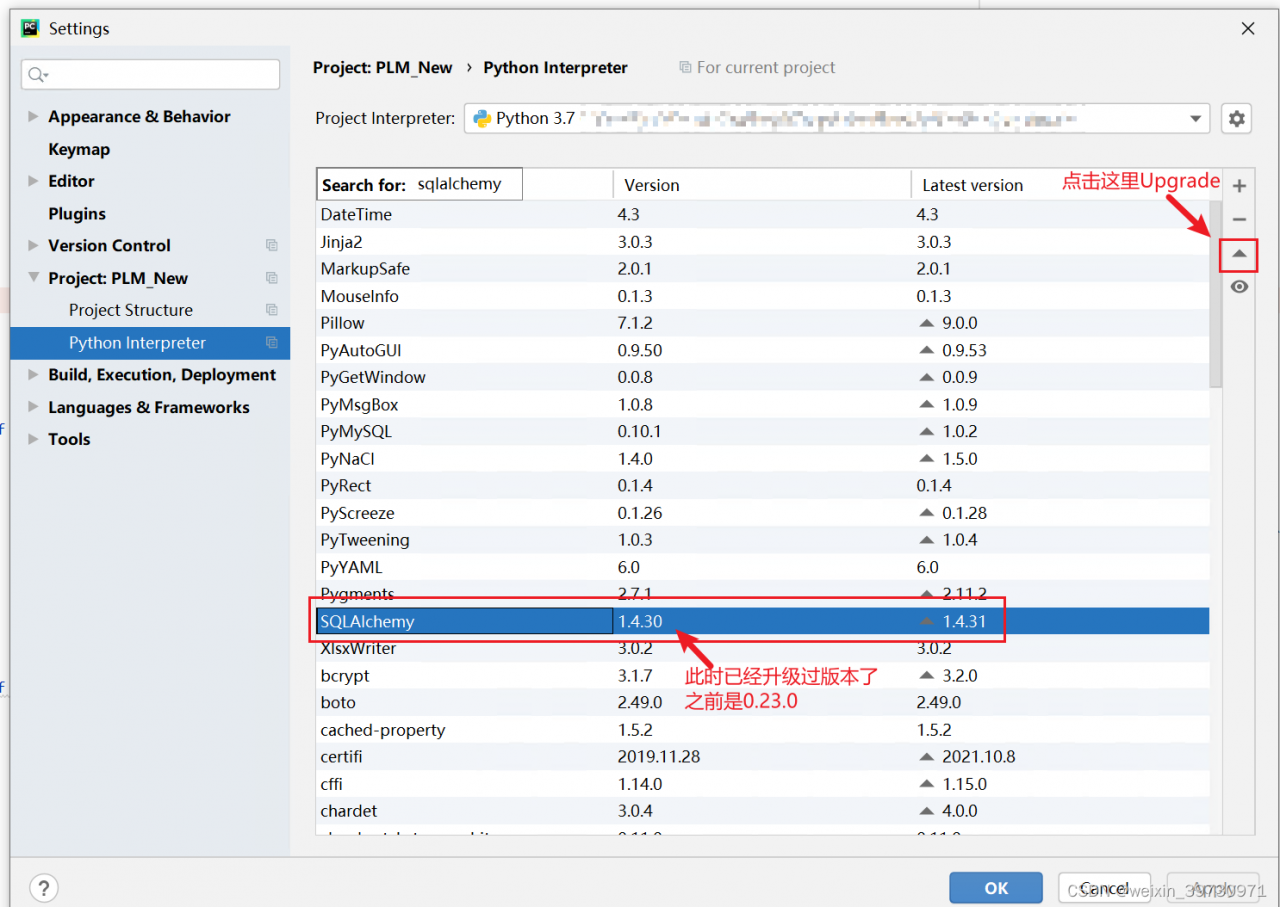
So I decided to upgrade and run again. Everything was normal~
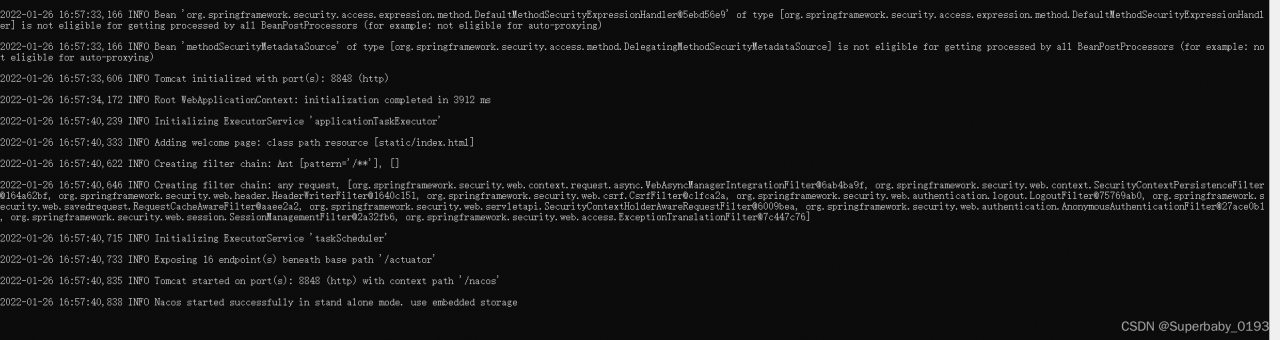
nacos Start Error: Error creating bean with name ‘grpcClusterServer’

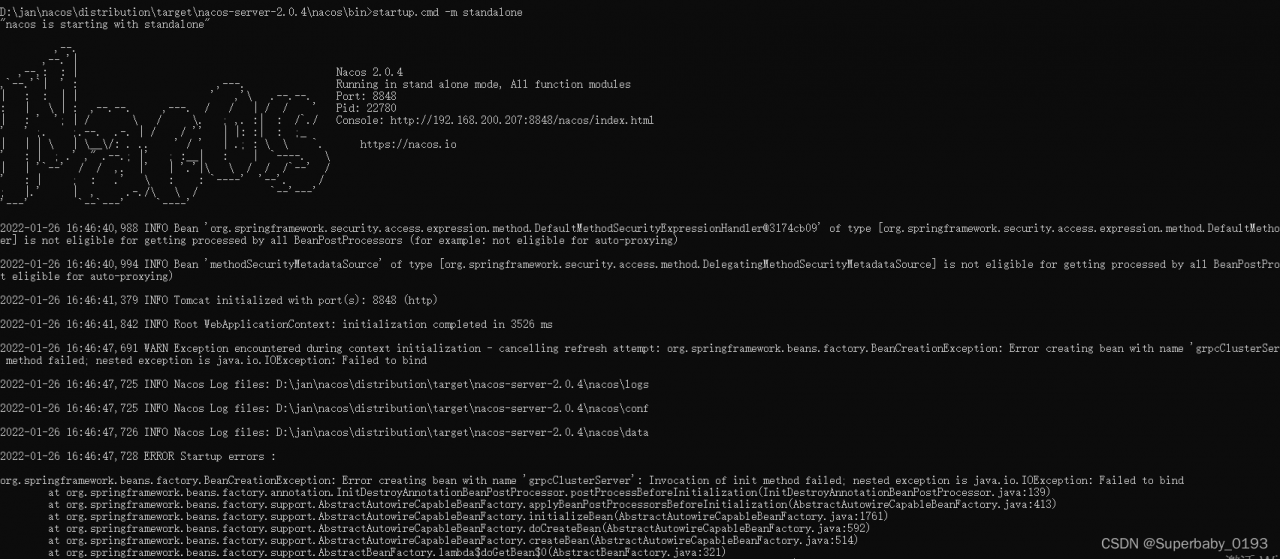
Today, I installed Nacos locally and reported the error creating bean with name ‘grpcclusterserver’ at startup. When I went to search for the cause of the error, I saw that a blogger said it would be better to try several more times. I didn’t know the specific reason, so I shut down and restarted directly and started again successfully
screenshot of error reporting:

screenshot of success:

[Solved] stream Convert list to map Error: java.lang.IllegalStateException: Duplicate key

I background

In many scenarios, the data of List needs to be transformed into the key-value pairs of Map scenarios to facilitate quick query data. For example: the need to query the corresponding person name details scenario according to the work number. There are two kinds of scenarios, the first one is to query the database once by each work number, which is obviously not reasonable because it is not good for DB pressure and connection. The second will be a collection of work number (need to consider the volume of data scenarios, Oracle supports a maximum of one thousand, mysql, although no online, but consider the performance and memory consumption need to consider the upper limit recommended 1000 below), the next is the second way to expand.

Translated with www.DeepL.com/Translator (free version)

II Development practice

List<User> userList = new ArrayList<>();

userList.add(User.builder().id(123).name("TEST123").build());

userList.add(User.builder().id(1231).name("TEST1231").build());

userList.add(User.builder().id(1232).name("TEST1232").build());

userList.add(User.builder().id(1233).name("TEST1233").build());

userList.add(User.builder().id(1234).name("TEST1234").build());

1.The stream implementation was not available before Java 1.8

Map<String, Long> idNameMap = new HashMap<String, Long>();

for(User user : userList ){

     idNameMap.put(user.getName(),  user.getId());

}

return idNameMap ;

2.Java 1.8 onwards supports stream implementation

return userList.stream().collect(Collectors.toMap(User::getName, User::getId);

III Existing problems

If you use the 2.1 way, the possible problems, if there are two data with the same name in the data, it will report an error java.lang.IllegalStateException: Duplicate key.

When using stream stream, it will not overwrite the data directly like the above way, but will report an error. So it needs to be optimized as

return userList.stream().collect(Collectors.toMap(User::getName, User::getId , (entity1, entity2) -> entity1);

It can solve the problem of error reporting.

[Solved] Hibernate Error: Row was updated or deleted by another transaction

Row was updated or deleted by another transaction (or unsaved-value mapping was incorrect) Hibernate Error:

org.hibernate.StaleObjectStateException:Row was updated or deleted by another transaction (or unsaved-value mapping was incorrect)

Error reporting reason:

1. The current version is not consistent with the db database version, the data is modified when the value of the form object in the version and the value of the corresponding record in the database version is not consistent, which makes the update method in the call, the version is not consistent with the reverse error.
2. Two or more sessions have modified the same record

Encountering such an exception indicates that the object of the operation uses an optimistic lock or the defined POJO defines the version field

Solution:

1. When submitting the form data, submit the version as well
2. First query the value of the version of the corresponding record in the database and assign it to the entity object to be modified, and then execute the update operation (after modifying the database data, the value of its version will change, so at this time the update operation needs to obtain the latest version value, assign it to the operation object, and then execute the update operation)

ROS Error: warning: “deprecated pixel format used“

Error log

[swscaler @ 0x28dace0] deprecated pixel format used, make sure you did set range correctly

Reason for error reporting
The above error occurs when using the ROS usb_cam package to call the camera, the error log is written clearly, that is, the video format used is deprecated. The error format is mjpg, after changing it to yuyv, the problem is solved.

Opencv c++ Read Video Error: capture.isOpened() Return false

#include<iostream>
#include<opencv2/opencv.hpp>
using namespace cv;
using namespace std;
int main()
{
    VideoCapture capture;
    Mat frame;
    const string source = "/home/gear/big_disk_c/wangjd/shipintest/789.mp4";
    // frame= capture.open("789.mp4");
    frame= capture.open(source);
    if(!capture.isOpened())
    {
        printf("can not open ...\n");
        return -1;
    }
    printf("1213131\n");
    // namedWindow("output", CV_WINDOW_AUTOSIZE);

    while (capture.read(frame))
    {
        imshow("output", frame);
        waitKey(10);
    }
    capture.release();
    return 0;
}

Reason: Path. I have a permission problem with this server, and it will report an error if I write the full path. And the executable file I generated and the video file are not in the same directory, …/789.mp4 will not be read, only the two put together to read. Later I found out that
The constructor of capture.open() passed in a const string, so I instantiated a const string source first, then I could write the full path, and then passed it in.

const string source = "/home/gear/big_disk_c/wangjd/shipintest/789.mp4";
frame= capture.open(source);

[Solved] react Error: Can‘t perform a React state update on an unmounted component

Warning: Can’t perform a React state update on an unmounted component. This is a no-op, but it indic

In the development of react, we may often encounter this warning:

Can't perform a React state update on an unmounted component.This is a no-op, but it indicates a memory leak in your application.

We cannot set state after the component is destroyed to prevent memory leakage

As for the above errors when switching routes in react, the actual reason is that after the component is mounted, you perform asynchronous operations, such as Ajax requests or setting timers, and you perform setstate operation in callback. When you switch routes, the component has been unmounted. At this time, the callback is still executing in the asynchronous operation, so the setstate does not get a value.

There are two solutions:

1. Clear all operations when uninstalling (e.g. abort your Ajax request or clear timer)

componentDidMount = () => {
    //1.ajax request
    $.ajax('Your request',{})
        .then(res => {
            this.setState({
                aa:true
            })
        })
        .catch(err => {})
    //2.timer
    timer = setTimeout(() => {
        //dosomething
    },1000)
}
componentWillUnMount = () => {
    //1.ajax request
    $.ajax.abort()
    //2.timer
    clearTimeout(timer)
}

2. Set a flag and reset it when unmount

componentDidMount = () => {
    this._isMounted = true;
    $.ajax('Your Request',{})
        .then(res => {
            if(this._isMounted){
                this.setState({
                    aa:true
                })
            }
        })
        .catch(err => {})
}
componentWillUnMount = () => {
    this._isMounted = false;
}

3. The simplest way (oil of gold)

componentDidMount = () => {
    $.ajax('Your Request',{})
    .then(res => {
        this.setState({
            data: datas,
        });
    })
    .catch(error => {
 
     });
}
componentWillUnmount = () => {
    this.setState = (state,callback)=>{
      return;
    };
}

Vue warn]: vue3 element Component emit Pass Event Error

vue3 in element component emit pass event error
Report error:

Vue warn]: Extraneous non-emits event listeners (cancel, confirm, modelClose) were passed to component but could not be automatically inherited because component renders fragment or text root nodes. If the listener is intended to be a component custom event listener only, declare it using the “emits” option.

Sub-component throwing events

 emits: ['cancel', 'confirm', 'modelClose'],
  setup (props, context) {
    const { showDialog } = toRefs(props)
    const show = computed(() => {
      return showDialog.value
    })
    const cancel = () => {
      context.emit('cancel')
    }
    const confirm = () => {
      context.emit('confirm')
    }
    const modelClose = () => {
      context.emit('modelClose')
    }
    return {
      show, cancel, confirm, modelClose
    }

Parent component receives events

`<user-info :showDialog="showDialog" @cancel="showDialog=false" @confirm="showDialog=false" @modelClose="showDialog=false"></user-info>

[Solved] Compile Error: cannot open include file ‘afxres.h‘

Problem Description:

compilation error: cannot open include file ‘afxres h’


Cause analysis:

this is the header file of MFC class library</ font>


Solution 1:

If the MFC component is not installed, you can replace it with the next two lines

//#include "afxres.h"
#include <Windows.h>
#include <winres.h>
//Only one line winres.h is OK!

Solution 2:

Just install MFC components

<script setup> Error: ‘defineProps‘ is not defined [How to Solve]

Solution 1: in eslintrc. JS env add configuration

  env: {
    'vue/setup-compiler-macros': true // New
  }

An error may be reported when the development service is restarted after configuration:

Environment key “vue/setup-compiler-macros” is unknown

Recompile again and the error disappears.

Solution 2: add global configuration in eslintrc.js

  globals: {
    defineProps: "readonly",
    defineEmits: "readonly"
  }