Author Archives: Robins

[Solved] Nacos Startup Error: Error creating bean with name ‘authFilter‘

Nacos startup error: error creating bean with name ‘authfilter’:

Start failure reason

Turn the startup page to the top level, and you will find that Nacos is started in a cluster:
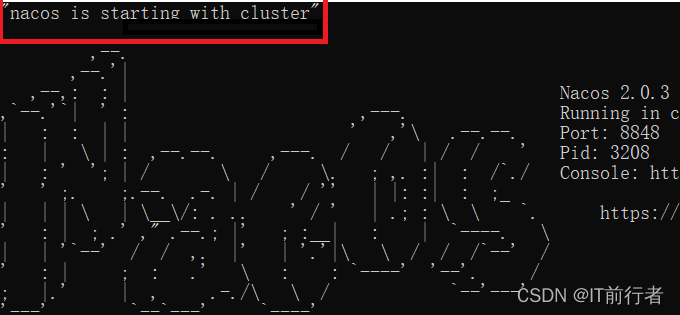
However, you just downloaded Nacos and did not make the cluster configuration of Nacos, so you need to start it in a stand-alone way.

Solution:

The first one: start the command line window under the bin directory of Nacos, and enter the command of single machine startup to start

startup.cmd -m stadalone

Second: modify the content of the startup.cmd script from set mode = "cluster" to set mode = "standalone", that is, change the cluster mode to stand-alone mode

Part of the contents of the original file of startup.cmd are as follows:

set MODE="cluster"
set FUNCTION_MODE="all"
set SERVER=nacos-server

After modification:

set MODE="standalone"
set FUNCTION_MODE="all"
set SERVER=nacos-server

ll”
set SERVER=nacos-server


Then double click startup.cmd to start, it is OK!
[Solved] spring boot Startup Error: Error creating bean with name ‘requestMappingHandlerMapping‘ defined in class path

org.springframework.beans.factory.BeanCreationException: Error creating bean with name 'requestMappingHandlerMapping' defined in class path resource [org/springframework/boot/autoconfigure/web/servlet/WebMvcAutoConfiguration$EnableWebMvcConfiguration.class]: Invocation of init method failed; nested exception is java.lang.IllegalStateException: Ambiguous mapping. Cannot map 'reachIndex' method 
com.xxx.controller.ReachIndex#getxxindex(Model, String)
to { [/xxindex]}: There is already 'indexController' bean method
com..controller.IndexController#getxxindex(Model, String) mapped.
	at org.springframework.beans.factory.support.AbstractAutowireCapableBeanFactory.initializeBean(AbstractAutowireCapableBeanFactory.java:1786)
	at org.springframework.beans.factory.support.AbstractAutowireCapableBeanFactory.doCreateBean(AbstractAutowireCapableBeanFactory.java:602)
	at org.springframework.beans.factory.support.AbstractAutowireCapableBeanFactory.createBean(AbstractAutowireCapableBeanFactory.java:524)
	at org.springframework.beans.factory.support.AbstractBeanFactory.lambda$doGetBean$0(AbstractBeanFactory.java:335)
	at org.springframework.beans.factory.support.DefaultSingletonBeanRegistry.getSingleton(DefaultSingletonBeanRegistry.java:234)
	at org.springframework.beans.factory.support.AbstractBeanFactory.doGetBean(AbstractBeanFactory.java:333)
	at org.springframework.beans.factory.support.AbstractBeanFactory.getBean(AbstractBeanFactory.java:208)
	at org.springframework.beans.factory.support.DefaultListableBeanFactory.preInstantiateSingletons(DefaultListableBeanFactory.java:944)
	at org.springframework.context.support.AbstractApplicationContext.finishBeanFactoryInitialization(AbstractApplicationContext.java:918)
	at org.springframework.context.support.AbstractApplicationContext.refresh(AbstractApplicationContext.java:583)
	at org.springframework.boot.web.servlet.context.ServletWebServerApplicationContext.refresh(ServletWebServerApplicationContext.java:145)
	at org.springframework.boot.SpringApplication.refresh(SpringApplication.java:754)
	at org.springframework.boot.SpringApplication.refreshContext(SpringApplication.java:434)
	at org.springframework.boot.SpringApplication.run(SpringApplication.java:338)
	at org.springframework.boot.SpringApplication.run(SpringApplication.java:1343)
	at org.springframework.boot.SpringApplication.run(SpringApplication.java:1332)
	at com.xxx.Application.main(Application.java:15)
	at sun.reflect.NativeMethodAccessorImpl.invoke0(Native Method)
	at sun.reflect.NativeMethodAccessorImpl.invoke(NativeMethodAccessorImpl.java:62)
	at sun.reflect.DelegatingMethodAccessorImpl.invoke(DelegatingMethodAccessorImpl.java:43)
	at java.lang.reflect.Method.invoke(Method.java:498)
	at org.springframework.boot.devtools.restart.RestartLauncher.run(RestartLauncher.java:49)
Caused by: java.lang.IllegalStateException: Ambiguous mapping. Cannot map 'reachIndex' method 
com.xxx.controller.ReachIndex#getxxindex(Model, String)
to { [/xxindex]}: There is already 'indexController' bean method
com.xxx.controller.IndexController#getxxindex(Model, String) mapped.
	at org.springframework.web.servlet.handler.AbstractHandlerMethodMapping$MappingRegistry.validateMethodMapping(AbstractHandlerMethodMapping.java:665)
	at org.springframework.web.servlet.handler.AbstractHandlerMethodMapping$MappingRegistry.register(AbstractHandlerMethodMapping.java:631)
	at org.springframework.web.servlet.handler.AbstractHandlerMethodMapping.registerHandlerMethod(AbstractHandlerMethodMapping.java:328)
	at org.springframework.web.servlet.mvc.method.annotation.RequestMappingHandlerMapping.registerHandlerMethod(RequestMappingHandlerMapping.java:395)
	at org.springframework.web.servlet.mvc.method.annotation.RequestMappingHandlerMapping.registerHandlerMethod(RequestMappingHandlerMapping.java:76)
	at org.springframework.web.servlet.handler.AbstractHandlerMethodMapping.lambda$detectHandlerMethods$2(AbstractHandlerMethodMapping.java:298)
	at java.util.LinkedHashMap.forEach(LinkedHashMap.java:684)
	at org.springframework.web.servlet.handler.AbstractHandlerMethodMapping.detectHandlerMethods(AbstractHandlerMethodMapping.java:296)
	at org.springframework.web.servlet.handler.AbstractHandlerMethodMapping.processCandidateBean(AbstractHandlerMethodMapping.java:265)
	at org.springframework.web.servlet.handler.AbstractHandlerMethodMapping.initHandlerMethods(AbstractHandlerMethodMapping.java:224)
	at org.springframework.web.servlet.handler.AbstractHandlerMethodMapping.afterPropertiesSet(AbstractHandlerMethodMapping.java:212)
	at org.springframework.web.servlet.mvc.method.annotation.RequestMappingHandlerMapping.afterPropertiesSet(RequestMappingHandlerMapping.java:206)
	at org.springframework.beans.factory.support.AbstractAutowireCapableBeanFactory.invokeInitMethods(AbstractAutowireCapableBeanFactory.java:1845)
	at org.springframework.beans.factory.support.AbstractAutowireCapableBeanFactory.initializeBean(AbstractAutowireCapableBeanFactory.java:1782)
	... 21 common frames omitted

Question:
Mainly the controller layer appears with two same url: @RequestMapping(“/xxxx”);
Solution:
Comment out one of them, or modify the mapping address inside the brackets of one of the @RequestMapping(“/xxxx”).

[Solved] springCloud Startup Error: Error creating bean with name ‘defaultValidator‘ defined in class path resource

Start spring cloud. A simple Eureka server service starts with an error


org.springframework.beans.factory.BeanCreationException: Error creating bean with name 'defaultValidator' defined in class path resource [org/springframework/boot/autoconfigure/validation/ValidationAutoConfiguration.class]: Invocation of init method failed; nested exception is java.lang.NoClassDefFoundError: Could not initialize class org.hibernate.validator.internal.engine.valueextraction.ValueExtractorManager
	at org.springframework.beans.factory.support.AbstractAutowireCapableBeanFactory.initializeBean(AbstractAutowireCapableBeanFactory.java:1699) ~[spring-beans-5.0.8.RELEASE.jar:5.0.8.RELEASE]
	at org.springframework.beans.factory.support.AbstractAutowireCapableBeanFactory.doCreateBean(AbstractAutowireCapableBeanFactory.java:573) ~[spring-beans-5.0.8.RELEASE.jar:5.0.8.RELEASE]
	at org.springframework.beans.factory.support.AbstractAutowireCapableBeanFactory.createBean(AbstractAutowireCapableBeanFactory.java:495) ~[spring-beans-5.0.8.RELEASE.jar:5.0.8.RELEASE]
	at org.springframework.beans.factory.support.AbstractBeanFactory.lambda$doGetBean$0(AbstractBeanFactory.java:317) ~[spring-beans-5.0.8.RELEASE.jar:5.0.8.RELEASE]
	at org.springframework.beans.factory.support.DefaultSingletonBeanRegistry.getSingleton(DefaultSingletonBeanRegistry.java:222) ~[spring-beans-5.0.8.RELEASE.jar:5.0.8.RELEASE]
	at org.springframework.beans.factory.support.AbstractBeanFactory.doGetBean(AbstractBeanFactory.java:315) ~[spring-beans-5.0.8.RELEASE.jar:5.0.8.RELEASE]
	at org.springframework.beans.factory.support.AbstractBeanFactory.getBean(AbstractBeanFactory.java:199) ~[spring-beans-5.0.8.RELEASE.jar:5.0.8.RELEASE]
	at org.springframework.beans.factory.support.DefaultListableBeanFactory.preInstantiateSingletons(DefaultListableBeanFactory.java:759) ~[spring-beans-5.0.8.RELEASE.jar:5.0.8.RELEASE]
	at org.springframework.context.support.AbstractApplicationContext.finishBeanFactoryInitialization(AbstractApplicationContext.java:869) ~[spring-context-5.0.8.RELEASE.jar:5.0.8.RELEASE]
	at org.springframework.context.support.AbstractApplicationContext.refresh(AbstractApplicationContext.java:550) ~[spring-context-5.0.8.RELEASE.jar:5.0.8.RELEASE]
	at org.springframework.boot.web.servlet.context.ServletWebServerApplicationContext.refresh(ServletWebServerApplicationContext.java:140) ~[spring-boot-2.0.4.RELEASE.jar:2.0.4.RELEASE]
	at org.springframework.boot.SpringApplication.refresh(SpringApplication.java:762) [spring-boot-2.0.4.RELEASE.jar:2.0.4.RELEASE]
	at org.springframework.boot.SpringApplication.refreshContext(SpringApplication.java:398) [spring-boot-2.0.4.RELEASE.jar:2.0.4.RELEASE]
	at org.springframework.boot.SpringApplication.run(SpringApplication.java:330) [spring-boot-2.0.4.RELEASE.jar:2.0.4.RELEASE]
	at org.springframework.boot.SpringApplication.run(SpringApplication.java:1258) [spring-boot-2.0.4.RELEASE.jar:2.0.4.RELEASE]
	at org.springframework.boot.SpringApplication.run(SpringApplication.java:1246) [spring-boot-2.0.4.RELEASE.jar:2.0.4.RELEASE]
	at com.itmuch.cloud.study.EurekaApplication.main(EurekaApplication.java:15) [classes/:na]
Caused by: java.lang.NoClassDefFoundError: Could not initialize class org.hibernate.validator.internal.engine.valueextraction.ValueExtractorManager
	at org.hibernate.validator.internal.engine.ValidatorFactoryImpl.<init>(ValidatorFactoryImpl.java:140) ~[hibernate-validator-6.0.11.Final.jar:6.0.11.Final]
	at org.hibernate.validator.HibernateValidator.buildValidatorFactory(HibernateValidator.java:38) ~[hibernate-validator-6.0.11.Final.jar:6.0.11.Final]
	at org.hibernate.validator.internal.engine.ConfigurationImpl.buildValidatorFactory(ConfigurationImpl.java:364) ~[hibernate-validator-6.0.11.Final.jar:6.0.11.Final]
	at org.springframework.validation.beanvalidation.LocalValidatorFactoryBean.afterPropertiesSet(LocalValidatorFactoryBean.java:309) ~[spring-context-5.0.8.RELEASE.jar:5.0.8.RELEASE]
	at org.springframework.beans.factory.support.AbstractAutowireCapableBeanFactory.invokeInitMethods(AbstractAutowireCapableBeanFactory.java:1758) ~[spring-beans-5.0.8.RELEASE.jar:5.0.8.RELEASE]
	at org.springframework.beans.factory.support.AbstractAutowireCapableBeanFactory.initializeBean(AbstractAutowireCapableBeanFactory.java:1695) ~[spring-beans-5.0.8.RELEASE.jar:5.0.8.RELEASE]
	... 16 common frames omitted

The hibernate-validator version problem
it is found that the version relied on in my POM file is

 <dependency>
       <groupId>org.hibernate.validator</groupId>
       <artifactId>hibernate-validator</artifactId>
       <version>6.0.11.Final</version>
 </dependency>
Kick out the hibernate-validator version and re-reference it

  <dependencies>
    <dependency>
      <groupId>org.springframework.cloud</groupId>
      <artifactId>spring-cloud-starter-netflix-eureka-server</artifactId>
      <exclusions>
        <exclusion>
          <artifactId>hibernate-validator</artifactId>
          <groupId>org.hibernate.validator</groupId>
        </exclusion>
      </exclusions>
    </dependency>

    <dependency>
      <groupId>org.hibernate.validator</groupId>
      <artifactId>hibernate-validator</artifactId>
      <version>6.0.20.Final</version>
    </dependency>
  </dependencies>


[Solved] JNI Error: ld: error: too many errors emitted, stopping now (use -error-limit=0 to see all errors)

1. Error description

ld: error: too many errors emitted, stopping now (use -error-limit=0 to see all errors)

What went wrong:
Execution failed for task ‘:app:externalNativeBuildDebug’.

Build command failed.
Error while executing process D:\ProgramFiles\Android\sdk\cmake\3.6.4111459\bin\cmake.exe with arguments

2. Cause of error

When developing JNI, this error occurs during compilation. It may be that the path of NDK is not set

3. Solutions

Add the path to the NDK in local.properties in the project directory
eg:

ndk.dir=D\:\\ProgramFiles\\Android\\sdk\\ndk\\21.3.6528147

[Solved] Maven Project Error: error in opening zip file

Cause:

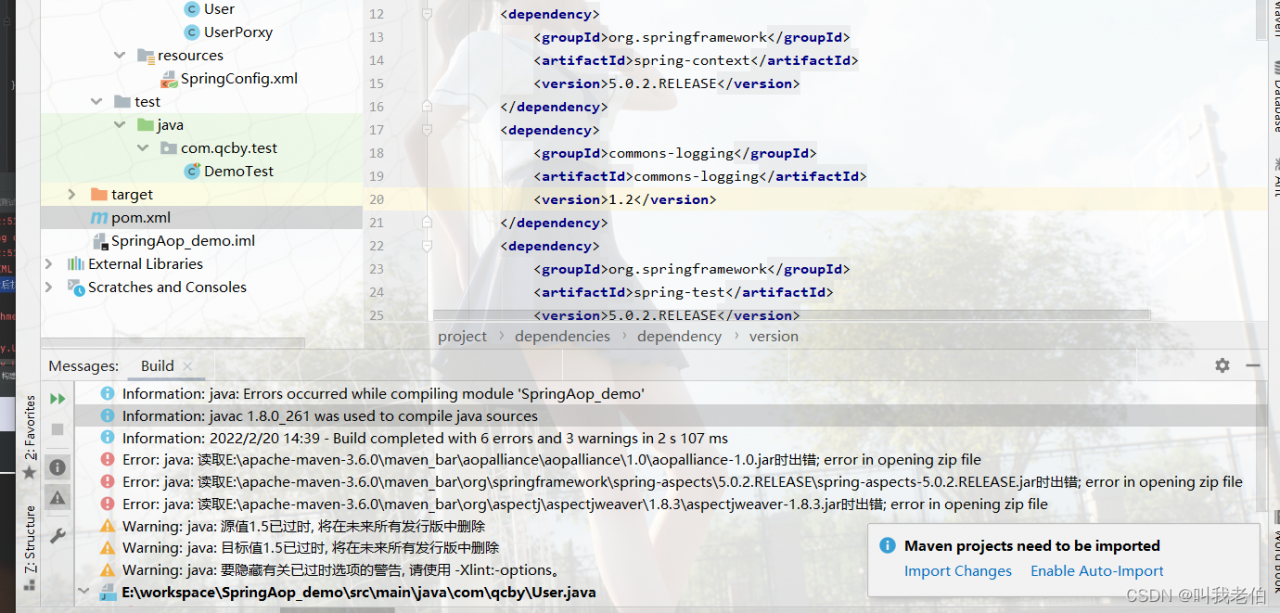
Create a maven project in idea and import pom.xml, related configuration. The following error occurred while running

****.***.***error in opening zip file

This error report occurs due to a jar version conflict in maven.

Solution:
Delete the maven local repository jar package, and then idea in the project refresh, let maven re-download dependencies. (the error reported in those lines, there is a corresponding path, you can delete it)

According to the error path, delete the corresponding jar from your computer. When you come back and refresh, it’s finished.

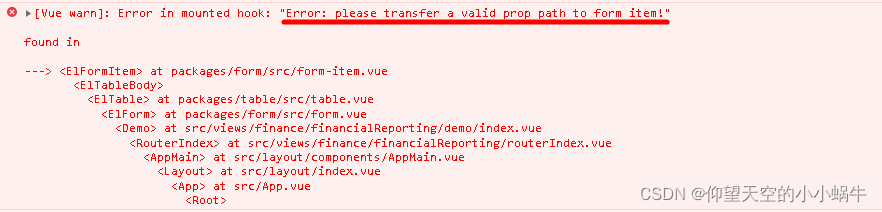
[Vue warn]Error in mounted hook: “Error: please transfer a valid prop path to form item“

This article mainly explains the error reporting and solution of nested El table in El form

report errors

[Vue warn]: Error in mounted hook: "Error: please transfer a valid prop path to form item!"

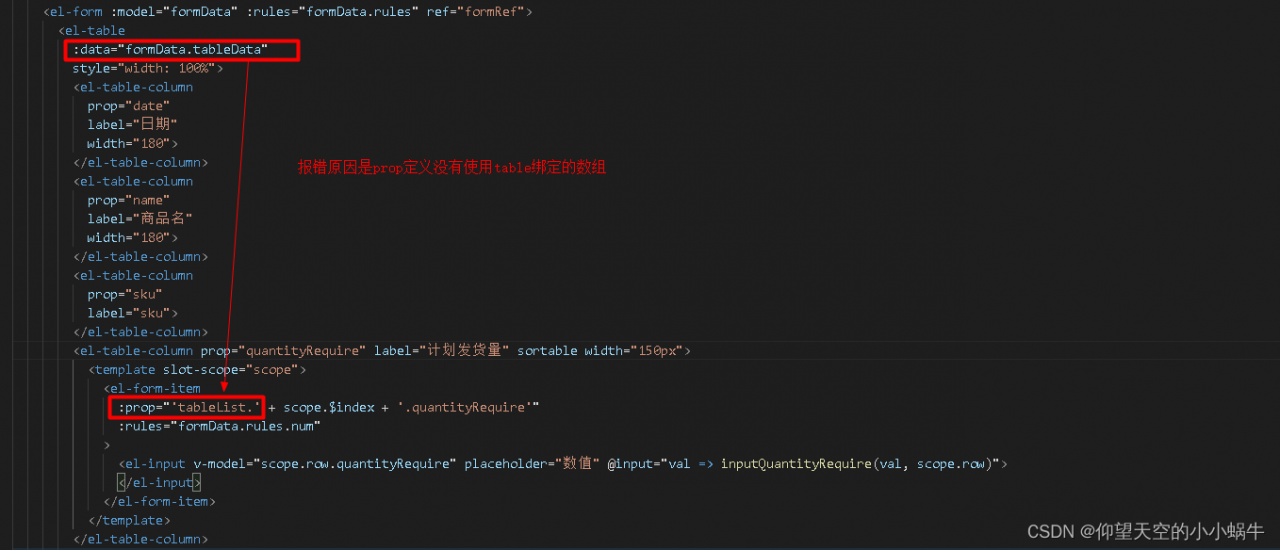
Error reporting reason

The reason for the error is that the prop definition does not use the array name tabledata bound by table

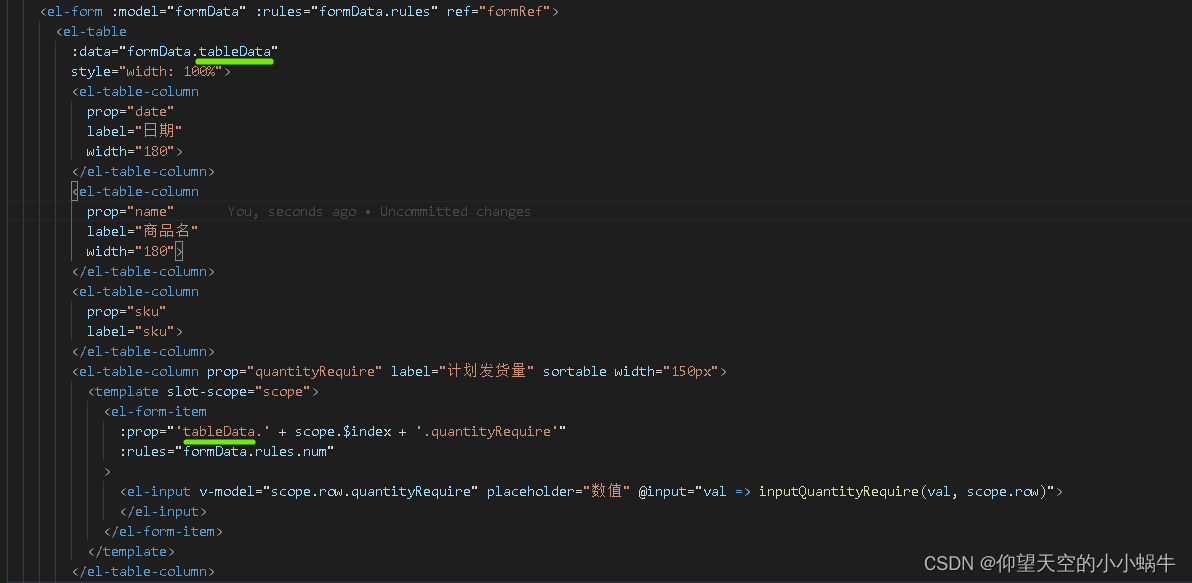
Solution:

Prop uses the array name tabledata bound by table

[Solved] Hbase …ERROR: Unable to read .tableinfo from file:/hbaseData/data/default/table1/xxxx

Solution:

1. Make sure that the table is not less nor more, the judgment scheme gives 2 points

(1) the simplest, compare the number and size of files

(2) compare the contents of the file md5 and directory name, and the number of – (in my computer g:/md5 – to their own words)

Copy the original data away

2. use hbase shell to create 1 new table, the table structure should be the same as the one you had problems with before, and the same name

3. Go to the data directory under your new directory and find the .tabledesc

(local is hidden files, hdfs is not)

4. go into this directory will be . tableinfo.xxxx copy out

5. delete the data in your table, copy the data you copied, and put the tableinfo data into .tabledesc.

6. Execute hbase hbck -repair to repair the table, if one repair is not successful, you can execute it several times

[How to Solve] error at ::0 formal unbound in pointcut

error at ::0 formal unbound in pointcut

This error was reported when using aop’s @before for log prenotification

Error code here

	@Before(value = "webLogAspect()")
    public void logBefore(JoinPoint joinPoint,Object ret) {
        ServletRequestAttributes attributes = (ServletRequestAttributes) RequestContextHolder.getRequestAttributes();
        HttpServletRequest request = attributes.getRequest();
        //在attribute中加入开始时间
        request.setAttribute("time",System.currentTimeMillis());
    }

Then, after I remove the second parameter, it is normal

@Before(value = "webLogAspect()")
public void logBefore(JoinPoint joinPoint) {

Explain that other operations are required when multiple parameters are used, otherwise an error will be reported

@Before(value = "webLogAspect() && args(ret)")
public void logBefore(JoinPoint joinPoint, Object ret) {

Problem-solving

[Solved] ansible Command Error: Error -5 while decompressing data: incomplete or truncated stream

1. Error message:

An error occurs when executing the ansible command

ERROR! Unexpected Exception, this is probably a bug: Error -5 while decompressing data: incomplete or truncated stream

The detailed error reports are as follows

[root@localhost tmp]# ansible -h
ERROR! Unexpected Exception, this is probably a bug: Error -5 while decompressing data: incomplete or truncated stream
the full traceback was:

Traceback (most recent call last):
  File "/usr/bin/ansible", line 97, in <module>
    mycli = getattr(__import__("ansible.cli.%s" % sub, fromlist=[myclass]), myclass)
  File "/usr/lib/python2.7/site-packages/ansible/cli/__init__.py", line 38, in <module>
    from ansible.inventory.manager import InventoryManager
  File "/usr/lib/python2.7/site-packages/ansible/inventory/manager.py", line 36, in <module>
    from ansible.plugins.loader import inventory_loader
  File "/usr/lib/python2.7/site-packages/ansible/plugins/loader.py", line 22, in <module>
    from ansible.parsing.utils.yaml import from_yaml
  File "/usr/lib/python2.7/site-packages/ansible/parsing/utils/yaml.py", line 17, in <module>
    from ansible.parsing.yaml.loader import AnsibleLoader
  File "/usr/lib/python2.7/site-packages/ansible/parsing/yaml/loader.py", line 30, in <module>
    from ansible.parsing.yaml.constructor import AnsibleConstructor
  File "/usr/lib/python2.7/site-packages/ansible/parsing/yaml/constructor.py", line 29, in <module>
    from ansible.parsing.vault import VaultLib
  File "/usr/lib/python2.7/site-packages/ansible/parsing/vault/__init__.py", line 42, in <module>
    from cryptography.hazmat.backends import default_backend
  File "/usr/lib64/python2.7/site-packages/cryptography/hazmat/backends/__init__.py", line 7, in <module>
    import pkg_resources
  File "build/bdist.linux-x86_64/egg/pkg_resources/__init__.py", line 70, in <module>
  File "build/bdist.linux-x86_64/egg/pkg_resources/extern/__init__.py", line 43, in load_module
    __import__(extant)
error: Error -5 while decompressing data: incomplete or truncated stream

2. Background of error reporting

When installing setuptools inansible-playbook, it terminated unexpectedly, and then execute ansible command to report this error,


3. Solution:

Reset setuptools-33.1.1.zip package decompression and installation:

cd setuptools-33.1.1  

python setup.py install

It is normal to try the ansible command after execution. Some friends may not be setuptools, or they may not execute after installing into a package. Please try it yourself.

[Solved] RuntimeError: Error(s) in loading state_dict for Model: Missing key(s) in state_dict

Error message:

Using the network weights trained by FCN, UNET and deeplab, an error is reported when loading the model:

RuntimeError: Error(s) in loading state_dict for Model: Missing key(s) in state_dict....

Training environment:

CPU:Intel E5
GPU: 3090*2
Pytorch1. ten

Solution:

Solve the mismatch problem
method 1 (invalid): the dictionary cannot match strictly. When the model is loaded, use the following code to add false to solve the mismatch problem

net.load_state_dict(t.load(ckpt_path),False)

Note: this method unlocks the strict matching and can ignore the error report. However, the model loaded by this method has problems in the actual segmentation effect due to the mismatch of parameters. Use it with caution!

Method 2: the network is the same, the only difference is that NN is used in the training process The dataparallel() method calls two graphics cards for training, so before loading the model weight, the model is also suitable for dataparallel packaging, which can solve the above error reporting problem.

net = nn.DataParallel(net)
net = net.to(device)

[Solved] Uncaught Error: @electron/remote is disabled for this WebContents

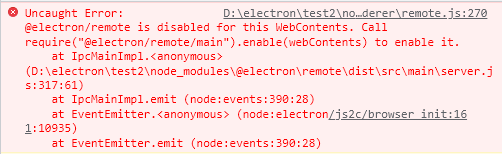
There is an error using the remote module:

Uncaught Error: @electron/remote is disabled for this WebContents. Call require("@electron/remote/main").enable(webContents) to enable it.
    at IpcMainImpl.<anonymous>


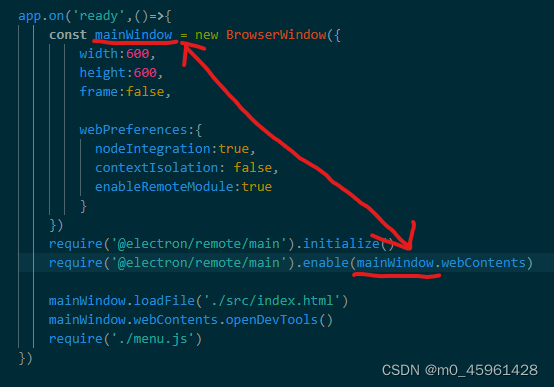
according to the prompt, you need to add a line: require(“@electron/remote/main”).enable(webContents) in main.js, but if it is added directly, the webcontents is not defined error will be displayed.

You can’t add it directly, webContents should be preceded by the defined variable name, as follows, webContents should be replaced with mainWindow.webContents.