#/bin/env python
# -*-coding:utf8-*-
import socket
import fcntl
import time
import struct
import smtplib
import urllib
import datetime
from email.mime.multipart import MIMEMultipart
from email.mime.text import MIMEText
from email.mime.image import MIMEImage


#发送邮件的基本函数,参数依次如下
# smtp服务器地址、邮箱用户名,邮箱秘密,发件人地址,收件人地址(列表的方式),邮件主题,邮件html内容
def sendEmail(smtpserver, username, password, sender, receiver, subject, msghtml):
  msgRoot = MIMEMultipart('related')
  msgRoot["To"] = ','.join(receiver)
  msgRoot["From"] = sender
  msgRoot['Subject'] =  subject
  msgText = MIMEText(msghtml,'html','utf-8')
  msgRoot.attach(msgText)
  #sendEmail
  smtp = smtplib.SMTP()
  smtp.connect(smtpserver)
  smtp.login(username, password)
  smtp.sendmail(sender, receiver, msgRoot.as_string())
  smtp.quit()


# 检查网络连同性
def check_network():
  # 试验5次ping 百度,如果连通就返回True,否则返回False
  for i in range(0, 5):
    try:
      result=urllib.urlopen('http://baidu.com').read()
      #print result
      print "Network is Ready!"
      break
    except Exception , e:
      print e
      print "Network is not ready,Sleep 5s...."
      time.sleep(5)
  else:
    print "Sorry that pi isn't connectted to Internet now"
    return False
  return True


# 获得本级制定接口的ip地址
def get_ip_address():
  s = socket.socket(socket.AF_INET, socket.SOCK_DGRAM)
  s.connect(("1.1.1.1",80))
  ipaddr=s.getsockname()[0]
  s.close()
  return ipaddr


if __name__ == '__main__':
  if check_network():
    ipaddr = get_ip_address()
    now = datetime.datetime.now()
    time_info = now.strftime('%Y-%m-%d %A %H:%M:%S')
    send_text = "Boot time: %s\nIP addr: %s" % (time_info, ipaddr)
    sendEmail('smtp.sina.com','you email username ','your email password ','your emial address',['[email protected]'], 'Raspberry Pi boot status', send_text)
  else:
    print "Sorry that I can't help without network"
Solution of “serve with message ‘spawn Vue cli service enoent”
Error running vue:
Error while running task E:\ vue \cistudy-frontend:serve with message ‘spawn’ vue-cli-service ENOENT ‘
The solution is as follows:
re-import the project in the vue visual interface will prompt the lack of “node_modules dependency”. The previous choice was still to import, this time choose to install the node_modules dependency and then import, the installation steps are as follows:
- in CMD into the project directory (this is very important!!
- execute NPM install
- re-import in the visualization panel.
Log search of SQL execution on distributed green plus database master
enter/gpmaster// pg_log gpseg – 1, you can see the listed log list:  using the command for a keyword in the log file: 5409626 is the SESSION ID
more gpdb-2020-09-26_000000. CSV |grep 5409526

finally renders the SQL execution LOG containing the session id. The easiest way to find the LOG above is to find the LOG. If there is a better way to find the LOG later, then update it.
Servlet.service() for servlet [dispatcherServlet] in context with path [] threw exception [Request p
in the course of using springboot today, Met the Servlet service () for the Servlet [dispatcherServlet] in context with the path [] threw the exception [Request processing failed; nested exception is Java. Lang. NullPointerException] with root cause error, really sad, Write it down.
error reason: 
I cited in the service implementation class two resource bundle files, but only write a @ Autowared, so only the first package is automatically injected, and the second package is not injection, So, should be to write a @ Autowared 
so my problem is solved!
Raspberry pie set up to run Python program automatically
method:
- switch to root account sudo
- before exit 0 add the execute command 0 sudo python /xx/xx/xx. Py
1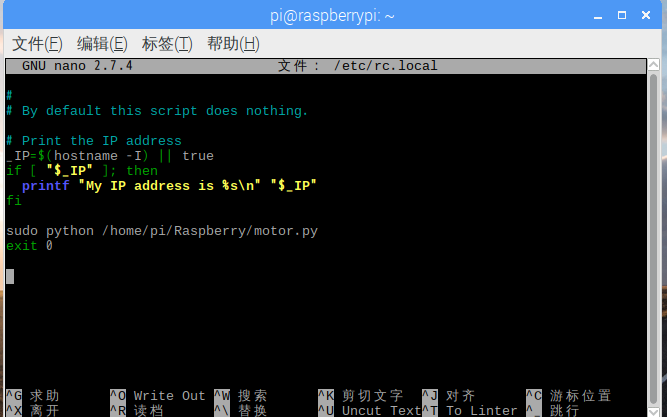
- save the restart can see the effect after
modify rc.local file sudo nano /etc/rc.local
The SSM project cannot load various static resources
after the deployment of SSM often unable to load image resources or CSS style, but should do all did, change web. XML, applicationContext. XML what of, is a fan of

solution:
where tomcat is deployed
 the two add
apply and then you’re done
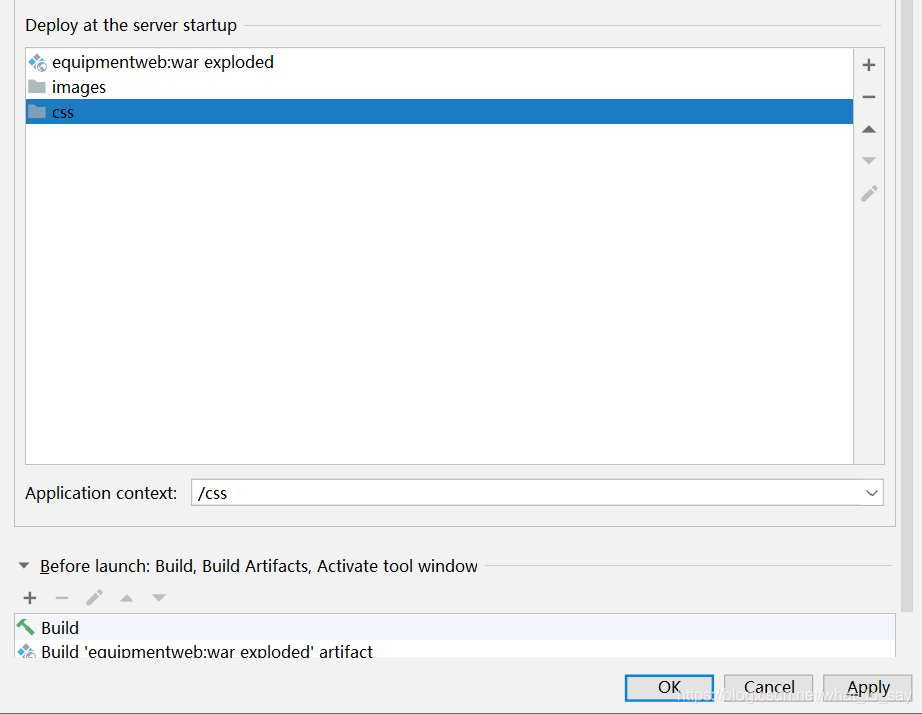
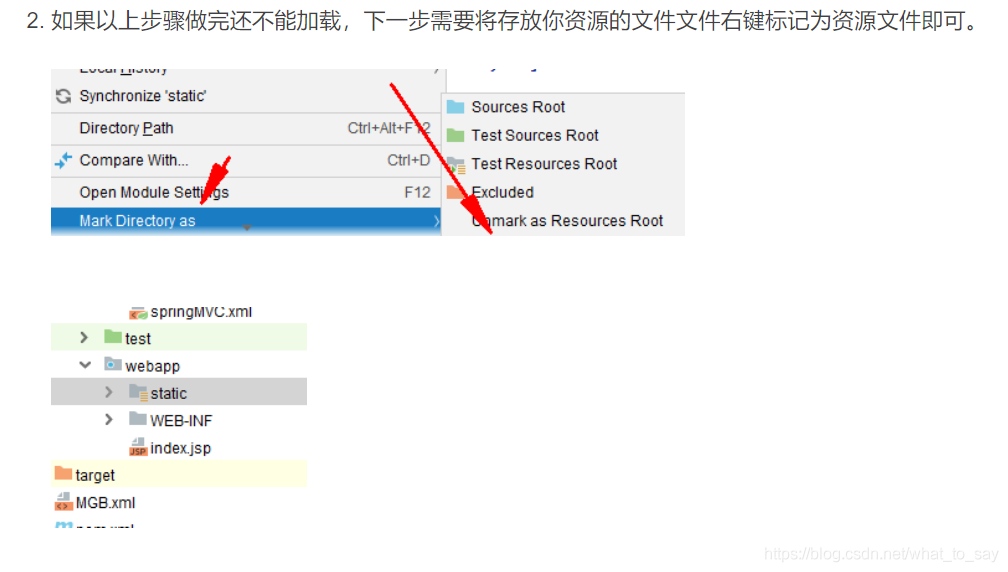
there is another untested method:
How to Fix Invalid bound statement (not found) Error
there have been many articles on the Internet explaining the possible reasons for this error, nothing more than the following:
1. Java method does not exist in mapper.xml, and then the method of executing Mapper will report the
. The return value of xxxmapper.java method is List, while the select element does not correctly configure ResultMap, or only configure ResultType
4. If you confirm that there is no problem above, please modify the corresponding XML file, such as deleting a blank line, save. 5. See if the XML configuration path of mapper is correct
error 2 treatment.
maven default would make all configuration files under the SRC/main/resources and SRC/main/Java under all the Java files packaged or published to the target \ classes here, but the reality we may under the SRC/main/Java also placed some configuration files such as hibernate configuration file or mybatis mapper configuration files, etc., if you don’t do some additional configuration, after that our packaging projects may find these must be a resource file, So add a configuration like the following to the POM.xml so that the XML file under SRC /main/ Java is copied to the corresponding class directory along with the Java compiled class file.
<build>
<resources>
<resource>
<directory>src/main/java</directory>
<includes>
<include>**/*.properties</include>
<include>**/*.xml</include>
</includes>
<filtering>false</filtering>
</resource>
</resources>
</build>
Mybatis automatically generated SQL error
first of all, I want to make it clear that the tool is not wrong, I’m sure your hair is wrong, yes, it’s me, let’s look at my fault
SQL: Insert into T_ADMINISTRATIVE (A_ID, s_ID, A_import_TZZl, A_import_tz_remark, A_import_file_route, A_expert_Lzzl, A_expert_Lz_remark, a_expert_file_route, A_risk_pgzl, A_risk_pgremark, A_risk -file_route, ssh_zl, ssh_remark, ssh_file_route, A_node_status, a_del_status) values (?,?,?,?,?,?,?,?,?,?,?,?,?,?,?,?)
### Cause: com.mysql.jdbc.exceptions.jdbc4.MySQLSyntaxErrorException: You have an error in your SQL syntax; Check the manual that corresponds to your MySQL server version for the right syntax to use near ‘- file_route, ssh_zl,
ssh_remark, ssh_file_route, a_node_status,
a_de’ at line 4
insert increase error, at the beginning because it was a SQL statement problem, until finally confirm that it is not SQL problem, go back to the table you created (created garbage)
file-route. File_route. All right, just rebuild it.
Linux error deletion libc.so.6 how to recover
one day, after boot as usual when a common software, suddenly reported an error /lib/x86_64-linux-gnu/ libb.so.6: version glibc_2.28 ‘not found, the original is the version of libc is wrong, so download unzip update, re-establish the soft link, found that almost all commands can not be used. So </code b> can only use some commands by adding LD_PRELOAD=/lib/ x86_64-gnu /libc-2.27.so can only use some commands. Attempt to restart directly kernel panic =_=||
solution
- to create soft connection before entering the root model, then you can update the libc normal. So. 6 (I haven’t tried) </ li>
- if you pack is a dual system, then it is simple, direct from another system to access the directory, and the libc. So. 6 to replace the original file (to the original version)
- if there is only one system on your machine, you can use RUFUS startup disk 】 【 create a usb stick, and then U disk to start the system, to modify the libc. So. 6.
Android 10 open file exception open failed: eacces (permission denied) android:requestLegacyExternalStorage= “true“
in Android development, we generally use the following code to get the storage path, and the results are generally /storage/emulated/0
in AndroidManifest. Application node in the XML file with the android: requestLegacyExternalStorage = “true” attribute, as follows: </ p>
<application
    android:requestLegacyExternalStorage="true"
may be easy for developers, but for those who are new to android, it doesn’t use
now most mobile phones are Android version 10.0, when reading and writing files to the memory card, the problem of: open failed: EACCES (Permission denied) will occur. After adding the above one sentence of code to baidu, it has not been solved. The possible reason is that there is no dynamic access Permission added in the code snippet
dynamic read and write permission code:
final int REQUEST_EXTERNAL_STORAGE = 1;
if (ContextCompat.checkSelfPermission(MainActivity.this,
                        Manifest.permission.WRITE_EXTERNAL_STORAGE) != PackageManager.PERMISSION_GRANTED) {
                    ActivityCompat.requestPermissions(MainActivity.this, new String[]{Manifest.permission.WRITE_EXTERNAL_STORAGE}, 101);
                } else {
                    //downloadFile();
                    /**
                     * Write the code you want to execute here
                     */
                }
Where is
used?
for example, we now have a button, we get its click event in the Activity, click we want to add a photo in: /storage/emulated/0/DCIM, we want to perform the operation in else can
example:
no dynamic permissions added:
 utils_get.setOnClickListener(new View.OnClickListener() {
            @Override
            public void onClick(View view) {
                getDataFromokHttpUtils();
            }
        });
add dynamic permissions:
utils_down.setOnClickListener(new View.OnClickListener() {
            @Override
            public void onClick(View view) {
                final int REQUEST_EXTERNAL_STORAGE = 1;
                String[] PERMISSIONS_STORAGE = {
                        Manifest.permission.READ_EXTERNAL_STORAGE,
                        Manifest.permission.WRITE_EXTERNAL_STORAGE };
                if (ContextCompat.checkSelfPermission(MainActivity.this,
                        Manifest.permission.WRITE_EXTERNAL_STORAGE) != PackageManager.PERMISSION_GRANTED) {
                    ActivityCompat.requestPermissions(MainActivity.this, new String[]{Manifest.permission.WRITE_EXTERNAL_STORAGE}, 101);
                } else {
                    downloadFile();
                }

            }
        });
</ div>
FileNotFoundError: [Errno 2] No such file or directory: ‘./mnist_image_label/mnist_train_jpg_6000028
FileNotFoundError: [Errno 2] No such file or directory: ‘./mnist_image_label/mnist_train_jpg_6000028755_0.jpg ‘
error in reading file
in tensorflow
Traceback (most recent call last):
  File "Tensorflow/Test/9-26 mnist_train_ex1.py", line 43, in <module>
    x_train,y_train = generateds(train_path,train_txt)
  File "Tensorflow/Test/9-26 mnist_train_ex1.py", line 25, in generateds
    img = Image.open(img_path) #读入图片
  File "\envs\tf2.0-gpu\lib\site-packages\PIL\Image.py", line 2878, in open
    fp = builtins.open(filename, "rb")
FileNotFoundError: [Errno 2] No such file or directory: './mnist_image_label/mnist_train_jpg_6000028755_0.jpg'
locates to line 25
img = Image.open(img_path) #读入图片
error reading image
view path
train_path = './mnist_image_label/mnist_train_jpg_60000'
found is missing “\”
reflect on the foundation and summarize
here
here is what’s under the file, so backslash
I am a small white, welcome to communicate
python ValueError: source code string cannot contain null bytespytest executes test cases with the following error the reason is that my D:\study\python\BasicKnowledgePoints\s5_frame\f01_pytest\ init |