run with keras times cannot import name ‘tf_utils’
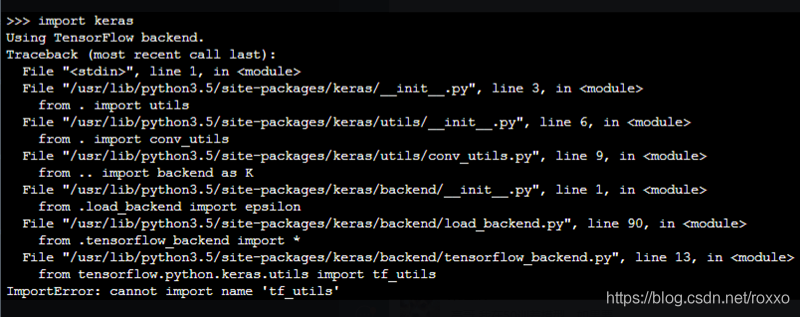
keras default version is high, pip3 install keras==2.2.0 solve
run with keras times cannot import name ‘tf_utils’
keras default version is high, pip3 install keras==2.2.0 solve
this paper mainly solves the problem that zero card of pytorch GPU occupies more video memory than other CARDS during model training. As shown in the figure below: the native GPU card is TITAN RTX, video memory is 24220M, batch_size = 9, and three CARDS are used. The 0th card video memory occupies 24207M. At this time, it just starts to run, and only a small amount of data is transferred to the video card. If the data is in multiple points, the video memory of the 0 card must burst. The reason why 0 card has higher video memory: During the back propagation of the network, the calculated gradient of loss is calculated on 0 card by default. So will be more than other graphics card some video memory, how much more specific, mainly to see the structure of the network.
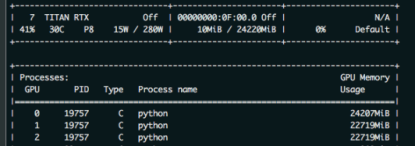
as a result, in order to prevent training was interrupted due to out of memory. The foolhardy option is to set batch_size to 6, or 2 pieces of data per card.
batch_size = 6, the other the same, as shown in the figure below
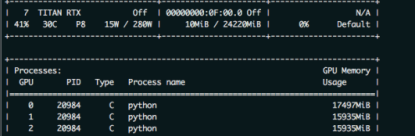
have found the problem?Video memory USES only 1,2 CARDS and less than 16 gigabytes of memory. The batch_size is sacrificed because the 0 card might exceed a little bit of video memory.
so there’s no more elegant way?The answer is yes. That is borrowed from the transformer – xl BalancedDataParallel used in the class. The code is as follows (source) :
import torch
from torch.nn.parallel.data_parallel import DataParallel
from torch.nn.parallel.parallel_apply import parallel_apply
from torch.nn.parallel._functions import Scatter


def scatter(inputs, target_gpus, chunk_sizes, dim=0):
    r"""
    Slices tensors into approximately equal chunks and
    distributes them across given GPUs. Duplicates
    references to objects that are not tensors.
    """

    def scatter_map(obj):
        if isinstance(obj, torch.Tensor):
            try:
                return Scatter.apply(target_gpus, chunk_sizes, dim, obj)
            except Exception:
                print('obj', obj.size())
                print('dim', dim)
                print('chunk_sizes', chunk_sizes)
                quit()
        if isinstance(obj, tuple) and len(obj) > 0:
            return list(zip(*map(scatter_map, obj)))
        if isinstance(obj, list) and len(obj) > 0:
            return list(map(list, zip(*map(scatter_map, obj))))
        if isinstance(obj, dict) and len(obj) > 0:
            return list(map(type(obj), zip(*map(scatter_map, obj.items()))))
        return [obj for targets in target_gpus]

    # After scatter_map is called, a scatter_map cell will exist. This cell
    # has a reference to the actual function scatter_map, which has references
    # to a closure that has a reference to the scatter_map cell (because the
    # fn is recursive). To avoid this reference cycle, we set the function to
    # None, clearing the cell
    try:
        return scatter_map(inputs)
    finally:
        scatter_map = None


def scatter_kwargs(inputs, kwargs, target_gpus, chunk_sizes, dim=0):
    """Scatter with support for kwargs dictionary"""
    inputs = scatter(inputs, target_gpus, chunk_sizes, dim) if inputs else []
    kwargs = scatter(kwargs, target_gpus, chunk_sizes, dim) if kwargs else []
    if len(inputs) < len(kwargs):
        inputs.extend([() for _ in range(len(kwargs) - len(inputs))])
    elif len(kwargs) < len(inputs):
        kwargs.extend([{} for _ in range(len(inputs) - len(kwargs))])
    inputs = tuple(inputs)
    kwargs = tuple(kwargs)
    return inputs, kwargs


class BalancedDataParallel(DataParallel):

    def __init__(self, gpu0_bsz, *args, **kwargs):
        self.gpu0_bsz = gpu0_bsz
        super().__init__(*args, **kwargs)

    def forward(self, *inputs, **kwargs):
        if not self.device_ids:
            return self.module(*inputs, **kwargs)
        if self.gpu0_bsz == 0:
            device_ids = self.device_ids[1:]
        else:
            device_ids = self.device_ids
        inputs, kwargs = self.scatter(inputs, kwargs, device_ids)
        if len(self.device_ids) == 1:
            return self.module(*inputs[0], **kwargs[0])
        replicas = self.replicate(self.module, self.device_ids)
        if self.gpu0_bsz == 0:
            replicas = replicas[1:]
        outputs = self.parallel_apply(replicas, device_ids, inputs, kwargs)
        return self.gather(outputs, self.output_device)

    def parallel_apply(self, replicas, device_ids, inputs, kwargs):
        return parallel_apply(replicas, inputs, kwargs, device_ids)

    def scatter(self, inputs, kwargs, device_ids):
        bsz = inputs[0].size(self.dim)
        num_dev = len(self.device_ids)
        gpu0_bsz = self.gpu0_bsz
        bsz_unit = (bsz - gpu0_bsz) // (num_dev - 1)
        if gpu0_bsz < bsz_unit:
            chunk_sizes = [gpu0_bsz] + [bsz_unit] * (num_dev - 1)
            delta = bsz - sum(chunk_sizes)
            for i in range(delta):
                chunk_sizes[i + 1] += 1
            if gpu0_bsz == 0:
                chunk_sizes = chunk_sizes[1:]
        else:
            return super().scatter(inputs, kwargs, device_ids)
        return scatter_kwargs(inputs, kwargs, device_ids, chunk_sizes, dim=self.dim)
you can see, in the code BalancedDataParallel inherited the torch. The nn. DataParallel, through the custom after 0, the size of the card batch_size gpu0_bsz, namely 0 card a bit less data. Balance the memory usage of 0 CARDS with other CARDS. The invocation code is as follows:
import BalancedDataParallel

 if n_gpu > 1:
    model = BalancedDataParallel(gpu0_bsz=2, model, dim=0).to(device)
    # model = torch.nn.DataParallel(model)
gpu0_bsz: 0 card batch_size of GPU;
model: model;
dim: batch dimension
as a result, we might as well just batch_size set to 8, namely gpu0_bsz = 2 try, the results are as follows:
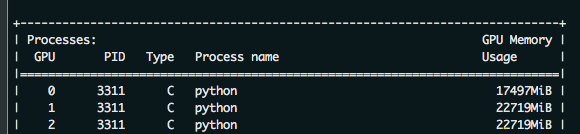
the batch_size from 6 to 8 of success, because 0 put a batch less, therefore, will be smaller than the other CARDS. But sacrificing the video memory of one card to the video memory of others, eventually increasing the batch_size, is still available. The advantages of this method are even more obvious when the number of CARDS is large.
The immediate cause of the error is trying to open a table file that was not previously closed. This error could be caused by:
In the process before
can also be other errors, but it doesn’t matter, look at the solution, you can from the root to avoid this kind of error about load/save .
open and exit excel files in a safe way, you can avoid the above type of load/save error. When opening a file, open excel in the following ways: if the original file already exists, just load it directly; If it doesn’t exist, create a new workbook and prepare the last save.
import os
from openpyxl import Workbook
from openpyxl import load_workbook
if os.path.exists(new_filename):
    new_wb = load_workbook(new_filename)
else:
    new_wb = Workbook()
is safely saved as excel
wb.save(filename) # For workbooks that need to save written content
wb.close() # Read-only workbook for the program
NameError: name ‘requests‘ is not defined is lack of package import requests;
NameError: name ‘request’ is not defined because of lack of package from flask import request.
these two look too much alike, but they don’t work the same way. “Requests” is for getting GET, POST requests, etc., such as
r = requests.get('https://api.github.com/user', auth=('user', 'pass'))
“request” is used to get form data such as
request.form.get("value")
, or the front-end request method, etc. For more details, please refer to request
in flask
reference:
Requests: let HTTP service humans
NameError: name ‘request’ is not defined
has a string sent from the front, in the form of letter + English, to get the letter to change color for it, so split. It USES the built-in method of String. When I look back, I see there are 60 or 70 methods in 1.8, so I have to write the String carefully when I have time.
code
//比如字符串为:Fn9527
String asid = "Fn9527";
String str = asid.replaceAll("[0-9]","");
String num = asid.replaceAll("[a-zA-Z","");

//syso
//syso
</ p>
result
Fn
9527
</ div>
tensorflow2.x has been greatly changed over 1.x to make TensorFlow users more efficient. Where Tf.contrib was abandoned altogether is a major change of 2.x version, but import tensorflow.contrib.slim as Slim as a superior package, has been widely used in many previous versions. Most of the source code is still written based on the TensorFlow1.x version, which makes some modules that have been removed from the 2.x version unusable.
when running a import tensorflow. Contrib. Slim as slim
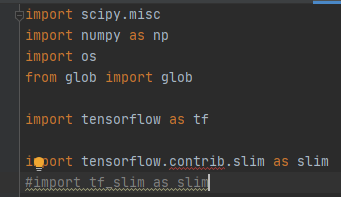
: ModuleNotFoundError: No module named 'tensorflow. Contrib false

query existing solutions, most of the use of the reduced version of the method, if you want to use this method can go to the query.
because I don't want to use the method of reducing the version to solve, after searching on github to find out the information
link: tf.contrib.slim is not worked in tensorflow 2.0 what is the alternative for that?.
Tf - slim has a independent of tensorflow mirror to tf.com pat. V1 compatible mode is used, install the package can be 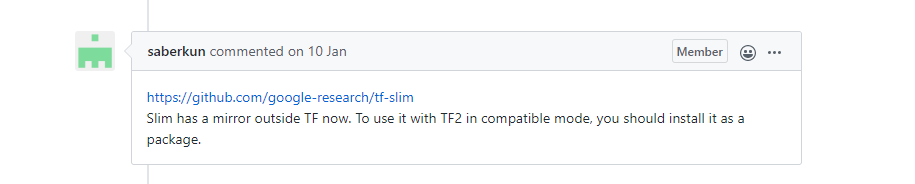
tf-slim is a lightweight library for defining, training, and evaluating complex models in TensorFlow. Tf-slim's components can be freely blended with the native TensorFlow and other frameworks.
here you can find information about Slim: link.
use PIP to download tf-slim
in CMD
pip install --upgrade tf_slim
download:

note when using Slim library:
#import tensorflow.contrib.slim as slim
import tf_slim as slim
where the commented out part is the source code, modified no longer report an error.
(ps: the ability is limited, if there is an error, please point out.
when installing jupyter, it appears as
Defaulting to user installation because normal site-packages is not writeable
Requirement already satisfied: jupyter in c:\users\shebin xu\appdata\roaming\python\python37\site-packages (1.0.0)
Requirement already satisfied: ipywidgets in c:\users\shebin xu\appdata\roaming\python\python37\site-packages (from jupyter) (7.5.1)
Requirement already satisfied: notebook in c:\users\shebin xu\appdata\roaming\python\python37\site-packages (from jupyter) (6.1.4)
Requirement already satisfied: nbconvert in c:\users\shebin xu\appdata\roaming\python\python37\site-packages (from jupyter) (6.0.4)
Requirement already satisfied: ipykernel in c:\users\shebin xu\appdata\roaming\python\python37\site-packages (from jupyter) (5.3.4)
Requirement already satisfied: qtconsole in c:\users\shebin xu\appdata\roaming\python\python37\site-packages (from jupyter) (4.7.7)
Requirement already satisfied: jupyter-console in c:\users\shebin xu\appdata\roaming\python\python37\site-packages (from jupyter) (6.2.0)
Requirement already satisfied: nbformat>=4.2.0 in c:\users\shebin xu\appdata\roaming\python\python37\site-packages (from ipywidgets->jupyter) (5.0.7)
Requirement already satisfied: traitlets>=4.3.1 in c:\users\shebin xu\appdata\roaming\python\python37\site-packages (from ipywidgets->jupyter) (5.0.4)
Requirement already satisfied: ipython>=4.0.0; python_version >= "3.3" in c:\users\shebin xu\appdata\roaming\python\python37\site-packages (from ipywidgets->jupyter) (7.18.1)
Requirement already satisfied: widgetsnbextension~=3.5.0 in c:\users\shebin xu\appdata\roaming\python\python37\site-packages (from ipywidgets->jupyter) (3.5.1)
Requirement already satisfied: jupyter-core>=4.6.1 in c:\users\shebin xu\appdata\roaming\python\python37\site-packages (from notebook->jupyter) (4.6.3)
Requirement already satisfied: prometheus-client in c:\users\shebin xu\appdata\roaming\python\python37\site-packages (from notebook->jupyter) (0.8.0)
Requirement already satisfied: terminado>=0.8.3 in c:\users\shebin xu\appdata\roaming\python\python37\site-packages (from notebook->jupyter) (0.9.1)
Requirement already satisfied: argon2-cffi in c:\users\shebin xu\appdata\roaming\python\python37\site-packages (from notebook->jupyter) (20.1.0)
Requirement already satisfied: ipython-genutils in c:\users\shebin xu\appdata\roaming\python\python37\site-packages (from notebook->jupyter) (0.2.0)
Requirement already satisfied: jupyter-client>=5.3.4 in c:\users\shebin xu\appdata\roaming\python\python37\site-packages (from notebook->jupyter) (6.1.7)
Requirement already satisfied: tornado>=5.0 in c:\users\shebin xu\appdata\roaming\python\python37\site-packages (from notebook->jupyter) (6.0.4)
Requirement already satisfied: jinja2 in c:\users\shebin xu\appdata\roaming\python\python37\site-packages (from notebook->jupyter) (2.11.2)
Requirement already satisfied: Send2Trash in c:\users\shebin xu\appdata\roaming\python\python37\site-packages (from notebook->jupyter) (1.5.0)
Requirement already satisfied: pyzmq>=17 in c:\users\shebin xu\appdata\roaming\python\python37\site-packages (from notebook->jupyter) (19.0.2)
Requirement already satisfied: bleach in c:\users\shebin xu\appdata\roaming\python\python37\site-packages (from nbconvert->jupyter) (3.2.1)
Requirement already satisfied: pygments>=2.4.1 in c:\users\shebin xu\appdata\roaming\python\python37\site-packages (from nbconvert->jupyter) (2.7.1)
Requirement already satisfied: jupyterlab-pygments in c:\users\shebin xu\appdata\roaming\python\python37\site-packages (from nbconvert->jupyter) (0.1.1)
Requirement already satisfied: pandocfilters>=1.4.1 in c:\users\shebin xu\appdata\roaming\python\python37\site-packages (from nbconvert->jupyter) (1.4.2)
Requirement already satisfied: entrypoints>=0.2.2 in c:\users\shebin xu\appdata\roaming\python\python37\site-packages (from nbconvert->jupyter) (0.3)
Requirement already satisfied: nbclient<0.6.0,>=0.5.0 in c:\users\shebin xu\appdata\roaming\python\python37\site-packages (from nbconvert->jupyter) (0.5.0)
Requirement already satisfied: mistune<2,>=0.8.1 in c:\users\shebin xu\appdata\roaming\python\python37\site-packages (from nbconvert->jupyter) (0.8.4)
Requirement already satisfied: testpath in c:\users\shebin xu\appdata\roaming\python\python37\site-packages (from nbconvert->jupyter) (0.4.4)
Requirement already satisfied: defusedxml in c:\users\shebin xu\appdata\roaming\python\python37\site-packages (from nbconvert->jupyter) (0.6.0)
Requirement already satisfied: qtpy in c:\users\shebin xu\appdata\roaming\python\python37\site-packages (from qtconsole->jupyter) (1.9.0)
Requirement already satisfied: prompt-toolkit!=3.0.0,!=3.0.1,<3.1.0,>=2.0.0 in c:\users\shebin xu\appdata\roaming\python\python37\site-packages (from jupyter-console->jupyter) (3.0.7)
Requirement already satisfied: jsonschema!=2.5.0,>=2.4 in c:\users\shebin xu\appdata\roaming\python\python37\site-packages (from nbformat>=4.2.0->ipywidgets->jupyter) (3.2.0)
Requirement already satisfied: colorama; sys_platform == "win32" in c:\users\shebin xu\appdata\roaming\python\python37\site-packages (from ipython>=4.0.0; python_version >= "3.3"->ipywidgets->jupyter) (0.4.3)
Requirement already satisfied: pickleshare in c:\users\shebin xu\appdata\roaming\python\python37\site-packages (from ipython>=4.0.0; python_version >= "3.3"->ipywidgets->jupyter) (0.7.5)
Requirement already satisfied: jedi>=0.10 in c:\users\shebin xu\appdata\roaming\python\python37\site-packages (from ipython>=4.0.0; python_version >= "3.3"->ipywidgets->jupyter) (0.17.2)
Requirement already satisfied: backcall in c:\users\shebin xu\appdata\roaming\python\python37\site-packages (from ipython>=4.0.0; python_version >= "3.3"->ipywidgets->jupyter) (0.2.0)
Requirement already satisfied: decorator in c:\users\shebin xu\appdata\roaming\python\python37\site-packages (from ipython>=4.0.0; python_version >= "3.3"->ipywidgets->jupyter) (4.4.2)
Requirement already satisfied: setuptools>=18.5 in c:\program files (x86)\microsoft visual studio\shared\python37_64\lib\site-packages (from ipython>=4.0.0; python_version >= "3.3"->ipywidgets->jupyter) (40.8.0)
Requirement already satisfied: pywin32>=1.0; sys_platform == "win32" in c:\users\shebin xu\appdata\roaming\python\python37\site-packages (from jupyter-core>=4.6.1->notebook->jupyter) (228)
Requirement already satisfied: pywinpty>=0.5; os_name == "nt" in c:\users\shebin xu\appdata\roaming\python\python37\site-packages (from terminado>=0.8.3->notebook->jupyter) (0.5.7)
Requirement already satisfied: cffi>=1.0.0 in c:\users\shebin xu\appdata\roaming\python\python37\site-packages (from argon2-cffi->notebook->jupyter) (1.14.2)
Requirement already satisfied: six in c:\program files (x86)\microsoft visual studio\shared\python37_64\lib\site-packages (from argon2-cffi->notebook->jupyter) (1.15.0)
Requirement already satisfied: python-dateutil>=2.1 in c:\program files (x86)\microsoft visual studio\shared\python37_64\lib\site-packages (from jupyter-client>=5.3.4->notebook->jupyter) (2.8.1)
Requirement already satisfied: MarkupSafe>=0.23 in c:\users\shebin xu\appdata\roaming\python\python37\site-packages (from jinja2->notebook->jupyter) (1.1.1)
Requirement already satisfied: packaging in c:\users\shebin xu\appdata\roaming\python\python37\site-packages (from bleach->nbconvert->jupyter) (20.4)
Requirement already satisfied: webencodings in c:\users\shebin xu\appdata\roaming\python\python37\site-packages (from bleach->nbconvert->jupyter) (0.5.1)
Requirement already satisfied: nest-asyncio in c:\users\shebin xu\appdata\roaming\python\python37\site-packages (from nbclient<0.6.0,>=0.5.0->nbconvert->jupyter) (1.4.0)
Requirement already satisfied: async-generator in c:\users\shebin xu\appdata\roaming\python\python37\site-packages (from nbclient<0.6.0,>=0.5.0->nbconvert->jupyter) (1.10)
Requirement already satisfied: wcwidth in c:\users\shebin xu\appdata\roaming\python\python37\site-packages (from prompt-toolkit!=3.0.0,!=3.0.1,<3.1.0,>=2.0.0->jupyter-console->jupyter) (0.2.5)
Requirement already satisfied: pyrsistent>=0.14.0 in c:\users\shebin xu\appdata\roaming\python\python37\site-packages (from jsonschema!=2.5.0,>=2.4->nbformat>=4.2.0->ipywidgets->jupyter) (0.17.3)
Requirement already satisfied: attrs>=17.4.0 in c:\users\shebin xu\appdata\roaming\python\python37\site-packages (from jsonschema!=2.5.0,>=2.4->nbformat>=4.2.0->ipywidgets->jupyter) (20.2.0)
Requirement already satisfied: importlib-metadata; python_version < "3.8" in c:\users\shebin xu\appdata\roaming\python\python37\site-packages (from jsonschema!=2.5.0,>=2.4->nbformat>=4.2.0->ipywidgets->jupyter) (1.7.0)
Requirement already satisfied: parso<0.8.0,>=0.7.0 in c:\users\shebin xu\appdata\roaming\python\python37\site-packages (from jedi>=0.10->ipython>=4.0.0; python_version >= "3.3"->ipywidgets->jupyter) (0.7.1)
Requirement already satisfied: pycparser in c:\users\shebin xu\appdata\roaming\python\python37\site-packages (from cffi>=1.0.0->argon2-cffi->notebook->jupyter) (2.20)
Requirement already satisfied: pyparsing>=2.0.2 in c:\program files (x86)\microsoft visual studio\shared\python37_64\lib\site-packages (from packaging->bleach->nbconvert->jupyter) (2.4.7)
Requirement already satisfied: zipp>=0.5 in c:\users\shebin xu\appdata\roaming\python\python37\site-packages (from importlib-metadata; python_version < "3.8"->jsonschema!=2.5.0,>=2.4->nbformat>=4.2.0->ipywidgets->jupyter) (3.1.0)
according to the way on the Internet, can’t solve
later find jupyter in the user -> appdata-> … -> Python_37 and PIP is in a different folder because it was originally installed in Visual Code and CMD calls in the Visual Code installation directory.
solution:
1, according to the requirement already following the address to find the jupyter installation directory, double-click jupyter-notebook. Exe
2, or directly copy jupyter related files to the original directory, it can be called in the CMD.
The
Javaweb project has the following configuration when configuring web.xml in the basic servlet implementation.
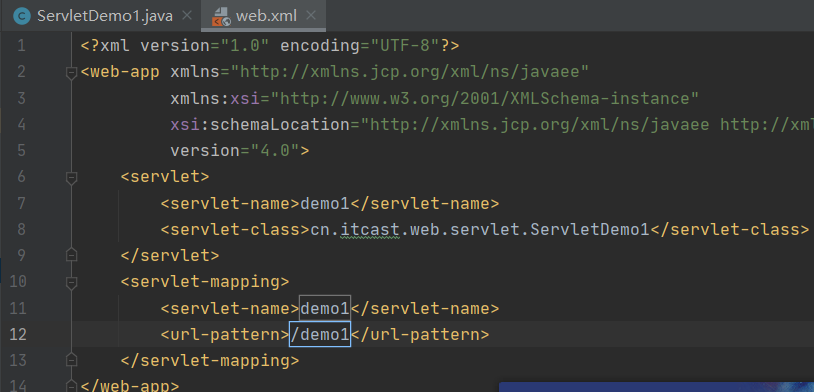
when writing/demo, don’t miss”/”, can appear otherwise in running the browser 404 error.
Dubbo unable to register problem
error starting server:
Failed to register consumer:// 192.168.60.1/com. Duck. Service. The UserService?application=user-web& category=consumers& check=false& default.check=false& default.reference.filter=regerConsumerFilter& default.timeout=600000& Dubbo = server & amp; interface=com.atguigu.gmall.service.UserService& methods=getReceiveAddressByMemberId,getAllUser& pid=12648& side=consumer& Timestamp = 1583642177210 to zookeeper zookeeper:// 47.112.171.153:2181/com. Alibaba. Dubbo. Registry. RegistryService?application=user-web& client=zkclient& Dubbo = server & amp; interface=com.alibaba.dubbo.registry.RegistryService& pid=12648& timestamp=1583642177225, cause: Zookeeper is not connected yet!
problem, this is due to Linux firewall enabled, causing registration failure.
resolved: turn off the Linux (CentOS7 based) firewall
Service
systemctl stop firewaldeld. service
1
insert picture description
here
consumption null pointer exception problem
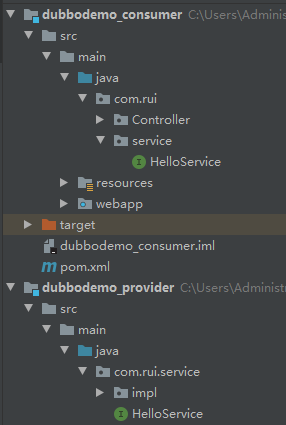
the reason is that the package name not consistent, do not agree the package name can lead to the provider and consumer is not a node, that consumers will never gain value!!!!!
dubbo could not register problem
consumer null pointer exception
vim/etc/sudoers command, the file is edited, but couldn't find how to save and exit the interface
- online has said press ESC, and then wq can save, I haven't response, press the ESC only Windows ding-dong prompt
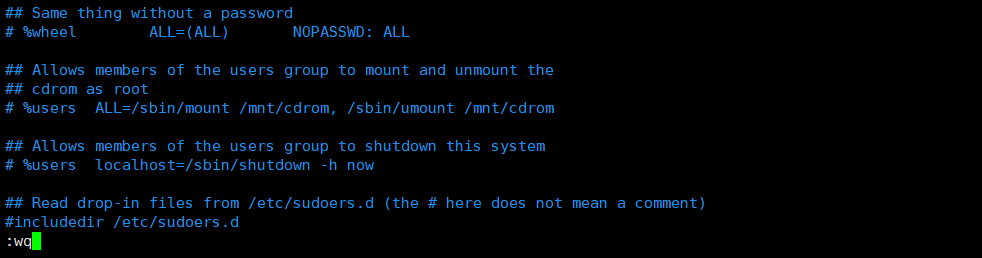
- for a long time to see a solution, the last line in the file, directly on the keyboard input (or shift +; These two keys)
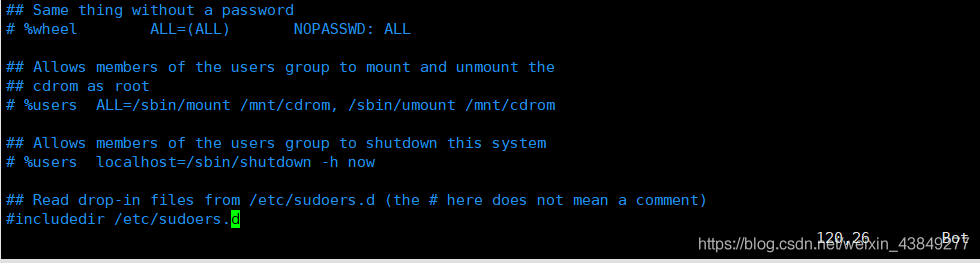
4. At this point, you will find that you are ready to enter the command, and the next time you open the file, you will save
reference: https://blog.csdn.net/wy_1997/article/details/83822884
using android studio synchronization project, I could not download gradle-3.5.1. Pom, after analyzing the image of aliyun every time, I failed and went to dl.google.com
of Google
The
result therefore causes the connection to time out
each time
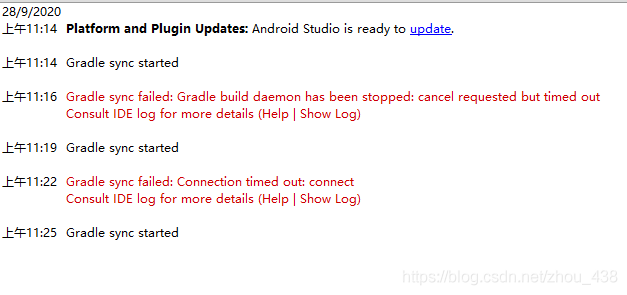
causes this problem because HTTPS causes it, and commenting out HTTPS will solve the problem
file path to be modified: C:\Users\Administrator\.gradle\gradle.properties
systemProp.http.proxyHost=127.0.0.1
systemProp.http.proxyPort=1080
#systemProp.https.proxyHost=mirrors.opencas.ac.cn
#systemProp.https.proxyPort=80
defines the agent name as a1
source name is r1, if there are more than one, use space spacing
sink name is k1, channel name is c1
a1.sources = r1
a1.sinks = k1
a1.channels = c1
#组名名.属性名=属性值
a1.sources.r1.type=netcat
a1.sources.r1.bind=hadoop102
a1.sources.r1.port=99999

#定义sink
a1.sinks.k1.type=logger

#定义chanel
a1.channels.c1.type=memory
a1.channels.c1.capacity=1000

#连接组件 同一个source可以对接多个channel,一个sink只能从一个channel拿数据!
a1.sources.r1.channels=c1
a1.sinks.k1.channel=c1