Author Archives: Robins

Gradle Compile Error: compileJava FAILED [How to Solve]

When using gradle project, the following situations occur during the process of building a file:

> Task :compileJava
/home/user_1/idea-program/avro-car-sensor-simulator-master/src/main/java/com/hivemq/CarDataPayloadGenerator.java:7: error: cannot access PluginPayloadGenerator
import com.hivemq.simulator.plugin.sdk.load.generators.PluginPayloadGenerator;
                                                      ^
  bad class file: /home/user_1/idea-program/avro-car-sensor-simulator-master/device-simulator-plugin-sdk-1.0.0.jar(com/hivemq/simulator/plugin/sdk/load/generators/PluginPayloadGenerator.class)
    class file has wrong version 55.0, should be 52.0
    Please remove or make sure it appears in the correct subdirectory of the classpath.

> Task :compileJava FAILED

FAILURE: Build failed with an exception.

* What went wrong:
Execution failed for task ':compileJava'.
> Compilation failed; see the compiler error output for details.

* Try:
Run with --stacktrace option to get the stack trace. Run with --info or --debug option to get more log output. Run with --scan to get full insights.

* Get more help at https://help.gradle.org

According to the above error conditions:

“bad class file: /home/user_1/idea-program/avro-car-sensor-simulator-master/device-simulator-plugin-sdk-1.0.0.jar(com/hivemq/simulator/plugin/sdk/load/generators/PluginPayloadGenerator.class)

class file has wrong version 55.0, should be 52.0

Please remove or make sure it appears in the correct subdirectory of the classpath.”

It is possible to know that the problem occurs in the idea-program/avro-car-sensor-simulator-master/device-simulator-plugin-sdk-1.0.0.jar, which requires version 55, while the current environment is version 52.
(Reason for the error: running a class file compiled with a JDK of 11 using a JRE with a JDK of 8)

The corresponding version of Java is as follows:

ava SE 13 = 57,
Java SE 12 = 56,
Java SE 11 = 55,
Java SE 10 = 54,
Java SE 9 = 53,
Java SE 8 = 52,
Java SE 7 = 51,
Java SE 6.0 = 50,
Java SE 5.0 = 49,
JDK 1.4 = 48,
JDK 1.3 = 47,
JDK 1.2 = 46,
JDK 1.1 = 45

After configuring java11, try again and compile successfully
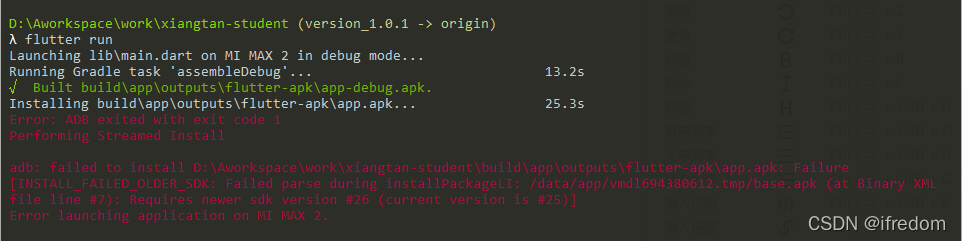
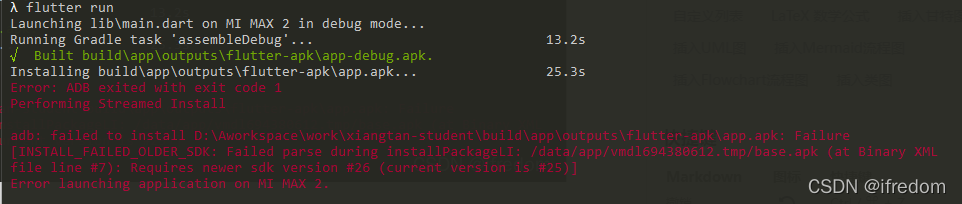
Android Error: Failure [INSTALL_FAILED_USER_RESTRICTED: Invalid apk] in android

When debugging with Xiaomi mobile phone (MI Max 2), the application cannot be installed

Settings -> Additional settings -> Developer options ->

1. Close “MIUI optimization” and restart
2 Open “USB debugging”
3 Open “install via USB”
4 Set USB configuration to charging
5 Open “install via USB”**

next step

At this step, the problem of mismatch of SDK version has been fixed. Modify the SDK version

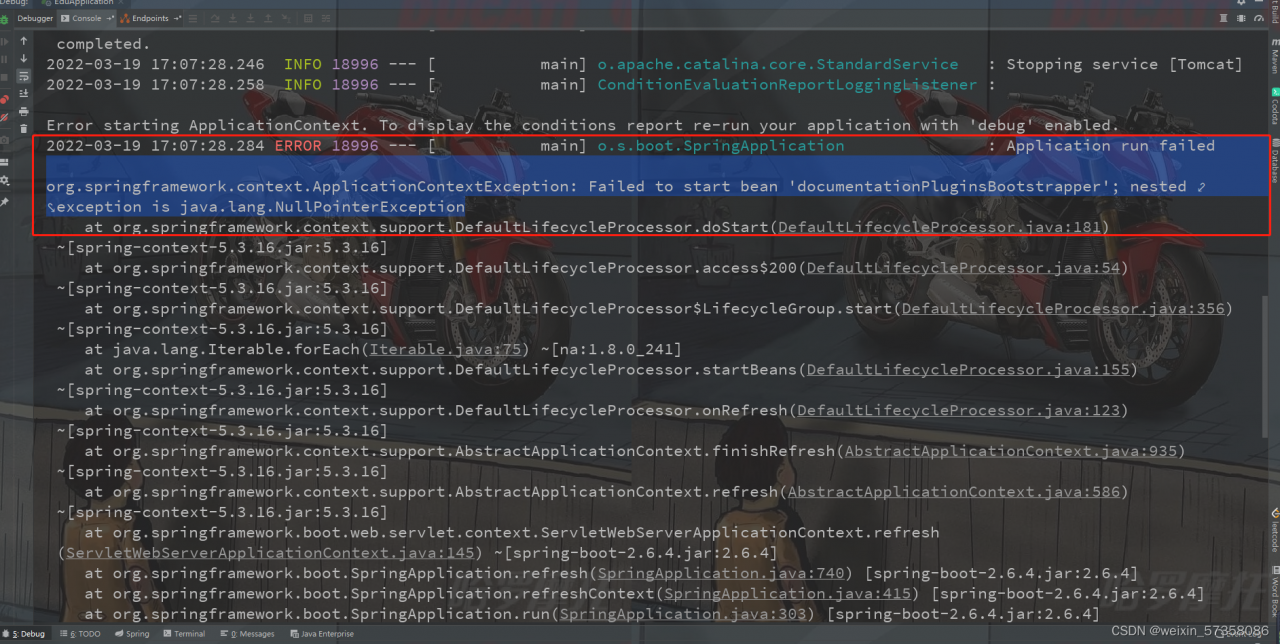
Failed to start bean ‘documentationPluginsBootstrapper‘ [How to Solve]

Error when springboot integrates swagger:

pplication run failed

org.springframework.context.ApplicationContextException: Failed to start bean 'documentationPluginsBootstrapper'; nested exception is java.lang.NullPointerException


This is because the springboot version is too high, resulting in a bug.

Solution:

1. Reduce your SpringBoot version

2. Add the followings to your configuration file:

spring.mvc.pathmatch.matching-strategy=ant_path_matcher

[Solved] Failed to get convolution algorithm. This is probably because cuDNN failed to initialize

Problem description

Failed to get convolution algorithm. This is probably because cuDNN failed to initialize


Cause analysis:

Insufficient GPU memory

Solution:

1.kill -9 PID_*
2. Dynamically allocate GPU memory:

from tensorflow.compat.v1 import ConfigProto
from tensorflow.compat.v1 import InteractiveSession

config = ConfigProto()
config.gpu_options.allow_growth = True
session = InteractiveSession(config=config)

Linux Error: error:Failed dependencies [How to Solve]

1. problem description

When I tried to install the RPM package of vscode in Ubuntu, the following error occurred:

[root@localhost src]# rpm -ivh code-insider-1.66.0-1647322605.el7.x86_64.rpm
error: Failed dependencies:
	code-insider conflicts with (installed) code-insider-1.66.0-1647322605.el7.x86_64


2. solution

Add two parameters –nodeps --force or –force --nodeps after the installation package, and ignore the error message for installation. For example:

– force means mandatory installation
– nodeps means that dependencies are not checked during installation

Enter the following code:

rpm -ivh –nodeps --force code-insider-1.66.0-1647322605.el7.x86_64.rpm

Problem-solving.

How to Remove “Devtools failed to parse sourcemap” Warning

Recently, in the process of developing with webpack-dev-server , the console has been reporting a warning: DevTools failed to parse SourceMap: webpack:///node_modules/[email protected]@sockjs-client/dist/sockjs.js.map. Here’s how to eliminate this warning:

Sourcemap Technology

Before dealing with this warning, it is important to understand what SourceMap is and what it is used for. When writing a website, if there are many javascript files, when rendering the content to the client browser, if we use a packaging tool like webpack, we can merge and compress those js files and remove the spaces and other elements from them, thus reducing the file size and improving the responsiveness of the page. However, the problem is that the js file cannot be debugged in the browser because the compressed file is compact, without spaces and line breaks.
In a nutshell, SourceMap is how to map compressed js code into formatted code. When you deploy code in the Production environment, along with the compressed and optimized js code, there is also a sourcemap file that contains the original js code. When Chrome, the client browser, receives this compressed js file, it automatically looks for the relevant sourcemap file on the server and converts the compressed js code into formatted js code.

Remove warning

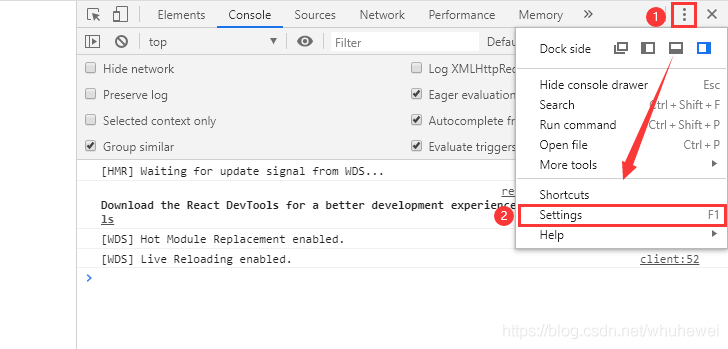
Scheme 1: disable sourcemap browser function

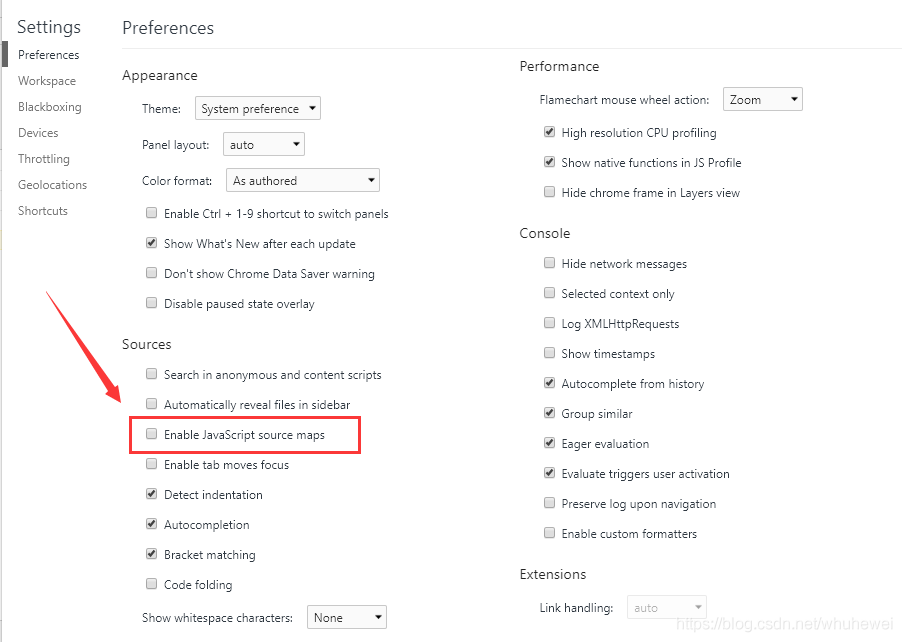
First open DevTools of Chrome browser as follows:

uncheck Enable JavaScript Source maps

the warning disappears after disabling this function in the browser, but this does not fundamentally solve the problem.

Scheme 2: configure webpack

Add devtool: "inline-source-map" in webpack.config.js, as follows:

const path = require("path");
const HtmlWebpackPlugin = require("html-webpack-plugin");
const htmlPlugin = new HtmlWebpackPlugin({
    template: path.join(__dirname, "./src/index.html"),
    filename: "index.html"
});

module.exports = {
    mode: "development",
    // mode: "production"
    plugins: [
        htmlPlugin
    ],
    module: {
        rules: [
            {
                test: /.js|jsx$/,
                use: "babel-loader",
                exclude: /node_modules/
            }
        ]
    },
    devtool: "inline-source-map"
};

failed to obtain in-memory shard lock [How to Solve]

Cause of problem:

1. The reason for this problem is that the original slice was not properly closed and cleaned up, so there is no way to get a slice lock when the slice has to be reallocated back to the problem node.
2. This does not cause the slice data to be lost, it just needs to retrigger the allocation

Recovery instruction

curl -XPOST http://localhost:9200/_cluster/reroute?retry_failed

View details

curl -XGET http://localhost:9200/_cluster/allocation/explain

yum: Error: Failed to download metadata for repo ‘aliyun-AppStream‘: Cannot download repomd.xml

preface

centos8 stopped the service of source on December 31, 2021

The current system is CentOS

[root@localhost ~]# cat /etc/centos-release
CentOS Linux release 8.5.2111
[root@localhost ~]# 

Yum error message

[root@localhost ~]# yum install ipmitool
CentOS-8 - AppStream                                                                                                                                                                   439  B/s | 2.3 kB     00:05    
Errors during downloading metadata for repository 'aliyun-AppStream':
  - Status code: 404 for https://mirrors.aliyun.com/centos-Vault/8.5.2111/BaseOS/x86_64/os/repodata/repomd.xml (IP: 182.105.147.113)
Error: Failed to download metadata for repo 'aliyun-AppStream': Cannot download repomd.xml: Cannot download repodata/repomd.xml: All mirrors were tried
[root@localhost ~]# 

Solution

1. Execute the following commands

[root@localhost ~]#cd /etc/yum.repos.d/
[root@localhost yum.repos.d]# 
[root@localhost yum.repos.d]# 
[root@localhost yum.repos.d]# ls -lh        
total 24K
-rwxr-xr-x. 1 root root  288 Mar 22 20:07 CentOS-AppStream.repo
-rwxr-xr-x. 1 root root  276 Mar 22 20:07 CentOS-BaseOS.repo
-rwxr-xr-x. 1 root root 3.0K Mar 22 20:07 CentOS-Base.repo
-rwxr-xr-x. 1 root root  279 Mar 22 20:07 CentOS-Extras.repo
[root@localhost yum.repos.d]# 
[root@localhost yum.repos.d]# 
[root@localhost yum.repos.d]# sed -i 's/mirrorlist/#mirrorlist/g' /etc/yum.repos.d/CentOS-*
[root@localhost yum.repos.d]# sed -i 's|#baseurl=http://mirror.centos.org|baseurl=http://vault.centos.org|g' /etc/yum.repos.d/CentOS-*
[root@localhost yum.repos.d]# 
[root@localhost yum.repos.d]# 
[root@localhost yum.repos.d]# yum update -y
Repository base is listed more than once in the configuration
Repository extras is listed more than once in the configuration
Repository centosplus is listed more than once in the configuration
Repository PowerTools is listed more than once in the configuration
Repository AppStream is listed more than once in the configuration
CentOS-8 - AppStream                                                                                                                                                             437  B/s | 2.3 kB     00:05    
Errors during downloading metadata for repository 'aliyun-AppStream':
  - Status code: 404 for https://mirrors.aliyun.com/centos-Vault/8.5.2111/BaseOS/x86_64/os/repodata/repomd.xml (IP: 124.225.134.244)
Error: Failed to download metadata for repo 'aliyun-AppStream': Cannot download repomd.xml: Cannot download repodata/repomd.xml: All mirrors were tried

2. If the problem is not solved, do the following:

[root@localhost yum.repos.d]# 
[root@localhost yum.repos.d]# 
[root@localhost yum.repos.d]# wget -O /etc/yum.repos.d/CentOS-Base.repo https://mirrors.aliyun.com/repo/Centos-vault-8.5.2111.repo
--2022-03-22 20:08:42--  https://mirrors.aliyun.com/repo/Centos-vault-8.5.2111.repo
Resolving mirrors.aliyun.com (mirrors.aliyun.com)... 124.225.134.241, 124.225.134.239, 124.225.134.243, ...
Connecting to mirrors.aliyun.com (mirrors.aliyun.com)|124.225.134.241|:443... connected.
HTTP request sent, awaiting response... 200 OK
Length: 2495 (2.4K) [application/octet-stream]
Saving to: ‘/etc/yum.repos.d/CentOS-Base.repo’

/etc/yum.repos.d/CentOS-Base.repo                    100%[===================================================================================================================>]   2.44K  --.-KB/s    in 0s      

2022-03-22 20:08:47 (49.0 MB/s) - ‘/etc/yum.repos.d/CentOS-Base.repo’ saved [2495/2495]

[root@localhost yum.repos.d]# 
[root@localhost yum.repos.d]# 
[root@localhost yum.repos.d]# 
[root@localhost yum.repos.d]# yum clean all
Repository base is listed more than once in the configuration
Repository extras is listed more than once in the configuration
Repository centosplus is listed more than once in the configuration
Repository PowerTools is listed more than once in the configuration
Repository AppStream is listed more than once in the configuration
18 files removed
[root@localhost yum.repos.d]# 
[root@localhost yum.repos.d]# 
[root@localhost yum.repos.d]# yum makecache
Repository base is listed more than once in the configuration
Repository extras is listed more than once in the configuration
Repository centosplus is listed more than once in the configuration
Repository PowerTools is listed more than once in the configuration
Repository AppStream is listed more than once in the configuration
CentOS-8 - AppStream                                                                                                                                                             428  B/s | 2.3 kB     00:05    
Errors during downloading metadata for repository 'aliyun-AppStream':
  - Status code: 404 for https://mirrors.aliyun.com/centos-Vault/8.5.2111/BaseOS/x86_64/os/repodata/repomd.xml (IP: 119.41.210.242)
Error: Failed to download metadata for repo 'aliyun-AppStream': Cannot download repomd.xml: Cannot download repodata/repomd.xml: All mirrors were tried
[root@localhost yum.repos.d]# 

3. Then perform the following operations

[root@localhost yum.repos.d]# 
[root@localhost yum.repos.d]# ls -lh        
total 24K
-rwxr-xr-x. 1 root root  288 Mar 22 20:07 CentOS-AppStream.repo
-rwxr-xr-x. 1 root root  276 Mar 22 20:07 CentOS-BaseOS.repo
-rwxr-xr-x. 1 root root 3.0K Mar 22 20:07 CentOS-Base.repo
-rwxr-xr-x. 1 root root  279 Mar 22 20:07 CentOS-Extras.repo
[root@localhost yum.repos.d]# 
[root@localhost yum.repos.d]# mkdir bak
[root@localhost yum.repos.d]# mv  *.repo  bak
[root@localhost yum.repos.d]# ls
bak
[root@localhost yum.repos.d]#
[root@localhost yum.repos.d]#
[root@localhost yum.repos.d]# wget -O /etc/yum.repos.d/CentOS-Base.repo https://mirrors.aliyun.com/repo/Centos-vault-8.5.2111.repo
--2022-03-22 20:10:10--  https://mirrors.aliyun.com/repo/Centos-vault-8.5.2111.repo
Resolving mirrors.aliyun.com (mirrors.aliyun.com)... 124.225.134.239, 124.225.134.241, 124.225.134.243, ...
Connecting to mirrors.aliyun.com (mirrors.aliyun.com)|124.225.134.239|:443... connected.
HTTP request sent, awaiting response... 200 OK
Length: 2495 (2.4K) [application/octet-stream]
Saving to: ‘/etc/yum.repos.d/CentOS-Base.repo’

/etc/yum.repos.d/CentOS-Base.repo   100%[==================================================================>]   2.44K  --.-KB/s    in 0s      

2022-03-22 20:10:15 (98.3 MB/s) - ‘/etc/yum.repos.d/CentOS-Base.repo’ saved [2495/2495]

[root@localhost yum.repos.d]#
[root@localhost yum.repos.d]#
[root@localhost yum.repos.d]# yum clean all
0 files removed
[root@localhost yum.repos.d]# yum makecache
CentOS-8.5.2111 - Base - mirrors.aliyun.com                                                                                     454 kB/s | 4.6 MB     00:10    
CentOS-8.5.2111 - Extras - mirrors.aliyun.com                                                                                                                                    1.0 kB/s |  10 kB     00:10    
CentOS-8.5.2111 - AppStream - mirrors.aliyun.com                                                                                                                                 571 kB/s | 8.4 MB     00:15    
Metadata cache created.
[root@localhost yum.repos.d]# ls 
bak  CentOS-Base.repo
[root@localhost yum.repos.d]#
[root@localhost yum.repos.d]#
[root@localhost yum.repos.d]# yum install ipmitool
Last metadata expiration check: 0:00:27 ago on Tue 22 Mar 2022 08:10:54 PM CST.
Dependencies resolved.
=================================================================================================================================================================================================================
 Package                                          Architecture                                   Version                                                 Repository                                         Size
=================================================================================================================================================================================================================
Installing:
 ipmitool                                         x86_64                                         1.8.18-18.el8                                           AppStream                                         395 k

Transaction Summary
=================================================================================================================================================================================================================
Install  1 Package

Total download size: 395 k
Installed size: 1.1 M
Is this ok [y/N]: y
Downloading Packages:
ipmitool-1.8.18-18.el8.x86_64.rpm                                                                                                                                                 71 kB/s | 395 kB     00:05    
-----------------------------------------------------------------------------------------------------------------------------------------------------------------------------------------------------------------
Total                                                                                                                                                                             71 kB/s | 395 kB     00:05     
Running transaction check
Transaction check succeeded.
Running transaction test
Transaction test succeeded.
Running transaction
  Preparing        :                                                                                                                                                                                         1/1 
  Installing       : ipmitool-1.8.18-18.el8.x86_64                                                                                                                                                           1/1 
  Running scriptlet: ipmitool-1.8.18-18.el8.x86_64                                                                                                                                                           1/1 
  Verifying        : ipmitool-1.8.18-18.el8.x86_64                                                                                                                                                           1/1 

Installed:
  ipmitool-1.8.18-18.el8.x86_64                                                                                                                                                                                  

Complete!
[root@localhost yum.repos.d]#

At this point, you can use the yum install command.

[Solved] “Failed to run kubelet“ err=“failed to run Kubelet: misconfiguration: kubelet cgroup driver: \“cgrou

kubelet Startup Error:

"Failed to run kubelet" err="failed to run Kubelet: misconfiguration: kubelet cgroup driver: \"cgrou...: \"systemd\""
systemctl status kubelet
[root@k8s-node1 kubernetes]# systemctl status kubelet
● kubelet.service - Kubernetes Kubelet
   Loaded: loaded (/usr/lib/systemd/system/kubelet.service; enabled; vendor preset: disabled)
   Active: failed (Result: start-limit) since 一 2022-03-21 15:29:19 CST; 23s ago
  Process: 30267 ExecStart=/usr/bin/kubelet (code=exited, status=1/FAILURE)
 Main PID: 30267 (code=exited, status=1/FAILURE)
3月 21 15:29:19 k8s-node1 kubelet[30267]: E0321 15:29:19.200485   30267 server.go:302] "Failed to run kubelet" err="failed to run Kubelet: misconfiguration: kubelet cgroup driver: \"cgrou...: \"systemd\""
3月 21 15:29:19 k8s-node1 systemd[1]: kubelet.service: main process exited, code=exited, status=1/FAILURE
3月 21 15:29:19 k8s-node1 systemd[1]: Unit kubelet.service entered failed state.
3月 21 15:29:19 k8s-node1 systemd[1]: kubelet.service failed.
3月 21 15:29:19 k8s-node1 systemd[1]: kubelet.service holdoff time over, scheduling restart.
3月 21 15:29:19 k8s-node1 systemd[1]: Stopped Kubernetes Kubelet.
3月 21 15:29:19 k8s-node1 systemd[1]: start request repeated too quickly for kubelet.service
3月 21 15:29:19 k8s-node1 systemd[1]: Failed to start Kubernetes Kubelet.
3月 21 15:29:19 k8s-node1 systemd[1]: Unit kubelet.service entered failed state.
3月 21 15:29:19 k8s-node1 systemd[1]: kubelet.service failed.
Hint: Some lines were ellipsized, use -l to show in full.


Solution:
Remove native.cgroupdriver=systemd from the docker configuration file or change systemd to cgroupfs

vim /etc/docker/daemon.json 
{
    "exec-opts": ["native.cgroupdriver=cgroupfs"]
}
systemctl daemon-reload
systemctl enable kubelet
systemctl restart kubelet
systemctl status kubelet

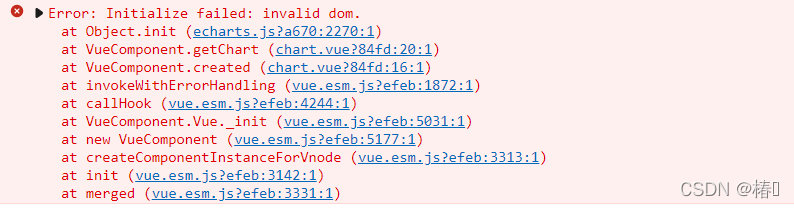
[Solved] Vue echarts Error: Initialize failed: invalid dom.

Error reporting reason

DOM has not been mounted yet, echarts.init() has already started execution

resolvent

1. Don’t use created, use mounted. Created just creates an instance at this time, but the template hasn’t been mounted yet

created:Called before the template is rendered into html, i.e. usually initialize some property values and then render into view.
mounted: called after the template is rendered into html, usually after initializing the page and then doing some required operations on the html dom nodes

That is to say, the created() method is called before the page is loaded, and DOM is not loaded yet. So use mounted when DOM is changed, and use created when DOM is not changed

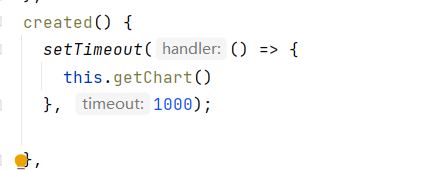
2. Use setTimeout to delay loading

Failed to find Qt component “Widgets“ [How to Solve]

In the project, QT6 is used 2.1 after installing QT, this error is reported when QtCreator is used:

but it set Qt6_FOUND to FALSE so package "Qt6" is considered to be NOT
  FOUND.  Reason given by package:

  Failed to find Qt component "Widgets" config file at ""

The reason is that although QT has been installed, some other libraries QT depends on have not been installed:

I use Ubuntu system: use the following command to install (OpenGL installation)

sudo apt-get install build-essential libgl1-mesa-dev