Author Archives: Robins

OpenSCManager Error 1722

Execute the following command in server A (Windows Server 2008 R2) to access the service health of remote server B (Windows Server 2003) :

sc \\servername query “servicename”

The results returned are as follows:

[SC] OpenSCManager FAILED 1722: The RPC server is unavailable.


Solution: Just restart server A. Because I really don’t know what causes it, it is OK to run the command in my native machine, but the operating system of my native machine is exactly the same as that of server A, so it should not be the setting problem of server B.


Reproduced in: https://www.cnblogs.com/yumianhu/p/3707538.html

IOS development NSURLSession/NSURLConnection HTTP load failed solution

Recently, I have been busy for the launch of the new storage app. I have been busy for nearly a month. After a period of 996, I can finally take a breath today and continue to update my blog. This paper records the problems and solutions encountered when sending a HTTPS request in iOS 9. It is hoped that through this paper, we can have a deeper understanding of the configuration of ATS.
Problem description
When developing app, I encountered the problem of sending HTTPS request in iOS 9 :

NSURLSession/NSURLConnection HTTP load failed (kCFStreamErrorDomainSSL, -9801)

As we know, after , iOS 9, all network requests use HTTPS by default. If you send HTTP request, the following error will be reported. But we can allow HTTP request by setting the value of nsapptransportsecuritynsallowsarbitraryloads to be YES :

App Transport Security has blocked a cleartext HTTP (http://) resource load since it is insecure. Temporary exceptions can be configured via your app's Info.plist file.

info.plist

This solves the HTTP request problem, but when I send a HTTPS request, the HTTP laod failed problem still occurs. Although the above method can also be used to solve this problem, it is not the fundamental solution.
The solution
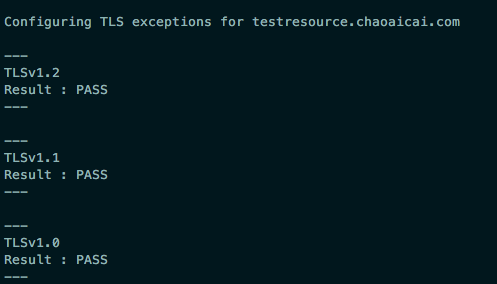
Through the analysis, doubt is TLS problem, because the 9 default need TLS1.2 iOS version to encrypt data, if the server does not support the TLS1.2 , the URLSession: task: didCompleteWithError: returns the nil error , However, the back-end development colleagues said that the server supports TLS1.0, TLS1.1 and TLS1.2, it seems that this is not the problem of TLS. Therefore, I was not assured. I used nscurl to test the test server. As expected, TLS1.2 was not supported.

# 加 --verbose 是为了显示详细的调试信息
/usr/bin/nscurl --ats-diagnostics --verbose https://testresource.chaoaicai.com

It can be seen from the output that the server only supports TLS1.0. Therefore, the colleagues in the background development were asked to test and modify, and then tested again. It was found that the server supports TLS1.2, and the network request of HTTPS is normal.

ATS exception configuration
In fact, for the server does not support TLS1.2, but the client to send HTTPS request there is another solution, is to configure ATS, set the lowest TLS version, as shown in infos.plist :

<key>NSAppTransportSecurity</key>
  <dict>
  <key>NSExceptionDomains</key>
  <dict>
    <!--你的https域名-->
    <key>testresource.chaoaicai.com</key>
    <dict>
      <!--允许子域-->
      <key>NSIncludesSubdomains</key>
      <true/>
      <!--TLS允许的最低版本号-->
      <key>NSExceptionMinimumTLSVersion</key>
      <string>TLSv1.0</string>
    </dict>
  </dict>
</dict>

Where, the specific Settings of NSExceptionDomains are described below, where ATS can be understood in more detail
NSIncludesSubdomains: is applied to the domain name, the default is NONSExceptionAllowsInsecureHTTPLoads: whether to allow HTTP requests, YES (allow), the default is NONSExceptionMinimumTLSVersion: TLS version of the lowest NSExceptionRequiresForwardSecrecy: whether to pre encryption, NO (encryption is allowed, but does not support PFS: Perfect forward secrecy), default is YESNSRequiresCertificateTransparency: the need for effective signing certificate, YES (need), the default is NO


This paper just briefly introduces how to configure ATS, and solves the problem that HTTPS cannot be accessed because the server does not support TLS1.2. It is necessary to understand the specific workflow of HTTPS and TLS, please refer to relevant materials.
The resources
# # iOS issue record about NSURLSession/NSURLConnection HTTP load failed (kCFStreamErrorDomainSSL, - 9801)
IOS 9 comes with a series of tutorials
IOS 9.0
Clean up the pits in iOS9 adaptation (graphic)
Cocoa Keys
NSURLSession/NSURLConnection HTTP load failed (kCFStreamErrorDomainSSL, -9802) on a subdomain?

Windows Realtek USB wireless network card boot failure Rtlihvs. DLL module stop problem

June 4, 2020 Update:
Another reason was found that the USB wireless network card of the chip could not be connected to the USB interface of the monitor (USB interface is provided on the AOC monitor of the blogger).
It is speculated that the network card device could not be successfully initialized due to insufficient power supply of THE USB interface on the display when the system started. In this case, the network card can only be directly inserted into the host computer.
Or buy a separate USB extension cord and place it on the desktop (it may cause signal problems if some partners plug it into the host).


Problem description
After booting up, the wireless network card does not start successfully. When entering the device manager, you can see that the network card is marked as warning. The device can be successfully activated and used by disabling and enabling the device.
The log
In the Windows system log, we can see a warning log with the event ID of 10002, which is described as follows:

WLAN Extensibility Module has stopped.

Module Path: C:\WINDOWS\system32\Rtlihvs.dll

Analysis of the
Preliminary analysis indicates that the component version is too low (the current system is Windows 10) or the driver version is too low. Through the replacement of various versions of the driver can not solve the problem. Hence Google…
To solve
Reference: WLAN Extensibility Module has failed to start-up – Microsoft Community
The solution steps are as follows:

    Win + R open regedit registry editor; Expand and locate to HKEY_LOCAL_MACHINE\SYSTEM\CurrentControlSet\ Class\{4d36e972-e325-11ce-bfc1-08002be10318}; There are several items beginning with 00, and the sub-items Ndi are searched in turn for the presence of IHVExtensions. Its contents are roughly as follows:

    [HKEY_LOCAL_MACHINE\SYSTEM\CurrentControlSet\Control\Class\{4d36e972-e325-11ce-bfc1-08002be10318}\0008\Ndi\IHVExtensions]
    "ExtensibilityDLL"="%SystemRoot%\\system32\\Rtlihvs.dll"
    "UIExtensibilityCLSID"="{6C2A8CCA-B2A2-4d81-A3B2-4E15F445C312}"
    "GroupName"="Realtek CCX SDK IHV Service"
    "AdapterOUI"=dword:0000e04c
    

    After confirmation, right-click IHVExtensions and select export and backup to any place. Delete IHVExtensions, restart the system and confirm, Fixed!

The Spring problem Failed to read Schema Document

schema_reference.4: Failed to read schema document 'http://www.springframework.org/schema/beans/spring-beans-2.5.xsd', because 1) could not find the       document; 2) the document could not be read; 3) the root element of the document is not <xsd:schema>.

One solution: Cut and paste the code and save it.

Sometimes you will find that a system that has been booting up properly in the past will one day report the following error:

(plain)
view plain
The copy

    org. XML, sax SAXParseException: schema_reference. 4: Failed to read the schema document ‘http://www.springframework.org/schema/beans/spring-beans-2.0.xsd’, because 1) could not find the document. 2) The document could not be read; 3) The root element of the document is not < xsd:schema> .

    Obviously, the XSD file specified in the Spring XML configuration file cannot be read, mostly due to an outage or the temporary inability to connect to the Spring official website. You can use the browser type XSD file URL, such as: http://www.springframework.org/schema/beans/spring-beans-2.0.xsd for confirmation.

    There are two common online solutions to this problem. The first is simple and effective, but cumbersome: convert all spring configuration files with XSD paths in the form of urls to paths in the form of CLASspath pointing to local XSD files, for example: Classpath: org/springframework/beans/factory/XML/spring beans – 2.5 XSD, another way is to build in the native web server, according to the URL to create the corresponding folder, in a corresponding XSD file, add “127.0.0.1 www.springframework.org” in the machine hosts file. In fact, both of these approaches are “skew” approaches, and to figure this out you need to start with Spring’s XSD file loading mechanism.

    First of all: You must know that Spring always tries to look up the XSD file locally when it loads the XSD file (all versions of the XSD file are already included in the Spring JAR), and if it is not found, then it will go to the URL specified path to download. This is a perfectly reasonable thing to do, and it doesn’t look like it’s downloaded from the site every time. In fact, if all of your configurations are positive, your project can be started without an error if the network is disconnected. Spring load XSD file class is PluggableSchemaResolver, you can take a look at its source to verify the above statement. In addition, you can add in log4j.xml:

    [HTML]
    view plain
    The copy

      < The logger name = “org. Springframework. Beans. Factory. XML” & gt; & lt; Level value = “all”/& gt; & lt; /logger>

      Log to see how Spring loads XSD files.
      Next, the question is why Spring didn’t find the required files locally and had to go to the web site to download them. And this is a very simple question. In many Spring JARS, under the meta-INf directory, there is a Spring.schemas, this is a property file, the contents of which are like the following:

      (plain)
      view plain
      The copy

      The

        http\://www.springframework.org/schema/beans/spring-beans-2.0.xsd=org/springframework/beans/factory/xml/spring-beans-2.0.xsd http\://www.springframework.org/schema/beans/spring-beans-2.5.xsd=org/ Springframework/beans/factory/XML/spring beans – 2.5 XSD http\://www.springframework.org/schema/beans/spring-beans-3.0.xsd=org/springframework/beans/factory/xml/spring-beans-3.0.xsd…

        In fact, this file is spring’s mapping of the local location path of the XSD file that Spring USES to find the XSD file locally (that is, in spring’s JAR). The reason for not finding the XSD file may be that the version of the declared XSD file does not exist locally, other than the URL typing error. In general, the new version of the spring jar package will all the past version (2.0) should be self XSD packaging, and in the spring. The schema file to add the corresponding item, the situation of the problems are often the statement USES a high version of the XSD file, such as 3.0, but rely on the spring jar package is the previous version 2.5, due to the nature not may contain 3.0 2.5 XSD file, at this time will cause the spring to XSD file target site to download, in case of broken network or target site is not available, That’s what happened.

        However, in implementation development, these errors are not uncommon, and the most common cause of this problem is related to the use of a Maven packaging plug-in called “Assembly.” Many projects need to package the project together with all the JARS it depends on into a jar package, and Maven’s Assembly plug-in is designed to do this. But because the engineering often rely on many jars, and be dependent jar can rely on other jar package, so that when the project rely on to a different version of the spring, when using the assembly for packaging, can only be one version under the jars of spring. The schemas files into finally hit the jar of the bag, it’s likely missing out on some version of the XSD local map, then the article mentioned at the beginning of the error. If your project is a single JAR, you can verify that this is not the case by examining the Spring.schemas file in the resulting JAR. In this case, the solution is generally recommended to use another packaged plug-in shade, which is indeed a more excellent tool than assembly. On the processing of Spring.schemas file, shade can merge all the Spring.schemas files in all jars.

        This is the mechanism by which Spring loads XSD files and the analysis of the cause of the problem. In fact, we should have our project always load a native XSD file at startup, rather than download it every time we go to the site, which requires a review of your project in the context of the above.
        In this paper, the original link: http://blog.csdn.net/bluishglc/article/details/7596118, reprint please indicate the source!

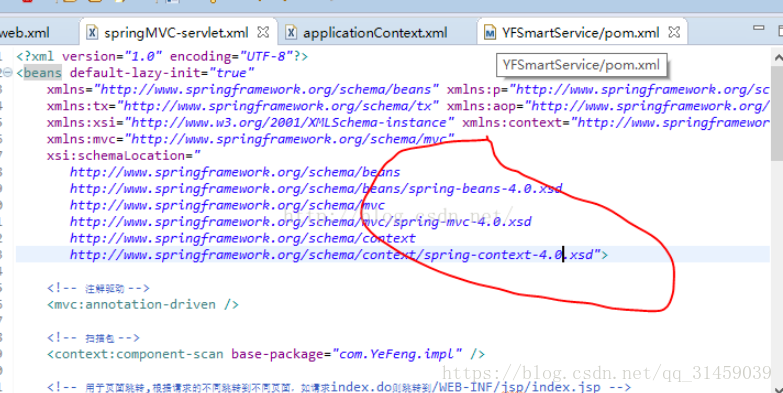
        Through baidu and search, I found that it was caused by the mismatch between the version and configuration of spring That I relied on in Maven POM.xml.
        I used
        &lt in the pom.xml; spring.version> 4.0.9. RELEASE< /spring.version>
        USES version 4.0, but the above is version 3.1
        . Change the spring configuration in the above screenshot to 4.0, and do a clean operation at the same time, the problem is solved

The Python PIP installation module prompts the error failed to create process

The Python PIP installation module prompts the error failed to create process

(venv) F:\cxm\venv\Scripts>pip install ipython
failed to create process.

The reason:
This error was reported because python’s directory name or location has changed.
Solutions:
1. Find the directory where Python is modified and open scripts directory, as shown in the figure below. The diagram below:

2. Find the pip-script.py file, open it, and replace the following code on the first line with the path to the python. Exe you have modified:
Old:

New:

#!F:\cxm\venv\Scripts\python.exe # 变动的路径

3. You can now use the PIP installation module
 
http://www.chenxm.cc/post/643.html

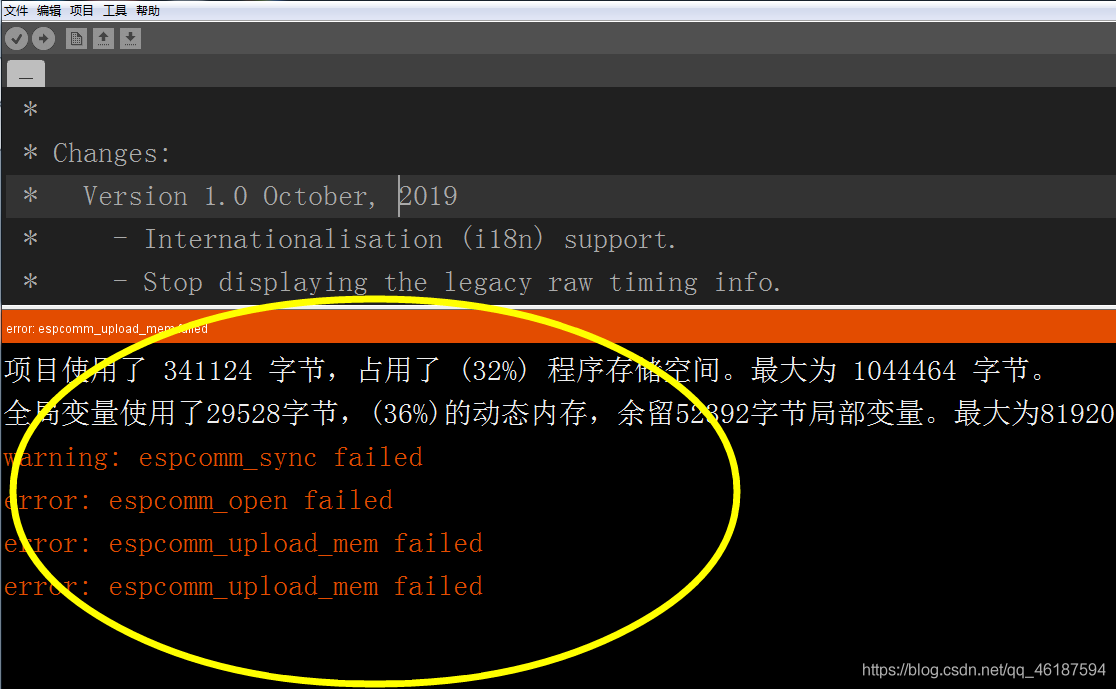
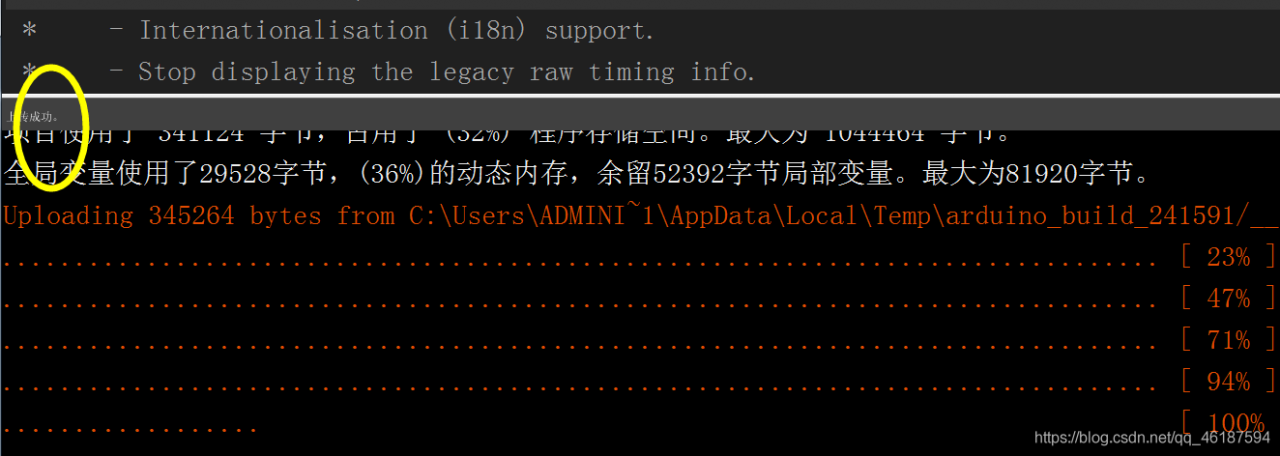
Warning: ESPCOMM_SYNC Failed Error: ESPCOMM_open Failed Error: ESPCOMM_UPLo

Warning: espcomm_sync failed
error: espcomm_open failed
error: espcomm_upload_mem failed
error: espcomm_upload_mem failed “
error: espcomm_upload_mem failed”

>
solutions;
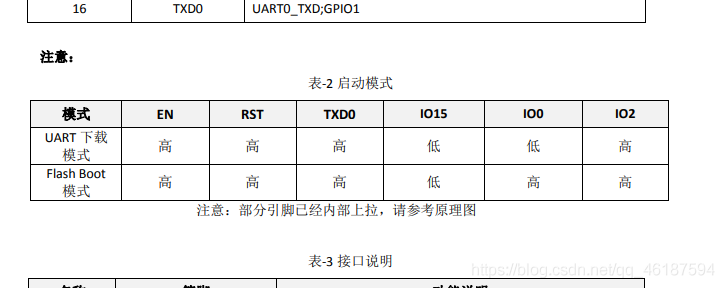
First, hardware
1. Check the connection
to confirm the connection is correct,
UTXD — RXD
URXD — TXD
VCC – 3.3 V
GND – GND
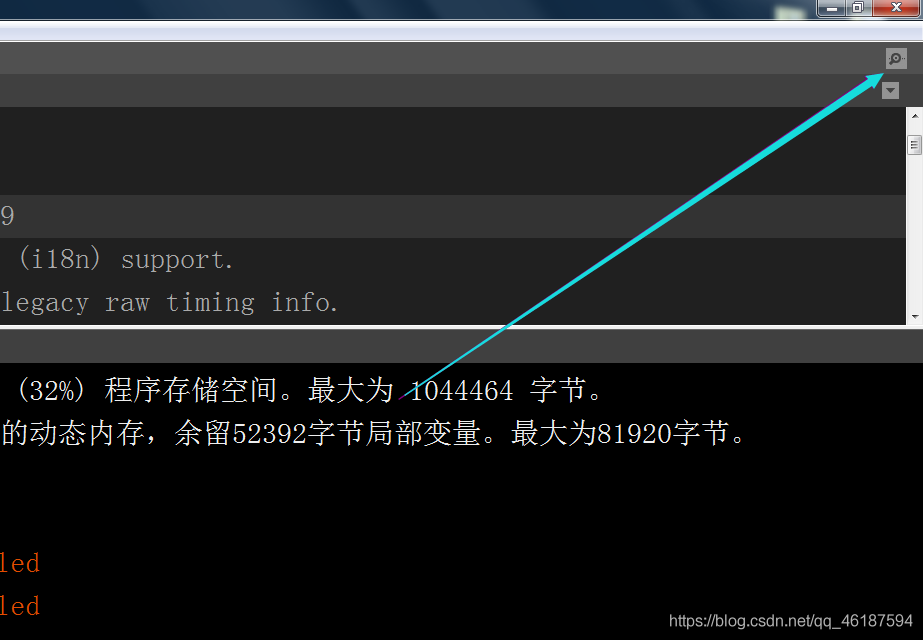
2. Check to see if the serial port on ESP8266 is being used by other software stations and click on the serial port monitor. If the serial port window pops up normally, it’s ok,

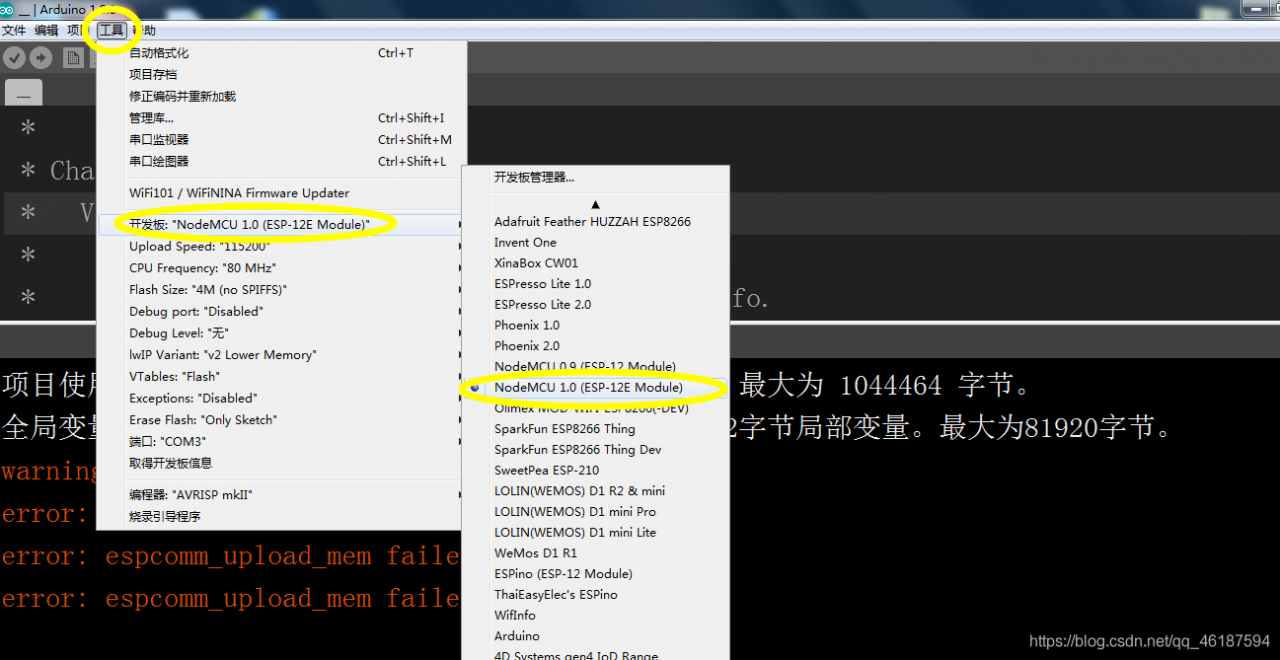
If you can’t pop up, check the tool — port — (select the appropriate port).
Second, other
1. Select the corresponding development board,

2.
Press Flash (or BOOT) not to lose, and then press the reset button to release, and then click to download, flash(or BOOT) do not loose, download the end of the release.
with ESP12 activation instructions

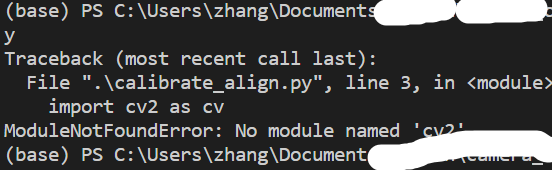
When VS code imported Cv2, an error ImportError: numpy.core.multiarray failed to import; There are no mistakes in using the Spyder

The following error occurs when programming in VsCode and using anaconda’s virtual environment as the interpreter to import Cv2

ImportError: numpy.core.multiarray failed to import

After checking the trial, it was found that:

    I use on spyder without this error; Also used after trying to update numPY; And the python interpreter in the lower left corner is the right choice;

It turned out that the reason might be that vs Code was not started correctly and the Anaconda environment might not have been activated.
In the Anaconda Prompt, the following is executed in sequence

conda activate env_name
cd workDir
code .

So now it’s activated and the import is correct.
In addition, try to directly open VS Code, and then open python working directory in the File-Open folder.
Also note this error. The environment of Vscode is correct, but the terminal does not activate the environment. This can be determined by checking the contents of the prefix brackets.

ASP.NET AJAX client-side framework failed to load


======================================================

note: source code click here to download

======================================================

Asp.net ajax client-side framework failed to load

posted on 2011-08-09 00:04 Leo. W read (30) comments (0) edit collection

development environment from xp upgrade to 64-bit 2008 or windows7,iis change to 7.0, encountered various problems

encountered the same problem, various errors

1 webform_autofocus(“”) missing object

2 asp.net ajax client framework failed to load

solution application pool, advanced Settings, with 32-bit applications enabled set to true.

everything is ok.

depressed colleagues also default installation, I do not know how to set to false, made me crazy for two days!!

tag: ajax client-side

green channel: good text to focus on my collection this article with me to contact

registered users can only post comments after logging in, please log in or register, return to the homepage of the blog garden.

home blog ask flash news garden recruitment knowledge base

latest it news :

·android platform surpassed ios

in advertising browsing share in December with 51.6%
· ios beta source code shows that iPad 3 May support siri

· Stephen Hawking’s new computer

· jingdong mall won a piece of Beijing’s commercial land with 295 million yuan

· American newspaper giants cooperate with facebook Google media attach importance to network network

» more news…

latest knowledge base article :

·javascript object-oriented programming

· continuous integration of “everything is code”

· continuously integrated “software self-recognition”

· continuous integration play-word check-in dance

· what is a closure.
my understanding

» more knowledge base articles…

Textbook touring exhibition in autumn 2011

China -pub out of print computer books on demand service

======================================================

in the end, I invite you to participate in sina APP, sina is a free to give you a space, support PHP+MySql, free secondary domain name, free domain name binding this is the address I invited, you register through this link is my friend, and get a gift of 500 yundou, worth 5 yuan! The station I created has more than 2000 visitors per day, and I can earn 50+ yuan per day by hanging advertisements. Oh, (^o^)/

python: This application failed to stat could not find or load the Qt platform plugin “windows”

there was a problem that the graphics window could not be used when drawing with matplotlib today:

This application failed to start because it could not find or load the Qt platform plugin “windows”
in “”.

Reinstalling the application may fix this problem.

That’s the case with

.

I had no problem using it before, but suddenly today, I think it must be because I have just reinstalled some packages or library files of the system that have not been installed, or the environment is configured.

because python was installed before, then install whatever package you need, step by step install over, after reinstall the system for convenience, install anaconda, so as not to rely on the environment too much trouble. However, there was a problem: the application failed to start because it could not find or load the QT platform plug-in “Windows” .

looked up some related column problems on the Internet, and finally solved the problem.

plug-ins cannot be found or loaded, in two cases 1: no relevant software or libraries are installed. 2: Yes, but there is no associated path at call time.

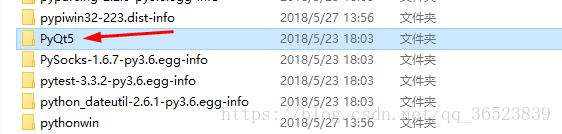
I looked at Qt’s installation package:

is all there is, so the problem should be the path setting. There are many related problems on the Internet, the main one is to add it in the environment variable, the steps are as follows:

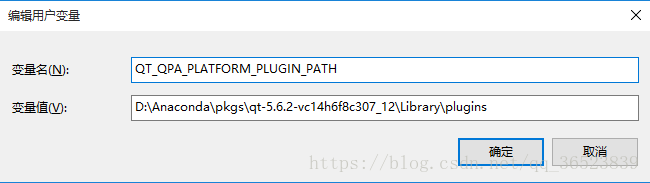
variable name: QT_QPA_PLATFORM_PLUGIN_PATH

plugins variable value: D:\Anaconda\ PKGS \qt-5.6.2-vc14h6f8c307_12\Library\plugins (my path, installation location changed, changed)

remember that it’s the qt plugins path.

if the problem is the above, then 90% of the solution is like this. At the beginning, I also added the variable value wrong, so I failed several times, but as long as you find the right path, you can solve ( after every change in the variable remember to restart the software, run again, otherwise no change ).

Swap off failed: cannot allocate memory

swap partition closes

is ready to adjust the utilization of the swap partition under Linux.

executing swapoff-a-v under Linux reports the following error:

swapoff: /dev/mapper/cryptswap1: swapoff failed: Cannot allocate memory

error cause analysis:

can be seen from the above information, the current Linux/dev/mapper/cryptswap1 this device as a swap partition, if the current swap partition instead of the current remaining capacity is greater than the system memory, will quote this mistake, because at the time of closing swap partition, all need to partition data written to the memory, if the memory capacity is insufficient, will cause the error.

resolved:

method 1: free memory cache

# sync ; echo 3 > /proc/sys/vm/drop_caches  #先把内存数据回写到磁盘,然后释放内存缓存

drop_caches accepted parameters are 1, 2, 3, empting pagecache, slab object, pagecahce, and slab object

, respectively

parameters explanation to this file can be found from https://github.com/torvalds/linux/blob/master/Documentation/sysctl/vm.txt:

drop_caches

Writing to this will cause the kernel to drop clean caches, as well as
reclaimable slab objects like dentries and inodes.  Once dropped, their
memory becomes free.

To free pagecache:
    echo 1 > /proc/sys/vm/drop_caches
To free reclaimable slab objects (includes dentries and inodes):
    echo 2 > /proc/sys/vm/drop_caches
To free slab objects and pagecache:
    echo 3 > /proc/sys/vm/drop_caches

dirty state memory cache will not be freed. To free as much memory cache as possible, first execute the command sync to reduce memory cache in the dirty state. If disable, the input parameter 4, note that 0 is not acceptable:

the above method may not work if you use too much swap partition.

method 2: allows memory overcommit

overcommit_memory controls “when user space requests memory, overcommit and approve:

When this flag is 0, the kernel attempts to estimate the amount
of free memory left when userspace requests more memory.

When this flag is 1, the kernel pretends there is always enough
memory until it actually runs out.

When this flag is 2, the kernel uses a "never overcommit"
policy that attempts to prevent any overcommit of memory.
Note that user_reserve_kbytes affects this policy.

2 means overcommit is not allowed. At this point, if swap is stopped, the available memory is reduced and the user space memory request may trigger overcommit to be rejected.


Reference

https://www.lijiaocn.com/%E9%97%AE%E9%A2%98/2019/02/27/linux-swap-off-fail.html

reproduced in: https://www.cnblogs.com/yjt1993/p/11163679.html