Author Archives: Robins

A call to an OS function failed

Recently encountered a problem in the project development, draw a Scrollbox with BCB6, and then use the program to build 10 scrollBox as the parent class panel, Panel in the child thread access. But whenever you access panel-> When the handle parameter is handled, the thread either gets stuck or reports an error “A call to an OS function failed”. I searched for a long time, but I couldn’t find the reason. Because the project code is relatively complex, then I want to build an empty project directly, click to add components, access can be normal. The appearance of the problem is vague. Later in the process of debugging found that when the panel was created, the first call panel-> Handle, then the subsequent access in the child thread will not make an error. Although the problem seems to be solved, we still don’t know why it happened. I will take this as a note for future reference.
PS: In access parameter panel-> In debugging Handle, an error will sometimes occur: “Class already exists. Code: 1410.”

Reproduced in: https://www.cnblogs.com/kamiya/p/11162723.html

Andorid: Installation failed due to invalid APK file due to version mismatch

I recently upgraded Gradle, created a new project, and ran it in the simulator, only to find an error that could not be installed.
Installation failed due to invalid APK file
Check the LogCat log and get the error message from the Couldn’t Load memtrack Module.
The simulator is 8.0-API-26 and the gradle configuration is

    compileSdkVersion 28
    buildToolsVersion "28.0.3"
    defaultConfig {
        applicationId "my.study"
        minSdkVersion 19
        targetSdkVersion 28
        versionCode 1
        versionName "1.0"
        testInstrumentationRunner "android.support.test.runner.AndroidJUnitRunner"
    }

By comparison, I found that api-28 corresponds to an android9 system, while my emulator is an android8 system. The mismatch here leads to the failure of installation.
Modify targetSdkVersion=26 in Gradle configuration

    compileSdkVersion 28
    buildToolsVersion "28.0.3"
    defaultConfig {
        applicationId "my.study"
        minSdkVersion 19
        targetSdkVersion 26
        versionCode 1
        versionName "1.0"
        testInstrumentationRunner "android.support.test.runner.AndroidJUnitRunner"
    }

Problem solving.

django.db.utils.IntegrityError: UNIQUE constraint failed: auth_user.username

Create user code has been completed, the user = user. The objects. The create_user (username = ‘356’ and password = ‘123456’), but an error in the back, then the created user has exists in the database , when you change an error that part of the code to execute, complains, remind you that this user has been created in the database, so you can’t use the data to create.
where does the code execute to form something in the database
username must be unique

“503 Service Unavailable” error when connecting to vCenter Server using vSphere Web Client (2121043)


Last Updated: 2020/3/22Categories: Troubleshooting 6 Subscribe
Symptoms

note: this article is a “503 service unavailable” error when connecting to the vCenter Server using the vSphere Web Client. While we will continue to strive to provide the best translations for this article, localized content may become obsolete. Please refer to the English version for the latest content.

Failed to connect to vCenter Server using the vSphere Web Client. You should see entries similar to the following:

503 Service Unavailable (Failed to connect to endpoint: [N7Vmacore4Http20NamedPipeServiceSpecE: 0 x7f009c095810] _serverNamespace =/_isRedirect = false _pipeName =/var/run/vmware/VPXD – webserver – pipe)

503 Service Unavailable (Failed to connect to endpoint: [class Vmacore::Http::LocalServiceSpec:00000000006F92F0] _serverNamespace = /vsphere-client

503 Service Unavailable (Failed to connect to endpoint: [N7Vmacore4Http20NamedPipeServiceSpecE:0x7f0c6005e4c0] _serverNamespace =/_isRedirect = false _pipeName =/var/run/vmware/vpxd-webserver-pipe)

503 service unavailble fail to connect to end point.

503 Service Unavailable (Failed to connect to endpoint: [N7Vmacore4Http16LocalServiceSpecE:0x7f65e7834610] _serverNamespace = /vsphere-client _isRedirect = false _port = 909

503 Service Unavailable (Failed to connect to endpoint: [N7Vmacore4Http16LocalServiceSpecE:0x00007f2470005950] _serverNamespace = /sdk action = Allow _port = 8085)
For more information about other potential causes and symptoms, see “503 Service unavailing “error on the vSphere Web Client when logging in or logging the vCenter Server.
The Purpose

when one or more services or endpoints are unavailable, an HTTP 503 error response code may be returned. For example, the vCenter Server service might not be running or Stopped while the vSphere Web Client service is running.
Resolution

to troubleshoot this problem:

    verify that the computer trying to access the vCenter Server using the vSphere Web Client with Telnet is connected by running the following command:
telnet vcenter_fqdn 9443

    runs the following command to check whether the partition on the VCSA has enough free space:
Df-h
* in version 6.7, the /storage/archive partition should be full, which is expected behavior. For details, see “File System /storage/ Archive is low on Storage Space “on the VCSA 6.7 VAMI Page

    use the following command to ensure that the vCenter Server service is running:

Service – control – the status – all
* If any of the services shut down unexpectedly, you can start all of them by running the following command:
Service – control – start – all
* If the PSC is external, you may also need to check the services on the PSC.
  
For more information on how to stop/start the service, see the following articles:
How to Stop, Start or Restart vCenter Server 6.x Services
Stopping, Starting or Restarting VMware vCenter Server Appliance 6.x services
    

    to ensure that VCSA has enough resources to handle requests, you may need to use the top command to check CPU/ memory usage on both the host and the VCSA. If all VC services are up and the Web Client is still not open, you can find more details on this issue in the virgo log at the following location:

Windows vCenterServer: C:\ProgamData\VMware\vCenterServer\logs\ VSphere – Client \logs\
VCenter Server Appliance: /var/log/vmware/ vsperr-client /logs/
Please also view the vpxd.log file:
Windows vCenterServer: C:\ProgramData\VMware\vCenterServer\logs\vmware-vpx
VCenter Server Appliance: /var/log/vmware/ VPXD
The Related Information
“503 service unavailable” error when connecting to the vCenter Server using the vSphere Web Client (2121043)vmware-vpxd service on VCSA fails with the error “contains unexpected zero page at block” on vpxd.log (50113962)Accessing the ESXi host through the Host Client UI fails with error: “503 Service Unavailable” (2144962)”invalid credentials LDAP Error 49″ error when starting Inventory Services in vCenter Server 6.x (2147280)How to reset the lost or forgotten root password in vCenter Server Appliance 6.5 (2147144).

FileZilla Server prompts 550 Could not open file for reading when downloading files (illustration)

This error prompts me to study for an hour, finally found that it was because the downloaded file was occupied by another program, so it could not be downloaded.
Solutions:
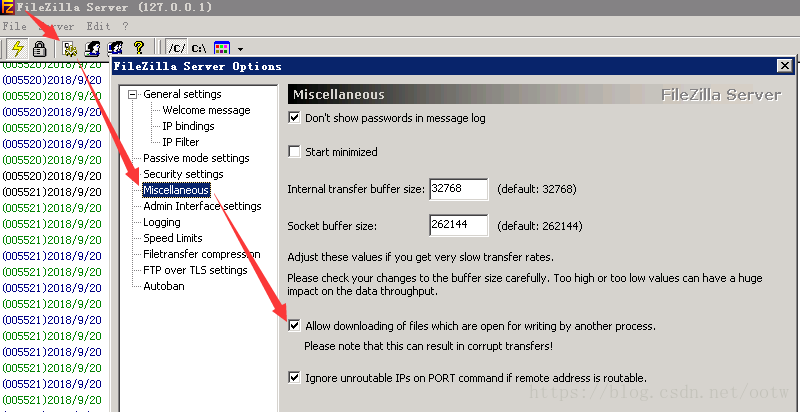
Open the FileZilla Server admin screen – Settings -Miscellaneous-Allow M.E. of files which are open for writing by another process.
The diagram below:

Uncaught TypeError: Failed to execute ‘appendChild’ on ‘Node’: parameter 1 is not of type ‘Node How to Fix

I want to dynamically insert a line of data into tBody, and I write the following code:

html:
        <table id="theList">
        <thead>
            <th>姓名</th>
            <th>年龄</th>
            <th>性别</th>
            <th>操作</th>
        </thead>
        <tbody id="myBody"></tbody>
    </table>


js:

let list = []
let temp = []

list.push({
    name: '张三',
    age: 20,
    sex: '男'
})
list.push({
    name: '赵四',
    age: 19,
    sex: '女'
})
function render(data) {
    var html=[]
    for (let i = 0; i < data.length; i++) {
        let template = '<tr><td>'+data[i].name+'</td><td>'+data[i].age+'</td><td>'+data[i].sex+'</td><td><a href="javascript:;">修改</a>&nbsp;&nbsp;<a href="javascript:;">删除</a></td></tr>'
        html.push(template)
                                    document.getElementById('myBody').appendChild(html.join(''))
    } 
}
render(list)

The browser throws an Uncaught TypeError when running the above code: Failed to execute ‘appendChild’ on ‘Node’ : parameter 1 is not of type ‘Node’. To find out the cause of the error by looking up data:
AppendChild () requires that a tr object be passed in, not a tr string
and html.join(“) above is a string

console.log(typeof html.join(''))  //stirng

Solution:
render function

function render(data) {
    for (let i = 0; i < data.length; i++) {
        let tr = document.createElement('tr')
        tr.innerHTML = '<td>'+data[i].name+'</td><td>'+data[i].age+'</td><td>'+data[i].sex+'</td><td><a href="javascript:;">修改</a>&nbsp;&nbsp;<a href="javascript:;">删除</a></td>'
        document.getElementById('myBody').appendChild(tr)
    } 
}

Tr is an object. Instead of writing like this, you might as well just write:

function render(data) {
    var html=[]
    for (let i = 0; i < data.length; i++) {
        let template = '<tr><td>'+data[i].name+'</td><td>'+data[i].age+'</td><td>'+data[i].sex+'</td><td><a href="javascript:;">修改</a>&nbsp;&nbsp;<a href="javascript:;">删除</a></td></tr>'
        html.push(template)
        document.getElementById('myBody').innerHTML = html.join('')
    } 
}

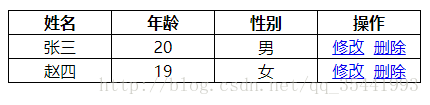
Operation effect:

Other features are still being implemented… .

An error is reported when starting the Android emulator: Emulator: audio: Failed to create voice `goldfish_audio_in’

After updating Android Studio to 3.5.2, the following error occurred when starting the emulator:
Emulator: audio: Failed to create voice `goldfish_audio_in’
In fact, this error does not affect our use in the future, but for me who is a little obsessive, mistakes are unforgivable and must be solved.
Solutions:
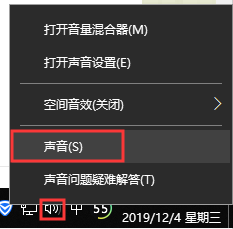
Right click on the sound icon and select Sound.

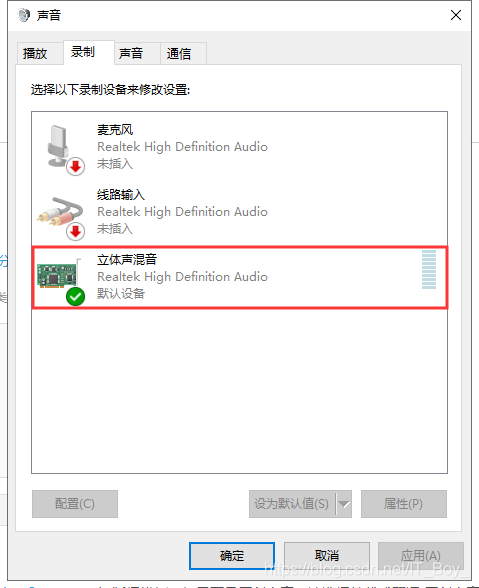
After opening the sound Settings panel, select the “Record” TAB, right-click the “Stereo Mix” and enable it, as shown in the figure below:

Open the Android emulator again, the error report disappears, and the problem is solved.

curl: (25) Failed FTP upload: 550 Solution

Problem description
Using curl to upload an FTP file today throws an error

sam@sam-hp-z238:~$ curl -T /home/sam/myinstall ftp://192.168.2.48/camera
  % Total    % Received % Xferd  Average Speed   Time    Time     Time  Current
                                 Dload  Upload   Total   Spent    Left  Speed
  0     0    0     0    0     0      0      0 --:--:-- --:--:-- --:--:--     0
curl: (25) Failed FTP upload: 550

 
The solution
Is important! The FTP address must end with /
For example: curl - T/home/Sam/myinstall ftp://192.168.2.48/camera/
Perfect test solution!

sam@sam-hp-z238:~$ curl -T /home/sam/myinstall ftp://192.168.2.48/camera/
  % Total    % Received % Xferd  Average Speed   Time    Time     Time  Current
                                 Dload  Upload   Total   Spent    Left  Speed
100  1612    0     0  100  1612      0  76761 --:--:-- --:--:-- --:--:-- 76761


Solution to (ERROR: Failed to build gem native extension.) encountered when updating pod

A normal update of the POD command

sudo gem install -n /usr/local/bin cocoapods

Normally, if you execute the command above, you can upgrade directly. If you upgrade successfully, everything will be fine.
On the contrary, encounter the following upgrade failed!

➜  Ruby: sudo gem install -n /usr/local/bin cocoapods
Building native extensions. This could take a while...
ERROR:  Error installing cocoapods:
	ERROR: Failed to build gem native extension.

    current directory: /Library/Ruby/Gems/2.3.0/gems/ffi-1.12.2/ext/ffi_c
/System/Library/Frameworks/Ruby.framework/Versions/2.3/usr/bin/ruby -r ./siteconf20200313-24412-3logr3.rb extconf.rb
mkmf.rb can't find header files for ruby at /System/Library/Frameworks/Ruby.framework/Versions/2.3/usr/lib/ruby/include/ruby.h

extconf failed, exit code 1

Gem files will remain installed in /Library/Ruby/Gems/2.3.0/gems/ffi-1.12.2 for inspection.
Results logged to /Library/Ruby/Gems/2.3.0/extensions/universal-darwin-18/2.3.0/ffi-1.12.2/gem_make.out

This upgrade problem has been plaguing for several days. It may be that the ruby version is incompatible with the latest POD version. Therefore, Ruby must be upgraded before pod can be successfully upgraded.
The method is found on StackOverflow, but of course there are some other exception issues that need to be resolved during installation (by default you have xcode-select installed)
1. Install RVM

curl -L https://get.rvm.io | bash -s stable

If the installation is successful and the following prompts appear, you can proceed directly to step 2

Upgrade of RVM in /Users/mengshun/.rvm/ is complete.

Thanks for installing RVM 🙏
Please consider donating to our open collective to help us maintain RVM.

👉  Donate: https://opencollective.com/rvm/donate

If it fails, appeared at the bottom of the error (error content curl: (7) Failed to connect to port 443 raw.githubusercontent.com: Operation timed out)

➜  Ruby: curl -L https://get.rvm.io | bash -s stable
  % Total    % Received % Xferd  Average Speed   Time    Time     Time  Current
                                 Dload  Upload   Total   Spent    Left  Speed
100   194  100   194    0     0    166      0  0:00:01  0:00:01 --:--:--   166
curl: (7) Failed to connect to raw.githubusercontent.com port 443: Connection refused

Execute the following instructions

sudo gem install redis

Then proceed with the RVM installation command (curl -L https://get.rvm.io | basket-s stable)
If you still report 443 errors, wait for a while and try again (I tried 3 times myself).
2. Install Ruby 2.6

➜  Ruby: rvm install ruby-2.6
Searching for binary rubies, this might take some time.
No binary rubies available for: osx/10.14/x86_64/ruby-2.6.3.
Continuing with compilation. Please read 'rvm help mount' to get more information on binary rubies.
Checking requirements for osx.
Homebrew libs 'coreutils libyaml [email protected] readline' require update - skipping.
Skipping update of certificates bundle '/usr/local/etc/[email protected]/cert.pem', to force update run:
    rvm osx-ssl-certs update /usr/local/etc/[email protected]/cert.pem

Requirements installation successful.
Installing Ruby from source to: /Users/mengshun/.rvm/rubies/ruby-2.6.3, this may take a while depending on your cpu(s)...
ruby-2.6.3 - #downloading ruby-2.6.3, this may take a while depending on your connection...
  % Total    % Received % Xferd  Average Speed   Time    Time     Time  Current
                                 Dload  Upload   Total   Spent    Left  Speed
100 13.8M  100 13.8M    0     0   9172      0  0:26:21  0:26:21 --:--:-- 11855
ruby-2.6.3 - #extracting ruby-2.6.3 to /Users/mengshun/.rvm/src/ruby-2.6.3 - please wait
ruby-2.6.3 - #configuring - please wait
ruby-2.6.3 - #post-configuration - please wait
ruby-2.6.3 - #compiling - please wait
ruby-2.6.3 - #installing - please wait
ruby-2.6.3 - #making binaries executable - please wait
ruby-2.6.3 - #downloading rubygems-3.0.8
ruby-2.6.3 - #extracting rubygems-3.0.8 - please wait
ruby-2.6.3 - #removing old rubygems - please wait
ruby-2.6.3 - #installing rubygems-3.0.8 - please wait
ruby-2.6.3 - #gemset created /Users/mengshun/.rvm/gems/ruby-2.6.3@global
ruby-2.6.3 - #importing gemset /Users/mengshun/.rvm/gemsets/global.gems - please wait
ruby-2.6.3 - #generating global wrappers - please wait
ruby-2.6.3 - #gemset created /Users/mengshun/.rvm/gems/ruby-2.6.3
ruby-2.6.3 - #importing gemsetfile /Users/mengshun/.rvm/gemsets/default.gems evaluated to empty gem list
ruby-2.6.3 - #generating default wrappers - please wait
ruby-2.6.3 - #adjusting #shebangs for (gem irb erb ri rdoc testrb rake).
Install of ruby-2.6.3 - #complete 
Ruby was built without documentation, to build it run: rvm docs generate-ri


➜  Ruby: ruby -v
ruby 2.6.3p62 (2019-04-16 revision 67580) [x86_64-darwin18]


➜  Ruby: rvm use ruby-2.6.3
Using /Users/mengshun/.rvm/gems/ruby-2.6.3


➜  Ruby: rvm --default use 2.6.3
Using /Users/mengshun/.rvm/gems/ruby-2.6.3


3. Complete and then directly execute the POD installation command

➜  Ruby: sudo gem install -n /usr/local/bin cocoapods
Password:
Fetching concurrent-ruby-1.1.6.gem
Fetching thread_safe-0.3.6.gem
Fetching activesupport-4.2.11.1.gem
Fetching nap-1.1.0.gem
Fetching tzinfo-1.2.6.gem
Fetching i18n-0.9.5.gem
Fetching fuzzy_match-2.0.4.gem
Fetching httpclient-2.8.3.gem
Fetching ffi-1.12.2.gem
Fetching algoliasearch-1.27.1.gem
Fetching ethon-0.12.0.gem
Fetching typhoeus-1.3.1.gem
Fetching netrc-0.11.0.gem
Fetching cocoapods-core-1.9.1.gem
Fetching claide-1.0.3.gem
Fetching cocoapods-deintegrate-1.0.4.gem
Fetching cocoapods-downloader-1.3.0.gem
Fetching cocoapods-plugins-1.0.0.gem
Fetching cocoapods-search-1.0.0.gem
Fetching cocoapods-stats-1.1.0.gem
Fetching cocoapods-trunk-1.4.1.gem
Fetching cocoapods-try-1.1.0.gem
Fetching molinillo-0.6.6.gem
Fetching atomos-0.1.3.gem
Fetching CFPropertyList-3.0.2.gem
Fetching escape-0.0.4.gem
Fetching gh_inspector-1.1.3.gem
Fetching colored2-3.1.2.gem
Fetching cocoapods-1.9.1.gem
Fetching nanaimo-0.2.6.gem
Fetching xcodeproj-1.15.0.gem
Fetching fourflusher-2.3.1.gem
Fetching ruby-macho-1.4.0.gem
Successfully installed thread_safe-0.3.6
Successfully installed tzinfo-1.2.6
Successfully installed concurrent-ruby-1.1.6
Successfully installed i18n-0.9.5
Successfully installed activesupport-4.2.11.1
Successfully installed nap-1.1.0
Successfully installed fuzzy_match-2.0.4
Successfully installed httpclient-2.8.3
Successfully installed algoliasearch-1.27.1
Building native extensions. This could take a while...
Successfully installed ffi-1.12.2
Successfully installed ethon-0.12.0
Successfully installed typhoeus-1.3.1
Successfully installed netrc-0.11.0
Successfully installed cocoapods-core-1.9.1
Successfully installed claide-1.0.3
Successfully installed cocoapods-deintegrate-1.0.4
Successfully installed cocoapods-downloader-1.3.0
Successfully installed cocoapods-plugins-1.0.0
Successfully installed cocoapods-search-1.0.0
Successfully installed cocoapods-stats-1.1.0
Successfully installed cocoapods-trunk-1.4.1
Successfully installed cocoapods-try-1.1.0
Successfully installed molinillo-0.6.6
Successfully installed atomos-0.1.3
Successfully installed CFPropertyList-3.0.2
Successfully installed colored2-3.1.2
Successfully installed nanaimo-0.2.6
Successfully installed xcodeproj-1.15.0
Successfully installed escape-0.0.4
Successfully installed fourflusher-2.3.1
Successfully installed gh_inspector-1.1.3
Successfully installed ruby-macho-1.4.0
Successfully installed cocoapods-1.9.1
Parsing documentation for thread_safe-0.3.6
Installing ri documentation for thread_safe-0.3.6
Parsing documentation for tzinfo-1.2.6
Installing ri documentation for tzinfo-1.2.6
Parsing documentation for concurrent-ruby-1.1.6
Installing ri documentation for concurrent-ruby-1.1.6
Parsing documentation for i18n-0.9.5
Installing ri documentation for i18n-0.9.5
Parsing documentation for activesupport-4.2.11.1
Installing ri documentation for activesupport-4.2.11.1
Parsing documentation for nap-1.1.0
Installing ri documentation for nap-1.1.0
Parsing documentation for fuzzy_match-2.0.4
Installing ri documentation for fuzzy_match-2.0.4
Parsing documentation for httpclient-2.8.3
Installing ri documentation for httpclient-2.8.3
Parsing documentation for algoliasearch-1.27.1
Installing ri documentation for algoliasearch-1.27.1
Parsing documentation for ffi-1.12.2
Installing ri documentation for ffi-1.12.2
Parsing documentation for ethon-0.12.0
Installing ri documentation for ethon-0.12.0
Parsing documentation for typhoeus-1.3.1
Installing ri documentation for typhoeus-1.3.1
Parsing documentation for netrc-0.11.0
Installing ri documentation for netrc-0.11.0
Parsing documentation for cocoapods-core-1.9.1
Installing ri documentation for cocoapods-core-1.9.1
Parsing documentation for claide-1.0.3
Installing ri documentation for claide-1.0.3
Parsing documentation for cocoapods-deintegrate-1.0.4
Installing ri documentation for cocoapods-deintegrate-1.0.4
Parsing documentation for cocoapods-downloader-1.3.0
Installing ri documentation for cocoapods-downloader-1.3.0
Parsing documentation for cocoapods-plugins-1.0.0
Installing ri documentation for cocoapods-plugins-1.0.0
Parsing documentation for cocoapods-search-1.0.0
Installing ri documentation for cocoapods-search-1.0.0
Parsing documentation for cocoapods-stats-1.1.0
Installing ri documentation for cocoapods-stats-1.1.0
Parsing documentation for cocoapods-trunk-1.4.1
Installing ri documentation for cocoapods-trunk-1.4.1
Parsing documentation for cocoapods-try-1.1.0
Installing ri documentation for cocoapods-try-1.1.0
Parsing documentation for molinillo-0.6.6
Installing ri documentation for molinillo-0.6.6
Parsing documentation for atomos-0.1.3
Installing ri documentation for atomos-0.1.3
Parsing documentation for CFPropertyList-3.0.2
Installing ri documentation for CFPropertyList-3.0.2
Parsing documentation for colored2-3.1.2
Installing ri documentation for colored2-3.1.2
Parsing documentation for nanaimo-0.2.6
Installing ri documentation for nanaimo-0.2.6
Parsing documentation for xcodeproj-1.15.0
Installing ri documentation for xcodeproj-1.15.0
Parsing documentation for escape-0.0.4
Installing ri documentation for escape-0.0.4
Parsing documentation for fourflusher-2.3.1
Installing ri documentation for fourflusher-2.3.1
Parsing documentation for gh_inspector-1.1.3
Installing ri documentation for gh_inspector-1.1.3
Parsing documentation for ruby-macho-1.4.0
Installing ri documentation for ruby-macho-1.4.0
Parsing documentation for cocoapods-1.9.1
Installing ri documentation for cocoapods-1.9.1
Done installing documentation for thread_safe, tzinfo, concurrent-ruby, i18n, activesupport, nap, fuzzy_match, httpclient, algoliasearch, ffi, ethon, typhoeus, netrc, cocoapods-core, claide, cocoapods-deintegrate, cocoapods-downloader, cocoapods-plugins, cocoapods-search, cocoapods-stats, cocoapods-trunk, cocoapods-try, molinillo, atomos, CFPropertyList, colored2, nanaimo, xcodeproj, escape, fourflusher, gh_inspector, ruby-macho, cocoapods after 145 seconds
33 gems installed


➜  Ruby: pod --version
1.9.1

Upgrade successful!