Author Archives: Robins

[Solved] Docker Startup Error: OCI runtime create failed container_linux.go380 starting container process

Docker startup error

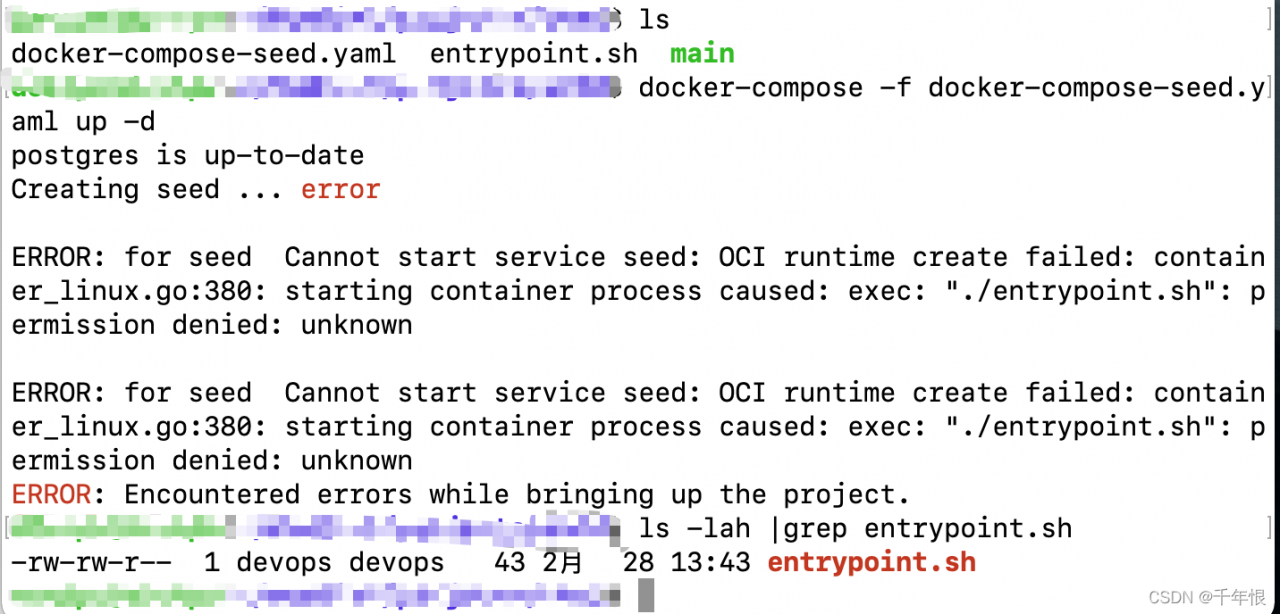
response from daemon: OCI runtime create failed: container_ linux. go:380: starting container process

The reason is that a startup script does not have execution permission

Solution:

Give the startup script execution permission: chmod +x entrypoint.sh

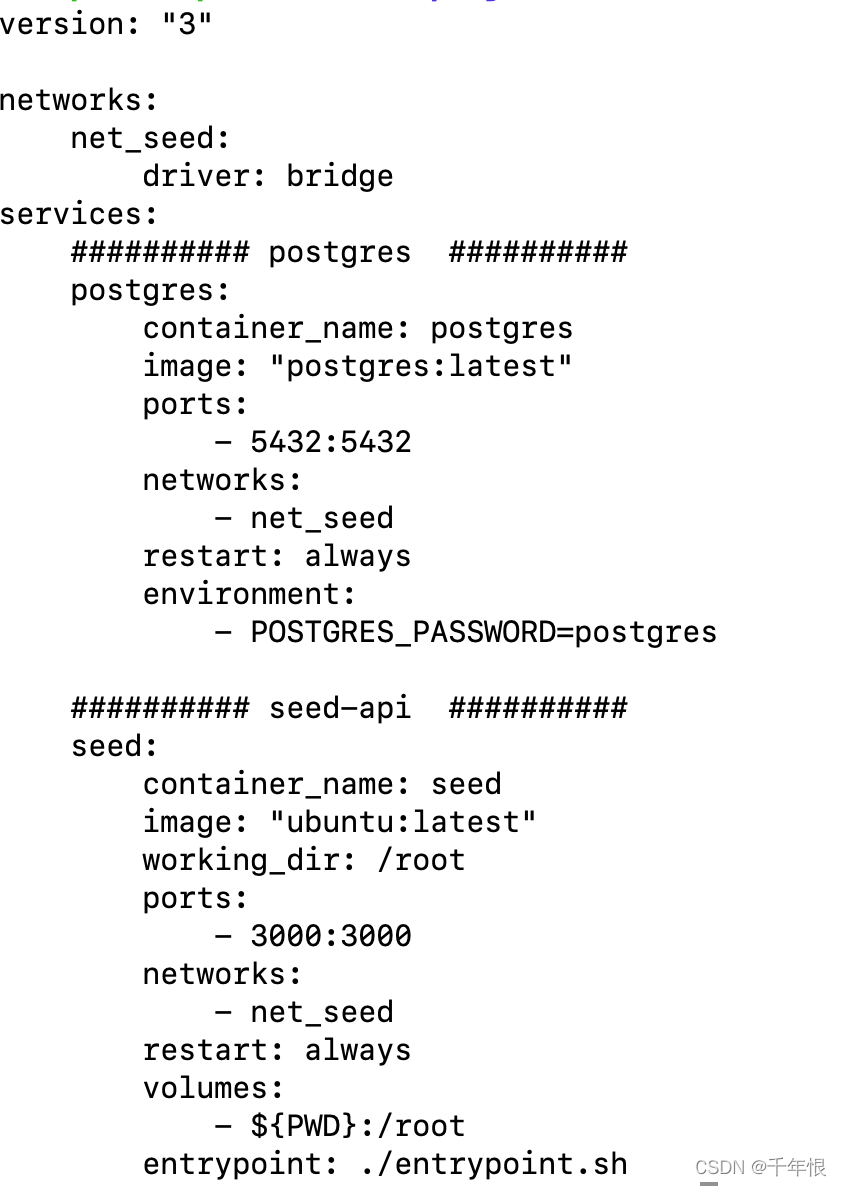
1. The container startup script defined by docker-compose is entrypoint: ./entrypoint.sh, this script must have executable permissions on the host
2. For images created by Dockerfile, the startup scripts in CMD also need to have execution permissions

[Solved] Qt Error: qt.network.ssl: QSslSocket::connectToHostEncrypted: TLS initialization failed

Project scenario:

QT network programming appears when requesting the website: qt.network.ssl: QSslSocket::connectToHostEncrypted: TLS initialization failed


Problem description

Cause analysis:

The computer may not have the correct OpenSSL installed.


Solution:

1. we use the following code to determine the OpenSSL version our QT support

#include <QSslSocket>
#include <QDebug>
qDebug()<< QSslSocket::sslLibraryBuildVersionString();

My output here is:
you can see that my OpenSSL version is bit 1.1.1. Download the corresponding version of OpenSSL
2. on this website: http://slproweb.com/products/Win32OpenSSL.html Download the corresponding OpenSSL version. One thing to note is: if you use MinGW 32-bit kit, Download

otherwise, if you use MinGW 64 bit kit, Download win64 OpenSSL. Note that both compilers only need to download the EXE executable of the light version.

3. Install OpenSSL
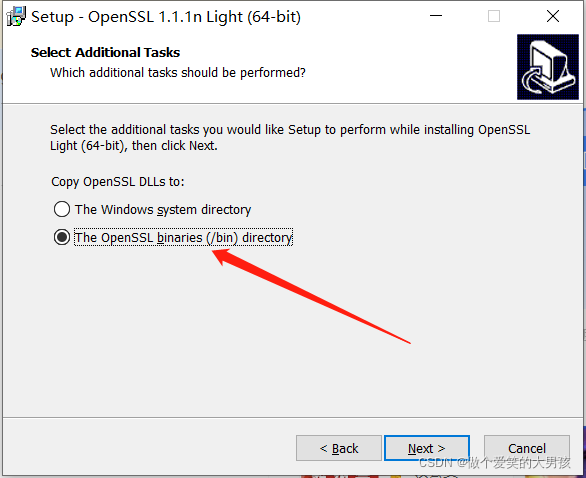
click next all the time. In the last step, set the folder to bin.
4. Copy the file
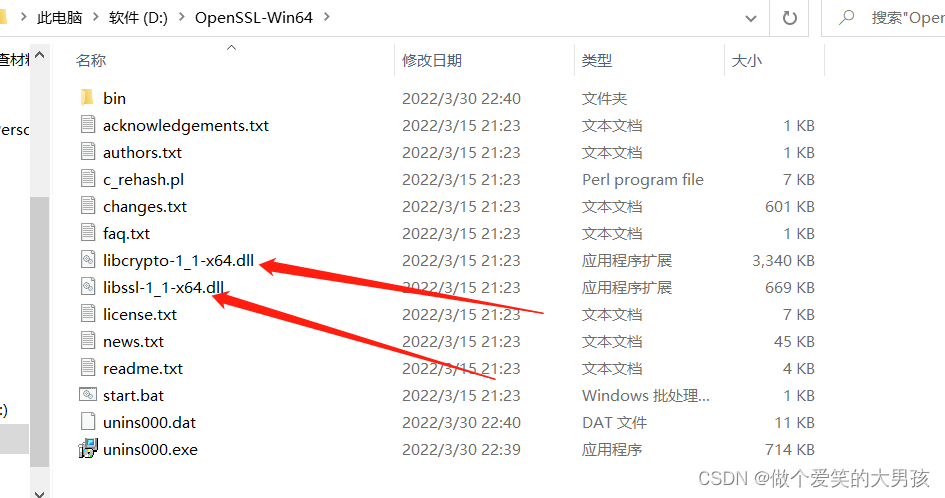
I downloaded the Win64 version of OpenSSL here. Therefore, copy the libcrypto-1_1-x64.dll and libssl-1_1-x64.dll files in the OpenSSL folder to the qt installation directory. The specific directory is here: D:\Qt\Qt5.14.0\5.14.0\ mingw73_64\bin. If you download 32-bit, you only need to put it in the D:\Qt\Qt5.14.0\5.14.0\mingw73_32\bin directory, and the others are similar.
5. Ends
if you run the project file again, QT will not report the error: qt.network.ssl: QSslSocket::connectToHostEncrypted: TLS initialization failed

[Solved] NVIDIA-SMI has failed because it couldn‘t communicate with the NVIDIA driver

environment

– notebook model: Dell precision 5520
– graphics card model: M1200
– system: Ubuntu 20.04


Question

After installing the N card driver, execute NVIDIA SMI , and an error is reported:

NVIDIA-SMI has failed because it couldn't communicate with the NVIDIA driver. Make sure that the latest NVIDIA driver is installed and running.


Solution:

Method 1

Cause: the system kernel is upgraded, resulting in the mismatch between the new version of kernel and the original graphics card driver
solution: use DKMS to generate the corresponding kernel file

View driver version

ls /usr/src | grep nvidia

For example, my result is nvidia-470.103.01

matching

sudo apt-get install dkms
sudo dkms install -m nvidia -v 470.103.01

Method 2

Reason: the same as scheme 1
solution: log in using the kernel. Then set the default to start with the kernel.

Method 3 (work for me)

Reason: the secure boot of the BIOS is in the enable state
Solution: enter the BIOS (generally press F2 when starting up) and turn off secure boot
it is strongly recommended that even if your secure boot is already in disable, it is recommended to execute it once: enable, restart, disable, and then restart. (this is my situation, so confused!!)

[Solved] FATAL ERROR: Ineffective mark-compacts near heap limit Allocation failed – JavaScript heap out of me

Build react project prompts error message


<--- Last few GCs --->

[1118:0x104c00000]   210060 ms: Scavenge (reduce) 2020.9 (2049.8) -> 2020.1 (2051.3) MB, 3.4/0.0 ms  (average mu = 0.148, current mu = 0.006) allocation failure 
[1118:0x104c00000]   213180 ms: Mark-sweep (reduce) 2021.0 (2050.3) -> 2020.1 (2051.3) MB, 3117.6/0.0 ms  (average mu = 0.089, current mu = 0.010) allocation failure scavenge might not succeed


<--- JS stacktrace --->

FATAL ERROR: Ineffective mark-compacts near heap limit Allocation failed - JavaScript heap out of memory
 1: 0x101319fc5 node::Abort() (.cold.1) [/usr/local/bin/node]
 2: 0x1000b6169 node::Abort() [/usr/local/bin/node]
 3: 0x1000b62df node::OnFatalError(char const*, char const*) [/usr/local/bin/node]
 4: 0x100200ba7 v8::Utils::ReportOOMFailure(v8::internal::Isolate*, char const*, bool) [/usr/local/bin/node]
 5: 0x100200b43 v8::internal::V8::FatalProcessOutOfMemory(v8::internal::Isolate*, char const*, bool) [/usr/local/bin/node]

Solution:

1. Install increase-memory-limit.

 npm install -g increase-memory-limit

2. Execute after successful installation

increase-memory-limit

Execute npm run build again and it will be OK!

SpringBoot Startup Error: Failed to start component [Connector[HTTP/1.1-8080]]

Failed to start component [Connector[HTTP/1.1-8080]]

The following error is reported when starting springboot:

Failed to start component [Connector[HTTP/1.1-8080

protocol handler start failed

Solution:
It is the port number occupation problem:
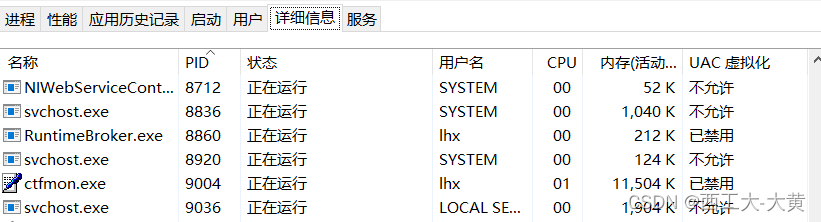
just close the occupied 8080 port number, enter in cmd: netstat -aon|findstr “port number”, find the PID corresponding to 8080 (port number), and then open the task manager. Find the corresponding PID in “Details” and stop the task.

[Solved] Invalid prop: type check failed for prop “modelValue“. Expected Number…

Warning prompt

After running the project, chrome console will prompt the following error message:

[Vue warn]: Invalid prop: type check failed for prop "modelValue". Expected Number with value 5, got String with value "5".

  at <VanRate modelValue="5" onUpdate:modelValue=fn<onUpdate:modelValue> size=11  ... >

  at <DetailItem detailData= (2) [{…}, {…}] onTrustBuyClick=fn<bound trustClick> >

  at <Detail onVnodeUnmounted=fn<onVnodeUnmounted> ref=Ref< Proxy {getSpecialData: ƒ, trustClick: ƒ, moreClick: ƒ, …} > key=0 >

  at <RouterView>

  at <App>

analysis

According to the above warning prompt, you can clearly see the problem, Invalid prop: type check failed for prop “modelValue”. Expected Number with value 5, got String with value “5” This sentence has actually explained that the reason for the error is prop The attribute value of the value failed to be verified. The value required by the component is 5 of the number type, but the currently obtained value is “5” of the string type. This is caused by inconsistent data types. The prop is used as a property in the Vue component, so you only need to determine which component is reporting the error. Check the value format of the prop and change it to the Expected type, such as number here. To sum it up: warning errors due to inconsistent data types.

Solution:

The warning log has indicated that the specific error occurred in that component. Find the location of that component, and then check where the data types are inconsistent when transmitting values, and then modify the attributes. Generally, the value format type in the props of the component can be directly modified to the type required by the corresponding component.


[Solved] Ineffective mark-compacts near heap limit Allocation failed – JavaScript heap out of memory

Problem description

After the project is run and compiled, the problem of running interruption occurs frequently. You need to re execute the command yarn serve


Error content

<--- JS stacktrace --->

FATAL ERROR: Ineffective mark-compacts near heap limit Allocation failed - JavaScript heap out of memory

The JS heap is out of memory

Cause analysis:

If the project is large, memory overflow will be thrown when starting or packaging, and the node server memory needs to be expanded


Solution:

Try method 1: Expand memory
Shortcut key Win+R to open the run window, run npm install -g increase-memory-limit 2. Run increase-memory-limit
in the project folder , the memory expansion is completed, and then start the project.

The situation is slightly better after the expansion, but the operation will be interrupted when throwing

CALL_AND_RETRY_LAST Allocation failed – JavaScript heap out of memory

Try method 2: Shortcut key Win+R to open the run window, run setx NODE_OPTIONS –max_old_space_size=4096

Subsequent operation is normal, no error is reported

[Solved] Kubernetes ingress-srv. error: failed calling webhook “validate.nginx.ingress.kubernetes.io”

Problem scenario

When writing the configuration file of the ingress controller entry controller of kubernetes

kubectl apply -f ingress-srv.yaml

Three Errors:

    1. Error 1:

no matches for kind “Ingress” in version “networking.k8s.io/v1beta1”

    Error 2: pathType is wrong after I modified APIVersion to v1.

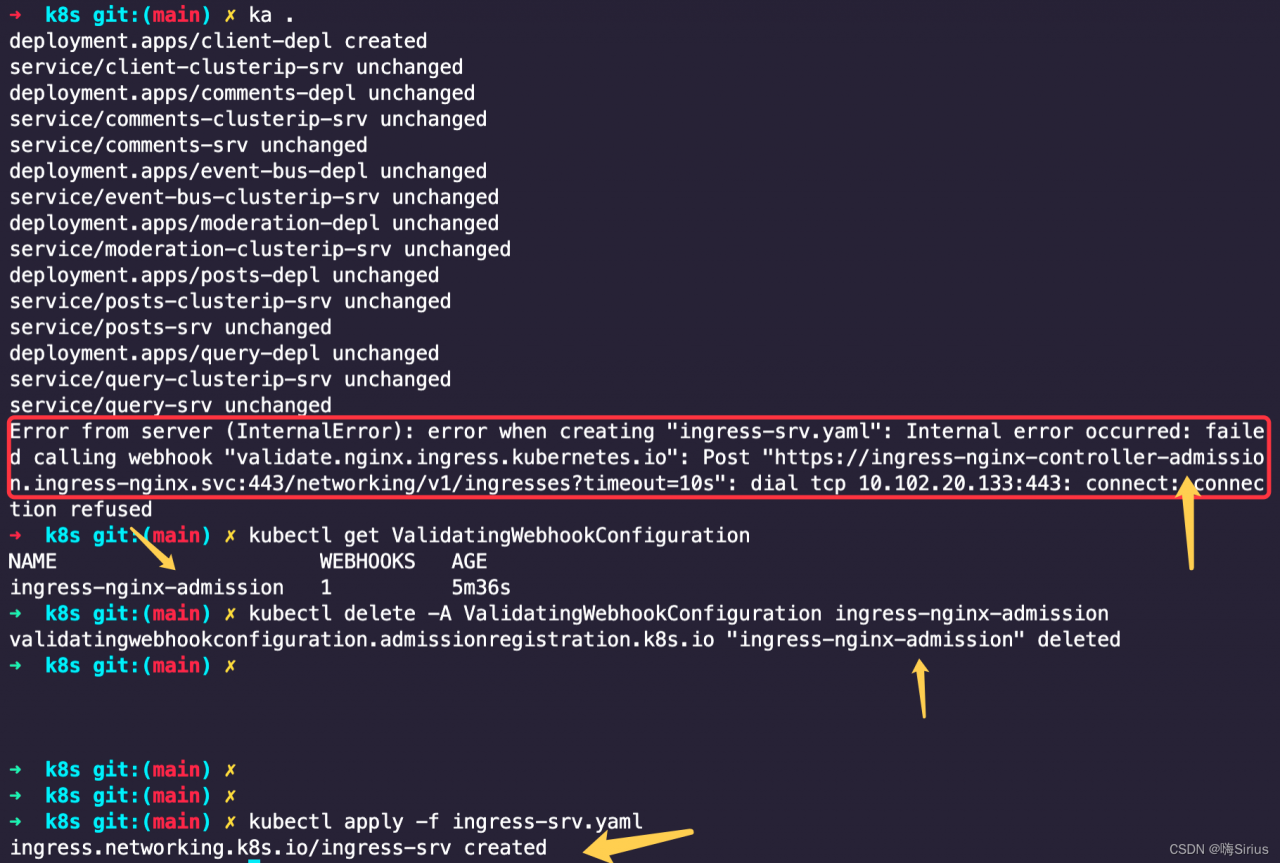
Error 3: Error from server (InternalError): error when creating “ingress-srv.yaml”: Internal error occurred: failed calling webhook “validate.nginx.ingress.kubernetes.io”: Post “https://ingress-nginx-controller-admission.ingress-nginx.svc:443/networking/v1/ingresses?timeout=10s”: dial tcp 10.102.20.133:443: connect: connection refused


Solution 1:
no matches for kind “Ingress” in version “networking.k8s.io/v1beta1”
Modify

apiVersion: networking.k8s.io/v1beta1

to

apiVersion: networking.k8s.io/v1


Solution 2:

pathType is wrong after I modified APIVersion to v1.

It is the version issue. here is the mofied codes below:

Original codes (report error):

apiVersion: networking.k8s.io/v1beta1
kind: Ingress
metadata:
  name: ingress-srv
  annotations:
    kubernetes.io/ingress.class: nginx
    nginx.ingress.kubernetes.io/use-regex: "true"
spec:
  rules:
    - host: posts.com
      http:
        paths:
          - path: /posts/create
            backend:
              serviceName: posts-clusterip-srv
              servicePort: 4000
          - path: /posts
            backend:
              serviceName: query-srv
              servicePort: 4002
          - path: /posts/?(.*)/comments
            backend:
              serviceName: comments-srv
              servicePort: 4001
          - path: /?(.*)
            backend:
              serviceName: client-srv
              servicePort: 3000

Here is the modified code:

apiVersion: networking.k8s.io/v1
kind: Ingress
metadata:
  name: ingress-srv
  annotations:
    kubernetes.io/ingress.class: nginx
    nginx.ingress.kubernetes.io/use-regex: "true"
spec:
  rules:
    - host: posts.com
      http:
        paths:
          - pathType: Prefix
            path: "/posts/create"
            backend:
              service:
                name: posts-clusterip-srv
                port:
                  number: 4000
          - pathType: Prefix
            path: "/posts"
            backend:
              service:
                name: query-srv
                port:
                  number: 4002
          - pathType: Prefix
            path: "/posts/?(.*)/comments"
            backend:
              service:
                name: comments-srv
                port:
                  number: 4001
          - pathType: Prefix
            path: "/?(.*)"
            backend:
              service:
                name: client-srv
                port:
                  number: 3000


Solution 3:
1. First kubectl get ValidatingWebhookConfiguration
2. Then kubectl delete -A ValidatingWebhookConfiguration ingress-nginx-admission
3. Delete that admission, and then it’s normal
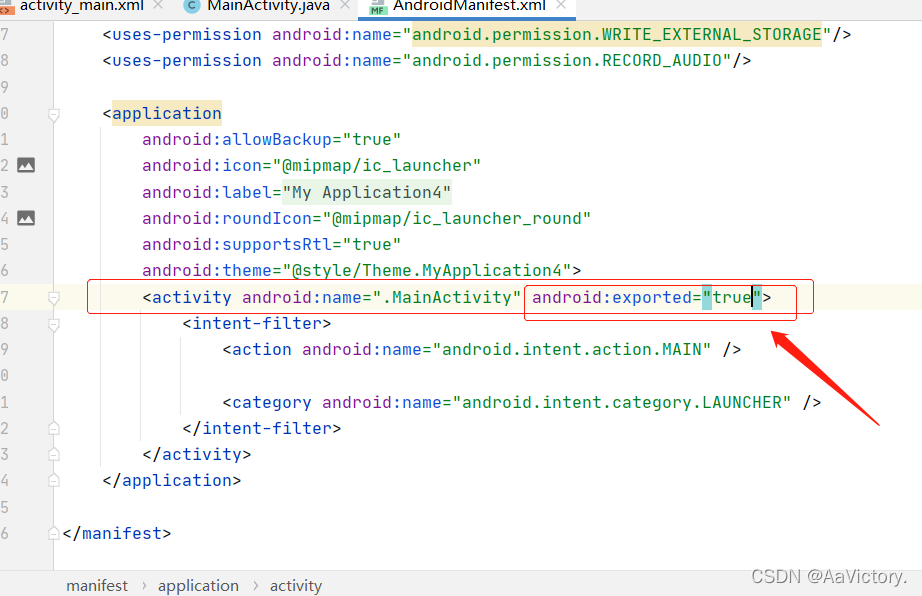
[Solved] Manifest merger failed: Apps targeting Android 12 and higher are required to specify an explicit va

Manifest merge failed: when the corresponding component defines an intention filter, you need to specify an explicit value for Android: exported for Android 12 and later applications. See https:developer.android.comguidetopicsmanifestactivity-elementexported.

Manifest merger failed : Apps targeting Android 12 and higher are required to specify an explicit value for `android:exported` when the corresponding component has an intent filter defined. See https://developer.android.com/guide/topics/manifest/activity-element#exported for details.

Solution:

1. you need add  Android:exported to specify an explicit value

2. Add android:exported = "true" in the list file.

[Solved] IDEA2021.3 Error: Failed to write core dump. Minidumps are not enabled by default on client versions of

IDEA2021.3 Error: Failed to write core dump. Minidumps are not enabled by default on client versions of Windows

Issue:
IEDA2021.3  Error: Failed to write core dump. Minidumps are not enabled by default on client versions of Windows

Error Meesages:

A fatal error has been detected by the Java Runtime Environment:
EXCEPTION_ACCESS_VIOLATION (0xc0000005) at pc=0x00007ff8d19b122e, pid=64220, tid=0x000000000000fae8
JRE version: Java™ SE Runtime Environment (8.0_291-b10) (build 1.8.0_291-b10)
Java VM: Java HotSpot™ 64-Bit Server VM (25.291-b10 mixed mode windows-amd64 compressed oops)
Problematic frame:
C [vcruntime140.dll+0x122e]
Failed to write core dump. Minidumps are not enabled by default on client versions of Windows
If you would like to submit a bug report, please visit:
http://bugreport.java.com/bugreport/crash.jsp


Solution:
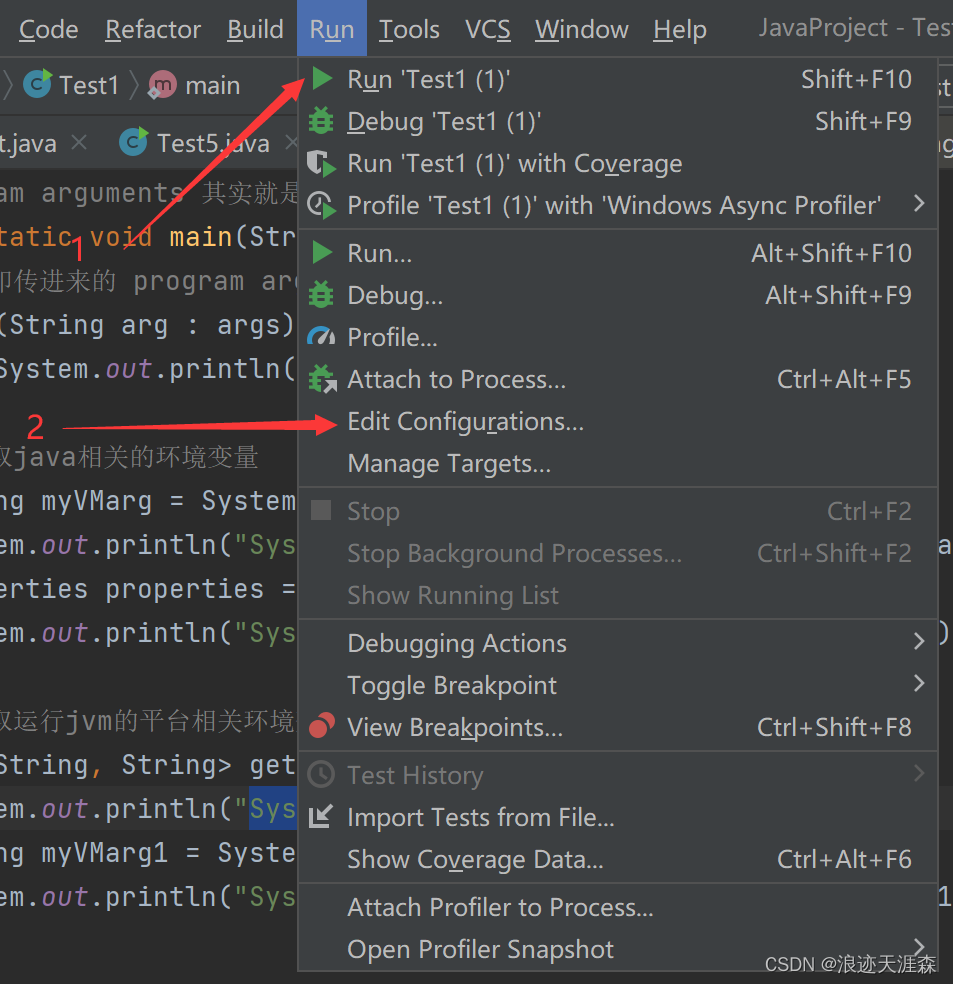
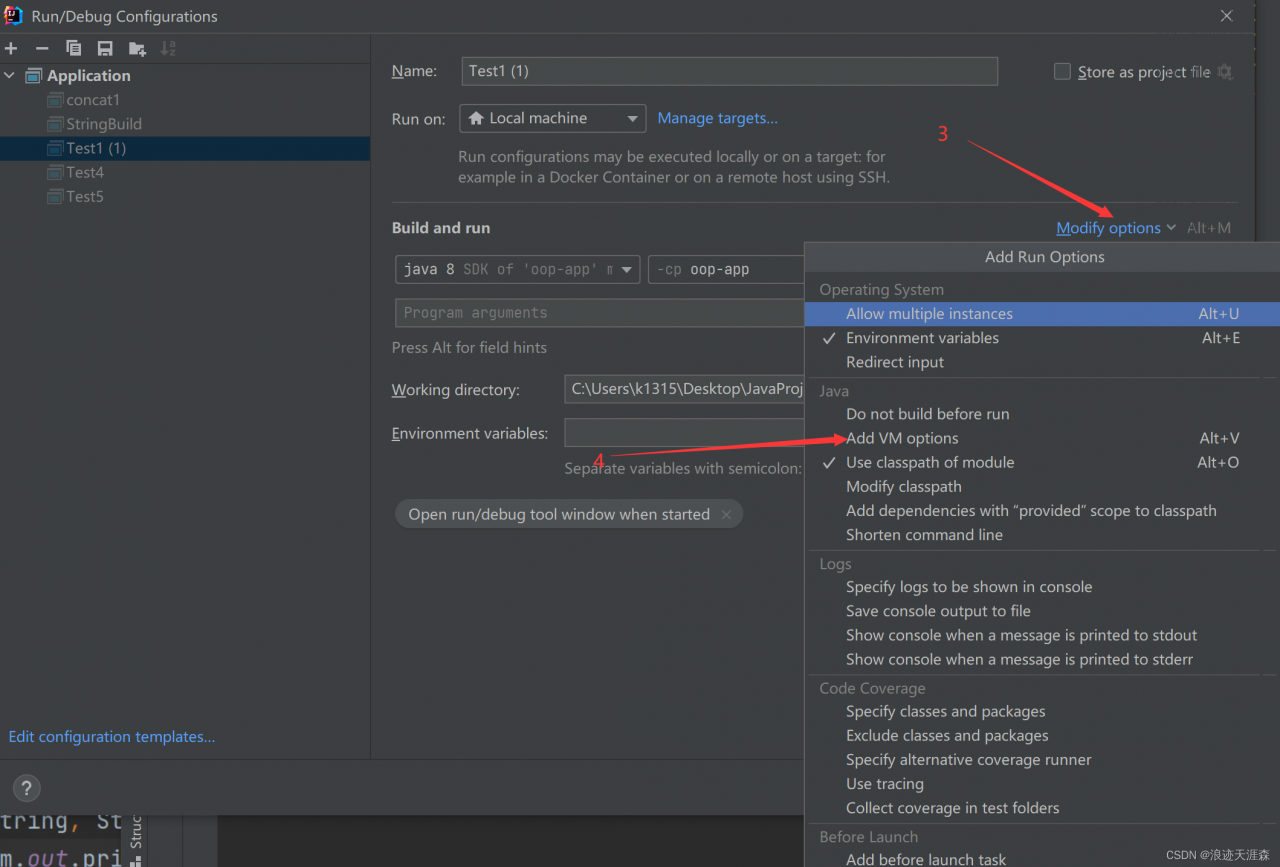
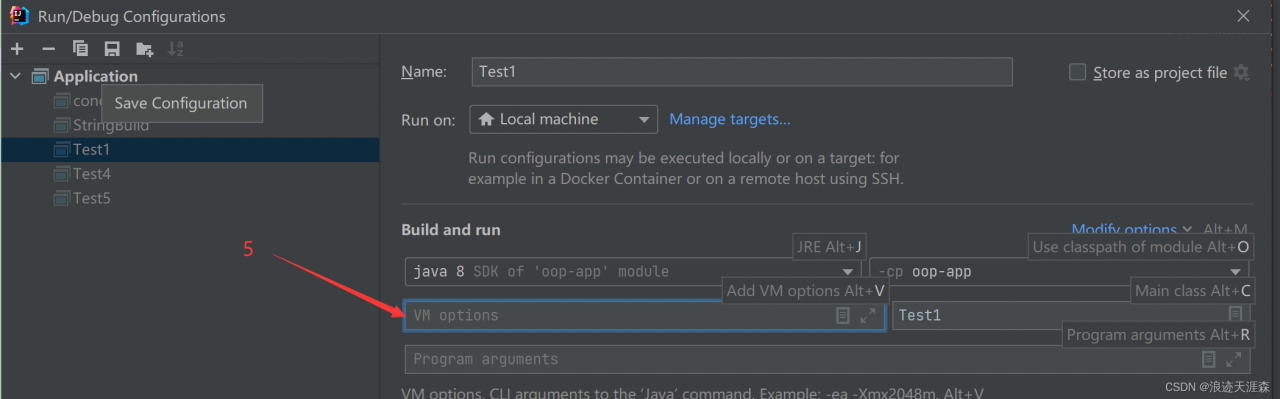
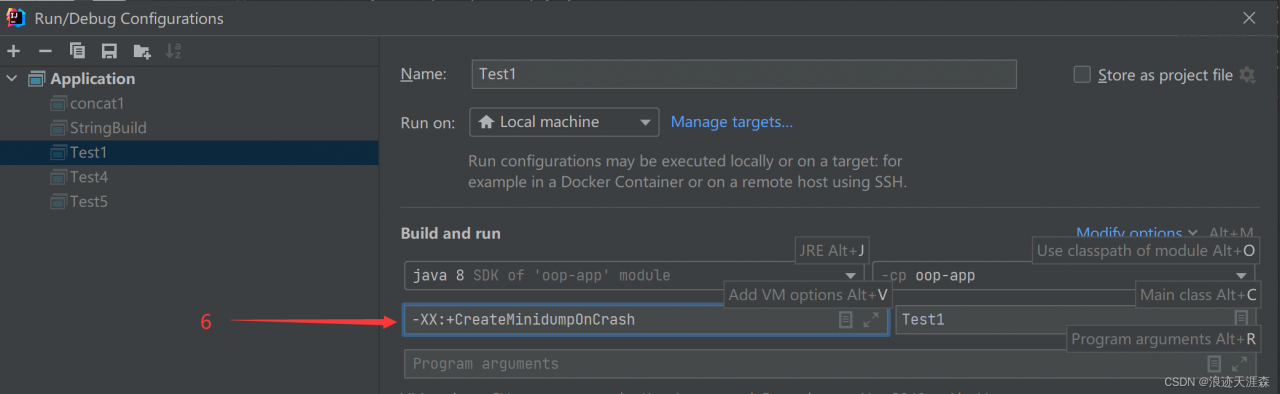
As the screenshot below, just click Run->Edit Configurations->Modify options->Add VM options:

  • For JDK8 and below, fill in **-XX:+CreateMinidumpOnCrash**
  • For JDK9 and above, fill in **-XX:CreateCoredumpOnCrash**
    and click OK

then run the code console and the Core dump written will be output. Default location: C:\Users******\Desktop**** ****\hs_err_pid21232.mdmp, you can view more detailed error information in hs_err_pid21232.mdmp.